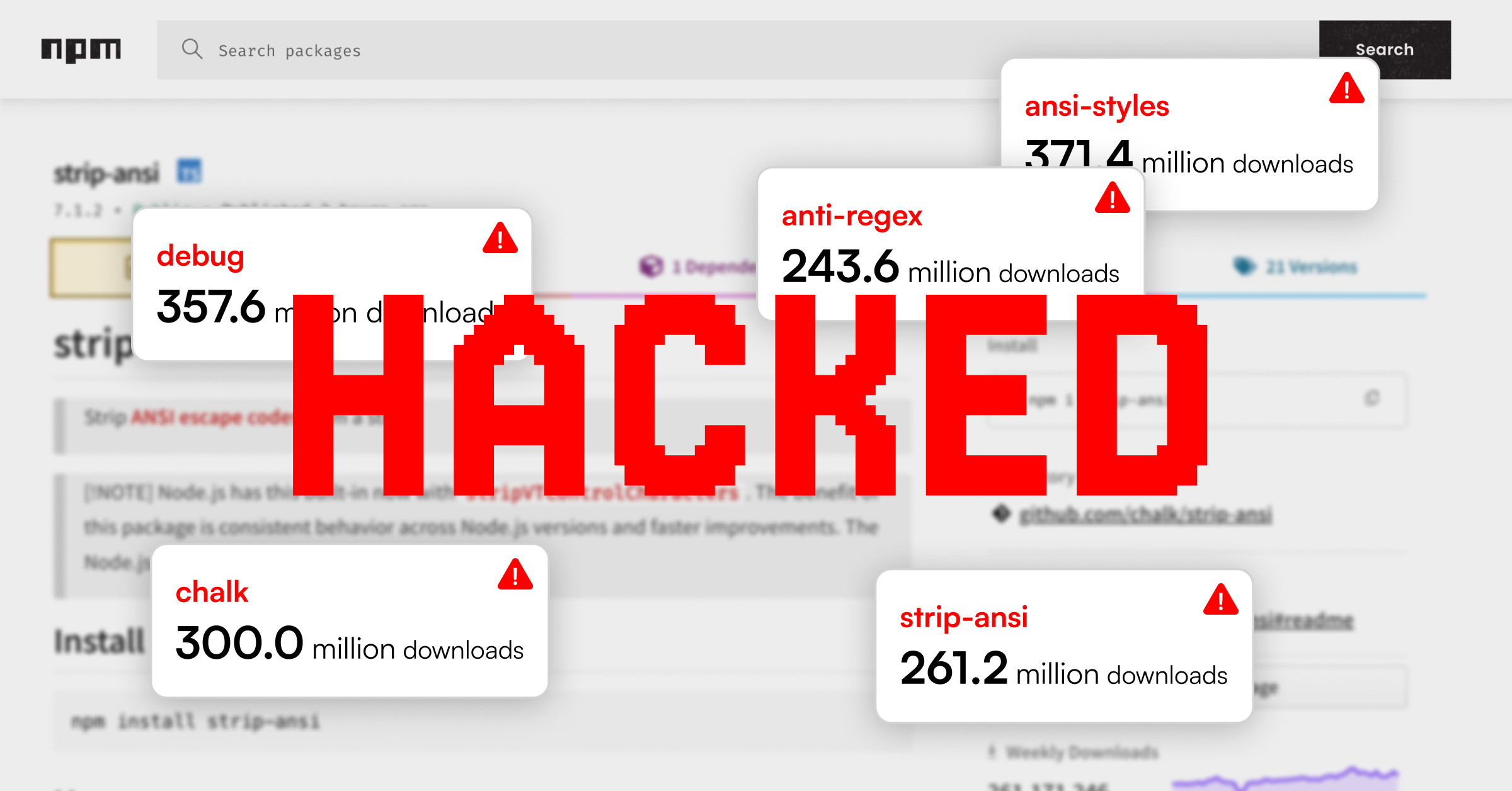


The Great npm Compromise: A Post-Mortem
A coordinated supply chain attack on the npm ecosystem was detected today, a swift and widespread compromise that left no doubt about the increasingly concerning nature of open-source threats. While many headlines focused on a phishing email, the real story lies in the sophisticated, multi-layered payload that followed, one designed to silently exfiltrate data from crypto wallets.
This wasn’t a smash-and-grab operation, it was a highly targeted operation that leveraged social engineering to plant an advanced, client-side financial weapon. It was a perfectly executed demonstration of why a reactive, traditional security approach to application and supply chain security just isn’t enough anymore.
This new level of threat demands a new approach to security. It’s no longer enough to look for what’s wrong; we need a security model that anticipates threats by understanding the subtle, context of your code and ecosystem.
But first, the attack.
npm Supply Chain Attack: A Social Engineering Masterclass
The attack was a client-side compromise initiated by a phishing campaign against a maintainer of widely used npm packages. The attackers gained control of the maintainer’s account and used the access to inject malicious code into 19 popular dependencies, which collectively have over 2 billion weekly downloads. The injected payload was identical across all affected packages, designed to silently siphon sensitive information from systems interacting with crypto assets.
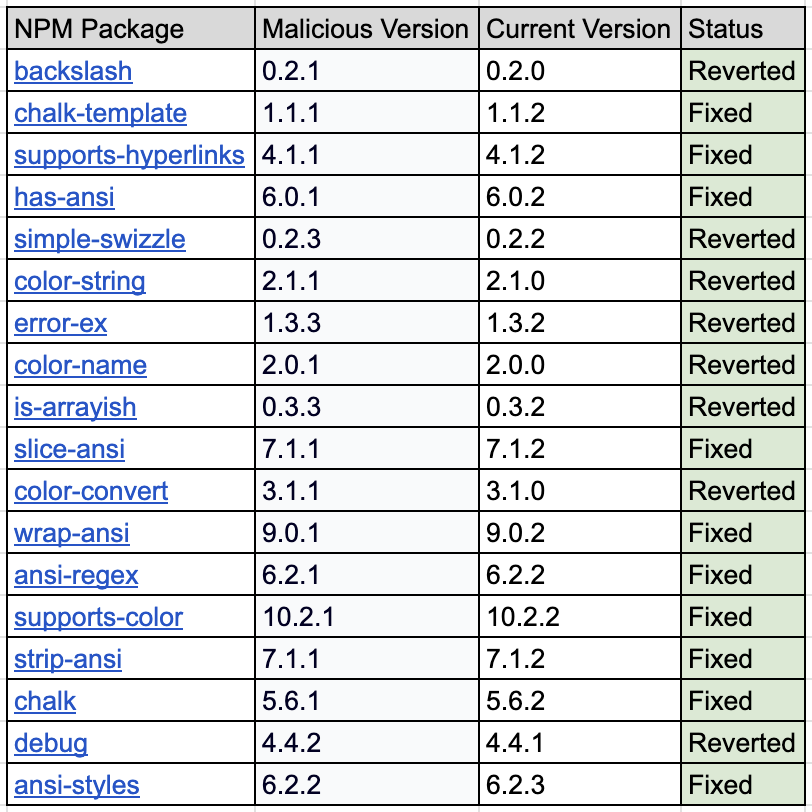
The compromised packages and their malicious versions are:
- [email protected]
- [email protected]
- [email protected]
- [email protected]
- [email protected]
- [email protected]
- [email protected]
- [email protected]
- [email protected]
- [email protected]
- [email protected]
- [email protected]
- [email protected]
- [email protected]
- [email protected]
- [email protected]
- [email protected]
- [email protected]
- [email protected]
As of the time of publication, the current state of packages is as follows:
How the Compromise Happens
There were two key ways this vulnerability could have put organizations at risk:
- One of the compromised packages was used for the first time, and the malicious version ended up in the environment.
- A container was rebuilt, and, during the process, one of the vulnerable packages was included. Because a file lock was not used to pin package versions, the build pulled the latest, and compromised versions from npm, which were then embedded into the artifacts.
- If an npm update command was run, the execution would bump up the versions in the package.json to the latest (and compromised) versions.
Rebuilding the artifact at this point should retrieve the fixed package versions from npm, effectively remediating the vulnerability.
Technical Analysis of the Attack Vector and Payload
The initial compromise began with a sophisticated phishing email sent from a fraudulent domain, npmjs.help, designed to impersonate the official npm registry (npmjs.com). The email used always-reliable social engineering to trick the maintainer into “updating” their 2FA credentials on a fake login page. The credentials and token were then exfiltrated to an attacker-controlled endpoint at websocket-api2.publicvm.com.
The malicious code injected into the packages functioned as a “Web3 drainer,” or a man-in-the-browser attack, engineered to hijack cryptocurrency activity. Once active, it silently monitors for connected wallets and manipulates transactions by using techniques like transaction swapping.
The payload’s primary function was to intercept and manipulate cryptocurrency transactions by hooking into standard browser APIs like fetch and XMLHttpRequest, as well as Web3 APIs such as window.ethereum and those used by wallets like MetaMask and Phantom. Because the code tampers with the data displayed on web pages, even deposit fields or QR codes can be altered without the user’s knowledge, resulting in funds, tokens, and approvals being diverted directly to the attacker.
The malware was capable of address-swapping for a variety of cryptocurrencies, including Ethereum, Bitcoin, Solana, Tron, Litecoin, and Bitcoin Cash. It also targeted on-chain smart contract functions, such as ERC-20 token transfers and approvals, to steal a wide range of assets. The address-swapping logic was particularly advanced, using a string similarity algorithm, such as Levenshtein distance, to find a “closest looking” attacker address to the legitimate one, making the fraudulent address nearly identical to the intended one.
OX Security in Action
This attack underscores the critical need for a new, layered approach to application security. The OX Security Platform takes an AI-powered approach to holistic security for an AI-driven world.
OX’s real-time threat intelligence and SBOM correlation engine can identify malicious versions and initiate automated alerts across affected environments. A Software Bill of Materials (SBOM) is a complete inventory of all the components that comprise a software application, providing a centralized record of third-party and open-source dependencies. This allows our engine to rapidly identify which environments are affected by vulnerabilities or threats.
OX customers would see the detection of this incident on their security dashboard.
In the particular case of the npm attack, here is an example of what our customers would see in their dashboards.
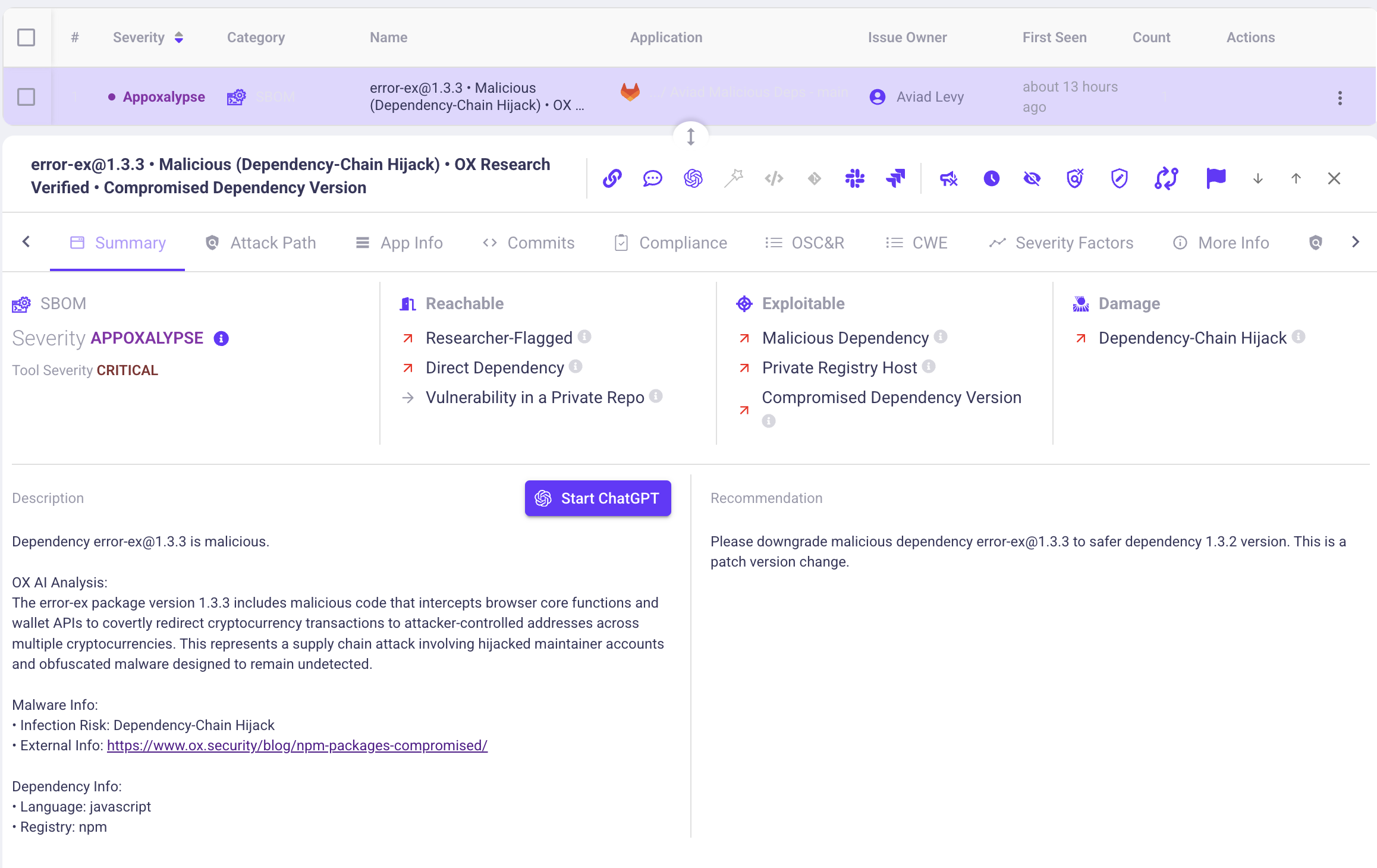
The platform flagged [email protected] with a Critical severity, identifying a “Dependency-Chain Hijack.”
The “OX AI Analysis” went beyond simple pattern matching; it understood the true implications of the package’s behavior by seeing that it was attempting to intercept browser core functions and wallet APIs. The platform didn’t just identify the threat; it provided clear, actionable remediation steps.
The recommendation was a simple and immediate patch version change: “Please downgrade malicious dependency [email protected] to safer dependency 1.3.2” . This is the essence of OX, not just detecting a vulnerability, but understanding its context and providing a specific, automated pathway to remediation.
If your environment includes any of the affected versions, OX recommends the following:
- Immediate upgrade to clean versions.
- Full dependency audit using OX’s SBOM scanner.
- Runtime behavior analysis to detect any wallet-related exfiltration attempts.
If you are not an OX customer, you can still check for the following Indicators of Compromise (IOCs) in your container checkethereumw
newdlocal
0xFc4a4858bafef54D1b1d7697bfb5c52F4c166976
To check your own environment, copy-paste, and run the following in your container shell:
grep -RInE
‘checkethereumw|newdlocal|0xFc4a4858bafef54D1b1d7697bfb5c52F4c166976’ /
Conclusion
For teams without access to automated security solutions, the immediate priority is to audit projects manually. Remove or downgrade the compromised package versions, rebuild applications from clean sources, and review deployed environments for any injected code. Developers and end-users should revoke existing token approvals, rotate secrets, and, when possible, move funds to fresh wallets created offline.
The fragility of trust in open-source ecosystems is now clear. OX Security’s layered approach, combining SBOM visibility, runtime monitoring, and threat intelligence ensures that even deeply nested threats are surfaced and neutralized before damage is done.
We’ll continue to monitor the npm ecosystem and provide updates as the situation evolves. For real-time alerts and remediation guidance, visit your OX Security dashboard or contact your account team.
Appendix
To validate whether npm cache contains the malicious dependencies, or your codebase lists them directly, run the following scripts:
npm cache validator:
#!/usr/bin/env bash
set -euo pipefail

packages=(
  [email protected]
  [email protected]
  [email protected]
  [email protected]
  [email protected]
  [email protected]
  [email protected]
  [email protected]
  [email protected]
  [email protected]
  [email protected]
  [email protected]
  [email protected]
  [email protected]
  [email protected]
  [email protected]
  [email protected]
  [email protected]
)

echo "Checking npm cache..."
npm_output="$(npm cache ls 2>/dev/null || true)"

found=false
for p in "${packages[@]}"; do
  name=${p%@*}
  ver=${p#*@}
  if grep -q "${name}-${ver}" <<<"$npm_output"; then
    echo "• $p"
    found=true
  fi
done

$found || echo "(none)"
npm code dependency checker:
#!/bin/sh

pkgs="[email protected] [email protected] [email protected] [email protected] \
[email protected] [email protected] [email protected] [email protected] \
[email protected] [email protected] [email protected] [email protected] \
[email protected] [email protected] [email protected] [email protected] [email protected]"

for p in $pkgs; do
  pkg=${p%@*}; vuln=${p#*@}
  echo "$pkg (vuln: $vuln)"
  npm ls "$pkg" --all --depth=Infinity 2>/dev/null \
    | grep -o "$pkg@[^ ]*" | cut -d@ -f2 | sort -u | sed 's/^/  - /' \
    || echo "  - Not installed"
done
)