TL;DR
- AppSec leaders need a strategy to quickly detect, prioritize, and fix vulnerabilities without slowing development. This guide explains how to integrate AVM effectively within your SDLC.
- AppSec leaders rely on Application vulnerability management (AVM) integrated with application security testing tools to integrate security within the SDLC, enforce consistent policies, and achieve faster remediation cycles while ensuring risk visibility and compliance.
- Vulnerabilities often stem from insecure coding practices, outdated third-party components, and misconfigurations that attackers exploit to gain access, exfiltrate data, or disrupt services.
- Effective AVM requires visibility across the software stack, automation in detection and patching, and collaboration between developers, testers, and security teams.
Application vulnerability management isn’t a task to tick off a checklist; it’s an ongoing practice of finding, conducting a thorough vulnerability assessment, and fixing weaknesses across applications and APIs. With modern development pipelines pushing code live multiple times a day, relying on an annual or semi-annual security review no longer works. Security must be woven directly into how software is written, tested, and released.
The importance of AVM is underscored by data. According to the 2024 IBM X-Force Threat Intelligence Index, 26% of initial access vectors in cyberattacks were tied to the exploitation of public-facing applications. For AppSec leaders, this isn’t just a cautionary stat; it’s proof that weak AVM practices can lead to compliance violations, revenue loss, and reputational damage.
Effective security isn’t defined by how many scans you run, but by how well you interpret results, prioritize exploitable risks, and guide teams toward remediation. And this isn’t just about passing audits like PCI DSS, HIPAA, or GDPR. Done right, AVM allows teams to move fast without opening dangerous gaps, creating a workflow where security feels like an enabler, not a blocker.
Understanding Application Vulnerabilities and Their Importance
Before we dive into bigger challenges like legacy systems or microservices, let’s step back and define what we mean by “vulnerabilities” and why they’re such a persistent problem.
What is an Application Vulnerability?
Understanding application security vulnerabilities is critical: A software vulnerability is any weakness in how an application is written, configured, or interacts with third-party libraries. These weaknesses can be exploited to steal data, execute malicious code, or bypass security controls. APIs are naturally exposed, as their primary function is to provide programmatic access over the internet, which makes them a frequent target for attacks. Common entry points include broken authentication, inadequate input validation, and misconfigured endpoints.
Common Root Causes
Most vulnerabilities don’t arise from rare or unusual zero-day exploits but from routine development and operational oversights.
- Insecure coding practices like string concatenation in SQL queries (leading to SQL injection).
- Unpatched open-source libraries, the Log4j incident (CVE-2021-44228) being a prime example, where an overlooked dependency became a global security crisis.
- Configuration mistakes, such as shipping apps with default credentials, overly-permissive cloud roles, or exposed debug endpoints.
Attackers automate scanning for such weaknesses, meaning even the smallest misstep can be discovered and exploited at scale.
Breaking Down Vulnerabilities: Code Flaws, Configuration Issues and Dependency Risks
Not all weaknesses are the same, and knowing where they come from helps teams fix what matters most.
1. Code-Level Flaws
These are direct mistakes in how software is written. Classic cases include unsafe memory handling in C/C++ or passing unchecked user input into SQL queries.
// Vulnerable C snippet - unsafe memory handling
char buffer[10];
strcpy(buffer, input); // input larger than 10 chars causes buffer overflow// Vulnerable Node.js snippet - SQL Injection
const query = `SELECT * FROM users WHERE id = '${req.query.id}'`;
db.query(query); // attacker can inject `' OR '1'='1`2. Configuration Weaknesses
In this case, the issue isn’t the application code itself, but how the system is configured. For example, leaving default credentials unchanged, misconfiguring authentication or authorization settings, exposing administrative or debugging interfaces, or enabling verbose logging in production (which can reveal sensitive internal details) can all create easy targets for attackers. These misconfigurations make it easier for malicious actors to gain unauthorized access, escalate privileges, or extract sensitive data.
The danger here is exposure without visibility. Teams often don’t notice misconfigurations until attackers scan and exploit them. Misconfigured S3 buckets leaking data or Kubernetes dashboards exposed to the internet are recurring examples.
3. Dependency and Package Risks
Modern apps lean heavily on open-source libraries. If one of those is outdated or malicious, it becomes an attack vector. Incidents like the Log4j exploit or typosquatting packages (like installing reqests instead of requests) show how risky dependencies can be.
This category carries supply chain risk. Instead of breaking into your application directly, attackers compromise an upstream library and reach thousands of applications at once. That’s what made Log4Shell so impactful; even organizations with strong security postures were vulnerable.
4. Mapping to Standards
These categories line up with known lists like the OWASP Top 10 and the CWE Top 25, which makes it easier for teams to prioritize and report issues.
The risk here is inconsistent prioritization. Without mapping vulnerabilities to recognized frameworks, teams often fix “easy” bugs while leaving critical ones open. OWASP and CWE act as a north star to ensure energy goes into the issues attackers actually exploit most.
Integration of AVM into Enterprise SDLC
Application vulnerability management isn’t just about finding issues; it’s about weaving security into every stage of the software lifecycle. To make this work at scale, organizations are increasingly embedding AVM practices directly into the environments where developers build and ship code.
1. Shift-Left Security Testing in IDEs
Embedding vulnerability detection early in the SDLC enables AppSec and DevOps teams to identify exploitable risks before they reach production, reducing overall exposure. Plugins for JetBrains IDEs, VS Code, or Eclipse can flag unsafe functions, warn about insecure API usage, and highlight outdated dependencies.
2. Pre-Commit Hooks and Pull Request Checks
A step further, pre-commit hooks and Pull request (PR) checks enforce vulnerability scanning before code is ever merged. For example, a Git pre-commit hook can run Bandit for Python or ESLint with security plugins for JavaScript, blocking unsafe code from being committed.
# Sample pre-commit hook for Python with Bandit
#!/bin/sh
bandit -r .
if [ $? -ne 0 ]; then
  echo "❌ Security issues found. Commit aborted."
  exit 1
fi
On GitHub or GitLab, PR workflows can automatically run dependency scans, blocking merges if critical vulnerabilities are found. This transforms AVM into a guardrail rather than an afterthought.
3. Security Gates in CI/CD Pipelines
In enterprise CI/CD pipelines, AVM integrates as automated quality gates. Tools like Trivy (container scanning), OWASP ZAP (dynamic testing), or Snyk (dependency scanning) can be embedded as pipeline stages.
Challenges Facing AppSec Managers and Senior Testers
From handling vulnerability debt in aging applications to coordinating fixes across globally distributed teams, AppSec managers’ day-to-day work often feels like a never-ending game of whack-a-mole, except the stakes involve compliance penalties and potential data breaches.
1. Vulnerability Debt in Legacy Applications
Legacy applications are often the silent carriers of vulnerability debt, a backlog of unpatched flaws accumulated over years of development. These systems, built on outdated frameworks or written in languages without modern security libraries, are notoriously difficult to retrofit with AVM practices. For example, a ten-year-old Java application may still rely on EOL (end-of-life) versions of Struts or Spring, with no straightforward upgrade path.
2. Maintaining Coverage in Microservices and Distributed Architectures
In modern enterprises, applications are no longer monoliths. A single piece of software might consist of dozens of microservices, each written in different languages and deployed across containers, VMs, and serverless platforms. Ensuring vulnerability coverage across this ecosystem is a challenge of scale and visibility.
3. Managing False Positives Across Multiple Scanning Tools
No AppSec team relies on a single scanner. Static analyzers, dynamic scanners, dependency checkers, and container security tools are often run in parallel. While this breadth ensures broader coverage, it also introduces another problem: false positives.
OX Security in the Application Vulnerability Management Workflow
Most AVM programs fall down not because teams don’t scan, but because findings live in silos and lack operational context. OX Security’s Code Projection technology consolidates signals from code to runtime, focuses on the critical 5% of vulnerabilities, and delivers real risk mapping through runtime-to-source correlation. It transforms findings into prioritized, auditable actions within AppSec and DevOps workflows. Think of it as a control tower for AppSec; it doesn’t replace the planes (your scanners), it orchestrates safe, fast landings with full runway visibility.
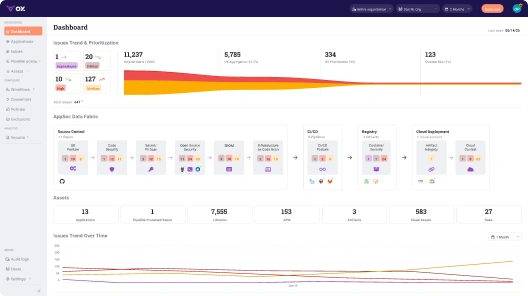
1. Unified AVM Dashboard
OX presents a single, correlated view across code vulnerabilities (SAST), dependency risks (SCA), exposed APIs and workloads, and cloud assets. By leveraging Code Projection, OX ensures that AppSec leaders focus on exploitable vulnerabilities with maximum impact, minimizing noise from non-critical alerts. This reduces tool sprawl and shortens the path from “we found something” to “we know what breaks and who owns it.” OX explicitly advertises consolidated visibility and attack-path analysis that ties code, application/API exposure, workloads, and cloud assets together.
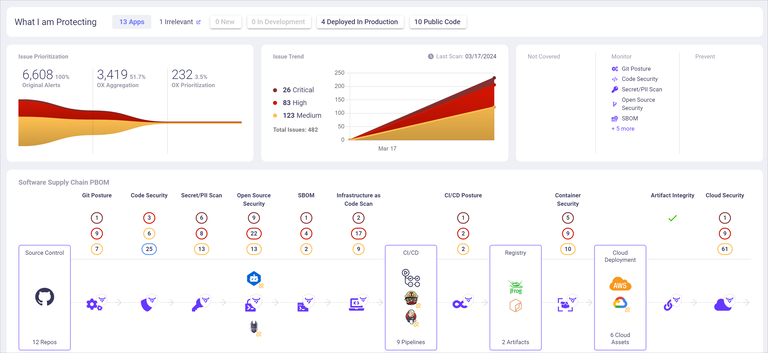
OX’s PBOM (Pipeline Bill of Materials) is the backbone of that view. Where an SBOM (Software Bill of Materials) inventories components, a PBOM tracks the full lineage of a build, from first line of code to release, so you can answer, “how did this get here” and, “what else shares the same compromised step.” That lineage is maintained in real time and is designed to minimize attack surface by exposing weak links across your pipeline, not just inside the artifact.
2. Contextual Prioritization
OX’s Code Projection approach augments CVSS scoring with runtime-to-source correlation and environment context, ensuring that AppSec teams focus on exploitable vulnerabilities rather than generic CVEs.
Practically, this means a critical vulnerability in a dead package sinks below a medium vulnerability in a hot path that touches customer data. OX calls out “evidence-based prioritization,” “guided fix recommendations,” and “code to cloud traceability” as first-class capabilities, which are key to focusing engineers on what’s exploitable and important.
This is where attack-path context pays off: by drawing a line from commit to container to cluster, the platform can tell you when a library vulnerability is reachable through the deployed service graph rather than just present in a lockfile. For leaders who need to defend risk exceptions, that reachability evidence is exactly what auditors ask for.
3. Integrated CI/CD Gates
Security that never reaches the pipeline is security that gets bypassed. OX integrates with common CI/CD systems (e.g., GitHub Actions, Jenkins, GitLab CI) so policy becomes code: if critical SAST/secrets/SCA issues are detected, the build fails; if the project meets risk policy, it proceeds. Their guidance highlights encoded policy gates and “fail-fast” behavior inside CI, which is the difference between guidelines and enforcement.
Because OX plugs into source control and the pipeline, feedback lands where developers live: in pull requests. Guided fix recommendations and inline context shorten mean-time to remediation (MTTR) from weeks to days, turning the platform into a collaboration surface rather than a security inbox.
4. End-to-End Traceability
When an incident ticket lands, the questions are always the same: What changed? Who changed it? Where else is it deployed? OX’s code-to-cloud traceability answers those in one place by linking repos, pipelines, artifacts, images, and runtime assets. Paired with PBOM, you can map a vulnerability from the commit that introduced it to the deployment(s) it affects, and prove, during an audit, that the fix propagated across all environments.
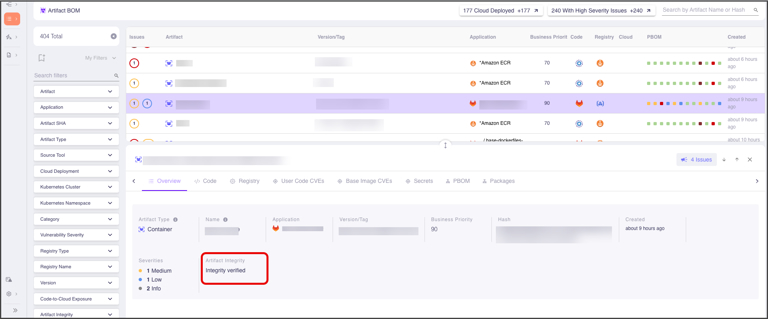
Traceability also helps with proactive governance. If a malicious dependency or compromised build step is discovered, you can use PBOM relationships to find every service that inherited that risk and push fixes systematically, rather than hunting by grep across dozens of repos.
Example Enterprise Workflow
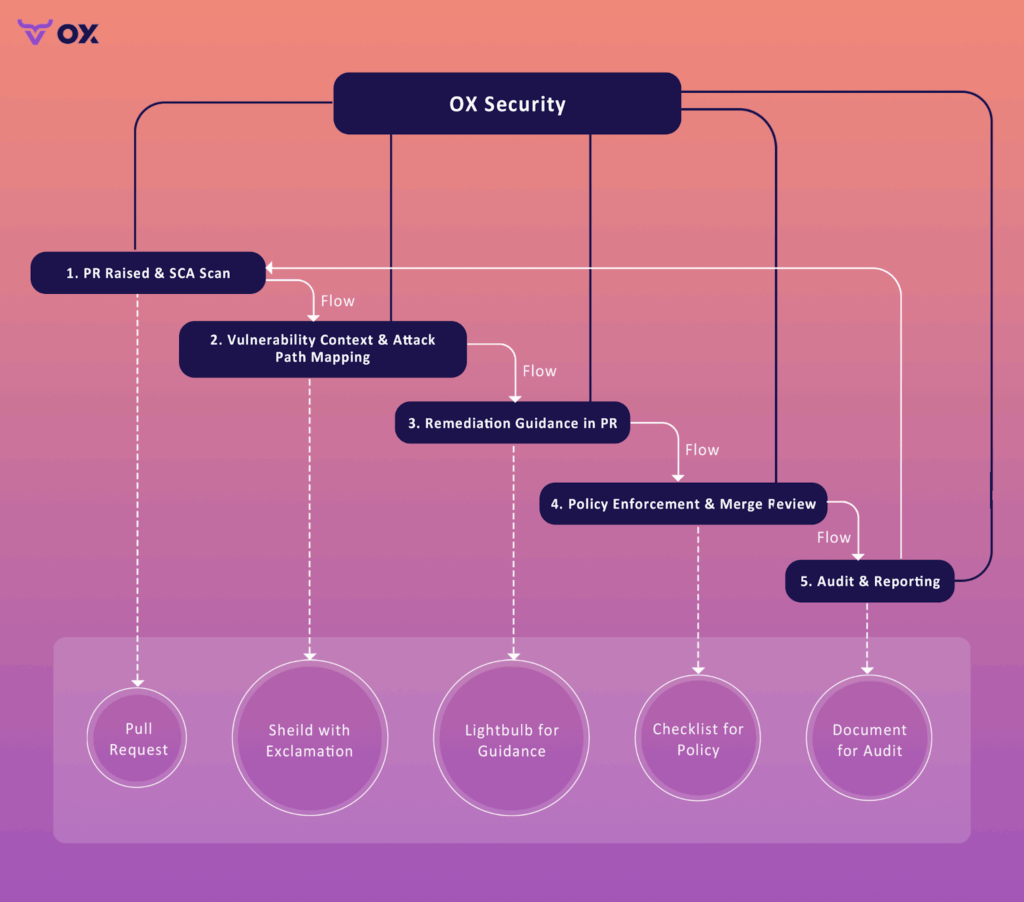
To make this concrete, here’s how the loop runs in a GitHub-first organization using OX:
Step 1: PR is opened; OX maps the repo and scans the code/dependencies.
When a developer raises a PR, OX (connected to GitHub via the official Source Control connector) maps repositories and can scan selected repositories on demand or continuously. Findings can be surfaced back into your GitHub workflow by creating GitHub Issues so developers can triage where they already work.
To connect with GitHub App:
- In the OX platform, go to Connectors and select GitHub > GITHUB APP.
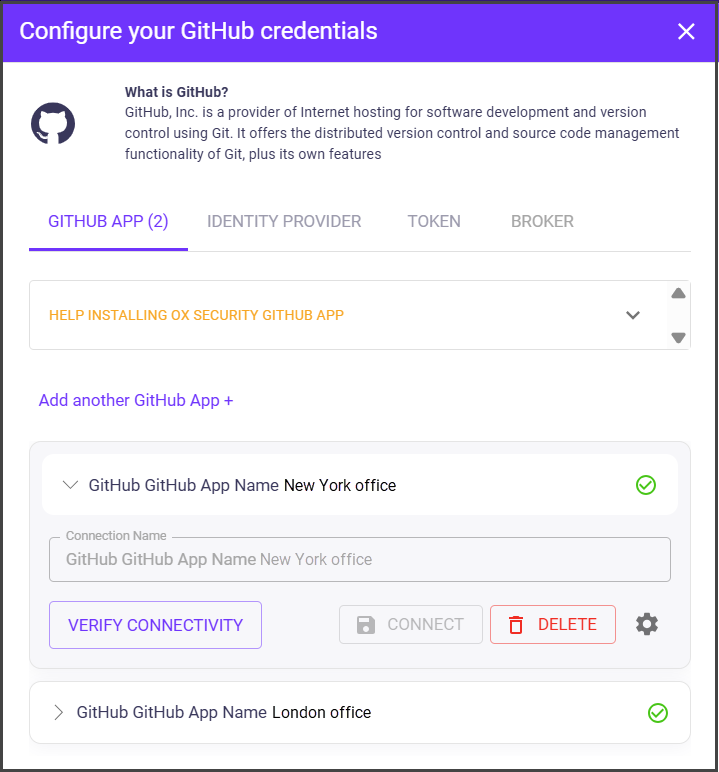
- Select CONNECT. You are automatically redirected to the source control system’s authentication dialog.
- Login to GitHub. The Install OX Security dialog appears with the list of organizations that you have defined on GitHub.
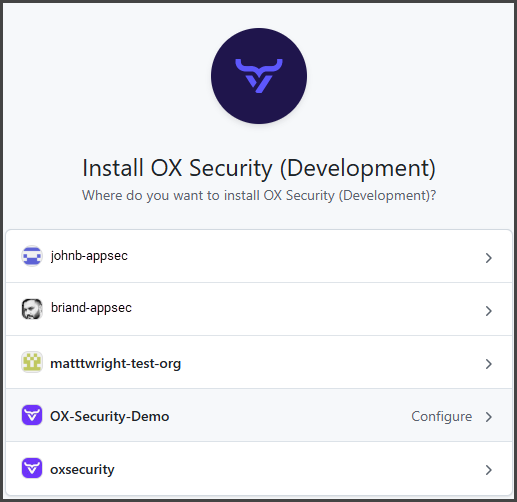
- Select the organization with which you want to set the GitHub-OX integration.
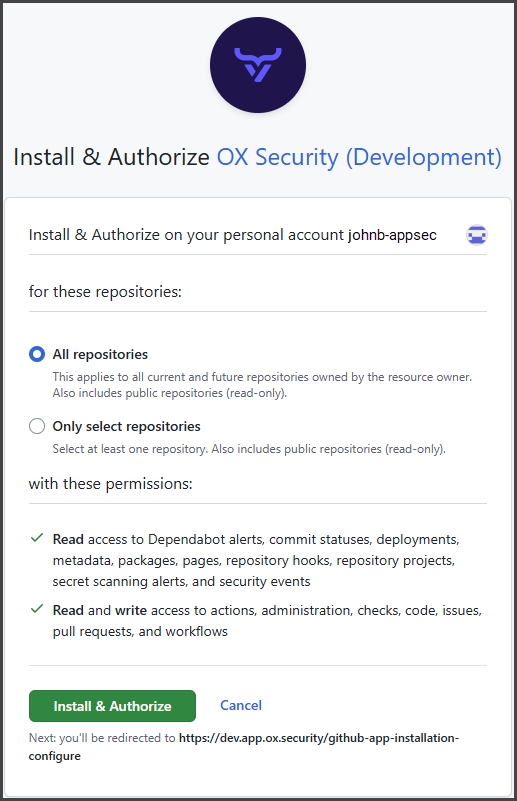
- In the Install and Authorize OX Security dialog, select as follows:
- All repositories: Grants OX GITHUB APP permissions to all the GitHub repositories within the selected GitHub organization.
- Only select repositories: Select GitHub repositories to which you want to grant OX GITHUB APP permissions within the selected GitHub organization.
- Select Install and Authorize. The connection is established, and you are redirected back to OX Security, where the list of all the repositories that are used in the integration appears.
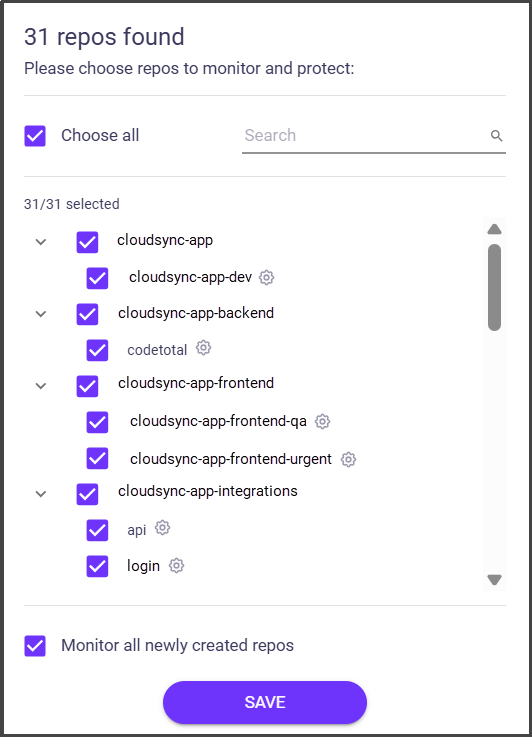
- Select the repos you want to scan and click SAVE.
- To connect more GitHub accounts to the same organization in the OX platform, select Add another GitHub App+, add the app, and select CONNECT.
Step 2 : The vulnerable dependency is flagged with context, not just a score.
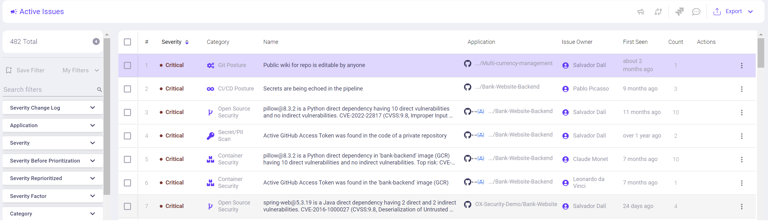
In OX, the “Issues” view prioritizes what to fix with signals like attack-path exposure and reachable vulnerabilities, while PBOM/Artifact BOM gives code-to-cloud lineage so you see where the affected artifact actually runs. That combination moves the item from “generic CVE” to a risk in a real deployment path.
Step 3: Remediation guidance is attached, and the policy can enforce what’s allowed.

From the issue details, OX shows fix guidance and related metadata that helps developers upgrade or patch quickly. At the same time you can enforce organizational policies (for example, fail the check or create tickets for certain severities) so “no-go” conditions are encoded, not debated ad hoc.
Step 4 : Review and merge with CI/CD enforcement in place.
Security managers review the contextualized risk and proceed; CI tools like Jenkins integrate with OX, so policy checks run in the pipeline rather than after the fact. That way, merges and releases respect the same rules your AppSec team defined in OX.
1. Connection Options
- Login
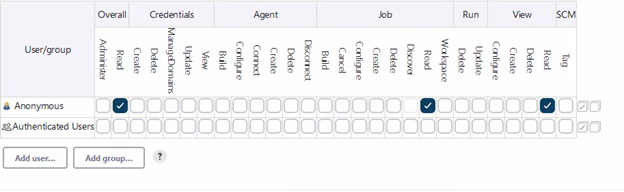
- Create a specific user for us (i.e, ox-security)
- Provide roles/permissions to the user to read
2. Generate API key
- Make sure you are logged into the Jenkins instance as an administrator
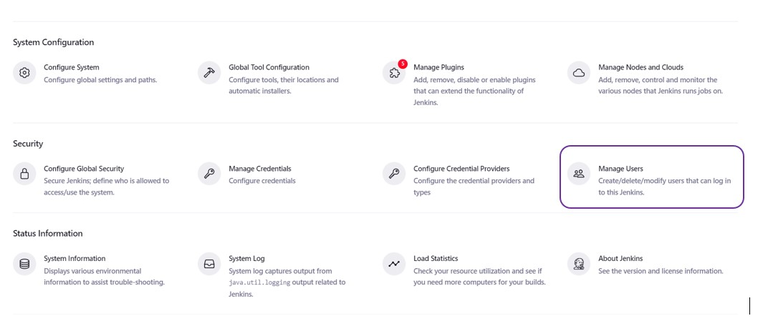
- Click on “Manage Jenkins” in the dashboard
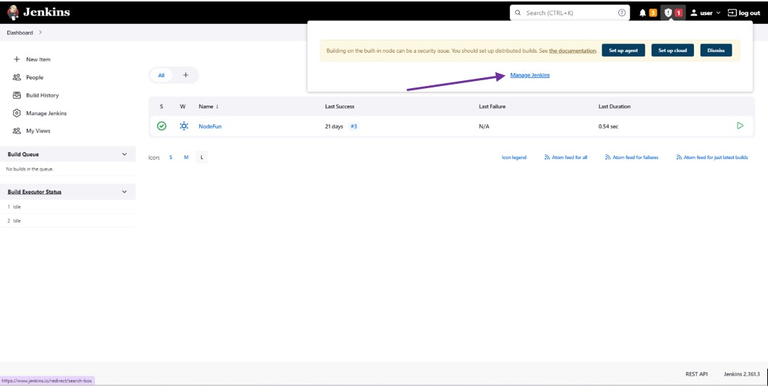
3. Click on “Manage Users”.
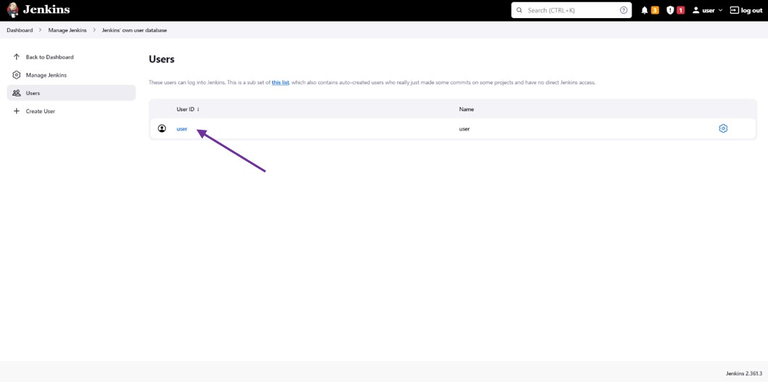
- Select the user you would like to generate an API token for, then click on their name to access their user configuration page
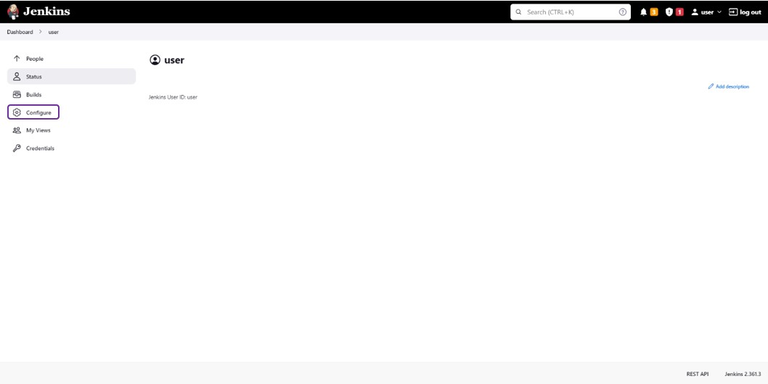
- Generate a token using the “Add new token” section.
- Save your configuration
4. Enter the API key in the system
Step 5 : Audit and follow-through are covered by traceability and SLAs.
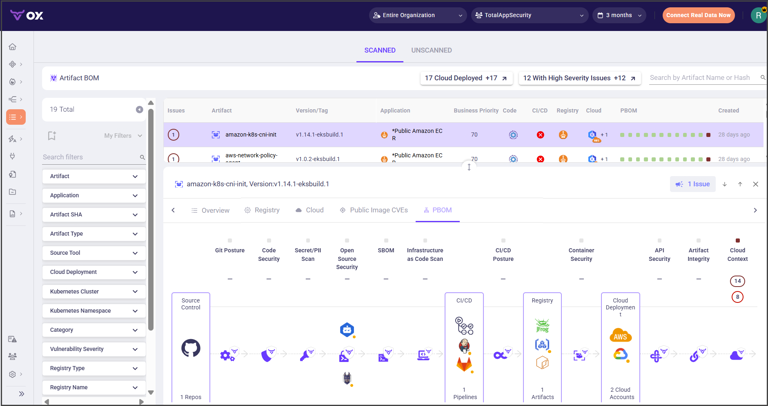
If you need to prove a CVE was remediated, PBOM/Artifact BOM provides end-to-end traceability from source through artifacts to what’s deployed; SLA configuration/reporting in OX helps you demonstrate remediation timelines against policy.
Conclusion
Application vulnerability management only scales when three gaps close: the visibility gap between tools, the context gap between severity and exploitability, and the workflow gap between security and engineering. OX Security’s approach addresses all three by centralizing signals, enriching them with code-to-cloud and PBOM lineage, and enforcing policy where it counts, the pull request and the pipeline. For AppSec leaders, that translates into faster remediation cycles, real risk visibility, fewer false positives, and cleaner audits, all while focusing on the critical 5% of exploitable vulnerabilities. For senior testers, it means moving from chasing alerts to curating risk with evidence that survives scrutiny.
If your north star is “ship fast without shipping risk,” the operating model is straightforward: catch early in the IDE and PR, enforce in CI (Continuous Integration) with policy, prove in production with traceability, and document the journey with PBOM. OX gives you those rails so velocity and security stop competing and start compounding.
FAQs
Application vulnerability management is the continuous process of discovering, assessing, prioritizing, and remediating weaknesses across software and APIs, coordinated across the SDLC and supply chain.
AVM reduces breach likelihood, accelerates remediation, and strengthens compliance by making security gates part of delivery. OX’s evidence-based prioritization and code-to-cloud traceability are examples of capabilities that turn scanning into measurable risk reduction.
Common classes include injection and input handling issues in code, vulnerable or out-of-date open-source packages, misconfigurations across cloud and Kubernetes, and API-specific flaws like broken object-level authorization.
Operationally, AVM starts with discovery (repos, pipelines, artifacts, images, runtime assets), runs continuous analysis (SAST/SCA/DAST/secrets/IaC), correlates findings, applies policy gates in CI, and then traces fixes to production.
A practical sequence is inventory → detect → correlate/prioritize → enforce in CI → remediate in PRs → verify in runtime → audit with lineage.