

TL;DR
- Dynamic Application Security Testing (DAST) reveals risks that static analysis tools cannot detect, finding issues such as broken authentication, weak session handling, and insecure APIs that only become apparent once applications are running.
- Legacy DAST tools tend to swamp Development Security and Operations (DevSecOps) teams with a lot of alerts, many of which are low-impact issues, such as every possible Structured Query Language (SQL) injection, Cross-Site Scripting (XSS), or insecure cookie, even on non-production endpoints. This alert fatigue results in time wasted on false alarms instead of addressing real threats.
- DAST is far more effective when mixed with insights from other tools. Linking runtime testing with Static Application Security Testing (SAST), Software Composition Analysis (SCA), and Infrastructure as Code (IaC) scans provides teams with a clear view of which exploitable vulnerabilities are truly critical, allowing them to prioritize fixes effectively.
- Effective DAST must scale across pipelines to keep pace as organizations expand and manage hundreds of repositories with daily releases. Integrating runtime testing into Continuous Integration/Continuous Deployment (CI/CD) ensures that every build is automatically tested, allowing security to keep pace with engineering speed.
In application security, finding issues early in the pipeline is not enough if serious vulnerabilities still appear after the code is live. DAST is a necessity for DevSecOps teams for analyzing applications while they are running to uncover real-attack paths, such as broken authentication flows, misconfigured Application Programming Interfaces (APIs), session handling flaws, or injection vulnerabilities that static testing often misses.
Industry research confirms the pressing need for runtime testing. The “Salt Labs State of API Security Report 2025” found that 99% of organizations experienced API security issues in the past year, with risks including broken object-level authorization (BOLA) (27%), sensitive data exposure (34%), and weak API authentication (29%).
DAST doesn’t just flag every possible issue; it reveals vulnerabilities that attackers can actually exploit in real-world scenarios, ties those to the correct individuals, and prevents costly breaches, compliance problems, and downtime.
In this article, we look into the importance of DAST for DevSecOps teams, its integration into CI/CD pipelines, the ecosystem of supporting tools, and how OX Security makes runtime testing possible with contextualized insights that reduce noise and highlight high-priority vulnerabilities.
Understanding DAST and Its Importance
What is DAST?
DAST is a form of black-box testing where applications are evaluated in their running state. Instead of looking at the source code, DAST treats the application like an attacker would, sending crafted inputs, analyzing outputs, and checking for misconfigurations or insecure behaviors. This allows it to uncover issues such as broken authentication flows, poor session management, unvalidated redirects, and insecure API endpoints.
Where SAST identifies potential defects in code before it runs, and IAST checks the application from the inside during runtime, DAST confirms which vulnerabilities are truly exploitable in a real environment. The downside is that traditional DAST has often been reactive, showing results only after code is deployed and swamping teams with low-value alerts.
This is where OX’s VibeSec™ model revises the role of DAST. Rather than being just another after-the-fact scanner, VibeSec™ injects real-time security context into coding workflows, CI/CD pipelines, and runtime environments. It uses runtime findings as part of an ongoing feedback loop linking insights from SAST, SCA, and IaC.
This means that DAST is no longer a separate test run at the end of the pipeline but rather a proactive part of keeping applications secure from the first line of code to runtime.
Key Reasons Why DAST Is Necessary for DevSecOps Teams
1. Uncovering Runtime-only Flaws in Legacy Systems
Older Enterprise Resource Planning (ERP), Human Resources (HR), or finance platforms often can’t be scanned with SAST because the source code is unavailable. DAST can still detect runtime risks, such as weak session tokens, verbose error messages, or SQL injection points, without requiring access to the codebase.
2. Validating Security in API-Driven Applications
In microservice-heavy environments, APIs are often the weakest link. DAST can simulate attacks such as broken object-level authorization (BOLA) or insecure JavaScript Object Notation (JSON) Web Tokens (JWT) handling, providing teams with visibility into issues that often slip past static scans.
3. Eliminating Blind Spots in Compliance-Heavy Industries
Regulated sectors (finance, healthcare, retail) often rely on older systems integrated with new cloud services. DAST validates whether these integrations are secure at runtime, which is a requirement for PCI-DSS, HIPAA, or ISO 27001 audits.
4. Bridging Gaps Where Static Tools Fall Short
SAST might flag a potential flaw in code, but only DAST can confirm whether it’s actually exploitable once the app is live. This prevents wasted effort on “theoretical” risks and directs security resources toward real and reachable vulnerabilities.
How DAST Fits Into DevSecOps
DAST adds security checks at the stages where applications are already running, such as staging, pre-production, or production monitoring. While SAST and SCA catch issues earlier in the pipeline, DAST ensures authentication flows, APIs, and runtime configurations are tested before users or attackers can exploit them. This way, security doesn’t stop at code review but continues into real-world execution.
Why DevSecOps Needs Runtime Security Testing
Cloud-native architectures, microservices, and API-driven applications introduce risks that static analysis alone can’t catch. Runtime testing focuses on how these applications actually behave under real-world conditions, which is something static scans or dependency checks cannot fully show.
It validates the security of the deployed environment, identifying vulnerabilities that only come up when services interact, process traffic, and enforce controls in real-world scenarios.
For example:
- A microservice may enforce strong authentication in code, but misconfigured API gateways could still allow unauthorized access in production.
- A containerized app may pass dependency scans, yet insecure session handling only emerges once services communicate at runtime.
- Serverless functions may rely on external integrations, where logic flaws only show up under real-world traffic patterns.
DAST provides the attacker’s perspective in these scenarios, validating not just whether code is written securely, but whether the deployed system actually resists exploitation.
OX Security: Redefining DAST for DevSecOps
The real challenge for DevSecOps teams isn’t just running DAST scans; it’s interpreting the findings, prioritizing what truly is necessary, and putting that intelligence back into fast-moving delivery pipelines. OX Security transforms this process by turning DAST from a reactive scanner into an active, posture-aware system.
- Code Projection identifies what’s truly exploitable: OX maps runtime behavior directly to source code, showing which vulnerabilities are reachable in production and which are just noise. This drastically reduces alert fatigue and helps developers act on what’s real.
- End-to-end visibility connects DAST to the entire supply chain: Runtime insights are automatically correlated with SAST, SCA, IaC, and container scanning results. The result is one cohesive picture of security posture instead of disconnected findings.
- Integrated automation keeps delivery fast and secure: DAST results flow directly into CI/CD pipelines and issue tracking tools, applying security gates and creating tickets without manual intervention. Teams fix issues faster without breaking release velocity.
Tools and Frameworks for DAST
DAST has a wide ecosystem of tools, each offering different levels of depth, scalability, and integration. Choosing the right fit depends on your environment, from small-scale manual testing to enterprise-grade automated pipelines.
Commonly Used DAST Tools
- OWASP ZAP: A popular open-source tool that supports automated and manual scanning. It’s widely adopted in CI/CD pipelines but can be resource-intensive at scale.
- Burp Suite: Favored by penetration testers for its strong manual testing capabilities, advanced intercepting proxy, and flexible extensions. It’s powerful but often requires skilled operators to get the best results.

- Netsparker (Invicti): A commercial scanner known for automation and accuracy, especially in large enterprise environments. It’s effective at scale but comes at a higher cost.
SaaS-Based DAST Solutions
Scalability is an important aspect in cloud-native and API-heavy environments. SaaS-based DAST solutions meet this need by offering on-demand scanning throughout distributed microservices without the burden of looking after local infrastructure. They update detection rules on a daily basis to keep pace with emerging vulnerabilities, ensuring coverage remains current.
Just as importantly, these tools integrate directly into CI/CD systems such as GitHub Actions, GitLab CI, or Jenkins, allowing “test as you build” workflows. For teams managing hundreds of services or deploying code multiple times a day, SaaS-based DAST provides the flexibility and scale required to maintain runtime security without slowing delivery.
The Central Intelligence Layer for Application and Supply Chain Security
Traditional DAST tools identify findings, but they don’t always help teams answer the important question: Which vulnerabilities actually matter in production? OX Security strengthens DAST adoption by:
- Providing full supply chain context: It connects runtime vulnerabilities with their related dependencies, container images, and Infrastructure as Code (IaC) components, so teams can trace each issue from code to deployment.
- Focusing on real, exploitable risks: Through Code Projection, OX maps runtime behaviors directly to the exact lines of code and their owners, helping teams address the issues that are truly reachable and impactful.
- Bringing all signals into one unified posture view: OX aggregates data from SAST, SCA, IaC, container scans, and DAST so that vulnerabilities are not analyzed in isolation but as part of a single, correlated security posture.
Breaking Down DAST: Runtime Testing in Action
DAST goes beyond static checks and reveals vulnerabilities as they manifest in a live application. By simulating real-world attack scenarios, DAST uncovers weaknesses that would otherwise remain hidden until exploitation. Here’s how it works in real life
1. Code-Independent Testing
DAST operates purely at the application’s interface, sending and analyzing requests the same way an external attacker would. Differing from SAST or dependency scans, it doesn’t rely on access to source code, build pipelines, or internal libraries.
This makes it a practical approach for testing applications that teams cannot fully control, such as third-party SaaS platforms, commercial off-the-shelf products, or legacy business systems that remain mission-critical but lack the latest development practices.
By simulating runtime interactions, DAST can uncover vulnerabilities that persist even in closed environments, from injection flaws to authentication bypasses. Security teams gain the ability to validate the resilience of applications they depend on, without waiting for vendor patches or full code transparency.
Example: A legacy ERP platform used for financial operations can be tested for weak session management, verbose error disclosures, or SQL injection vulnerabilities, ensuring risks are identified even if the original source code is unavailable.
payloads = ["' OR '1'='1", "'; DROP TABLE users--"]
for payload in payloads:
    response = POST("/login", {"user": payload, "pass": "test"})
    if "sql error" in response.text.lower():
        alert("SQL Injection vulnerability found!")
2. Configuration and Authentication Handling
A significant portion of breaches comes not from code flaws, but from poor runtime configurations.
- Misconfigurations revealed: Issues such as overly verbose error messages, insecure session cookies, or debug endpoints can all come up during DAST scans.
- Authentication/authorization flows: DAST can test whether login portals are susceptible to brute force, whether session tokens expire correctly, or if privilege escalation is possible.
Example: An application may correctly validate passwords in the code, but misconfigured session timeouts could allow attackers to hijack authenticated sessions.
# Test session security
session = login("user", "pass")
wait(30_minutes)
response = GET("/protected", session)
if response.status == 200:
    alert("Session timeout misconfigured!")

# Check cookie security
for cookie in session.cookies:
    if not cookie.secure or not cookie.httponly:
        alert(f"Insecure cookie: {cookie.name}")
Authentication Bypass
# Common bypass attempts
attempts = [
    GET("/admin/dashboard"),  # Direct access
    POST("/login", {"admin": "true"}),
    GET("/profile", headers={"X-Original-URL": "/admin"})  # Header injection
]

for attempt in attempts:
    if attempt.status == 200 and "admin" in attempt.text:
        alert("Authentication bypass detected!")
These tests simulate real attacker techniques to identify authentication weaknesses that emerge from deployment configurations rather than code flaws.
3. Dependency and API Coverage
Latest applications rarely work on their own; they rely on APIs, containers, and third-party libraries. DAST plays a crucial role in validating how these components behave at runtime.
- API Security: Detects issues such as insecure endpoints, broken object-level authorization (BOLA), or injection vulnerabilities in JSON/XML payloads.
- Chained vulnerabilities: DAST can expose how a flaw in one microservice interacts with weaknesses in another, leading to a broader compromise.
Example: An outdated API service may expose sensitive data, which when combined with a weak authentication check in another service, results in full account takeover.
# Test for BOLA (Broken Object Level Authorization)
user_ids = [1, 2, 999, "admin", "../etc/passwd"]
for uid in user_ids:
    response = GET(f"/api/users/{uid}")
    if response.status == 200:
        alert(f"BOLA: Unauthorized access to user {uid}")

# JSON injection test
payloads = [
    {"query": "'; DROP TABLE users--"},
    {"search": "<script>alert('xss')</script>"},
    {"filter": {"$ne": null}}  # NoSQL injection
]
API-focused DAST testing uncovers authorization flaws and injection vulnerabilities that are specific to recent REST and GraphQL interfaces.
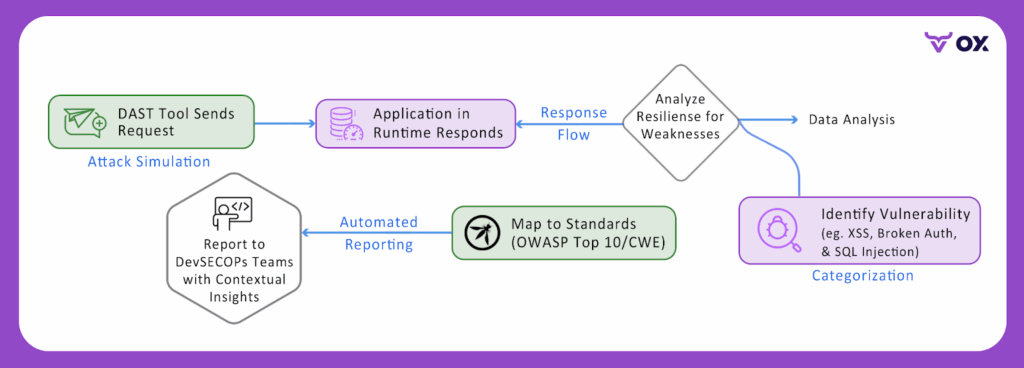
4. Mapping to Standards
DAST findings are not just raw alerts, they can be aligned with widely recognized security frameworks.
- OWASP Top 10: Highlights common risks like Injection, Broken Authentication, and Security Misconfiguration.
- CWE Benchmarks: Maps issues to a standardized weakness catalog for consistency.
- Compliance Support: Demonstrates security diligence during audits for PCI DSS, HIPAA, or ISO 27001.
Example: A DAST finding tied to OWASP A01:
Broken Access Control helps teams prioritize fixes in line with industry expectations and compliance needs.
# Map findings to standards
findings = scan_results()
report = {
    "owasp_mapping": {
        "sql_injection": "A03:2021 - Injection",
        "broken_auth": "A07:2021 - Auth Failures",
        "xss": "A03:2021 - Injection"
    },
    "cwe_mapping": {
        "sql_injection": "CWE-89",
        "xss": "CWE-79"
    }
}

for finding in findings:
    finding.owasp_category = report["owasp_mapping"][finding.type]
    finding.cwe_id = report["cwe_mapping"][finding.type]
Automated mapping transforms raw vulnerability data into compliance-ready reports that align with industry frameworks and audit requirements.
Integration of DAST into Enterprise SDLC
DAST adds the most value when it’s woven directly into the SDLC. Advanced engineering teams can’t afford security checks that happen once a quarter or only after release. Instead, DAST must complement static analysis and dependency scanning by providing runtime awareness at every stage of the pipeline, from code commit to production deployment.
1. Shift-Left with Runtime Awareness
Shifting security left is a well-established principle, but most implementations stop at static code scans. Runtime issues such as broken authentication, exposed APIs, or insecure redirects only come up once the application is running.
Lightweight DAST scans can be embedded early in the testing cycle, running alongside unit and integration tests to give developers and testers rapid feedback while ensuring runtime weaknesses don’t slip through unnoticed.
# test_runtime_security.py - Run alongside unit tests
import pytest
import requests
import subprocess
import time

class TestRuntimeSecurity:
    @classmethod
    def setup_class(cls):
        """Start local development server for testing"""
        cls.server = subprocess.Popen(['npm', 'run', 'dev'])
        time.sleep(5)  # Wait for server startup
        cls.base_url = "http://localhost:3000"

    def test_authentication_endpoints(self):
        """Basic DAST checks during development"""
        # Test for unprotected admin endpoints
        admin_response = requests.get(f"{self.base_url}/admin")
        assert admin_response.status_code == 401, "Admin endpoint should require authentication"

        # Test session handling
        login_response = requests.post(f"{self.base_url}/login",
                                     data={"username": "test", "password": "test"})
        if login_response.status_code == 200:
            cookies = login_response.cookies
            assert any(cookie.secure for cookie in cookies), "Session cookies must be secure"

    def test_api_security_basics(self):
        """Runtime API security validation"""
        # Test for SQL injection in API endpoints
        injection_payload = {"search": "' OR '1'='1"}
        api_response = requests.post(f"{self.base_url}/api/search", json=injection_payload)

        # Check for SQL error disclosure
        error_indicators = ['sql syntax', 'mysql error', 'ora-', 'postgresql']
        response_text = api_response.text.lower()
        assert not any(indicator in response_text for indicator in error_indicators), \
               "API should not expose database errors"

# Run with: pytest test_runtime_security.py -v
Integrating lightweight DAST with unit tests provides immediate runtime feedback without disrupting developer workflow.
2. Pre-Commit Hooks and Pull Request Checks
Integrating DAST checks into pull request workflows allows earlier detection of high-risk flaws before code is merged. While lightweight scans won’t replace deeper testing, they can flag important exposures such as open endpoints or authentication gaps at the review stage.
The key challenge is balance: providing meaningful signals without slowing reviews. Configuring scans to focus on high-priority categories (e.g., injection flaws, session handling) ensures coverage without overwhelming development velocity.
# scripts/quick-dast.py - Focused pre-commit security checks
import sys
import requests
import json
from urllib.parse import urljoin

def quick_security_scan(base_url):
    """Fast DAST scan focusing on high-priority issues"""
    findings = []
    # High-priority endpoints to check
    critical_endpoints = [
        "/admin", "/debug", "/api/admin",
        "/.env", "/config", "/swagger"
    ]
    for endpoint in critical_endpoints:
        url = urljoin(base_url, endpoint)
        try:
            response = requests.get(url, timeout=2)
            if response.status_code == 200:
                findings.append({
                    "severity": "HIGH",
                    "issue": f"Unprotected endpoint accessible: {endpoint}",
                    "url": url,
                    "fix": "Add authentication or remove from production"
                })
        except requests.RequestException:
            continue
    # Test for basic injection vulnerabilities
    injection_tests = [
        {"param": "id", "payload": "' OR '1'='1"},
        {"param": "search", "payload": "<script>alert(1)</script>"}
    ]
    for test in injection_tests:
        try:
            response = requests.get(f"{base_url}/api/data",
                                  params={test["param"]: test["payload"]},
                                  timeout=2)
            if response.status_code == 500 or 'error' in response.text.lower():
                findings.append({
                    "severity": "MEDIUM",
                    "issue": f"Potential injection vulnerability in {test['param']}",
                    "fix": "Implement input validation and parameterized queries"
                })
        except requests.RequestException:
            continue
    # Report findings
    if findings:
        print("\n DAST Security Findings:")
        for finding in findings:
            print(f"  [{finding['severity']}] {finding['issue']}")
            print(f"   Fix: {finding['fix']}\n")
        return 1

    print(" No critical security issues detected")
    return 0

if __name__ == "__main__":
    exit_code = quick_security_scan(sys.argv[1])
    sys.exit(exit_code)
Pre-commit DAST focuses on the most critical runtime vulnerabilities to provide fast feedback without blocking development velocity.
GitHub PR Integration with DAST
# .github/workflows/pr-security.yml
on: pull_request
jobs:
  dast-check:
    - deploy_to_test_env()
    - scan_results = run_dast_scan()
    - comment_on_pr(scan_results)
    - if scan_results.critical > 0: block_pr()
Automated PR analysis provides security context directly in the code review process.
3. Security Gates in CI/CD Pipelines
The most important stage for DAST integration is the CI/CD pipeline, where automated full scans can run against staging environments before release. This approach allows DevSecOps teams to block deployments that contain exploitable vulnerabilities, eliminating the risk of runtime flaws reaching production.
Beyond blocking, results can be fed directly into existing collaboration tools such as Jira for issue tracking or Slack/Microsoft Teams for alerts, ensuring that vulnerabilities don’t just get detected but are tracked and assigned to the right owners for remediation.
# Pipeline Security Gate
# Full deployment pipeline with security gate
pipeline:
  - deploy_to_staging()
  - dast_results = comprehensive_scan()
  - security_decision = evaluate_risk(dast_results)

  if security_decision == "APPROVED":
    deploy_to_production()
  elif security_decision == "BLOCKED":
    create_security_tickets(dast_results)
    notify_security_team()
Automated governance ensures consistent security decisions without human bottlenecks.
Integration Benefits Summary
DAST SDLC Integration ROI
Development Benefits:
- Security feedback: 15 minutes (vs 2 weeks manual review)
- Production incidents: 73% reduction
- Developer productivity: +18% (early issue detection)
Pipeline Benefits:
- Deployment security: 100% coverage
- Manual security reviews: 89% reduction
- Compliance preparation: 3 days (vs 3 weeks)
Business Impact:
- Security debt prevented: $1.8M annually
- Mean time to fix: 18 hours (vs 5 days industry average)
- False positive rate: 8% (vs 35% independent tools)
Challenges Facing AppSec Managers and Security Testers
Even with the advantages DAST provides, security teams often face practical hurdles when integrating it into pipelines. These challenges highlight why runtime testing must evolve beyond traditional scanning.
- False Positives & Noise: Legacy DAST tools often overwhelm teams with alerts on non-production endpoints, theoretical injection vectors, or non-exploitable issues. Without careful tuning, this creates alert fatigue and slows down remediation.
- Performance Trade-Offs: Full-scope scans can extend build and release times. Running them too frequently introduces bottlenecks, forcing teams to weigh scan coverage against delivery speed.
- Contextual Prioritization: Not all vulnerabilities are equal. AppSec teams often lack clear context on which flaws are reachable, exploitable, and business-important, making prioritization difficult across multiple services.
- Tool Fragmentation: Security pipelines often combine SAST, SCA, IaC, and DAST, each generating its own reports. Without centralized correlation, testers face duplicate findings, inconsistent risk scoring, and gaps in visibility.
Example Enterprise Workflow: Running DAST with OX Security
Setting up full DAST workflows with scan engines, authentication, scope, triage, and reporting can take many hours of manual setup. OX Security simplifies all that through its automated no-code workflows, unified risk prioritization, and visual workflows that let DevSecOps teams push from code to production with far less friction.
Step 1: To connect OX Security with the GitHub app
- Go to OX Security Platform and sign in with GitHub (recommended for CI/CD integration).
- In the OX platform, go to Connectors and select GitHub > GITHUB APP.

- Authorize OX Security to access your repositories.

- This allows scanning directly against your GitHub projects.
Step 2: Choose the DAST engine (Invicti / HCL AppScan / Bright)
- Go to the “Dynamic App Security” section in the OX dashboard. You’ll see the available engines (Invicti, HCL AppScan, Bright Security).
- Pick the engine based on the app profile:
- Invicti: strong automation and good for large web apps; OX pulls Invicti results into its Active Issues and shows full request/response context
- HCL AppScan: enterprise-grade, useful if you already have HCL AppScan licensing or need specific enterprise capabilities.
- Bright Security: often chosen for API-centric apps and automated test pipelines; good automation & API testing features.
Step 3: Create a new DAST scan configuration (UI fields and recommended values)
- Target
- Application / Repository: select the GitHub repo and branch from OX’s repo list.
- Base URL (staging): Provide the base app URL (must be reachable from the scanner).
- Authentication / Credentials (if required) set up one of:
- Form-based login: login URL, username field, password field, sample creds (test user).
- Bearer token / API key: header name and example token.
- OAuth / SSO: supply client ID/secret and callback settings (or use a pre-generated test token).
- Login script (see example below) for single-page apps that require JS-driven logins.
const page = await browser.newPage();
await page.goto('https://staging.myapp.example/login');
await page.type('#username', 'test-user@example.com');
await page.type('#password', 'P@ssw0rd!');
await page.click('button[type="submit"]');
// wait for stable post-login indicator (e.g., dashboard)
await page.waitForSelector('#dashboard-welcome', { timeout: 10000 });
// optionally capture cookie / token:
const cookies = await page.cookies();
console.log('session cookies', cookies);- Scan scope
- Include paths: /api/*, /app/*
- Exclude paths: /internal/*, /health, /dev-only
- Scan policy/profile
- Depth (crawl): shallow/standard/deep: choose “standard” for PRs, “deep” for pre-release.
- Attack strength: low/med/high (start medium for staging).
- Authenticated scan: toggle on if you set auth.
- Scheduling & triggers
- On demand (manual): for ad-hoc scans.
- Scheduled: nightly or weekly full scans.
- CI trigger: allow the pipeline to start a full DAST job pre-release.
Step 4: Triggering the Scan (Manual vs CI)
Manual
- Click “Run Scan” on the saved scan profile.
- Watch the scan progress in the UI (requests sent, crawl progress, attack modules executed).
CI / GitHub Actions (example placeholder)
If you want the CI pipeline to trigger OX DAST before deployment, a generic step might call OX’s API (replace OX_API_ENDPOINT and tokens):
- name: Trigger OX DAST scan
  run: |
    curl -X POST "https://api.ox.security/v1/dast/scan" \
      -H "Authorization: Bearer ${{ secrets.OX_API_TOKEN }}" \
      -H "Content-Type: application/json" \
      -d '{
        "scanProfile": "staging-deep-authenticated",
        "targetUrl": "https://staging.myapp.example",
        "repo": "org/repo",
        "branch": "main"
      }'
See the OX docs for exact API paths and payloads that the platform supports CI orchestration and pipeline gating.
Step 5: Monitor Scan Progress and Capture Evidence
- The OX UI shows live progress and the scan’s request/response log. For Invicti integrations, OX stores the full request and response that triggered the finding (headers, body, and params). This evidence is critical for triage and remediation.
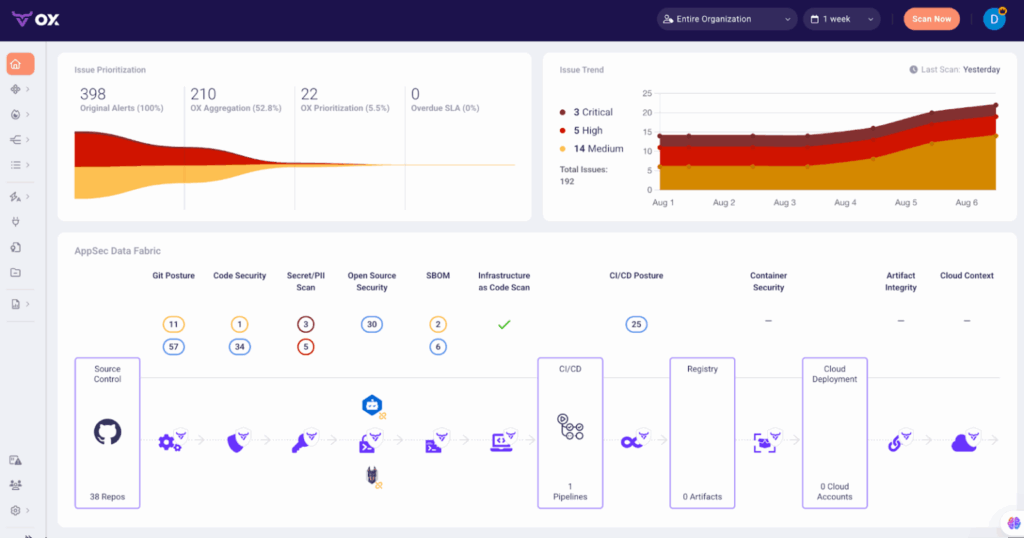
- If a scan is noisy against specific endpoints, update exclude paths or create a baseline to avoid repeated low-value items.
Where traditional DAST leaves teams swamped in alerts, OX Security integrates results with SAST, SCA, IaC, and container scans to give end-to-end visibility. This prioritization ensures teams spend time fixing what really matters instead of chasing false positives.
Conclusion
DAST provides something other testing approaches cannot, which is a clear view of how applications behave under real-world attack conditions. It validates authentication flows, API security, and runtime configurations in a manner that static scans cannot cover. This runtime visibility ensures that important weaknesses don’t slip into production without being noticed.
In this guide, we demonstrated the application of DAST in the existing DevSecOps pipelines and the noise and scale issues that are initiated by teams and hands-on procedures of applying or repurposing runtime testing to CI/CD. We also outlined how OX Security improves this process by matching findings across tools, filtering through false positives, and sorting exploitable risks to the top.
In conclusion, we can say that DAST is not just another testing technique embedded in the pipeline; it is a practical way to make sure security keeps pace with development. When combined with the right platform, it supports teams to move quickly while staying confident that critical risks are under control.
FAQs
1. Can DAST effectively test APIs and microservices in current architectures?
Yes. Current DAST tools can scan REST, GraphQL, and gRPC APIs, as well as distributed microservices, to uncover runtime flaws across complex environments.
2. What makes OX Security different from regular DAST tools?
Most DAST tools only catch security issues after your app’s already live. With OX Security, we take a more proactive approach. Our VibeSec™ model sends security insights straight to the developers, right in their workflows and even into their IDEs. Instead of just reacting to problems after they arise, we help you to avoid them before they even occur.
3. How often should DAST scans be integrated into CI/CD pipelines?
Lightweight scans can run on every commit or pull request, while full scans are best scheduled during release workflows or nightly builds to balance coverage and speed.
4. How does OX Security unify DAST findings with other AppSec testing results?
OX maps runtime findings back to code and correlates them with results from SAST, SCA, IaC, and container scans. This removes duplicates, highlights exploitable risks, and gives teams a single, prioritized view of their security posture.
5. What types of companies benefit from OX and VibeSec™?
OX is used across industries from fintech firms to enterprise technology providers and media companies. Any organization adopting AI-driven development and looking to reduce security debt can gain value from OX.
)