TL;DR
- Most modern applications are built on open-source dependencies — packages your team didn’t write, didn’t vet, and often didn’t directly install. SCA tools scan those components for known CVEs, outdated versions, and license risks before they reach production.
- In 2025, that’s only part of the problem. Dependencies move through builds, pipelines, and deployments, and risk often surfaces after code is packaged and running, not just where it’s declared in a manifest file.
- Tools like Snyk, GitHub Advanced Security, and Mend focus on detecting vulnerable components early and helping developers fix them before merging.
- OX correlates SCA findings with pipeline context, runtime data, and business impact via Code Projection across OX Code (code layer) and OX Cloud (runtime/cloud), enabling teams to pinpoint reachable vulnerabilities, track where they shipped, and understand exploitability in real-world environments.
Software Composition Analysis (SCA) tools help developers identify and manage security vulnerabilities, licensing issues, and other risks in open-source and third-party software components, ensuring safer and more compliant applications. In this blog, I will explore the top 10 SCA tools for 2025, highlighting their primary use cases and key features. Along with practical insights, I’ll share brief hands-on experiences to help you understand how each tool fits into modern software security workflows.
- OX Security
- Snyk
- Mend (formerly WhiteSource)
- GitHub Advanced Security (GHAS)
- OWASP Dependency-Check
- Anchore Syft + Grype
- FOSSA
- Jfrog Xray
- Black Duck by Synopsys
- Dependency-Track (OWASP)
You’re not just shipping your code anymore; you’re shipping every transitive dependency that sneaks in via npm install, pip install, or mvn package. According to the Linux Foundation and Harvard’s 2020 FOSS Contributor Survey, open source now makes up 70–90% of the code in modern software.
And in many of those projects, transitive packages account for the majority of vulnerabilities, often pulled in without any direct developer action. Yet most of these components are poorly maintained or years out of date, introducing silent risk into your pipeline.
These numbers are a reflection of why security is more than just writing secure application logic. Even if your own code is secure, the real risk often lies in the dependencies you bring in. For example, the Log4Shell vulnerability (CVE-2021-44228) wasn’t in the core application code of most systems; it was present in a widely used logging library. Despite writing safe business logic, thousands of teams were affected because a critical component deep in their Java dependency tree had an exploit.
As a Platform Security manager myself, I often find myself asking the same questions: How do we know what’s actually running in production? Are we flagging real risks, or just noise? Developers want to move fast, but security can’t be an afterthought. This gap creates tension and burnout on both sides.
And there’s an effective solution to this problem: Software Composition Analysis (SCA). For teams still working through where SCA fits relative to code-level analysis, a clear SAST vs SCA breakdown is worth reviewing first – both scan your codebase but target completely different risk layers and drive different remediation workflows. SCA tools specifically scan every open-source component in your codebase, direct and transitive, and cross-reference them against vulnerability databases to flag known CVEs, outdated versions, and license conflicts before a build ships.
To get a real-world example, let’s take a look at a Reddit discussion, where a user pointed out how automated SCA tools improve real-world security hygiene:
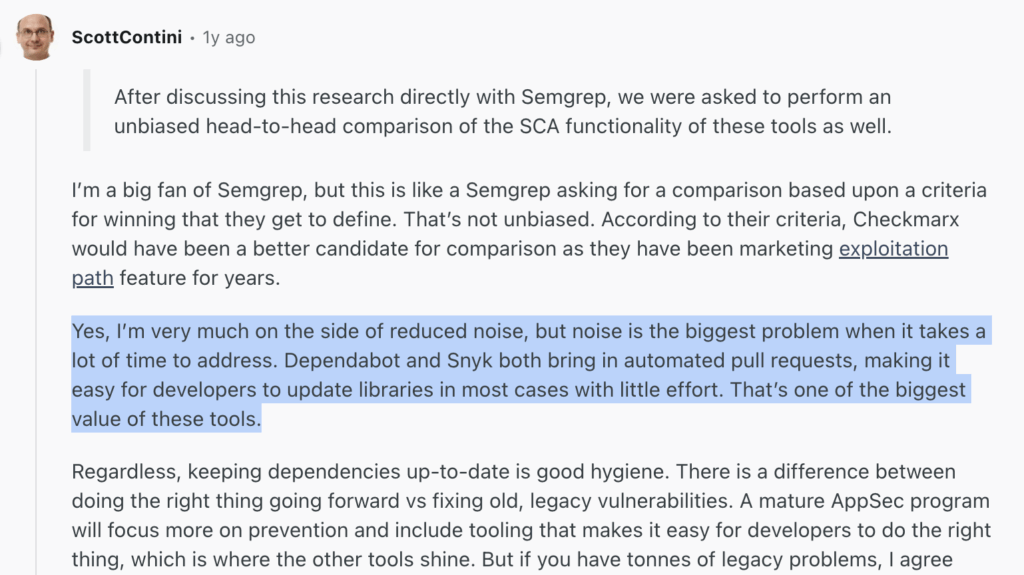
The Reddit comment highlights how Snyk and Dependabot add value by automating pull requests, helping developers update libraries with minimal effort. This ease of use is considered one of the biggest benefits of these tools in managing software dependencies.
SCA tools help you check whether a package introduces privilege escalation paths, includes known CVEs, or breaks policy rules that could weaken your pipeline. The problem is, most tools claim to cover everything, but in practice, they either flood you with alerts or don’t fit well into DevSecOps workflows.
For example, some tools still treat SCA like a batch job, like the JFrog Xray offers deep package metadata scanning, but many teams report sluggish performance when integrated into large multi-module builds.
Others, like OSO, do a great job detecting transitive vulnerabilities in real-time by hooking directly into the build process. However, OSO lacks mature reporting or exportable SARIF support, which can slow down downstream triage and ticketing.
That’s why teams should care, not just about detection, but about how detection fits into real workflows.
In this guide, we will go through the noise and offer a focused look at the top 10 tools, both commercial and open-source, that DevSecOps engineers can rely on in 2025. Because not all SCA tools are built for today’s pipelines.

What Software Composition Analysis (SCA) Actually Does
If you’ve ever worked on a modern application like a production Node.js service using Express or a Python API built on FastAPI, you know that most of the code you deploy isn’t written by your team. It comes bundled with packages like express-session, uvicorn, or requests, often pulling in dozens of transitive dependencies from npm, PyPI, or Maven Central.
For example, installing express-rate-limit can bring in ms, debug, and several others, each with its own potential vulnerabilities and license obligations. SCA tools map out this dependency tree, identify known CVEs (e.g., CVE-2024-2882 in a sub-dependency of node-fetch), flag outdated versions, and alert you to risks before they become production issues.
Here’s a brief illustration of how SCA works:

Let’s review what’s happening in the above diagram:
- The SCA process begins in IntelliJ IDEA by validating the pom.xml file to list all project dependencies.
- OWASP Dependency-Check uses pURLs to map each dependency and matches them against the NVD to identify known CVEs.
- Jenkins automates the build pipeline by pulling code from Git, compiling it, and generating a Software Bill of Materials (SBOM).
- The generated SBOM is then published to Dependency-Track, which continuously audits it for vulnerabilities and license compliance issues.
- This creates a DevSecOps pipeline where all open source components are scanned, tracked, and reviewed before the software reaches production.
A good SCA engine cross-references those components with vulnerability databases like the NVD, checks license metadata, and flags known exploits or legal risks before they impact your delivery pipeline.
For AppSec engineers, this ecosystem is a constant balancing act, keeping up with changing package versions, patching transitive vulnerabilities, and making sure license obligations are met.
Why SCA Is a DevSecOps Priority in 2025?
The urgency around SCA isn’t new, but in 2025, it’s becoming foundational to modern software delivery. Here’s why:
First, supply chain attacks are getting more frequent, more automated, and harder to detect early. Sonatype’s 2023 report found that they logged 245,032 malicious packages, and this number tripled in just one year. This shows a shift in strategy: attackers no longer try to breach your app directly; they inject vulnerabilities into the open-source ecosystem and wait for them to spread via trusted package managers.
Second, regulations are catching up. The U.S. government’s Executive Order on Improving the Nation’s Cybersecurity mandates SBOM (Software Bill of Materials) as part of every software contract. That means DevSecOps teams must not only know what goes into their software, but also prove it.
Finally, the tooling has matured. Today’s SCA tools aren’t clunky post-build scanners; they’re integrated into Git workflows, CI pipelines, and even IDEs. As a result, modern teams can shift SCA left, catching vulnerable packages before they even land in main.
How to Actually Evaluate SCA Tools?
Once the need for SCA is clear, the next challenge is choosing a tool that fits your workflow, and this is where many teams get stuck. Most vendors claim they offer vulnerability scanning, license auditing, and SBOM generation.
But in real-world engineering environments, what actually separates a useful SCA tool from a generic one is its ability to blend seamlessly into the day-to-day developer experience.
Transitive Dependency Coverage
The tool should detect vulnerabilities not just in direct dependencies, but also deep in your dependency tree. Look for tools that can recursively scan and flag risks from packages you didn’t explicitly install (e.g., vulnerabilities buried 4–5 levels deep in a Maven or npm project).
CI/CD Integration Quality
Check how easily the tool plugs into your existing DevOps pipeline. Does it support GitHub Actions, GitLab CI, Jenkins, or Bitbucket Pipelines natively? Can it fail builds with policy-based gating or only after the fact?
License Risk Classification and Enforcement
A good SCA tool must detect license types (GPL, MIT, Apache 2.0, etc.) and flag usage that violates your organization’s policies. Better tools allow blocking or alerting based on license risk tiers and support automated remediation.
Remediation Support and SBOM Generation
Look for tools that not only identify problems but also suggest fixes, such as known secure versions or patch references. Bonus if the tool includes SBOM tools that can auto-generate accurate Software Bills of Materials (SBOMs) in CycloneDX or SPDX format, which are often needed for compliance
Malicious Package Detection
SCA isn’t just about known CVEs. The rise of intentionally harmful packages, often disguised as common libraries, makes it important for scanners to go beyond public databases. A solid tool must distinguish between accidental vulnerabilities and deliberately malicious components.
Container Scanning Support
With containers becoming the standard deployment unit, SCA tools should scan open-source dependencies inside Docker images or Kubernetes workloads. This extends visibility to the full runtime environment, not just the source code.
Supply Chain Visibility
A modern SCA solution contributes to software supply chain risk management by monitoring not just direct dependencies, but also vulnerabilities introduced through transitive, third-party, or vendor-contributed packages.
Top 10 SCA Tools for 2025
Ultimately, a good SCA tool doesn’t live in a silo; it lives inside your delivery pipeline, helping your team move faster, not slower. So here are the best 10 SCA Tools for 2025.
Before getting started, here is a brief table that explains the comparison in an easier way:
| Tool | Best For | CI/CD & Dev Workflow Integration | SBOM Support | CVE/Vuln Detection | License Compliance |
| OX Security | Security teams that need SCA findings correlated with pipeline context, runtime data, and business impact, not just a list of CVEs | GitHub, GitLab, CircleCI, Jenkins, IDEs | Yes. SBOM, PBOM, API BOM, and SaaS BOM are maintained continuously across code, build, and runtime | Yes, findings correlated with reachability, exploitability, and pipeline context via Code Projection | Yes, tracks license obligations across direct and transitive dependencies throughout the pipeline |
| Snyk | Developer-first experience with fast feedback | GitHub, GitLab, Bitbucket, Jenkins, VSCode | Yes | Yes (proprietary DB + NVD) | Partial |
| Mend | Enterprise legal & compliance teams | GitHub, Jenkins, Azure DevOps, Bamboo | Yes | Yes (CVE & license linked) | Yes |
| GitHub Advanced Security (GHAS) | GitHub-native teams | GitHub only | Yes (via Dependabot) | Yes (automated PRs & scans) | Basic |
| OWASP Dependency-Check | Lightweight open-source scans for Java/.NET | Jenkins, GitHub Actions, GitLab | No native | Yes (NVD only, slower updates) | No |
| Anchore Syft + Grype | Container-native teams needing image scans | GitHub Actions, GitLab, Tekton | Yes (CycloneDX/SPDX SBOMs) | Yes (via multiple DBs) | No |
| FOSSA | Enterprise license tracking and legal compliance | GitHub, GitLab, Bitbucket, Jenkins | Yes | Yes (dependency-based) | Yes |
| JFrog Xray | Binary analysis in Artifactory with impact tracing | JFrog Pipelines, Jenkins, GitHub, IDEs | Yes | Yes (binary-level, rich metadata) | Yes |
| Black Duck | Enterprise-grade audits, especially in M&A or legacy systems | Jenkins, Jira, Bitbucket, SonarQube | Yes | Yes | Yes |
| Dependency-Track | Passive SBOM monitoring & lifecycle CVE tracking | CI-compatible, API/webhook support | Yes (via CycloneDX/SPDX) | Yes (CVSS-based risk scoring) | No |
1. OX Security
OX Security is an AppSec platform that covers the full development lifecycle, from AI code generation through CI/CD pipelines to cloud runtime. Its SCA capability sits inside OX Code, which shows where a dependency is running, which services depend on it, and which pipeline change introduced it.
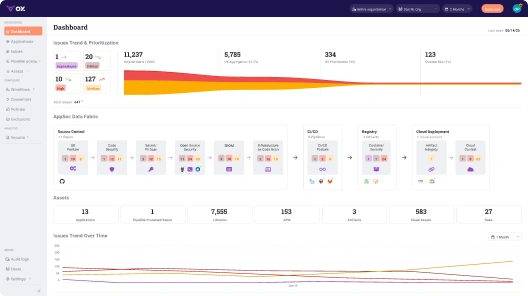
That specificity comes from Code Projection, OX’s correlation engine, which maps each finding to runtime exposure, pipeline metadata, and exploitability signals. In the scan below, 22,333 raw alerts across repositories, pipelines, and artifacts are narrowed to 440 issues tied to running services.
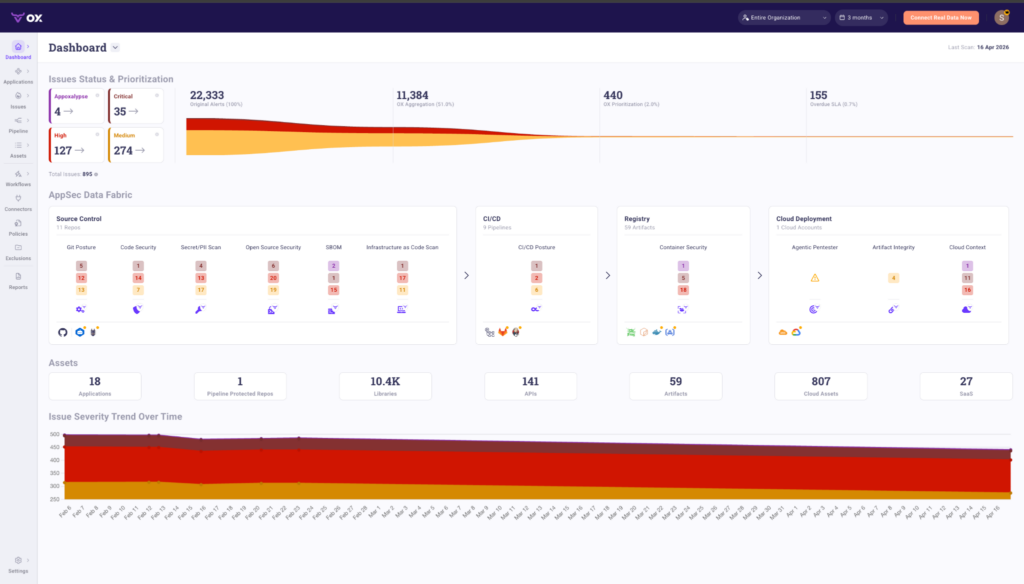
The dashboard groups findings by the applications and services they belong to, showing which components are deployed and exposed, not a flat list of repeated alerts.
Take spring-boot-starter-web@2.1.2.RELEASE, a Java dependency carrying 1 direct and 51 transitive CVEs, flagged as Known Exploited (KEV), running in a Kubernetes cluster with internet access. OX traces the dependency chain, identifies the exposed path, and surfaces one fix: upgrade to 3.5.11, which resolves all 52 vulnerabilities in a single change. That same prioritization engine narrowed 22,333 raw alerts down to 440 issues, cutting noise by 98% so developers focus only on what’s real and exploitable.
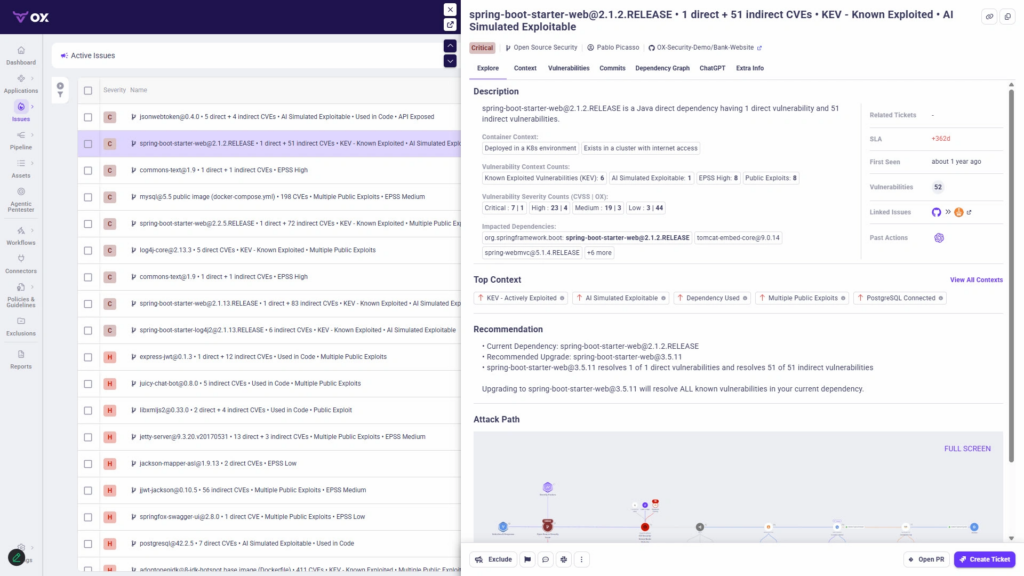
The detail view shows where the dependency runs, which services are affected, and how the attack path connects, traced back to the commit and pipeline that introduced it.
OX maintains continuous bill-of-materials coverage across code, pipelines, APIs, and cloud resources, with SBOM, API BOM, SaaS BOM, Artifact BOM (including PBOM), and Cloud BOM each updating as deployments change, so findings reflect the live system rather than a point-in-time snapshot.
OX Code analyzes every open-source component and the entire pipeline to pinpoint risks It connects to GitHub, GitLab, CircleCI, Jenkins, and IDEs without agent deployment.

2. Snyk
Best for: Developer-centric workflows with strong Git-based integration and fast feedback loops.
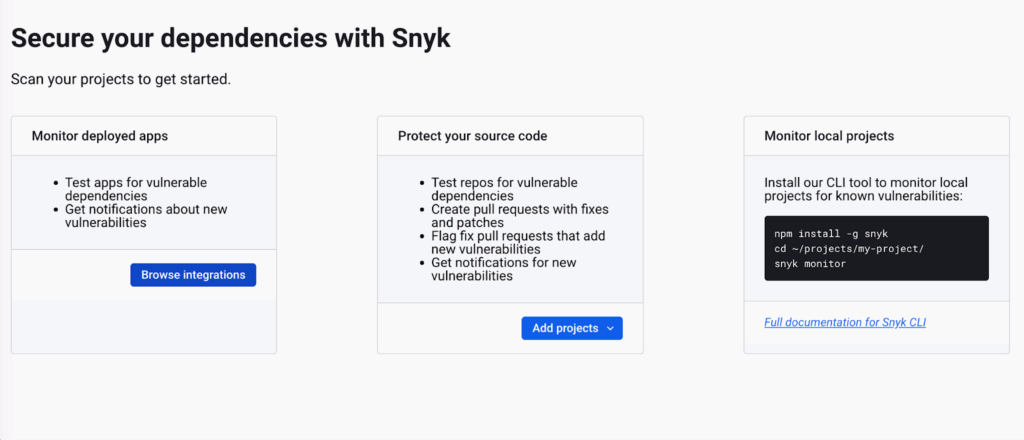
Snyk is a developer-first SCA platform designed to fit naturally into modern development workflows. It offers a command-line interface, GitHub pull request commenting, and an IDE plugin for surfacing known vulnerabilities during development. The tool is designed to align with common developer workflows and provides visibility into open-source risks within codebases.
To show how Snyk helps with security checks, I run it through a scan for all my GitHub private and public repositories to monitor deployed apps.
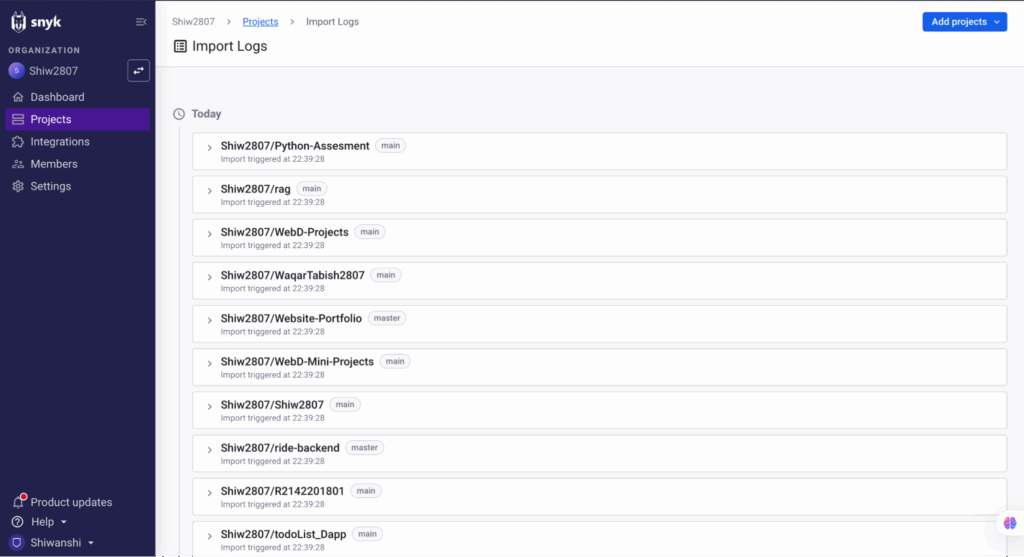
It flagged known vulnerabilities across multiple projects and suggested exact upgrades or patches. Plus, it really got integrated into my existing GitHub and CI setup without slowing anything down.
Snyk supports most mainstream languages, Node.js, Java, Python, Go, .NET, Ruby, and even Docker images. Snyk supports developer feedback loops by providing inline fix suggestions, patch recommendations, and the ability to auto-fix vulnerable or outdated packages directly within pull requests.
Its vulnerability data is sourced from a proprietary database, which may be a consideration for teams that prefer vendor-agnostic or fully transparent sources such as the NVD.
3. Mend (formerly WhiteSource)
Best for: Enterprises needing policy enforcement and legal license compliance at scale.
Mend is an enterprise-grade open-source management platform focused on security and license compliance. It’s most commonly adopted in organizations with legal, risk, and compliance teams involved in software approval processes. It maps dependencies to known license types (GPL, MIT, Apache, etc.) and flags conflicts based on your organization’s risk appetite.
It also supports enforcement policies, for example, blocking builds that include dependencies with unapproved licenses or known high-severity vulnerabilities.
While testing Mend on one of my demo Node.js repositories, it immediately flagged 15 security vulnerabilities as part of its GitHub integration. The tool highlighted issues ranging from critical CVEs like WS-2021-0153 and CVE-2021-32803, to high-risk license violations. Here’s an image of the same:
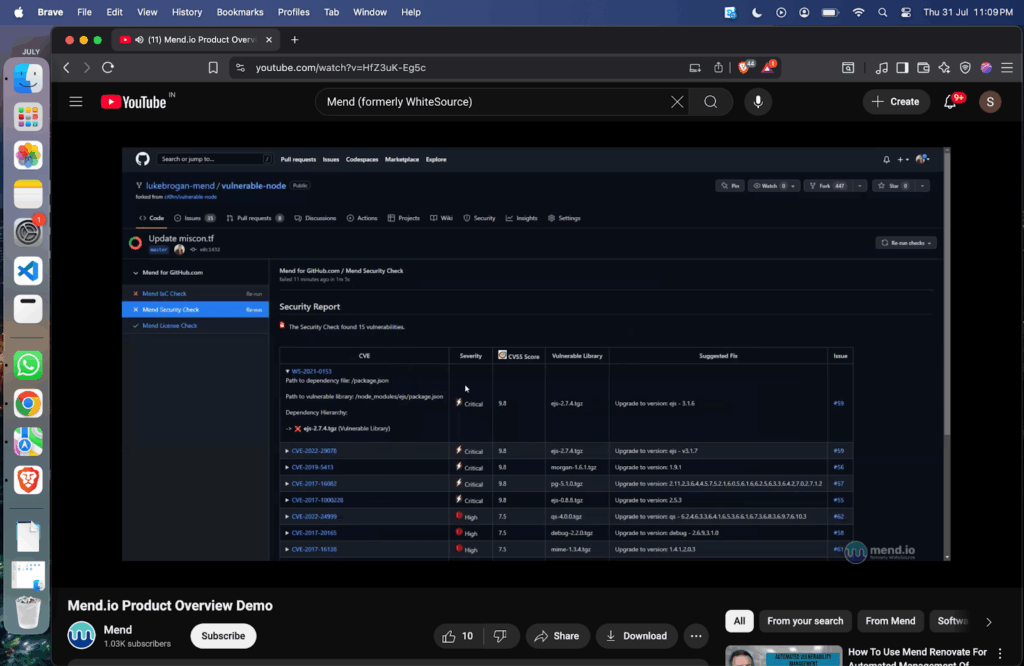
This kind of automated and actionable feedback right within the PR workflow helps developers fix issues before merging code, preventing vulnerable components from ever reaching production. Mend not only catches outdated libraries but also flags risky licenses, ensuring compliance and security go hand-in-hand.
Mend works with Jenkins, Azure DevOps, Bamboo, GitHub, and other CI tools. It generates SBOMs, license reports, and compliance audit logs across large codebases and multiple repositories. However, some users may find the policy engine to be rigid, requiring manual configuration to fine-tune for different teams or project needs.
4. GitHub Advanced Security (GHAS)
Best for: Teams already all-in on GitHub and want native integration without adding another tool.
GHAS is GitHub’s native security platform and includes built-in SCA via Dependabot and CodeQL scanning. It’s tailored for teams that manage their full SDLC on GitHub and prefer minimal external tooling.
Dependabot automatically detects outdated or vulnerable packages and opens PRs with fix suggestions. These are annotated with the CVE, severity, changelog info, and links to remediation docs. GitHub’s code scanning features can also block merges based on severity thresholds, ensuring teams don’t ship code with unresolved issues.
GHAS integrates into GitHub repositories without requiring external agents. It can be enabled via repository settings or configuration files and automatically runs on each push, pull request, and commit. This setup supports consistent enforcement and visibility across GitHub-hosted codebases.
5. OWASP Dependency-Check
Best for: Open-source SCA for Java and .NET projects in CI/CD pipelines.
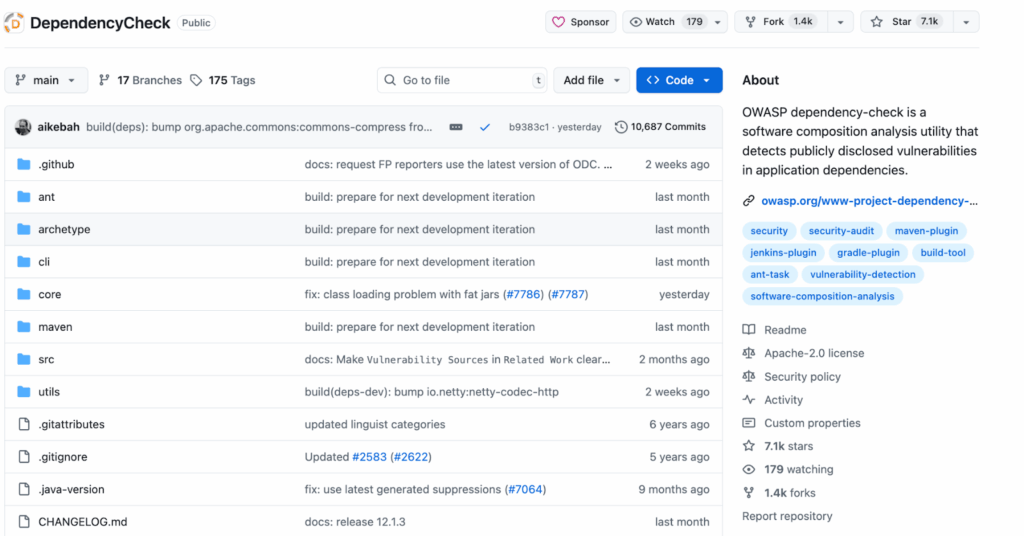
Dependency-Check is a widely used open-source CLI tool from OWASP, aimed at scanning Java and .NET projects for known vulnerabilities via the National Vulnerability Database (NVD).
It analyzes pom.xml, build.gradle, or .csproj files and produces reports in HTML, JSON, or XML formats. It’s often added to CI workflows in Jenkins, GitHub Actions, or GitLab CI to block builds with high-severity CVEs.
To test OWASP Dependency-Check, I ran a scan on a sample Java project using its CLI tool. Within seconds, it generated an HTML report highlighting several known vulnerabilities tied to third-party libraries.
The scan detected 8 vulnerabilities across 3 dependencies, including commons-compress and jackson. One of the flagged issues was a high-severity CVE in the Apache Commons Compress library with a confidence level of 44, indicating a reliable match against the NVD (National Vulnerability Database).
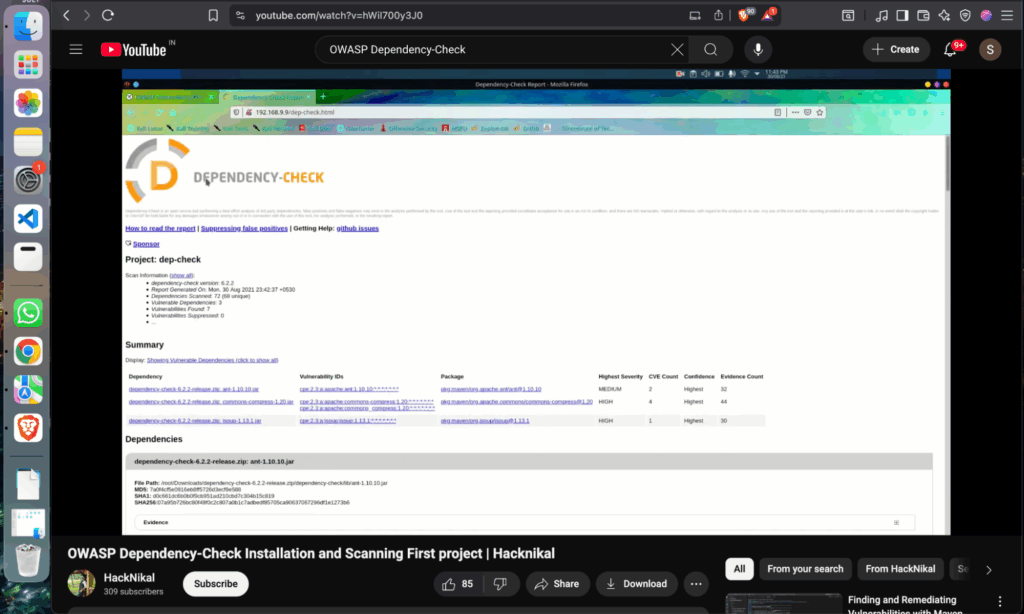
The report included CVE IDs (like CVE-2022-XXXX), severity ratings, and direct links to more information about each vulnerability. It gives a clear breakdown of each vulnerable package, the number of related CVEs, and suggested fixes (when available).
It’s commonly used by teams that want a lightweight, vendor-neutral solution without commercial licensing constraints. However, since it relies heavily on the NVD, it can lead to slower vulnerability data updates and occasional false positives.
6. Anchore Syft + Grype
Best for: Container image SCA and SBOM generation using open-source tooling.
Anchore is a container security company focused on helping teams secure the components that make up their container images. Its core offering includes two open-source CLI tools designed for container-native workflows:
- Syft: generates SBOMs from Docker images, filesystems, or source code
- Grype: scans SBOMs or images against vulnerability databases
These tools are popular in Kubernetes-first organizations or DevOps teams managing large container fleets. They integrate smoothly with GitLab CI, Tekton, GitHub Actions, and Trivy.
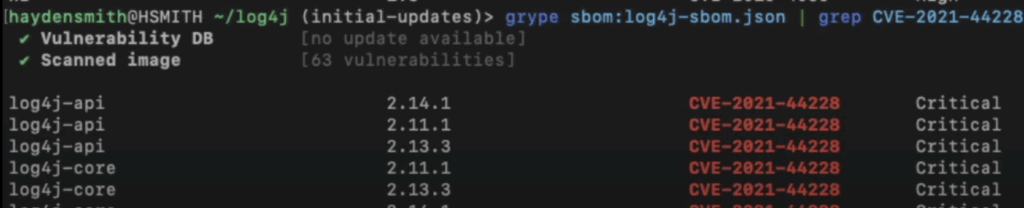
To analyze vulnerabilities in a Java project using log4j, I used Syft to generate an SBOM (Software Bill of Materials) and passed it to Grype for vulnerability scanning. Grype flagged 63 vulnerabilities, including multiple instances of the infamous CVE-2021-44228 (Log4Shell) across different versions of log4j-core and log4j-api.
The scan output was clean and CLI-friendly, highlighting affected packages, their versions, and associated CVEs along with severity levels (in this case, Critical). Here’s a snippet:
This setup allows teams to scan container layers and third-party base images for vulnerabilities that code-focused scanners might overlook. The tools are open-source and commonly used in cloud-native security workflows.
7. FOSSA
Best for: License management, legal compliance, and enterprise-grade open-source usage visibility.
FOSSA focuses on open-source license scanning, providing detailed license metadata across direct and transitive dependencies. It maps components to their respective licenses and applies custom policy checks, helping teams manage compliance requirements alongside vulnerability monitoring.
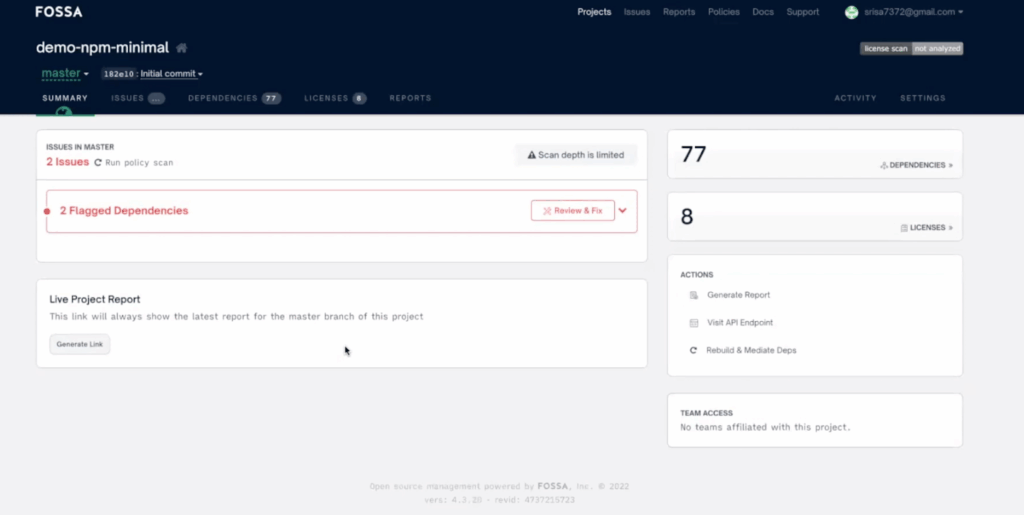
To check FOSSA, I ran it on a minimal NPM project, and it scanned all dependencies and quickly flagged 2 critical issues, highlighting 2 flagged dependencies right on the dashboard.
FOSSA surfaced 77 dependencies and 8 license types in its scan output, offering structured results with options like “Review & Fix” for teams to evaluate compliance steps. While its scan depth may be limited in some setups, it supports license visibility early in the review process.
FOSSA focuses heavily on license compliance in addition to vulnerability detection. It supports organizations that need to track legal obligations tied to third-party code and enforce open source policies across projects. Its CI integrations and reporting features allow teams to monitor both security and legal risk within the development workflow.
8. Jfrog Xray
Best for: Binary-level scanning in Artifactory and fine-grained impact analysis.
Xray is JFrog’s SCA solution that integrates directly with Artifactory. Instead of relying solely on declared dependencies in manifest files, it analyzes the final build artifacts, container layers, and Helm charts.
This method provides insight into what actually ships in production, which can be valuable for teams managing custom build processes or aggregating components from multiple origins.
While evaluating JFrog Xray, I scanned a mix of repositories, including Docker images, NPM packages, Maven builds, and even Hugging Face models, within the Artifactory ecosystem. Xray indexed artifacts across repositories like docker-local, npm-local, and pypi-local, giving visibility into their security posture.
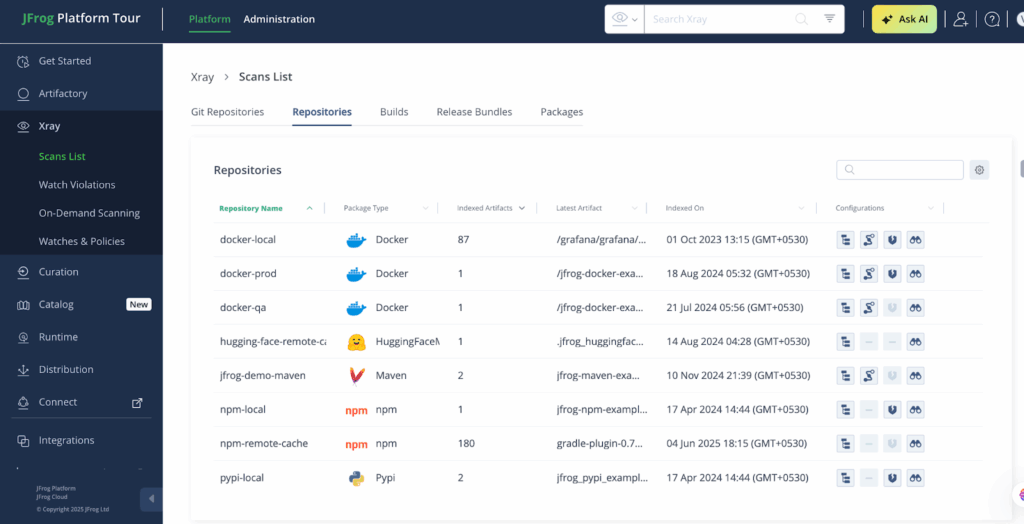
For example, in my docker-local repository setup, Xray scanned 87 artifacts against preconfigured security and license policies. It flagged vulnerabilities, surfaced license details, and offered insight into open-source components through on-demand scans and policy watches.
Additionally, its impact analysis feature tracks the usage of newly disclosed CVEs across builds, helping teams locate and address affected components more efficiently. However, its full feature set is tightly coupled with the broader JFrog platform, which may not align with teams using other artifact repositories or preferring toolchain flexibility.
9. Black Duck by Synopsys

Best for: Security and compliance audits at a large scale, especially in M&A or legacy-heavy environments.
Black Duck is an enterprise-focused SCA platform often used in regulated industries and during M&A due diligence. It supports a wide range of languages and can scan both source code and compiled binaries, which is useful in scenarios where source access is restricted.
It offers legal risk reports, export control checks, and full dependency graphs. The platform integrates with systems like SonarQube, Jenkins, Jira, and Bitbucket, fitting into existing enterprise workflows without requiring major changes.
For example, while testing Black Duck, I analyzed a Java component, HyperSQL Database Engine v2.3.4, within a demo project. Black Duck flagged 1 known vulnerability, tracked its license (BSD 3-Clause), and even highlighted contributor activity and usage across internal projects (insecure-bank, SIG Secure Bank).

The tool pulled metadata like release history, Open Hub links, and component tags, making it easy to assess security risk, license compliance, and operational maturity at a glance.
It is frequently used during M&A due diligence and vendor reviews where audit-grade reporting is required. However, Black Duck can involve a more complex setup process and slower feedback cycles compared to developer-centric tools like OX Security, which prioritize speed and in-IDE integration.
10. Dependency-Track (OWASP)

Best for: Continuous SBOM analysis and security monitoring from open-source pipelines.
Dependency-Track is an open-source platform built for SBOM lifecycle tracking. It doesn’t perform source code scans itself. Instead, it ingests SBOMs from tools like Syft, CycloneDX, or SPDX, and monitors them against updated vulnerability feeds over time.
This model supports teams looking to centralize software risk visibility across many projects. Once integrated, Dependency-Track can surface alerts when a CVE impacts an older component, even long after release. It includes API support, webhook automation, and CI/CD compatibility, allowing it to function as a passive monitoring layer within broader DevSecOps setups.
To test Dependency-Track, I scanned a Java-based application using OWASP Dependency-Track. The dashboard detected a total of 302 vulnerabilities across 120 components.
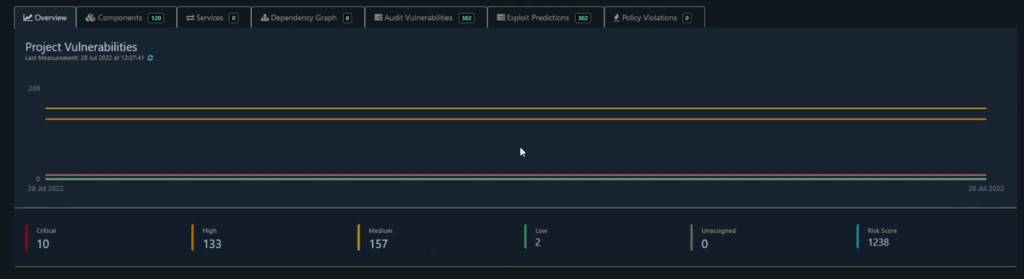
The platform’s ability to calculate a cumulative risk score is really helpful (in this case, 1238), based on CVSS metrics. All 302 vulnerabilities were flagged as potentially exploitable, giving the team a clear prioritization path.
The dashboard also visualized vulnerability trends over time and made it easy to audit and manage risks via the “Audit Vulnerabilities” tab. This kind of automated, risk-based analysis is crucial for maintaining software supply chain security and ensuring vulnerable dependencies don’t make it into production. However, the interface can feel unintuitive at times, especially for users unfamiliar with SBOM-based workflows or CycloneDX schema structures.
Conclusion
SCA tools have become a must for modern software teams in 2025. They help you spot risky packages early and keep your projects secure without slowing things down. Whether your team needs something lightweight or a tool that fits into a large CI/CD setup, there are options for every use case.
The tools listed above are a good place to start. Try them out in your own workflow, focus on what gives useful results, and make security a built-in part of how you ship code, not something you add later.
FAQs
SCA tools are security tools that scan the open-source and third-party libraries in your software. They check for known vulnerabilities (CVEs), outdated versions, and license problems. These tools help developers and security teams make sure that their dependencies are safe before the software is released.
SCA stands for Software Composition Analysis. It refers to the process of analyzing the components that make up your software, especially third-party packages, to identify risks related to security, licensing, and versioning.
SAST scans your proprietary code for bugs and logic flaws. In contrast, SCA focuses on third-party and open-source libraries, flagging known CVEs and license issues that come from dependencies you didn’t write yourself.
No. Developer-centric SCA tools like Snyk or Mend are built for dev workflows and IDEs. They help engineers fix issues directly in code before security teams even get involved.