
TL;DR
- ASPM doesn’t just connect your AppSec tools; it unifies them into a single, adaptive system that understands your entire security landscape. Static scans, dependency checks, and container monitors often give a fragmented view, but OX Security’s Active ASPM brings together that evolves with every build and commit, offering real-time visibility across your application’s lifecycle.
- VibeSec™ transforms runtime security from reactive to autonomous, keeping defenses one step ahead of potential threats. Instead of waiting for vulnerabilities to appear, the VibeSec™ agent streams live security context into IDEs, CI/CD pipelines, and runtime, enforcing policies as code is written and blocking unsafe patterns before deployment.
- Most teams end up chasing thousands of alerts, whereas ASPM filters the noise and highlights what actually matters. By bringing together runtime reachability, exploitability, and business impact, OX’s system identifies the few vulnerabilities that are truly exploitable in production and automatically assigns them to the right team before risk turns into downtime.
- ASPM brings security and development into the same rhythm by integrating security practices into every stage of the development process. Powered by the VibeSec™ engine, OX embeds security directly into day-to-day developer workflows, suggesting fixes inside the code to ensure every build ships secure by design, all without slowing down releases.
Application Security teams still face serious vulnerabilities that appear after deployment, where real users’ data are at risk. ASPM helps solve this problem by analyzing applications and minimizing vulnerabilities before they reach production, a process that is shifting left in application security. ASPM allows teams to gain a clear, unified view of their application security in enterprises with multiple projects in production.
For example, consider a fintech company moving its payments platform to a hybrid cloud. Their SCA scan flags 150 vulnerable libraries, and IaC scans show that the payment API is exposed to the internet. Looked at separately, the dev team spends weeks patching every flagged dependency, even though fewer than 10 are actually loaded in containers and exposed to attackers. With an ASPM powered by VibeSec™, the platform automatically correlates these findings, identifies only the 12 libraries that are reachable in production, and opens remediation tickets for the right owners.
Instead of being overwhelmed by noise, the team focuses on the critical 5% of issues that matter, cutting remediation time from weeks to days. Recent research supports this: the Cycode State of ASPM 2024 Report found that 90% of CISOs say the relationships between security and development teams need improvement, and 78% believe their AppSec attack paths are unmanageable. That relationship gap is the central theme of the CISO’s AppSec dilemma in the age of AI, where four CISOs argue partnership, not tooling, is what actually closes it.
In this article, we will be discussing what ASPM is and why it’s necessary for AppSec teams. We then look at how it compares to other security approaches and its capabilities. Finally, we walk through an ASPM implementation in real life, using OX Security to demonstrate how the platform applies these capabilities and delivers tangible benefits for AppSec and development teams.
Fixing the AppSec Bottlenecks: The Role of ASPM
A year ago, ASPM was often described as the next logical extension of orchestration, a way tounify SAST, DAST, SCA, and IaC results under one dashboard. Helpful, but still reactive – and without a structured threat taxonomy like the OSC&R framework to prioritize findings against real adversary TTPs, teams were left sifting through long lists of alerts without knowing which ones really mattered.
Over the last 12 months, that framing has shifted. ASPM is evolving into a preventive, context-aware control plane. Instead of just aggregating scanner findings, ASPM platforms correlate vulnerabilities against runtime context, business impact, and exploitability. The result: rather than being swamped by 1,000 alerts, teams focus on the small percentage of issues that are actually reachable and exploitable in production.
What’s Driving the Shift
- Tool sprawl and noise: Security leaders consistently report fatigue from juggling multiple scanners and dashboards. Without correlation, prioritization is slow and inconsistent.
- Cloud-native complexity: Microservices, APIs, containers, and AI-generated code create dynamic environments that require container security solutions and static tools can’t keep pace with.”
- Speed of attacks: Mandiant’s M-Trends 2025 reports global median dwell time at nearly 11 days, the narrowest window yet for defenders. This compressed response horizon underscores the need for always-on, context-aware posture controls, not just point-in-time scans.
- Analyst consensus: Gartner’s Innovation Insight for ASPM (Jan 2025) forecasts that 80% of regulated-industry orgs using AppSec testing will adopt ASPM by 2027 (up from nearly 29% today), changing ASPM from “nice-to-have” to foundational.
The New ASPM Paradigm
This evolution is defined by five key shifts:
- From alerts to actions (automatic tickets, blocked merges, fix PRs).
- From static CVSS to runtime reachability & exploitability.
- From dashboards to embedded guardrails in developer workflows.
- From periodic scans to consistent, stateful posture graphs.
- From manual rule-writing to AI-driven autonomous enforcement.
The net effect is clear: ASPM is no longer just about visibility; it is about real-time prevention and posture management in a world where attacks move faster than ever. But understanding ASPM’s potential is only the first step. The real question for organizations is: what challenges stand in the way of adopting it, and how do they overcome them?
That’s where the next section comes in: exploring the application security challenges that are driving teams toward ASPM adoption.
Application Security Challenges That Drive Active ASPM Adoption
After running multiple AppSec programs, I can tell you this: the challenge isn’t “we don’t have enough scanners” or “we need another dashboard.” The real issue is that critical risks are buried under noise, and security teams spend more time managing tools than minimising exposure.
1. Tool Sprawl & Alert Fatigue
Most organizations run at least 5–7 scanners (SAST, SCA, DAST, IaC, container, secrets, etc.). Each produces “critical” findings, often in different formats, with duplicates across tools. Engineers spend days chasing issues that never touch production, while real exploitable risks remain hidden. Whether that’s the right setup for your team, or a sign it’s time to consolidate, is exactly the debate a panel of CISOs and AppSec leaders works through in navigating multi-vendor vs. single platform, their answer, consistently, is “it depends on your maturity and requirements. This is what the science behind alert fatigue in security teams gets at directly: an average organization sees over half a million alerts, 95–98% non-critical, and that volume doesn’t just slow people down; it changes how they think.
2. Stale Visibility in Dynamic Environments
Traditional point-in-time scans are obsolete the moment they’re exported. In dynamic environments like Kubernetes, pods churn in hours and APIs are redeployed daily. I’ve seen teams patch base images while vulnerable containers kept running in production because runtime drift wasn’t tracked. The result? Uncertainty over whether a vulnerability is still exploitable.
3. Broken Prioritization Models
Severity-based triage using CVSS alone rarely aligns with real-world risk. A CVSS 9.8 in an unused library consumes valuable engineering time, while a CVSS 6.5 in a customer-facing payments API is the true business risk. Without runtime reachability, exposure analysis, and business context, teams are forced to fix what’s “loud” instead of what’s dangerous.
4. DevSec Friction
Handing developers Jira tickets labeled “fix this high vulnerability” is ineffective. Without context (runtime reachability, affected service, ownership, and impact), remediation efforts stall. This is why “shift left” often fails during implementation: we’re shifting problems earlier, not making them solvable. Developers don’t need more findings; they need actionable insights tied to their code and services. A panel of security and platform leaders from Vodafone, SAP, Repsol, and others gets at the root of this friction in bridging the gap: uniting security and development: developers aren’t ignoring security, they’re being handed findings with no context or actionable path forward. As three AppSec leaders put it in the journey to secure by design in a dynamic AppSec world, shift-left is a failed mantra unless it means giving developers high-quality information early, not just moving the same unstructured findings earlier in the pipeline. This OX webinar tackles that exact friction, bridging the gap between developers, security, and operations with a unified playbook built on people, process, and technology.
5. Compliance Fire Drills
Frameworks like PCI DSS 4.0, SOC2, and GDPR require consistent monitoring and evidence. Yet most organizations still scramble quarterly, exporting logs and manually building spreadsheets. By the time the audit package is ready, half the environment has already changed, leaving a compliance gap and regulatory risk.
6. Slow, Manual Remediation
Even when teams know which vulnerabilities matter, remediation pipelines are inefficient: export report, create ticket → assign → wait for clarification → debate severity. Critical findings can remain open for 90+ days, not because they’re unfixable, but because ownership is unclear or reproduction details are missing. Multiply that by thousands of issues, and mean-time-to-remediation (MTTR) becomes a compliance and security liability.
What Needs to Change
This is why so many AppSec programs feel reactive. Not because engineers lack skill or effort, but because the system creates bottlenecks at every stage. ASPM, done right, is about removing those bottlenecks, not adding another tool. It means:
- Correlating across scanners to eliminate duplicates and highlight meaningful context.
- Exposing runtime truth, which vulnerabilities are actually reachable, exploitable, and in production.
- Automating ownership so issues are routed with the right context to the right team.
- Enforcing policies in real time so compliance evidence is always current, not retroactively assembled.
This isn’t about “more dashboards.” It’s about helping AppSec teams get ahead of risks instead of chasing them.
Key Reasons Why ASPM is Necessary for Current AppSec Teams
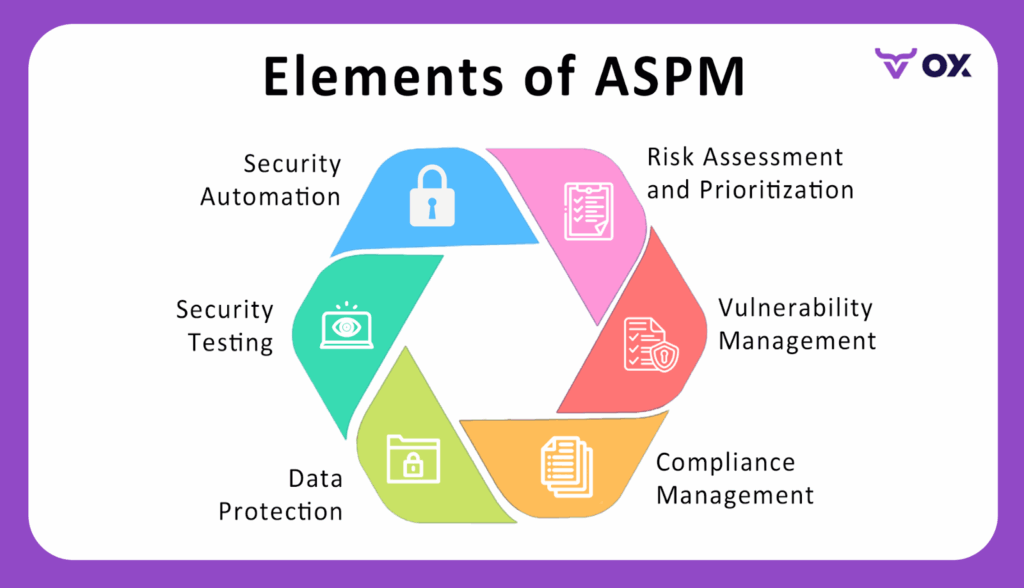
AppSec teams today face challenges that individual tools can’t solve on their own. ASPM provides ongoing, intelligent posture management that bridges the gap between detection and prevention.
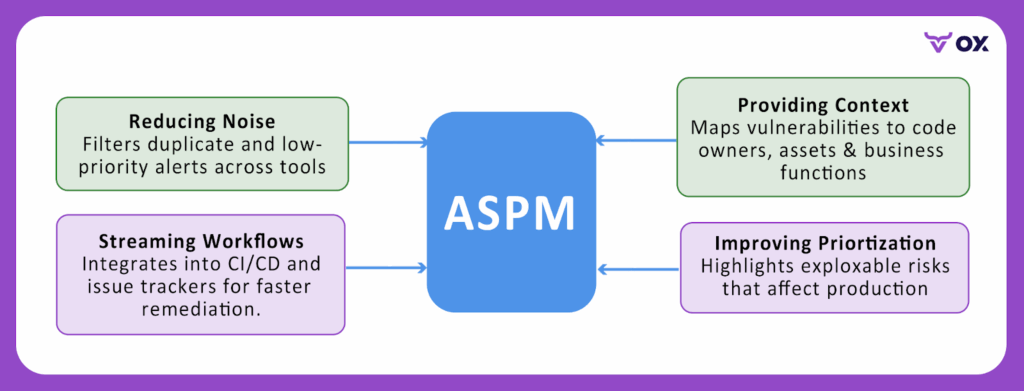
- Lowering Noise: filters duplicate and low-priority alerts by correlating data from all security tools, so teams only see exploitable risks that actually matter.
- Providing Context: Connects each vulnerability to its code owner, affected asset, and business function, giving both engineers and security teams a shared understanding of impact.
- Improving Prioritization: Highlights vulnerabilities that are both reachable and exploitable in production, helping teams fix what attackers could realistically exploit.
- Optimizing Workflows: By embedding security checks into CI/CD pipelines and developer tools, OX’s Active ASPM ensures faster remediation and automated policy enforcement through VibeSec™, without adding manual overhead. That same discipline, proving exploitability before asking developers to act, is what two AppSec leaders describe as the actual trust-building mechanism in from foundation to maturity in building an AppSec program: send the few things that matter, not everything you find.
Practical use-case: A fintech company managing dozens of microservices might receive thousands of vulnerability alerts from SAST, SCA, and container scans every week. Without ASPM, security engineers waste days triaging duplicates and non-critical issues. With ASPM, the system unifies alerts, maps them to specific microservices, and flags only the vulnerabilities that affect critical payment services, enabling the team to focus on what truly protects customers and compliance.
Comparison of ASPM and Other Security Approaches
The table below breaks down how ASPM compares with other common security approaches, clarifying what each does and where ASPM adds extra value.
| Approach | Purpose | Limitations | How ASPM Adds Value | Examples/Tools |
| Application Security Testing (SAST, DAST, IAST, etc.) | Finds coding flaws, runtime issues, and insecure logic. | Generates raw findings without showing which ones truly matter. | Correlates results, prioritizes exploitable risks, and maps them to ownership. | Veracode, Checkmarx, Burp Suite |
| Application Security Orchestration & Correlation (ASOC) | Aggregates alerts from different security tools into one place. | Still leaves teams with too many alerts and little context. | Adds posture management by showing business impact, reachability, and fix paths. | Code Dx, ZeroNorth |
| Cloud Security Posture Management (CSPM) | Secures cloud configurations and infrastructure settings. | Focuses on cloud misconfiguration, not the apps running inside. | Complements CSPM by monitoring the application layer, APIs, and dependencies. | Wiz, Prisma Cloud |
| Software Bill of Materials (SBOM) | Provides an inventory of libraries, components, and dependencies. | Tells you what you have, but not how risky or exploitable it is. | Enriches SBOM data with vulnerability context and runtime exposure. | SPDX, CycloneDX |
ASPM in Action: Capabilities Every AppSec Team Needs
To act as a real-time security compass, an ASPM solution must go beyond visibility. It should collect, correlate, and act on security data across the software lifecycle, giving AppSec and engineering teams a live, contextual view of the vulnerabilities. The following are key capabilities that define a strong ASPM platform and the value each brings to your security workflow.
Code-to-Cloud Visibility and Traceability:
ASPM platforms, like OX Security, provide end-to-end mapping from code repositories to cloud workloads through OX Cloud – capturing every artifact in the software supply chain and connecting code-level findings to actual runtime behavior, so teams understand not just what’s vulnerable but whether it’s reachable in the production environment.
Benefit: Eliminates blind spots and highlights hidden risks early.
Contextual Risk Scoring and Prioritization:
Instead of overwhelming developers with raw CVSS (Common Vulnerability Scoring System) scores, OX Security enriches findings with exploitability, business impact, environment sensitivity, and reachability context.
Benefit: Reduces noise and ensures teams focus on vulnerabilities with real-world impact.
Monitoring and Automation:
ASPM keeps security posture current by aggregating data from SAST, DAST, IaC, and secrets scanning tools. OX automates these posture checks and eliminates point-in-time visibility gaps.
Benefit: Enables real-time detection and rapid response to emerging risks.
Active Posture Intelligence with VibeSec™:
VibeSec™ turns passive monitoring into active protection. It uses AI-driven context to detect policy violations in real time and enforce corrective actions across the SDLC.
Benefit: Moves security from reactive patching to autonomous posture management.
DevSecOps and Security-as-Code Integration:
With OX, security becomes part of the CI/CD fabric where VibeSec™ enforces organization-level policies automatically at commit, build, and deployment stages.
Benefit: Catches issues earlier in the lifecycle, lowering remediation costs and security debt.
Unified Dashboards and Executive Reporting:
ASPM unifies findings into clear dashboards, tracking metrics like mean-time-to-remediation, posture trends, and compliance status.
Benefit: Aligns security outcomes with business priorities and supports strategic decision-making.
How OX Security’s Active ASPM Redefines Software Supply Chain Protection
Enterprises already run scanners across every layer of the stack, SAST, DAST, SCA, IaC, container, and secrets, yet exploitable risks still make it into production. The issue is not detection; it’s what happens next. Findings pile up across silos, backlogs grow, and AI-accelerated code means vulnerabilities slip through faster than teams can triage. OX Active ASPM and HCL AppScan in action walks through a live example: connecting an existing scanner via API key, then watching OX correlate, prioritize, and route the results automatically.
OX Security’s answer is Active ASPM powered by VibeSec™. Instead of waiting to detect, OX prevents exploitable code from ever shipping, weaving continuous, contextual security into repositories, pipelines, clouds, and developer workflows.
What Enterprises Still Do Manually Today
To understand why this matters, look at what security teams are still doing today. Even with dozens of scanners, most enterprises are stuck with highly manual processes:
- Exporting & Normalizing: Copying CSV/JSON outputs from scanners into spreadsheets.
- Deduplication & Correlation: Reconciling the same CVE across multiple tools.
- False-Positive Validation: Reproducing issues in staging or code reviews.
- Context Gathering: Checking reachability, API exposure, business impact by cross-referencing logs and service maps.
- Ownership & Ticketing: Deciding which team owns an issue and re-keying details into Jira/ServiceNow.
- Remediation Tracking: Re-running scans and comparing outputs before closing tickets.
- Drift Detection: Verifying runtime matches patched builds.
- Audit Evidence: Assembling quarterly spreadsheets for compliance.
This fragmented workflow drives duplicated effort, delayed remediation, and compliance gaps, even in organizations with mature toolchains.
Active ASPM That Goes Beyond Detection with OX
- Prevention vs. Detection: OX doesn’t just log CVEs, it blocks insecure merges, remediates code inline, and enforces policy in CI/CD.
- Autonomous Decisioning: Findings are deduplicated, validated, and prioritized automatically with Code Projection and exploitability analysis.
- Embedded in Workflows: Developers get one-click fixes from Agent OX in GitHub or their IDE, tickets auto-routed to owners, and PRs blocked on exploitable risk.
- Context Across Code, Runtime, APIs, Cloud: OX correlates static analysis, runtime reachability, API exposure, SaaS dependencies, and cloud misconfigs into one fabric.
- Governance Built In: SLA timers, scope filters, SBOM/PBOM reports, and audit logs give compliance teams evidence in real time.
By grounding security in real exploitability and developer context, OX ensures teams focus on the risks that matter most.
How OX Works
So how does OX actually deliver on this? The model is simple but powerful:
1. Onboard: Getting started with OX is designed to be quick. You connect your GitHub/GitLab/Bitbucket repos, CI/CD pipelines like GitHub Actions or Jenkins, your container registries (ECR, Harbor, JFrog, Docker Hub), and cloud environments (AWS, GCP, Azure). You can also hook in Jira or ServiceNow for ticketing. The heavy lifting is handled by lightweight components: the OX Broker for on-prem systems and the Kubernetes Inspector for clusters. They securely stream metadata out without opening inbound connections.
2. Contextual Sensing: This is where OX sets itself apart. Instead of just pulling scanner outputs, OX continuously feeds all the raw data, vulnerabilities, configs, logs, and API schemas into its AppSec Data Fabric. The platform then enriches this information with:
- Runtime reachability (is this vulnerable function actually executed?).
- API exposure (does this library sit behind a public API?).
- Cloud misconfigs (is this workload overly permissive in IAM or network settings?).
- Threat intelligence (CVSS, EPSS, CISA KEV data to see if the vuln is actively exploited).
3. Autonomous Prevention + Remediation: Once OX has full context, it acts. Insecure merges can be blocked automatically in PRs. Duplicate CVEs from multiple scanners are collapsed into a single finding. Issues are prioritized by exploitability and business impact. Developers get fixes where they work: AI-generated patches from Agent OX inline in GitHub or their IDE, or Jira tickets pre-filled with code location, owner, and SLA. Security teams don’t need to manually correlate, assign, or chase down issues.
Implementing ASPM Across the SDLC with OX Security
In this walkthrough, I’ll show how an enterprise AppSec team can implement ASPM using OX Security. The flow covers repository onboarding, pipeline scanning, ingesting results, analyzing attack paths, and automating remediation. By the end, you’ll have a working pipeline that monitors your application’s posture all the time and drives prioritized fixes directly into developer workflows.
What to Prepare Before Starting ASPM with OX Security
- An OX Security account and organization.
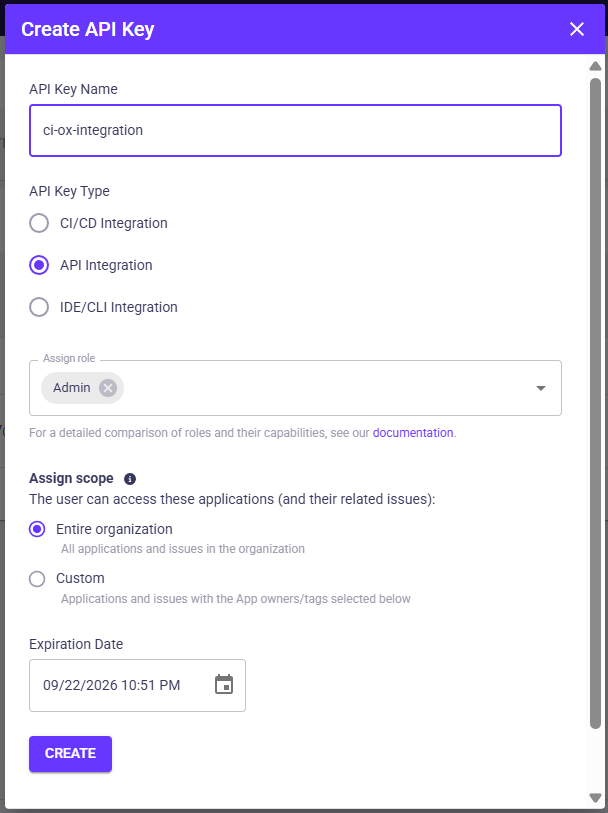
- An OX API key with API Integration scope (created under Settings → API Keys).
- A GitHub repository and GitHub App admin access (or a GitHub token) to connect repos.
- A CI runner (GitHub Actions or GitLab CI) with a sample application to scan.
- (Optional) Jira project with service account credentials for ticket automation.
Step 1: Create an Organization and API Key in OX
- Log in to OX Security and create an organization if one does not exist.
- In the OX UI, go to Settings → API Keys → CREATE API KEY.
- Name it “ci-ox-integration”, assign the scope to API Integration, and copy the token securely.
Step 2: Connect Your GitHub Repository
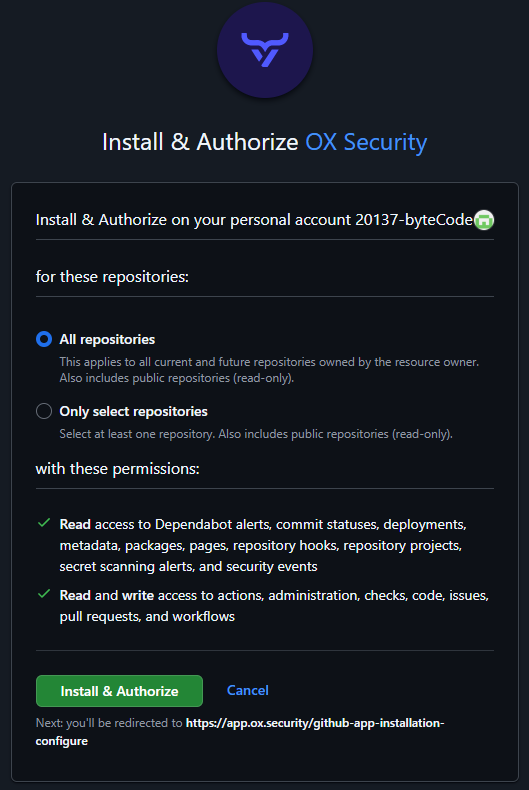
- From the dashboard, go to Connectors → Source Control → GitHub.
- Install the OX GitHub App (recommended) or use a personal access token.
- Select the repositories to monitor or choose “all repositories.”
Step 3: Add OX Scanning to Your CI/CD Pipeline
Here’s a GitHub Actions example that runs the OX scanner container, generates a JSON report, and uploads it as an artifact.
# .github/workflows/ox-aspm.yml
name: OX ASPM Scan

on:
  pull_request:
    branches: [main]

jobs:
  scan:
    runs-on: ubuntu-latest
    steps:
      - uses: actions/checkout@v4
      - name: Run OX ASPM Scanner
        run: docker run --rm \
             -v ${{ github.workspace }}:/repo \
             ghcr.io/oxsecurity/ox-scan:latest \
             scan --repo "${{ github.repository }}" \
                  --branch "${{ github.ref }}" \
                  --token "${{ secrets.OX_API_TOKEN }}" \
                  --output json --file ox-results.json
      - name: Upload results
        uses: actions/upload-artifact@v4
        with:
          name: ox-results
path: ox-results.json- Go to your repository in GitHub.
- Click Settings → Secrets and variables → Actions → New repository secret.
- Create a secret named OX_API_TOKEN and paste your API key from the OX UI (generated earlier). GitHub Actions will automatically substitute ${{ secrets.OX_API_TOKEN }} during the workflow run.
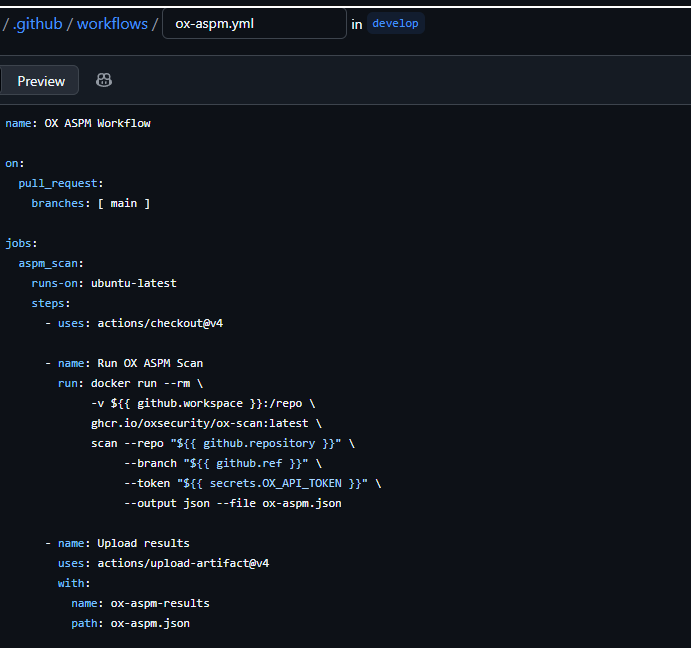
- Every time a pull request is opened or updated against the main branch, GitHub Actions will trigger this workflow.
- It checks out the code, runs the OX scanner in a Docker container, and generates a JSON results file (ox-aspm.json)
{
  "scanMetadata": {
    "repository": "demo-org/sample-app",
    "branch": "develop",
    "commit": "f5c2a3d",
    "scanId": "scan-12345",
    "timestamp": "2025-09-23T12:45:00Z"
  },
  "findings": [
    {
      "id": "OX-001",
      "title": "Outdated OpenSSL Library",
      "severity": "critical",
      "reachable": true,
      "exploitable": true,
      "component": {
        "name": "openssl",
        "version": "1.0.2",
        "path": "requirements.txt"
      },
      "description": "The application uses a vulnerable version of OpenSSL that allows remote code execution.",
      "recommendation": "Upgrade to OpenSSL 1.1.1+.",
      "owner": "payments-service-team"
    },
    {
      "id": "OX-002",
      "title": "Hardcoded Secret in Source Code",
      "severity": "high",
      "reachable": false,
      "exploitable": false,
      "component": {
        "name": "config.js",
        "line": 42
      },
      "description": "A static API key was found in the config.js file. Not reachable in production, it represents a security risk if exposed.",
      "recommendation": "Remove the hardcoded secret and use environment variables or a vault.",
      "owner": "frontend-team"
    }
  ]
}
Step 4: Consolidate Findings in OX
All pipeline scans are automatically pulled into the AppSec Data Fabric. If you also rely on third-party scanners, you can import their results via API. OX normalizes everything into a unified schema, so your team sees one collection of findings instead of juggling multiple dashboards.
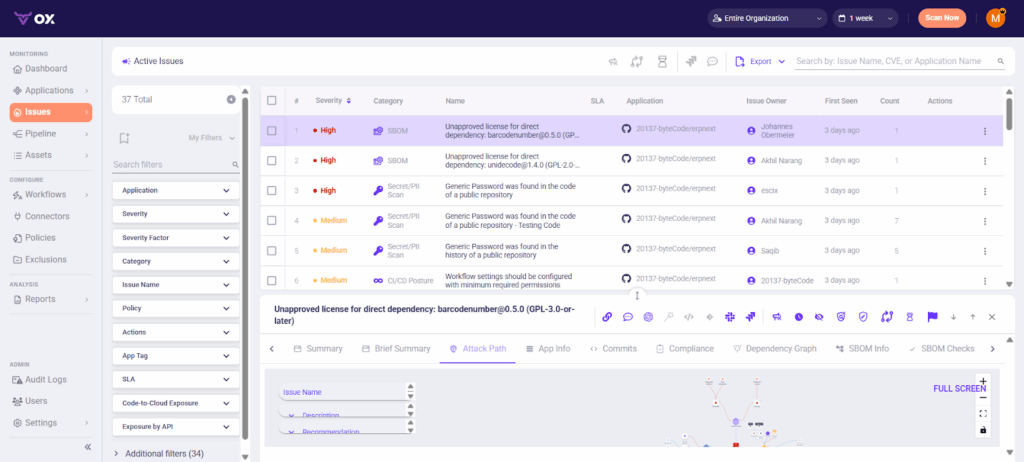
Ingest Results into OX
If you are using OX-native scans, results appear automatically. For third-party tools, ingest findings via the OX API:
curl \
  -H "Authorization: <OX_API_TOKEN>" \
  -H "x-apollo-operation-name: file-upload" \
  -F 'operations={"query":"mutation UploadThirdPartyFile($tool: String!, $file: Upload!) { uploadThirdPartyFile(tool: $tool, file: $file) { requestId success }}","variables":{"tool":"myscanner","file":null}}' \
  -F 'map={"0":["variables.file"]}' \
  -F 0=@upload-third-party.json \
  "https://api.ox.security/graphql"
This ensures all vulnerabilities and misconfigurations are centralized inside OX.
Step 5: Run a Posture Scan Across the SDLC
Trigger a full security posture analysis either from the UI or the GraphQL API to stitch together code, pipelines, and cloud runtime. This step is where OX differentiates itself, showing not just raw vulnerabilities but the actual pathways attackers could exploit.
In the OX UI, open your application and click “Run Posture Scan”.
Step 6: Analyze the Attack Path Graph
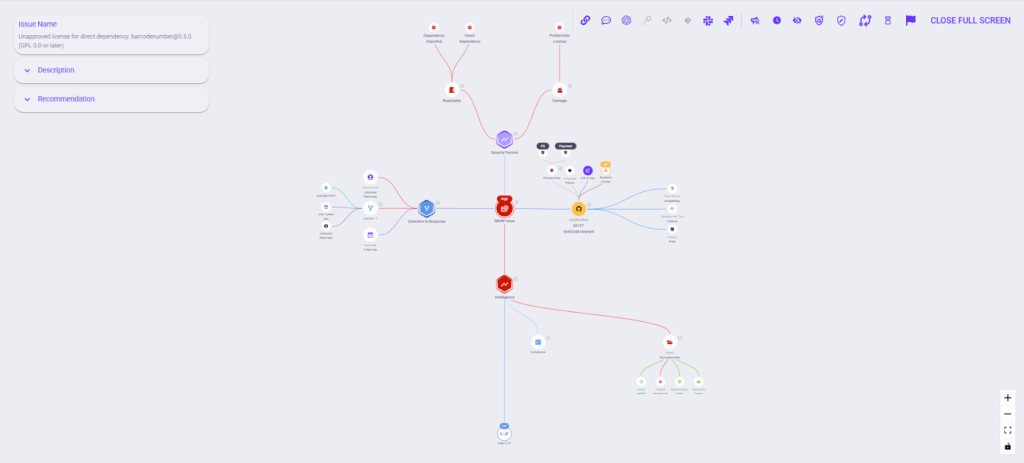
Here you’ll see how findings connect across code functions, dependencies, and cloud assets. The view overlays exploitability and business impact, making it clear which vulnerabilities truly pose a threat to production.
- Log in to the OX console.
- Go to Applications → [Your App] → Attack Path / Reachability.
- Use filters like Reachable, Exploitable, and Business Impact in the UI.
- Expand the graph nodes to trace how a vulnerability in a dependency can propagate through a function call into a running service.
Step 7: Automate Developer Handoffs
To close the loop, integrate OX with Jira. Findings can auto-generate tickets with severity tags, SLAs, and ownership assignments. For example, reachable high-risk vulnerabilities can be routed directly to the owning repo’s team, avoiding the “lost in translation” problem common in manual workflows.
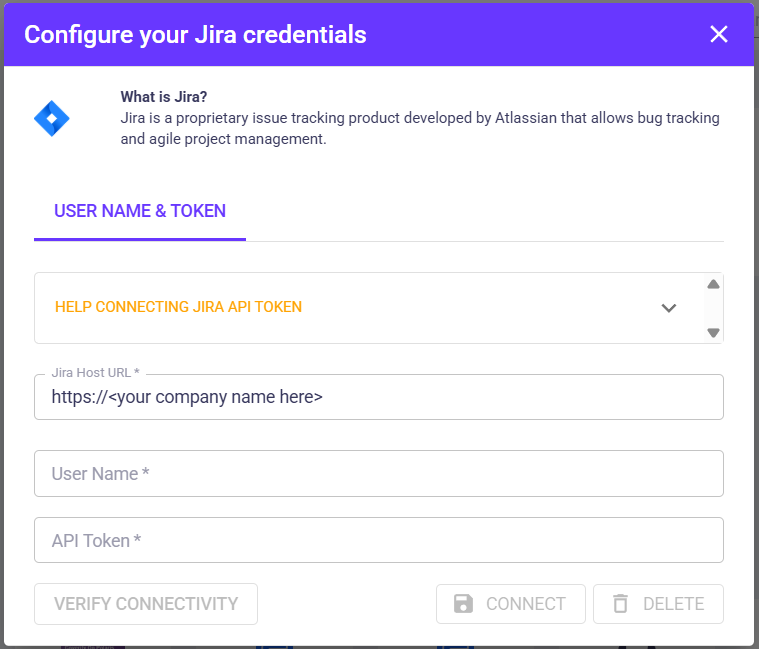
- In the OX UI: Go to Connectors → Ticketing → Jira.
- Authorize OX with a Jira service account and map projects.
- In your application findings view, click Create Ticket → Jira to confirm connectivity.
- (Optional) Automate via script:
critical_COUNT=$(jq '.findings | map(select(.severity=="critical")) | length' ox-results.json)

if [ "$critical_COUNT" -gt 0 ]; then
  curl -u "$JIRA_USER:$JIRA_TOKEN" \
    -X POST -H "Content-Type: application/json" \
    --data '{"fields":{"project":{"key":"SEC"},"summary":"Critical OX findings detected","issuetype":{"name":"Bug"}}}' \
    "$JIRA_BASE/rest/api/2/issue"
fi
Outcome
By onboarding repositories, unifying findings from the codebases, running posture scans, and automating developer handoffs, AppSec teams move from reactive reporting to blocking insecure code paths and misconfigurations before they reach production.
- Duplicates are eliminated across scanners through aggregation in the AppSec Data Fabric.
- Exploitability and business context are embedded into every finding, ensuring teams focus only on what matters.
- Tickets are routed directly to owners with line-of-code context, remediation guidance, and SLA alignment.
- Compliance evidence is kept up to date in real time, removing the need for stressful quarterly reporting fire drills.
Instead of static vulnerability lists, security posture becomes a living, contextual map that guides developers toward the risks that matter most. This shift is visible directly in the OX console:
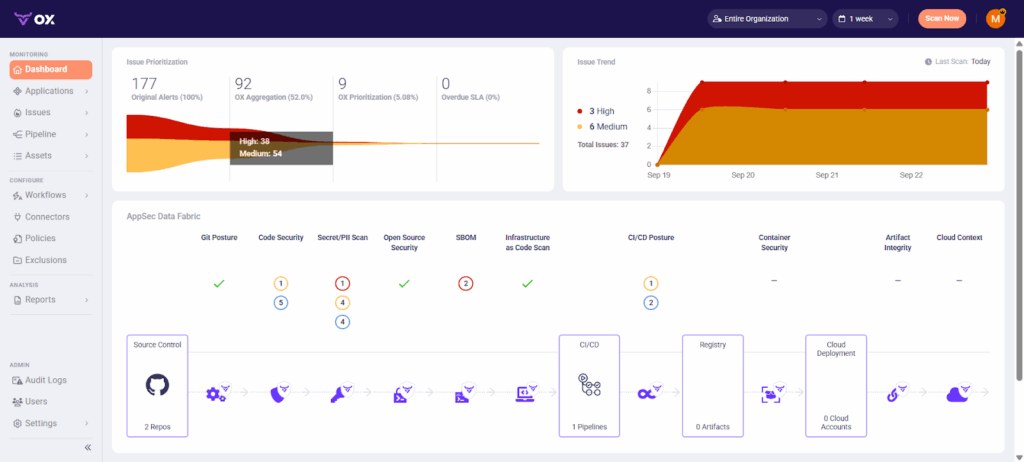
The funnel on the left shows 177 raw alerts collapsing into 92 unique issues, of which only 9 require prioritization after context and deduplication; the trend graph on the right tracks exploitable issues over time; the center fabric view maps posture across code, dependencies, IaC, CI/CD, and cloud; and the pipeline-to-cloud flow at the bottom connects repositories through registries and deployments, exposing where risks propagate.
Together, these views demonstrate how Active ASPM with VibeSec™ translates outcomes into live visibility, showing not just how many issues exist, but which ones matter the most, where they live in the software supply chain, and how they can impact.
Vision & Roadmap
OX is already pushing ASPM forward with:
- Agent OX: AI-generated fixes for Python/JS today, expanding to Java/Go.
- PBOM: Beyond SBOM, providing full pipeline provenance.
- Future: Autonomous AI agents enforcing policy across repos, pipelines, and cloud workloads in real time.
This roadmap makes OX not just a detection tool, but the backbone of proactive, autonomous AppSec.
Conclusion
ASPM is no longer “nice to have.” As current enterprises proceed towards cloud-native delivery, security teams face fragmented tooling, exploding attack paths, and constant pressure to keep up with developer velocity. Static reports and siloed scanners cannot keep pace with the way software is actually built and deployed.
OX Security’s Active ASPM model reframes how organizations manage application risk. Instead of being swamped in vulnerability lists, teams gain a living, contextual map of their security posture; a real-time compass that points to exploitable risks and directs remediation where it is necessary.
By embedding posture management directly into pipelines, repositories, and developer workflows, OX makes it possible for security and engineering teams to work from the same data, align on priorities, and measure progress all the time. The VibeSec™ engine implements this by enforcing security policies automatically, ensuring protection is updated alongside every code change.
In conclusion, for organizations looking to evolve beyond reactive patching over time, ASPM represents a path toward proactive, posture-driven security. With OX, this is not only achievable but operational at scale.
FAQ
VibeSec™ is OX Security’s autonomous layer that streams real-time security context into AI-assisted development. By embedding checks inside coding assistants and IDEs, it prevents vulnerabilities before they are written, securing every release by design.
Traditional tools detect problems after the fact, during scans, or in production. VibeSec™ works proactively, applying dynamic context in real time while code is written, tested, and deployed. This reduces security debt and shortens remediation cycles.
Frameworks define what good governance looks like, but they do not enforce it. OX maps framework requirements to specific controls across development, pipelines, and runtime. VibeSec enforces AI coding guardrails at the point of code creation, blocking policy violations before they enter the codebase, turning framework requirements into technical enforcement.
Yes. Security policies can be defined once and applied across repositories, pipelines, and environments. The platform blocks risky merges, opens tickets automatically, and generates audit-ready reports for compliance frameworks.
No. While enterprises benefit from scale, even small teams face the problem of fragmented tooling and alert overload. ASPM provides structure and context that can save smaller teams significant time and reduce the risk of ignoring critical issues.