TL;DR
- Application Security Posture Management (ASPM) brings together results from Static Application Security Testing (SAST), Dynamic Application Security Testing (DAST), Software Composition Analysis (SCA), and Infrastructure as Code (IaC) scanners into a single view.
- It reduces noise by cutting duplicate alerts and ranking vulnerabilities by exploitability and business risk, so teams focus only on issues that matter.
- ASPM acts as the control layer for application security, governing how findings are grouped, prioritized, routed, and reported across the enterprise.
- Adoption is increasing in sectors like finance, healthcare, Software as a Service (SaaS), and cloud-native platforms, where regulatory pressure and fast release cycles make posture-driven security crucial.
- AI-driven scoring and automation are shaping the future, helping enterprises cut mean-time-to-remediation and move from reactive security to proactive defense.
- OX Security starts at the source, securing applications from the moment AI-generated code is written through the cloud runtime. Through its PBOM (Pipeline Bill of Materials), teams gain end-to-end visibility, from source control and CI/CD posture to container security, artifact integrity, and cloud deployment context, across every stage of the software supply chain.
- This guide explains the top ASPM tools to watch in 2025: OX Security, Apiiro, ArmorCode, and Snyk ASPM, discussing the features that define an enterprise-grade platform.
Security in 2025 will be determined by how effectively organizations handle the vast number of alerts generated by their scanners. A single feature release can generate findings from SAST, DAST, SCA, IaC scans, and container checks, each appearing in different dashboards and competing for attention. ASPM emerged to give teams clarity, helping them spend less time reconciling duplicate results and more time addressing issues that actually matter.
By stitching together signals across code, pipelines, cloud, and runtime, strengthening overall software supply chain security, ASPM provides the missing layer of clarity: one posture view, one prioritization model, and one path to remediation.
According to Gartner, by 2026, 40% of organizations that build or acquire applications will use ASPM platforms to manage and strengthen their security posture. This growth is driven by two things: the complexity of cloud-native architectures and the need to keep up with AI-accelerated development. Without ASPM, enterprises risk becoming overwhelmed by unfiltered alerts, conflicting priorities, and missed vulnerabilities.
In this article, we will break down the state of ASPM in 2025, evaluate the features that define an enterprise-grade platform, and analyze four leading tools shaping the market this year.
The State of ASPM in 2025
What began as an optional layer has become a fundamental element of how enterprises manage their Application Security (AppSec) programs. Enterprises now view ASPM as the control plane that unifies fragmented security signals across code repositories, Continuous Integration (CI) pipelines, cloud configurations, and how this differs from cloud posture tools (read ASPM vs CSPM).
One of the main drivers of ASPM adoption is tool sprawl. A mid-sized enterprise might rely on separate tools for SAST, DAST, SCA, IaC checks, container image scans, and runtime monitoring. In the absence of a unifying posture layer, these tools generate duplicate alerts, conflicting priorities, and fragmented remediation efforts.
Developers often drown in noise, while security leaders lack a single metric to measure progress. ASPM solves this by bringing together results, normalizing data, and applying contextual risk scoring that highlights the small percentage of vulnerabilities that are truly exploitable and business-important.
Highly regulated sectors, such as finance and healthcare, are leading the charge, driven by compliance requirements and increased audit visibility. SaaS and cloud-native companies are following closely, attracted by ASPM’s ability to embed security directly into developer workflows.
ASPM has grown into a standard capability for enterprise security, setting the stage for testing what separates mature platforms from basic implementations.
Evaluation Criteria: What Makes an ASPM Tool Enterprise-Grade
Enterprises are turning to ASPM because traditional security methods cannot keep up with the speed and complexity of current software delivery. Cloud-native architectures, sprawling toolchains, and faster release cycles leave AppSec teams overwhelmed with fragmented findings and limited visibility.
ASPM platforms emerged to solve this by providing a unified control layer that brings together signals, prioritizes risk, and automates remediation, turning noise into an actionable security posture.
For mid-to-large enterprises, choosing the right tool comes down to how well it integrates with existing security programs and developer workflows. A strong ASPM solution must go beyond dashboards and reports to actively reduce risk, automate workflows, and provide measurable improvements in security posture.
The first consideration is integration with Continuous Integration (CI) and Continuous Deployment (CD) pipelines. See CI/CD pipeline security best practices for how enforcement can be implemented without friction. Enterprises cannot afford security checks that slow down delivery. An enterprise-grade ASPM tool must connect directly with developer workflows, whether through GitHub Actions, GitLab pipelines, or Jenkins, without introducing friction. Equally important is multi-repository and multi-branch coverage, as most large organizations work across hundreds of repositories and distributed teams.
The second consideration is contextual risk scoring and prioritization. Traditional scanners generate thousands of findings, many of which are low impact. An enterprise-grade ASPM tool must bring together results from SAST, DAST, SCA, IaC, and runtime, then apply exploitability and business impact context. This reduces noise and ensures developers work on the vulnerabilities that matter most.
Finally, enterprises should evaluate scalability, automation, and compliance reporting. An ASPM platform must support policy enforcement at scale, automatically block risky merges, and generate audit-ready reports for frameworks like SOC 2, HIPAA, and PCI DSS. Equally important is workflow automation; tools should integrate with ticketing systems such as Jira or ServiceNow, ensuring remediation tasks move smoothly from detection to closure.
In short, the enterprise-grade ASPM platform is a visibility layer and an orchestration layer that allows organizations to scale security without slowing down development velocity.
Why ASPM Is Important In Enterprise Workflows
Too Many Security Tools, Not Enough Context
Enterprises often rely on a mix of scanners, SAST for code, DAST for runtime, SCA for dependencies, IaC for cloud templates, plus container and configuration checks. Each of these tools provides hundreds of alerts, many of them duplicates, false positives, or issues with no real exploit path.
The outcome is alert fatigue. Security teams are swamped with noise, while the most pressing vulnerabilities remain missed or delayed. Developers, meanwhile, face fragmented dashboards and conflicting priorities.
ASPM addresses this gap by correlating and de-duplicating results into a single, prioritized risk score for each application or service. This provides both developers and security leaders with a clear view of what matters most, setting the stage for the criteria enterprises should use when choosing an ASPM platform.
Bridging the Gap Between Development and Security
Developers often view security tickets as generic blockers that don’t map to the code they wrote or the environments they maintain. Security teams, on the other hand, see thousands of unresolved issues with no clear insight into which ones are exploitable or business-critical.
This disconnect creates friction, slows down delivery, and leaves vulnerabilities unresolved. ASPM closes the gap by adding runtime and business context to findings, ensuring that developers receive actionable issues tied directly to their code paths and services, and security leaders get visibility into the risks that truly impact the business.
Top 4 ASPM Tools for Enterprise Security in 2025
Enterprises adopting ASPM need platforms that join fragmented scanner data, reduce alert fatigue, and scale across complex CI/CD pipelines. The following five tools represent the leading approaches to enterprise-grade ASPM in 2025.
1. OX Security
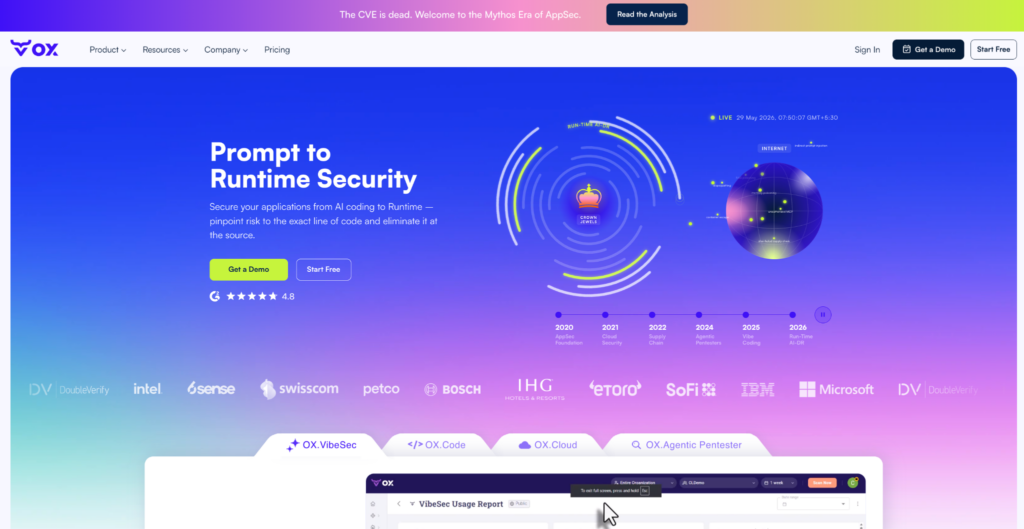
OX Security shifts application security further left by moving the first security checkpoint to the moment AI generates code, helping teams identify vulnerabilities before code reaches a commit while maintaining visibility through build pipelines and into production environments.
Unlike tools that collect alerts after code is written, OX moves the first security checkpoint to the moment of generation, embedding security directly into AI coding assistants like Cursor and Copilot so risks are eliminated before they ever reach the pipeline.
From there, OX carries that coverage through every stage: OX Code across the full SDLC, OX Cloud connecting code-level findings to runtime and cloud, and the OX Agentic Pentester continuously simulating real attacker techniques, so protection stays aligned with development speed without compromising delivery.
Key features
- Integrated Signal Layer: OX connects to your existing toolchain, dependency scanners, IaC validators, secret monitors, SAST, SCA, and cloud posture tools, and pulls their output into a single view. Tools like Snyk, Checkmarx, and Prisma can run alongside OX’s own scanners, with overlapping findings correlated and deduplicated automatically. The result is one clean, accurate posture view instead of five dashboards saying different things.
- Contextual Risk Prioritization: Not every vulnerability deserves a ticket. OX scores findings against reachability, exploitability, and business impact, surfacing the small subset that could actually be leveraged in your environment. Teams stop triaging noise and start fixing threats that matter.
- Workflow Integration: OX routes findings directly to where developers work. Via OX Workflows and Connectors, issues flow into Jira and Slack with context attached, the affected repository, severity, and recommended fix, so remediation moves without context switching or manual handoffs.
- Posture Analytics and Reporting: Dashboards track attack paths, policy compliance, and mean time to remediation trends over time. Reports are audit-ready out of the box, giving security leaders and auditors a consistent view of how posture is shifting, not just a snapshot of open issues.
Hands-on example: Putting ASPM to Work using OX Security
The demo connects a repository to OX, runs a pipeline scan, ingests results, and visualizes attack path reachability, ending with an automated Jira ticket for high-priority findings.
The demo stack: A sample microservices app with a Node.js/Express backend, React frontend, MongoDB, and Terraform-provisioned Kubernetes on AWS, a realistic enterprise setup with containers and CI/CD pipelines.
Prerequisites
- OX account with org admin access
- OX API key with API Integration scope
- A GitHub repository
- (Optional) Jira project for ticket automation
Step 1: Create your org and API key
Log in to https://app.ox.security/ and create your organization. Then go to Settings -> API Key Settings -> CREATE API KEY. Name it, select API Integration as the key type, and copy the secret. This is the only time you’ll see it.
Step 2: Connect GitHub
Go to Connectors -> Source Control -> GitHub. Connect via the GitHub App (recommended) or a personal access token. Select the repositories you want OX to monitor and save.
Step 3: Add OX scanning to your CI pipeline
The OX GitHub Action runs a full security scan, covering secrets, SAST, SCA, IaC, and more, on every push or pull request, evaluating results against your defined security policies. If a blocking issue is detected, the workflow fails unless overridden.
# .github/workflows/scan.yml
name: Security Scan

on:
  push:
    branches: [main]
  pull_request:
    branches: [main]

jobs:
  scan:
    runs-on: ubuntu-latest
    steps:
      - name: Checkout repository
        uses: actions/checkout@v3

      - name: OX Security Scan
        uses: oxsecurity/ox-security-scan@main
        with:
          ox_api_key: ${{ secrets.OX_API_KEY }}
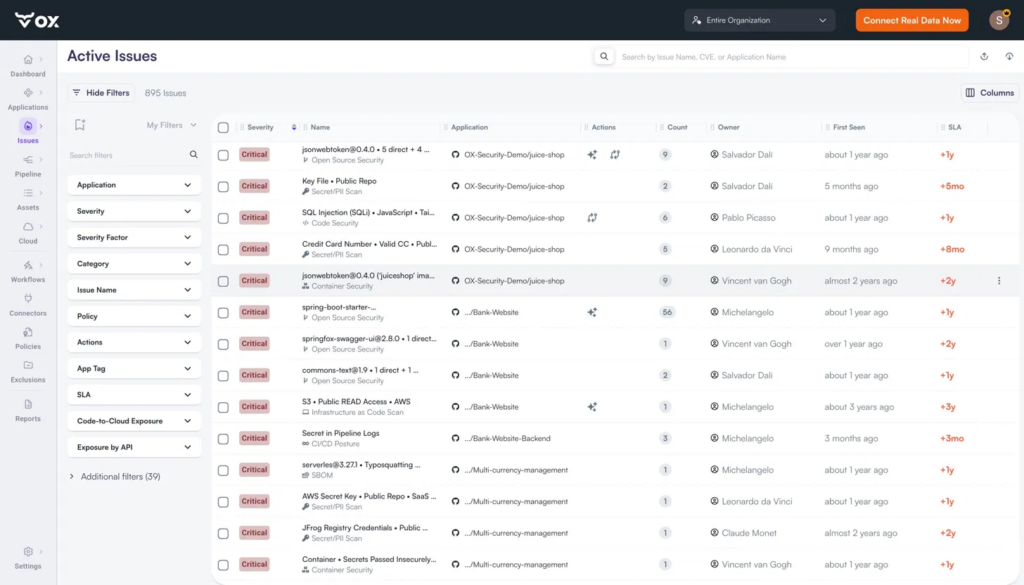
Once the scan completes, findings appear immediately in the Active Issues view, prioritized by severity, mapped to the owning application and developer, with SLA breach indicators and filter dimensions including Code-to-Cloud Exposure and Exposure by API.
Step 4: Ingest third-party scanner results
If you’re running additional scanners alongside OX, push their output via the API using base64-encoded file content:
curl -X POST \
  https://api.cloud.ox.security/api/apollo-gateway \
  -H 'Content-Type: application/json' \
  -H 'Authorization: <OX_API_KEY>' \
  -d '{
    "query": "mutation UploadThirdPartyFileBase64($data: String!, $tool: String!, $fileType: ThirdPartyUploadDataType) { uploadThirdPartyFileBase64(data: $data, tool: $tool, fileType: $fileType) { requestId success } }",
    "variables": {
      "data": "<base64 encoded file content>",
      "tool": "<your-scanner-name>",
      "fileType": "JSON"
    }
}'| Variable | Description |
| data | Your scanner output is encoded as a Base64 string |
| tool | Any string identifying the originating tool (e.g., “Snyk”, “Semgrep”) |
| fileType | JSON for OX-format uploads; SARIF for SARIF uploads. Must be set explicitly, if omitted, the file defaults to a Policy file, and imported issues will not appear |
Note: After uploading, you must run a scan for the imported issues to be registered in your organization. Issues will not appear in Active Issues until after the next scan completes. Refer to the “Importing Issues from External Systems” doc for the required JSON schema.
Step 5: View Attack Path and Reachability
Go to Active Issues and then select any Issue (in the current snapshot below ) then the Attack Path view.
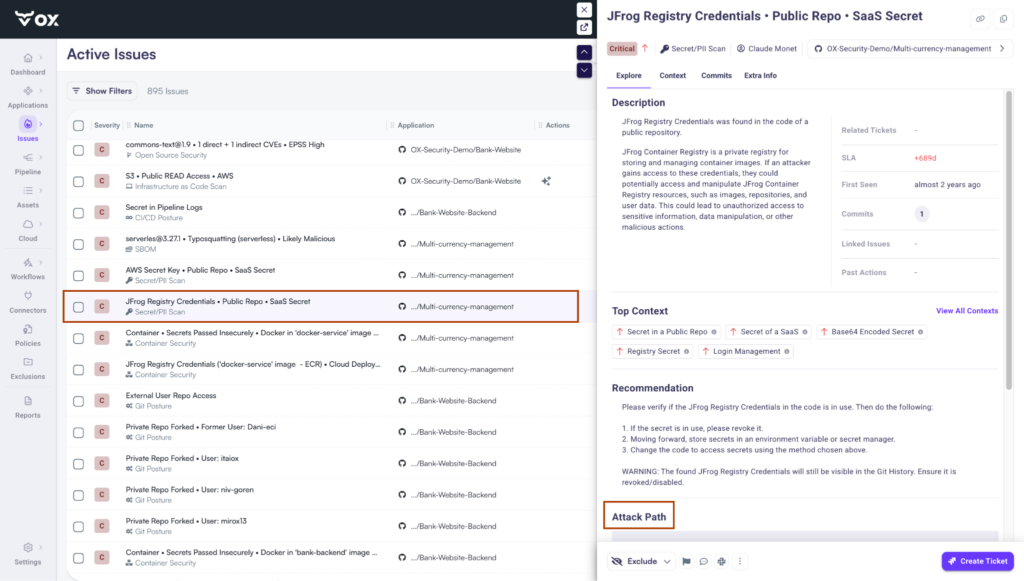
OX maps the full blast radius of each critical finding, from the detection signal and severity factors through the affected application, out to every API, artifact, and downstream connected service. Now as shown in the snapshot below:
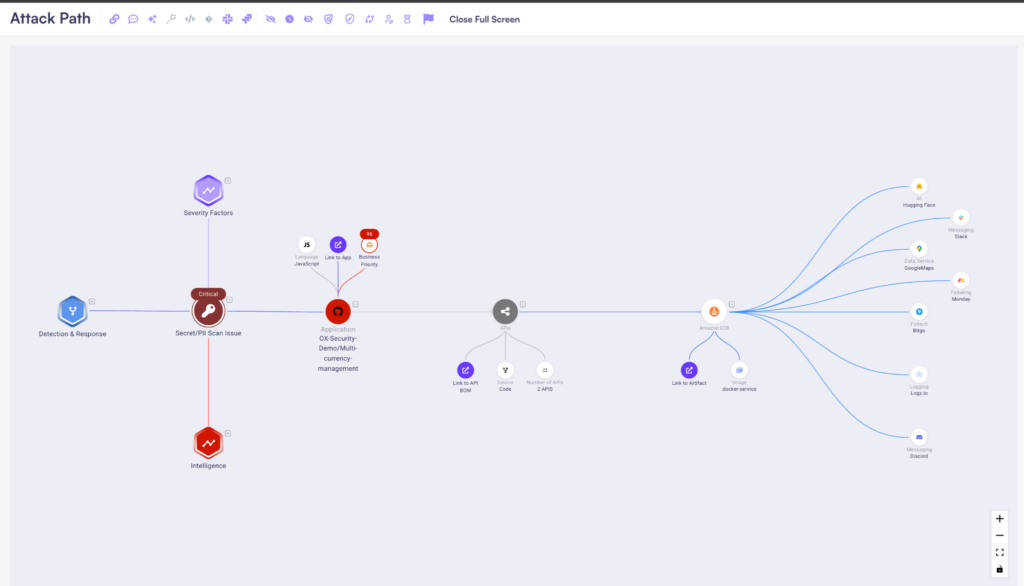
A Critical Container Security Issue in the Multi-currency-management app is traced through its APIs and Amazon ECR artifact all the way to connected SaaS services, including Slack, Hugging Face, Google Maps, Monday, and Logz.io, showing exactly what’s reachable if this vulnerability were exploited.
Step 6: Automate Jira tickets and remediation workflows
Configure the Jira connector under Connectors, select Ticket Management and then open Jira. Once connected, use OX Workflows to automate remediation actions on triggers, no code required:
- On issue.created AND severity >= high -> create Jira ticket + set 3-day SLA
- On issue.reachable == true -> tag as reachable + notify Slack channel
From 22,333 Alerts to 440 Reachable Issues:
After connecting the repository, running the pipeline scan, and ingesting results, the OX dashboard shows exactly what that flow produced. 22,333 raw alerts from across the stack, aggregated to 11,384, then prioritized down to 440 issues that are reachable and business-impactful. Only 166 are tracking against an active SLA breach.
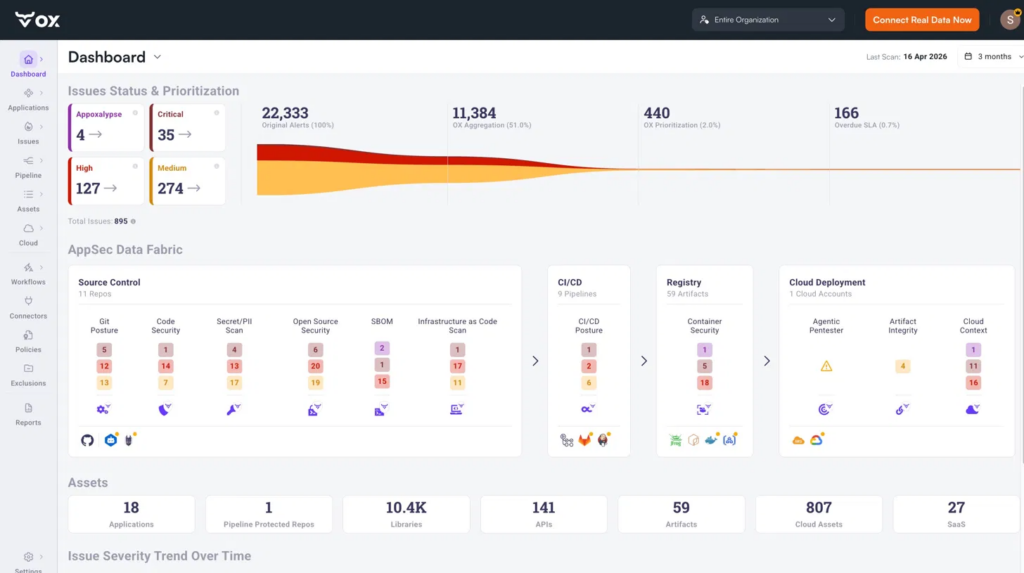
That coverage spans the full demo stack, from source control and CI/CD pipelines to container registries and cloud deployments, all correlated within OX Security’s AppSec Data Fabric as shown in the snapshot above. The Attack Path then connects those findings to the specific APIs, artifacts, and downstream services they can impact, helping teams prioritize high-severity reachable issues and surface them in Jira for remediation.
Pros
- Prevention before detection: OX stops insecure code at the moment of generation via Cursor and Copilot, a fundamentally different starting point than shift-left.
- Full lifecycle coverage: OX Code, OX Cloud, and OX Agentic Pentester cover the repo to runtime without separate tools.
- Attack path context: The reachability graph shows what’s actually exploitable and what it connects to, not just severity scores.
- Remediation built in: Findings route to Jira automatically via OX Workflows with SLA tracking and Slack notifications.
- Pipeline-level enforcement: Security policies block risky merges without requiring developer context switches.
Cons
- Requires integration across repositories, CI/CD pipelines, and cloud environments to unlock full visibility.
- May be a significant investment for smaller teams and startups.
- Teams new to AppSec risk prioritization may need time to fully utilize the platform.
2. Apiiro

Overview
Apiiro is an APSM platform built with a developer-first approach and a strong focus on contextual risk analysis. Platforms that treat all vulnerabilities equally are different from Apiiro enriches findings with application, supply chain, and business context, helping enterprises prioritize the issues that truly matter. Its architecture all the time tracks code changes, dependencies, and configurations across repositories and pipelines, creating a dynamic inventory of applications and associated risks.
Key Features
- Application and Supply Chain Inventory: Apiiro builds a detailed inventory of applications, code components, and dependencies from design through runtime. This provides teams with a single source of truth for the software supply chain, making it easier to track ownership and assess risk across distributed systems.
- Contextual Risk Prioritization: Findings are scored based not only on technical severity but also on exploitability, reachability, and business impact. This context reduces noise, ensuring security and engineering teams focus on the vulnerabilities that could materially affect the organization.
- Open Integration Model: The platform is made to integrate smoothly with existing developer tools, security scanners, and productivity platforms. Enterprises are not locked into proprietary scanning engines and can reuse investments in SAST, DAST, SCA, and IaC tools.
- Shift-Left and Monitoring: Apiiro detects risks as early as ticket creation or the design stage and monitors applications, lowering as changes move from code through build and deployment pipelines. This feedback loop allows teams to remediate issues earlier, thereby removing rework and associated costs.
- Collaboration and Governance Features: Apiiro provides policy-driven workflows, ownership mapping, and dashboards that bridge the gap between security leaders and development teams. Risks can be assigned, tracked, and remediated with clear accountability and responsibility.
Hands-on Example: Implementing ASPM in Pull Requests and Pipelines using Apiiro
Here, we connect your source control and CI/CD pipelines to the ASPM platform, allow PR guardrails and pipeline scans, and run targeted pull-request tests that feed findings into the platform’s risk graph. We normalized and correlated scanner outputs across SAST, SCA, IaC, and runtime, identified external-reachable and exploitable issues, and established automated workflows to create tickets or block merges.
The demo focuses on a single PR → scan → risk-graph → enforcement loop to show the end-to-end posture workflow.
- Install & connect: Install the Apiiro Application Security Platform GitHub App (or connect via your Apiiro tenant) and authorize the target repositories/org so Apiiro can observe PRs, commits, and pipeline metadata.

- Create your Apiiro tenant + connectors: Log in to your Apiiro workspace, add the SCM connector (GitHub/GitLab) and your CI provider (GitHub Actions/Jenkins/GitLab CI). Ensure the connectors have repository and workflow scopes so Apiiro receives PR and pipeline context.
- Simplify pull-request guardrails & material-change detection: Turn on Apiiro’s PR guardrails (risk-based checks) so each PR is automatically analyzed for reachable/exploitable changes and supply-chain risks before merging. Configure thresholds that will block or flag high-risk PRs.
- Trigger a PR scan and review the Risk Graph: Open a test PR with a code or dependency change. Apiiro will scan and populate its Risk Graph (code → APIs → runtime), showing prioritized, reachable risks you can triage in the UI. Use the Risk Graph view to demonstrate how Apiiro deduplicates scanner noise and highlights business-important issues.
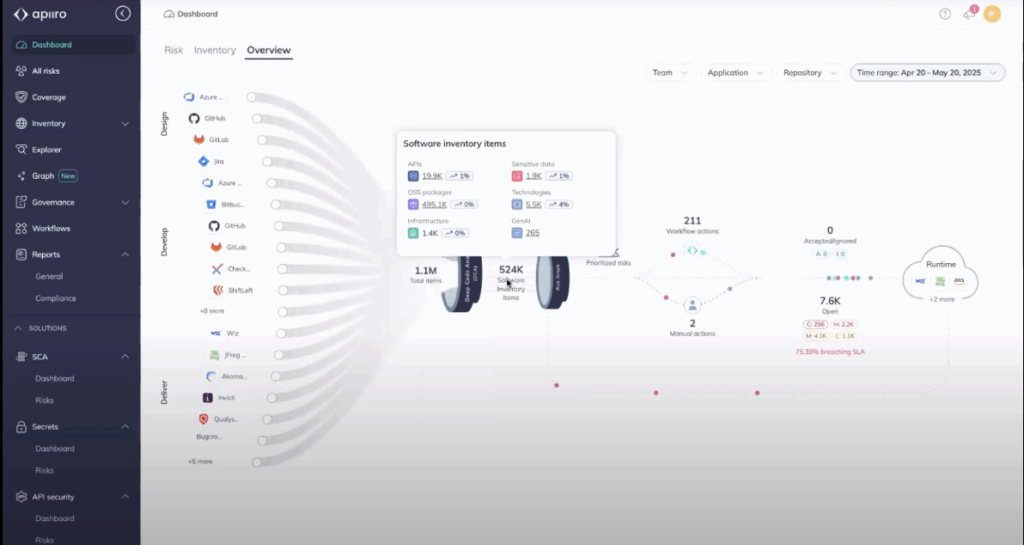
- Automate remediation & enforcement: Configure Apiiro workflows or connectors (e.g., Jira, ServiceNow) to automatically create tickets for high-priority findings and enforce merge/pipeline blocking for policy violations. Show a sample flow: PR → Apiiro blocks merge on high risk → ticket created in Jira for the assigned owner.
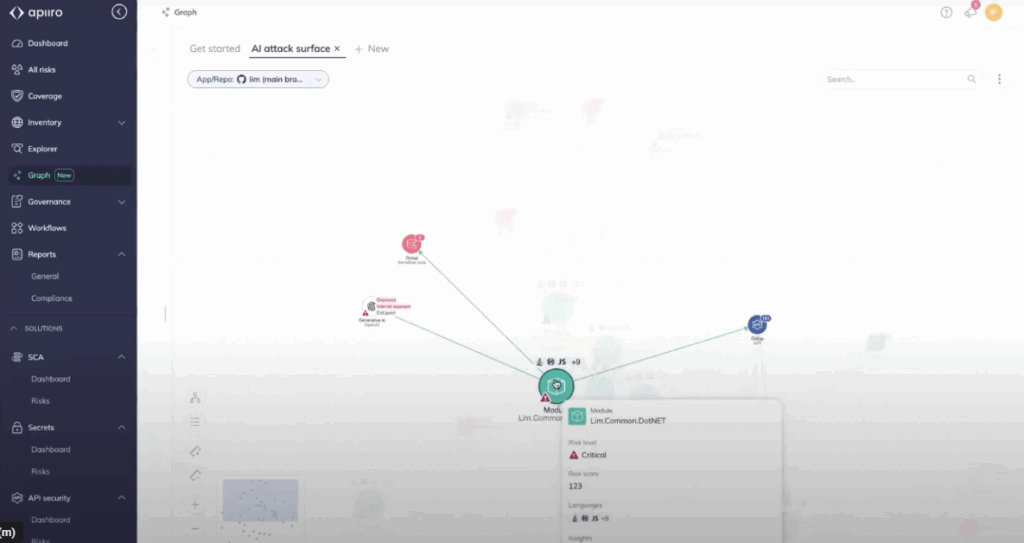
Result:
You get a single source of truth: deduplicated findings mapped to code, APIs, and runtime, with contextual risk scores that highlight the small subset of vulnerabilities that truly matter. High-risk, reachable issues are automatically triaged and turned into tracked remediation tasks or pipeline blocks, removing developer noise and lowering mean-time-to-remediation. The outcome is clearer prioritization, an enforceable security policy at merge-time, and measurable posture improvement across repositories.
Pros
- Holistic Visibility Across the Lifecycle: By tracking applications from design to runtime, Apiiro allows enterprises to identify risks at multiple stages, removing the likelihood of important vulnerabilities slipping into production.
- Reduced Tool Lock-In: Its open integration model means organizations can bring their own scanners. This flexibility protects existing investments and reduces migration friction compared to closed ecosystems.
- Developer-First Adoption: With integration into GitHub, GitLab, and ticketing systems, developers can receive feedback in their workflow rather than logging into separate dashboards. This speeds up remediation and promotes better adoption.
- Business Context in Security Decisions: Apiiro maps technical findings to business impact, making it easier for leadership to prioritize security work alongside other engineering initiatives. This is especially valuable in regulated industries where risk must be quantified.
Cons
- Setup Complexity: Because Apiiro builds a deep inventory and integrates with multiple scanners, the initial onboarding process can be resource-intensive. Organizations must dedicate engineering effort to connecting systems and fine-tuning policies.
- Cost at Scale: For enterprises managing hundreds of repositories and pipelines, Apiiro’s comprehensive monitoring can become expensive. Budgeting and ROI assessment are important during procurement.
- Delayed Value for Less Mature Teams: Enterprises with limited existing AppSec practices may struggle to extract immediate value, since Apiiro’s benefits are realized once contextual integrations are fully established.
- Learning Curve for Risk Modeling: Teams new to business-contextual security may need training to effectively use ownership mapping, policy workflows, and risk prioritization features.
3. ArmorCode
Overview
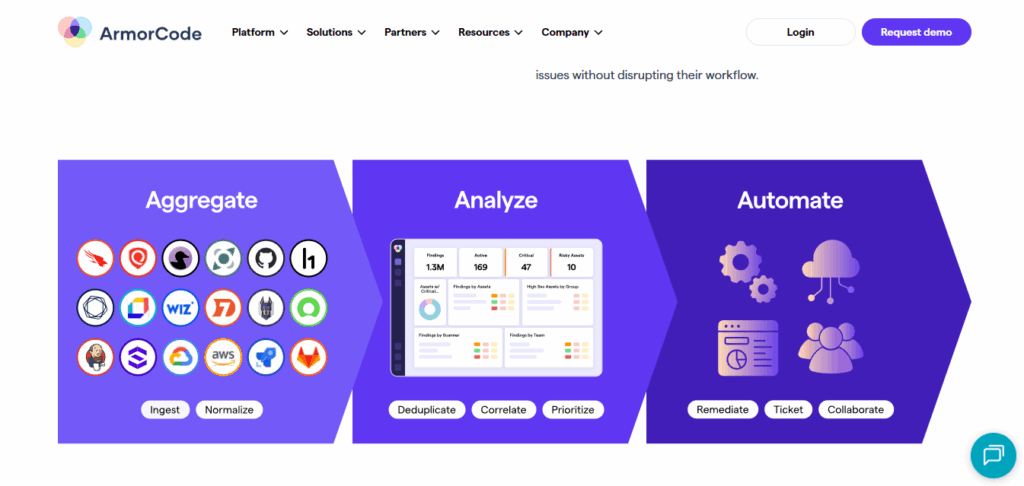
ArmorCode positions itself as a centralized APSM and AppSec orchestration hub. Instead of replacing scanners, it acts as a unifying control plane, ingesting results from SAST, DAST, SCA, cloud, and bug bounty platforms.
The platform’s focus is on providing visibility, governance, and compliance reporting at an enterprise scale, helping large organizations manage their security posture across hundreds of tools, repositories, and teams.
Key Features
- Centralized AppSec Orchestration: ArmorCode brings together vulnerability data from diverse sources into a single pane of glass. This allows AppSec teams to correlate issues across scanners and enforce governance policies consistently.
- Integration Marketplace: Supports integrations with dozens of security scanners (SAST, DAST, SCA, IaC, cloud posture tools) as well as developer collaboration platforms like Jira and Slack. This extensibility helps enterprises maximize ROI from existing tool investments.
- Compliance and Governance Dashboards: Provides out-of-the-box dashboards for SOC 2, HIPAA, PCI DSS, and other frameworks. These reports simplify audit readiness by mapping vulnerabilities and remediations directly to compliance controls.
- Workflow Automation and Alerting: Automates ticket creation, routing, and escalation using rules and policies. This reduces manual triage and ensures accountability by assigning vulnerabilities to the correct developers or teams.
Hands-on Example (Scanner Integration)
Connect your code and CI to ArmorCode, ingest scanner output, run a PR/CI scan to build ArmorCode’s risk graph, and wire automated remediation (Jira/ServiceNow) so policy enforcement happens at merge-time.
Step 1: Create a tenant and API key
Sign in to your ArmorCode tenant, create an organization, then generate an API key for integrations (API/ingest scope). Keep the token in your CI secrets store.

Step 2: Connect source control and CI providers
Install/authorize the ArmorCode GitHub app (or add GitLab/Jenkins connectors) so ArmorCode can observe PRs, commits, and pipeline metadata. Verify repository and workflow scopes during the install.
Step 3: Run scanner in CI and ingest findings into ArmorCode
Add a CI job that runs your SAST/SCA/DAST tool (example below uses Snyk) and pushes the JSON result to ArmorCode via the tenant import API or a built-in connector. Replace the upload URL with your tenant’s import endpoint.
# .github/workflows/aspmscan.yml (minimal)
name: aspmscan
on: [pull_request]
jobs:
  scan:
    runs-on: ubuntu-latest
    steps:
      - uses: actions/checkout@v4
      - name: Run Snyk
        run: snyk test --json > snyk-report.json
        env: SNYK_TOKEN: ${{ secrets.SNYK_TOKEN }}
      - name: Upload to ArmorCode (example)
        run: |
          curl -X POST -H "Authorization: Bearer $ARMOR_TOKEN" \
              -F "file=@snyk-report.json" \
              "https://<your-armor-host>/api/v1/import/snyk"
        env: ARMOR_TOKEN: ${{ secrets.ARMOR_TOKEN }}
Use the built-in connectors where available; ArmorCode supports hundreds of integrations and also gives an API/GraphQL interface for custom ingestion.
Step 4: Open the Risk / AI insights view and triage reachable issues
In the ArmorCode console, open the application or PR context and inspect the AI-driven risk graph (code → dependency → runtime mapping). Prioritize items marked reachable/exploitable and validate suggested remediation steps. The platform displays bring together de-duplicated findings for faster triage.

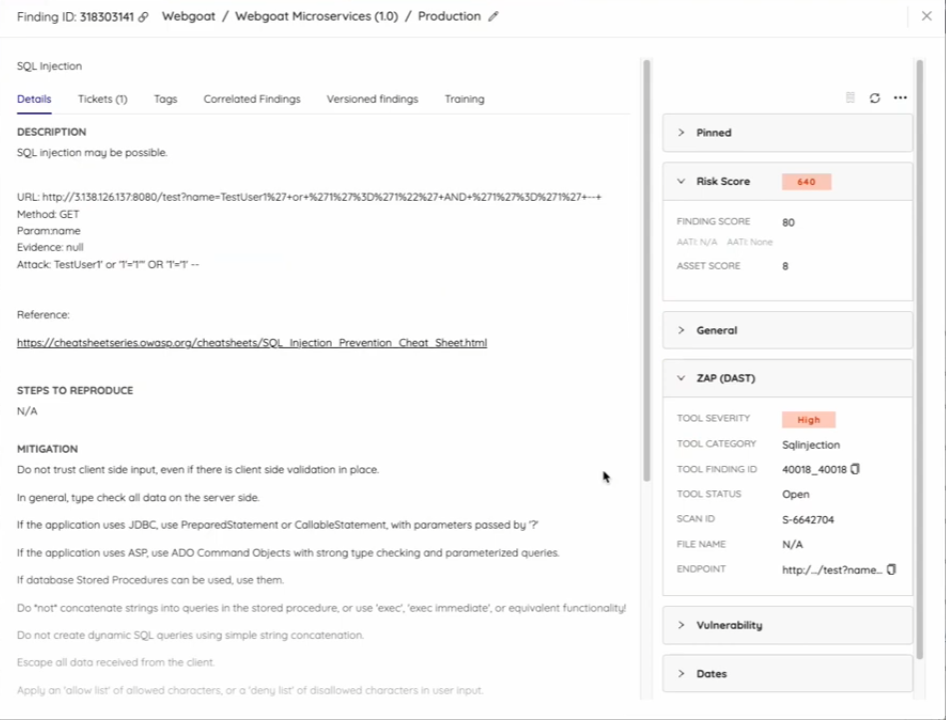
Step 5: Automate enforcement and remediation workflows
Configure the ArmorCode Jira or ServiceNow connector to automatically create tracked tickets for high-risk findings and optionally block merges or CI progression according to policy. Verify SLA fields and assignment mapping so issues flow to the right owners.
Result:
You get a single, enterprise-grade posture view where scanner noise is de-duplicated and mapped into an AI-enriched risk graph, exposing reachable and business-impacting issues. Automated tickets and pipeline enforcement ensure high-risk findings are tracked or blocked before merge, shrinking remediation cycles and producing auditable posture metrics.
Pros
- Combined Visibility: ArmorCode’s greatest strength is its ability to merge data from numerous security tools, giving enterprises a single source of truth rather than juggling separate dashboards. This reduces duplication and provides a clearer remediation backlog.
- Compliance-Driven Reporting: Enterprises in regulated industries value ArmorCode’s audit-ready dashboards, which map vulnerabilities and fixes directly to compliance frameworks. This lowers audit preparation effort and improves executive reporting.
- Extensive Integration Ecosystem: With dozens of prebuilt connectors, ArmorCode reduces the friction of plugging in existing scanners and workflows. This allows security leaders to orchestrate without forcing teams to abandon current toolchains.
Cons
- Less Developer-First Orientation: While strong for AppSec managers and compliance officers, ArmorCode is less embedded in developer workflows compared to tools like Snyk or Apiiro. Developers may need to rely on ticketing integration rather than on in-IDE feedback.
- Heavy Reliance on Integrations: Its orchestration model is powerful but also dependent on the quality and depth of third-party tool integrations. If a key scanner is missing or limited, the platform’s value diminishes.
- Opaque Enterprise Pricing: ArmorCode is positioned for large enterprises, and pricing is available only via sales engagement. This can be a barrier for smaller teams or organizations looking for transparent tiering.
4. Snyk ASPM
Overview
Snyk, best known for developer-first SCA and container security, has expanded into APSM. Its ASPM offering extends Snyk’s familiar developer experience to unify risk visibility across open-source dependencies, IaC, containers, and application posture. The focus is on embedding security checks directly into developer workflows while providing enterprise-wide dashboards for risk posture.
Key Features
- Developer-First Scanning: Tight integration with GitHub, GitLab, Bitbucket, and IDEs allows developers to identify and fix issues in real time, aligning with Snyk’s “shift-left” philosophy.
- Unified ASPM Dashboards: Extends beyond SCA to include IaC misconfigurations, container vulnerabilities, and open-source risks, providing a bring-together posture view for security teams.
- CI/CD Integration: Supports scanning within CI pipelines (GitHub Actions, GitLab CI, Jenkins) to ensure code and dependencies are checked all the time during builds and deployments.
- Policy Enforcement: Enterprises can define risk thresholds and enforce merge/pipeline policies when important vulnerabilities are detected, removing the likelihood of insecure releases.
- Collaboration and Reporting: Integrates with Jira and Slack for ticketing and developer collaboration, while providing dashboards for AppSec and leadership reporting.
Hands-on Example
Install the Snyk Security for Jira Cloud app and connect it to your Snyk Organization as well as your code repositories. This allows Jira’s Security feature. Once connected, configure automation so that vulnerabilities are automatically created and reconciled as Jira issues. The five compact steps below cover permissions, installation, linking targets, ticket automation, and basic lifecycle management.
Step 1: Prerequisites and permissions
Ensure you are a Jira Cloud administrator (member of site-admins, administrators, or jira-administrators) and a Snyk Organization administrator. Grant the app the required Jira scopes: Write data to the host application, Read data from the host application, and Delete data from the host application. Project admin permissions are required to add containers to a project.
Step 2: Install the Snyk app in Jira Cloud
In Jira: Apps → Find new apps → search for “Snyk Security in Jira Cloud” (use the EU/AU or SNYK-US-02 variant if applicable). Click ‘Get it now’ and follow the marketplace installation flow. After installation, go to Apps → Manage apps → Snyk Security in Jira and sign in to your Snyk account.
Step 3: Connect Snyk Organizations and repositories to Jira projects
In the Snyk app within Jira, Grant access when prompted, select the Snyk Organization(s) to link, then use Project → Security → Connect security containers to pick Snyk Targets (repositories/containers) for that Jira Project. Repeat per project; issue syncing is asynchronous, so allow a short delay for vulnerabilities to appear.


Step 4: Configure Jira automation for vulnerability-to-issue flow
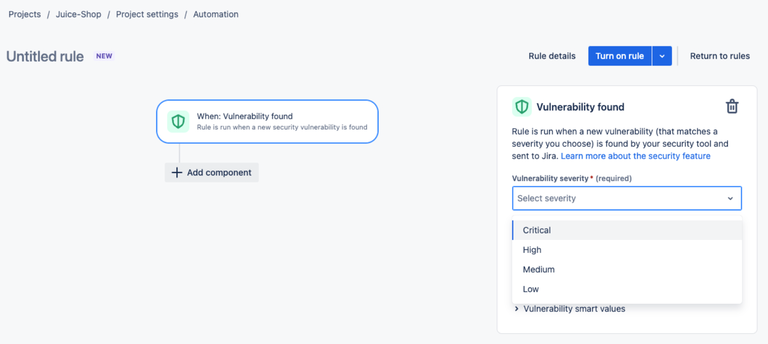
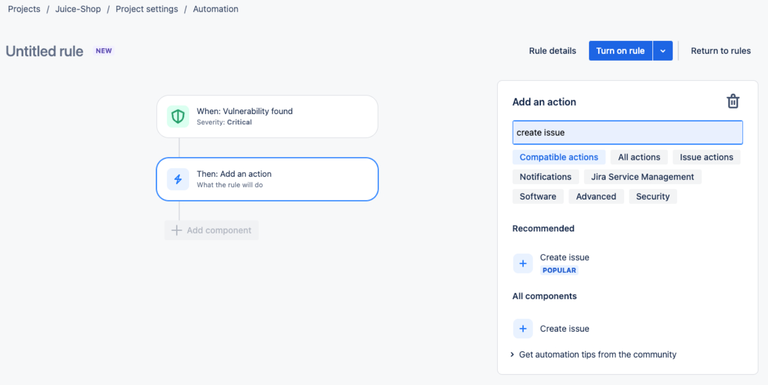
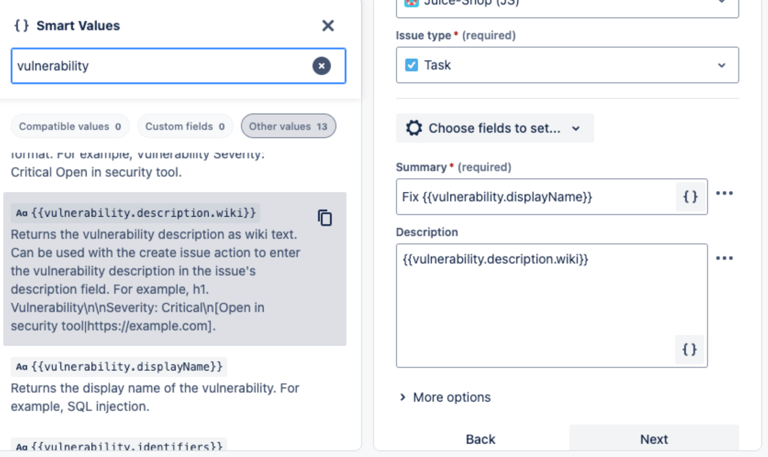
In Project Settings → Automation, create a rule: Trigger = Vulnerability Found (position minimum severity). Add Action = Create Issue (launch project, issue type, summary Fix {{vulnerability.displayName}}, description {{vulnerability.description.wiki}}). Then add Action = Link vulnerability to issue (Security). Turn on the rule to make vulnerability detection create tracked Jira work automatically.
Step 5: Maintain and reconcile lifecycle (linking, auto-close, deletion)
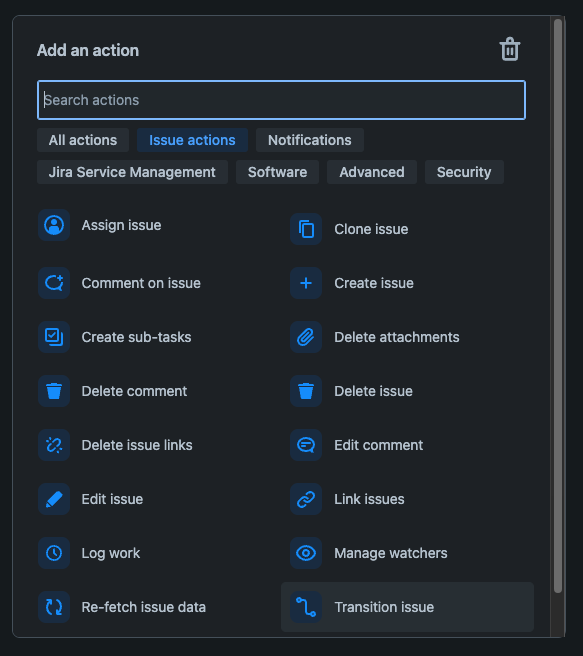
To link existing issues: from the Security tab, use the Actions menu → Link issue. To auto-close Jira issues when Snyk marks a vulnerability closed, create a Scheduled automation rule that runs a JQL search status != Done AND vulnerability[status] = CLOSED, then Action = Transition issue → Done. To remove a connected target, delete the container from the Jira Security panel first, then remove the repository/target from Snyk.



Pros
- Strong Developer Adoption: Snyk is widely adopted among developers for SCA and container scanning. Extending into ASPM means organizations can rank existing familiarity and adoption, removing training needs.
- Embedded in Developer Workflows: With IDE extensions and Git-based integrations, developers receive feedback in real time, improving fix velocity compared to tools that rely on out-of-band dashboards.
- Expanding ASPM Coverage: Snyk has moved beyond open-source scanning to include IaC and container posture, helping enterprises gain a broader view of application risks.
Cons
- ASPM Capabilities Still Maturing: While strong in SCA and container scanning, Snyk’s ASPM features are newer compared to incumbents like OX Security or ArmorCode. Enterprises may find gaps in governance or reporting.
- Cost Escalation at Scale: Snyk pricing often grows significantly with large numbers of developers and repositories. Enterprises must evaluate ROI when scaling ASPM adoption.
- Partial Coverage of Supply Chain: While it integrates well with code and containers, some runtime or pipeline posture elements may require supplemental tools.
Market Insights: Where ASPM is Headed
The ASPM market is maturing quickly, moving from niche experimentation to becoming a central part of enterprise AppSec strategies. Three clear trends are shaping its direction in 2025:
Bringing Signals Together: ASPM as the Control Plane
Enterprises are overwhelmed by the fragmentation of AppSec tooling. A single organization might run five or more scanners (SAST, DAST, SCA, IaC, container security). Without a unifying layer, vulnerabilities remain scattered across dashboards.
ASPM is progressively positioned as the “control plane” for application security, where scanner results are normalized, prioritized, and governed centrally. This is not only about visibility but also about enabling enterprises to enforce consistent policies across diverse teams and tools.
AI and Automation: Predictive Risk Scoring and Self-Healing
Manual triage of findings is no longer feasible at enterprise scale. ASPM vendors now rely on AI to predict which vulnerabilities are exploitable, which services they affect, and how urgent they are based on business impact.
The next stage is self-healing policies, where remediation tasks are automatically generated, tickets are opened, and in some cases, patches or configuration changes are suggested proactively. While still in its early stages, this automation trend is expected to significantly reduce the mean-time-to-remediation in large organizations.
Enterprise Adoption Patterns: From Pilots to Full-Scale Programs
Most enterprises begin with pilot deployments of ASPM in a handful of business-critical applications. Over time, as integrations stabilize and policies are tuned, organizations scale ASPM across hundreds of repositories and pipelines. Early adopters are regulated industries such as finance and healthcare, where compliance pressures drive adoption.
SaaS and cloud-native enterprises are close behind, attracted by ASPM’s ability to embed posture management into CI and CD workflows without slowing delivery.
Choosing the Right ASPM Tool for Your Organization
Selecting the right ASPM tool depends heavily on the maturity of your existing AppSec program. For organizations with a well-established vulnerability management program but lacking centralized posture, platforms such as ArmorCode or OX Security, which are orchestration-heavy, may be the best fit. For developer-first companies with strong DevSecOps practices, Apiiro or Snyk ASPM may align better with engineering workflows.
The table below summarizes how the leading ASPM vendors compare across key enterprise evaluation criteria.
ASPM Tools Comparison Table (2025)
| Criteria | OX Security | Apiiro | ArmorCode | Snyk ASPM |
| Strength | Unified application security platform (securing code generation, SDLC, runtime, continuous pentest) | Contextual risk analysis, developer-first | Centralized AppSec orchestration and compliance | Developer-first security with ASPM expansion |
| Integrations | Wide CI/CD, multi-branch, connectors for SCM and build systems | GitHub, GitLab, Bitbucket, major CI/CD | Large marketplace (SAST, DAST, SCA, cloud tools) | GitHub, GitLab, IDEs, CI/CD |
| Risk Prioritization | Contextual + exploitability-based | Strong business context scoring | Relies on external scanner data | Improving but limited |
| Developer Experience | Good CI/CD and workflow automation | Strong shift-left, developer-native | Less developer-first, more governance-heavy | Excellent (IDE plugins, Git workflows) |
| Scalability (Enterprise Fit) | Strong: multi-repo, enterprise workflows | Strong for mid-to-large orgs | High: focused on governance at scale | Strong adoption, scaling enterprise features |
| Compliance and Governance | Policy enforcement, reporting | Policy-driven workflows | Very strong (audit, governance dashboards) | Moderate (growing capabilities) |
| Automation and Workflow Support | Advanced (policy enforcement, remediation workflows) | Policy-based automation | Workflow orchestration across scanners | Automated scanning in repos/CI/CD |
| Maturity of ASPM Offering | Established | Established | Mature (orchestration + ASPM) | Emerging/evolving |
| Best Fit For | Enterprises seeking full supply chain visibility | Dev-first orgs with strong DevSecOps culture | Enterprises prioritizing compliance/governance | Dev-first teams scaling into ASPM |
| Pricing | Custom (enterprise) | Custom (enterprise) | Custom (enterprise) | Tiered (team → enterprise, ASPM = custom) |
Conclusion
The ASPM market in 2025 is evolving beyond vulnerability aggregation and dashboard consolidation. Organizations are increasingly looking for platforms that can connect risks to business impact, support remediation across teams, and provide visibility throughout the software delivery lifecycle. Each platform in this list approaches that challenge differently. ArmorCode and Apiiro focus heavily on risk correlation, governance, and security operations. Snyk remains a strong choice for developer-centric security workflows. OX Security takes a broader approach as a complete security platform, bringing together AI-generated code security, application security testing, cloud and runtime visibility, and continuous validation within a single platform.
Ultimately, the best choice depends on your team’s priorities. Some organizations need stronger governance and risk management. Others prioritize developer experience or software supply chain visibility. As AI-generated code and cloud-native applications become more common, the most effective platforms will be the ones that provide meaningful context across the entire application lifecycle and help teams focus on the risks that matter most.
FAQs
Most application security tools detect issues after code is written or deployed. OX takes a proactive approach by streaming live security intelligence into coding environments, pipelines, and runtime systems. This stops vulnerabilities from accumulating, instead of relying on reactive fixes after release.
OX provides coverage across the entire software lifecycle. It stops vulnerabilities at the coding stage, monitors APIs and cloud infrastructure for misconfigurations, and maintains protection in runtime environments. This end-to-end posture ensures that each release remains aligned with organizational security requirements.
OX provides integrations with more than 100 security, CI/CD, and collaboration platforms. This allows enterprises to connect their existing tools, ranging from scanners to ticketing systems, without disrupting established workflows.
OX is adopted across industries, including fintech, SaaS, and healthcare. Highly regulated enterprises value their compliance alignment, while cloud-native and developer-first organizations use VibeSec™ to reduce security noise and embed posture management directly into development.
Adoption timelines vary, but most large enterprises begin with a pilot in one or two business-critical applications, refine policies, and then scale across hundreds of repositories. With proper planning, pilot-to-scale rollout typically takes six to twelve months, depending on the complexity of integrations and the maturity of the existing AppSec program.