Container security isn’t failing because of containers; it’s failing because the build and runtime environments around them have become too fragmented to reason about. Most teams are running images built from multiple pipelines, pulled from mixed sources, and deployed across clusters with very different isolation models. Keeping track of what’s running is the real challenge.
Recent Docker security advisories addressing isolation-related CVEs show how quickly assumptions around image trust and runtime boundaries can become outdated. When central tooling needs security fixes at that pace, it’s a reminder that assumptions about image trust and runtime boundaries can become outdated overnight.
For enterprise leadership, the challenge is governance. Most incidents do not stem from a flaw in the container model itself but from the fragmentation between build and runtime environments. Teams run images built from multiple pipelines, pulled from mixed sources, and deployed across clusters with inconsistent isolation models.
The primary risk is lineage drift. When you cannot trace a running container back to the specific pipeline, commit, and security check that authorized it, you operate with an unmeasurable risk posture. A recent example involving Docker Desktop patching isolation-related CVEs illustrates this fragility: central tooling requires constant updates, meaning assumptions about image trust and runtime boundaries can become outdated immediately.
Mature organizations are shifting focus from raw CVE counts to exploitability. The goal is not to fix every theoretical vulnerability but to identify which specific libraries are loaded and reachable in the production environment.
Attack Surface Across Image Layers, Registries, Orchestrators, and the Host Kernel
Securing containers requires visibility into how code moves through the build system and settles into the runtime. Failures occur when these boundaries are weak or unmonitored. For AppSec and Platform teams, the attack surface is distributed across four key layers.
Here’s how those risks map to the components you rely on every day:
| Component | Role in the Stack | Enterprise Risk & Business Impact |
| Container Images | Base layers, binaries, and dependency stacks. | Supply Chain Integrity: Compromised base images or build-layer tampering introduce malicious code deep in the stack, bypassing perimeter defenses. |
| Registries | Storage and distribution hub (public or private). | Unauthorized Distribution: Mutable tags or weak permissions allow unverified artifacts to reach production, creating compliance gaps and audit failures. |
| Orchestrator | Scheduling, networking, secrets, and API access. | Lateral Movement: Over-permissive RBAC and misconfigured admission controllers allow a single compromised pod to grant attackers cluster-wide access. |
| Host / Engine | Runtime execution and isolation enforcement. | Infrastructure Compromise: Kernel exploits or container escapes can lead to node takeover, breaking multi-tenant boundaries and exposing data across business units. |
Defensive controls must align with these layers to ensure auditability:
- Build: Digest-pinned images and PBOM/SBOM generation.
- Registry: Immutable tags and strict role-based access.
- Orchestration: RBAC tuned to specific workload needs and admission policies that block non-compliant builds.
- Host: A patched, minimal surface area.
How OX Security and VibeSec Address the Gap
Traditional security tools act as external gatekeepers, creating friction that slows down development. OX Security changes this model with VibeSec, an approach that integrates security directly into the developer’s natural workflow, inside IDEs, Cursor, and GitHub Copilot.
By embedding context-aware AI into the development environment, OX allows teams to:
- Eliminate Noise: The platform filters out the majority of alerts that are irrelevant to the specific build context, allowing AppSec teams to focus on the 5% of risks that matter.
- Establish Lineage: OX utilizes PBOM (Pipeline Bill of Materials) to link code, images, and runtime environments. This provides a clear audit trail from the running container back to the developer who wrote the code.
- Fix at Source: Developers receive one-click fixes and proactive guidance while they code, avoid vulnerabilities from entering the pipeline in the first place.
How Enterprises Should Approach Container Security in Practice
Enterprise container security fails when teams try to understand every failure mode before acting. At scale, the correct approach is the opposite: establish a small set of non-negotiable controls first, then use evidence to refine them.
The following best practices represent the minimum baseline enterprises need to control container risk in 2025 and beyond. They focus on preventing widespread blast radius, maintaining traceability across build and runtime, and enforcing guardrails that adapt as environments change.
The detailed threat scenarios and breach anatomy that follow explain why these controls matter and what happens when they are missing.
Container Security Best Practices
Container security is best approached as a layered system, every phase of the container lifecycle introduces different risks, from vulnerable base images to misconfigured orchestration or neglected runtime monitoring.
The following best practices are divided into four actionable layers, each with concrete steps, code examples, and OX Security integrations that help enforce and automate protection across your build, deploy, and runtime workflows.
Let’s go step by step in detail on how you can skip risks at each layer.

Layer 1: Make images boringly safe before they hit a registry
The build stage is your first line of defense. Every mistake you ship in a container image (outdated packages, embedded secrets, unnecessary binaries) becomes a permanent risk that replicates across your clusters. Hardening the image early prevents runtime emergencies later.
1. Start from Minimal, Trusted Base Images
Use the smallest verified image that supports your runtime.
- Avoid: ubuntu:latest or heavy OS images.
- Use: gcr.io/distroless/base or alpine.
Distroless images reduce the attack surface by stripping shells, package managers, and unused utilities. If an attacker gets in, they have no tools to work with. If you maintain your own base image, sign it and automate its rebuild schedule. OX Pipeline Workflows can block any image that does not originate from your approved base registry.
2. Build with Multi-Stage Dockerfiles
Keep compilers and build tools out of production. Use multi-stage builds to separate the build environment from the runtime artifact.
FROM node:20 as build
WORKDIR /app
COPY package*.json ./
RUN npm ci
COPY . .
RUN npm run build

FROM gcr.io/distroless/nodejs20
COPY --from=build /app/dist /app
CMD ["node", "app/server.js"]
The first stage compiles the app. The second runs it. This single change removes hundreds of unnecessary packages that could contain vulnerabilities.
3. Drop Root and Lock Down Permissions
If container isolation fails, the root user inside the container maps to the root user on the host. Always drop privileges.
RUN addgroup --system app && adduser --system --ingroup app app
USER app
Combine this with strict file permissions (chmod, chown). Your application should only access what it explicitly needs to function.
4. Eliminate Hidden Baggage
Before pushing to a registry, scrub the image. Remove shell history, SSH keys, and API tokens used during the build. Use a .dockerignore file to exclude local artifacts like .env files.
OX Active ASPM includes secret scanning for container layers. It links any secrets found in an image back to the specific build pipeline and commit. This allows you to rotate the credential and fix the build script immediately.
5. Scan Before You Push
Run container vulnerability scans inside your CI pipeline. Traditional tools are useful for basic reporting, but they lack context. OX Active ASPM integrates directly into the workflow. It can block the build if it detects a critical vulnerability that is known to be exploitable. This prevents the “scan and ignore” cycle by stopping the risk before it becomes a deployment.

Layer 2: Lock down permissions and blast radius at deploy time
Once your container image is built, the risk shifts to how it runs. Permissions, network configuration, and isolation determine how much damage an attacker can do if they break in. These controls limit the blast radius.
1. Enforce Least Privilege
Run containers with the absolute minimum permission. In Kubernetes, you must block root access and restrict system calls.
securityContext:
  runAsNonRoot: true
  readOnlyRootFilesystem: true
  allowPrivilegeEscalation: false
  capabilities:
    drop:
      - ALL
  seccompProfile:
    type: RuntimeDefault
Apply this securityContext in your Pod specs or enforce it via admission controllers. Avoid flags like hostNetwork or privileged unless the workload physically cannot function without them.
OX Active ASPM connects these runtime settings directly to the code that defines them. The platform maps runtime metadata to your build artifacts. This lets you see if a vulnerable image is also running with excessive privileges, which would raise the severity of the finding.
2. Use Read-Only Filesystems
Attackers need to write files to execute scripts or download tools. Stop them by making the root filesystem read-only.
volumeMounts:
  - name: temp-storage
    mountPath: /tmp
    readOnly: false
Mount temporary writable directories only where specifically needed. This ensures an attacker cannot drop a crypto miner into /usr/bin or modify system binaries.
3. Network Segmentation
By default, Kubernetes allows every pod to talk to every other pod. This is a security failure. You must define strict CNI policies.
apiVersion: networking.k8s.io/v1
kind: NetworkPolicy
metadata:
  name: deny-all
spec:
  podSelector: {}
  policyTypes:
    - Ingress
    - Egress
Start with a “deny-all” policy. Then, open specific connections only for services that explicitly require them.
Layer 3: Turn your CI/CD pipeline into a security gate, not a firehose
Container security is about end-to-end traceability across every step of the software supply chain. Every commit, dependency, and build artifact is part of a trust graph. If you cannot trace a container back to its source, you cannot trust it.
1. The Pipeline is the Perimeter
The CI/CD system defines your security posture. Vulnerabilities caught here are cheap to fix. Vulnerabilities caught in production cause incidents. Every pipeline stage must include:
- Static Application Security Testing (SAST): Scan the code.
- Software Composition Analysis (SCA): Check open-source dependencies.
- Container Scanning: Check the final artifact.
- PBOM Generation: Record the lineage.
2. Enforce Gating with OX Workflows
Scanning is useless if it does not stop bad code. OX Active ASPM allows you to embed security gates directly into the CI/CD process. You can define rules such as “fail the build if a Critical vulnerability has a known exploit.”
- name: Trigger OX scan
  env:
    OX_API_KEY: ${{ secrets.OX_API_KEY }}
  run: |
    curl -X POST "https://api.ox.security/v1/scan/container" \
      -H "Authorization: Bearer $OX_API_KEY" \
      -d '{"image":"my-registry.io/my-app:${GITHUB_SHA}"}'
This automates the decision. It removes the human bottleneck and ensures no image leaves the pipeline unless it meets your baseline.
3. PBOM
A standard SBOM lists the ingredients in an image. OX’s Pipeline Bill of Materials (PBOM) goes further. It tracks the entire history of the software. It records who committed the code, which pipeline built it, and if the artifact was altered after the build.
This lineage is the central of Active ASPM. It creates a link between the developer who wrote the code and the container running in the cluster. When a new vulnerability is disclosed, you do not just know which containers are affected. You know exactly who needs to fix it.
4. Machine Speed Remediation
Today volume is the challenge. Developers push code faster than AppSec can review it. By integrating OX into the pipeline, you automate the triage. The system filters out noise (unreachable vulnerabilities) and flags only the issues that block deployment. This keeps the pipeline moving at machine speed without compromising security.
Layer 4: Stay ahead of new CVEs with runtime-aware monitoring
Security does not stop when containers go live. New vulnerabilities are disclosed daily. Dependencies update. Configurations drift. Post-deployment monitoring ensures your production workloads remain compliant and that exploitable issues are addressed immediately.
1. Scanning and Runtime Awareness
A container that passes every build scan can still become vulnerable tomorrow. You need regular monitoring, not one-off reports.
OX Active ASPM handles this through its Container Vulnerability Management (CVM) capabilities, as explained in Container Security Tools. It scans running containers and correlates new CVEs with the actual runtime context. It identifies which libraries are loaded and which code paths are active.
2. Prioritization: Fix What Matters
Most teams drown in vulnerability noise because they treat every “Critical” CVE the same. This is a mistake. A vulnerability in a library that is never executed is not an emergency.
OX Active ASPM ranks findings based on three factors:
- Exploitability: Is there a known exploit kit available?
- Reachability: Is the vulnerable function actually called by the application?
- Business Impact: Does this service handle sensitive data?
This “contextual prioritization” filters out the chaos. It allows DevSecOps engineers to ignore false positives and focus entirely on the risks that can actually cause a breach.
3. Automated Remediation
When a real threat is confirmed, speed is the only metric that counts. In the era of AI-driven attacks, manual ticketing is too slow.
OX Active ASPM treats vulnerabilities as workflow events.
- A container running with a reachable Critical CVE triggers an automatic ticket.
- A privilege escalation attempt triggers a policy that isolates the pod.
- A fix suggestion is sent directly to the developer who owns the code, linked via PBOM.
This closes the loop. It connects production back to code at machine speed.
4. What to Monitor (Checklist)
- Base Image Age: Flag images older than 90 days for an immediate rebuild.
- Open Ports: Audit for unnecessary network exposure.
- Process Anomalies: Detect unexpected binaries or shell processes.
- Runtime Escape Attempts: Look for unusual system calls.
- Filesystem Changes: Monitor for writes in read-only layers.
OX Active ASPM provides a single view of these metrics. Because it maps container vulnerabilities to application assets and CI pipelines, every issue includes the context required to fix it.

Why Legacy Security Models Break at Scale
Standard security tools were designed for long-lived servers and static networks. Cloud-native environments break these assumptions, creating blind spots for the CISO and operational overhead for engineering teams.
1. Ephemerality Creates Audit Gaps
Pods in Kubernetes are created and terminated constantly. Snapshot-based scanners often miss short-lived containers entirely. For compliance teams, this creates a “black box” where malicious activity or misconfigurations can execute and disappear without leaving a trace for auditors.
2. High Volume Without Context
Images pull in massive dependency trees, triggering thousands of CVE alerts. However, most of these libraries are never executed by the application. Without runtime context, AppSec teams waste budget and cycles triaging “critical” vulnerabilities that have no path to exploitation.
3. Mutable Artifacts and Trust Drift
Using tags like latest introduces inconsistency. The image scanned during the build phase may not match the image pulled by the cluster during deployment if the tag was overwritten. This breaks the chain of custody, making it impossible to prove that the code running in production is the same code that passed security checks.
4. Policy Drift and Identity Management
Kubernetes security relies heavily on non-code configurations: Service Accounts, RBAC roles, and Network Policies. These evolve independently of the application code. A “temporary” permission grant can easily become a permanent backdoor. Traditional VM-centric tools cannot visualize these identity-based risks, leaving the organization exposed to lateral movement.
What Happens When These Best Practices Are Missing
Container breaches typically begin with a weakness in one of the control boundaries that support the workload, for example, a vulnerable base layer, an image pulled from an unverified registry, an over-permissive service account, a namespace without network segmentation, or a workload granted elevated Linux capabilities. Because Kubernetes stitches these layers together through its control plane and API surface, a flaw in any one component can be leveraged to pivot from the image to the runtime, into the cluster API, and ultimately to the underlying node.
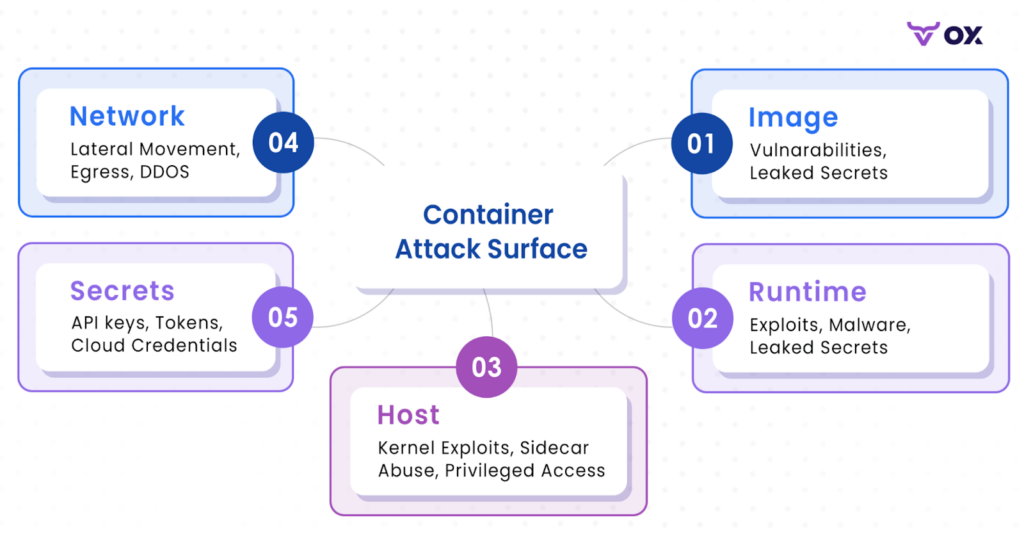
1. Image Layers and Build Pipeline Weaknesses: Container images inherit risk from every layer beneath them. Most compromises start here because attackers target the parts of the image developers rarely inspect:
- Outdated or vulnerable base images (Alpine, Debian, Ubuntu) where unpatched CVEs accumulate in shared libraries.
- Excessive build-stage artifacts left behind after multi-stage builds, CLI tools, package managers, or debugging utilities that expand the attack surface.
- Mutable tags and registry drift, where the image scanned in CI is not the same digest pulled at runtime.
- Leaked metadata such as ENV variables, tokens, or internal URLs embedded in image layers.
- Overly permissive filesystem structure, including world-writable directories or scripts exposed via $PATH.
If an attacker poisons a layer upstream or compromises a build step, that payload propagates to every downstream service that reuses the same base. This is how wide-blast-radius supply-chain attacks spread through container fleets.
2. Orchestrator and Runtime Pivot Points: Once a compromised image runs, the orchestrator determines how far an attacker can go. Kubernetes provides powerful automation, but misconfigurations at this layer create reliable escalation paths:
- Docker socket mounts (/var/run/docker.sock) grant near-root control over the node’s container runtime.
- Over-permissive service accounts, especially those with verbs like get, list, create, or exec across multiple resource types.
- Namespace-level privilege leaks, where workloads inherit RBAC roles intended for entirely different services.
- Missing or overly broad NetworkPolicies, allowing arbitrary east-west traffic and cluster-internal scanning.
- Unrestricted admission controllers, enabling workloads to run as root, mount host paths, or disable AppArmor/seccomp profiles.
From this layer, attackers typically escalate by using the Kubernetes API or by chaining permissions across namespaces. This is the phase where lateral movement happens.
3. Host Kernel and Node-Level Isolation Breakdowns: Containers rely on the underlying host kernel for isolation. If those boundaries weaken, an attacker can jump from one compromised workload to node-level control:
- Kernel vulnerabilities (namespaces, cgroups, or overlayfs) allowing container escapes.
- Excessive Linux capabilities, such as CAP_SYS_ADMIN, CAP_NET_ADMIN, or CAP_SYS_PTRACE.
- Privileged containers, which effectively remove isolation and expose host devices.
- HostPath mounts that allow direct read/write access to critical filesystem locations.
- Unpatched or bloated node images containing unused, vulnerable system packages.
Once the node is compromised, all pods scheduled on that node, even those running in separate namespaces, become reachable.
4. Secrets, Identity, and Metadata Exposure: Identity often becomes the pivot that turns a compromised workload into full cluster access:
- Environment-variable secrets easily retrieved through /proc, logs, or container introspection tools.
- Overbroad secret mounts, where entire secret bundles are exposed to workloads that need only a subset.
- Service accounts with elevated RBAC, allowing direct interaction with the Kubernetes API (listing pods, reading secrets, spawning privileged workloads).
- Cloud metadata APIs, which attackers use to obtain credentials or instance roles if network controls are weak.
- Lack of rotation or short-lived credentials, making any leaked secret immediately impactful.
Identity misconfigurations frequently define the attacker’s final pivot, enabling full-cluster enumeration, lateral movement, or direct access to sensitive back-end systems.
Conclusion
You cannot secure a Kubernetes estate by staring at a vulnerability scanner. The volume of transient containers and the speed of deployment make traditional “scan-and-patch” cycles obsolete. If you try to manually review every image in a large cluster, you will block releases and still miss the actual risks.
The layers we discussed: hardened builds, runtime isolation, and supply chain tracking, are the baseline. But these controls must be automated.
OX Active ASPM makes this practical. Instead of dumping a list of CVEs on your desk, it correlates runtime data with your build pipeline. It tells you exactly which vulnerabilities are reachable and traces them back to the developer who introduced them. This allows you to ignore the noise and fix the code that actually matters.
As AI speeds-up development velocity, your security tools must move at machine speed. Focus on context, automate the lineage tracking, and stop wasting engineering cycles on risks that will never be exploited.