Api-everything




A real browser loads the page, and you get the JSON the page itself received, as a REST API and MCP tools.
No AI at runtime, read-only, no HTML parsing.
A warm pool of real Chrome browsers runs a small YAML recipe (open this page, do these steps,
capture the matching HTTP, GraphQL, WebSocket, or SSE response), and the daemon returns the JSON
the site's own page already received. It only reads responses; it never forges or alters requests,
so the browser itself produces any tokens the site needs.
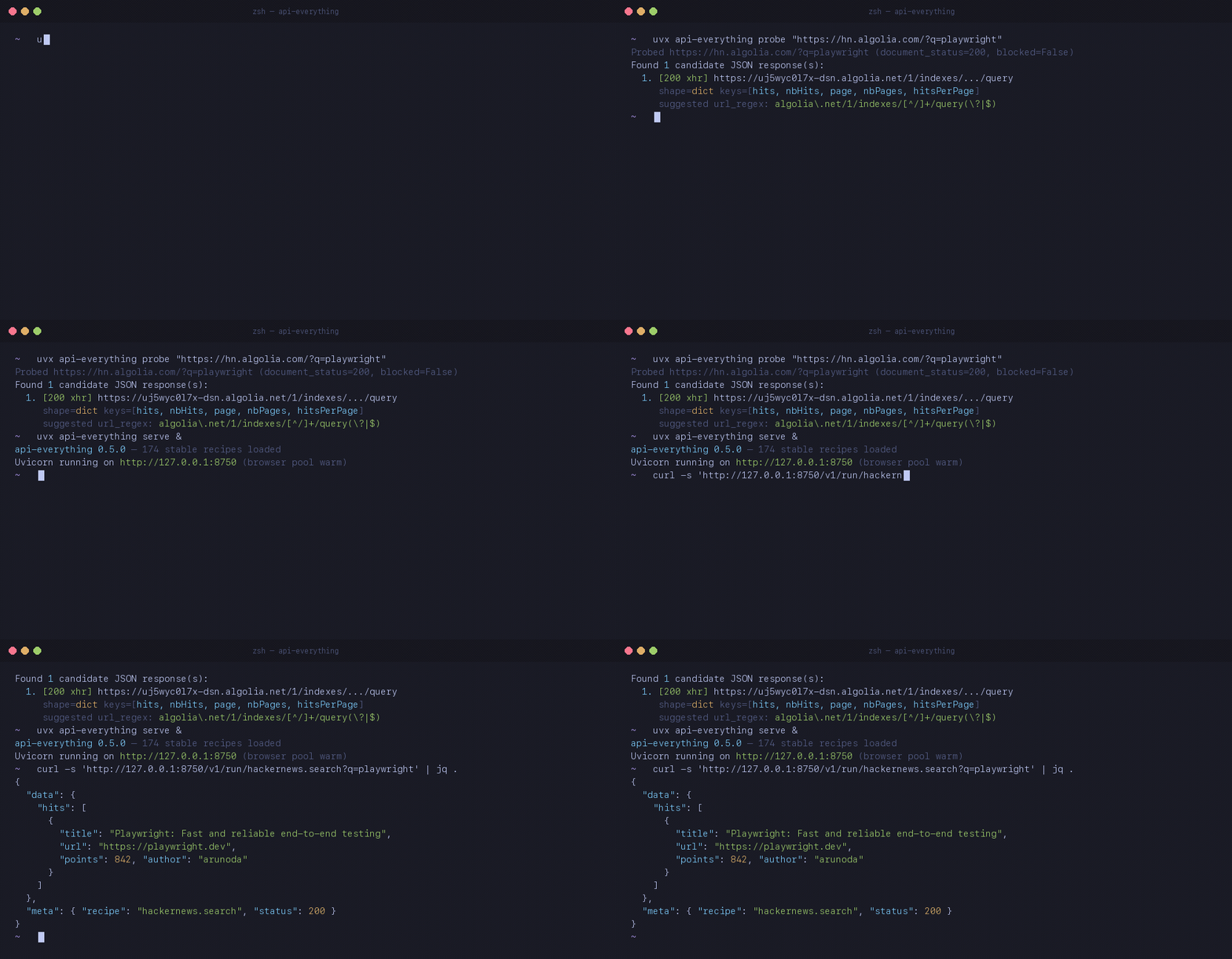
Why not just copy the request? The bundled demo site mints a single-use token on every page
load, so replaying a captured request gets a 403 (the tests prove this). Loading the page in a real
browser and reading its own response works. Watch it from a clone with
uv run python bench/replay_demo.py.
Know before you try it:
- Not every site works. Reddit and Quora answer automated Chrome with HTTP 403, and this project
does not try to get past blocks.
- 53 of the bundled recipes click or type on the page, so a layout change can break those.
- Many bundled recipes read sites that also have a public API. They are working examples; where a
public API does what you need, calling it directly is simpler and faster.
Status: alpha. The core works end to end (the daemon, warm browser pool with backpressure,
recipes, checks, logins, and the recipe-scaffolding pipeline). 242 real-site recipes ship marked
stable (the 5 reference recipes below plus 237 from the
developer catalog), each after 5 consecutive passing live checks when it was
added (last additions 2026-11-26). Sites change, so run api-everything check to see how they do
today. sequelize_docs.search and techempower.results failed their check on 2026-11-29 and are
marked experimental. The mock-site latency targets have not been validly measured on a quiet machine yet; see
bench/README.md for every run.
Try it
Needs Python 3.11+, uv and Google Chrome. No Chrome (a Linux
server, say)? Run uvx --from api-everything playwright install --only-shell chromium once and set
browser: chromium in your config; see Choosing a browser.
uvx api-everything serve # the daemon on 127.0.0.1:8750 (no clone needed)
curl 'http://127.0.0.1:8750/v1/run/hackernews.search?q=playwright'
Or try the bundled token-gated local demo site (127.0.0.1:8799) from a local clone (uv sync):
uv run python -m api_everything.mock_site &   # a demo target on 127.0.0.1:8799
curl 'http://127.0.0.1:8750/v1/run/mock.items?q=Item%203'
{"data":{"items":[{"id":3,"title":"Item 3"}]},"meta":{"recipe":"mock.items","status":200,"count":1}}
Docker (headless Chromium included)
Build the image from a clone (no published image is available yet). An API token is required when
binding 0.0.0.0:
docker build -t api-everything .
docker run --rm --init -p 8750:8750 \
  -e API_EVERYTHING_TOKEN=change-me \
  -v "$(pwd)/my-recipes:/recipes:ro" \
  -e API_EVERYTHING__RECIPES_DIR=/recipes \
  api-everything
| Command |
What it does |
api-everything serve |
Run the daemon: a warm pool of Chrome browsers serving /v1 (--ui for Playground at /ui, --docs for Swagger UI at /docs, --watch for hot-reload) |
api-everything doctor |
Diagnose Python, Playwright, Chrome/Chromium, port, token, and recipe health |
api-everything codegen |
Generate typed TypeScript (--lang ts) or Python (--lang python) clients |
api-everything watch NAME |
Poll a recipe and emit JSON diffs or POST alerts to --webhook |
api-everything validate |
Check every recipe without starting anything |
api-everything check NAME... \| --all |
Run recipes' live checks; goes through a running daemon |
api-everything login PROFILE |
Sign in by hand once for recipes that use a logged-in profile |
api-everything probe TARGET |
Inspect live XHR/fetch JSON calls from a URL (catalog site IDs need a clone of the repository) |
api-everything scaffold TARGET |
Generate a draft YAML recipe (with optional --probe auto-detection) |
api-everything promote NAME |
Run N consecutive live checks (default 5) and promote to stable |
api-everything chrome PROFILE |
Start the Chrome an attached profile connects to (see below) |
api-everything mcp |
Let an AI agent call your recipes as tools over MCP (see below) |
api-everything recipes pull\|diff\|apply\|remove |
Fetch shared recipes from git and apply the ones you approve |
api-everything repair NAME |
Draft a verified fix for a recipe whose check failed because the site changed |
api-everything record URL |
Browse a page once and generate a verified recipe for one of its JSON responses |
Endpoints: GET|POST /v1/run/{recipe}, GET /v1/recipes, GET /v1/recipes/{name},
GET /v1/stats (token only), GET /metrics (Prometheus), and GET /healthz. Pass --docs to serve to expose per-recipe typed /openapi.json (ready for openapi-typescript or Python client generators) and /docs. Settings live in an optional
api-everything.yaml (see api-everything.example.yaml).
Web Playground (--ui)
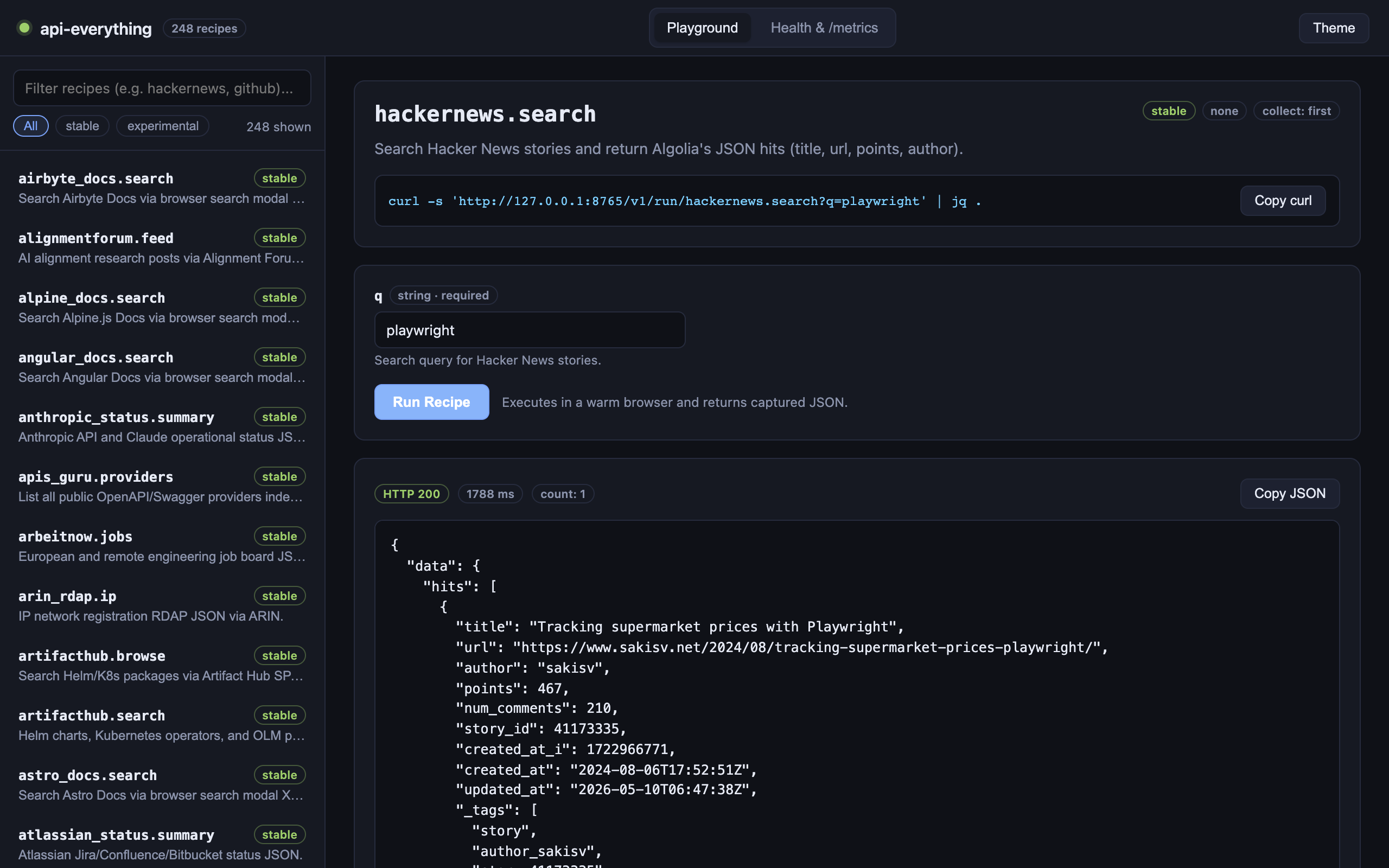
Start the daemon with --ui to browse all bundled recipes, test parameters with auto-generated forms, copy curl commands, probe live URLs, and inspect /metrics health locally at http://127.0.0.1:8750/ui (off by default):
uvx api-everything serve --ui --watch
SDKs, Chrome Extension & MCP Registry
Why Not X?
Many web apps load their data from internal JSON endpoints. Api-everything is for that case; other
tools are better for others.
When to choose what:
- Use Api-everything when the target site already fetches clean JSON in the browser and you want a zero-token REST API or MCP tool.
- Use Crawl4AI / ScrapeGraphAI when data lives only in server-rendered HTML/articles and you want LLM-ready Markdown.
- Use Browser-Use for open-ended, multi-step tasks (filling out arbitrary forms or navigating unfamiliar sites).
- Use Scrapy for high-volume static HTML crawling where JS hydration and single-use request tokens are not required.
Reference recipes and their status
| Recipe |
Status |
Last checked |
Result |
hackernews.search |
stable |
2026-11-25 |
Passes 5/5 live checks (captures hn.algolia.com Algolia XHR JSON) |
github.explore |
stable |
2026-11-25 |
Passes 5/5 live checks (public api.github.com/search/repositories JSON) |
wikipedia.summary |
stable |
2026-11-25 |
Passes 5/5 live checks (Wikimedia REST summary JSON) |
mastodon.explore |
stable |
2026-11-25 |
Passes 5/5 live checks (captures mastodon.social/explore trends XHR JSON) |
substack.search |
stable |
2026-11-25 |
Passes 5/5 live checks (captures substack.com/search fetch JSON) |
mock.items |
stable |
2026-11-15 |
Passes (the local demo site) |
reddit.search |
experimental |
2026-11-16 |
HTTP 403 block page for automated Chrome: headless, with a visible window, and through an attached Chrome (fresh profile) |
quora.answers |
experimental, unverified |
2026-11-15 |
HTTP 403 with a Cloudflare "security verification" page; its matcher is a placeholder |
The agreed rule is: a reference recipe must pass its live check five times in a row, or ship
labelled experimental with its status written down. All five flagship recipes above (plus 237
more stable developer recipes in docs/CATALOG.md) passed five consecutive
live checks; reddit.search and quora.answers did not pass and stay experimental. This project
deliberately does not solve CAPTCHAs or evade bot detection, so it does not try to get past those
blocks. check --all skips experimental recipes unless you pass --include-experimental. To write
a recipe that works, see docs/RECIPES.md, or use the
100-site catalog with probe, scaffold, and promote from a clone of the repository (the
catalog file is not part of the installed package).
Scheduling live checks
api-everything check --all runs every stable recipe's live check and exits 1 if any fail, so a
scheduler can run it and a notify_command in your config can tell you. Run it on your own
machine, never from hosted CI: your home IP and your Chrome are what the sites accept. If a
daemon is running, the checks go through it.
With cron (every morning at 09:00; use the full path to uvx from which uvx):
0 9 * * * /opt/homebrew/bin/uvx api-everything check --all >> "$HOME/api-everything-checks.log" 2>&1
With launchd on macOS, save this as ~/Library/LaunchAgents/local.api-everything.check.plist
and load it with launchctl load:
<?xml version="1.0" encoding="UTF-8"?>
<!DOCTYPE plist PUBLIC "-//Apple//DTD PLIST 1.0//EN" "http://www.apple.com/DTDs/PropertyList-1.0.dtd">
<plist version="1.0"><dict>
  <key>Label</key><string>local.api-everything.check</string>
  <key>ProgramArguments</key>
  <array><string>/opt/homebrew/bin/uvx</string><string>api-everything</string>
         <string>check</string><string>--all</string></array>
  <key>StartCalendarInterval</key><dict><key>Hour</key><integer>9</integer>
         <key>Minute</key><integer>0</integer></dict>
  <key>StandardOutPath</key><string>/tmp/api-everything-checks.log</string>
  <key>StandardErrorPath</key><string>/tmp/api-everything-checks.log</string>
</dict></plist>
Both examples follow the standard formats but have not been run under a real scheduler by the
author. A recipe that is blocked by its site (the experimental ones) is skipped unless you add
--include-experimental.
Attaching to a Chrome you start
For a logged-in profile you can start the Chrome yourself and let the daemon attach to it,
instead of the daemon launching one:
profiles:
  reddit:
    attach: http://127.0.0.1:9222   # this machine only; pick any free port
uv run api-everything chrome reddit   # a visible Chrome on its own folder; sign in by hand
uv run api-everything serve           # attaches to it; stopping the daemon leaves it open









