Scan your whole stack


From OX Research Newsroom






Latest version: v2026.11.28.0
Digital Human was last scanned on 28 Nov 2026 at version 2026.11.28.0. Risk score 0 of 100. No malicious behavior was detected.
| Version | Published | Status |
|---|---|---|
| 2026.11.28.0 LATEST | 28 Nov 2026 | No rules fired |
Findings for v2026.11.28.0. The score is a capped sum of the weights of the rules that fired — not CVSS, not exploitability, and not a probability. It is not comparable across packages with different scan coverage.
The score describes 2026.11.28.0; other versions have their own rules, not their own score.
The publisher’s own README, as collected from the registry.
A Model Context Protocol (MCP) server for the AceDataCloud Digital Human API.
Use the local stdio package and an AceDataCloud API token. The public hosted HTTPS endpoint could not be verified, so this README does not offer it as a connection option. The local MCP process still calls AceDataCloud's API; it does not run the underlying service offline.
Bearer. An API Key / API Token field expects this raw value; only a manually configured HTTP Authorization header needs the Bearer prefix. A platform-... account-management token cannot replace a generation API key.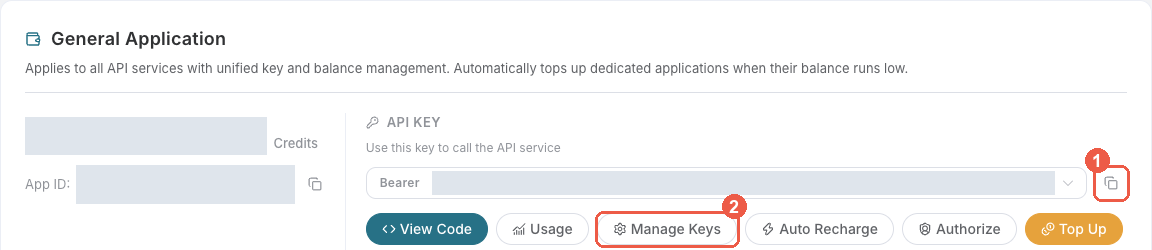
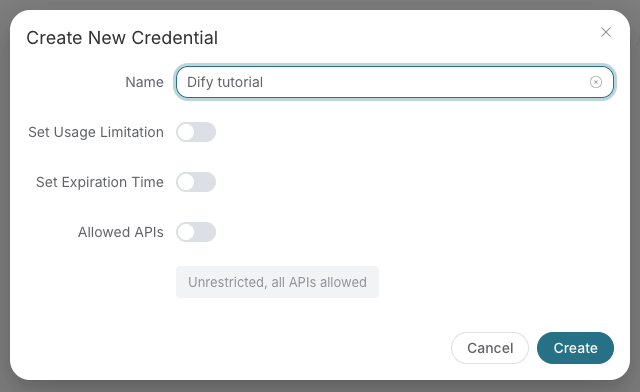
Save the key in the client's credential store or the environment variable shown below. Never put it in a prompt, shared workflow, screenshot, or Git commit. If authentication fails, check the full copied value, application/service access, expiration, usage limit, and balance before creating another key.
In a client with MCP Registry support, search for io.github.AceDataCloud/mcp-digitalhuman and select the PyPI stdio package. Supply your application token in the client’s secret settings. After connecting, open the tool list and check for digitalhuman_create_video and digitalhuman_get_task. Listing tools confirms the local connection without submitting a generation. Use only media you own or have permission to use.
Install the package and give the local process an API token:
python -m pip install mcp-digitalhuman
export ACEDATACLOUD_API_TOKEN='YOUR_API_TOKEN'
mcp-digitalhuman
For Claude Desktop local MCP, merge this entry into the file opened by its developer settings (~/Library/Application Support/Claude/claude_desktop_config.json on macOS). uvx requires uv on PATH:
{
  "mcpServers": {
    "digitalhuman": {
      "command": "uvx",
      "args": ["mcp-digitalhuman"],
      "env": {"ACEDATACLOUD_API_TOKEN": "YOUR_API_TOKEN"}
    }
  }
}
Keep this user-level file private. Self-hosted HTTP uses mcp-digitalhuman --transport http --port 8000; expose it only with suitable network and TLS controls. Local execution still calls the AceDataCloud API.
Confirm that the MCP client loads its tools. For an existing task ID, digitalhuman_get_task makes an authenticated query; loading the tool alone does not prove downstream API access. A real service request can be billed. If it returns 401, check the API token; if it returns 403 or an account/balance error, read that response before retrying.
pip install -e ".[dev,test]"
pytest -q
ruff check .digitalhuman_get_tasks_batch retrieves exactly the supplied IDs in input order using authenticated single-task requests. It does not list recent history. A failed retrieval is reported as an error rather than replaced with unrelated tasks.
Use digitalhuman_list_tasks(limit=20, type="voices") to list the authenticated caller's recent tasks, newest first. limit is 1–100; optional type is videos or voices. created_at_min and created_at_max filter strictly after/before Unix timestamps in seconds. This uses the API's retrieve_batch history action, without an ID array. The result retains count and detailed items; media URLs and voice IDs are nested in each item's response. started_at, finished_at and elapsed can be null while processing.
Find threats in your stack.
OX Radar can check high-priority threats, like critical package CVEs, against your context.
Each incident is marked Detected or Not Detected with a remediation plan and proof all tracked in the Response Center.
The probe returned only these fields for this server — auth requirement, protocol and tool list weren’t observed, so they’re not shown (never guessed).
The publisher’s own links, as the registry reports them. These are not sources for the assessment on this page.
 Read the latest findings