
Scan your whole stack


From OX Research Newsroom






Latest version: v0.6.2
Punk Records was last scanned on 26 Nov 2026 at version 0.6.2. Risk score 0 of 100. No malicious behavior was detected.
| Version | Published | Status |
|---|---|---|
| 0.6.2 LATEST | 26 Nov 2026 | No rules fired |
| 0.6.1 | 23 Nov 2026 | No rules fired |
| 0.6.0 | 23 Nov 2026 | No rules fired |
| 0.5.0 | 22 Nov 2026 | Not shown |
Findings for v0.6.2. The score is a capped sum of the weights of the rules that fired — not CVSS, not exploitability, and not a probability. It is not comparable across packages with different scan coverage.
The score describes 0.6.2; other versions have their own rules, not their own score.
The publisher’s own README, as collected from the registry.




One brain for all your AI agents. Persist every CLAUDE.md, AGENTS.md, napkin, and rules file
from every project and machine in a single versioned store. Sync it over any git remote, or carry it
across an air gap on a USB stick. Agents can read and write it live over MCP.

On Egghead, Dr. Vegapunk keeps one shared brain, the Punk Records. His satellites each go off and learn things, and whatever they learn flows back into that shared brain. This project does the same for your agents: each project and machine is a satellite, and
~/.punk-recordsis the brain.The name is a nod to One Piece (the linked wiki pages contain spoilers). This is a fan-named project, not affiliated with Eiichiro Oda, Shueisha or Toei Animation.
Agent memories are scattered across dozens of repos and dotfiles. Many of them are deliberately
uncommitted (CLAUDE.local.md, napkins, ~/.claude/CLAUDE.md). They get lost when you wipe a
laptop, they diverge between your work and home machines, and they can't follow you into an
offline network.
CLAUDE.md to each repo. Keep doing it for conventions your team shares. It does not
cover the memories you keep out of git on purpose (CLAUDE.local.md, napkins, ~/.claude), notes
you would rather not push to a team repo, or a machine that cannot reach the repo host. Punk
Records stores those too, alongside the committed ones.| Scope | Files |
|---|---|
| Any project | CLAUDE.md, CLAUDE.local.md, AGENTS.md, AGENT.md, GEMINI.md, napkin.md, CONVENTIONS.md, .cursorrules, .windsurfrules, .clinerules, .goosehints (anywhere in the tree) |
.claude/*.md (napkins, commands, agents), .claude/skills/*, .cursor/rules/*, .windsurf/rules/*, .clinerules/*, .roo/rules/*, .kiro/steering/*, .github/copilot-instructions.md, .github/instructions/*.md |
|
Claude Code auto memory, ~/.claude/projects/<project>/memory/*.md (stored as @claude-memory/...; restored into the matching folder for the project's path on each machine, and shared by its worktrees) |
|
Global ($HOME) |
~/.claude/CLAUDE.md, ~/.claude/napkin.md, ~/.claude/{commands,agents,skills}/*, ~/.codex/AGENTS.md, ~/.gemini/GEMINI.md, ~/.config/goose/.goosehints |
Run punk scan to see what would be captured. To add your own patterns, put globs in punk.json
inside the store ({"include": ["docs/ai/*.md"], "exclude": []}).
To leave Claude Code auto memory out, use {"exclude": ["@claude-memory/*"]}. CLAUDE_CONFIG_DIR
is honoured; a custom autoMemoryDirectory setting is not read yet.
Requires Python 3.9+ and git. No other dependencies.
pipx install punk-records                 # or: pip install punk-records
brew install gablooge/tap/punk-records    # Homebrew on macOS or Linux; brings its own Python
uv tool install punk-records # with uvpunk init # creates ~/.punk-records and tracks your global memories
punk track ~/code/app ~/code/api
punk save # snapshot every memory file into the store
punk context ~/code/app # everything an agent should know there, as one documentCreate a private repo (GitHub, GitLab, Gitea, a bare repo on your NAS, anything git can reach):
punk git remote add origin git@github.com:you/my-punk-records.git
punk sync                       # save -> pull -> push -> restore
On another machine:
punk init git@github.com:you/my-punk-records.git
punk track ~/src/app            # matched to the same records through the project's git remote
punk sync
Projects get their identity from their git remote (github.com/you/app), so the same repo checked out
at different paths on different machines shares one set of memories. Projects without a remote get
local/<dirname>; you can override it with punk track --id.
If the host should not see your memories at all, let punk encrypt them with age
(install age first; still no Python dependencies):
punk encrypt init git@github.com:you/my-punk-records.git   # makes ~/.config/punk/age.key if missing
punk sync
Your store stays plain text on each machine; the remote only ever holds one file,
punk-records.bundle.age, replaced on every push. On another machine, copy ~/.config/punk/age.key
(keep it private and backed up; without it the remote cannot be read) and run
punk init --encrypted <url>. A machine can also keep its own key: run
punk encrypt add-recipient <its age1... public key> on a machine that can already read the remote,
then sync there. punk encrypt status shows the key and recipients. If an encrypted store also has a
plain git remote, punk sync refuses to run rather than push anything unencrypted.
Read another Punk Records store too, for example your team's shared conventions:
punk subscribe acme git@github.com:acme/team-punk-records.git
punk subscriptions               # what you read, and when it was last updated
punk unsubscribe acme
For any project, punk context (and the MCP get_context tool and punk-context prompt) then shows the
team's general rules, your global memories, the team's notes for that repo (matched by its git
remote, even if you don't track it), and your project memories last, so your own notes have the final
word. punk search labels team hits @acme/.... Subscriptions are read-only: nothing from them is
written into your projects or your store, or pushed anywhere. punk sync and the Claude Code
session-start hook fetch them, and an unreachable one never blocks your own sync. Subscriptions are
per machine; run punk subscribe on each machine that should read them.
punk export /media/usb/records.bundle     # on the connected side
punk import /media/usb/records.bundle     # on the air-gapped side (and back again)
A bundle is a standard git bundle file. It carries full history and can be verified on arrival, and
imports merge the same way online pulls do.
Copy one of these into Claude Code, Cursor, Codex or any agent that can run shell commands (the copy
button is at the top right of each block). Replace the parts in <angle brackets>.
First time, on this machine
Install punk-records (https://pypi.org/project/punk-records) with pipx, run `punk init`, track this
repo with `punk track .` and run `punk save`. Register its MCP server for Claude Code in all my
projects with `claude mcp add --scope user punk-records -- punk mcp`. Then run `punk scan` and tell
me which memory files it found.
Back up to a private repo
Create a private GitHub repo named my-punk-records (`gh repo create my-punk-records --private`),
add it to my punk store with `punk git remote add origin <its ssh url>`, and run `punk sync`.
Tell me what was pushed.
A new laptop
I'm setting up a new laptop. Install punk-records (https://pypi.org/project/punk-records) with
pipx, run `punk init <my store's git url>`, then `punk track` every git repo under ~/code and run
`punk sync`. List any conflicts and don't overwrite local files.
Sync automatically in Claude Code
Keep this project's CLAUDE.md and AGENTS.md in sync across my machines with punk-records
(https://pypi.org/project/punk-records): install it with pipx if `punk` is missing, run
`punk init` if there is no store, `punk track .`, then `punk install-hooks` so memories are
restored when a session starts and saved when it ends.
Encrypt the remote (untrusted host)
Encrypt my punk-records remote: install age if it is missing, then run
`punk encrypt init <git url of a private repo for it>` and `punk sync`. Tell me where the key
file is and remind me to back it up; without it the remote cannot be read.
Read my team's store
Subscribe to my team's punk-records store, read-only: `punk subscribe <team name> <team store git
url>`, then show me `punk context .` for this repo so I can see the team's rules next to mine.
An agent that runs unattended (cron, CI)
This agent runs unattended from <cron / CI / scheduler>. Make it keep what it learns with
punk-records 0.6.1 or newer: run `punk track <the agent's project dir>` once, then wrap each run in
`punk --agent <team>/<agent> session start --project <dir>` before and
`punk --agent <team>/<agent> session end --project <dir>` after. Exit 0 is done, 2 means a person
must act (log it and alert), 1 means punk could not run (log it). Neither may change the agent's
own exit code.
Before you finish a session
Before we finish: save the gotchas you hit today to this project's CLAUDE.md in punk records
(the `append_memory` tool, or `punk remember "<the lesson>"`), one line each, no duplicates of what
is already there.The plugin sets up both the MCP server and the session hooks (punk itself still comes from
pipx install punk-records). Add this repository as a plugin marketplace, then install the plugin
from it:
/plugin marketplace add gablooge/punk-records
/plugin install punk-records@punk-records
Claude Code 2.1.275 or newer also does both in one step:
/plugin install punk-records --marketplace gablooge/punk-records. From a shell, the same commands
start with claude plugin instead of /plugin.
Or do the same by hand:
claude mcp add --scope user punk-records -- punk mcp   # all projects; without --scope: this project only
punk install-hooks                                     # restore at session start, save + sync at the end
Use one or the other: with both, memories are restored and saved twice. The plugin's setup skill
(/punk-records:setup) walks through installing punk, punk init and tracking the project, and
removes hooks left by punk install-hooks.
There is no server to keep running: Claude Code starts punk mcp when a session begins and talks to
it over stdin/stdout. Run punk init once first. If punk is not found, use the full path from
which punk.
Cursor: add to ~/.cursor/mcp.json (all projects) or .cursor/mcp.json (one project):
{ "mcpServers": { "punk-records": { "command": "punk", "args": ["mcp"] } } }Codex (CLI, IDE extension and ChatGPT desktop share this):
codex mcp add punk-records -- punk mcp # or [mcp_servers.punk-records] in ~/.codex/config.tomlAny other MCP client works the same way: a stdio server with "command": "punk" and
"args": ["mcp"].
Clients that browse the MCP Registry find it as
io.github.gablooge/punk-records; they start it with uvx punk-records mcp, which needs
uv instead of a pipx install. Run uvx punk-records init once first.
code --install-extension gablooge.punk-records) or, for VSCodium and Cursor,
Open VSX. It needs punk 0.4.0 or newer;
source at punk-records-vscode.~/.claude/settings.json and the MCP
configuration with the CLI, so punk install-hooks and
claude mcp add --scope user punk-records -- punk mcp apply inside VS Code too.punk mcp.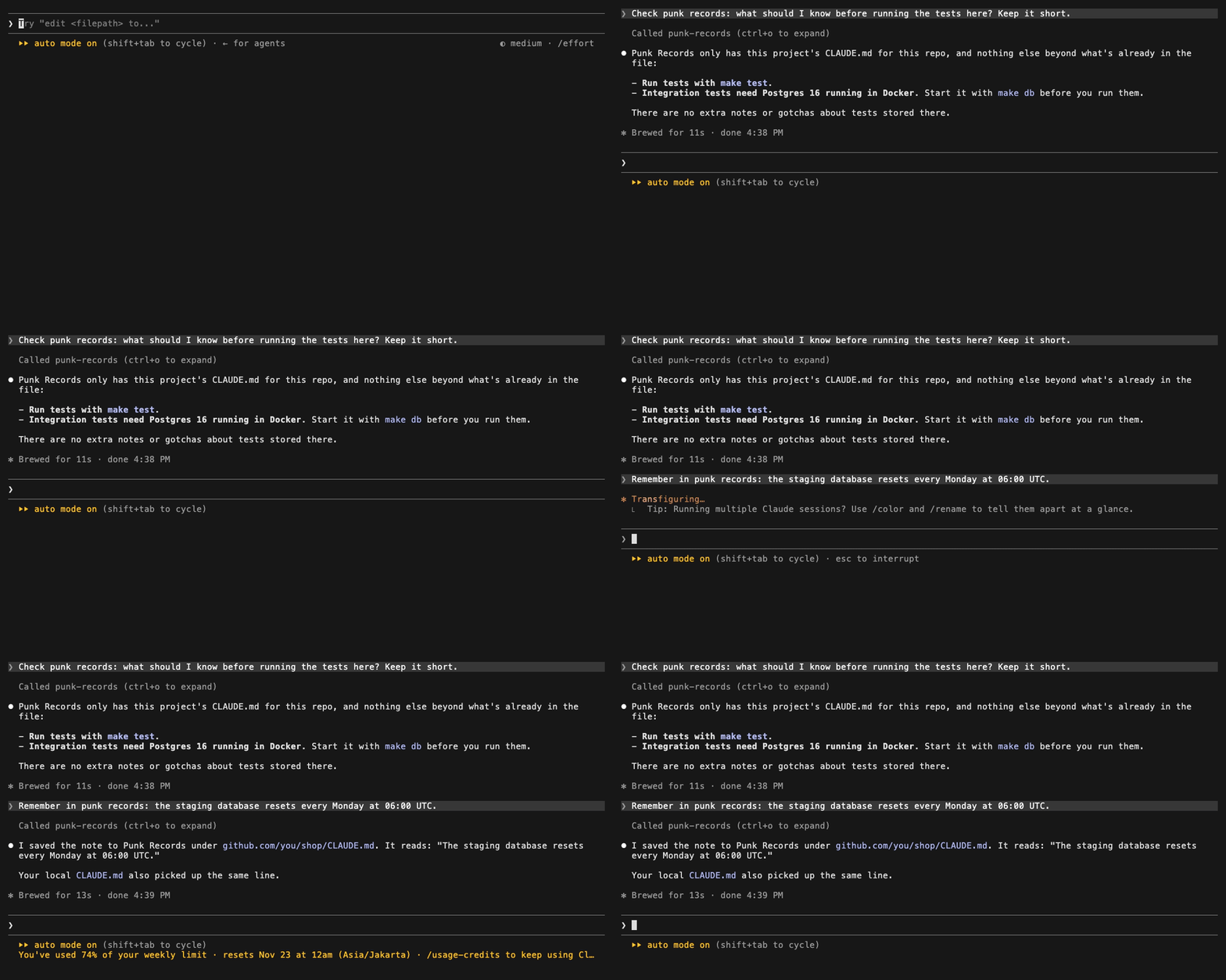
| You say | The agent uses |
|---|---|
| "Before you start, check punk records for what I already know about this repo." | get_context |
| "Search punk records across all my projects: how did I set up GitHub Actions caching?" | search_memories |
| "Which projects do I have memories for?" | list_satellites, list_memories |
| "Show me the napkin for github.com/me/api." | read_memory |
| "Remember in punk records: integration tests need Docker running." | append_memory |
| "Before we finish, save the gotchas you hit today to this project's CLAUDE.md in punk records." | append_memory |
| "Tidy up this project's CLAUDE.md in punk records: merge duplicates and group by topic." | read_memory, write_memory |
| "Sync punk records." | sync (only with punk mcp --allow-sync) |
The same phrases, one per line, to copy:
Before you start, check punk records for what I already know about this repo.
Search punk records across all my projects: how did I set up GitHub Actions caching?
Which projects do I have memories for?
Show me the napkin for github.com/me/api.
Remember in punk records: integration tests need Docker running.
Before we finish, save the gotchas you hit today to this project's CLAUDE.md in punk records.
Tidy up this project's CLAUDE.md in punk records: merge duplicates and group by topic.
Sync punk records.Find threats in your stack.
OX Radar can check high-priority threats, like critical package CVEs, against your context.
Each incident is marked Detected or Not Detected with a remediation plan and proof all tracked in the Response Center.
The probe returned only these fields for this server — auth requirement, protocol and tool list weren’t observed, so they’re not shown (never guessed).
The publisher’s own links, as the registry reports them. These are not sources for the assessment on this page.
 Read the latest findings