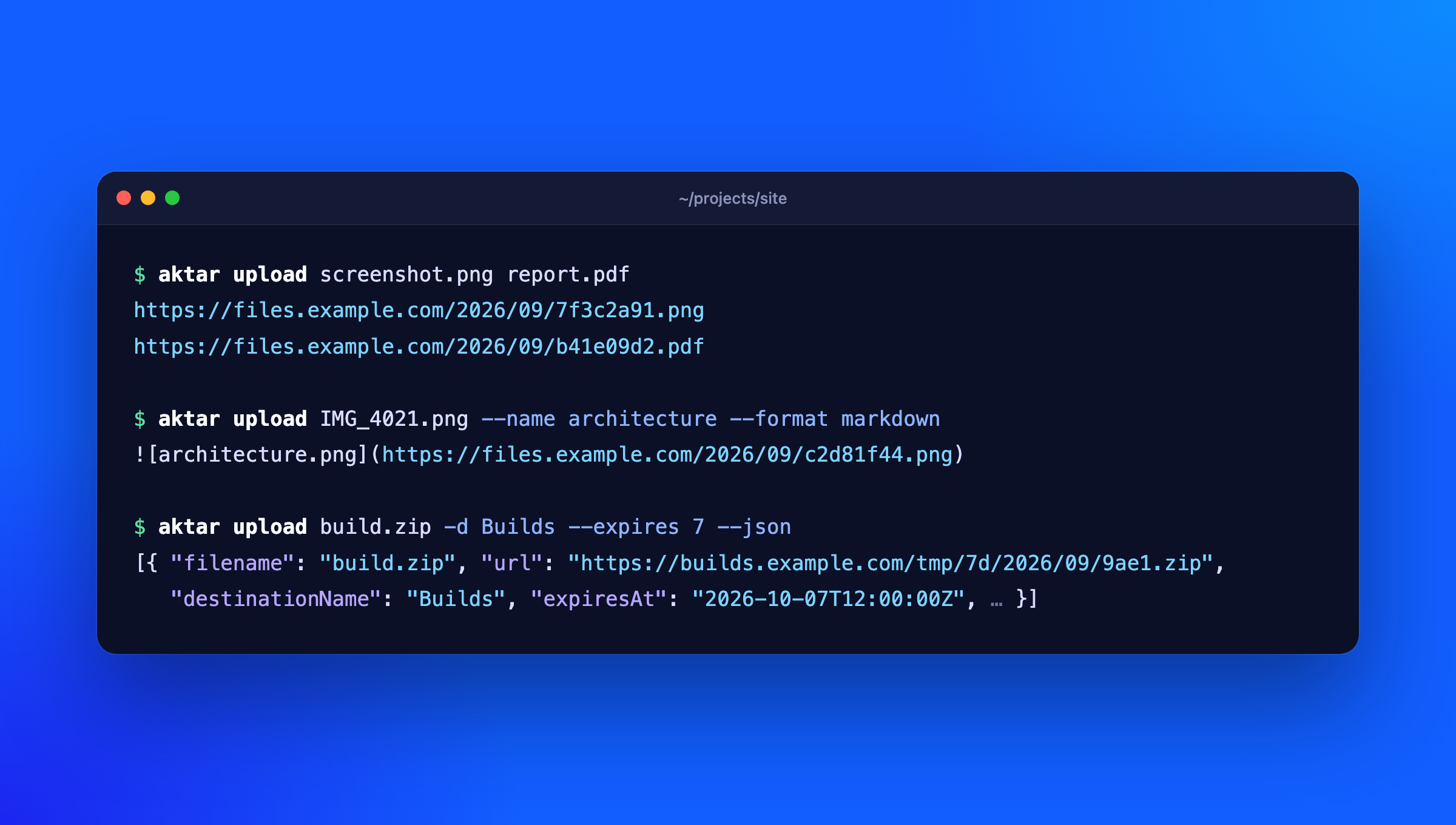
The aktar command talks to the Aktar app on your Mac or Windows PC, so it uses the destinations, keys, path templates and link settings you already set up there. Your storage keys never leave the app.
$ aktar upload screenshot.png
https://files.example.com/2026/09/7f3c2a91.png
Install
npm install -g @getaktar/cli
# or
brew install getaktar/tap/aktar-cli
Or run it without installing: npx @getaktar/cli upload file.png.
Requires Node.js 18 or later and Aktar for Mac 0.18.0 or Aktar for Windows 0.11.0 or later (earlier versions of the CLI work with Aktar for Mac 0.4.0 and later).
Connect to Aktar
- In Aktar, open Settings > Integrations and turn on Allow local connections.
- Copy the token shown there.
- Run:
aktar login
and paste the token when asked (avoid aktar login --token <token>: other programs can see command lines, and it stays in your shell history). It's checked against Aktar and saved to ~/.config/aktar/cli.json (%APPDATA%\aktar\cli.json on Windows), readable only by you. You can also pipe it in (pbpaste | aktar login) or set AKTAR_TOKEN (and AKTAR_PORT if you changed the port) instead.
Usage
aktar upload report.pdf                     # prints the link
aktar upload *.png -f markdown              # one Markdown image per file
aktar upload build.zip -d Builds            # pick a destination by name or ID
aktar upload notes.txt --folder docs/2026   # keep the name, upload into a folder
aktar upload IMG_4021.jpg --name cover      # upload as cover.jpg
aktar upload log.txt --expires 7            # delete after 7 days
aktar upload --clipboard                    # the file or image on the clipboard
aktar upload demo.mp4 --qr                  # the link and a QR code to open it on your phone
aktar upload talk.pdf --short               # a short link from the destination's link shortener
aktar upload photo.jpg --json               # full details as JSON

aktar status                                # which Aktar and destination you're connected to
aktar destinations                          # list destinations and their kind (* marks the selected one)
aktar history invoice -n 5                  # search recent uploads
aktar replace 0B6C2F8E-3D1A-4C55-9E2B-7A41D0C3E9F1 v2.png  # new file, same link
aktar replace docs/guide.pdf guide.pdf -d Docs  # replace a key in a destination's bucket
aktar qr https://example.com                # a QR code of any link or text
aktar qr 0B6C2F8E-3D1A-4C55-9E2B-7A41D0C3E9F1  # a QR code of an upload in history
aktar short 0B6C2F8E-3D1A-4C55-9E2B-7A41D0C3E9F1  # a short link for an upload in history
Without -d, files go to the destination selected in Aktar's menu bar. Uploads show up in Aktar's history like any other.
--format chooses what's printed: url (default), markdown, html, or custom (your template from Aktar). --expires takes 1, 7, 14 or 30 days and needs Aktar's auto-delete rules on that destination; without it, files are kept.
Each destination has a kind of storage: s3 (Cloudflare R2, Amazon S3, Backblaze B2, MinIO and other S3-compatible storage), webdav (Aktar for Mac 0.23.0 / Windows and Linux 0.17.0 and later) or sftp (a later Aktar); older apps only have s3. aktar destinations shows it next to the provider, and --json has it as kind. WebDAV and SFTP destinations can't delete files after a while or make temporary links, so aktar upload -d <destination> --expires is refused for them before anything is uploaded. When Aktar itself turns a request down because the destination can't do it (HTTP 409), aktar prints Aktar's message on one line and exits 1.
--name uploads a single file under another name: it's what {filename} and {ext} in the destination's path template become, and what Aktar's history shows. If the name has no extension, the file's own is added (--name cover uploads IMG_4021.jpg as cover.jpg); if it has one, it's used as given. With --folder, it's the name inside the folder.
If the same file (same contents, destination and expiry) is already in the bucket, Aktar doesn't upload it again and gives you the existing link. aktar prints the link as usual and notes it on stderr (aktar: photo.jpg: already uploaded, reused the existing link), so scripts reading stdout still get one link per file. This needs Aktar for Mac 0.10.0 or Windows 0.3.0.
Short links
If a destination has a link shortener set up in Aktar (Shlink, YOURLS, Kutt, Dub, Short.io or your own), Aktar shortens its links following that destination's rules, and aktar prints the short link. --format uses it too: the Markdown, HTML and custom formats come from Aktar with the short link in them.
--short makes a short link for this upload even if the destination's "Only shorten links longer than" rule would skip it. It fails if the destination has no link shortener.--no-short makes none this time.
If Aktar can't make the short link (the shortener is down, say), the upload still goes through: aktar prints the original link and notes it on stderr (aktar: talk.pdf: couldn't make a short link, printed the original link: ...).
aktar short <upload-id|link> makes a short link for an upload already in history, found by its ID, link or short link, and prints it. If it already has one, that's the one printed. --json prints the short link's details (provider, status, clicks when the shortener counts them), --qr adds its QR code. aktar history shows each upload's short link after its link.
Older versions of Aktar, and Aktar for Windows until it has short links, ignore --short and --no-short.
QR codes
aktar upload --qr prints a QR code under each link, so you can open it on your phone. The QR code is always of the link itself (the short link, if there is one), whatever --format prints. It's drawn black on white in the terminal, whatever its theme; when the output isn't a terminal, or NO_COLOR is set, it's drawn without colors (light modules as blocks), which phone cameras read on a light or dark background. --qr can't be combined with --json.
aktar qr <text> shows the QR code of any link or text; quote text with spaces. Given an upload ID from aktar history --json, it shows that upload's link (its short link, if it has one) and its QR code. --png <file> saves the QR code as a PNG instead:
aktar qr https://files.example.com/2026/09/7f3c2a91.png --png link.png
What Aktar does for you
The app does the work per destination, so the CLI needs nothing extra for it:
- Converting images to WebP or AVIF, if the destination is set to
{md5} and {sha256} in path templates, to name files by their contents- Big files: past 5 GB, Aktar uploads in parts and resumes after a dropped connection.
aktar streams the file to the app, so its size doesn't matter
The link aktar prints is the one for the file as stored, after any conversion.
JSON output
aktar upload --json prints an array with one entry per uploaded file:
[
  {
    "id": "0B6C…",
    "filename": "photo.jpg",
    "objectKey": "2026/09/7f3c2a91.jpg",
    "url": "https://files.example.com/2026/09/7f3c2a91.jpg",
    "shortUrl": null,
    "destinationId": "5D1A…",
    "destinationName": "Screenshots",
    "mimeType": "image/jpeg",
    "size": 482113,
    "createdAt": "2026-09-30T12:00:00Z",
    "expiresAt": null,
    "formats": { "url": "…", "markdown": "…", "html": "…", "custom": "…" },
    "reused": false
  }
]
reused is true when nothing was uploaded because the file was already there; older versions of Aktar leave it out. shortUrl is the upload's short link, or null when it has none; formats already use it. When Aktar couldn't make the short link, shortLinkError says why. aktar history --json has shortUrl too.
Exit codes
| Code |
Meaning |
| 0 |
Everything worked |
| 1 |
At least one upload or request failed (the others still went through) |
| 2 |
Bad arguments, or a file that doesn't exist (nothing was uploaded) |
| 3 |
Not logged in, Aktar isn't running, its local API is off, the token is wrong, or the app on the port couldn't prove it's Aktar (or is too old to) |
AI agents (MCP and skill)
MCP server
aktar mcp runs a Model Context Protocol server, so Claude, Cursor, VS Code, Codex and other agents can upload through Aktar, find past uploads and make links. Connect Aktar first (aktar login), then add it to your agent with the folder it may upload files from:
claude mcp add aktar -- aktar mcp --root ~/Projects    # Claude Code
codex mcp add aktar -- aktar mcp --root ~/Projects     # Codex
For Claude Desktop, Cursor, VS Code and others that take a JSON config:
{
  "mcpServers": {
    "aktar": { "command": "aktar", "args": ["mcp", "--root", "/Users/you/Projects"] }
  }
}
Without a global install, use "command": "npx", "args": ["-y", "@getaktar/cli", "mcp", "--root", "/Users/you/Projects"].
| Tool |
What it does |
upload_file |
Upload a file (destination, name, folder, expiry, short link optional) and return its link, Markdown and HTML |
upload_clipboard |
Upload what's on the clipboard (left out with --root) |
replace_file |
Write a new file over an upload or any file in a bucket, keeping its link (only with --allow-replace or --allow-delete; Mac 0.14.0 / Windows 0.7.0) |
create_short_link |
A short link for an upload, from its destination's link shortener |
search_uploads |
Search upload history (with each upload's short link) |
list_destinations |
Destinations, their kind (s3, webdav, sftp) and what file types each is used for |
list_bucket |
Browse a bucket's folders and files |
create_temporary_link |
A link that stops working after a while (presigned URL). This gives access: anyone with the link can download the file until it expires, even from a private bucket. At most 60 minutes unless --max-link-minutes allows more. Only s3 destinations; WebDAV and SFTP ones are refused with a plain message |
get_thumbnail |
A preview image of an upload (Mac 0.13.0 / Windows 0.6.0) |
list_watched_folders |
Watched folders and their status |
pause_watching |
Pause watched folders, for a number of minutes or until resumed (Mac 0.11.0 / Windows 0.4.0) |
resume_watching |
Resume watched folders |
get_status |
Check the connection |
delete_upload |
Delete an upload from its bucket (only with --allow-delete) |
Uploading publishes a file, so keep an eye on what your agent sends. Your agent asks before calling a tool unless you allow it, and the server limits what it can reach:









