






Scan your whole stack








Latest version: v0.7.3
GhostPaw Affinity was last scanned on 25 Nov 2026 at version 0.7.3. Risk score 20 of 100 (low). High-severity rules fired.
| Version | Published | Status |
|---|---|---|
| 0.7.3 LATEST | 25 Nov 2026 | 1 rule fired |
| 0.7.2 | 12 Nov 2026 | No rules fired |
| 0.7.1 | 10 Nov 2026 | No rules fired |
| 0.7.0 | 5 Nov 2026 | Not shown |
| 0.6.2 | 4 Nov 2026 | Not shown |
Findings for v0.7.3. The score is a capped sum of the weights of the rules that fired — not CVSS, not exploitability, and not a probability. It is not comparable across packages with different scan coverage.
The skill's instructions or bundled files tell the agent to download content from a remote location and run it. This pattern can be used to change behavior after a review, but it also appears in legitimate installers. Check the source.
HIGHThe score describes 0.7.3; other versions have their own rules, not their own score.
The publisher’s own README, as collected from the registry.
Agent contacts: people, promises and yearly dates, with a radar for who is drifting.
A local social CRM: contacts, identities, relationships, journal events, commitments and recurring dates in one SQLite file. One self-contained binary per platform, an MCP server, and a zero-dependency TypeScript library.
Each line downloads the latest release for one platform, checks it against
SHA256SUMS, puts ghostpaw-affinity on your PATH and prints the version.
Linux x64
cd "$(mktemp -d)" && T=linux-x64 && V=$(curl -fsSLI -o /dev/null -w '%{url_effective}' https://github.com/GhostPawJS/affinity/releases/latest | sed 's|.*/v||') && F=ghostpaw-affinity-$V-$T.tar.gz && U=https://github.com/GhostPawJS/affinity/releases/download/v$V && curl -fsSL -O "$U/$F" -O "$U/SHA256SUMS" && grep " $F\$" SHA256SUMS | sha256sum -c - && tar -xzf "$F" ghostpaw-affinity && mkdir -p ~/.local/bin && mv ghostpaw-affinity ~/.local/bin/ && { case ":$PATH:" in *":$HOME/.local/bin:"*) ;; *) echo 'export PATH="$HOME/.local/bin:$PATH"' >> ~/.profile; export PATH="$HOME/.local/bin:$PATH";; esac; } && ghostpaw-affinity --versionLinux arm64
cd "$(mktemp -d)" && T=linux-arm64 && V=$(curl -fsSLI -o /dev/null -w '%{url_effective}' https://github.com/GhostPawJS/affinity/releases/latest | sed 's|.*/v||') && F=ghostpaw-affinity-$V-$T.tar.gz && U=https://github.com/GhostPawJS/affinity/releases/download/v$V && curl -fsSL -O "$U/$F" -O "$U/SHA256SUMS" && grep " $F\$" SHA256SUMS | sha256sum -c - && tar -xzf "$F" ghostpaw-affinity && mkdir -p ~/.local/bin && mv ghostpaw-affinity ~/.local/bin/ && { case ":$PATH:" in *":$HOME/.local/bin:"*) ;; *) echo 'export PATH="$HOME/.local/bin:$PATH"' >> ~/.profile; export PATH="$HOME/.local/bin:$PATH";; esac; } && ghostpaw-affinity --versionmacOS Apple silicon
cd "$(mktemp -d)" && T=darwin-arm64 && V=$(curl -fsSLI -o /dev/null -w '%{url_effective}' https://github.com/GhostPawJS/affinity/releases/latest | sed 's|.*/v||') && F=ghostpaw-affinity-$V-$T.tar.gz && U=https://github.com/GhostPawJS/affinity/releases/download/v$V && curl -fsSL -O "$U/$F" -O "$U/SHA256SUMS" && grep " $F\$" SHA256SUMS | shasum -a 256 -c - && tar -xzf "$F" ghostpaw-affinity && sudo mkdir -p /usr/local/bin && sudo mv ghostpaw-affinity /usr/local/bin/ && ghostpaw-affinity --versionmacOS Intel
cd "$(mktemp -d)" && T=darwin-x64 && V=$(curl -fsSLI -o /dev/null -w '%{url_effective}' https://github.com/GhostPawJS/affinity/releases/latest | sed 's|.*/v||') && F=ghostpaw-affinity-$V-$T.tar.gz && U=https://github.com/GhostPawJS/affinity/releases/download/v$V && curl -fsSL -O "$U/$F" -O "$U/SHA256SUMS" && grep " $F\$" SHA256SUMS | shasum -a 256 -c - && tar -xzf "$F" ghostpaw-affinity && sudo mkdir -p /usr/local/bin && sudo mv ghostpaw-affinity /usr/local/bin/ && ghostpaw-affinity --versionWindows x64 (PowerShell)
$r='GhostPawJS/affinity'; $v=(irm "https://api.github.com/repos/$r/releases/latest").tag_name; $f="ghostpaw-affinity-$($v.TrimStart('v'))-windows-x64.zip"; $u="https://github.com/$r/releases/download/$v"; $t=(New-Item -ItemType Directory (Join-Path $env:TEMP ([guid]::NewGuid()))).FullName; iwr "$u/$f" -OutFile "$t\$f" -UseBasicParsing; iwr "$u/SHA256SUMS" -OutFile "$t\SHA256SUMS" -UseBasicParsing; $want=((Get-Content "$t\SHA256SUMS" | Where-Object { $_ -like "* $f" }) -split '\s+')[0]; if (-not $want -or (Get-FileHash "$t\$f" -Algorithm SHA256).Hash -ne $want) { throw "checksum mismatch for $f" }; $d=Join-Path $env:LOCALAPPDATA 'Programs\ghostpaw\bin'; Expand-Archive "$t\$f" $t -Force; New-Item -ItemType Directory -Force $d | Out-Null; Copy-Item "$t\ghostpaw-affinity.exe" $d -Force; $p=[Environment]::GetEnvironmentVariable('Path','User'); if (";$p;" -notlike "*;$d;*") { [Environment]::SetEnvironmentVariable('Path',"$p;$d",'User') }; $env:Path="$d;$env:Path"; ghostpaw-affinity --versionThese commands install the latest release in ~/.local/bin on Linux, /usr/local/bin on macOS (asks for sudo), or %LOCALAPPDATA%\Programs\ghostpaw\bin on Windows; Linux adds it to PATH via ~/.profile only if missing, and Windows adds it to the user PATH (open a new terminal afterwards). To pin a version, set V=0.6.0 instead of resolving latest ($v='v0.6.0' in PowerShell).
For a pinned Linux/macOS download to the current directory with no profile or PATH edits, choose the matching T (linux-x64, linux-arm64, darwin-arm64, or darwin-x64):
V=0.6.0
T=linux-x64
F=ghostpaw-affinity-$V-$T.tar.gz
U=https://github.com/GhostPawJS/affinity/releases/download/v$V
curl -fsSL -O "$U/$F" -O "$U/SHA256SUMS" &&
  { case "$T" in darwin-*) grep " $F\$" SHA256SUMS | shasum -a 256 -c - ;; *) grep " $F\$" SHA256SUMS | sha256sum -c - ;; esac; } &&
  tar -xzf "$F" ghostpaw-affinity && ./ghostpaw-affinity --version
Then:
ghostpaw-affinity contact create '{"name":"Owner","kind":"agent"}' --bootstrap-owner
ghostpaw-affinity contact create '{"name":"Sam","kind":"human"}' --json | jq .id
ghostpaw-affinity search sam
ghostpaw-affinity skill            # cheat sheet and tool reference
Contacts live in ~/.ghostpaw/affinity.db unless --db <path> or the
GHOSTPAW_AFFINITY_DB environment variable says otherwise; relative paths
resolve against the current directory.
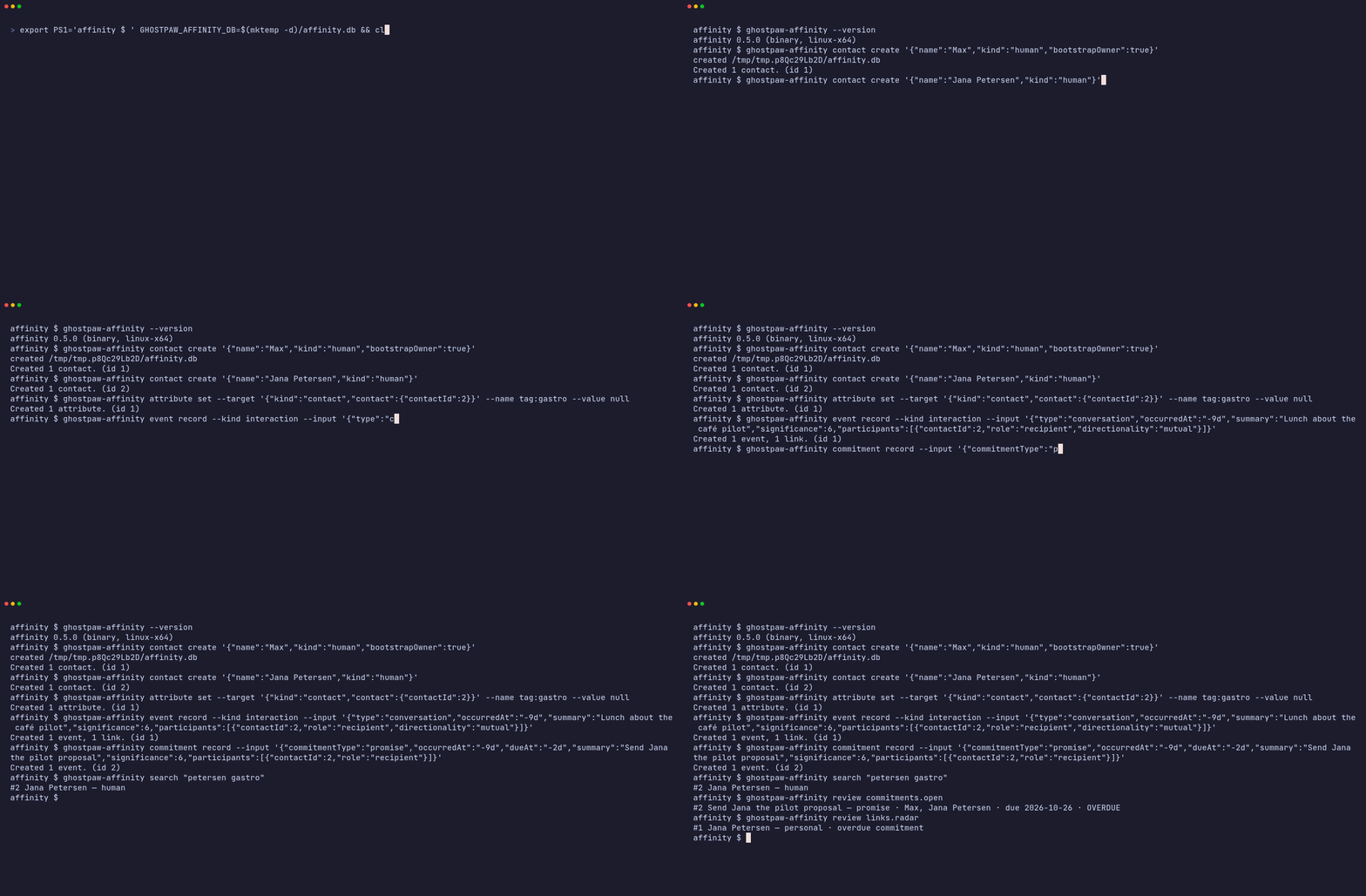
A session with the linux-x64 binary against a fresh database:
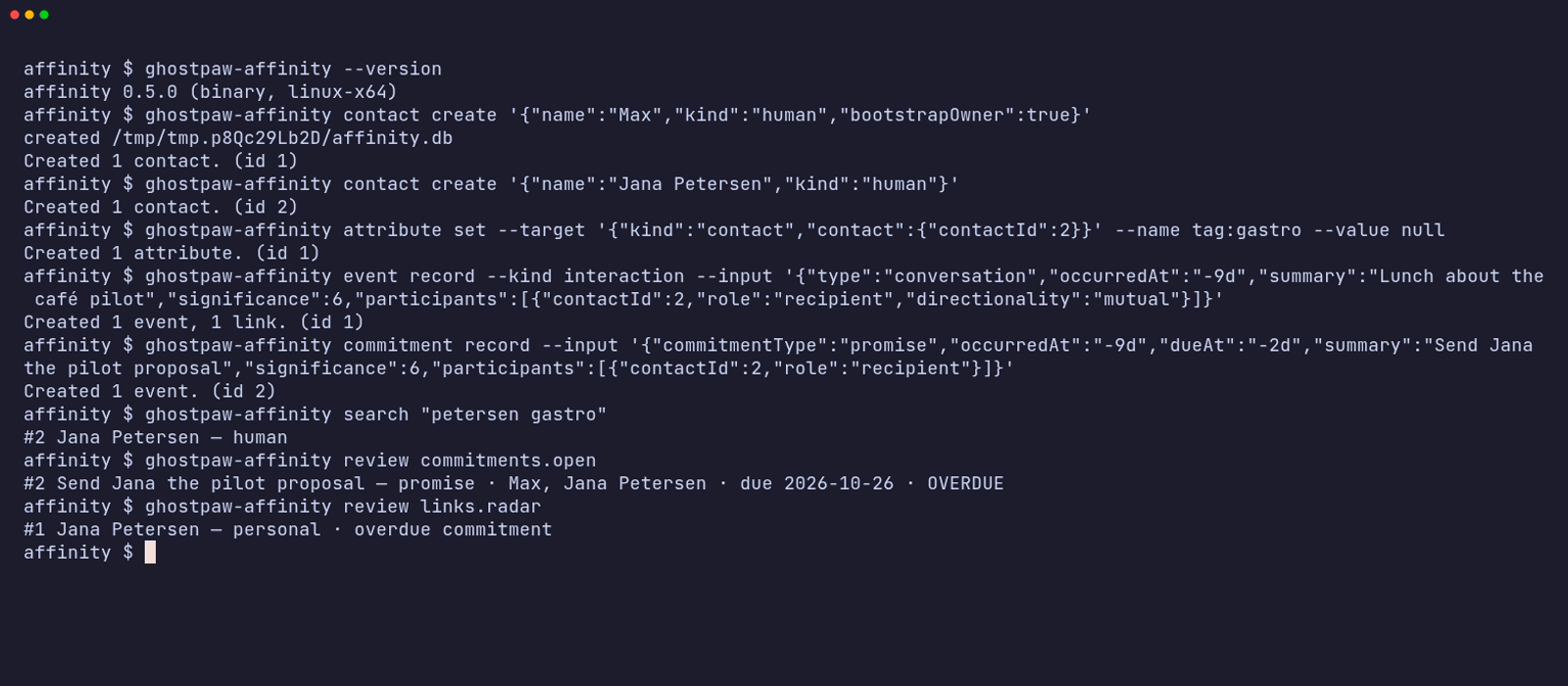
The same session as an animated GIF.
The npm package needs Node 24+ and has zero runtime dependencies:
npx -y @ghostpaw/affinity --help
npm install -g @ghostpaw/affinity # provides ghostpaw-affinitynpm install @ghostpaw/affinityimport { DatabaseSync } from "node:sqlite";
import { initAffinityTables, read, write, tools } from "@ghostpaw/affinity";See Quick Start and docs/LLM.md for the tool facade.
Interactive installers (also verify SHA256SUMS):
curl -fsSL https://raw.githubusercontent.com/GhostPawJS/affinity/main/install.sh | shirm https://raw.githubusercontent.com/GhostPawJS/affinity/main/install.ps1 | iexmise use -g github:GhostPawJS/affinity
ubi --project GhostPawJS/affinity --exe ghostpaw-affinity --in ~/.local/bin
eget GhostPawJS/affinityFor aqua, define a
github_release package in aqua.yaml:
registries:
  - name: affinity
    type: local
    path: affinity-registry.yaml
packages:
  - name: GhostPawJS/affinity@v<VERSION>
registry: affinityaffinity-registry.yaml:
packages:
  - type: github_release
    repo_owner: GhostPawJS
    repo_name: affinity
    asset: ghostpaw-affinity-{{trimV .Version}}-{{.OS}}-{{.Arch}}.tar.gz
    format: tar.gz
    replacements: { amd64: x64 }
    overrides:
      - goos: windows
        asset: ghostpaw-affinity-{{trimV .Version}}-windows-{{.Arch}}.zip
        format: zip
    files:
      - name: ghostpaw-affinity
SHA256SUMS covers every archive and server.mcpb. To verify a downloaded
archive's build attestation:
gh attestation verify <archive> -R GhostPawJS/affinitySet GHOSTPAW_VERIFY=attestation for attestation verification in install.sh.
Binaries are unsigned; macOS binaries carry an ad-hoc signature. For a browser
download on macOS, remove quarantine with
xattr -d com.apple.quarantine /path/to/ghostpaw-affinity.
Linux binaries require glibc 2.28+; use npx on Alpine.
See the binary build workflow.
Each archive is roughly 40-46 MB (the binary embeds the Node runtime, 105-150 MB unpacked); the npm package is about 2 MB unpacked. Every release, including the one-liners above, is installed and run on ubuntu-24.04, macos-15 and windows-2025 by the install check.
Inside a Codex CLI --sandbox workspace-write session, the database and its
parent directory must be inside a writable root, including SQLite's -wal and
-shm side files. A default DB under ~/.ghostpaw outside those roots can fail
with SQLITE_CANTOPEN or EPERM (often exit 70; directory creation failures
may exit 2), even when normal shell permissions allow access. Put the DB inside the workspace with --db ./state/affinity.db,
or set GHOSTPAW_AFFINITY_DB="$PWD/state/affinity.db" for CLI/MCP use.
To use an external DB directory, add it when starting the OpenAI Codex CLI
(replace <dir-with-db> with its absolute path):
codex exec --sandbox workspace-write --add-dir <dir-with-db> "Run the GhostPaw CLI"Alternatively, set sandbox_workspace_write.writable_roots in
~/.codex/config.toml before starting the session:
[sandbox_workspace_write]
writable_roots = ["/absolute/dir-with-db"]Every client below starts the same stdio server: ghostpaw-affinity mcp.
Without the binary, use npx -y @ghostpaw/affinity mcp as the command instead.
Claude Code
claude mcp add ghostpaw-affinity -- ghostpaw-affinity mcpor as a plugin, which also installs the skill:
/plugin marketplace add GhostPawJS/affinity
/plugin install ghostpaw-affinity@ghostpaw-affinity
Codex CLI (~/.codex/config.toml)
[mcp_servers.ghostpaw-affinity]
command = "ghostpaw-affinity"
args = ["mcp"]
Cursor (.cursor/mcp.json), Claude Desktop (claude_desktop_config.json)
or a project .mcp.json:
{
  "mcpServers": {
    "ghostpaw-affinity": {
      "command": "ghostpaw-affinity",
      "args": ["mcp"]
    }
  }
}
Claude Desktop users can also install server.mcpb from the
latest GitHub release.
A Dockerfile is included for container hosts:
docker build -t ghostpaw-affinity . && docker run -i --rm -v affinity:/data ghostpaw-affinity.
The server speaks MCP 2026-07-28 (stateless, server/discover) and the
initialize-based revisions 2025-11-25, 2025-06-18, 2025-03-26 and 2024-11-05.
SKILL.md (repo root) and skills/affinity/SKILL.md follow the
Agent Skills format and ship in the npm package.
Copy skills/affinity/ into your agent's skills folder, or print it:
ghostpaw-affinity skill > SKILL.md
ghostpaw-affinity skill --list       # workflow guides
ghostpaw-affinity skill bootstrap-and-cold-startRecord events and commitments with an optional externalRef: {source, id}.
Both values are trimmed and non-empty; source is lowercased. The pair is unique
across the database. Repeated intake returns the original event and no_op,
without creating rows or relationship effects.
content preserves text exactly, including whitespace, empty strings and NUL,
up to 1 MB (1,048,576 UTF-8 bytes). Supply a short summary, or omit it to derive
one from the first non-empty content line (at most 140 characters; empty text
becomes (no text)). Unknown event fields and moment kinds are validation errors.
Journal/timeline rows omit content by default; use {includeContent: true} in
library/tool options or CLI --with-content. Content appears once in review JSON.
Events support a free-text channel (trimmed, lowercased, at most 40 characters),
parentRef, parentEventId, and a root threadRef. Journal, timeline, moments,
and open commitment reviews accept a channel filter. Set event attributes with
write.setAttribute(db, {kind: "event", eventId}, name, value); unset and replace
use the same target and validation as contact/link attributes.
Read exact events with read.getEventById(db, eventId) or
read.getEventByExternalRef(db, source, id). read.searchEvents searches folded
summary, content, reference and channel text. The search tool's scope is
contacts by default, with additive events and all modes.
read.getEventThread(db, source, id) returns a root and its descendants in time
order, including parents imported after their children.
write.reviseEvent(db, eventIdOrTarget, patch) accepts summary, content,
occurredAt, significance, channel, type within the same event family, and an
externalRef only when absent. write.deleteEvent(db, eventIdOrTarget, {confirm: true}) removes evidence, participants, attributes and link effects,
then replays surviving effects and refreshes rollups. Targets can also be
{ref: {source, id}}. Existing 0.5.x databases migrate through
initAffinityTables. Historical affinity/trust/rank baselines are recovered
from saved deltas; historical cadence and state before evidence were not stored
and use the default cadence and active state during replay.
export GHOSTPAW_AFFINITY_DB=~/crm/affinity.db      # or --db <path>
ghostpaw-affinity contact create '{"name":"Fox","kind":"human","bootstrapOwner":true}'
ghostpaw-affinity search "jana"                     # names, identities, tags, attributes, roles, events
ghostpaw-affinity contact create '{"name":"Jana Petersen","kind":"human"}'
ghostpaw-affinity identity add --contact '{"contactId":2}' --input '{"type":"email","value":"jana@example.com"}'
ghostpaw-affinity event record --kind interaction --input '{"type":"conversation","occurredAt":"today","summary":"Call re pilot","significance":6,"participants":[{"contactId":2,"role":"recipient","directionality":"mutual"}]}'
ghostpaw-affinity commitment record --input '{"commitmentType":"promise","occurredAt":"today","dueAt":"+3d","summary":"Send proposal","significance":6,"participants":[{"contactId":2,"role":"recipient"}]}'
ghostpaw-affinity attribute set --target '{"kind":"contact","contact":{"contactId":2}}' --name tag:gastro --value null
ghostpaw-affinity review contacts.list --tag gastro
ghostpaw-affinity review contacts.list --attribute pipeline_stage=proposal
ghostpaw-affinity review commitments.open            # overdue promises are flagged
ghostpaw-affinity review links.radar                 # who is drifting, with reasons
ghostpaw-affinity show contact_profile --contact '{"contactId":2}'
ghostpaw-affinity contact export --contact '{"contactId":2}'   # omit --contact for the whole database
ghostpaw-affinity contact delete --contact '{"contactId":2}' --confirm
ghostpaw-affinity skill prints the full cheat sheet; skill --list and
skill <guide> print the workflow guides.
Find threats in your stack.
OX Radar can check high-priority threats, like critical package CVEs, against your context.
Each incident is marked Detected or Not Detected with a remediation plan and proof all tracked in the Response Center.
The probe returned only these fields for this server — auth requirement, protocol and tool list weren’t observed, so they’re not shown (never guessed).
The publisher’s own links, as the registry reports them. These are not sources for the assessment on this page.
 Read the latest findings