Scan your whole stack


From OX Research Newsroom






Latest version: v0.14.6
figlens was last scanned on 24 Nov 2026 at version 0.14.6. Risk score 20 of 100 (low). High-severity rules fired.
| Version | Published | Status |
|---|---|---|
| 0.14.6 LATEST | 24 Nov 2026 | 1 rule fired |
| 0.14.5 | 16 Nov 2026 | No rules fired |
| 0.14.4 | 12 Nov 2026 | No rules fired |
| 0.14.3 | 9 Nov 2026 | Not shown |
Findings for v0.14.6. The score is a capped sum of the weights of the rules that fired — not CVSS, not exploitability, and not a probability. It is not comparable across packages with different scan coverage.
The skill's instructions or bundled files tell the agent to download content from a remote location and run it. This pattern can be used to change behavior after a review, but it also appears in legitimate installers. Check the source.
HIGHThe score describes 0.14.6; other versions have their own rules, not their own score.
The publisher’s own README, as collected from the registry.
figlens turns saved Figma files into design context your coding agent can act on—not just a screenshot to interpret.
bundle collects a frame's data, assets and reference render; verify reports missing files, font checks and handoff limitations. MCP nodes can save large node JSON to a file with out instead of returning it inline.compare-image compares your screenshot with figlens's render and names the layers under differing regions. Review those differences and rendering warnings; it is not a pixel-perfect guarantee.diff compares saved revisions; changes and watch report updates to tracked local scopes; freshness tells when a saved copy is older than the online file, and pull saves a new copy through your own browser sign-in. Save a new .fig from Figma to pick up design edits—this is not live Figma sync. Named accounts route each design to separate browser profiles and API-token environment variables; existing defaults stay unchanged. figlens sources init [DIR]: Scan local .fig files into .figlens/sources.json without overwriting it; names come from meta.json or the filename. Fill in the blank URLs before pulling.Offline at the foundation. In Figma, File > Save local copy. Put design.fig next to your code. Then a Figma link is enough: its node id picks the frame. With no saved copy, copy the layers in Figma (right-click > Copy) and run figlens clipboard screen.fig; a copy has no images or vector outlines (how). One native binary reads it locally, without a running Figma app, login or network calls to Figma; only the opt-in freshness check (with a configured API token; default: FIGMA_TOKEN) and pull (through your browser sign-in) reach Figma.
No design file yet? Check your setup with the tiny public example: verify your chosen binary, find one frame and validate its bundle. No model required.
Put design.fig in your project, then choose one setup. Each gives your agent the figlens tools and the same built-in guidance for planning, implementation and image preparation.
| Setup | Use it for | Guidance comes from |
|---|---|---|
| Plugin | Claude Code, Codex, Antigravity, Cursor, Kimi Code | the plugin's skill and the server's workflow tool |
| MCP | Claude Code, Cursor, Codex, Gemini CLI and other MCP clients | the server's workflow tool |
| Pi | Pi 1.3.0+ | the package, which ships the skill |
| OpenCode V2 | OpenCode V2 2.2.0 | the package skill |
| OMP | OMP 18.13.2 | the package skill |
| Herdr | a panel beside your agents in Herdr 0.1.12+: find a screen, hand it to one, track each screen's progress on a board | the receiving agent's own setup |
| CLI | agents that only run shell commands, scripts and CI, or you | figlens workflow <topic>, or the optional skill |
Ordinary vs advanced. Ordinary use needs no setup: figlens search design.fig "query" reads the .fig and creates nothing. An optional local index is created only when you ask for one (figlens index prepare design.fig --scope 0:0), then reused across restarts and hosts. See Ordinary search and the optional local index. Optional and experimental: --mode semantic or hybrid ranks by meaning with a local model you set up yourself; see Optional semantic search.
One install adds the figlens skill and MCP server to your agent (Node.js 18+). The server is pinned to the plugin's release (npx -y @runkids/figlens@<version> mcp); update the plugin to move to a new version.
| Host | Install |
|---|---|
| Claude Code | claude plugin marketplace add runkids/figlens, claude plugin install figlens@figlens |
| Codex | codex plugin marketplace add runkids/figlens, codex plugin add figlens@figlens |
| Antigravity | agy plugin install https://github.com/runkids/figlens/tree/main |
| Cursor | git clone --depth 1 https://github.com/runkids/figlens ~/.cursor/plugins/local/figlens, then reload the window |
| Kimi Code | /plugins install https://github.com/runkids/figlens/tree/main in a session, then /reload |
skillshare installs the same plugin on several hosts at once: skillshare plugin add https://github.com/runkids/figlens.git --target claude --target codex --target cursor -g; update it later with skillshare plugin update figlens -g.
Restart the host or start a new session, then check that the figlens tools are listed. A plugin install copies the repository: about 7 MB, plus the Git history (about 60 MB) in Codex. Antigravity loads only the first 24 KB of the skill; the server's workflow tool serves the full guidance. Muse is not supported yet. Host matrix and what was verified
Claude Code (Node.js 18+, macOS/Linux):
claude mcp add --transport stdio --scope local figlens -- npx -y @runkids/figlens mcpCodex CLI (Node.js 18+, macOS/Linux):
codex mcp add figlens -- npx -y @runkids/figlens mcpAny MCP client:
{
  "mcpServers": {
    "figlens": {
      "command": "npx",
      "args": ["-y", "@runkids/figlens", "mcp"]
    }
  }
}
Without Node.js, install the standalone binary (CLI) and use "command": "figlens", "args": ["mcp"]. Start a new session and check that the figlens tools are listed (/mcp in Claude Code). No separate skill install is required. Add --root <dir> after mcp to limit which folders figlens may read and write.
Add these options after mcp in your client's args. These are the only MCP startup options; both are optional and repeatable.
| Option | Meaning |
|---|---|
--root DIR |
Allows design reads and exports inside DIR and its subfolders. Without it, figlens adds no path restriction: OS permissions still apply. It does not default to the current project or scan the computer. |
--storage-root DIR |
Allows explicitly requested custom index storage inside DIR and its subfolders. It does not select or change the default storage location. |
Use absolute paths to existing directories. Each option and path is a separate array item; repeat the option for multiple folders. --root means a path boundary, not administrator access, and only restricts figlens MCP, not the agent's other tools.
Example with two design/output roots and two allowed storage roots:
{
  "mcpServers": {
    "figlens": {
      "command": "npx",
      "args": [
        "-y", "@runkids/figlens", "mcp",
        "--root", "/absolute/designs",
        "--root", "/absolute/project",
        "--storage-root", "/absolute/storage-a",
        "--storage-root", "/absolute/storage-b"
      ]
    }
  }
}
There is no figlens mcp --storage option. Choose the actual location with the index tool's storage argument (an absolute path under an allowed storage root), or CLI figlens index prepare design.fig --storage /absolute/storage-a. After prepare, figlens remembers that workspace's location and reuses it across restarts and hosts without repeating storage or --storage-root. Without a custom location, the per-user defaults apply; no storage flag is needed.
To keep these paths out of a checked-in config, or to share designs across Git worktrees, see roots in a checked-in config.
Multiple storage roots only expand the allowed locations: each storage argument still selects one location. They do not distribute, sync or back up indexes. An existing workspace database cannot be moved by simply naming another root; figlens refuses the conflicting location.
One package ships the CLI, MCP, viewer, /figlens commands and skill:
pi install npm:@runkids/figlensPi extension guide
Install the package in OpenCode V2:
opencode plugin add @runkids/figlensRestart the host, then run /figlens help. OpenCode V2
Install the same package in OMP:
omp plugin install @runkids/figlensRestart the host, then run /figlens help. OMP
Run it through npm, or install the standalone binary:
npx @runkids/figlens --help                                                                # Node.js 18+, no install
curl -fsSL https://raw.githubusercontent.com/runkids/figlens/main/scripts/install.sh | sh  # macOS, Linux
brew install runkids/tap/figlens                                                           # Homebrew
irm https://raw.githubusercontent.com/runkids/figlens/main/scripts/install.ps1 | iex      # Windows PowerShell
npx runs the binary of the package version it resolves. Script installs update with figlens update; Homebrew installs with brew upgrade figlens. Binaries cover macOS (Apple silicon, Intel), Linux (arm64, x86_64) and Windows (x86_64).
An agent that uses the CLI reads its guidance with figlens workflow build (also audit, images, search, plan, planning-details and the opt-in yolo), which always matches the binary's version, or from the agent skill.
CLI reference
Different Figma accounts can use figlens pull --login --account work and optional "account": "work" in the source mapping. Existing default sessions need no migration. Figma accounts: browser login and API tokens.
figlens sources init [DIR]: Scan local .fig files into .figlens/sources.json without overwriting it; names come from meta.json or the filename. Fill in the blank URLs before pulling.
The skill teaches an agent the same workflow as the built-in guidance: find the frame, read the bundle in small pieces, plan scoped work and check the running UI against the design. It holds instructions only, so pair it with the CLI or MCP. MCP and Pi setups do not need it.
Recommended: skillshare. Install the skill once and sync it to each agent you use:
skillshare install github.com/runkids/figlens/skills/figlens
skillshare sync
The same tool can also set up the figlens MCP connection for those agents:
skillshare mcp add figlens --global --target claude --target codex --target cursor --no-tui -- npx -y @runkids/figlens mcp
skillshare sync mcp --global
Other ways to install the skill:
npx skills add runkids/figlens --skill figlens # Skills CLIOr copy skills/figlens/ from this repository or a release archive into your agent's skills directory (Claude Code: ~/.claude/skills/). An installed skill updates separately from the binary; figlens workflow always matches it.
Then ask for a screen:
Build the task board from ./design.fig in this project.
Find the matching frame, use this project's components and image workflow,
then compare the running UI with the design and fix confirmed differences.
Report missing assets and any checks you could not run.
The agent finds the frame, bundles its design data, assets and reference image, then builds the screen with your stack. The shared workflow guides font and asset checks; missing inputs are reported while layout implementation continues with documented fallbacks. Ask for the changed files and a browser comparison.
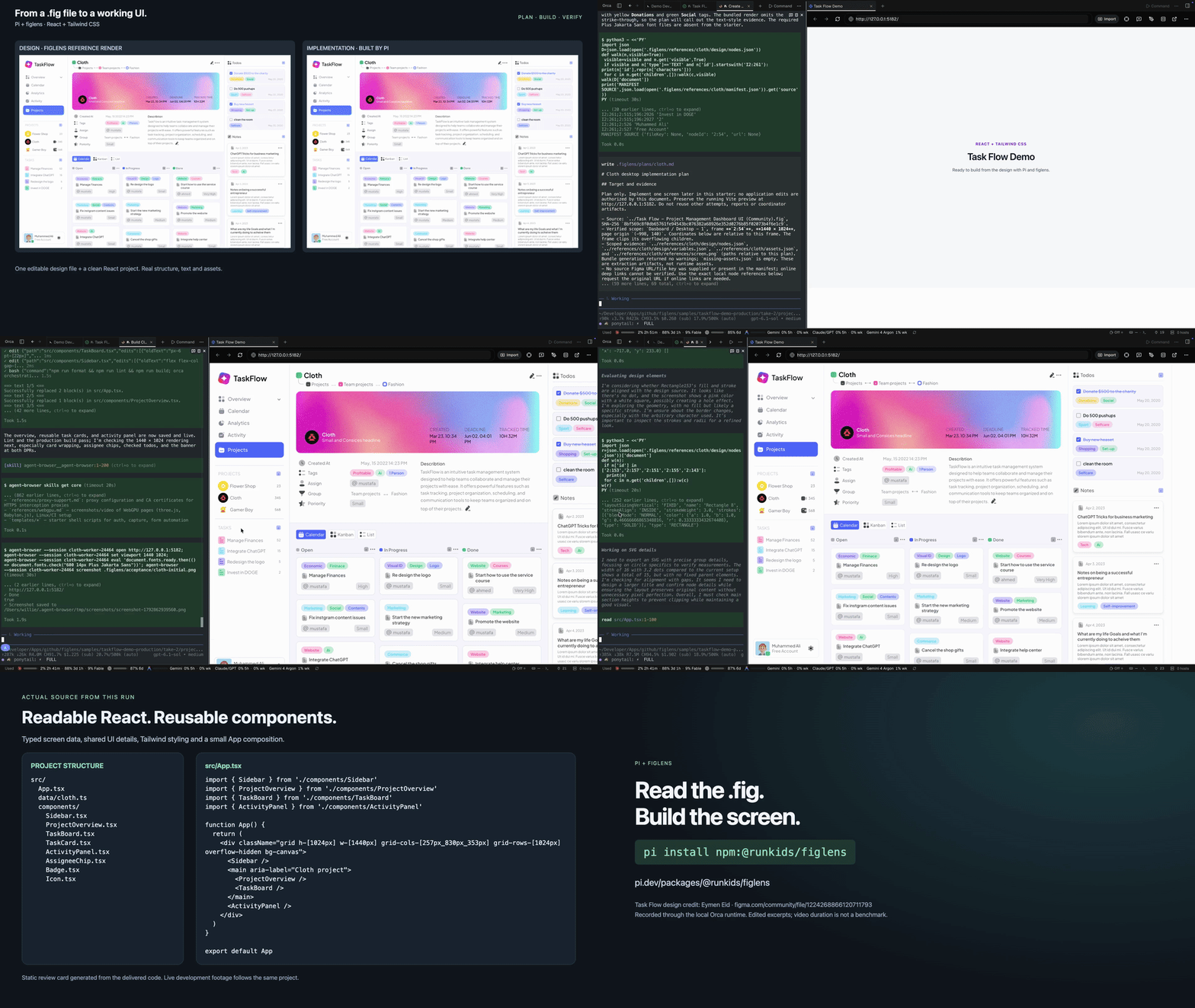
Looping GIF at 3× the edited video’s playback speed. Click it for the full 78-second video.
78-second video. Pi runs /figlens plan, reads a dashboard frame from a local .fig, builds it with React and Tailwind CSS, then checks and corrects the running UI. Edited time-lapse, not a benchmark or a pixel-perfect promise. Design: Task Flow by Eymen Eid · recording notes.
From .fig to editable HTML/CSS: in a controlled task-list study, all six figlens-based attempts preserved all 19 visible text occurrences as real DOM text and all four icons. CLI and MCP extraction also passed with Docker networking disabled. Follow the case study for setup, measurements and independent image comparisons.
Use figlens when the design should travel as a file: remote agents, CI, offline work, handoff between agents, unlimited repeated reads. Use the official Figma MCP when the agent must see the live design without an export step.
Reading a .fig is offline. Installing and updating figlens, gs:// inputs, the opt-in freshness check and pull, your model provider and your project's dependencies still need a network.
Full comparison
One frame, one zip. Structure to build from, assets to use, a picture to check against.
Bundle contents and examples · How close is it to Figma?
.fig when the design changes. figlens cannot download a design from a Figma URL.warnings, missing-assets.json and unresolved variables in context.md, then compare the implementation with the design._figlens.renderDiagnostics, bounded inspect summaries and bundle and export warnings; missing-assets.json lists only asset failures. No warnings does not establish pixel fidelity. A background blur past the 64 one export draws is left out and named only in those warnings (20 nodes, then a count).Find threats in your stack.
OX Radar can check high-priority threats, like critical package CVEs, against your context.
Each incident is marked Detected or Not Detected with a remediation plan and proof all tracked in the Response Center.
The probe returned only these fields for this server — auth requirement, protocol and tool list weren’t observed, so they’re not shown (never guessed).
The publisher’s own links, as the registry reports them. These are not sources for the assessment on this page.