ng-checkup


Renamed on npm: since 1.6.1 the package is ng-checkup-cli (npx ng-checkup-cli). Versions up to 1.5.0 are still on npm as ng-checkup. The command it installs is still ng-checkup.
A one-minute modernization report for any Angular codebase.
Point it at a repository and it tells you how far the code is from current Angular, what will break on the next upgrade, and where the work is. Twelve areas get a grade, from the Angular version and third-party packages to security and bundle size, translation keys that resolve to nothing, accessibility defects and code that breaks server rendering are listed beside them (and a thirteenth graded area for AngularJS code still waiting to be migrated), every finding names the files, and the HTML report is one self-contained page you can hand to your team lead.
npx ng-checkup-cli
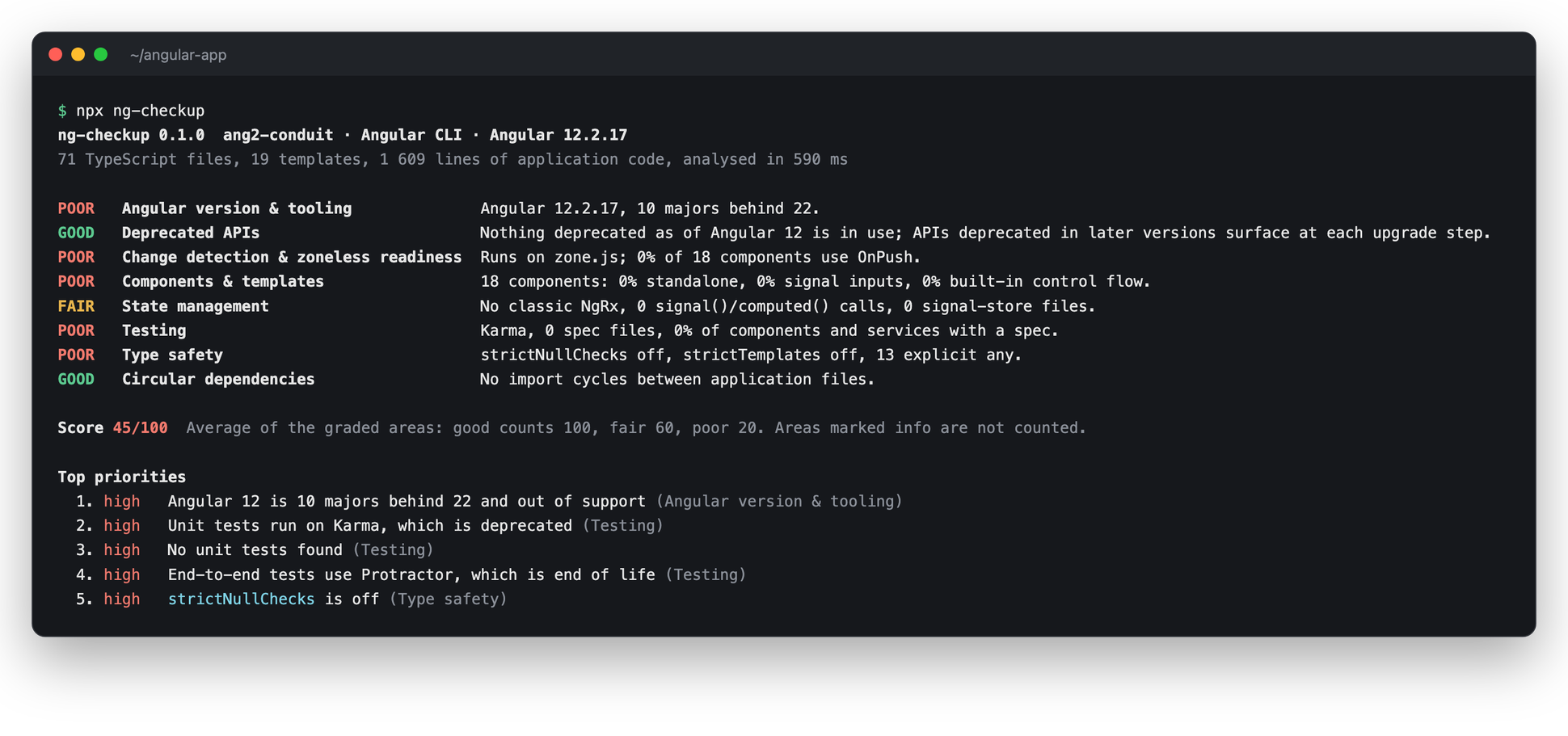
See a full example report → (the Angular 12 version of the RealWorld example app)
Contents
- Quick start
- Set it up in a project
- Configuration
- Baseline: adopt it on legacy code
- Watch mode
- Only what a branch changed
- History
- Upgrade plan
- AngularJS and hybrid apps
- Primo VE to NDE
- A live site
- Monorepos
- Many repositories
- Before and after
- Client report
- What it checks
- Reports
- A badge for the README
- A backlog from the findings
- In CI
- Programmatic API
- What leaves your machine
- How it works
- FAQ
- VS Code extension
- MCP server for editor agents
- Contributing
Quick start
Run it in the root of an Angular CLI or Nx workspace. It needs Node 22 or newer and nothing else; your project does not have to build.
# 1. The summary in your terminal
npx ng-checkup-cli

# 2. The full report as a page to share
npx ng-checkup-cli --report checkup.html

# 3. Record today's numbers, then fail CI only when one gets worse
npx ng-checkup-cli baseline
npx ng-checkup-cli --fail-on regression
No npm install needed. Without node_modules, the exact versions come from the lockfile (npm, yarn or pnpm), and the Angular type definitions the deprecated-API check reads are downloaded once for those versions and cached. So it works on a fresh clone and in a CI job before npm ci.
Or check a repository without cloning it yourself:
npx ng-checkup-cli github:owner/repo --report checkup.html
npx ng-checkup-cli https://gitlab.com/group/app#release-2.4
It clones only the one commit into a temporary folder, runs, and deletes it. Nothing from the repository is installed or run.
Set it up in a project
To keep the checkup in the project, with a script, a config file and a CI step:
ng add ng-checkup-cli        # Angular CLI: installs it and asks which CI to use
# or
npx ng-checkup-cli init      # any workspace, including Nx
Both make the same changes and list what they changed:
| File |
Change |
package.json |
a "checkup": "ng-checkup" script, and ng-checkup-cli in devDependencies (init only; ng add installs it itself) |
ng-checkup.config.json |
writes checkup.html on every run, and an empty ignore list |
.gitignore |
the generated reports, if the repository has a .gitignore |
ng-checkup.baseline.json |
today's numbers, so CI fails only when one gets worse (baseline) |
.github/workflows/ng-checkup.yml |
runs on every pull request with --fail-on regression, uploads the reports (when .github/ exists) |
ng-checkup.gitlab-ci.yml |
the GitLab job: Code Quality in merge requests and an MR comment; add include: [{ local: ng-checkup.gitlab-ci.yml }] to your .gitlab-ci.yml (when that file exists) |
ng-checkup.azure-pipelines.yml |
an Azure Pipelines pipeline beside your main one: the SARIF report as the CodeAnalysisLogs artifact for the Scans tab, the HTML report as an artifact; create a pipeline from it and add it as a build validation (when azure-pipelines.yml exists) |
bitbucket-pipelines.yml |
a pull-request step that keeps the reports as artifacts; when the file exists already, init leaves it alone and prints the step to paste |
After that it is npm run checkup (or pnpm checkup, yarn checkup; the lockfile decides). Running either command again changes nothing. It never overwrites a file you wrote: an existing workflow or config is kept, and a different checkup script is kept unless you pass --force.
npx ng-checkup-cli init --dry-run      # show the changes, write nothing
npx ng-checkup-cli init --ci gitlab    # pick the CI instead of detecting it (github, gitlab, azure, bitbucket, none)
Configuration
ng-checkup.config.json in the project root. Every key is optional, and every command-line flag overrides its key.
{
  "reports": ["checkup.html"],
  "failOn": "poor",
  "maxExamples": 5,
  "offline": false,
  "ignore": ["src/legacy", "**/generated", "apps/*/e2e"]
}
| Key |
Meaning |
Flag |
reports |
report files to write, relative to the config file |
--report |
failOn |
exit with 1 when an area is poor (or fair), or with regression when a measure is worse than the baseline |
--fail-on |
maxExamples |
example files listed per finding |
--max-examples |
offline |
skip the npm lookup of the latest Angular version |
--offline |
ignore |
paths left out of the analysis; a path matches everything below it, * stays within a folder, ** crosses folders |
|
ignoreDependencies |
runtime dependencies the unused-dependencies finding leaves out, because something loads them in a way the code does not show; a name, or @scope/* for a whole scope |
|
baseline |
the baseline file, relative to the config file (default ng-checkup.baseline.json in the root) |
|
plan |
add the upgrade plan to every run |
--plan |
attributeSelectors |
also list directives, and components with an attribute selector, that no template matches, and inputs and outputs no template binds |
--attribute-selectors |
only |
report only these areas, by check id (["security", "dependencies"]) |
--only |
skip |
leave these areas out of the report, the score and the baseline |
--skip |
rules |
your own rules, see Custom rules |
|
An unknown key or a wrong type stops the run with an error, so a typo cannot silently switch off a CI threshold. Use --config path/to/file.json for a file elsewhere.
Asked one by one: --interactive (-i) asks for every setting in turn, rules included, with the config file's value in brackets: Enter keeps it, - clears a list, and a wrong answer is explained and asked again. At the end it asks whether to save the answers to ng-checkup.config.json for the next runs; either way this run uses them.
npx ng-checkup-cli -i
Where a setting comes from. In every integration the same order holds: what is given for this run, then the config file, then the built-in default.
| Where |
This run |
Then |
Without either |
| Command line |
flags, --config-json, --interactive |
ng-checkup.config.json |
defaults |
| GitHub Action |
inputs you set (fail-on, plan, offline, args) |
ng-checkup.config.json |
defaults |
| GitLab component and include |
inputs or variables you set (fail-on, args) |
ng-checkup.config.json |
defaults |
| VS Code extension |
offline: true in the file wins over the setting |
ng-checkup.config.json |
the extension's settings |
| MCP server |
the tool call's arguments |
rules from ng-checkup.config.json |
defaults |
The integrations' inputs are empty by default, so a config file committed to the repository is what CI runs with. Two exceptions: the Action and the GitLab job write their reports to fixed paths of their own, so reports from the file is not used there, and the editor lists every location of a finding whatever maxExamples says.
For one run only: --config-json takes the same keys as JSON and lays them over the file, without editing it. rules are merged by id, so a run can try one more rule. - reads the JSON from standard input, to paste or pipe a longer one.
npx ng-checkup-cli --config-json '{"offline":true,"rules":[{"id":"no-moment","forbidImport":"moment"}]}'
Custom rules
Forbid an import or a pattern, and count every place that breaks it:
{
  "rules": [
    { "id": "no-moment", "forbidImport": "moment", "severity": "medium", "message": "Use date-fns" },
    { "id": "no-console", "pattern": "console\\.(log|debug)", "severity": "low" },
    { "id": "no-focused-tests", "pattern": "\\bf(describe|it)\\(", "files": ["**/*.spec.ts"], "severity": "high" }
  ]
}
| Key |
Meaning |
id |
lower-case letters, digits and dashes; the measure is rules.<id> |
forbidImport |
a package or path, or a list of them; moment also covers moment/locale/de, and import type is allowed |
pattern |
a regular expression, tested on every line of TypeScript files, templates and stylesheets, comments included |
files |
paths the rule reads, in the ignore syntax; without it, application code only, with it test code too |
severity |
high, medium (default) or low |
message |
what to do instead, shown with every finding |
Each rule needs id and exactly one of forbidImport and pattern. The rules form their own area, never graded, so the score does not change. Each rule is a measure in the baseline: ng-checkup baseline records today's count, and --fail-on regression fails only when it goes up. That is the difference from ESLint's no-restricted-imports, which fails on every old violation too.
A pattern that takes longer than two seconds on one file stops the run and names the rule and the file; that is a pattern that backtracks without end, such as (a+)+b.
Baseline: adopt it on legacy code
A ten-year-old Angular app will not pass --fail-on poor on day one, and a CI check that is red from the start gets switched off. The baseline fixes that: it records today's numbers, and CI fails only when one of them gets worse.
npx ng-checkup-cli baseline                    # writes ng-checkup.baseline.json; commit it
npx ng-checkup-cli --fail-on regression        # in CI: fails only on a number that went up
Baseline  2 worse
  worse  Type safety: Explicit any in application code 13 → 15
  worse  Type safety: Non-null assertions (x!) 0 → 1









