




Scan your whole stack


From OX Research Newsroom






Latest version: v0.6.29
SUNGLASSES was last scanned on 27 Nov 2026 at version 0.6.29. Risk score 0 of 100. High-severity rules fired.
| Version | Published | Status |
|---|---|---|
| 0.6.29 LATEST | 27 Nov 2026 | 2 rules fired |
| 0.6.25 | 21 Nov 2026 | 2 rules fired |
| 0.6.24 | 15 Nov 2026 | 2 rules fired |
| 0.6.23 | 14 Nov 2026 | Not shown |
| 0.6.22 | 14 Nov 2026 | Not shown |
Findings for v0.6.29. The score is a capped sum of the weights of the rules that fired — not CVSS, not exploitability, and not a probability. It is not comparable across packages with different scan coverage.
Several behaviors that are each common on their own, such as reading registry credentials, contacting a variable host or running shell commands, appear together in this package in a combination associated with attacks. The finding message lists the behaviors that were combined.
HIGHThe score describes 0.6.29; other versions have their own rules, not their own score.
The publisher’s own README, as collected from the registry.
Open source input firewall for AI agents, beta. A local scanner checks text, code, PDFs, images, QR codes, audio and video with 1,498 patterns that carry a matcher (1,569 are listed) across 117 listed categories and reports findings and incomplete scans. When the scanner cannot read part of an input, it says so and exits 3; an incomplete scan is never reported as clean. A Claude Code hook blocks secret material in tool calls and the paths and hosts your policy lists, before a tool runs, best effort under its 10 second timeout.
What works today
tools/list and tools/call until a person
approves the server at an interactive terminal. Once approved, it withholds a
credential in a tool call or in a tool result, which is the credential lane and not
general inspection of everything a tool returns. Installing it is not protection
on its own. See What the proxy enforces.Sunglasses is a local, open source scanner for text and supported files. It reports what it matched and what it could not read, so you can decide what to pass onward. It produces findings and an exit status; a CI job, a Claude Code hook or your own code acts on that result.
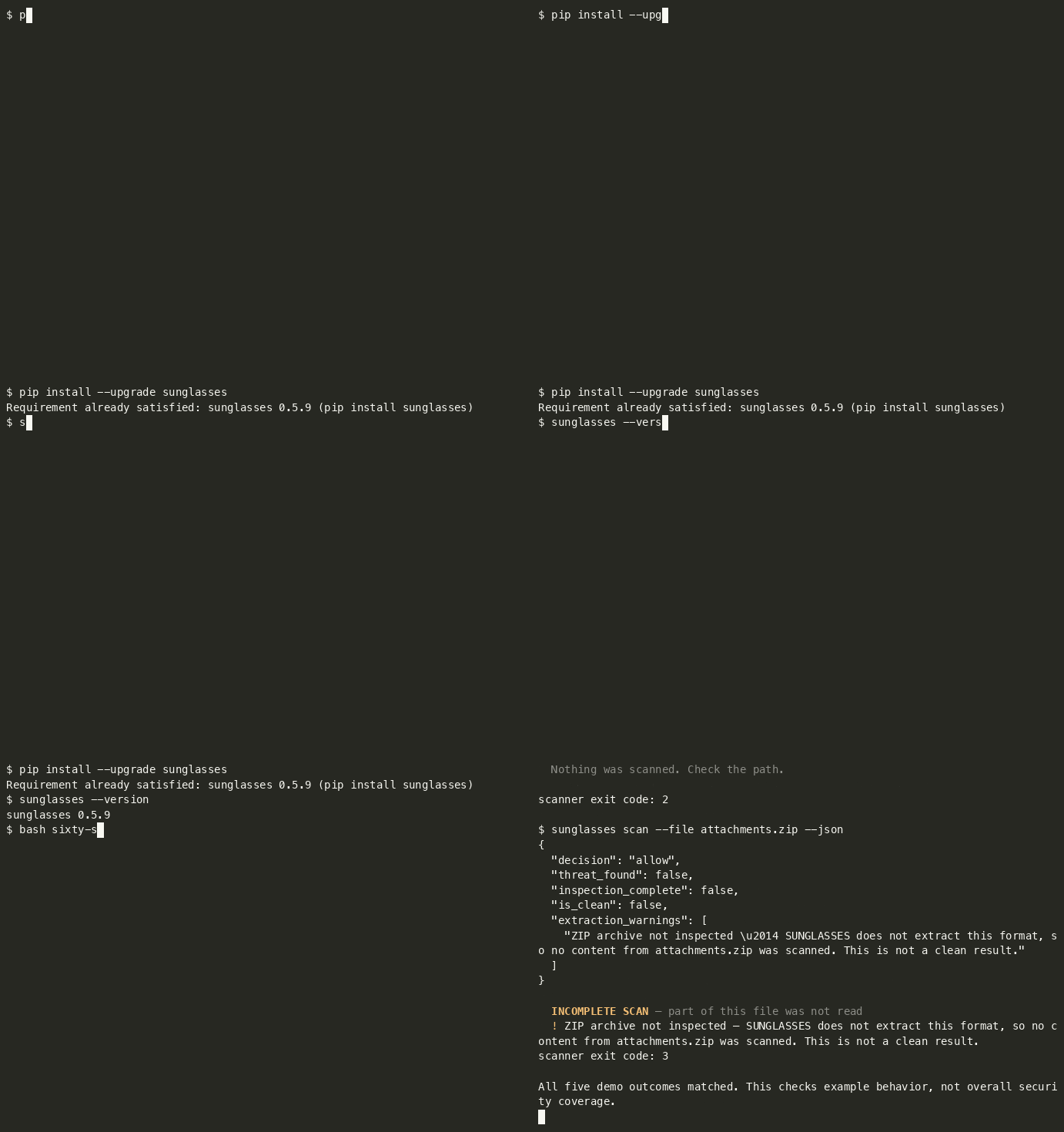
python3 -m venv .venv && source .venv/bin/activate
python -m pip install --upgrade sunglasses
curl -fsSL -o sixty-seconds.sh https://raw.githubusercontent.com/sunglasses-dev/sunglasses/main/demo/sixty-seconds.sh && bash sixty-seconds.sh
An activated virtualenv keeps the install and the sunglasses your shell resolves in the
same environment, and --upgrade matters if you already have an older version. curl -fsSL
fails on an HTTP error instead of saving the error page, so the script only runs if the
download actually succeeded.
The script writes three fixture files into a temp directory, and deliberately scans a fourth path that does not exist, five scanner invocations in total, because the archive is scanned twice (human output and JSON). The script's own commands execute; scanned content stays data (it is never executed, and the ZIP is not extracted).
Abbreviated output, recorded on 0.5.6. Finding rows 2-5 are omitted below; timings and presentation are not shown because they vary.
$ sunglasses scan --file notes.md            # ordinary sprint notes
  PASS — No threats detected.
scanner exit code: 0

$ sunglasses scan --file vendor-brief.md     # a vendor brief with an instruction buried in it
  BLOCK [HIGH] — 6 threat(s) found:
  1. [HIGH] Ignore previous instructions            GLS-PI-001
  … findings 2-5 omitted …
  6. [HIGH] Data exfiltration to sink (mechanism)   GLS-MECH-003
scanner exit code: 1

$ sunglasses scan --file attachments.zip     # an archive we do not extract
  INCOMPLETE
  No findings in the inspected scope. Part of this input was not read, so this is
  not a clean result.
scanner exit code: 3

$ sunglasses scan --file missing.md
  File not found: missing.md — Nothing was scanned. Check the path.
scanner exit code: 2
And the same archive as JSON. Selected fields from the scan document, not the whole of it.
{
  "decision": "not_inspected",
  "threat_found": false,
  "inspection_complete": false,
  "is_clean": false,
  "extraction_warnings": [
    "ZIP archive not inspected — SUNGLASSES does not extract this format, so no content from attachments.zip was scanned. This is not a clean result. It lists 2 members, 33 bytes declared by the archive (brief.txt, notes/summary.txt); the member names were scanned."
  ]
}
decision: not_inspected with is_clean: false. The archive's table of contents was read and its
member names were scanned; the members themselves were not, and when no member name matches a pattern
the decision says so itself (before 0.6.17 it said allow beside is_clean: false).
A caller that tests decision == "allow" stops here; one that tests decision != "allow"
should read threat_found before treating this as a threat. The document exposes the
distinction; acting on it is the caller's job.
Timings and presentation vary. The demo checks the exit statuses and the ZIP coverage fields; report a mismatch against your installed version.
⭐ If this is useful, consider starring the repository.
🕶 Or try it in your browser, no install. sunglasses.dev/scan (scan text, GitHub repos, or images). Image OCR runs locally in your browser; the image never leaves your device.
python -m sunglasses.proxy -- <your server command> runs a real MCP server as
a child process and mediates the stdio session between it and your client.
What it does depends entirely on whether that server has been approved, and
the two states are very different.
Out of the box, every tools/list and tools/call from your client is
refused. The client receives a typed JSON RPC error like this one.
{"jsonrpc":"2.0","id":3,"error":{"code":-32070,"message":"SUNGLASSES_WITHHELD",
 "data":{"reason_code":"APPROVAL_REQUIRED","rule":"S4",
         "status":"not_run","inspection_complete":false,
         "inspected_utf8_bytes":0,
         "server_id":"40ed892fc0f0b8819c294778c492dbd0",
         "snapshot_sha256":"26aeeb2f7c5b61aa33523967171d46c0d248cd13d612cef913b089daccae4c64"}}}
server_id and snapshot_sha256 are the two values the approve command
needs, and the refusal is where you get them. You do not have to look inside
the state directory to find out what to approve.
status: not_run and inspected_utf8_bytes: 0 describe your client's
request. It is not forwarded to the server and its arguments are not scanned.
The proxy does read the server's own tool list first. It fetches every
tools/list page from the server and scans the descriptors to build the
snapshot you approve. A page with a finding is refused on that finding before
any approval is looked up. Installing the proxy does not protect anything by
itself.
Approval is a deliberate human step and it requires an interactive terminal.
$ python -m sunglasses.proxy approve <server_id> --snapshot <snapshot_sha256>
approving records that a human viewed this capture, and this is not an
interactive terminal, so nobody did          # exits 1, nothing is recorded
It prints the tool names and the first 16 characters of each descriptor digest, then asks. It records that someone at an interactive terminal answered yes to that list. From a pipe it refuses. Run it at a real terminal and answer the prompt.
An approval belongs to one server, not to a tool list. The snapshot hash
covers the descriptors, and two different servers exposing the same tools have
the same snapshot_sha256, but they get different server_ids, and the
approval is stored against the server_id. Measured with two servers whose
captures both read snapshot_sha256 26aeeb2f7c5b61aa… carry the ids
8740fa6360ce72946fa5a99e86974e01 and 0096972d2543ec556ad9eefe9c144b05, and
approving the first left the second refusing with APPROVAL_REQUIRED until it
was approved at its own terminal prompt.
So changing the command behind a familiar tool list does not inherit the approval you already gave. A server that presents the same descriptors as one you trust is still a server you have not approved.
With the snapshot approved, the mediator inspects messages in both directions and withholds one whose content the engine blocks, returning the reason code, the rule, the bytes inspected and the rule ids that fired.
{"jsonrpc":"2.0","id":3,"error":{"code":-32070,"message":"SUNGLASSES_WITHHELD",
 "data":{"reason_code":"PROHIBITED_CONTENT","rule":"S2","status":"complete",
         "inspection_complete":true,"inspected_utf8_bytes":87,
"rule_ids":["GLS-SD-001-API","GLS-SD-003-API"]}}}-API
rules are the tool result channel. A tool result is the api_response channel.
from the shell, sunglasses scan --channel api_response runs those rules, and
--channel tool_output runs them too. Releases up to 0.6.19 declared none of the
credential rules on tool_output. A test pins this wording and the facts behind it
(see the CHANGELOG entry).GLS-SD-010 is line anchored, and that is a limit in every channel. It
matches an assignment at the start of a line, so a KEY=value that is
indented by any whitespace, or sits inside a JSON string, or sits behind a
quote, is not matched on any channel, not in a tool result, and not in a
file or a message either, which are channels it does declare. Indentation
alone is enough, which makes this wider than it sounds, since a config block, a YAML
mapping or an indented snippet all miss. Note the assignment's POSITION is
what matters and not the quoting of its value. PASSWORD="hunter2" at a line
start is matched, "PASSWORD=hunter2" is not. When the value is in a known credential format the
GLS-SD-001 family still catches it everywhere (GLS-SD-001 on file,
message and web content, GLS-SD-001-API in a tool result), so what is
actually uncovered is an assignment whose value has no recognisable shape
(a password, a DSN, an internal token) once it is embedded. Closing it needs
a different anchor, which is a new rule with its own fixtures rather than a
channel added to this one.tools/list returns the real list and a benign
call returns its real result.Ctrl+C while the proxy is serving no longer aborts the interpreter. Once shutdown finishes, the process exits with status 130. Shutdown waits on the server, so a server that has stopped reading its input can hold it open.
This is the credential lane on tool results and tool calls. It is not general inspection of everything a tool returns, and no comparison with any other tool is claimed. See Not claimed in this release in CHANGELOG.md.
Four exit statuses, deliberately different signals.
| exit | meaning |
|---|---|
0 |
inspection completed in the supported scope, and nothing matched |
1 |
threat found (the inspection may still have been incomplete, and that is reported alongside) |
3 |
incomplete, nothing matched in the part that was inspected; some component was not |
2 |
usage or operational error |
0 and 3 never collapse into each other. "Everything I support reading here was read,
and nothing matched" and "this format was not inspected" are different facts, and the second
one is where agents get hurt. Exit 0 is not a guarantee that a file is safe, only that the
supported scope was covered and no pattern fired. In JSON the same split is explicit.
is_clean is not threat_found and inspection_complete.
You do not need an MCP client for this. The package ships a tiny server,
sunglasses/proxy/echo_server.py, bundled for the proxy self test; it works as a sample server, it is not a supported surface.
It has one tool, echo. Run all
of it from one empty folder, with the python3 that has SUNGLASSES installed.
Nothing outside that folder and ~/.sunglasses/ is touched.
1. Wrap it. install needs an existing .mcp.json to edit, so write one first.
cat > .mcp.json <<'EOF'
{
  "mcpServers": {
    "echo": {
      "command": "python3",
      "args": ["-m", "sunglasses.proxy.echo_server"]
    }
  }
}
EOF
sunglasses install echo
2. Be the client. A client speaks newline delimited JSON RPC on stdin. Put five lines in a file, an initialize, its notification, a tool list, a harmless call and a call that carries an AWS example key.
cat > calls.jsonl <<'EOF'
{"jsonrpc":"2.0","id":1,"method":"initialize","params":{"protocolVersion":"2025-06-18","capabilities":{},"clientInfo":{"name":"try","version":"1"}}}
{"jsonrpc":"2.0","method":"notifications/initialized"}
{"jsonrpc":"2.0","id":2,"method":"tools/list"}
{"jsonrpc":"2.0","id":3,"method":"tools/call","params":{"name":"echo","arguments":{"text":"hello from the two minute try"}}}
{"jsonrpc":"2.0","id":4,"method":"tools/call","params":{"name":"echo","arguments":{"text":"my key is AKIAIOSFODNN7EXAMPLE"}}}
EOF
python3 -m sunglasses.proxy -- python3 -m sunglasses.proxy.echo_server < calls.jsonl
The proxy answers the initialize, then refuses ids 2, 3 and 4 with code
-32070, SUNGLASSES_WITHHELD and reason APPROVAL_REQUIRED. That is the
gate working, and it is the expected first result. Each refusal carries two
values in its data object, server_id and snapshot_sha256. Read them from
your own output. The server_id is computed from the command, its arguments and
the folder you ran it in, so yours will differ from anyone else's, and a
different folder gives a different one. Approval is stored against that id, so
stay in the same folder for the rest of this page.
3. Approve it as a person. This has to run at a real terminal. It is refused when its input is a pipe.
sunglasses proxy approve <server_id> --snapshot <snapshot_sha256>
# the same command, spelled as the module
python3 -m sunglasses.proxy approve <server_id> --snapshot <snapshot_sha256>
Both spellings run the same code. sunglasses --help lists proxy.
4. Run the same file again.
python3 -m sunglasses.proxy -- python3 -m sunglasses.proxy.echo_server < calls.jsonlThe tool list comes back and the harmless call returns its echo. The call
carrying the key is withheld with PROHIBITED_SECRET and never reaches the
server. A credential in a result is withheld the same way with
PROHIBITED_CONTENT. The checks behind this are the credential lane described
under What the proxy enforces, and this run is not
evidence beyond that lane.
5. Put it back. sunglasses uninstall echo restores your .mcp.json
byte for byte. The approval is kept on purpose, so it applies again if you wrap
the same command from the same folder. To revoke every approval on this machine,
remove the approvals folder.
sunglasses uninstall echo
rm -r ~/.sunglasses/proxy/approvalsFind threats in your stack.
OX Radar can check high-priority threats, like critical package CVEs, against your context.
Each incident is marked Detected or Not Detected with a remediation plan and proof all tracked in the Response Center.
The probe returned only these fields for this server — auth requirement, protocol and tool list weren’t observed, so they’re not shown (never guessed).
The publisher’s own links, as the registry reports them. These are not sources for the assessment on this page.
 Read the latest findings