Scan your whole stack


From OX Research Newsroom






Latest version: v0.2.6
writ was last scanned on 24 Nov 2026 at version 0.2.6. Risk score 0 of 100. No malicious behavior was detected.
| Version | Published | Status |
|---|---|---|
| 0.2.6 LATEST | 24 Nov 2026 | No rules fired |
| 0.2.5 | 16 Nov 2026 | No rules fired |
| 0.2.4 | 15 Nov 2026 | No rules fired |
| 0.2.3 | 14 Nov 2026 | Not shown |
| 0.2.2 | 13 Nov 2026 | Not shown |
Findings for v0.2.6. The score is a capped sum of the weights of the rules that fired — not CVSS, not exploitability, and not a probability. It is not comparable across packages with different scan coverage.
The score describes 0.2.6; other versions have their own rules, not their own score.
The publisher’s own README, as collected from the registry.
Find the dangerous writes in your Python agent's code, then gate it. pywrit is the Python
client and writ CLI for Writ: an allow/deny gate that sits
in front of your agent's consequential writes (database, HTTP, files, email, queues,
AWS) and records a hash-chained receipt for every decision.
writ scan is local, deterministic, and free: it parses your code with Python's
ast module, makes no network calls, and needs no API key.
pip install pywritRequires Python 3.9+. Installs the writ command and the pywrit Python client.
JavaScript/TypeScript devs: run the scanner with no Python setup via npm:
npx writ-scan .The writ-scan package wraps the same scanner (including TS/JS support). On
first run it installs pywrit[polyglot] from PyPI using your Python 3.9+
(one-time); afterwards it starts instantly. See npm/ for details,
environment overrides (WRIT_PYTHON, WRIT_SCAN_NO_INSTALL), and the
install test.
| Language | writ scan |
writ scan --apply |
Notes |
|---|---|---|---|
| Python | Yes | Yes, inserts _writ_check gates |
Parsed with the stdlib ast, no extra needed |
| TypeScript / JavaScript | Yes, with pywrit[polyglot] |
No, scan only | Needs the extra: pip install 'pywrit[polyglot]'. Without it, the report says so loudly: a warning block names the unscanned files instead of reporting zero findings |
| Go | Yes, with pywrit[polyglot] |
No, scan only | First detection family plus request-pipeline Call/RawRequest, package-level generated clients, and GORM Raw raw-SQL writes: database/sql Exec/ExecContext, GORM Create/Save/Update/Updates/Delete/FirstOrCreate/CreateInBatches, HTTP client writes (Post/Put/Patch/Delete/PostForm, package-level and client method) and http.NewRequest with a write method, generated-client ..\<New|Update|Delete|Create>, request-pipeline X.Call/X.RawRequest with a write method, package-level generated clients .\<New|Update|Delete|Create> on an imported resource-shaped package, GORM Raw db.Raw / tx.Raw with a write-first SQL string literal, including WITH-CTE writes. Go findings are product-code-only by default: writes under docs/, scripts/, examples/, sandbox/, benchmark/, demo/, testdata/, and in files carrying the standard Go codegen marker are suppressed by default and counted per class, restored with --include-non-product. Without the extra, the report names the unscanned Go files in the same warning block as TS/JS |
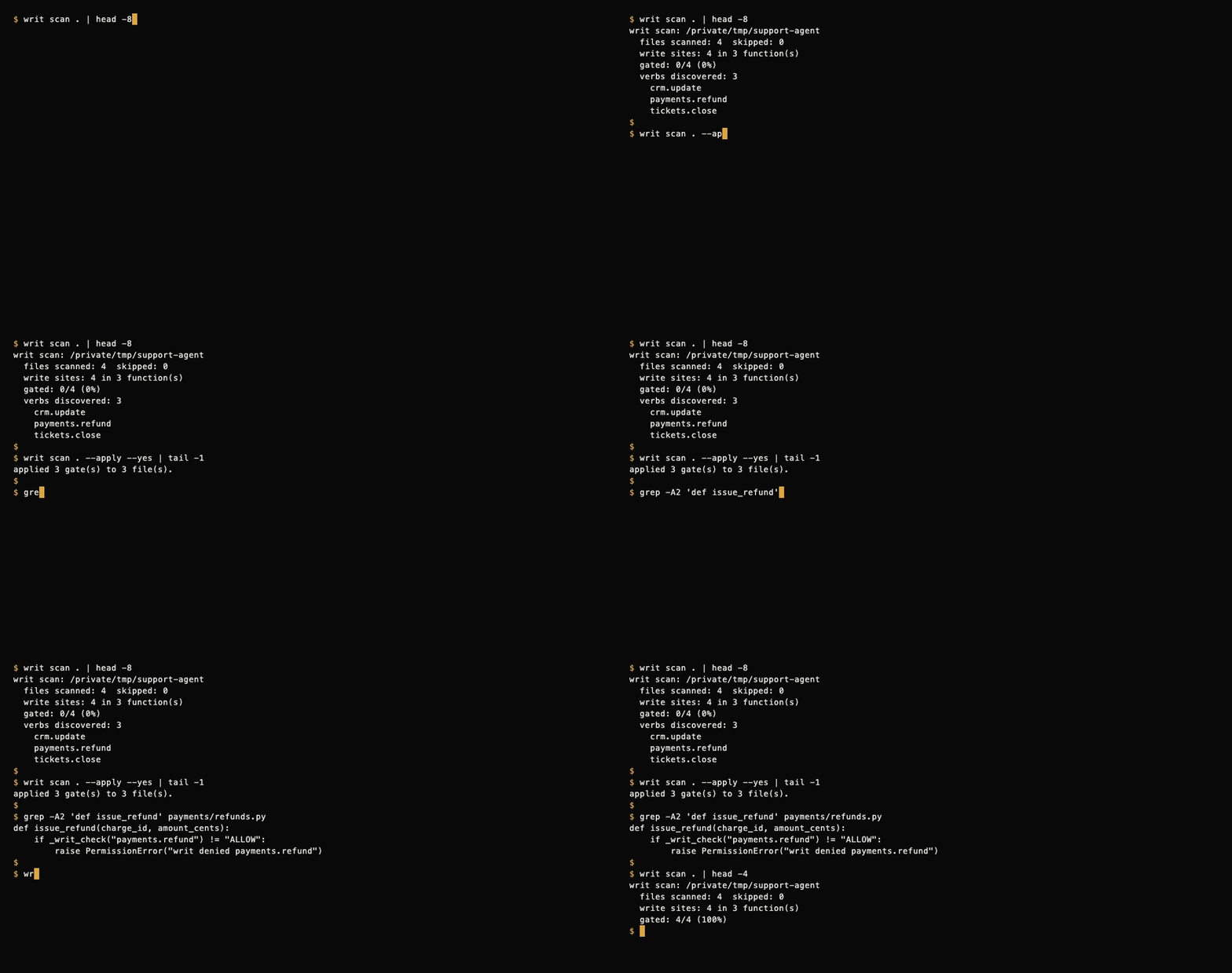
1. Scan. See which functions write, and how many of them are gated.
writ scan .writ scan: /path/to/support-agent
files scanned: 4 skipped: 0
write sites: 4 in 3 function(s)
gated: 0/4 (0%)
verbs discovered: 3
crm.update
payments.refund
tickets.closeIt also prints a risk report (0-100, weighted by risk tier), writes the discovered
verbs to writ-policy.json, and shows the instrumentation it would add as a unified
diff. Nothing in your code changes yet. writ scan . --score prints just the risk report.
2. Wrap. One command takes the repo from unwrapped to wrapped: scan, show the diff, ask for explicit approval, apply the gates, and report before/after coverage.
writ wrap .        # interactive approval
writ wrap . --yes  # no prompt (e.g. in CI)
--dry-run previews the plan and exits before prompting; --diff-only prints the
unified diff for review tools. Each gated function now asks Writ before it writes, and
fails closed:
def issue_refund(charge_id, amount_cents):
    if _writ_check("payments.refund") != "ALLOW":
        raise PermissionError("writ denied payments.refund")
    ...
writ scan . --apply is still available as the manual alternative. Re-run writ scan .
and you'll see gated: 4/4 (100%).
3. Gate. Get a free API key, load the discovered policy, and run your agent.
writ key --email you@example.com                  # free API key + tenant
export WRIT_API_KEY=writ_...                      # read by the inserted gate
export WRIT_SPONSOR=acme WRIT_AGENT=support-agent # optional: who is acting
writ scan . --push-policy --key "$WRIT_API_KEY"   # upload the discovered verb policy
Every gated write now gets ALLOW, DENY, or STEP_UP (a human sponsor must
approve), and every decision is written to your tenant's tamper-evident audit log:
writ receipts --key "$WRIT_API_KEY"       # latest receipts
writ verify-chain --key "$WRIT_API_KEY"   # verify the receipt hash chain
writ stream --key "$WRIT_API_KEY"         # tail decisions live
writ report --key "$WRIT_API_KEY" # Agent Action Reportwrit scan detectsPython (.py) files, parsed with the stdlib ast (no extra dependencies):
| Category | Examples |
|---|---|
| Database | cursor.execute(...) / executemany / executescript (write SQL only; SELECT/WITH/... skipped), session.add / commit / delete / merge / flush |
| HTTP | requests.post / put / patch, client.delete(...), session.request(...) |
| Files | open(..., "w"/"a"/"x"/"+"), Path.write_text / write_bytes / unlink / rename, os.remove / rename / makedirs, shutil.rmtree / move / copy |
sendmail, send_message, send_email |
|
| Queues | publish, produce, enqueue, queue.send(...) |
| AWS SDK | put_object, put_item, delete_item, upload_file, send_message, start_execution, ... |
payments.refund or crm.update, inferred
from the file path and function name.writ_check(...) / _writ_check(...) counts as gated.node_modules, dist, build.
Use --exclude SUBSTR (repeatable) to skip more.stripe.Refund.create(...), deferred task queues, or shared clients
several layers down. The risk report lists these gaps every time.writ scan also finds write sites in TypeScript and JavaScript. It needs the
optional extra (tree-sitter based):
pip install 'pywrit[polyglot]'
writ scan .
Without the extra, the scanner prints a prominent warning block naming the unscanned TS/JS files and keeps going — Python scanning never needs it.
Findings from non-product paths (docs/, scripts/, sandbox/, examples/,
benchmark/, demo/, and build-tooling files such as gulpfile.js or
webpack.config.*) are suppressed by default: the report counts them per
class and names every suppressed path instead of listing them as findings.
Pass --include-non-product to report them like any other finding.
Every scan report ends with a one-line pointer to the Writ GitHub App
(install: https://github.com/apps/writ-scanner, guide:
https://docs.withwrit.com/git-hub-app), which runs the scan on every push
and pull request; the JSON report (--format json) carries the same
pointer under github_app.
TS/JS is scan-only: findings are listed with verbs for your policy file,
but writ scan --apply never rewrites TS/JS files — gate those by hand.
Covered patterns: fetch/axios writes, fs writes, SQL through knex-style
clients, Prisma writes, JS SDK calls such as stripe.refunds.create(...), and
generated REST resource clients: create / update / patch / remove
methods (plus their ...WithHttpInfo variants) that build request options
with an explicit write HTTP method and route them through the client request
pipeline (twilio-style generated clients, e.g. twilio-node).
(Still not covered: the Python SDK equivalents like stripe.Refund.create(...)
— see "Not covered" above.)

writ scan also finds write sites in Go. It needs the optional extra (tree-sitter based):
pip install 'pywrit[polyglot]'Find threats in your stack.
OX Radar can check high-priority threats, like critical package CVEs, against your context.
Each incident is marked Detected or Not Detected with a remediation plan and proof all tracked in the Response Center.
The probe returned only these fields for this server — auth requirement, protocol and tool list weren’t observed, so they’re not shown (never guessed).
The publisher’s own links, as the registry reports them. These are not sources for the assessment on this page.