Scan your whole stack


From OX Research Newsroom






Are you using @astronomic-dev/ui?
Find out what’s in your code.
Scan your apps free in minutes (opens in a new tab)Latest version: v0.1.0
@astronomic-dev/ui was last scanned on 23 Nov 2026 at version 0.1.0. Risk score 0 of 100. No malicious behavior was detected.
| Version | Published | Status |
|---|---|---|
| 0.1.0 LATEST | 23 Nov 2026 | No rules fired |
| 0.0.0-stage | 23 Nov 2026 | Not shown |
Findings for v0.1.0. The score is a capped sum of the weights of the rules that fired — not CVSS, not exploitability, and not a probability. It is not comparable across packages with different scan coverage.
The score describes 0.1.0; other versions have their own rules, not their own score.
The publisher’s own README, as collected from the registry.
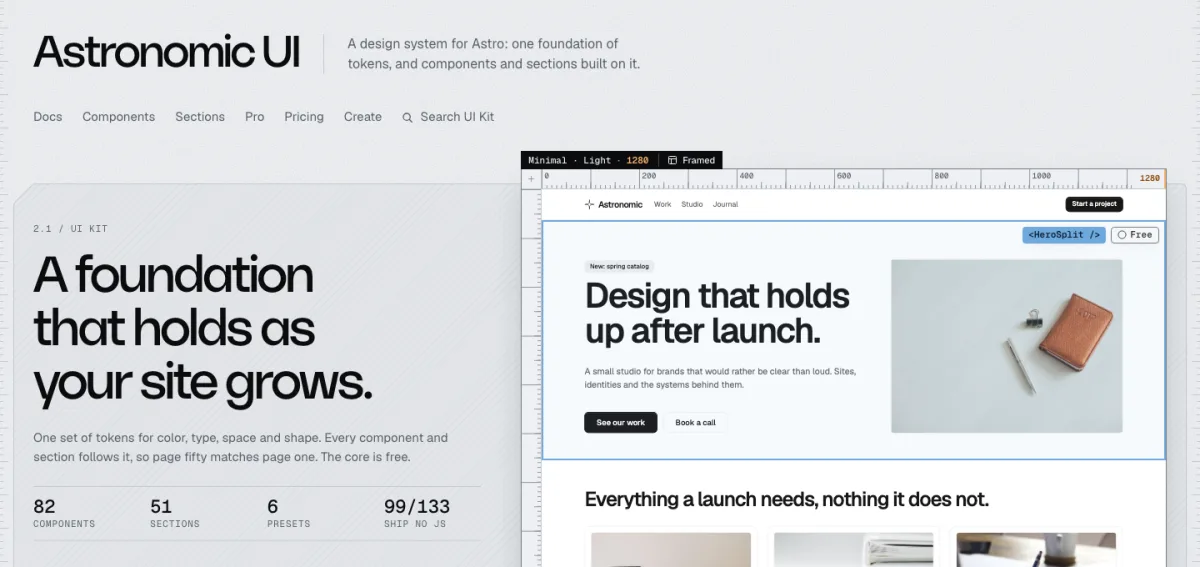
Free, restylable Astro components driven by semantic --ui-* tokens: navbars, heroes, cards, forms, footers, features, listings, search and more, in one consistent look. Swap a preset or a few token values and every component follows, dark mode included.
Docs and live examples: astronomic.dev/ui. Package: npm. Source and issues: GitHub.
Astronomic UI needs Astro 7 and Tailwind CSS v4. Install it with its peers:
pnpm add @astronomic-dev/ui astro tailwindcss @tailwindcss/viteAdd Tailwind's Vite plugin in astro.config.mjs:
import tailwindcss from "@tailwindcss/vite";
import { defineConfig } from "astro/config";

export default defineConfig({
    vite: { plugins: [tailwindcss()] },
});In the site's main CSS file:
@import "tailwindcss";
@import "@astronomic-dev/ui/tokens.css";
@import "@astronomic-dev/ui/theme.css";
@import "@astronomic-dev/ui/presets/soft.css"; /* optional: a preset, after tokens.css */

/* Tailwind skips node_modules, so point it at the component source.
   The path is relative to this CSS file (here: src/styles/global.css). */
@source "../../node_modules/@astronomic-dev/ui/src";
Without the @source line the components render unstyled.
Without a preset you get the default look, Minimal. The presets in @astronomic-dev/ui/presets/:
| Preset | File | Fonts | Fontsource packages |
|---|---|---|---|
| Minimal (default) | none, tokens.css alone |
Geist | @fontsource-variable/geist |
| Clean | clean.css |
Inter | @fontsource-variable/inter |
| Modern | modern.css |
Plus Jakarta Sans | @fontsource-variable/plus-jakarta-sans |
| Playful | playful.css |
Bricolage Grotesque and Nunito | @fontsource-variable/bricolage-grotesque, @fontsource-variable/nunito |
| Soft | soft.css |
Figtree | @fontsource-variable/figtree |
| Ink | ink.css |
Newsreader and Libre Franklin | @fontsource-variable/newsreader, @fontsource-variable/libre-franklin |
Load the fonts your preset uses, from Fontsource or Google Fonts. Every font stack names both family names ("Geist", "Geist Variable", ...), so either source works.
Import components by path:
---
import "../styles/global.css";
import Button from "@astronomic-dev/ui/components/Button.astro";
---

<Button href="/start">Get started</Button>
Use only the kit's token-based classes next to the components, and never the dark: variant: dark mode swaps the token values.
Many parts come in families (the navbar, hero, card, footer and so on). Each family has one shell and a few recipes, such as FooterSimple and FooterColumns. Use the recipes on a page, and a shell alone only to build a layout of your own.
Every component, its props and its slots: astronomic.dev/ui.
The search components (SearchClassic, SearchButton, SearchPage) run on the free @astronomic-dev/search package, which the kit does not install. To use them, add it to your site:
pnpm add @astronomic-dev/searchThe other components do not need it.
MIT. See LICENSE.
Find threats in your stack.
OX Radar can check high-priority threats, like critical package CVEs, against your context.
Each incident is marked Detected or Not Detected with a remediation plan and proof all tracked in the Response Center.
The probe returned only these fields for this server — auth requirement, protocol and tool list weren’t observed, so they’re not shown (never guessed).
The publisher’s own links, as the registry reports them. These are not sources for the assessment on this page.