Scan your whole stack








Are you using dsh-plugin-toolkit?
Find out what’s in your code.
Scan your apps free in minutes (opens in a new tab)Latest version: v0.22.1
dsh-plugin-toolkit was last scanned on 24 Nov 2026 at version 0.22.1. Risk score 0 of 100. No malicious behavior was detected.
| Version | Published | Status |
|---|---|---|
| 0.22.1 LATEST | 24 Nov 2026 | No rules fired |
| 0.22.0 | 24 Nov 2026 | No rules fired |
| 0.21.2 | 23 Nov 2026 | No rules fired |
| 0.21.1 | 23 Nov 2026 | Not shown |
| 0.21.0 | 22 Nov 2026 | Not shown |
Findings for v0.22.1. The score is a capped sum of the weights of the rules that fired — not CVSS, not exploitability, and not a probability. It is not comparable across packages with different scan coverage.
The score describes 0.22.1; other versions have their own rules, not their own score.
The publisher’s own README, as collected from the registry.
English · 中文
一个 DeepSeek Harness 插件从 init 到被市场索引接受之间需要的一切:脚手架、客户端 bundle 的测试台、不重启应用就能看到改动的方法,以及一条不用背十四个步骤的发布流程。
npx dsh-plugin-toolkit@latest init ./my-panel --name my-panel   # 生成一个已经能通过检查的插件
npx dsh-plugin-toolkit@latest verify .                          # 打包、安装 tarball、真的把面板挂起来
npx dsh-plugin-toolkit@latest release --pr --merge              # 打 tag、等 npm、更新索引、开 PR 并合并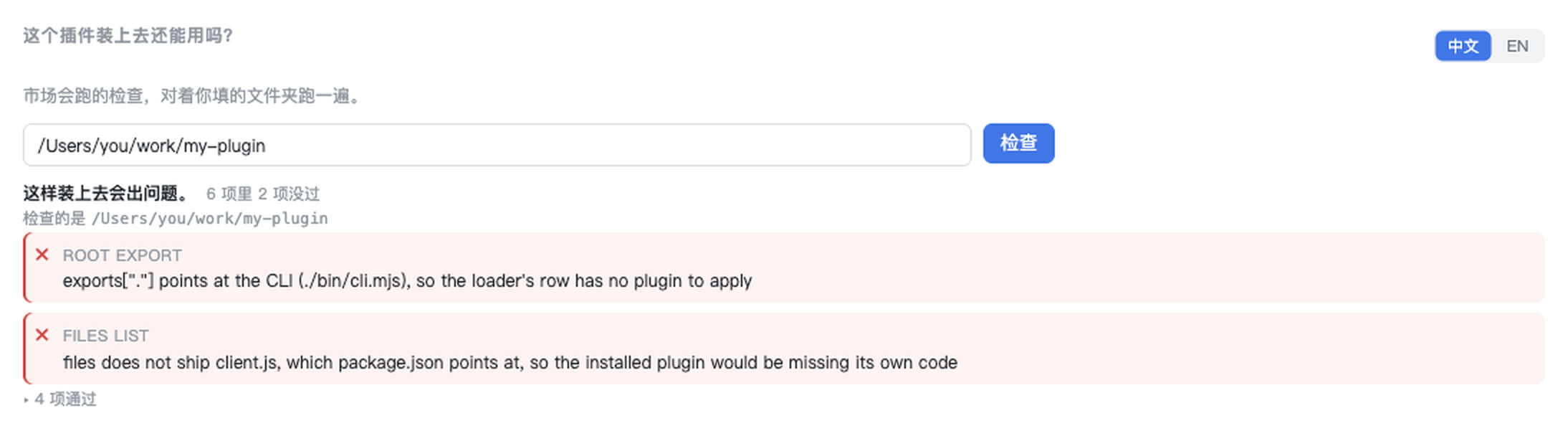
同一套检查,放在右侧栏:填文件夹、owner/repo 或 GitHub 链接,它直接告诉你哪一项会失败、为什么。不安装任何东西,也不写你的文件。
| 你是谁 | 从这里开始 | 然后 |
|---|---|---|
| 第一次写插件 | init |
doctor、verify |
| 改一个已经装上的面板 | dev |
mount、testkit、audit |
| 要发一个版本 | verify |
release、index |
verify 到底做了什么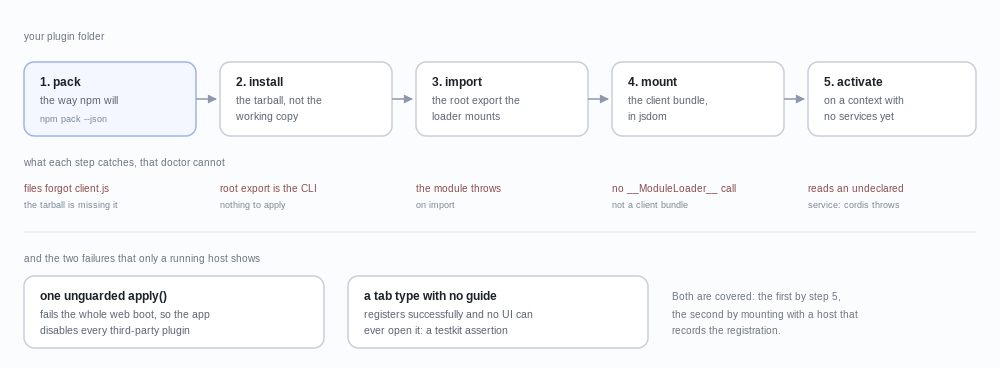
顺序是有意义的。先打包,检查读到的就是 npm 会发布的文件清单,而不是你手边那个文件夹;装 tarball,import 的就是加载器真正会 import 的那个根导出;挂载,就是真的在 jsdom 里把客户端 bundle 跑一遍,宿主还会记录它注册了什么。
每一步的存在,都是因为曾经有插件通过了前一步、却装进去什么都不做。
我发布自己第一个面板插件的那天,同一个错误在四个地方各出现一次,而且每次的报错都指向别处:
package.json 里 exports["."] 指向 CLI,插件装上了,加载器那行什么都 apply 不到;files 忘了 client.js,npm pack 出来的包里没有面板代码,doctor 读工作副本看不出来;dsh.client 却没有 exports["./client"],宿主直接把这一行丢掉,界面上只留一个红点「异常」,没有任何文字;ctx.locale.register(...) 在服务就绪前抛错,整个 web boot 失败,应用把这判成「第三方插件不支持」并关掉所有插件。每一条都能在发布前被机器拦住,所以每一条现在都是一项检查。这些检查对着宿主的解析代码写,而不是对着文件约定写——差别就是 verify 报 mounted the panel 而真实宿主什么都不加载。
下面每一条都真实发布过,而且只看 manifest 一个都发现不了。
| 你会看到 | 真正的原因 | 现在由谁拦 |
|---|---|---|
| 标签是个红点,面板永远打不开 | exports["."] 指向了 CLI,加载器那一行没有插件可挂 |
root export |
| 插件装上了,应用从不加载它 | 声明了 dsh.client,但 exports["./client"] 不存在——宿主直接丢掉这一行 |
client declaration |
| 应用提示「第三方插件不支持」,把所有插件都禁用 | apply() 读了没声明的 ctx.webServer,cordis 不是返回 undefined 而是抛错 |
verify(在一个没有任何服务的 ctx 上调用 apply) |
| 标签注册成功,界面里却没有任何入口 | sidebarRightTabs.register() 注册的是类型,侧栏列的是 tabs.guide() 的返回 |
testkit 的测试,不是 doctor |
前三条是静态的:doctor 和 verify 不用开应用就能抓到。第四条是 UI 契约,必须把面板挂起来、检查注册出去的参数——那是 testkit 的活。
这五个事故——红点没有面板、宿主丢掉一行、一行没加保护的 apply() 让应用禁用全部插件、注册了却没人能打开的标签、以及一个判错了的检查器——都写了原始报错和复现步骤:插件装上了,却什么都不做。
market/index.json 的仓库和 gh(已登录)。verify 过了,可以用这个徽章,点回这里:
[](https://github.com/WJDdidi-1/dsh-plugin-toolkit)这是声明不是装饰:dsh-plugin verify . 退出码为 0 才挂。
npx dsh-plugin-toolkit@latest init ./my-panel --name my-panel
cd my-panel && npm install && npm test
生成的项目里已经有了这些容易被忘掉的东西:
main / exports[".""] 指向插件本体(index.js,导出 apply);exports["./client"] 指向 client.js(没有它宿主不服务这个 bundle);dsh.client = { platform: "web", immediately: true } 与 dsh.bundle.patch;files 覆盖上面每一个路径;node --test 用例和一个钉住本工具版本的 CI 工作流。版本号取自当前运行的 CLI 自身,所以脚手架不会落后于你正在读的文档。
检查器固定在对话栏下方、输入框上方:默认收起成一行,点开就是完整指南——这是给谁用的、怎么用、每一项检查拦什么、以及它证明不了什么——下面才是文件夹输入框和结果。同一个面板也在右侧栏有一个 Plugin doctor 标签页,对话区忙的时候用那个。
输入框接受三种东西:本地文件夹、owner/repo、GitHub 链接。只写一个名字会去 GitHub 搜,列出候选仓库(带星数),点哪个查哪个;查仓库时只下载一次 tarball 到临时目录,不 clone 进你的工作区、不安装任何东西。
面板中英双语,默认中文;中文 / EN 开关就在对话栏那一行的右侧(右侧栏标签里也有),选过之后会记住。
不开应用也能看:
node scripts/preview.mjs /tmp/panel.html # 收起、展开、有结果、侧栏标签import { createFetch, expectSnapshot, mountClient } from 'dsh-plugin-toolkit/testkit';
const panel = await mountClient({
file: 'client.js',
copy: { en: {} },
fetch: createFetch({ '/toolkit/check': { body: { ok: true, checks: [] } } }),
});
await panel.type('.tk-input', '/tmp/plugin');
await panel.click('.tk-button');
console.log(panel.text());
await panel.unmount();mountClient 用 jsdom 加载真实的单文件 bundle、注入宿主服务、把组件真的渲染出来。它提供 type / click / press(都返回 Promise)、text()、query / queryAll / must,以及 aria(selector) / expectAria(selector, expected)——后者让「读屏器看到的是什么」变成断言,而不是靠选择器猜。
await expectSnapshot(panel, { name: 'empty' });第一次运行写入 test/__snapshots__/empty.html 与 .aria.txt;之后每次比较,差异会打印出来。
npx dsh-plugin-toolkit@latest audit --host http://127.0.0.1:54133它扫描 ~/.dsh/profiles/*/node_modules 里所有声明了 dsh 的包,对每个跑 doctor,再从宿主的 /plugins/events 读取「应用真的加载了它吗」。输出把两类问题分开:
root export 没有 apply、exports["./client"] 缺失、patch 形状不对——这些会让插件不工作;engines.dsh、README 没有 Requirements 段——市场索引要这些,加载器不读。7 installed plugin(s) are not in the running app 和 13 … not ready for the market index 是两件事,混着数会让人去修根本不影响使用的东西。
npx dsh-plugin-toolkit@latest dev ./my-plugin --host http://127.0.0.1:54133它监听源码,把改动复制进 profile 的 node_modules,然后在宿主的 /plugins/events SSE 上等一帧 rebuilt 确认——只有真的重载了才算成功。如果预览显示 the running app has not loaded <id>,那是插件没被加载,重启一次应用即可,不是 dev 的问题。
- uses: WJDdidi-1/dsh-plugin-toolkit@v1
  with:
    dir: .
    version: 0.9.5
默认跑 verify:打包、把 tarball 装进临时目录、import 根导出断言它有 apply、用裸 ctx 调一次 apply({}) 确认服务缺失时降级而不是抛错、最后把面板挂起来。doctor 在读工作副本,verify 在读用户真正会装到的东西。
doctor 检查什么| 检查 | 拦住的是 |
|---|---|
| manifest | 没有 name / version / engines.dsh |
| root export | exports["."] 指向 CLI,加载器那行没有插件可 apply |
| client entry | 找不到 bundle,或 dsh.client 与 exports["./client"] 不一致 |
| client declaration | platform 不是 web、缺 exports["./client"]、指向的文件不存在 |
| files list | npm pack 不会带上 manifest 指到的路径 |
| patch | cordis.patch.yml 不是唯一一条 - insert: |
| readme | 没有 Requirements 段(advisory,市场索引要) |
dsh-plugin-toolkit doctor . 的退出码只由 hard 项决定。
按顺序查这五件事:
node -e "import('dsh-plugin-toolkit').then(m => console.log(typeof m.apply))" 应为 function;npx dsh-plugin-toolkit verify .;cordis.patch.yml 是不是恰好一条 - insert:,name 与包名一致;~/.dsh/toolkit-client-report.ndjson(本插件的面板把激活失败写在这里,因为界面只有一个红点)。release 做什么engines.dsh、README Requirements;git tag plugin-vX.Y.Z && git push origin plugin-vX.Y.Z(--publish 时接着 npm publish);npm view 有缓存,直接读 versions);market/index.json 里该插件改成新版本 + 真实 publishTimestamp;--merge 时等 CI 全绿后 squash 合并;索引在别人的仓库里时用 --market <dir>,它会对着那个目录做第 4–6 步。
dsh plugin add;npm.cmd 有专门的测试,但没有 Windows 实机手工验证。Apache-2.0。
Find threats in your stack.
OX Radar can check high-priority threats, like critical package CVEs, against your context.
Each incident is marked Detected or Not Detected with a remediation plan and proof all tracked in the Response Center.
The probe returned only these fields for this server — auth requirement, protocol and tool list weren’t observed, so they’re not shown (never guessed).
The publisher’s own links, as the registry reports them. These are not sources for the assessment on this page.