
Scan your whole stack


From OX Research Newsroom






Are you using dsh-profile-config-sync?
Find out what’s in your code.
Scan your apps free in minutes (opens in a new tab) Read the latest findings
Latest version: v0.7.0
dsh-profile-config-sync was last scanned on 28 Nov 2026 at version 0.7.0. Risk score 0 of 100. No malicious behavior was detected.
| Version | Published | Status |
|---|---|---|
| 0.7.0 LATEST | 28 Nov 2026 | No rules fired |
| 0.6.47 | 27 Nov 2026 | No rules fired |
| 0.6.46 | 27 Nov 2026 | No rules fired |
| 0.6.45 | 27 Nov 2026 | Not shown |
| 0.6.44 | 27 Nov 2026 | Not shown |
Findings for v0.7.0. The score is a capped sum of the weights of the rules that fired — not CVSS, not exploitability, and not a probability. It is not comparable across packages with different scan coverage.
The score describes 0.7.0; other versions have their own rules, not their own score.
The publisher’s own README, as collected from the registry.
dsh-profile-config-sync —— DeepSeek Harness 客户端的多端配置备份 / 同步 / 还原插件。




中文 | English
DSH 的配置散在 ~/.dsh 的十几处:profile、全局提示、Skills、Agent 预设、插件设置、插件数据、工作区、会话记录。
这个插件把它们按 12 组内容抓成一份 Git 仓库快照,推到你自己的 Git 远端或 WebDAV 云端;换机器、重装、误改,一条命令拉回来铺好。
同步动作在客户端退出后执行,不会搬走写了一半的配置。
来源:基于 QcWyGm/dsh-config-sync-plugin(MIT)重写与扩展,见文末「来源与版权」。
session_projcache)。逐组 / 逐项可关,抓不到的会在窗口末尾与面板常驻提示里点名。.cmd(Windows)/ .sh(macOS、Linux)。machines/。~/.dsh/backups/,选错档也能再回滚一层。四个关键词:配置(12 组按需抓取)· 备份(仓库即快照,Git 有历史)· 同步(一台推、一台拉)· 还原(铺回本机,可回滚)。
一句话流程:本机 → 抓取 → 仓库 → 推送 → Git 远端 / WebDAV → 拉取 → 另一台机器,每一步都能退回上一档。
| 安装 | 从零开始 | 面板 | 同步内容 |
|---|---|---|---|
| 脚本 | 还原备份 | 插件数据 | 自动同步 |
| 仓库 / 云端 | WebDAV | 问题反馈 | 工作区与会话 |
历史版本细节 · 完整实测记录 · 字段与接口参考
插件包名 dsh-profile-config-sync(npm 上的 dsh-config-sync 是上游同名项目,不是这个包)。
| 方式 | 命令 / 入口 |
|---|---|
| npm | npm i dsh-profile-config-sync(已发布到与 GitHub Release 相同的版本,latest 标签指的就是它) |
| 插件市场 | 客户端「插件市场 → 发现」搜「配置备份与同步」(market-index.json 登记的 source.type 是 npm,装的就是 registry 上的在线版) |
| 离线 tgz | pnpm add ./dsh-profile-config-sync-0.6.49.tgz(内网机器用这个) |
发布状态:v0.6.49(macOS 全面可用 + 平台分区)已在本机验证并打 tag;npm 上的同名包同步发布(npm i dsh-profile-config-sync)。多端测试安装:pnpm add ./dsh-profile-config-sync-0.6.49.tgz 或从 npm 安装。
要正式发布时(需要有权限的账号,我不会擅自 push):
gh release create v<版本> dsh-profile-config-sync-<版本>.tgz \
  --repo huanyu-a/dsh-profile-config-sync --title "v<版本>" --notes-file <发布说明.md>
# tag 与包名必须是同一个版本号,别像旧文档那样写成 v0.6.39 配 0.6.44 的包
git tag -a v<版本> -m "v<版本>" && git push origin v<版本>
# 发布后把仓库根的 version.json 更新到新版本并推上去:它随 npm 包一起发布(files 里有它),面板读的是包内那份
# (version.json 不在 npm 包里,files 字段没有它)
装好后插件目录是 <客户端根>\dsh-profile-config-sync-<ver>,appRoot 留空时由插件位置反推客户端根。
13 条 /config-sync/* 路由在进入处理器之前,先由宿主 Connection 判定:
ctx.connection.requestRejection(request) —— DSH 官方的 Host/Origin 围栏加浏览器会话鉴权,
和 GUI 自己的 /api 通道是同一套。宿主没有 connection 服务时(非 Web 载体),才退回插件自己的
originAllowed(只认本机 Host、拒绝跨站与 Sec-Fetch-Site: cross-site)。
为什么要有这一层:webServer.register 只是裸 HTTP 载体,DSH 文档写得很直白——
「The carrier owns no authentication or Origin policy」,路由鉴权是组合层的责任。
0.6.41 及之前只靠插件自己写的 originAllowed:缺 Origin 头的请求(本机任意进程、curl)
会被当成可信来源放行,实测裸 curl http://127.0.0.1:<端口>/config-sync/status 返回 200(宿主端口每次启动会变,取 DSH_WEB_URL),
能读到仓库路径、配置摘要、待同步清单,也能触发推送与还原。
现在同一请求得到 401,拒绝响应体只有 { ok: false, error: "unauthorized" | "forbidden" },不含任何业务字段。
因为依赖 requestRejection / connection.fetch 这组准入接口,package.json 声明了 engines.dsh: ">=0.2.2-rc.5"。
这个下限是量出来的,不是拍的:准入接口在 0.2.2-rc.5 的源码里已经在(dsh-client-connection/src/rpc-host.ts 的 requestRejection / admit),
而 DSH 在安装与 profile 启动时都强制检查 engines.dsh(拿一个声明 >=99.0.0 的假插件在临时 profile 上就能复现 incompatible-version 拒绝),
所以写 >=0.2.3 会把正跑着 0.2.2-rc.5 的机器直接挡在门外。等运行时升到 0.2.3+ 之后,这个下限可以一行收紧。
自检里有专门的一套(route-admission,16 条断言):13 条路由在 403 / 401 / 放行 / 无 connection 四种情形下逐一验证,
并做结构断言「每条 webServer.register 的 handler 都套了准入」,防止以后新增路由时漏掉这一层。
Lock-SyncRun(命名 Mutex),同一 ~/.dsh 并发时后来者以退出码 3 结束;macOS / Linux 的引擎没有这层锁,两个动作同时跑仍可能撞文件。browser-profiles / Login Data / Cookies 等路径段三处硬拦(见插件数据)。源机器推一次、目标机器拉一次(隔离环境两台假机 + 本地裸库实测走通):
源机器 A ──────────────────────► 远端(Gitee / GitHub / 自建) ──────► 目标机器 B
1 装插件(tgz 或市场)                                              1 装「同版本」客户端并启动一次
2 面板填 本机仓库 + 云端地址                                        2 装插件,填同一对本机仓库 + 云端地址
3 点「初始化推送」 3 点「拉取」(会用仓库版本覆盖本机配置)前置条件(缺一项就卡住):
| 项 | 要求 | 不满足时 |
|---|---|---|
| 客户端版本 | 两台同版本(profile\host-contract.json 校验) |
拉取报 版本不一致,加 -AllowVersionDrift 才能强铺 |
目标机器 .dsh |
至少启动过一次客户端 | [X] 目标 profile 不存在,拉取直接退出 |
| 内置运行时 | <AppRoot>\node.exe 或客户端本体 |
本机没有可用的内置运行时 → 会话 cwd 改不了,会话列表是空的 |
| git | 两端都装 | 找不到 git.exe |
命令行等价(面板点按钮就行,这里是同一件事):
pwsh -File runtime\sync.ps1 push   -RepoRoot <仓库目录> -DshHome <~\.dsh> -AppRoot <客户端根> -SkipInstall -Force
pwsh -File runtime\sync.ps1 pull   -RepoRoot <仓库目录> -DshHome <~\.dsh> -AppRoot <客户端根> -SkipInstall -Force
-SkipInstall 跳过 pnpm install(离线场景必须);-Force 跳过「检测到 DSH 在运行」的保护(真机请先退出客户端,别用)。
从零验证最容易踩的 5 个点、首次推送/拉取的原始输出,见 docs/REFERENCE.md。
| 入口 | slot | 说明 |
|---|---|---|
| 左侧栏一行 | sidebar.panellist(id: config-sync) |
标题「配置备份与同步」(英文 Config Backup & Sync) |
| 点开的面板 | main(key: config-sync) |
与侧栏行必须在嵌套 inject 里成对 register(细节见 REFERENCE) |
| 设置摘要行 | settings.general.item |
「设置 → 通用」里同名摘要行:一行四态 chip + 展开(仓库、远端、私钥) |
包里有什么(index.js / client.js / runtime/ / tools/ 等)见 REFERENCE。
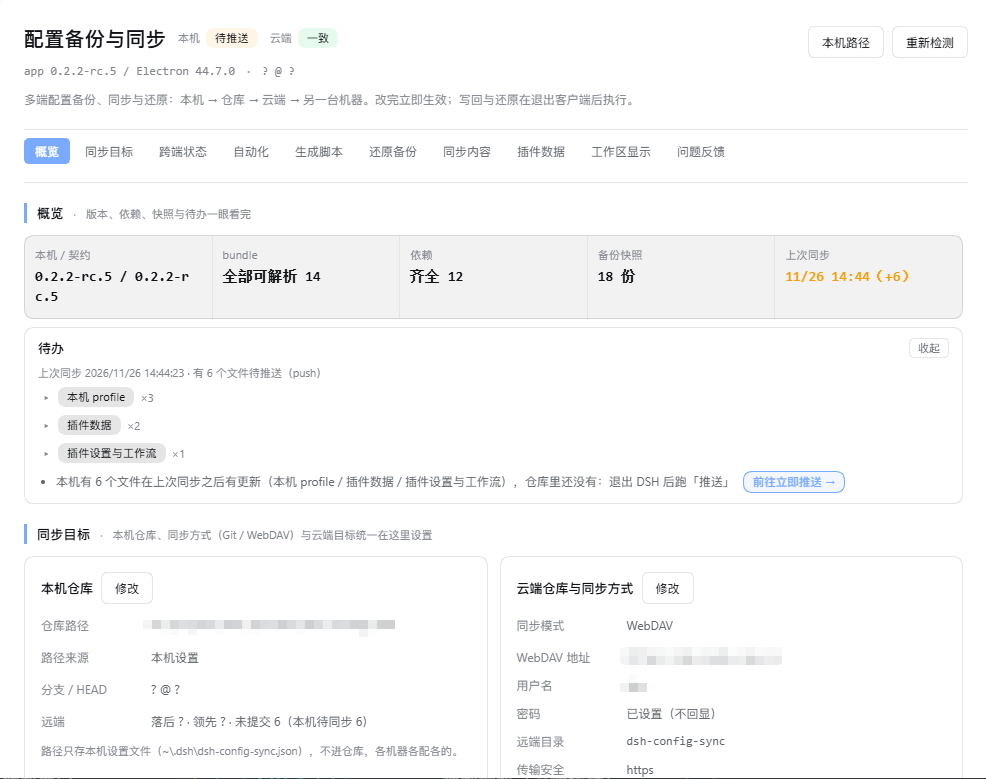
配置备份与同步 本机 [一致/待推送/待拉取/有问题] 云端 [一致/不一致/待拉取]。云端全自动(挂载查一次、之后每 2 分钟复查)。app 版本 / Electron 版本 · 分支 @ 短 HEAD。本机 / 契约、bundle、依赖、备份快照、上次同步((+N) = 之后又写入几个文件);有事才出现「待办」。git status 干净时新会话可能还没 capture。status 按 mtime 比对 capture 真正会抓的 12 组,晚于上次同步的计入;取消勾选的组不计入。上限 20000 文件 / 1.5 秒,便宜的配置类先扫、贵的后扫。apply.ps1 与 profile\package.json(再有 sync.ps1 才算能推拉)。repoPath → DSH_CONFIG_REPO → 常见位置探测;配置里填的空目录同样算有效答案。repo.phase:ok 真仓库、empty 空目录待首次拉取、missing 目录不存在、unusable 有别的文件却不像仓库;pushAllowed / pullAllowed 按它算。prepare(push) 与 auto(push-now) 一律 400。拉取走 git init → 补 origin → fetch → checkout -B <分支>(不用 clone,目录里可能已有 同步-*.cmd)。push -u origin main。git ls-remote --heads + 临时 bare fetch --depth 1 --filter=blob:none + ls-tree -r 数文件数(15 秒超时);探不到(离线/认证失败)就只允许拉取,remoteFiles===0 一律算两边都空,用 --force-with-lease 覆盖那个空分支。prepare 也 400(远端缺失时「还原」不受影响)。~\.dsh\dsh-config-sync.json,跟本机走、不进仓库;SSH 私钥只存路径,可留空交给 .ssh\config。不挑平台:远端只校验写法,fetch / push / pull / ls-remote 全交给 git。Gitee、GitHub、GitLab、自建 Gitea/Forgejo 走同一条路。
| 项 | 说明 |
|---|---|
| 地址写法 | git@host:owner/repo.git、ssh://git@host:port/owner/repo.git、https://host/owner/repo.git |
| 默认分支 | 先试 main,没有就取远端第一个分支(老仓库 master 也行) |
| 认证 | SSH 填私钥路径;HTTPS 用 Git 凭据管理器,插件不存密码 |
| 单文件上限 | 三档:源头 >100 MB 抓取时跳过、≥95 MB 提交前剔除、50–95 MB 只警告 |
私有库:优先 SSH 地址。插件自身更新只查 npm,与本机配置的 Git 远端无关,所以换成私有库也不影响自更新(也不用再为它配令牌)。
WebDAV 与 git 共用同一份仓库格式,只换传输层(不依赖 git、不需要远端仓库)。面板「云端仓库与同步方式」卡里填地址、账号、密码与远端目录即可。
Find threats in your stack.
OX Radar can check high-priority threats, like critical package CVEs, against your context.
Each incident is marked Detected or Not Detected with a remediation plan and proof all tracked in the Response Center.
The probe returned only these fields for this server — auth requirement, protocol and tool list weren’t observed, so they’re not shown (never guessed).
The publisher’s own links, as the registry reports them. These are not sources for the assessment on this page.
Read the latest findings