Scan your whole stack








Are you using @gapi/core?
Find out what’s in your code.
Scan your apps free in minutes (opens in a new tab) Read the latest findings
Latest version: v1.8.290
@gapi/core was last scanned on 26 Nov 2026 at version 1.8.290. Risk score 0 of 100. No malicious behavior was detected.
| Version | Published | Status |
|---|---|---|
| 1.8.290 LATEST | 26 Nov 2026 | No rules fired |
| 1.8.289 | 26 Nov 2026 | No rules fired |
| 1.8.288 | 25 Nov 2026 | No rules fired |
| 1.8.287 | 25 Nov 2026 | Not shown |
| 1.8.286 | 25 Nov 2026 | Not shown |
Findings for v1.8.290. The score is a capped sum of the weights of the rules that fired — not CVSS, not exploitability, and not a probability. It is not comparable across packages with different scan coverage.
The score describes 1.8.290; other versions have their own rules, not their own score.
The publisher’s own README, as collected from the registry.
Really easy GraphQL API framework build on top of NodeJS inspired by @Angular
Build with @rxdi - reactive Extension Dependency Injection Container working inside Browser and Node
Created to provide complex backend scalable applications with minimum effort.
For questions/issues you can write ticket here
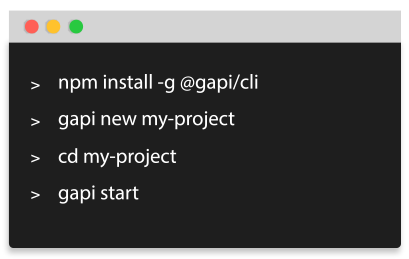
Starting project for less than 1 minute via Gapi-CLI
Heroku Ready!
Basic starter project has Heroku Easy Deploy Button!
Amazon ServerLess Ready!
Check Example
Part of the frameworks and techniques used without which Gapi would not exist :love_letter:
IoC Containers are DI frameworks that can work outside of the programming language. In some you can configure which implementations to use in metadata files (e.g. XML) which are less invasive. With some you can do IoC that would normally be impossible like inject an implementation at pointcuts.
Pointcuts - aspect-oriented computer programming
Advanced Starter Example and production build
Video Tutorials
npm install @gapi/coreimport { CoreModule } from '@gapi/core';
import { Controller, Module, Bootstrap } from '@rxdi/core';
import { Query, Type } from '@rxdi/graphql';
import { GraphQLObjectType, GraphQLInt, GraphQLNonNull } from 'graphql';
export const UserType = new GraphQLObjectType({
name: 'UserType',
fields: () => ({
id: {
type: GraphQLInt,
},
}),
});
@Controller()
export class UserQueriesController {
@Type(UserType)
@Query({
id: {
type: new GraphQLNonNull(GraphQLInt),
},
})
findUser(root, { id }, context): UserType {
return { id: id };
}
}
@Module({
imports: [CoreModule.forRoot()],
controllers: [UserQueriesController],
})
export class AppModule {}
Bootstrap(AppModule).subscribe();You need to create tsconfig.json with following content
{
  "compilerOptions": {
    "emitDecoratorMetadata": true,
    "experimentalDecorators": true
  }
}
Execute
ts-node index.tsOr execute the following command to set these options on runtime:
export TS_NODE_COMPILER_OPTIONS='{"experimentalDecorators": true, "emitDecoratorMetadata": true}' &&
ts-node index.ts --compilerOptions $TS_NODE_COMPILER_OPTIONS
To add configuration click here
https://github.com/Stradivario/gapi/tree/master/packages/federation
import { FederationModule } from '@gapi/federation';
import { Bootstrap } from '@rxdi/core';

Bootstrap(
  FederationModule.forRoot({
    port: 4000,
    willSendRequest({ request, context }) {
      request.http.headers.set('authorization', context.headers.authorization);
    },
    serviceList: [
      { name: 'accounts', url: 'http://localhost:9000/graphql' },
      { name: 'products', url: 'http://localhost:9001/graphql' },
    ],
  }),
).subscribe(() => console.log('started'));
Or
import { ApolloServer } from 'apollo-server';
import { ApolloGateway, RemoteGraphQLDataSource } from '@apollo/gateway';

const serviceList = [
  {
    name: 'accounts',
    url: 'http://localhost:9000/graphql',
  },
];

class AuthenticatedDataSource extends RemoteGraphQLDataSource {
  willSendRequest({ request, context }) {
    request.http.headers.set('authorization', context.authorization);
  }
}
const gateway = new ApolloGateway({
  serviceList,
  buildService: ({ url }) => new AuthenticatedDataSource({ url }),
  __exposeQueryPlanExperimental: true,
});

(async () => {
  const server = new ApolloServer({
    gateway,
    engine: false,
    context: ({
      req: {
        headers: { authorization },
      },
    }) => ({ authorization }),
    subscriptions: false,
  });

  const { url } = await server.listen({ port: 4000 });
  console.log(`🚀 Apollo Gateway ready at ${url}`);
})();npm install -g nodemon ts-nodenpm install @gapi/cli -gIt may take 20 seconds because it will install project dependencies.
gapi new my-projectgapi new my-project --advancedgapi new my-project --microservicesgapi new my-project --serverlessgapi new my-project --serverless-sequelizeEnter inside my-project and type:
npm starthttp://localhost:9000/altairgapi testgapi startgapi test --watch
if (process.env.BEFORE_HOOK) {
  // do something here
}gapi test --beforeimport { Container } from '@rxdi/core';
import { AuthPrivateService } from './auth.service';
const authService: AuthPrivateService = Container.get(AuthPrivateService);
describe('Auth Service', () => {
it('unit: signJWTtoken => token : Should sucessfully sign jwt', async (done) => {
const token = authService.signJWTtoken({
email: 'dada@abv.bg',
id: 1,
scope: ['ADMIN'],
});
expect(token).toBeTruthy();
const verifyedToken = authService.verifyToken(token);
expect(verifyedToken.email).toBe('dada@abv.bg');
expect(verifyedToken.id).toBe(1);
expect(verifyedToken.scope[0]).toBe('ADMIN');
done();
});
});Filepath: root/src/app/user/user-queries.controller.e2e.spec.ts
import { Container } from '@rxdi/core';
import { IQuery } from '../core/api-introspection/index';
import { TestUtil } from '../core/test-util/testing.service';
import { map } from 'rxjs/operators';

const testUtil: TestUtil = Container.get(TestUtil);

describe('User Queries Controller', () => {
  it('e2e: queries => (findUser) : Should sucessfully find user', async (done) => {
    testUtil
      .sendRequest<IQuery>({
        query: `
        query findUser($id: Int!) {
            findUser(id: $id) {
                id
                settings {
                    username
                    firstname
                }
            }
        }
      `,
        variables: {
          id: 1,
        },
      })
      .pipe(
        map((res) => {
          expect(res.success).toBeTruthy();
          return res.data.findUser;
        }),
      )
      .subscribe(
        async (res) => {
          expect(res.id).toBe(1);
          expect(res.settings.username).toBe('o');
          expect(res.settings.firstname).toBe('pesho');
          done();
        },
        (err) => {
          expect(err).toBe(null);
          done();
        },
      );
  });
});import { Effect } from '@rxdi/core';
import { OfType } from '@rxdi/graphql';
import { EffectTypes } from '../core/api-introspection/EffectTypes';
@Effect()
export class UserEffects {
@OfType<EffectTypes>(EffectTypes.login)
findUser(result, payload, context) {
console.log(result, payload, context);
}
}How it works ?
When the application starts the whole schema is collected via Decorators applied inside GapiControllers.Now when we have our schema collected and bootstraping is done next step is to attach all BehaviorSubject Observables to particular resolver and from that step we got Type based string literal enums a.k.a Gapi Effects.They look like that:
function strEnum<T extends string>(o: Array<T>): { [K in T]: K } {
  return o.reduce((res, key) => {
    res[key] = key;
    return res;
  }, Object.create(null));
}
export const EffectTypes = strEnum([
  'myevent',
  'login',
  'subscribeToUserMessagesBasic',
  'subscribeToUserMessagesWithFilter',
  'destroyUser',
  'updateUser',
  'addUser',
  'publishSignal',
]);
export type EffectTypes = keyof typeof EffectTypes;
Import GapiEffect inside Module
import { Module } from '@rxdi/core';
import { UserQueriesController } from './user-queries.controller';
import { UserSubscriptionsController } from './user-subscriptions.controller';
import { UserMutationsController } from './user-mutations.controller';
import { UserService } from './services/user.service';
import { AnotherService } from './services/another.service';
import { UserEffects } from './user.effects';

@Module({
  controllers: [
    UserQueriesController,
    UserSubscriptionsController,
    UserMutationsController,
  ],
  services: [UserService, AnotherService],
  effects: [UserEffects],
})
export class UserModule {}
If you want to create custom Effect for particular resolver you need to use @EffectName('myevent') Decorator takes String This decorator will override default event which is Name of the Method in this example will be findUser
  @Type(UserType)
  @EffectName('myevent')
  @Query({
    id: {
      type: new GraphQLNonNull(GraphQLInt)
    }
  })
  findUser(root, { id }, context) {
    return {
      id: 1
    };
  }
If you click Save app will automatically reload and you will have such a typing inside autogenerated EffectTypes from api-introspection Then you can lock it with new Typo generated "myevent"
  @Type(UserType)
  @EffectName(EffectTypes.myevent)
  @Query({
    id: {
      type: new GraphQLNonNull(GraphQLInt)
    }
  })
  findUser(root, { id }, context) {
    return {
      id: 1
    };
  }
Purpose of Effects is to create logic after particular resolver is triggered Successfully without thrown error for example:
How to register plugin to the system.
Difference between Plugin and Service is that system will trigger register method inside constructor if exist,
else it will resolve OnInit and constructor properties.
That way you can register your own plugins to the system after everything is bootstrapped.
If you decide for example to return Promise on register and resolve it inside setTimeout(() =>resolve(data), 1000) the app will wait till the promise is resolved.
import { Module, Plugin, Service, PluginInterface } from '@rxdi/core';
import { HAPI_SERVER } from '@rxdi/hapi';
import { Server } from '@hapi/hapi';

@Service()
export class TestService {
  testMethod() {
    return 'Hello world';
  }
}

@Plugin()
export class MyHapiPlugin implements PluginInterface {
  name = 'MyPlugin';
  version = '1.0.0';

  constructor(
    private testService: TestService,
    @Inject(HAPI_SERVER) private server: Server,
  ) {}

  async register() {
    this.server.route({
      method: 'GET',
      path: '/test',
      handler: this.handler.bind(this),
    });
  }

  async handler(request, h) {
    return this.testService.helloWorld();
  }
}

@Module({
  plugins: [MyHapiPlugin],
  services: [TestService],
})
export class AppModule {}Find threats in your stack.
OX Radar can check high-priority threats, like critical package CVEs, against your context.
Each incident is marked Detected or Not Detected with a remediation plan and proof all tracked in the Response Center.
The probe returned only these fields for this server — auth requirement, protocol and tool list weren’t observed, so they’re not shown (never guessed).
The publisher’s own links, as the registry reports them. These are not sources for the assessment on this page.
Read the latest findings