
Scan your whole stack


From OX Research Newsroom






Are you using latexlint?
Find out what’s in your code.
Scan your apps free in minutes (opens in a new tab) Read the latest findings
Latest version: v2.0.2
latexlint was last scanned on 26 Nov 2026 at version 2.0.2. Risk score 0 of 100. No malicious behavior was detected.
| Version | Published | Status |
|---|---|---|
| 2.0.2 LATEST | 26 Nov 2026 | No rules fired |
| 2.0.1 | 6 Nov 2026 | No rules fired |
| 2.0.0 | 3 Nov 2026 | No rules fired |
| 0.0.0-stage | 3 Nov 2026 | Not shown |
Findings for v2.0.2. The score is a capped sum of the weights of the rules that fired — not CVSS, not exploitability, and not a probability. It is not comparable across packages with different scan coverage.
The score describes 2.0.2; other versions have their own rules, not their own score.
The publisher’s own README, as collected from the registry.

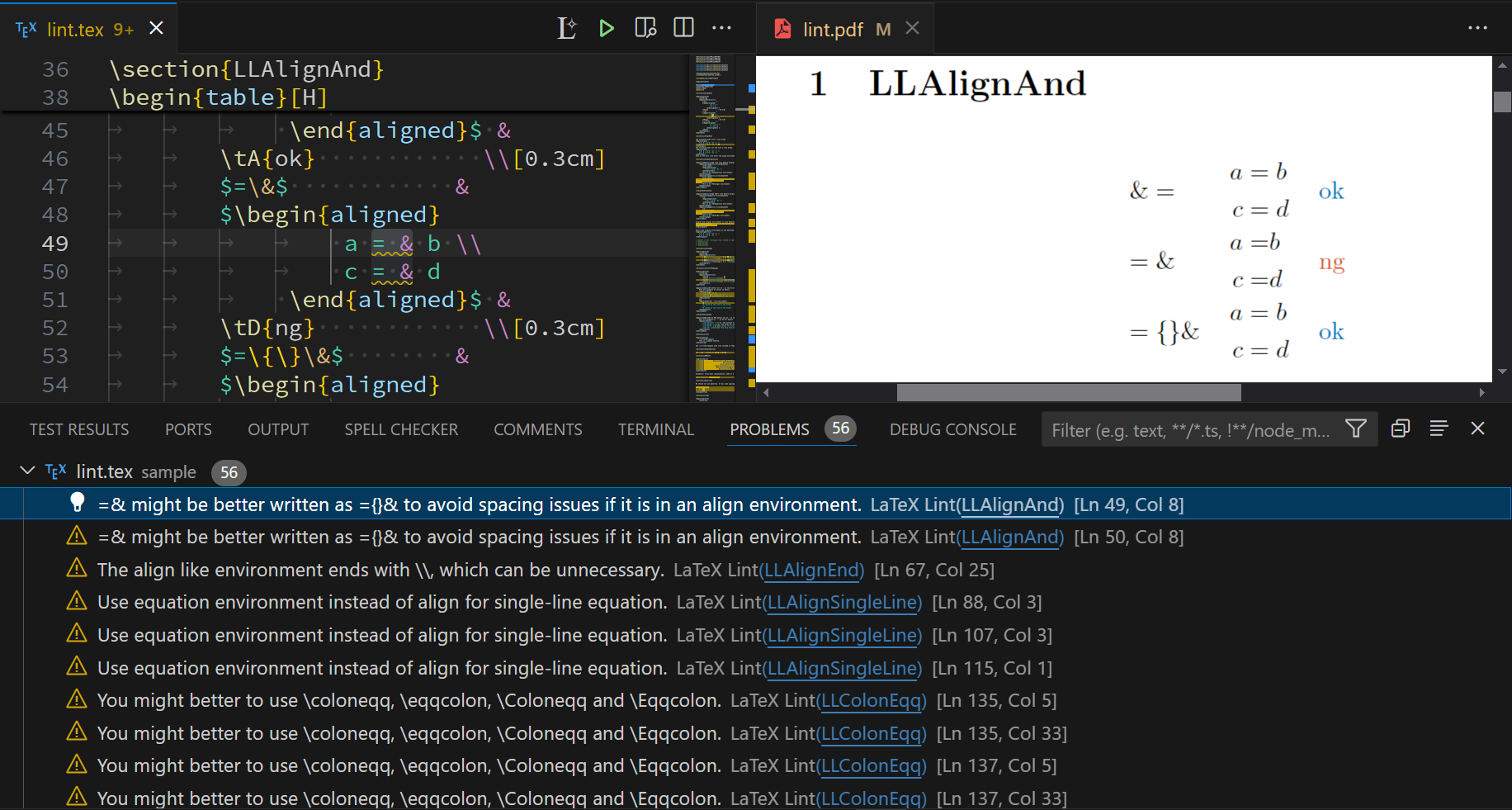
LaTeX Lint is a linter to detect common LaTeX and academic writing issues.
VS Code Extension Version is available.
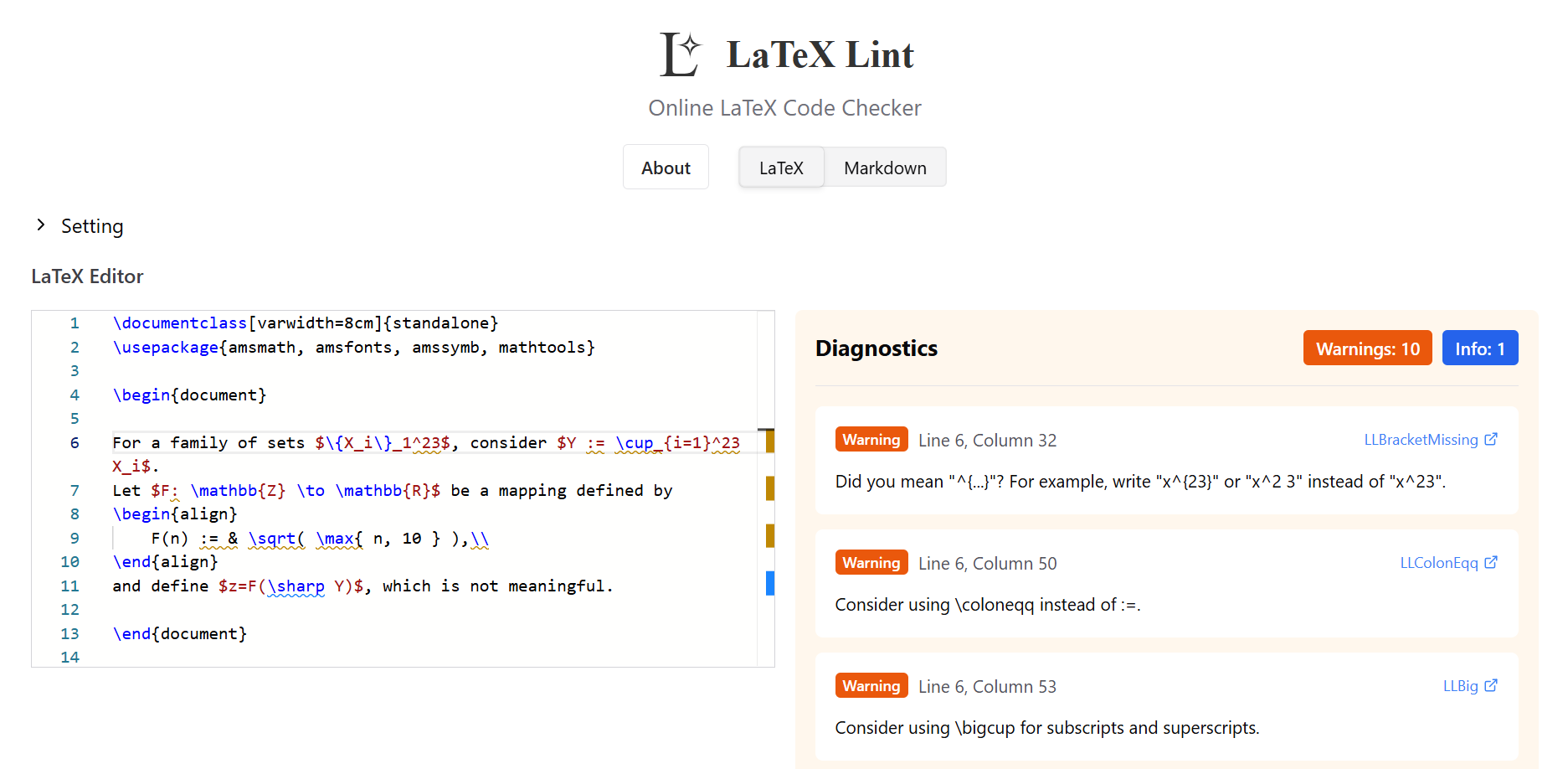
Web Version is also available.
CLI version can also be used with pre-commit and CI.
The detected rules are listed below.
We strongly recommend enabling only the rules that match your preferences and writing style.
See LaTeX Lint: Choose Detection Rules for details.
=&, \leq&, \geq&, etc.)align environment ends with \\)align environment without \\)\cap_, \cup_, etc.)\max{ and \min{)^23, _23, disabled by default)\sqrt(, ^(, and _():=, =:,::=, and =::): for mapping)\ref, disabled by default)...)")-(hyphen))eqnarray environment)\footnote)<< and >>)(\ref{eq:)\sharp likely to be a misuse of \#)KB, MB, GB, etc. without \SI)^T, disabled by default)1,000 etc.)\title{}, \section{}, etc.)latexlint.userDefinedRules)Please also refer to sample/lint.pdf and our Japanese article (日本語解説記事) if needed.
Detect =& of align environments in .tex and .md files.
Use &= or ={}& to avoid extra spaces.
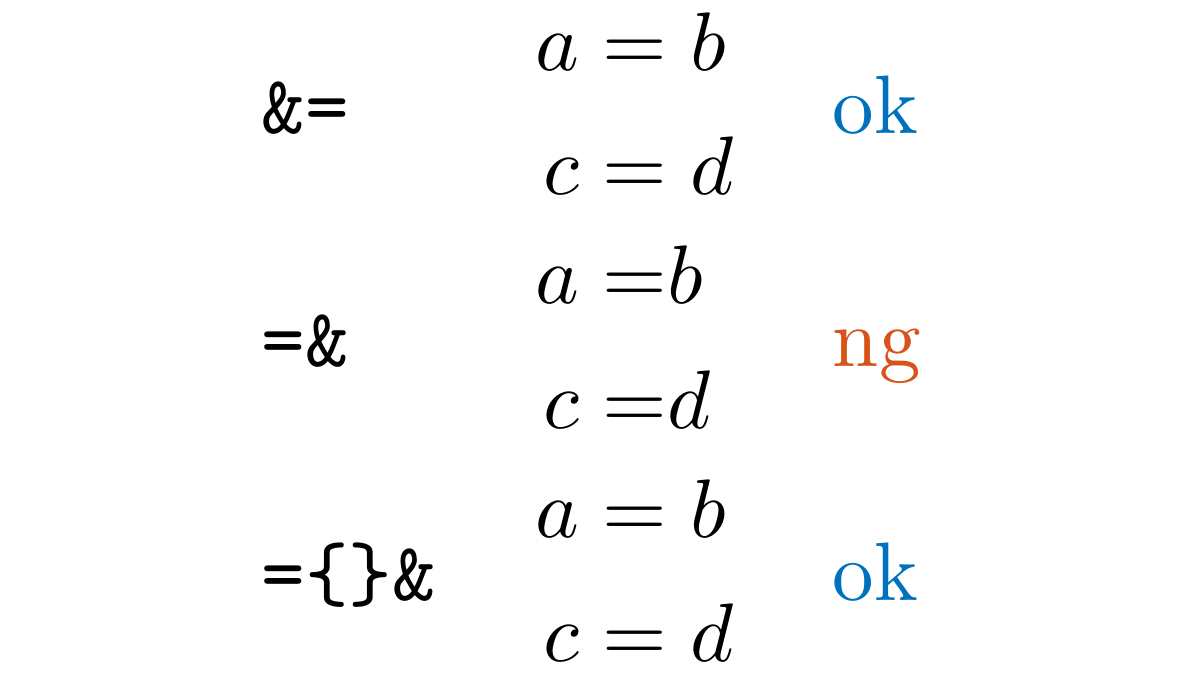
We also detect \neq&, \leq&, \geq&, etc.
References:
Relation spacing error using =& in aligned equations (Stack Exchange)
Detect align, gather, and other environments end with \\ in .tex and .md files.
This \\ would be unnecessary.
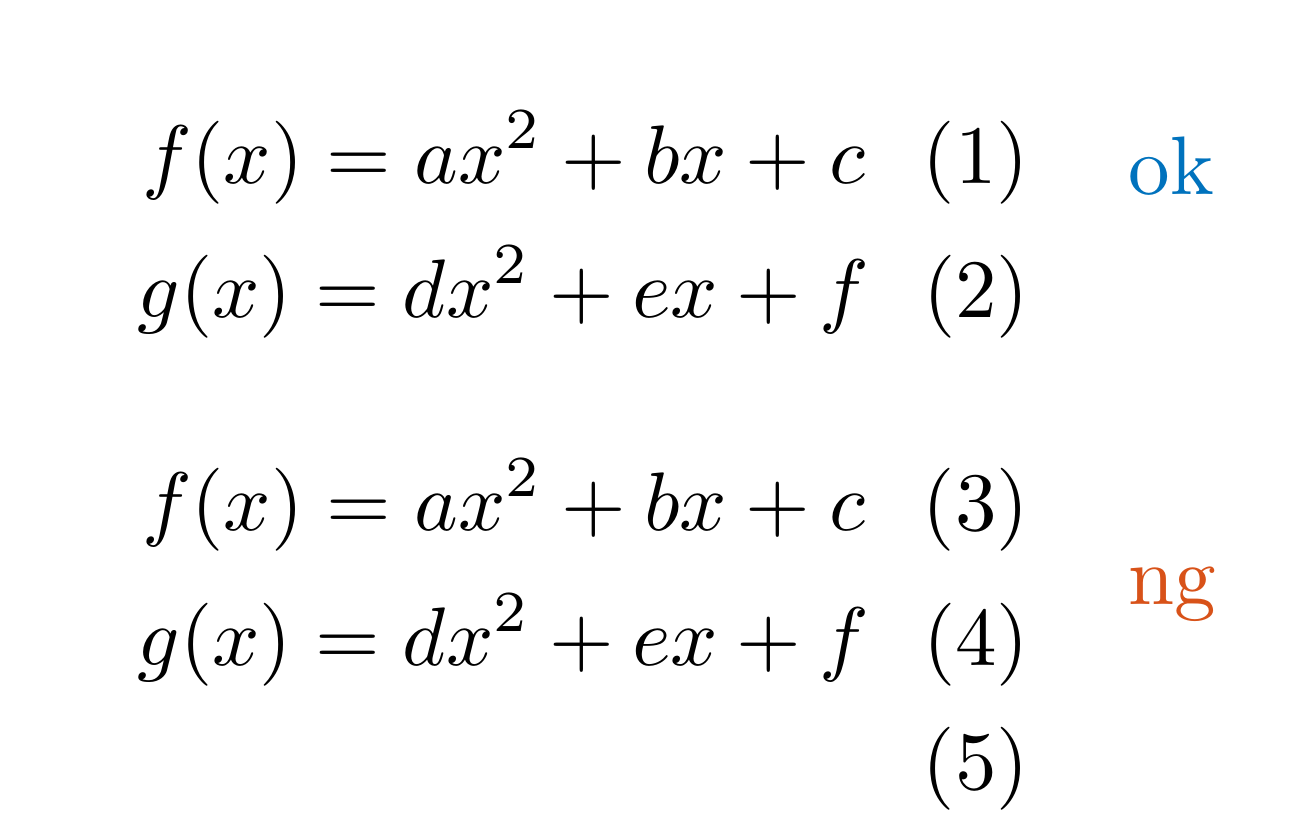
Detect align environment without \\ in .tex and .md files.
Single-line equations are recommended to use the equation environment.
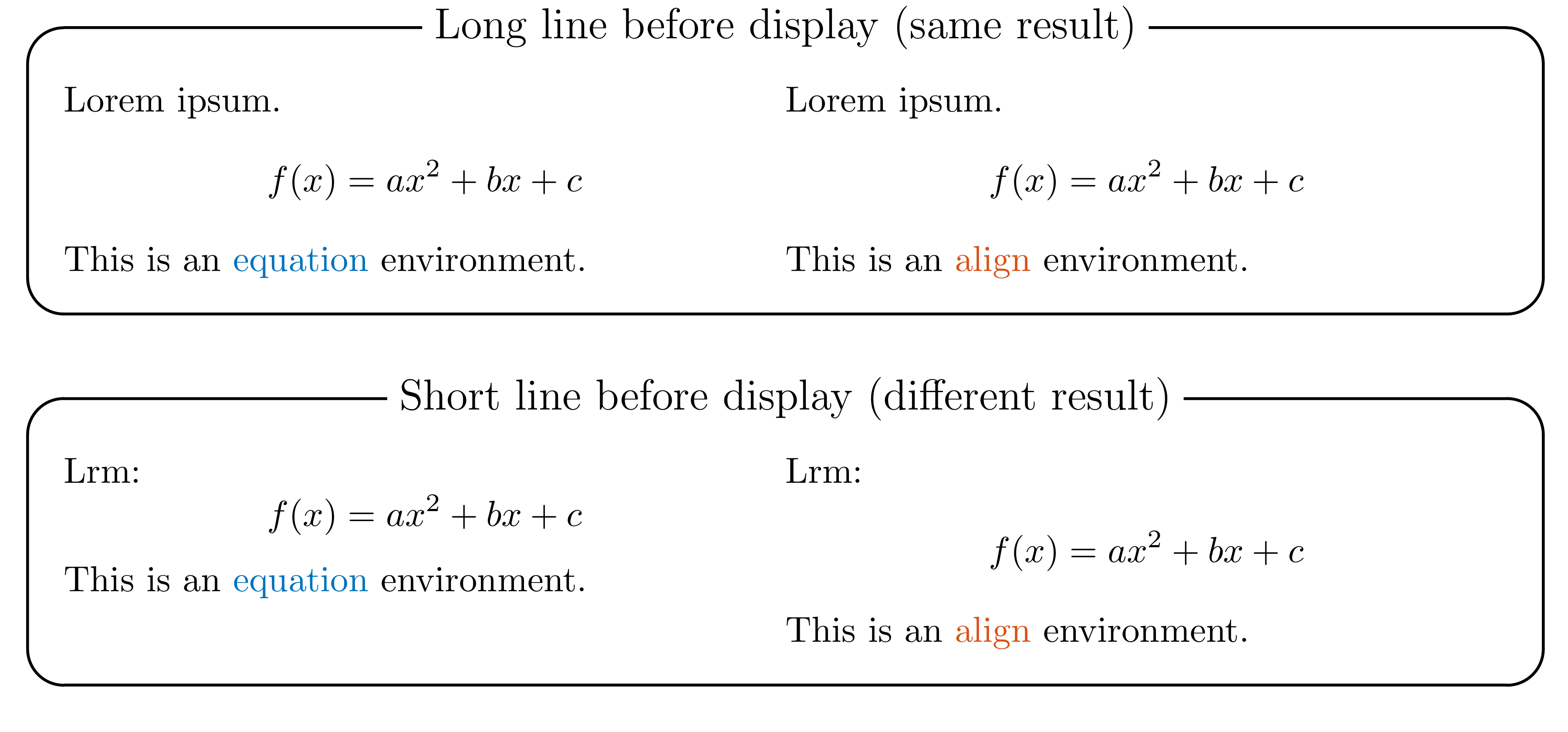
The spacing of the align environment is different from the equation environment with only one equation. Official documentation of amsmath package assumes the use of the equation environment for a single equation.
To rewrite \begin{align} ... \end{align} to \begin{equation} ... \end{equation}, you can rename the command by LaTeX Lint: Rename Command or Label.
References:
Detect wrong article usage in .tex and .md files.
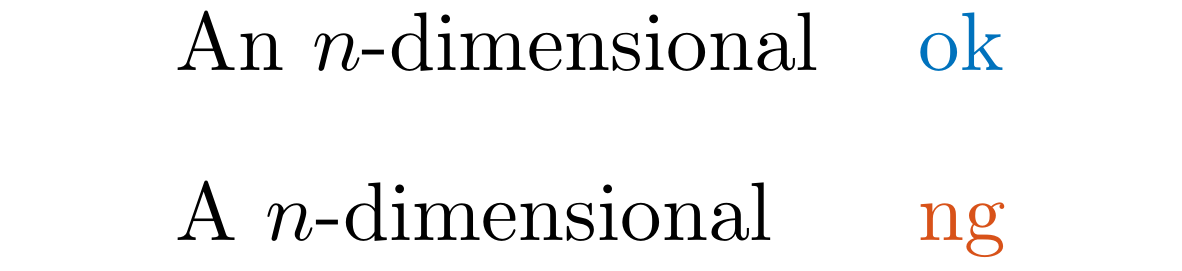
Examples are as follows:
Single letters:
a $a$ → OK: an $a$a $n$ → OK: an $n$a $x$ → OK: an $x$an $u$ → OK: a $u$Abbreviations:
a EM → OK: an EM (Expectation–Maximization)a EVD → OK: an EVD (Eigenvalue Decomposition)a FFT → OK: an FFT (Fast Fourier Transform)a NP-hard → OK: an NP-hard (Non-deterministic Polynomial-time hard)a LSTM → OK: an LSTM (Long Short-Term Memory)a LTI → OK: an LTI (Linear Time-Invariant)a MLE → OK: an MLE (Maximum Likelihood Estimation)a MSE → OK: an MSE (Mean Squared Error)a ODE → OK: an ODE (Ordinary Differential Equation)a RNN → OK: an RNN (Recurrent Neural Network)a RKHS → OK: an RKHS (Reproducing Kernel Hilbert Space)a SDE → OK: an SDE (Stochastic Differential Equation)a SVD → OK: an SVD (Singular Value Decomposition)a SVM → OK: an SVM (Support Vector Machine)a XOR → OK: an XOR (Exclusive OR)LaTeX commands:
a $\mathbb{R}$-valued → OK: an $\mathbb{R}$-valueda $L^1$ → OK: an $L^1$a $\ell^2$ → OK: an $\ell^2$a $\mathcal{L}^\infty$ → OK: an $\mathcal{L}^\infty$References:
Should individual letters be preceded with "an"? (Stack Exchange)
Detect \cap_, \cup_, \odot_, \oplus_, \otimes_, \sqcup_, \uplus_, \vee_, and \wedge_ in .tex and .md files.
You should likely use \bigcap, \bigcup, \bigodot, \bigoplus, \bigotimes, \bigsqcup, \biguplus, \bigvee, and \bigwedge instead.
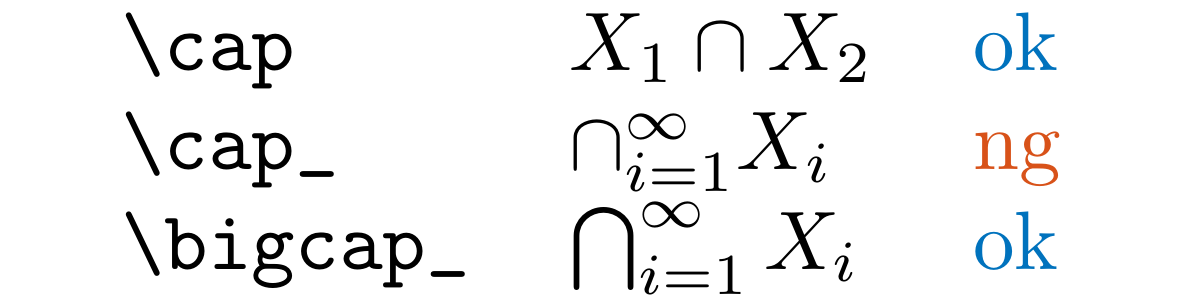
References:
Formatting the union of sets (Stack Exchange)
Detect \max{ and \min{ in .tex and .md files.
You should likely use \max( and \min( instead, or add a space like \max { or \min { to make it clear.
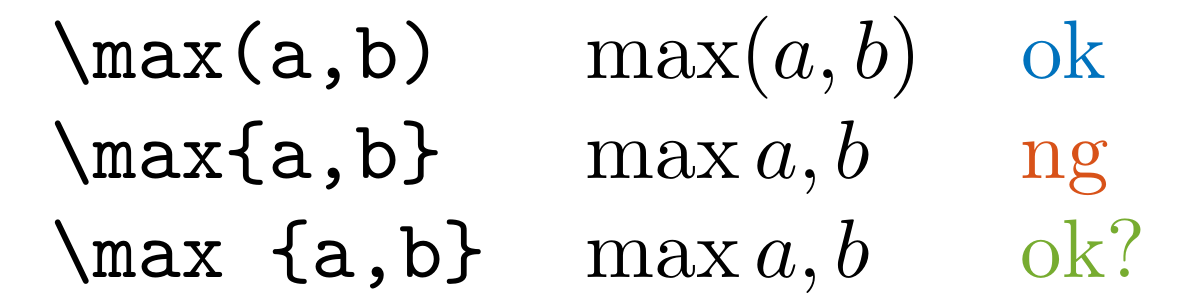
Detect cases such as ^23, _23, ^ab, and _ab in .tex files. Clarify the scope of the superscript and subscript by adding {} or a space.
This rule is disabled by default.
Filenames / URLs / labels are ignored, such as in \includegraphics{figure_23} or \url{http://example.com/abc_123}.
This rule is disabled in the preamble (only if \begin{document} exists, before that).
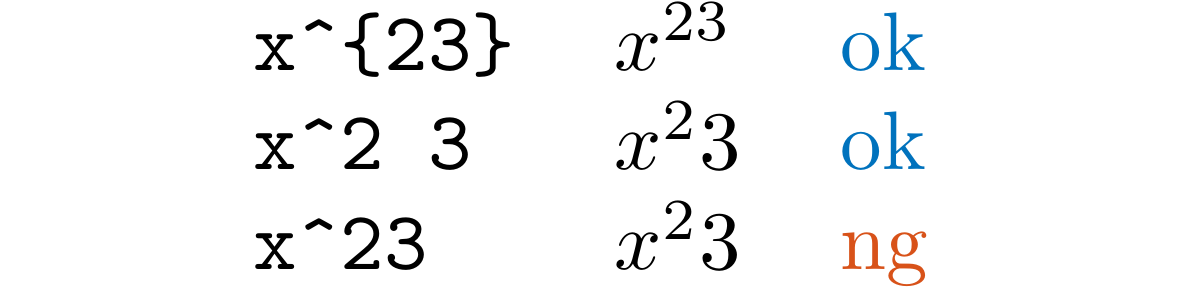
Detect \sqrt(, ^(, and _( in .tex and .md files.
You should likely use \sqrt{, ^{, and _{ instead.

Detect :=, =:, ::=, and =:: in .tex and .md files.
You should likely use \coloneqq, \eqqcolon, \Coloneqq, and \Eqqcolon in the mathtools package instead.
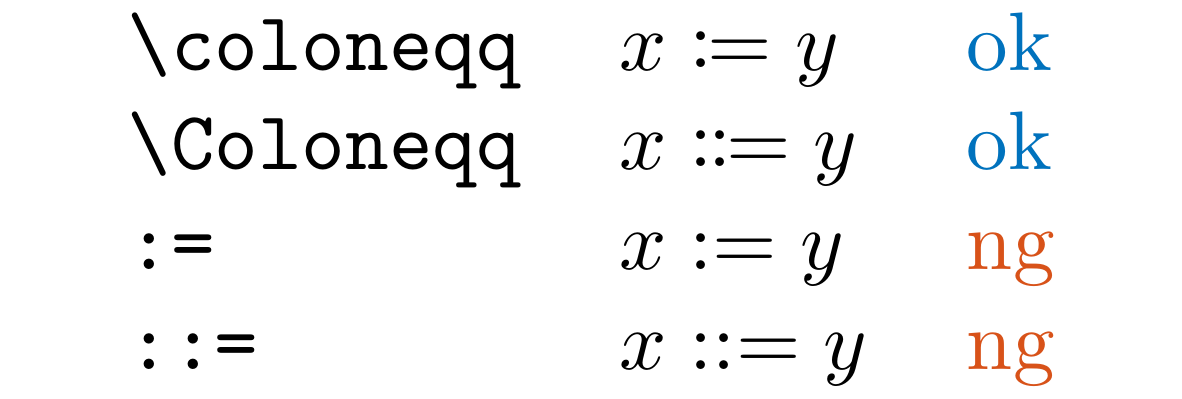
The colon is slightly too low in :=, but vertically centered in \coloneqq.
References:
How to typeset $:=$ correctly? (Stack Exchange)
What is the latex code for the symbol "two colons and equals sign"? (Stack Exchange)
Detect : which seems to be used for mapping in .tex and .md files.
You likely want to use \colon instead.
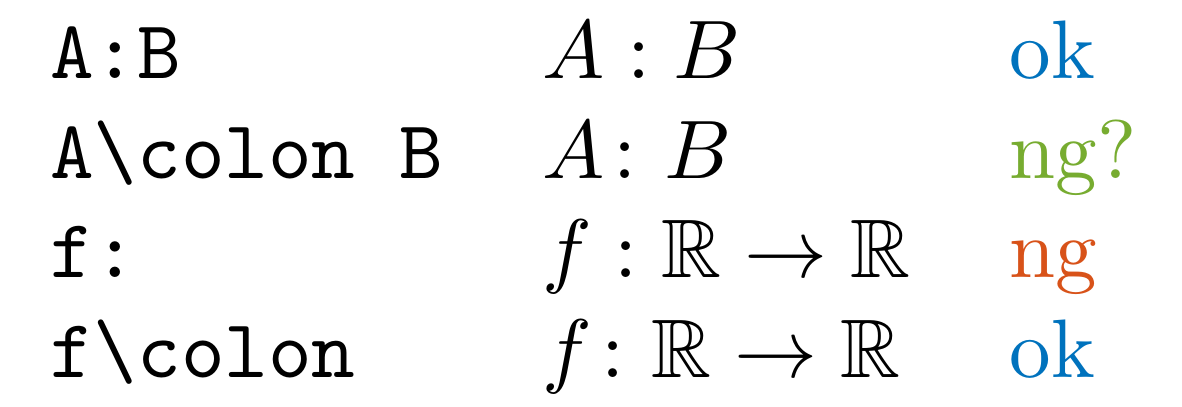
\colon is recommended for the mapping symbol. : is used for ratios, such as 1:2.
When \to, \mapsto, or \rightarrow appear, the rule looks back up to 10 words to find the nearest :, using some heuristics to suppress false positives.
References:
Using \colon or : in formulas? (Stack Exchange)
Detect \ref in .tex files.
You should likely use \cref or \Cref in the cleveref package instead.
This rule is disabled by default.
We prefer this package because it can automatically add prefixes like "Sec." or "Fig.". We can keep the consistency of the reference format.
This rule is disabled in the preamble (only if \begin{document} exists, before that).
Detect ... in .tex files.
Since \dots automatically selects the appropriate dots and adjusts the spacing, it is recommended to use \dots instead of ....
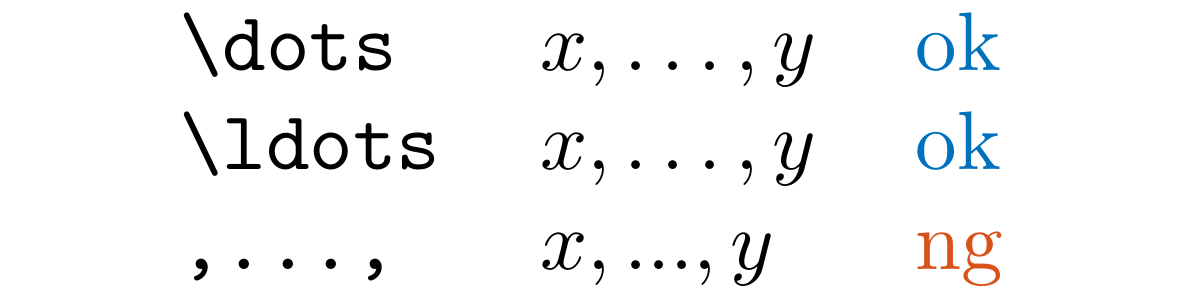
We also detect +...+ (... surrounded by operators) and 0.333... (... following a number).
(Admittedly, there is probably no very objective evidence that \dots is superior to ..., so it may be a matter of style preference. However, as the references suggest, \dots is recommended by many people.)
References:
Is there a difference between \ldots and \textellipsis? (Stack Exchange)
16.2.6 Dots, horizontal or vertical
Detect " in .tex files. Use ``XXX'' instead for double quotation.
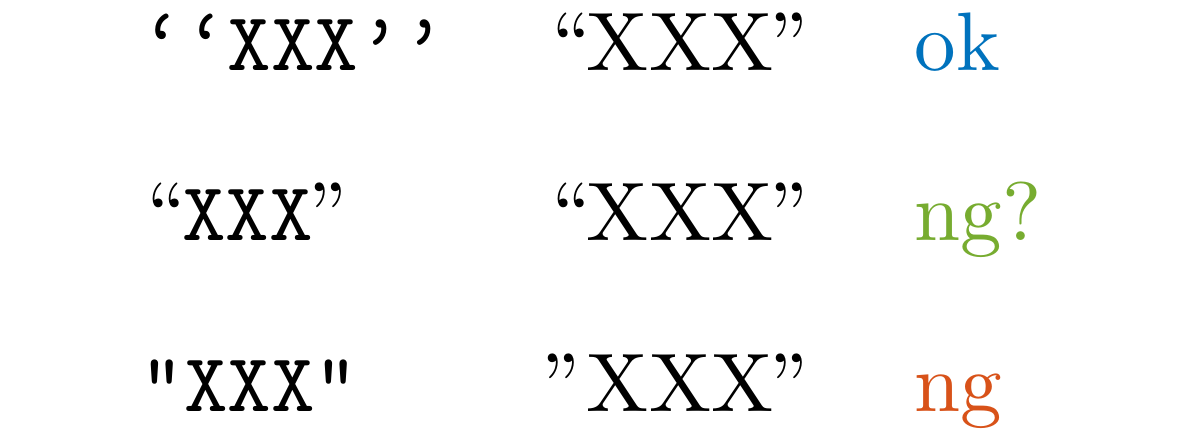
As for “XXX”, there is no problem in most cases and thus we don't detect it, but we prefer to use ``XXX'' for consistency.
You can also use \enquote{XXX} with the csquotes package.
References:
What is the best way to use quotation mark glyphs? (Stack Exchange)
Detect the dubious use of hyphens in .tex and .md files.
You should likely use -- for en-dash and --- for em-dash.
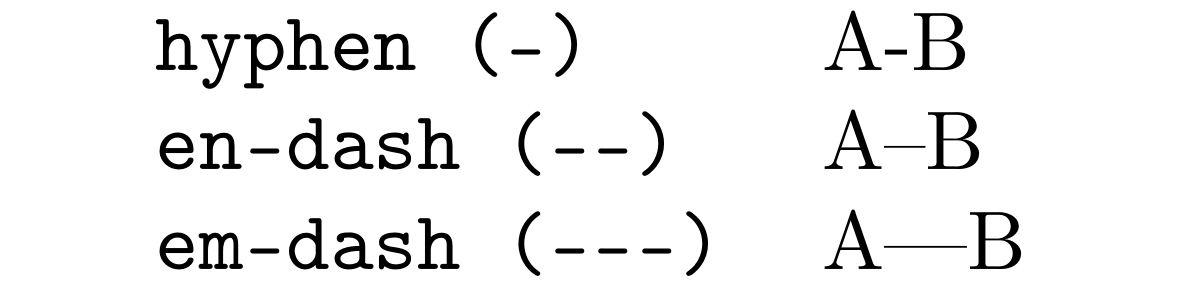
Although this rule is not inherent orthographic "correctness", in a lot of cases, the use of an en dash is preferred.
For example, we detect the following.
Erdos-Renyi (random graph, Erd\H{o}s--R\'enyi)Einstein-Podolsky-Rosen (quantum physics, Einstein--Podolsky--Rosen)Fruchterman-Reingold (graph drawing, Fruchterman--Reingold)Gauss-Legendre (numerical integration, Gauss--Legendre)Gibbs-Helmholtz (thermodynamics, Gibbs--Helmholtz)Karush-Kuhn-Tucker (optimization, Karush--Kuhn--Tucker)However, we do not detect the following as an exception.
Real-Valued / Two-Dimensional are skipped when both words are recognized general vocabulary.Fritz-John (optimization, name of a person)We also should use -- instead of - to indicate a range of pages, e.g., 123--456 instead of 123-456. A lot of BibTeX files follow this rule. We do not detect this because it might be just a subtraction.
Detect eqnarray environment in .tex and .md files.
You should likely use the align environment instead.
It is known that the eqnarray environment is not recommended because it has some spacing issues.
References:
Why not use eqnarray? (TeX FAQ)
Detect suspected typographical errors in the sequence of comparison operators in .tex and .md files.
The target of detection includes <=, \le =, \leq =, etc.
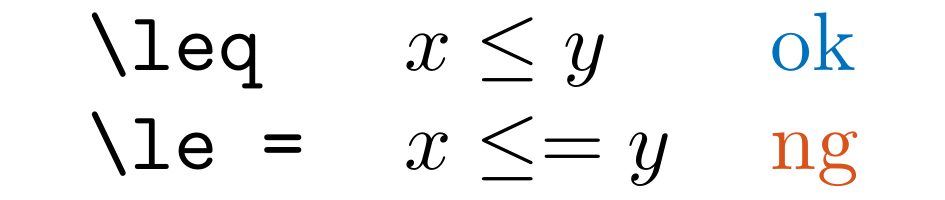
In markdown files, <= and => are ignored.
Detect unnecessary space before \footnote command in .tex files.
You should likely remove the space before \footnote, or add a percentage sign % at the end of the previous line to avoid unwanted space in the output.

Whether putting footnote markers before or after punctuation marks is a style choice, and thus we do not enforce a specific style.
References:
Where do I place a note number in relation to punctuation? (MLA Style Center):
Whenever possible, a note number should be placed at the end of a sentence.
Young wizards at Hogwarts learn how to throw flames by incanting “incendio.”2
If clarity requires that a note be placed somewhere other than at the end of a sentence, the note should generally be placed after a punctuation mark.
Despite Fredric Jameson’s influential imperative to historicize,5 Chakrabarty has criticized the “continuous, homogenous” characteristics of this understanding of history (111).
An exception is the dash, which follows a note number.
Positioned in the margins of each scene, the servant4—immobilized, silent, cast in shadow—uncannily substantiates Rodriguez’s claim.
In general, a note number should follow a closing parenthesis.
Woolf’s first novel, The Voyage Out, was published in 1915. (The original title of the novel was Melymbrosia.)8
Occasionally, however, placing a note number inside a closing parenthesis may help clarify the referent. In the following sentence, for instance, the author intends to elaborate on the meaning of the German word Binnenerzählung in a note.
According to Gail Finney, the frame narrative (as distinct from the embedded narrative, or Binnenerzählung3) prevents “penetration of, and subjective identification with, the protagonist” (322).
Best practice for source editing of footnotes (Stack Exchange):
You can use the
semantic-markuppackage, which provides a Footnote environment. You have to "escape" the end-of-line character by putting a % at the end of the line before the footnote. (Slightly modified by Hiroki Hamaguchi)
Find threats in your stack.
OX Radar can check high-priority threats, like critical package CVEs, against your context.
Each incident is marked Detected or Not Detected with a remediation plan and proof all tracked in the Response Center.
The probe returned only these fields for this server — auth requirement, protocol and tool list weren’t observed, so they’re not shown (never guessed).
The publisher’s own links, as the registry reports them. These are not sources for the assessment on this page.
Read the latest findings