Scan your whole stack


From OX Research Newsroom






Are you using @marcdomain/teriac?
Find out what’s in your code.
Scan your apps free in minutes (opens in a new tab) Read the latest findings
Latest version: v0.3.2
@marcdomain/teriac was last scanned on 28 Nov 2026 at version 0.3.2. Risk score 0 of 100. No malicious behavior was detected.
| Version | Published | Status |
|---|---|---|
| 0.3.2 LATEST | 28 Nov 2026 | No rules fired |
| 0.3.1 | 25 Nov 2026 | No rules fired |
| 0.3.0 | 25 Nov 2026 | No rules fired |
| 0.2.4 | 15 Nov 2026 | Not shown |
| 0.2.2 | 13 Nov 2026 | Not shown |
Findings for v0.3.2. The score is a capped sum of the weights of the rules that fired — not CVSS, not exploitability, and not a probability. It is not comparable across packages with different scan coverage.
The score describes 0.3.2; other versions have their own rules, not their own score.
The publisher’s own README, as collected from the registry.
teriac comes in two parts. Use either one, or both together:
| teriac CLI | teriac server | |
|---|---|---|
| For | Your machine: macOS, Linux and Windows | Your team's pull requests on GitHub |
| Does | Installs and switches versions, plans and applies, gives each project its version | Plans every pull request, applies when people ask, with permissions, approvals and guardrails |
| Get it | npm install -g @marcdomain/teriac |
Helm chart or Docker image |
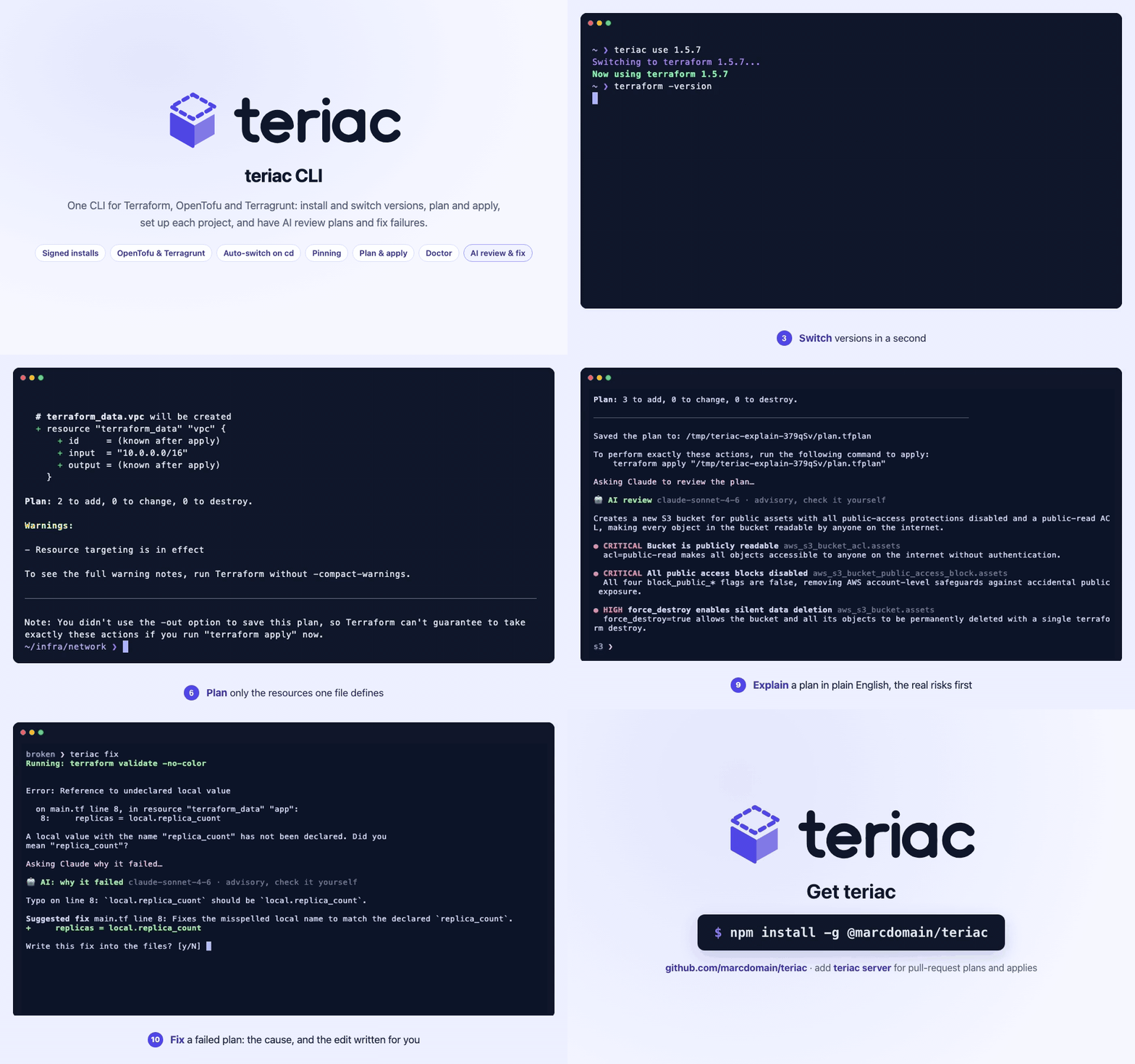
teriac is one command for Terraform, OpenTofu and Terragrunt, with no sudo:
.terraform-version, required_version, Terragrunt config), automatically on cd.teriac plan, apply, destroy, init, fmt and validate, with targets taken from files, and teriac exec to run one command with any version.teriac doctor to check the setup.teriac explain reviews a plan in plain English; teriac fix finds why a plan failed and suggests the fix.Everything lives in ~/.teriac/; upgrading teriac itself never touches your installed versions. Install it.
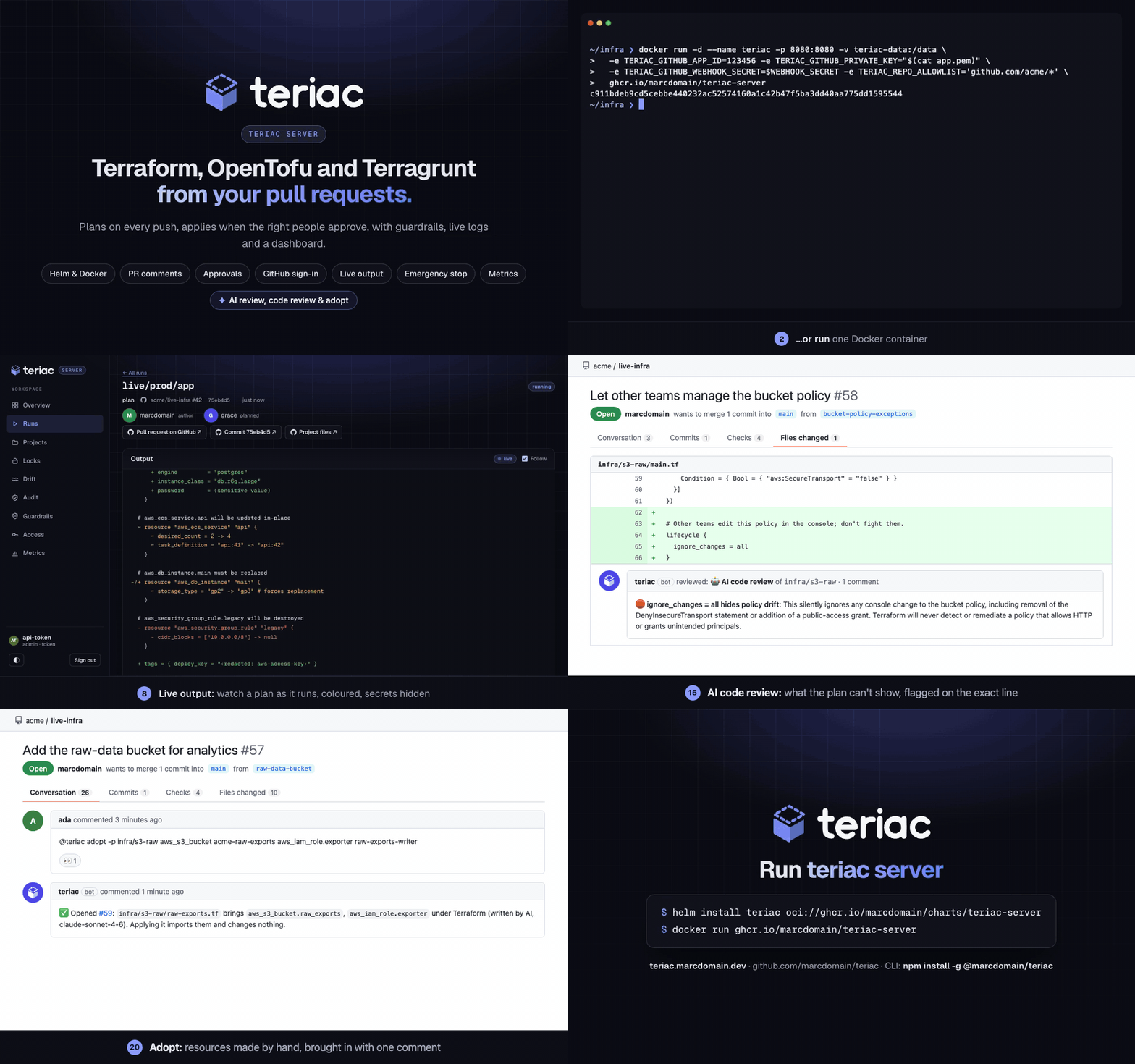
A self-hosted service for pull requests. It plans every project a pull request changes, posts
one clear comment, and applies when someone comments teriac apply:
teriac ask and policy drafts, from Claude on Anthropic's API, Bedrock, Vertex AI or Foundry. Advisory only.teriac adopt reads resources created in the console and opens a PR with their code and import blocks, planned first so applying imports them and changes nothing (tidied by AI when it's on).kubectl create namespace teriac
kubectl -n teriac create secret generic teriac-github \
--from-file=private-key=app.pem --from-literal=webhook-secret="$WEBHOOK_SECRET"
helm install teriac oci://ghcr.io/marcdomain/charts/teriac-server -n teriac \
--set github.appId=123456 --set github.existingSecret=teriac-github \
--set 'config.repoAllowlist={github.com/acme/*}'Setting up the GitHub App, PR commands and every setting: the server guide. Helm values: the chart guide.
npm install -g @marcdomain/teriacThe first time you run teriac, it creates ~/.teriac and adds ~/.teriac/bin to your PATH (shell configs, fish conf.d, or Windows User PATH). Restart your terminal once after that.
teriac has no install script, so it works the same with npm, pnpm, Bun and Yarn, and npm never asks you to allow scripts.
npm install -g @marcdomain/teriac
       │
       ▼
first `teriac` run (and after each upgrade)
  ├── creates ~/.teriac/bin/, ~/.teriac/store/, ~/.teriac/cache/
  └── adds ~/.teriac/bin to PATH (shell configs / Windows registry)
       │
       ▼
teriac install 1.9.0
  ├── fetches version list  →  ~/.teriac/cache/terraform-versions.json  (1hr TTL)
  ├── downloads zip         →  system temp dir  (with progress bar)
  ├── verifies SHA256       →  HashiCorp / OpenTofu checksums
  ├── extracts binary only  →  ~/.teriac/store/terraform/1.9.0
  └── records arch          →  ~/.teriac/store/terraform/arch.json
       │
       ▼
teriac use 1.9.0
  ├── copies ~/.teriac/store/terraform/1.9.0  →  ~/.teriac/bin/terraform
  └── writes active version  →  ~/.teriac/active.json

       │
       ▼
terraform plan   ← resolves to ~/.teriac/bin/terraform  (same binary as teriac)
teriac plan         ← spawns ~/.teriac/bin/terraform directly (no PATH lookup)
Both terraform and teriac commands always use the exact same binary.
~/.teriac/
  bin/
    terraform          ← active terraform binary (no sudo, no symlinks)
    tofu               ← active opentofu binary
    terragrunt         ← active terragrunt binary
  store/
    terraform/
      1.9.0            ← installed versions (binary renamed to version number)
      1.7.3
      arch.json        ← { "1.9.0": "arm64", "1.7.3": "amd64" }
    opentofu/
      1.8.0
      arch.json
    terragrunt/
      1.2.1
      arch.json
  cache/
    terraform-versions.json   ← remote list cached for 1 hour
    opentofu-versions.json
active.json ← { "terraform": "1.9.0", "opentofu": null, "terragrunt": "1.2.1" }teriac install latest # latest stable
teriac install 1.9.0 # exact version
teriac install 1.9.^ # latest 1.9.x patch
teriac install 1.8.0-beta1 # explicit pre-release (warns you)
teriac install latest --provider tofu # OpenTofu
teriac install 1.9.0 --arch amd64 # override architectureAliases: teriac i
teriac use 1.9.0
teriac use latest                       # latest installed version
teriac use 1.8.0 --provider tofu
No sudo. Copies binary to ~/.teriac/bin/terraform.
Detects and switches to the version your project requires. Installs it if not already in store.
teriac auto-switch
teriac as                               # alias
teriac as --provider tofu
Reads version from (in priority order):
.terraform-version, .tfswitchrc, .tfswitch.toml, or a terraform line in .tool-versions (asdf / mise).opentofu-version, .tofu-version, an opentofu or tofu line in .tool-versions, then .terraform-versionterraform.tfstate → terraform_version fieldrequired_version in any .tf file — supports all constraint operators:
=, >=, >, <=, <, !=, ~>, and compound ">= 1.3, < 2.0"cdWraps cd so that entering a directory automatically switches the terraform version — but only if the directory looks like a terraform project. Non-terraform folders have zero overhead (one filesystem check, no subprocess).
A directory is considered a terraform project if it contains:
.terraform-version, .opentofu-version, .tofu-version, .tfswitchrc, .tfswitch.toml), or.tool-versions file with a terraform, opentofu or tofu line, or*.tf filesThe hook switches Terraform as above, and also switches OpenTofu when the project pins it with its own file (.opentofu-version, .tofu-version or .tool-versions).
cd ~/Downloads           # no .tf files → nothing happens
cd ~/projects/react-app  # no .tf files → nothing happens
cd ~/projects/infra      # has main.tf  → auto-switch runs silently
cd ~/projects/platform   # has .terraform-version → auto-switch runs silently
Setup (one-time, add to your shell config):
# Bash
printf '\neval "$(teriac shell-init bash)"\n' >> ~/.bashrc

# Zsh
printf '\neval "$(teriac shell-init zsh)"\n' >> ~/.zshrc

# Fish
printf '\nteriac shell-init fish | source\n' >> ~/.config/fish/config.fish

# PowerShell
Add-Content $PROFILE "`nInvoke-Expression (teriac shell-init powershell | Out-String)"
After setup, entering a terraform project switches the version automatically — no manual teriac as needed.
shell-init also installs tab completions for all teriac commands and installed versions. After running the setup command above, teriac <tab> will complete commands, teriac use <tab> will complete installed versions, and teriac --provider <tab> will complete provider names.
teriac list                             # installed versions (default)
teriac ls --remote                      # all available versions from HashiCorp
teriac ls --remote --provider tofu      # all available OpenTofu versions
Active version is marked with 🚀.
teriac current                          # shows active version + PATH status
teriac which                            # alias
teriac current --provider tofu
Example output:
Active terraform version: 1.9.0
Binary: /Users/you/.teriac/bin/terraform
Reported: Terraform v1.9.0
PATH OK — 'terraform' resolves to teriac-managed binaryWrites a version file in the current directory so teammates get the same version via teriac auto-switch. Each tool has its own file, so pinning one never switches another:
teriac pin                              # pin currently active version → .terraform-version
teriac pin 1.9.0                        # pin a specific version
teriac pin --provider tofu              # → .opentofu-version
teriac pin --provider terragrunt # → .terragrunt-versionteriac upgrade # upgrade active 1.6.3 → latest 1.6.x patch
teriac upgrade 1.9 # install + use latest 1.9.x
teriac upgrade latest # install + use absolute latest
teriac upgrade --provider tofuAlso re-anchors ~/.teriac/bin in PATH to ensure it takes precedence over any system-installed terraform.
teriac remove 1.7.3
teriac rm 1.7.3 1.6.6                   # remove multiple
teriac rm 1.8.0 --provider tofu
Warns if you're removing the currently active version.
Remove all non-active versions at once to free disk space.
teriac prune                            # remove everything except the active version
teriac prune --keep 2                   # keep the 2 most recent + the active version
teriac prune --provider tofu
teriac prune --yes                      # skip confirmation prompt
The active version is always kept regardless of --keep.
Run a single command with a specific installed version without changing the active version. Useful for cross-version testing and CI.
teriac exec 1.9.0 -- version
teriac exec 1.8.0 -- plan -var="env=prod"
teriac exec 1.7.3 --provider tofu -- validate
Pass all terraform/tofu flags after --.
Run a full health check: store directories, active binaries, PATH order, PATH conflicts, and shell config.
teriac doctorExample output:
teriac doctor

Store
  ✔  ~/.teriac/store/terraform/ exists
  ✔  ~/.teriac/store/opentofu/ exists

Active versions
  ✔  terraform: active version is 1.9.0
  ✔  terraform: binary exists
  ✔  terraform: executes  (Terraform v1.9.0)
  –  tofu: not set up (no versions installed)

PATH
  ✔  ~/.teriac/bin is in PATH
  ✔  ~/.teriac/bin precedes system dirs in PATH
  ✔  'terraform' resolves to teriac-managed binary
  ✔  PATH block found in shell config (~/.zshrc)

Cache
  ✔  terraform version cache exists
  –  opentofu version cache not yet created

All checks passed. teriac is healthy.
Exits with code 1 if any issue is found.
All commands use the teriac-managed binary and accept extra terraform flags after --:
teriac init
teriac validate
teriac fmt
teriac fmt -- -recursive

teriac plan
teriac plan --file main.tf                        # extract targets from file
teriac plan --file main.tf --file network.tf      # multiple files
teriac plan --file main.tf -- -var="env=prod"     # with extra terraform flags

teriac apply --file main.tf -- -auto-approve
teriac destroy --file main.tf -- -auto-approve
--file parses .tf files and auto-generates -target flags for every resource, data, and module block found. Comments are stripped before parsing.
All commands support --provider tofu to use OpenTofu instead.
Find threats in your stack.
OX Radar can check high-priority threats, like critical package CVEs, against your context.
Each incident is marked Detected or Not Detected with a remediation plan and proof all tracked in the Response Center.
The probe returned only these fields for this server — auth requirement, protocol and tool list weren’t observed, so they’re not shown (never guessed).
The publisher’s own links, as the registry reports them. These are not sources for the assessment on this page.
Read the latest findings