
Scan your whole stack


From OX Research Newsroom






Are you using @mrclrchtr/supi-extras?
Find out what’s in your code.
Scan your apps free in minutes (opens in a new tab)Latest version: v15.0.0
@mrclrchtr/supi-extras was last scanned on 24 Nov 2026 at version 15.0.0. Risk score 0 of 100. No malicious behavior was detected.
| Version | Published | Status |
|---|---|---|
| 15.0.0 LATEST | 24 Nov 2026 | No rules fired |
| 14.3.0 | 23 Nov 2026 | No rules fired |
| 14.2.0 | 23 Nov 2026 | No rules fired |
| 14.1.0 | 21 Nov 2026 | Not shown |
| 14.0.0 | 19 Nov 2026 | Not shown |
Findings for v15.0.0. The score is a capped sum of the weights of the rules that fired — not CVSS, not exploitability, and not a probability. It is not comparable across packages with different scan coverage.
The score describes 15.0.0; other versions have their own rules, not their own score.
The publisher’s own README, as collected from the registry.

Adds a bundle of small quality-of-life features to the Pi coding agent.
codemode script at a glance instead of a wall of code.bash timeout.pi install npm:@mrclrchtr/supi-extras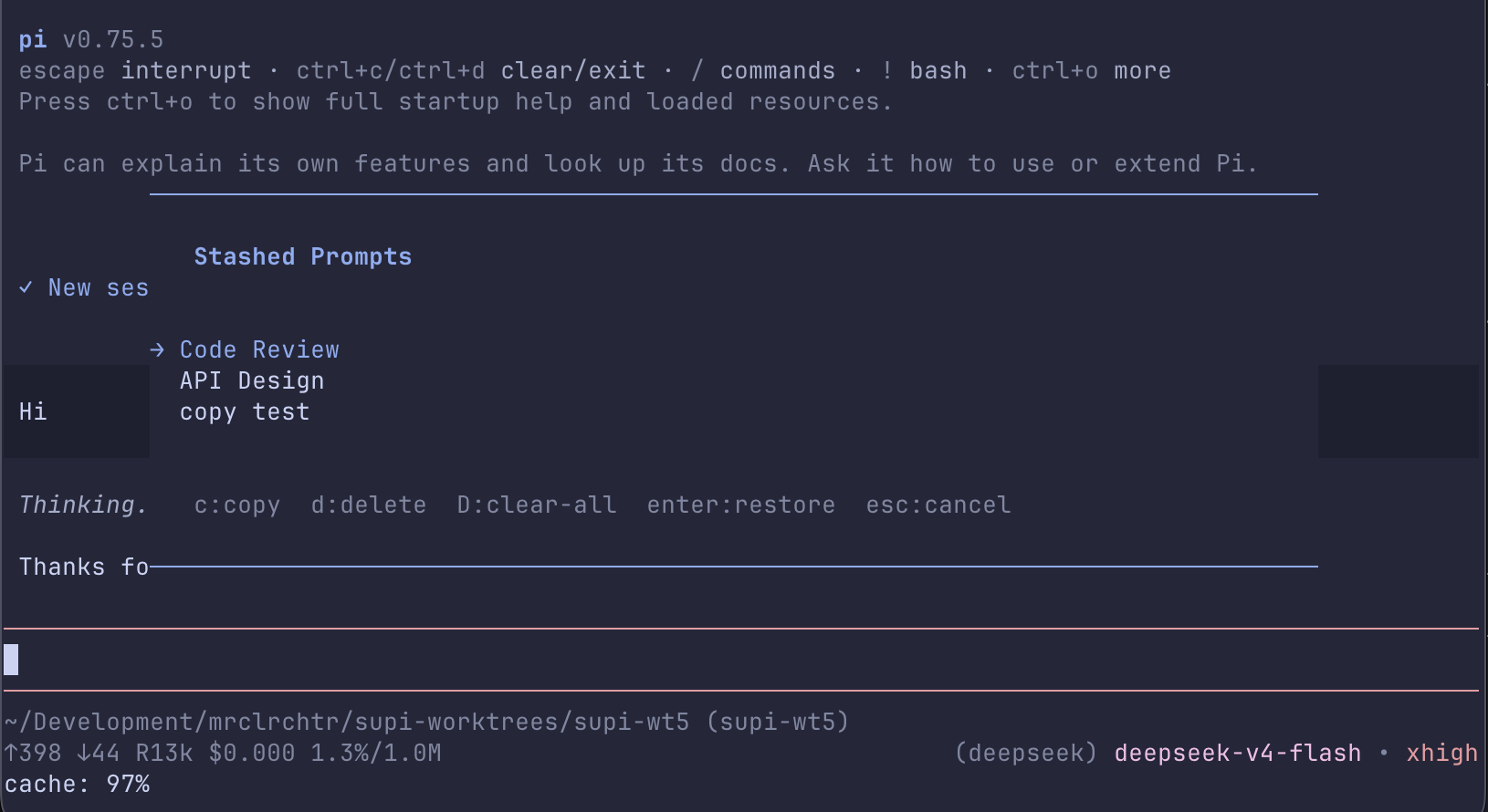
/exit — exit pi/e — alias for /exit/clear — start a new session (alias for /new)/clone-session <session-id> — clone a session into the current worktree and switch to it; autocomplete searches IDs and session names/supi-stash — browse, restore, copy, delete, or clear saved prompt drafts/supi-capabilities — choose extension tools and model-visible skills for this session/supi-capabilities opens a searchable selector. Use it to change extension tool and skill visibility for the current session.
/clone-session copy them. New sessions use the optional default profile; without a default, they start without overrides./skill:name commands and $name shortcuts stay available.Modified means session exclusions differ from the copy captured when the profile was applied.Install @mrclrchtr/supi-skills to manage skills. Tool controls work without that package.
Use Tab to open Profiles in /supi-capabilities. Apply a saved profile, save current exclusions under a new name, replace or delete a saved profile, or choose a default. Saving requires an explicit global or project scope. Replacement and deletion require confirmation.
Profiles contain exclusions, not a fixed list of available capabilities. New eligible tools and skills remain available unless their exact names are excluded. Package rows select current tools only; they do not create rules for future tools. Profiles do not change the model, instructions, child Agent Profiles, or security permissions.
Store definitions in ~/.pi/agent/supi/config.json or a trusted project's .pi/supi/config.json:
{
  "sessionCapabilities": {
    "profiles": {
      "research": {
        "excludedTools": ["agent_run"],
        "hiddenSkills": ["implement"]
      }
    },
    "defaultProfile": "research"
  }
}defaultProfile inherits the global default. Set it to null to use no default in that project. Missing or invalid defaults produce a warning and normal startup without profile exclusions.Alt+S — stash the current editor textAlt+C — copy the current editor text to the system clipboardPrompt stash stores drafts in ~/.pi/agent/supi/prompt-stash.json so they survive restarts.
/supi-stash opens an overlay with these actions:
Enter — restore the selected draft into the editorc — copy the selected draft to the clipboardd — delete the selected draftD — clear all draftsEsc — close the overlayIf the stash file cannot be read or written, drafts are kept in memory only and can be lost when pi closes.
While the agent is working, the package animates a spinner in the terminal tab title. When the turn finishes, it shows a done marker. The spinner pauses while a question waits for your answer.
The package replaces pi's default footer with two lines, each split into sections separated by a dim ·:
~/Development/supi  main !9                                       λ 3✓ ◫43
↑112 ↓52k · R4.5M W146k CH96.9% · $3.113 sub · ▰▱▱▱▱ 11.8%/1.0M   ✦ (anthropic) claude · high
The path line holds workspace state. It shows the Git branch with ahead/behind and file counts, for example main ⇡2 +1 !3 ?1. Counts refresh after tool runs, at most once per second. The stash count includes only stashes created on the current branch, because all worktrees of a repository share one stash stack. Workspace status from other SuPi packages, such as the LSP status, appears on the right.
The session line groups token totals, cache totals with the session cache-hit rate, cost, and context usage. Cache-hit and context values change color at their thresholds; context usage also shows a small bar unless icons are set to ascii. The model and thinking level appear on the right in theme colors, after status icons from other SuPi packages. When the window is narrow, the right side of each line shortens first.
When the first user message on the current session branch names GitHub issues or pull requests, the path line shows them after the session name, for example • #12 acme/app#5. It recognizes github.com issue and pull request URLs, owner/repo#12, and a bare #12, which resolves against the origin remote when it points to GitHub. Expanded skills and code are ignored. If the terminal supports hyperlinks, each reference links to its GitHub page.
Statuses that other extensions set with Pi's setStatus() appear on a third line.
Configure the footer under /supi-settings → Footer:
| Setting | Values | Default |
|---|---|---|
icons |
auto, nerd, unicode, ascii |
auto |
gitStatus |
true, false |
true |
issueLink |
true, false |
true |
auto cannot detect the terminal font. It uses Nerd Font icons on a local UTF-8 terminal, Unicode symbols over SSH, and ASCII otherwise. If icons render as boxes, choose unicode. ascii keeps the former path (branch) layout.

One codemode script can chain many tool calls. The compact row shows what the script did, not just its source: in the example above, a 10-line health check ran 7 calls in under two seconds. Its leading comment becomes the headline, each code_health, code_resolve, and bash call has its own line with its key argument, status, and duration, and the script's one-line result closes the row.
Pi's codemode tool (including wrappers that keep its code input) shows a compact row while collapsed: the script's first line (a leading // comment appears as plain text, so start scripts with one that states their purpose), its nested calls, a status line with duration, call count, failures, and model cost, and the first output line. Expand tool output (ctrl+o by default) to see Pi's full view with the script and output. Nested calls show their key argument (for example a path, command, or code-intelligence query), the error of failed calls, and durations of 100 ms or more. Consecutive identical calls merge into one row with a count (×5) and their summed duration. Long scripts show at most 8 call rows: running and failed calls stay visible, the latest other calls fill the rest, and one … N more calls: bash ×4, read ×4 row stands in for the hidden ones.
Turn compact rows off under /supi-settings → Codemode View; the change applies to new rows and to rows rebuilt on /reload.
| Setting | Default | Description |
|---|---|---|
codemode-view.compact |
true |
Collapse codemode rows to a summary |
The package sets:
GIT_EDITOR=trueGIT_SEQUENCE_EDITOR=trueThat prevents git subprocesses from hanging while waiting for an interactive editor.
Pi's bash tool has no default timeout. When the model calls bash without timeout, the package fills in a default (600 seconds) so a hung command cannot stall an unattended session. The limit is long enough for typical test and check runs; set an explicit timeout or lower the default for faster failure. Explicit timeout values are kept; other tools are untouched.
Configure it in /supi-settings → Bash Timeout → Default Timeout (seconds), stored in the bash-timeout section of ~/.pi/agent/supi/config.json or .pi/supi/config.json. This replaces the former @mrclrchtr/supi-bash-timeout package; existing settings keep working.
Find threats in your stack.
OX Radar can check high-priority threats, like critical package CVEs, against your context.
Each incident is marked Detected or Not Detected with a remediation plan and proof all tracked in the Response Center.
The probe returned only these fields for this server — auth requirement, protocol and tool list weren’t observed, so they’re not shown (never guessed).
The publisher’s own links, as the registry reports them. These are not sources for the assessment on this page.