
Scan your whole stack








Are you using @mrclrchtr/supi-settings?
Find out what’s in your code.
Scan your apps free in minutes (opens in a new tab)Latest version: v15.0.0
@mrclrchtr/supi-settings was last scanned on 24 Nov 2026 at version 15.0.0. Risk score 0 of 100. No malicious behavior was detected.
| Version | Published | Status |
|---|---|---|
| 15.0.0 LATEST | 24 Nov 2026 | No rules fired |
| 14.3.0 | 23 Nov 2026 | No rules fired |
| 14.2.0 | 23 Nov 2026 | No rules fired |
| 14.1.0 | 21 Nov 2026 | Not shown |
| 14.0.0 | 19 Nov 2026 | Not shown |
Findings for v15.0.0. The score is a capped sum of the weights of the rules that fired — not CVSS, not exploitability, and not a probability. It is not comparable across packages with different scan coverage.
The score describes 15.0.0; other versions have their own rules, not their own score.
The publisher’s own README, as collected from the registry.

SuPi Settings is a Pi extension and a small public UI library. It adds one interactive screen for the project and global settings that loaded SuPi extensions contribute.
This package is part of the SuPi release stack.
Install the Pi extension:
pi install npm:@mrclrchtr/supi-settingsIf Pi is open, run /reload after installation.
For local development:
pi install ./packages/supi-settingsThe extension registers one slash command and one skill:
/supi-settings — open a searchable settings screen/skill:supi-setup — audit SuPi package declarations, language servers, TypeScript code-action formatting, Code Intelligence exclusions, stale config sections, and the Review bootstrap command; report findings with evidence and apply only confirmed fixes. User-invoked only; it adds no model context.The package does not register a tool, a shortcut, or its own setting. The screen contains settings from other loaded SuPi extensions. If no extension contributes settings, Pi shows No settings registered by SuPi extensions.
The screen is available in Pi interactive TUI mode. Print, JSON, and RPC modes do not provide this custom screen.
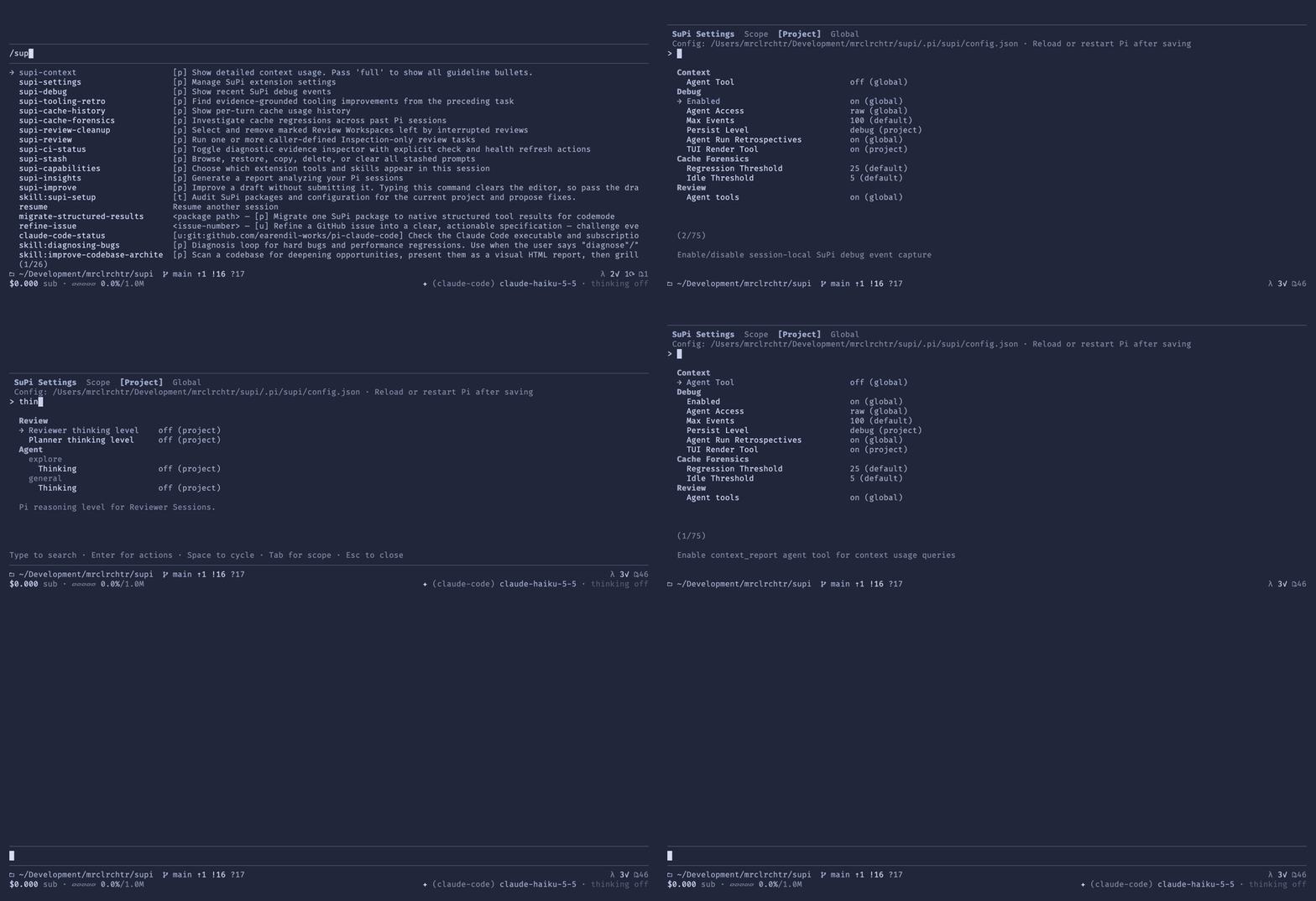
The screen starts in project scope.
| Input | Action |
|---|---|
| Type text | Filter by section, setting, key, or displayed value |
| Up or Down | Move through the settings |
| Enter | Open the actions for the selected setting |
| Space | Cycle a boolean, enum, or fixed numeric choice |
| Tab | Switch between project and global scope |
| Escape | Close the current menu or the settings screen |
Each value can have a (project), (global), or (default) source badge.
In project scope, a project value overrides a global value or the package default. Inherit from global and Use default delete the project value. In global scope, Reset to default deletes the global value.
Free-text, list, model, and custom settings open a matching editor or picker when the contributing module provides one.
Each contributing settings module owns its reads, writes, validation, refresh behavior, and notices. The screen waits for a write to finish and then reads a new snapshot. A failure in one module does not hide settings from modules that loaded successfully.
Modules that use the standard @mrclrchtr/supi-core config adapter store values in:
~/.pi/agent/supi/config.json<cwd>/.pi/supi/config.jsonA custom module can use a different store. SuPi Settings does not call a model or a remote service itself, but a contributed module controls its own operations. Pi extensions run with the permissions of the Pi process.
Add the package as a dependency when another extension needs the reusable UI helpers:
pnpm add @mrclrchtr/supi-settingsImport only from the explicit API subpath:
import {
  createInputSubmenu,
  createModelPickerSubmenu,
  openSettingsOverlay,
} from "@mrclrchtr/supi-settings/api";
The API exports:
openSettingsOverlay(pi, ctx) — collect the current settings modules and open the screen.createInputSubmenu(currentValue, label, done) — create a free-text submenu with confirm and cancel handling.createModelPickerSubmenu(currentValue, done, ctx?, options?) — create a picker from static choices and models that match Pi's configured enabledModels patterns. The picker includes disabled by default.The @mrclrchtr/supi-settings/extension subpath exports the Pi extension factory that registers /supi-settings.
Settings modules use registerSettings() and the SettingsModule types from @mrclrchtr/supi-core/settings. Their read() and apply() methods are asynchronous. The screen collects the modules when the command opens.
src/extension.ts — Pi extension entrypointsrc/api.ts — public UI exportssrc/ui/ — settings screen, scoped list, action menu, and submenusFind threats in your stack.
OX Radar can check high-priority threats, like critical package CVEs, against your context.
Each incident is marked Detected or Not Detected with a remediation plan and proof all tracked in the Response Center.
The probe returned only these fields for this server — auth requirement, protocol and tool list weren’t observed, so they’re not shown (never guessed).
The publisher’s own links, as the registry reports them. These are not sources for the assessment on this page.