
Scan your whole stack


From OX Research Newsroom






Are you using @perkyzz/emvb?
Find out what’s in your code.
Scan your apps free in minutes (opens in a new tab) Read the latest findings
Latest version: v1.5.0
@perkyzz/emvb was last scanned on 29 Nov 2026 at version 1.5.0. Risk score 0 of 100. No malicious behavior was detected.
| Version | Published | Status |
|---|---|---|
| 1.5.0 LATEST | 29 Nov 2026 | No rules fired |
| 1.4.2 | 24 Nov 2026 | No rules fired |
| 1.4.0 | 21 Nov 2026 | No rules fired |
| 1.3.0 | 14 Nov 2026 | Not shown |
| 1.2.0 | 13 Nov 2026 | Not shown |
Findings for v1.5.0. The score is a capped sum of the weights of the rules that fired — not CVSS, not exploitability, and not a probability. It is not comparable across packages with different scan coverage.
The score describes 1.5.0; other versions have their own rules, not their own score.
The publisher’s own README, as collected from the registry.

A visual page builder plugin for EmDash CMS 1.4, 1.5 and 1.6. Pages are built in a full-screen editor inside the EmDash admin and published as plain HTML and CSS. It runs on Node (SQLite) and Cloudflare Workers (D1).
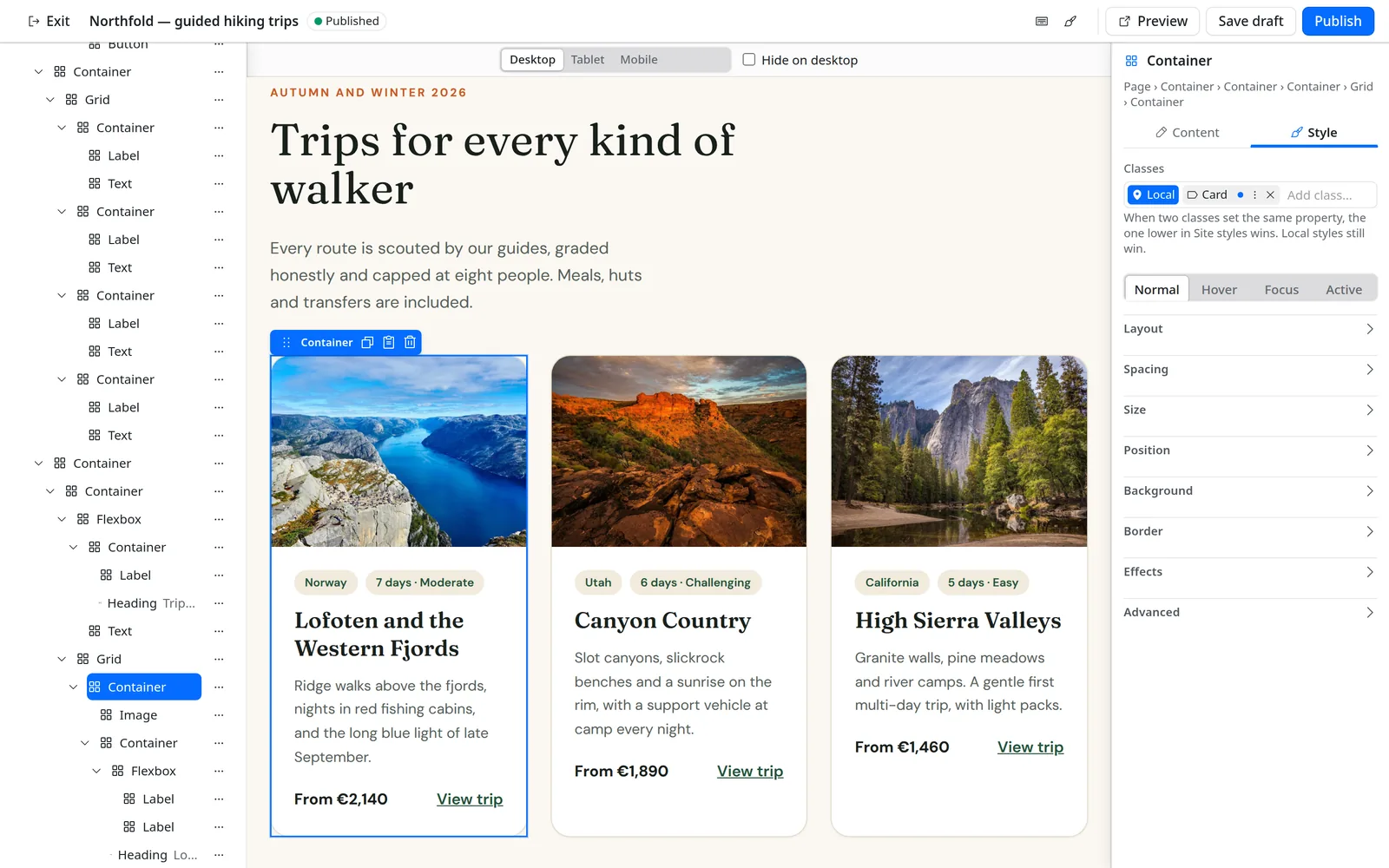
Library pictures can be cropped, adjusted, filtered and saved as a new media item from Image settings, the media library and the command palette. See the image editor guide. Third-party notices for the editor engine are in THIRD_PARTY_NOTICES.md.
npm i @perkyzz/emvbEmDash 1.4–1.6 sites provide the required peers: emdash >=1.4.0 \<2, astro ^7, react and react-dom ^19, @phosphor-icons/react ^2.1.10 and the exact @cloudflare/kumo version each EmDash release pins (2.6.0, 2.15.0 and 2.19.0 respectively). For forms, install @emdash-cms/plugin-forms 0.2.9–0.2.12 on 1.4, 0.2.13 on 1.5 or 0.2.14 on 1.6. Keep the Astro version your site's scaffold installs. Releases get stock-install smoke tests on 1.4.0, 1.5.0 and 1.6.0.
Dependencies installed with it: zod and @perkyzz/emvb-icons, the icon sets for the editor's Icon library. Only the editor loads them; a placed icon is saved into the page as SVG.
// astro.config.mjs
import { emvb } from "@perkyzz/emvb";

export default defineConfig({
  integrations: [
    emdash({
      plugins: [emvb()],
      // …database, storage…
    }),
  ],
});---
// src/pages/[slug].astro
import { getEmDashEntry, decodeSlug } from "emdash";
import { EmVBPage, resolveEmVBPage } from "@perkyzz/emvb/astro";
// With @emdash-cms/plugin-forms installed and registered:
import { EmVBFormsRuntime } from "@perkyzz/emvb/astro/forms/client";
import { EmVBMenuRuntime } from "@perkyzz/emvb/astro/menu";
import { EmVBTabsRuntime } from "@perkyzz/emvb/astro/tabs";
const emvb = await resolveEmVBPage(Astro);
if (!emvb && !(await getEmDashEntry("pages", decodeSlug(Astro.params.slug)))) {
return Astro.rewrite("/404");
}
---
{emvb && (
<EmVBPage page={emvb}>
{emvb.needsFormsRuntime && <EmVBFormsRuntime />}
{emvb.needsTabsRuntime && <EmVBTabsRuntime />}
{emvb.needsMenuRuntime && <EmVBMenuRuntime />}
</EmVBPage>
)}Each runtime is a small script mounted only on pages that need it; the rest of the page is plain HTML and CSS. Theme parts (resolveThemeParts) also report popups and floats, served from @perkyzz/emvb/astro/popups and @perkyzz/emvb/astro/floats.
Without the forms plugin, import EmVBFormsRuntime from @perkyzz/emvb/astro/forms (it renders nothing and does not import the plugin) or leave the element out. The /client subpath is the one that calls initForms.
A fixed route has no slug parameter. Pass the page's slug: await resolveEmVBPage(Astro, { slug: "home" }). Visitor rules can use the same call's visitor option ({ segments: ["member"] }, and country, device or returning when the site knows better); resolveThemeParts takes it too. The install guide shows both, and the canvasStyles option that loads your site's stylesheets into the editor canvas: emvb({ canvasStyles: ["/styles/site.css"] }). It also covers canvasCollections, which lets an emvb:canvas JSON field on your own collections hold an EmVB layout, edited in place with Edit with EmVB and rendered with resolveEmVBPage(Astro, { collection: "pages", field: "canvas" }).
Then sign in as an admin, open Pages VisualBuilder and click Set up EmVB once.
On EmDash 1.2+ with emdash({ mcp: true, … }), AI agents can build and edit draft EmVB pages. An admin turns them on in Pages VisualBuilder → AI agents (off by default) and approves the EmVB tools on EmDash's Plugins screen. Agents connect to EmDash's own endpoint (/_emdash/api/mcp) or through the local bridge, npx -y @perkyzz/emvb-mcp --site https://your.site with the token in EMVB_TOKEN. Tokens need the mcp:tools:emvb scope and an editor (not an admin) user. Agents only change drafts unless an admin allows publishing; each token may make 300 reads and 60 changes a minute and 10 publishes an hour. Every agent change shows in the version timeline with an Agent badge. See the MCP guide.
Website: https://emvb.dev. The full guide, the demos and the source are on GitHub: https://github.com/PerkyZZ999/EmVB.
MIT. The editor's Icon library includes Lucide (ISC), Font Awesome Free (icons CC BY 4.0, by Fonticons, Inc.), Tabler Icons (MIT) and Remix Icon 4.8.0 (Apache-2.0). Their notices and license texts are in THIRD_PARTY_NOTICES.md and licenses/. Icons you insert are saved into the page as SVG; a site that uses Font Awesome icons should credit Font Awesome (CC BY 4.0), for example "Icons by Font Awesome (fontawesome.com), CC BY 4.0" in its footer or credits.
Find threats in your stack.
OX Radar can check high-priority threats, like critical package CVEs, against your context.
Each incident is marked Detected or Not Detected with a remediation plan and proof all tracked in the Response Center.
The probe returned only these fields for this server — auth requirement, protocol and tool list weren’t observed, so they’re not shown (never guessed).
The publisher’s own links, as the registry reports them. These are not sources for the assessment on this page.
Read the latest findings