
Scan your whole stack










Are you using pi-context-decisions?
Find out what’s in your code.
Scan your apps free in minutes (opens in a new tab) Read the latest findings
Latest version: v6.0.1
pi-context-decisions was last scanned on 26 Nov 2026 at version 6.0.1. Risk score 0 of 100. No malicious behavior was detected.
| Version | Published | Status |
|---|---|---|
| 6.0.1 LATEST | 26 Nov 2026 | No rules fired |
| 6.0.0 | 24 Nov 2026 | No rules fired |
| 5.5.0 | 24 Nov 2026 | No rules fired |
| 5.4.0 | 23 Nov 2026 | Not shown |
| 5.3.0 | 23 Nov 2026 | Not shown |
Findings for v6.0.1. The score is a capped sum of the weights of the rules that fired — not CVSS, not exploitability, and not a probability. It is not comparable across packages with different scan coverage.
The score describes 6.0.1; other versions have their own rules, not their own score.
The publisher’s own README, as collected from the registry.
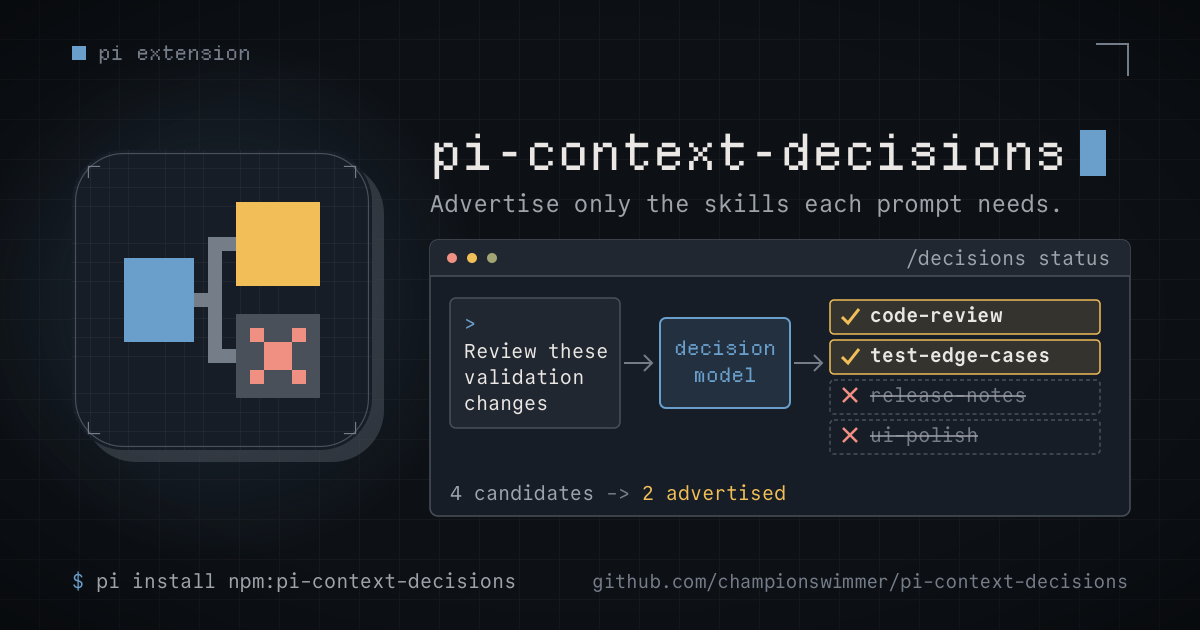

Give Pi the skills relevant to your task, without advertising your entire collection up front.
This extension uses a decision model to pick skill descriptions for Pi to see. As your task changes, it can add more. Skills already advertised stay available for the rest of that session branch.
It can also filter external tools, MCP servers and extension tool groups. That is a separate feature, off by default.
pi install npm:pi-context-decisionsRequires Node 22.18+ and Pi 1.1.0 APIs.
Keep this package first or near the start of your configured extensions. In Pi:
/decisions.TYPESAFE_API_KEY, OPENAI_API_KEY, GEMINI_API_KEY, or OPENROUTER_API_KEY for the selected route. OpenAI and Gemini direct require API keys, not OAuth.No decision model is selected by default. Until you select one, nothing is filtered and no decision calls are made. Selecting a model does not change either filtering switch. A fresh session matters because filtering never retracts skills or tools already made available on a branch.
Use Tab to switch settings tabs, Enter to select, Space to toggle, and Esc to go back or close.
If you only have a few skills, you may not need it: by default, fewer than eight automatic skills are left unfiltered. Decision calls add latency and may incur provider charges.
Ask Pi to work normally, for example:
Review these validation changes for missing edge cases.The picker scores unadvertised skills and adds relevant ones. By default it runs on each prompt and adds up to 12 new skills per round. It advertises names, descriptions and locations—not full skill bodies.
Use /decisions history to see committed additions on this branch, or /decisions status to check setup and the last decision:
/decisions history
/decisions status
To try tool filtering, open /decisions → Tools, enable Tool filtering, and choose a mode:
Add essentials to the Tools tab's always-allowed lists, then start a fresh session. /decisions tools list and /decisions mcp list show availability without making decision calls.
Enable the manager's subagentExtensions: true and install this extension as a configured package (for example, npm:pi-context-decisions in Pi's packages setting), not just a one-off -e load. Children have no skills, so skill picking is inert. Opt-in tool filtering runs independently in each child, using its user task; each child makes its own decision calls (and may incur charges).
Before enabling filtering, globally allowlist the manager's tools under Tools → Always allowed tools · Global:
agent_types, agent_spawn, agent_wait, agent_steer, agent_status,
agent_update, agent_pause, agent_stop, agent_output
Use individual names, not a wildcard; there is no automatic agent_* exemption. Global tool-name pins work in both parent and child. Alternatively, children have one SDK group per tool, ext__<tool-name> (e.g. ext__agent_spawn, ext__agent_wait), selectable under Always allowed MCP servers · Global. A parent package group such as ext__pi_subagent_manager does not cover those child SDK groups.
Bridged parent tools lose their original extension provenance: <subagent-inherited-tools> becomes the external group ext__subagent_inherited_tools, not internal tools. In both modes, direct bridge tools can be withheld and indirect calls gated. To keep these bridges available without scoring, open /decisions → Advanced → Subagents · Allow inherited tools (tools.allowSubagentInheritedTools, default false). This can only be enabled when public command provenance identifies pi-subagent-manager (or tool provenance when filtering is already on); otherwise the row explains the prerequisites. A saved true is ineffective without the manager/child bridges and is not rewritten. This setting pins the inherited-tools group in children in both modes (including on decision failures), but does not create bridges or bypass the manager’s tool restrictions. You can also globally pin essential tool names or that entire group; in mcp mode, pinning any member promotes the whole group. Tools retaining a public mcp__… namespace use that namespace instead. Check /decisions tools list and /decisions mcp list; child-local codemode/tool-search factories can have separate groups too.
The integration's parent-routed diagnostics require pi-subagent-manager ≥ 1.1.0 and diagnostics protocol 1. Decisions checks an explicit { version, protocol } capability on the public event bus, not reply-shape heuristics or manager files. Missing, old, malformed or prerelease versions are unsupported; no legacy handshake is accepted. When the manager is detected but its capability is unavailable, the TUI warns once per session and /decisions status explains the requirement; the Advanced inherited-tools row also shows setup help. Subagent diagnostics otherwise fall back to stderr. This check does not disable ordinary decisions or existing tool pins.
With a capable live child host, safe warnings/errors reach the parent UI, parent agent context (non-waking, marked untrusted), and agent_status.diagnostics. Top-level print runs (including resumed/forked child transcripts) and throwing sends retain stderr reporting. No tool registries are read for capability discovery. Identical automatic diagnostics retain the bounded 64-message dedupe cache; the manager additionally bounds/rate-limits delivery. Discovery is not authentication, and the protocol has no delivery acknowledgement: rate-limited reports may be dropped without retry. Explicit /decisions reports, UI/RPC notifications, and injected SDK reporting sinks are unchanged. Never include prompts, credentials, paths or raw provider errors in diagnostic text.
This is relevance gating, not a sandbox: discovery and server connections are unaffected. Offline coverage: test/extension-subagent.test.ts exercises the real Pi SDK; the optional scripts/verify-subagent-manager.mjs also exercises the sibling manager runtime with faux providers and existing local dependencies only.
Think of the decider as a context picker beside your coding agent, not another agent doing the task. The coding model chooses actions; the decision model only ranks which skills and tools are relevant. Purple boxes below show context selection.
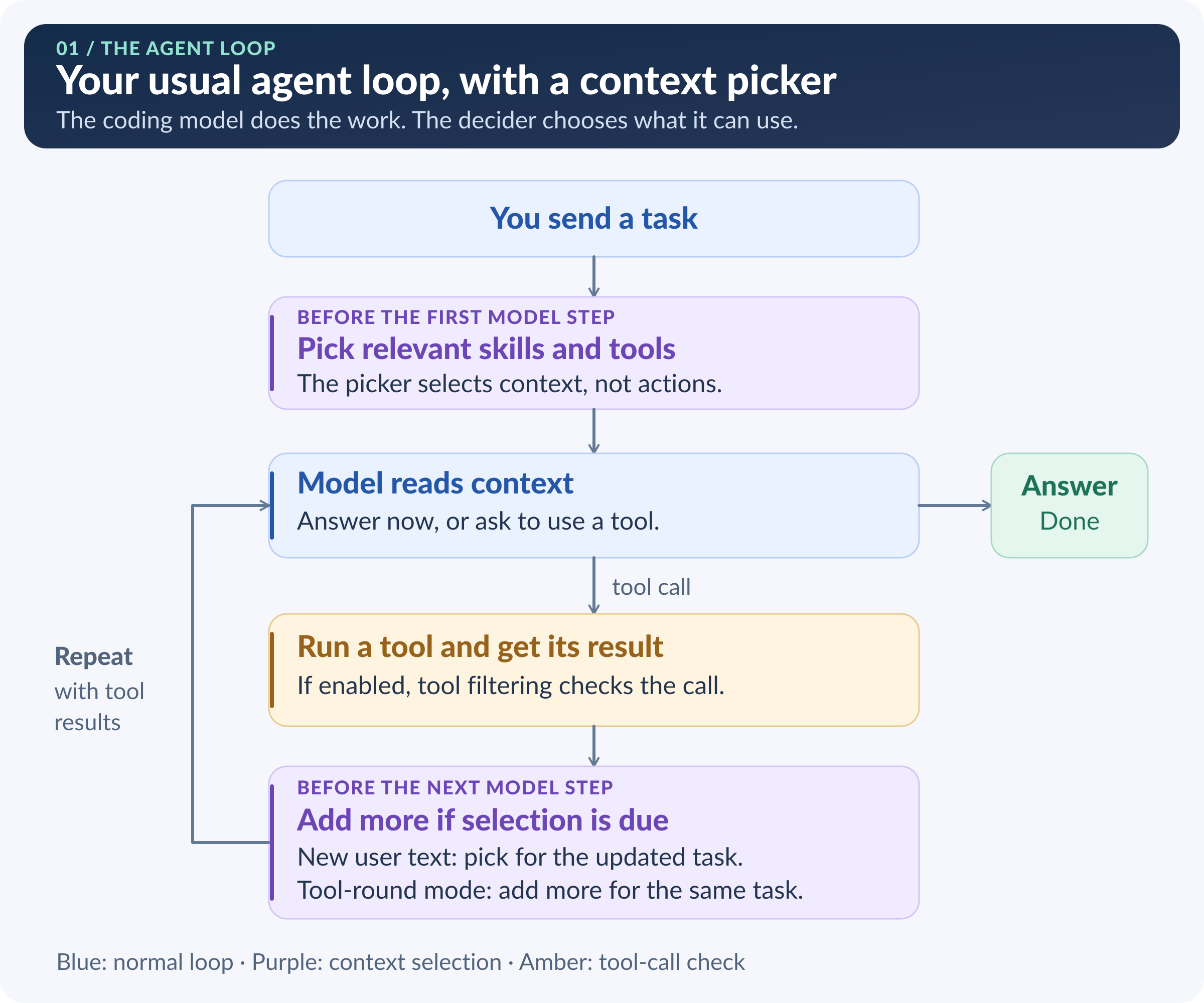
The usual loop is unchanged: task → model → tool → result → model → answer. Selection happens before the first coding-model step and, when needed, between later steps. The picker never forces an extra coding-model turn. Tool filtering is optional; when enabled, it also checks calls before execution.
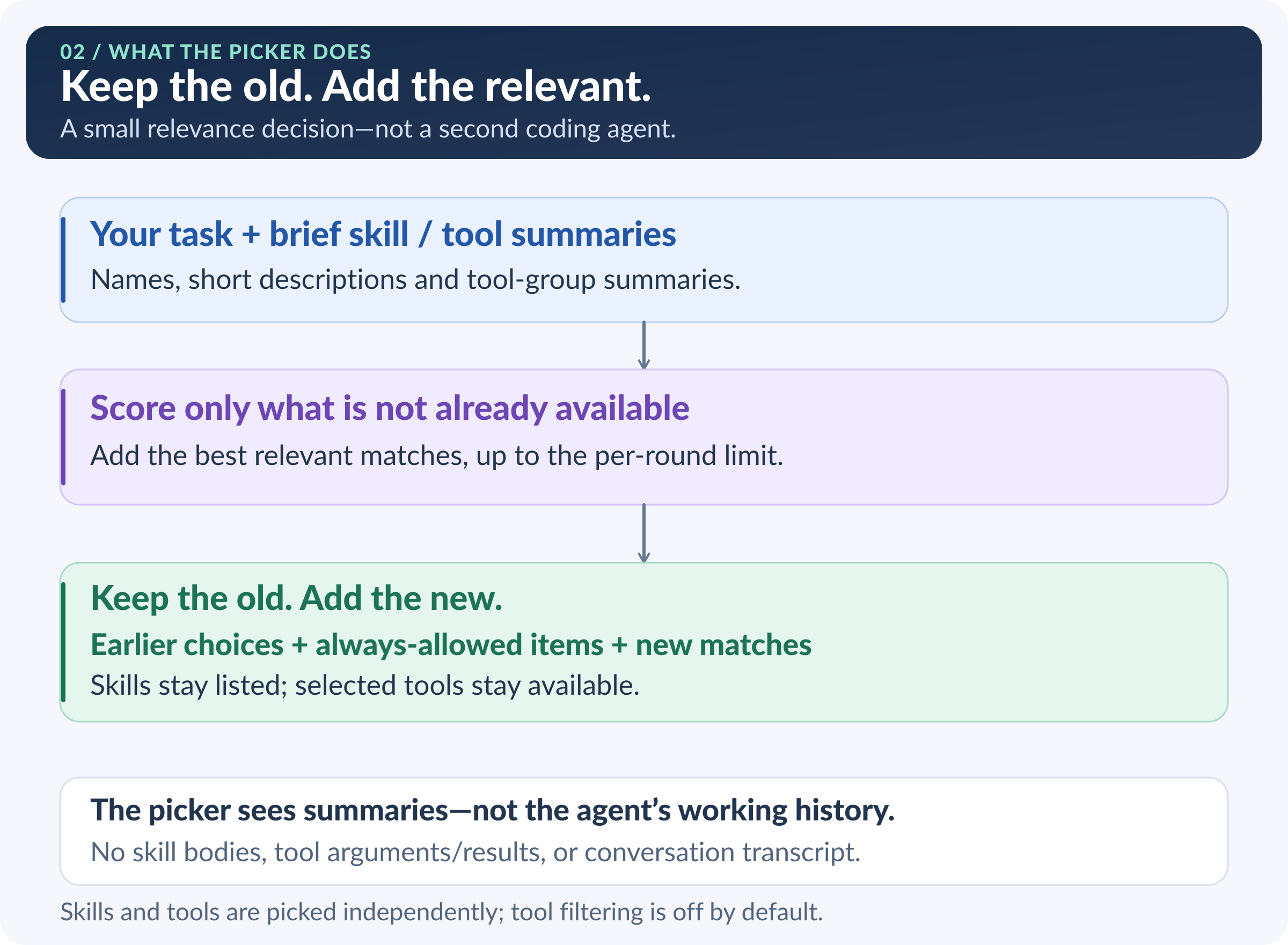
A skill is reusable guidance the coding model can load; the picker advertises its description, not its full instructions. Tools can be picked individually, or as whole MCP-server or extension tool groups.
For example: “Review this code” might add a review skill. Later, “Prepare a release” can add a release skill without removing the review skill. Choices only grow along the current conversation branch. Your always-allowed items skip scoring.
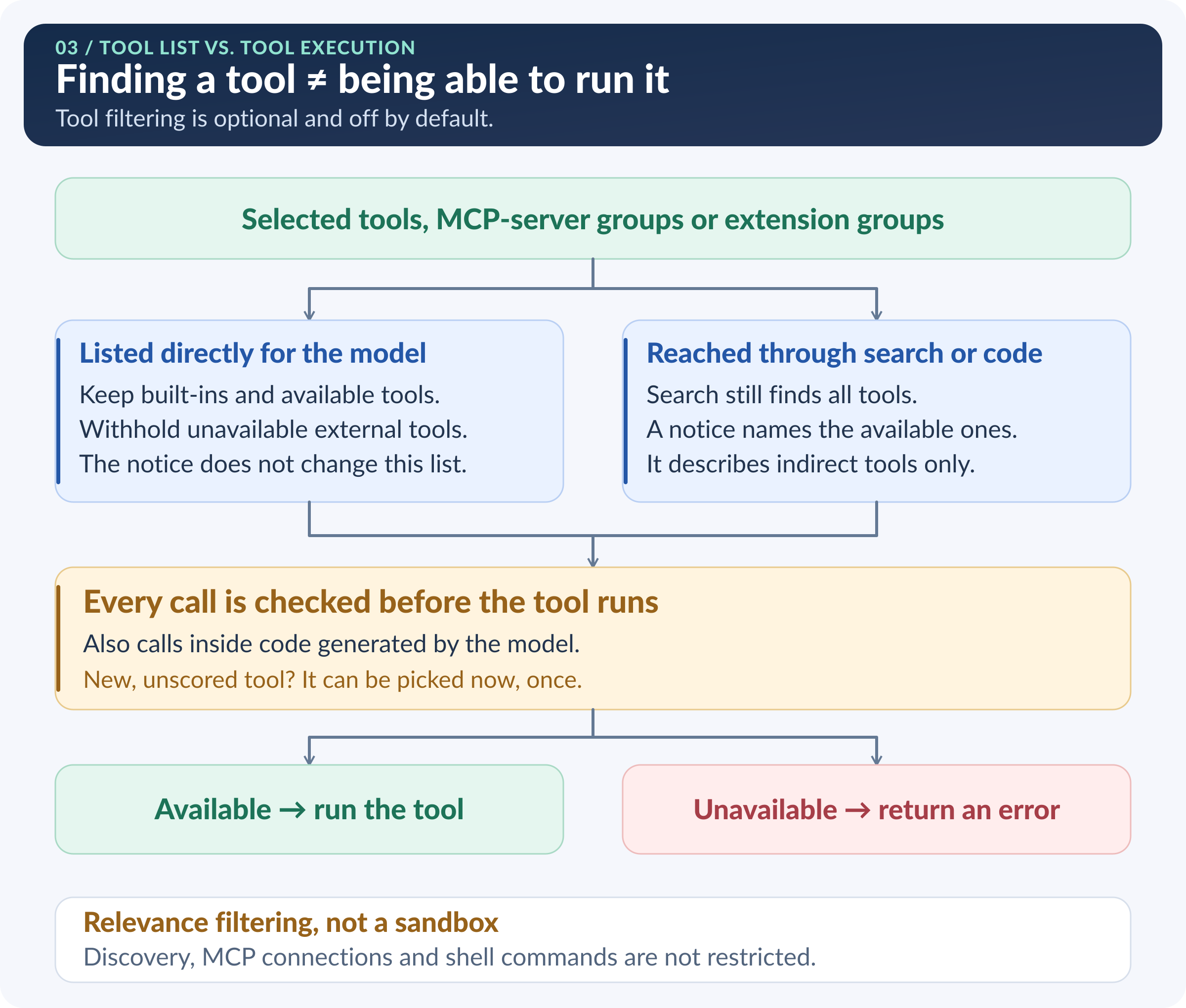
Direct tools have their definitions listed in the model request. Indirect tools are reached through search or generated code (codemode). A short notice tells the model which indirect tools are available; it does not override the direct list. Both direct and nested calls are checked before the target tool runs. Discovery and MCP connections stay unchanged—this is relevance filtering, not a sandbox.
Skills are picked on submitted prompts. Tool filtering has its own cadence:
| Tools setting | In plain English |
|---|---|
Each prompt (prompt, default) |
Pick for each new user task, including queued updates, using the task and bounded visible text of the immediately preceding run's final assistant reply when available. |
After tool rounds too (tool-round) |
Also add more after completed tool results, before the next model step. Re-score remaining candidates using the task plus bounded recent assistant text and tool calls (including arguments); never tool results or private reasoning. |
First prompt only (initial) |
Keep using the first task. Later tools are checked against it; candidates already considered are not picked again. A failed first pick can retry. |
New tools can also be checked when they appear or are first called. With no decision model selected, or too few candidates, everything stays available without scoring. A failed decision adds nothing by default; earlier choices stay.
before_agent_start runs before Pi saves the submitted user message. Skill and tool selection overlap here.turn_end only after a completed turn when context.canContinue is true. The assistant and tool results are already saved; Pi saves additions before inserting queued user text. The loop then returns to the next model request, not to before_agent_start. This extension never sets continue.read or bash tool to be advertised. Pi sends system updates in place only for supported provider/model combinations; otherwise a changed leading prompt can invalidate cache. Cache hits are not guaranteed.tool_call checks direct and nested calls. Eligible unscored tools can trigger one shared decision round. MCP resource calls are routed by their local server argument; unscoped resource listing is blocked while filtering is on. No call arguments reach the decision model.See skill picking and tool-filtering limitations for the full contracts.
Editable SVGs: agent loop · picker · tool checks. Offline PNG regeneration and implementation notes.
◇ ≡ 12/40 ⚙ 18/120
🎯 📚 12/40 🔧 18/120
Skills show advertised/total; tools show available/external total (g for groups). Choose Footer icons under /decisions → Advanced: ASCII/Unicode, Emoji, or Nerd Font. Icon requirements and footer states.
bash and other processes.MIT license.
Find threats in your stack.
OX Radar can check high-priority threats, like critical package CVEs, against your context.
Each incident is marked Detected or Not Detected with a remediation plan and proof all tracked in the Response Center.
The probe returned only these fields for this server — auth requirement, protocol and tool list weren’t observed, so they’re not shown (never guessed).
The publisher’s own links, as the registry reports them. These are not sources for the assessment on this page.
Read the latest findings