Scan your whole stack


From OX Research Newsroom






Are you using @stringsync/splates?
Find out what’s in your code.
Scan your apps free in minutes (opens in a new tab) Read the latest findings
Latest version: v2.1.0
@stringsync/splates was last scanned on 27 Nov 2026 at version 2.1.0. Risk score 50 of 100 (medium). High-severity rules fired. The AI review did not flag it.
| Version | Published | Status |
|---|---|---|
| 2.1.0 LATEST | 27 Nov 2026 | 1 rule fired |
| 2.0.19 | 25 Nov 2026 | 1 rule fired |
| 2.0.18 | 23 Nov 2026 | 1 rule fired |
| 2.0.17 | 22 Nov 2026 | Not shown |
| 2.0.16 | 22 Nov 2026 | Not shown |
Findings for v2.1.0. The score is a capped sum of the weights of the rules that fired — not CVSS, not exploitability, and not a probability. It is not comparable across packages with different scan coverage.
The code decides whether to destroy files based on where the machine is or on an answer fetched from a remote server, then overwrites or recursively deletes the files it finds by walking directories, such as the home directory or the current project. This matches protestware that wipes machines in targeted countries and remote kill switches that wipe a project when the server says so.
HIGHThe score describes 2.1.0; other versions have their own rules, not their own score.
The publisher’s own README, as collected from the registry.
spinningplates.tech · command: splates
Run many coding agents on one repository at once. Each works in its own git
worktree and lands its change on main itself, without pull requests.
# In your repository: install the splates skill for your agents
bunx @stringsync/splates init

# Optional: start the server for the page that shows tasks, queue and merges
bunx @stringsync/splates server
Running the server is optional. After init, your agents already work with
splates add and splates merge from the command line; the server adds a
page to watch and steer them. The top bar shows Update when the server finds
a newer npm release or, when running from a source checkout, a new commit
in one of the source directories it watches.
init runs in your repository. Commit what it writes: the splates skill, which it
installs with skills from this release's tag into
.agents/skills for Codex and most agents, linked from .claude/skills for
Claude Code, and skills-lock.json. splates update moves it to a newer release.
A release that keeps its records under .git/splates differently moves them
over as splates server starts, or as splates update runs, backing them up
first and putting them back if a step fails; the page then shows what failed,
with a way to retry or to start an agent that fixes it.
Without splates, bunx skills add stringsync/splates#v<release> --skill splates
installs the same skill. From then on, your agents start each change with
splates add and land it with splates merge.
Spinning Plates was arbor (@webappwiz/arbor). In a project that used it, run
bunx @stringsync/splates update: it installs the splates skill in place of arbor's and
renames arbor.config.ts. The next splates server moves
~/.arbor and each repository's .git/arbor to their new names, leaving links
behind. For one release, arbor still runs splates, and the ARBOR_*
variables, ARBOR.md and the [ARBOR …] directives are still read.
Contributions are welcome: see Contributing.
At its core, splates is a consistent way to coordinate worktrees. Each change is
a task with its own branch and worktree, and every agent moves tasks through
the same few commands, so agents never edit the same checkout and always know
what the others are doing. There is no daemon and no orchestrator: splates is a
CLI over git, and any agent in any terminal can use it. splates --help lists
every command. A bare splates prints help too; start the web page with
splates server. The splates dev namespace belongs only to this repository
and is absent from the published CLI.
Merging. splates merge rebases the task onto main, runs your checks
(preMerge in splates.config.ts) on the result, fast-forwards main, and
removes the worktree. A conflict or a failing check goes back to the agent that
made the change, which fixes it and merges again. A check that writes a JUnit
XML report to $SPLATES_TEST_REPORT (bun test --reporter=junit --reporter-outfile="$SPLATES_TEST_REPORT") queues a task for each test slower
than 5 seconds. A check that appends {"phase": "<name>", "ms": <n>} lines to
$SPLATES_GATE_PHASES has those phase times kept in the merge's log entry.
One premerge at a time. Each merge's gate (postRewrite and
preMerge) holds the machine's premerge lock, so merges from several agents
test one after another rather than run the machine out of memory. A gate
that runs past 3 minutes is killed, and the agent merges again. A preLock
command, if set, runs before the wait, so checks that need no lock fail first.
Pushing. With remote: "origin" in splates.config.ts, each task's
branch goes to that remote as splates/<task>: after every commit an agent
makes under splates server, at splates checkpoint and handoff,
and it is deleted once the task merges or is removed. splates checkpoint
commits uncommitted work first, as a WIP: checkpoint commit squashed before
merging. A branch that tracks SPLATES.md is never pushed or merged. With the
GitHub App's id and private key kept as the creds SPLATES_GITHUB_APP_ID and
SPLATES_GITHUB_APP_KEY, pushes to github.com use an hour-long token the App
mints for that repository's contents alone; otherwise, the machine's own git
credentials. Without remote, nothing is pushed.
With remote, main is the remote's: splates merge fetches it, rebases
onto it, runs the checks, pushes the tested splates/<task>, and asks
splates server, the coordinator, to move main there. The coordinator alone
pushes main, with its machine's own git credentials, and only when the
remote's main is still the commit the checks ran on; then it fast-forwards
its own main checkout. A merge refuses while the local main holds commits
the remote lacks, until they are pushed. Protect main with a ruleset that
lets only the coordinator's identity update it, and every tag with one, so the
App's tokens, which workers push with, reach splates/* alone.
Setup's GitHub pushing area walks through it for the project it is opened
from (splates setup in its repository, or the page on that project), each
step checked against GitHub:
github-app: make a GitHub App
with Webhook off and Repository permissions Contents: Read and write
alone, and keep its App ID and a private key it generates as the device
creds above.
github-install: install it on the project's repository alone.
github-ruleset: in the repository's Settings → Rules → Rulesets,
two active rulesets that restrict creations, updates and deletions, with
only Repository admin allowed to bypass them, the role of the account
the coordinator pushes main with: a branch ruleset on All branches
but splates/*, and a tag ruleset on All tags, since the App's
Contents permission would let a token push or move a release tag. GitHub
has no token that pushes branches but not tags. Or, with your own gh
sign-in, once for each body:
gh api --method POST repos/<owner>/<repo>/rulesets --input - <<'JSON'
{"name":"splates","target":"branch","enforcement":"active",
 "conditions":{"ref_name":{"include":["~ALL"],"exclude":["refs/heads/splates/*"]}},
 "rules":[{"type":"creation"},{"type":"update"},{"type":"deletion"}],
 "bypass_actors":[{"actor_id":5,"actor_type":"RepositoryRole","bypass_mode":"always"}]}
JSON
gh api --method POST repos/<owner>/<repo>/rulesets --input - <<'JSON'
{"name":"splates-tags","target":"tag","enforcement":"active",
 "conditions":{"ref_name":{"include":["~ALL"],"exclude":[]}},
 "rules":[{"type":"creation"},{"type":"update"},{"type":"deletion"}],
 "bypass_actors":[{"actor_id":5,"actor_type":"RepositoryRole","bypass_mode":"always"}]}
JSONgithub-push: add remote: "origin" to splates.config.ts and merge it.
Questions. When an agent needs you (a decision, access, a review, or
merges that keep failing), it writes its questions under ## Blocked in the
task's SPLATES.md, asks them in its reply and ends its turn, leaving its
worktree as it is. You answer, and it picks up where it left off.
splates server is an optional page for running agents and answering them, on
http://localhost:4269.
bunx @stringsync/splates serverRun it from anywhere: it serves every splates project on this machine. Its
project picker switches between them, and adds a repository by its path,
running splates init there and asking before it commits what that wrote.
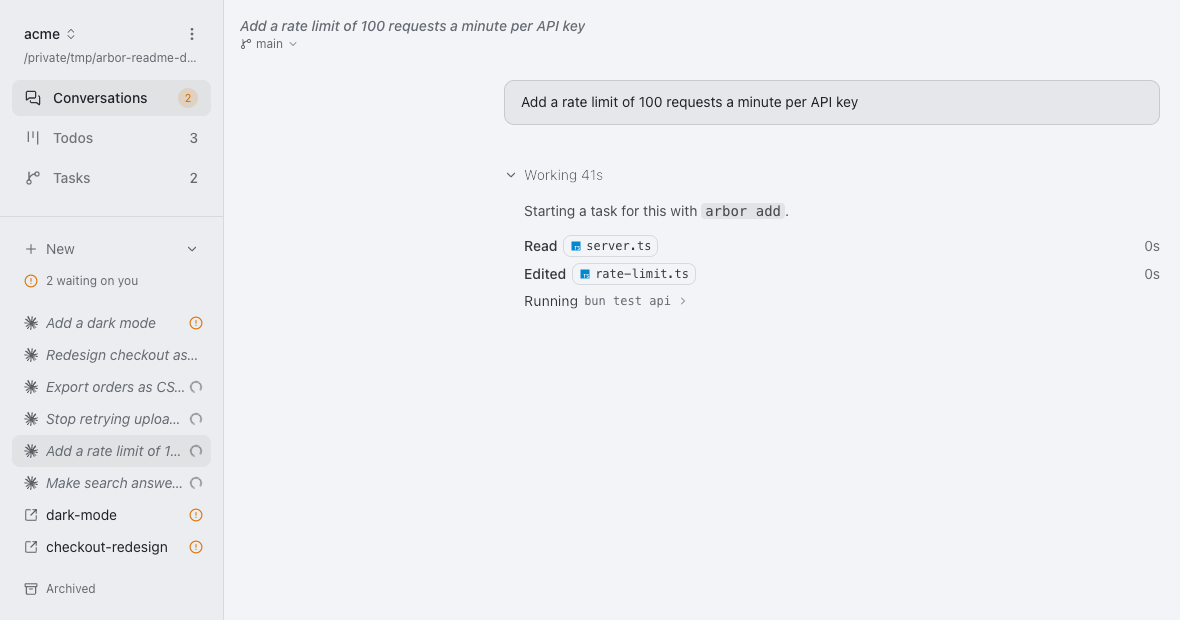
Start as many conversations as you like, each in a task of its own.
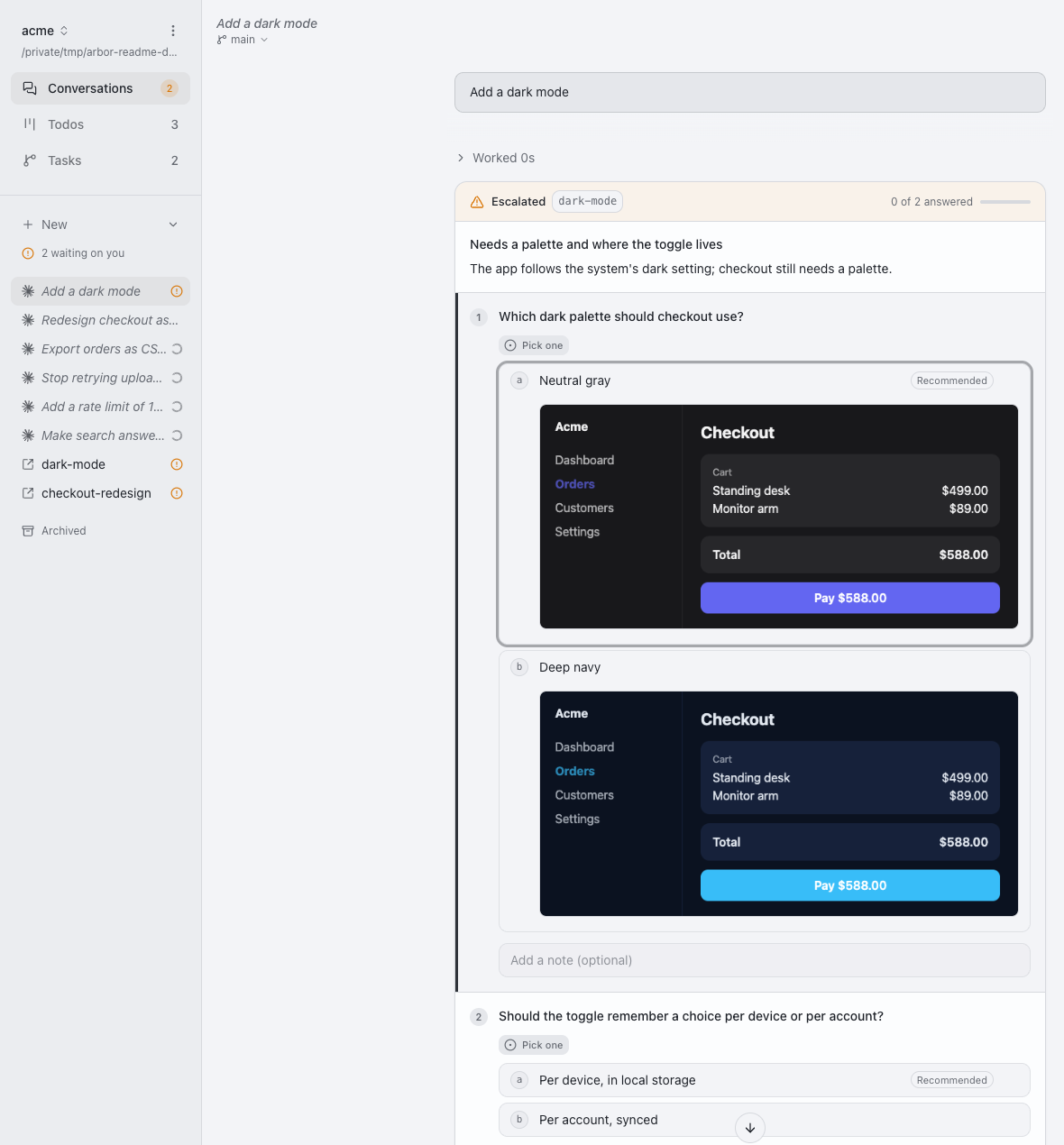
Agents ask as they go instead of guessing. Each question comes with its choices, the one the agent would pick, and a screenshot of each when there is something to see. Answer in a click.
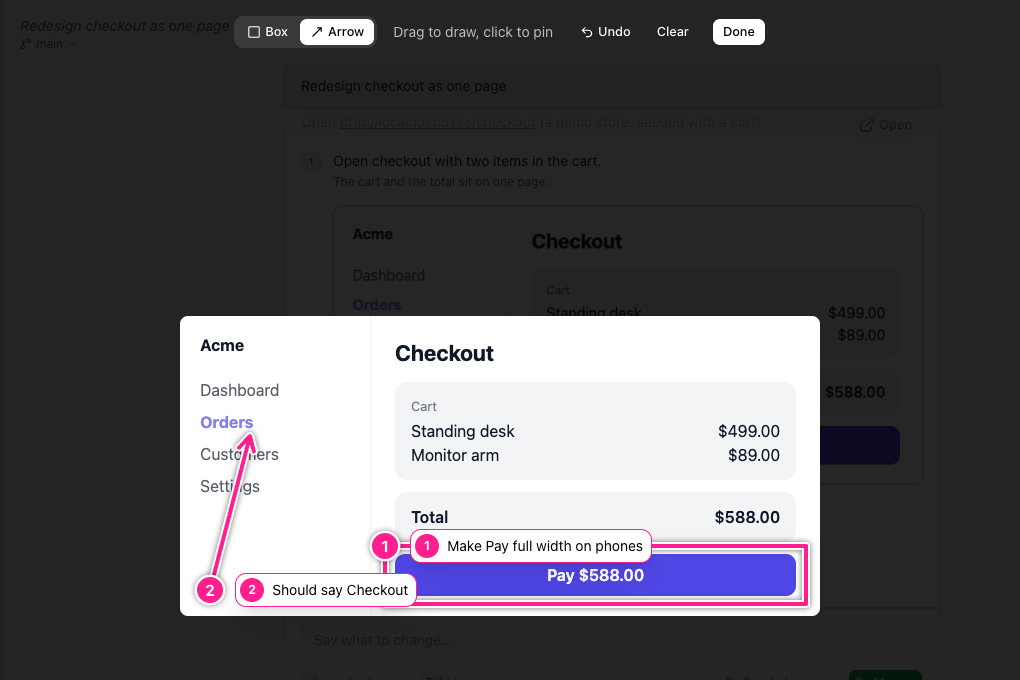
Mark up any image, one you upload or one an agent shows you. Draw a box or an arrow, pin a note to each, and send it back.
To open the page from another machine, put it behind a Cloudflare tunnel and Cloudflare Access, which decides who may enter. Set it up once per machine:
bunx @stringsync/splates tunnel setup splates.example.com --email me@example.com
# save the token on the Creds page of the server, then:
bunx @stringsync/splates tunnel setup splates.example.com --email me@example.com
bunx @stringsync/splates server
tunnel setup makes, through Cloudflare's API, a tunnel, the DNS record
routing the host to it, and an Access application letting in only those
emails, and saves them: the host, team and AUD tag in
~/.splates/tunnel.json, the tunnel's token in the system's secret store (the
Keychain on macOS). From then on a bare splates server runs the tunnel with
cloudflared, no cloudflared login needed. Run again, it changes only what
differs, such as the emails. The first run has no API token yet, so it
requests one on the Creds page of splates server, with how to make it; paste it
there, and run it again. An account with no Zero Trust organization gets one
with --team <name>, for <name>.cloudflareaccess.com. splates tunnel status
shows what is saved, and splates tunnel remove deletes it all again: the tunnels
of the machine and of every slot, their DNS records, the Access applications
and their policy, and the saved files and tunnel tokens. The API token stays.
To run several at once, as when trying changes to splates from a few worktrees, give each its own slot:
bunx @stringsync/splates server --slot--slot claims a short animal word for the checkout it runs in, as fox, and
serves it at https://fox.<zone>, on the zone tunnel setup used, behind the
same Access policy, so a phone opens each by name. A task's worktree keeps its
word until the task merges or is removed, which stops its server and gives the
word back; run again, --slot stops the tree's last server first. It refuses
a splates repository's main tree, which every agent shares. splates slots list
shows who holds each word, and splates slots prune frees those no tree owns any
more, stopping their servers. A word's tunnel and DNS record are made on its first
claim and kept, and one wildcard Access application covers every slot. A slot
keeps its own projects, roster and tunnel in ~/.splates/slots/<word>, apart
from yours, and starts in a throwaway project there, unless that home
registers the project it is run in (SPLATES_HOME=~/.splates/slots/fox splates init). The page shows the slot's emoji beside the project's name.
Or give the tunnel and the Access application by hand, over what is saved:
bunx @stringsync/splates server --tunnel splates.example.com \
  --access-team my-team --access-aud <the application's AUD tag>
--tunnel runs cloudflared tunnel run against the page for as long as the
server lives (--tunnel-name picks the named tunnel, else cloudflared's own
config does), and is refused without both Access flags. Requests to that host
must carry a verified Access token; with one, conversations and terminals
work too.
To use another tunnel, give splates.config.ts a tunnel, any object that
implements TunnelProvider:
import type { ConfigFile } from "@stringsync/splates/config";
import type { TunnelProvider } from "@stringsync/splates/config";

const myTunnel: TunnelProvider = {
    // throw, saying what to do, unless the tunnel can run
    async ready() {},
    // carry route.host to route.url until the returned resource is disposed
    run: ({ host, url, log }) => {
        const child = Bun.spawn(["my-tunnel", "--host", host, "--to", url]);
        return { disposeAsync: async () => void child.kill() };
    },
};

export default { tunnel: myTunnel } satisfies ConfigFile;
--tunnel <host> then runs yours instead of cloudflared. Access is still
required, since splates verifies Cloudflare Access tokens whatever carries the
traffic, and --tunnel-name is refused beside a provider of your own. One
that is not ready, or fails to start, is logged and skipped: the page keeps
serving on this machine.
This machine's own worker runs agents over a private Unix socket and
reconnects when the server restarts. Remote workers cannot join.
It runs as many agents at once as are started. Use splates worker list to
inspect it, and splates worker drain local --undo to resume it.
Any port a task's processes listen on, in its worktree or under its agent, is found and forwarded as VS Code forwards ports, through the worker that runs it. Save a wildcard base host for this machine to open each one anywhere, behind the same Access application:
bunx @stringsync/splates server --ports-host ports.example.comhttps://<task>-<port>.ports.example.com then reaches that task's server,
seen there as localhost:<port>, and only with a verified Access token;
routing *.ports.example.com to splates server, its DNS and TLS, are yours.
--ports-host none forgets the base. splates ports [task] lists each port
with its remote and local links, as the task's dialog on the page does.
As each task merges or is removed, splates writes down how it went in
~/.splates/outcomes.jsonl: how many times it came to you with questions or for
a review, how many merges failed and why, how many of the agent's picks you
overturned or took with words added, how long it waited on you, why it was
removed, and the agent and model behind it. The Stats page sums it over the
last 6 hours, day, 3 days or 7 days, cut into bars of half an hour to six
hours, or over all time a bar a week, by model, project and system, so you can tell whether tasks are landing
with fewer questions as your prompts and setup change. Its Act on cards
compare each figure with the as long a span before, saying whether it got
better or worse, and say what to change when one stands out. Fixed rules over
the counts make those calls, not a model, so the same outcomes always read
the same.
Kimi Code is on the default roster beside Claude and Codex, started as
kimi acp, Kimi's own ACP server. Its installer leaves kimi off the PATH,
so splates runs KIMI_PATH when set, else kimi on the PATH, else
~/.kimi-code/bin/kimi. A roster written before Kimi joined gains it once,
when the server starts on a machine with Kimi installed; take it off and it
stays off. Its models go by their full ids, such as kimi-code/k3.1-pro.
Sign in first with kimi login: splates never signs in for it.
Gemini runs through Google's Antigravity CLI, on the default roster as
Antigravity and started as agy acp, its own ACP server. Its installer puts
agy in ~/.local/bin, which may be off the PATH, so splates runs AGY_PATH
when set, else agy on the PATH, else ~/.local/bin/agy. A roster written
before Antigravity joined gains it once, when the server starts on a machine
with agy installed. Install it from Settings → Setup or with
curl -fsSL https://antigravity.google/cli/install.sh | bash, then sign in
with your Google account by running agy acp --login: splates never signs in
for it, and counts it signed in once agy models lists its models. Its model
is gemini-3.8-flash, and its Thinking Level is the effort. Usage and limits
readouts are not yet shown for it.
Gemini CLI, which splates ran before, is retired: Google stopped taking its personal sign-in, and a roster that still lists it keeps it readable but never picks it.
Find threats in your stack.
OX Radar can check high-priority threats, like critical package CVEs, against your context.
Each incident is marked Detected or Not Detected with a remediation plan and proof all tracked in the Response Center.
The probe returned only these fields for this server — auth requirement, protocol and tool list weren’t observed, so they’re not shown (never guessed).
The publisher’s own links, as the registry reports them. These are not sources for the assessment on this page.
Read the latest findings