Scan your whole stack


From OX Research Newsroom






Are you using vlmbox?
Find out what’s in your code.
Scan your apps free in minutes (opens in a new tab) Read the latest findings
Latest version: v0.2.0
vlmbox was last scanned on 27 Nov 2026 at version 0.2.0. Risk score 0 of 100. No malicious behavior was detected.
| Version | Published | Status |
|---|---|---|
| 0.2.0 LATEST | 27 Nov 2026 | No rules fired |
| 0.0.0-stage | 14 Nov 2026 | Not shown |
Findings for v0.2.0. The score is a capped sum of the weights of the rules that fired — not CVSS, not exploitability, and not a probability. It is not comparable across packages with different scan coverage.
The score describes 0.2.0; other versions have their own rules, not their own score.
The publisher’s own README, as collected from the registry.
English | 한국어
Turn the object boxes and points that vision-language models return into pixel coordinates on your original image, and draw them in the right place. One call, parseGrounding(text, { model, image }), handles Gemini, Qwen2-VL, Qwen2.5-VL, Qwen3-VL, PaliGemma, Florence-2 and Moondream. Zero runtime dependencies; runs in Node and in the browser, and a small React component draws the result under any object-fit.
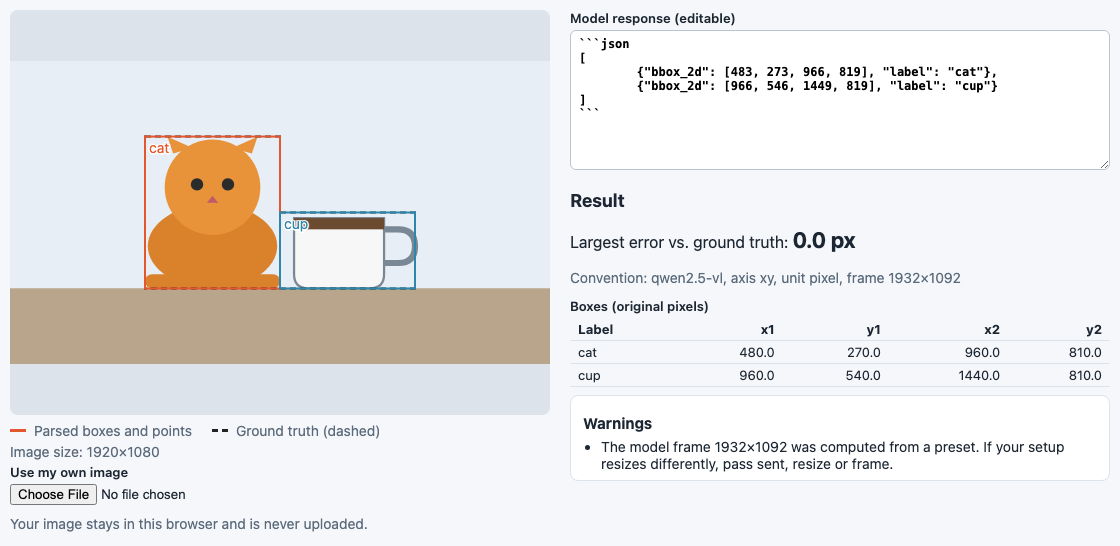
The demo page with a practice example. Solid boxes are what vlmbox parsed, dashed boxes are the known truth. They coincide, so the largest error is 0.0 px.
Think of an address. Some countries write city, district, street; others write street, district, city. A map pin only lands in the right spot if you know which order was used.
Vision-language models do the same with coordinates. Ask several of them for "the cat" in the same 1920x1080 image and you get different numbers, all correct in their own convention:
| Model | What it returns for the cat |
|---|---|
| Gemini | [250, 250, 750, 500] (y first, 0-1000) |
| Qwen2.5-VL | [483, 273, 966, 819] (x first, pixels of the resized input) |
| Qwen3-VL | [250, 250, 500, 750] (x first, 0-1000) |
| PaliGemma | <loc0256><loc0256><loc0768><loc0512> (y first, 1024 bins) |
| Moondream | {"x_min": 0.25, "y_min": 0.25, "x_max": 0.5, "y_max": 0.75} (0-1 fractions) |
All of these mean the same box: x 480-960, y 270-810 in the original image. Reading one with another model's rule puts the box in the wrong place (see Common mistakes it catches). vlmbox applies the right rule, including the Qwen2.5-VL resize step, and tells you when it had to guess or repair something.
The rows above come from the practice examples in fixtures/ (see How the examples were made).
Checked on 2026-11-13. Every convention is turned into original-image pixels with one formula: pixel = (value + bin) * image size / frame size.
model |
Output shape | Axis order | Unit | Reference frame | Source |
|---|---|---|---|---|---|
gemini |
JSON box_2d, {"label", "y", "x", "y2", "x2"} or {"point": [y, x]} (also {"boxes": [...]}) |
y first | 0-1000 | whole image | Vertex AI bounding box detection, Gemini image understanding |
qwen2-vl |
<\|box_start\|>(x1,y1),(x2,y2)<\|box_end\|> |
x first | 0-1000 | whole image | Qwen2-VL box tokens |
qwen2.5-vl |
JSON bbox_2d, point_2d |
x first | absolute pixels | the resized input (smart_resize, factor 28) |
Qwen3-VL cookbook, 2d_grounding, qwen-vl-utils |
qwen3-vl |
JSON bbox_2d, point_2d |
x first | 0-1000 | whole image | Qwen3-VL cookbook, 2d_grounding |
paligemma |
<locYYYY><locXXXX><locYYYY><locXXXX> label ; ... |
y first | 0-1023 tokens, divided by 1024 | whole image | big_vision PaliGemma README |
florence-2 |
label<loc_x1><loc_y1><loc_x2><loc_y2> |
x first | 1000 bins, bin centre (+0.5) | whole image | processing_florence2.py |
moondream |
JSON objects[] with x_min..y_max, points as {x, y} |
x first | 0-1 fractions | whole image | Moondream detect, point |
| custom object | JSON with box_2d, bbox_2d, bbox, box, point_2d or point |
axis: 'xy' \| 'yx' |
unit: 'pixel' \| 'normalized' + scale, optional binCenter |
frame or the image |
your own setup |
'auto' |
any of the above | guessed | guessed | guessed | see API |
Qwen's convention changed between generations: Qwen2-VL used 0-1000, Qwen2.5-VL used absolute pixels, Qwen3-VL went back to 0-1000. Pass the model that actually answered.
npm install vlmboxNeeds Node 20 or newer (or any modern browser). React is optional and only needed for vlmbox/react (npm install react).
To try it from source instead:
git clone https://github.com/LeeGyeongPil/vlmbox.git
cd vlmbox
npm install
npm run exampleGemini answers with box_2d as [ymin, xmin, ymax, xmax] on a 0-1000 scale, usually inside a code fence:
import { parseGrounding } from 'vlmbox';

const image = { width: 1920, height: 1080 }; // the ORIGINAL image size
const text = '```json\n[{"box_2d": [250, 250, 750, 500], "label": "cat"}]\n```';

const result = parseGrounding(text, { model: 'gemini', image });
console.log(result.boxes);
[ { label: 'cat', x1: 480, y1: 270, x2: 960, y2: 810 } ]Qwen2.5-VL answers in absolute pixels of the image after its own resize. vlmbox computes that size for you (with the same rounding as the Python reference) and reports it:
const qwen = '[{"bbox_2d": [483, 273, 966, 819], "label": "cat"}]';
const r = parseGrounding(qwen, { model: 'qwen2.5-vl', image });
console.log(r.boxes[0], r.convention.frame, r.warnings.map((w) => w.code));
{ label: 'cat', x1: 480, y1: 270, x2: 960, y2: 810 } { width: 1932, height: 1092 } [ 'frame-from-preset' ]The frame-from-preset warning means the frame was computed, not given. If your server resizes differently, see When boxes are still off.
Run the bundled example, which maps one practice response per model back to the same pixels:
npm run examplePractice examples (not live model output), image 1920x1080:
gemini cat x1=480.0 y1=270.0 x2=960.0 y2=810.0
qwen2-vl cat x1=480.0 y1=270.0 x2=960.0 y2=810.0
qwen2.5-vl cat x1=480.0 y1=270.0 x2=960.0 y2=810.0
qwen3-vl cat x1=480.0 y1=270.0 x2=960.0 y2=810.0
paligemma cat x1=480.0 y1=270.0 x2=960.0 y2=810.0
florence-2 cat x1=481.0 y1=270.5 x2=961.0 y2=810.5
moondream cat x1=480.0 y1=270.0 x2=960.0 y2=810.0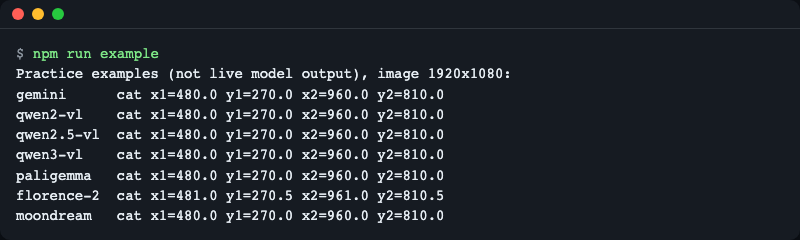
Seven different response formats, one set of original-image pixels. Florence-2 differs by half a pixel because it stores positions in 1000 bins and vlmbox restores each bin to its centre.
GroundingOverlay draws the boxes as an SVG layer over an <img>. It follows object-fit (letterboxing and cropping) and layout resizes, so boxes stay on the objects.
import { parseGrounding } from 'vlmbox';
import { GroundingOverlay } from 'vlmbox/react';

const result = parseGrounding(text, { model: 'gemini', image: { width: 1920, height: 1080 } });

export function Photo() {
  return (
    <GroundingOverlay
      src="https://raw.githubusercontent.com/LeeGyeongPil/vlmbox/v0.2.0/photo.jpg"
      result={result}
      fit="contain"
      onBoxClick={(box) => console.log(box.label)}
    />
  );
}
Props: src, result, alt, fit (contain, cover, fill, none, scale-down), showLabels, showPoints, colors, className, style, onBoxClick, referenceBoxes (dashed outlines, for example ground truth), imageSize (natural size, if you know it up front). Do not put a border on the image itself, because a border shifts the content box.
Without React, use toDisplay(box, natural, rendered, fit) to map a box into the coordinates of the element that shows the image:
import { toDisplay } from 'vlmbox';

toDisplay(result.boxes[0], { width: 1920, height: 1080 }, { width: 960, height: 960 }, 'contain');
// { label: 'cat', x1: 240, y1: 345, x2: 480, y2: 615 }The repository contains a small page that shows how the same response lands on the image under different rules. It needs no key and calls no model. Run it from a clone:
npm install
npm run demo
Open the address that Vite prints. Pick an example response, change Read as to another convention, and watch the boxes move. The page shows the largest error against the known truth, the convention it used, and any warnings. You can also paste your own response and use your own image (the image stays in your browser).
Language. The page has an English / 한국어 menu in the top right. The choice is saved in the browser (localStorage key vlmbox.demo.lang) and restored on reload. Only on the first visit, with nothing saved, the browser language decides: Korean for ko*, English otherwise. For screenshots or links you can force a language with ?lang=en or ?lang=ko in the address. The starting state can also come from the address: ?example=<id>&readAs=<model>&fit=contain|cover|fill (for example ?example=qwen2.5-vl&readAs=qwen3-vl; unknown values are ignored). The screenshots in this README are the English screen; README.ko.md uses the Korean screen.
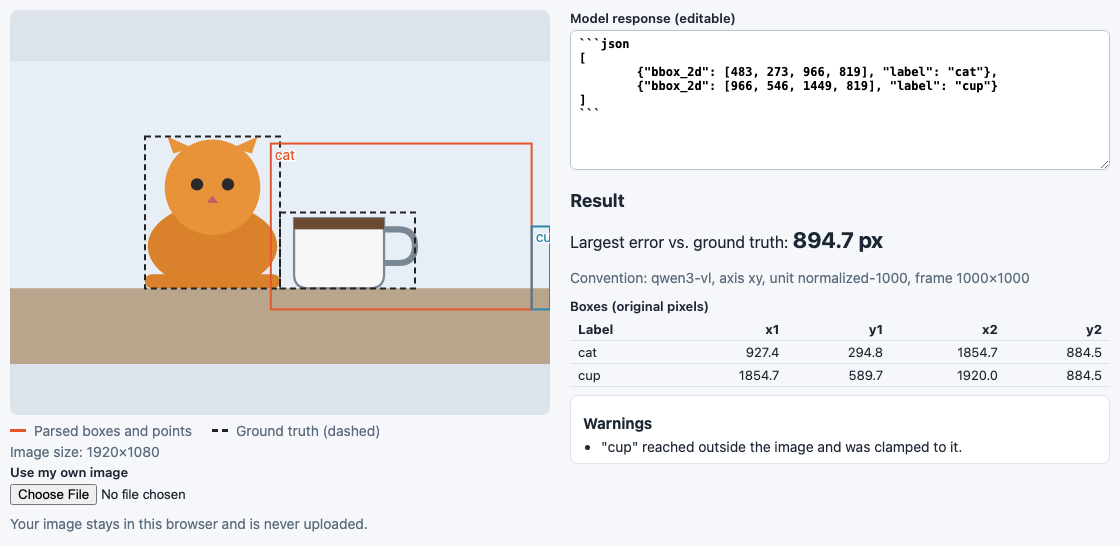
Same response as the first picture, read with Qwen3-VL's rule. The largest error jumps to 894.7 px.
All exports come from vlmbox; the React component comes from vlmbox/react.
parseGrounding(text, options): GroundingResult
| Option | Meaning |
|---|---|
model |
'gemini', 'qwen2-vl', 'qwen2.5-vl', 'qwen3-vl', 'paligemma', 'florence-2', 'moondream', 'auto', or a custom convention object { axis, unit, scale?, binCenter?, frame? } |
image |
Original image size { width, height }. Results are in this image's pixels |
sent |
Size actually sent to the model, if you shrank the image first |
resize |
Rule used to compute the Qwen2.5-VL frame: 'qwen2.5-vl' (default), 'qwen2-vl-processor-default', 'qwen3-vl', or { factor, minPixels, maxPixels } |
frame |
The frame the model saw, set explicitly. Highest priority |
label |
Label for responses that carry none (Moondream) |
clamp |
Clamp results to the image (default true) |
text can also be an already parsed object. The result is { boxes, points, warnings, convention }. Boxes are { label, x1, y1, x2, y2 }, points are { label, x, y }, both in original pixels, in the order the model wrote them. convention tells you what was used: id, axis, unit, frame, guessed and, for 'auto', confidence and reason.
Warnings (warnings[].code): truncated-json, clamped, swapped-corners, guessed-convention, frame-from-preset, no-grounding-found, skipped-item. Text without any grounding returns an empty result with no-grounding-found instead of throwing.
const cut = '[{"bbox_2d": [250, 250, 500, 750], "label": "cat"}, {"bbox_2d": [500, 5';
const t = parseGrounding(cut, { model: 'qwen3-vl', image });
console.log(t.boxes.length, t.warnings.map((w) => w.code));
1 [ 'truncated-json' ]Code fences, text before and after the JSON, and responses cut off at the token limit are handled; complete items are kept.
Find threats in your stack.
OX Radar can check high-priority threats, like critical package CVEs, against your context.
Each incident is marked Detected or Not Detected with a remediation plan and proof all tracked in the Response Center.
The probe returned only these fields for this server — auth requirement, protocol and tool list weren’t observed, so they’re not shown (never guessed).
The publisher’s own links, as the registry reports them. These are not sources for the assessment on this page.
Read the latest findings