Scan your whole stack


From OX Research Newsroom






Are you using agent-groupchat?
Find out what’s in your code.
Scan your apps free in minutes (opens in a new tab)Latest version: v0.4.0
agent-groupchat was last scanned on 24 Nov 2026 at version 0.4.0. Risk score 0 of 100. No malicious behavior was detected.
| Version | Published | Status |
|---|---|---|
| 0.4.0 LATEST | 24 Nov 2026 | No rules fired |
| 0.3.0 | 23 Nov 2026 | No rules fired |
| 0.2.0 | 22 Nov 2026 | No rules fired |
| 0.1.0 | 22 Nov 2026 | Not shown |
Findings for v0.4.0. The score is a capped sum of the weights of the rules that fired — not CVSS, not exploitability, and not a probability. It is not comparable across packages with different scan coverage.
The score describes 0.4.0; other versions have their own rules, not their own score.
The publisher’s own README, as collected from the registry.

A group chat between you and your AI agents, running on your own computer. Bring the AIs you already have (Claude Code, Codex, Gemini via Antigravity or the Gemini CLI, Aider, or any OpenAI-compatible chat API), run several copies of the same one, and give each a role with permissions its CLI really enforces.
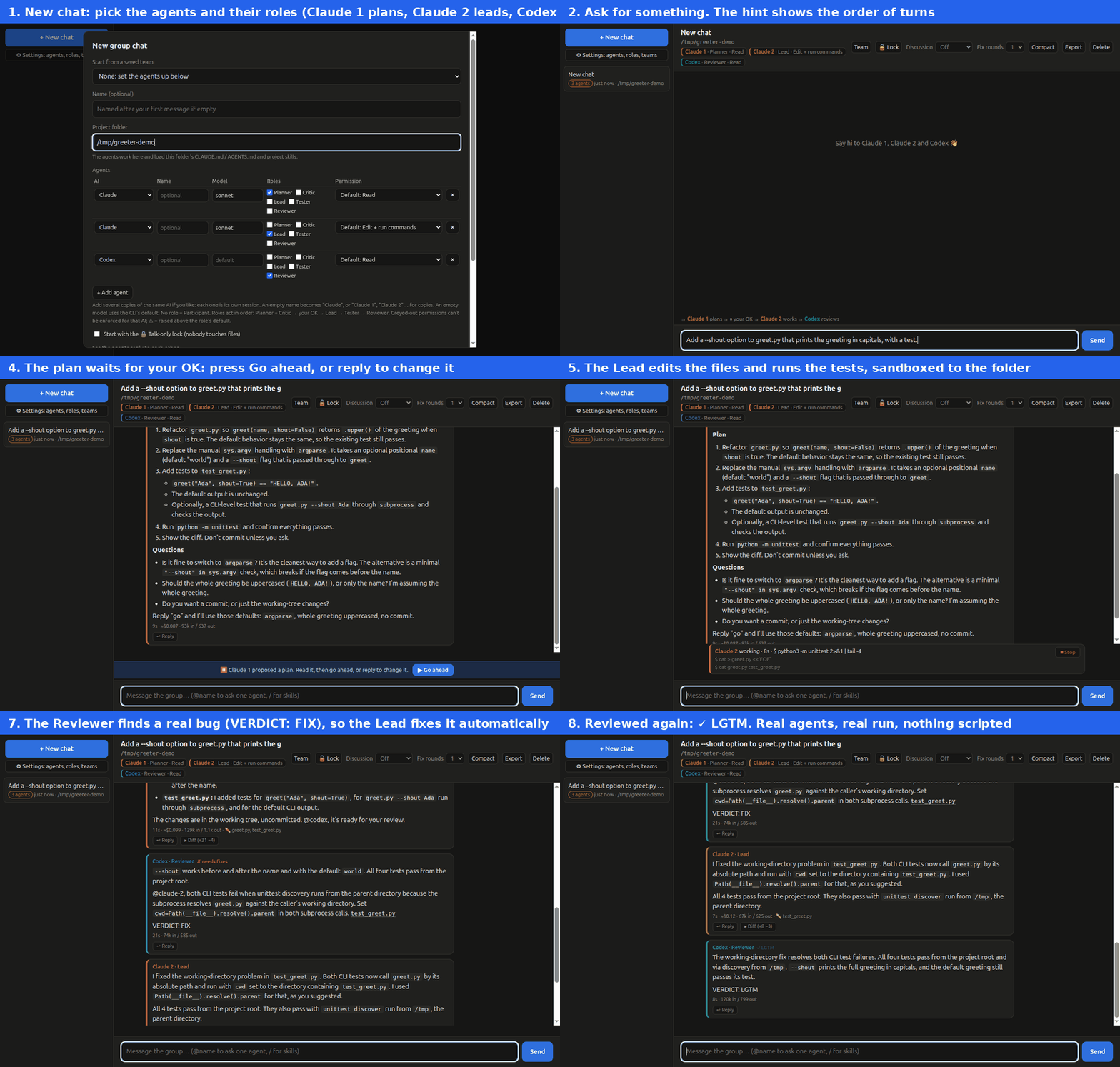
A real, unscripted run: Claude 1 plans, you press Go ahead, Claude 2 edits and tests, Codex finds a real bug (VERDICT: FIX), Claude 2 fixes it automatically, and Codex approves.
pipx install agent-groupchat      # or: uvx agent-groupchat
agent-groupchat                   # opens http://127.0.0.1:8765 in your browser
You also need at least one AI: a CLI you're already logged into (Claude Code,
Codex CLI, Antigravity (agy, for Gemini),
Gemini CLI,
Aider) or an API key for a chat API (see Agents).
From source: git clone https://github.com/MohammedAtya/agent-groupchat && cd agent-groupchat && python3 -m agent_groupchat.
Options: --port 9000, --no-browser, --version. If the port is taken it uses the next free
one; if agent-groupchat is already running, it just opens it. Stop it with Ctrl+C.
→ Claude 1 plans → ⏸️ your OK → Claude 2 works → Codex reviews.@claude-2, @codex; @claude reaches every Claude copy.✏️ editing app.py, $ pytest). ■ Stop
ends the turn; ▸ Diff under a reply shows exactly what it changed.New here? The user guide has ready-made team setups, everyday tips and fixes for common problems.
| AI | What you need | Permission levels it can enforce |
|---|---|---|
| Claude Code | claude, logged in |
all five |
| Codex CLI | codex, logged in |
Talk*, Read, Edit + run commands, Auto |
| Antigravity (Gemini) | agy, logged in |
Talk, Read, Edit |
| Gemini CLI | gemini, logged in (Google no longer serves it to personal accounts: use Antigravity) |
Talk, Read, Edit, Edit + run commands (needs Docker/Podman; Seatbelt on macOS) |
| Aider | aider + a model name (e.g. sonnet) |
Talk*, Read, Edit |
| Chat API | an OpenAI-compatible endpoint | Talk only (it sees the chat, not your files) |
* can't be stopped from reading files: it stays read-only and is told to only discuss.
claude, codex, agy, gemini…
and sign in). agent-groupchat uses that login; it never asks for your password.agent-groupchat from a terminal where that command works: it finds CLIs on your PATH.A chat's agents are fixed when it's created: to change who is in it, start a new chat (save the old setup with 💾 Save as team first). Roles, focus and permissions can be changed any time under Team.
Any OpenAI-compatible chat API works: OpenAI, Gemini, OpenRouter, Groq, Mistral, or a local server (Ollama, LM Studio). It can only talk (it sees the chat, not your files), so it fits roles like Planner, Critic or a second opinion.
Put the key in an environment variable. The app never stores your key; it reads it from the variable you name:
| OS | Command |
|---|---|
| Linux (bash) | echo 'export GEMINI_API_KEY="your-key"' >> ~/.bashrc && source ~/.bashrc |
| macOS (zsh) | echo 'export GEMINI_API_KEY="your-key"' >> ~/.zshrc && source ~/.zshrc |
| Windows | setx GEMINI_API_KEY "your-key", then open a new terminal |
Restart agent-groupchat from that terminal. It reads environment variables when it starts,
so a running copy won't see a new key (stop it with Ctrl+C, or pkill -f bin/agent-groupchat).
⚙ Settings → Agents → + Add chat API, fill in the row, Save, then Test:
| Field | Example |
|---|---|
| Id | gemini-api (lowercase; not a built-in id like gemini or antigravity) |
| Name | Gemini: what the agent is called in chats |
| Address (base URL) | from the table below |
| Model | a model name from the provider's current list, e.g. gemini-2.5-flash |
| Key: environment variable name | GEMINI_API_KEY: the variable's name, never the key (Settings refuses a value that looks like a key) |
It now appears in the AI menu of + New chat.
| Provider | Base URL | Key |
|---|---|---|
| OpenAI | https://api.openai.com/v1 |
OPENAI_API_KEY |
| Google Gemini | https://generativelanguage.googleapis.com/v1beta/openai/ |
GEMINI_API_KEY |
| OpenRouter | https://openrouter.ai/api/v1 |
OPENROUTER_API_KEY |
| Groq | https://api.groq.com/openai/v1 |
GROQ_API_KEY |
| Mistral | https://api.mistral.ai/v1 |
MISTRAL_API_KEY |
| Ollama (local) | http://localhost:11434/v1 |
none: leave it empty |
| LM Studio (local) | http://localhost:1234/v1 |
none: leave it empty |
Gemini three ways: Antigravity (agy) and Gemini CLI use your Google login and can work
on files; a Gemini chat API uses an API key and only talks. They have different names and ids,
so you can have all three in one chat.
The APIs are saved in ~/.agent-groupchat/config.json (you can also edit it by hand):
{"apis": [
  {"id": "gemini-api", "name": "Gemini", "model": "gemini-2.5-flash",
   "base_url": "https://generativelanguage.googleapis.com/v1beta/openai/", "key_env": "GEMINI_API_KEY"},
  {"id": "llama", "name": "Llama", "base_url": "http://localhost:11434/v1", "model": "llama3.1"}
]}
Aider runs with every prompt answered automatically, so everything risky it would agree to is
switched off: shell commands, git commits, .gitignore edits, self-updates. Its history files live
in ~/.agent-groupchat/sessions/, not in your project.
| Role | Job | Default permission |
|---|---|---|
| Planner | breaks the request into steps and asks questions before any work starts | Read |
| Critic | challenges the idea, looks for what everyone missed | Read |
| Lead | does the work | Edit + run commands |
| Tester | writes and runs tests; must not change the code under test | Edit + run commands |
| Reviewer | checks the Lead's changes, says what to fix or LGTM | Read |
| Participant | no special job (agents without a role) | Edit + run commands |
VERDICT: LGTM or VERDICT: FIX. On FIX the Lead fixes it
automatically (0–3 rounds, default 1), then it comes back to you.Two buttons next to Send let agents work at the same time, each in its own copy of the
project (a git worktree in ~/.agent-groupchat/worktrees/). Your project folder isn't touched
until you press Use this one.
| ⚡ Race (quality) | 🧩 Split (speed) | |
|---|---|---|
| What | every agent that can edit does the same task its own way | the task is divided; each agent builds a different part |
| Cost / time | about one turn per agent, in the time of one | about one agent's worth, but faster |
| Then | the Tester runs the tests in every copy, the Reviewer compares them and marks ⭐ its pick | the parts are merged (the Lead fixes clashes), then tested and reviewed, with fix rounds |
| You | Use this one, Combine two copies, or Discard | Use the 🧩 Result |
git init + a first commit (your files don't change, nothing is uploaded).Find threats in your stack.
OX Radar can check high-priority threats, like critical package CVEs, against your context.
Each incident is marked Detected or Not Detected with a remediation plan and proof all tracked in the Response Center.
The probe returned only these fields for this server — auth requirement, protocol and tool list weren’t observed, so they’re not shown (never guessed).
The publisher’s own links, as the registry reports them. These are not sources for the assessment on this page.