Scan your whole stack








Are you using agentflight-sdk?
Find out what’s in your code.
Scan your apps free in minutes (opens in a new tab) Read the latest findings
Latest version: v0.2.0
agentflight-sdk was last scanned on 28 Nov 2026 at version 0.2.0. Risk score 0 of 100. No malicious behavior was detected.
| Version | Published | Status |
|---|---|---|
| 0.2.0 LATEST | 28 Nov 2026 | No rules fired |
| 0.1.0 | 27 Nov 2026 | No rules fired |
Findings for v0.2.0. The score is a capped sum of the weights of the rules that fired — not CVSS, not exploitability, and not a probability. It is not comparable across packages with different scan coverage.
The score describes 0.2.0; other versions have their own rules, not their own score.
The publisher’s own README, as collected from the registry.
A black box recorder for AI agents. AgentFlight records what an agent does during a run: model calls, tool executions, decisions, state changes, token spend and failures. Every run is stored as an ordered timeline you can query, replay and fork.
Status: early development (week 5, viewer). APIs may change; see CHANGELOG.md.
Langfuse, LangSmith and Arize Phoenix are full LLM engineering platforms. Besides tracing they offer evaluations, datasets and experiments, prompt management and dashboards, with many framework and provider integrations. Langfuse and Phoenix can be self-hosted and accept OpenTelemetry traces. LangSmith runs as a LangChain cloud service, with self-hosted and bring-your-own-cloud options on its Enterprise plan.
AgentFlight is much smaller: a Python recorder, one server on Postgres (or SQLite) and a read-only viewer, with no evaluations, prompt management or dashboards. Its focus is re-running your own agent code from a recording. Replay serves the recorded model and tool outputs back to the same code in your process, offline, and fork swaps one step and runs live from there. That's different from re-running a single LLM call in a playground (Phoenix's span replay, for example, replays LLM calls with different inputs). Choose one of the platforms if you need evaluations, prompt management or team features; AgentFlight if you want a small self-hosted recorder with step-by-step replay of agent runs.
flowchart LR
    subgraph Agent process
        A[Your agent code] -->|run / llm_call / @tool / decision / state_change| SDK[agentflight SDK]
        SDK --> OTel[OpenTelemetry spans<br/>private TracerProvider]
        OTel --> EXP[AgentFlightExporter<br/>batched HTTP JSON]
    end
    EXP -->|POST /v1/spans| API[FastAPI ingest server]
    O[Any OpenTelemetry agent<br/>or Collector] -->|POST /v1/traces<br/>OTLP/HTTP| API
    API --> DB[(PostgreSQL<br/>runs + events)]
    C[curl / scripts] -->|GET /v1/runs, /v1/runs/:id| API
V[Browser] -->|/ui viewer| APIagentflight.run(...) opens the root span; its
trace id is the run id. Everything recorded inside it is a child span.attributes** (kind`, model, messages, tokens, tool
args/result, error type...). Structured values are stored as JSON.running until then; see
Run status).# 0. A key for the server and the SDK (never commit it)
export AGENTFLIGHT_API_KEY=$(openssl rand -hex 32)
# 1. Server + Postgres + retention job (applies Alembic migrations on start)
docker compose up --build
# or without Docker, using SQLite (from a checkout; elsewhere,
# `pip install "agentflight-sdk[server]"`):
pip install -e ".[server]"
agentflight-server migrate # uses AGENTFLIGHT_DATABASE_URL, default sqlite:///./agentflight.db
agentflight-server serve # http://127.0.0.1:8000
# 2. Record the toy agent (the SDK reads AGENTFLIGHT_API_KEY)
pip install -e . # elsewhere: pip install agentflight-sdk
# (the package is agentflight-sdk; you import agentflight)
python examples/toy_agent.py
# 3. Inspect: open http://localhost:8000/ui and sign in with the key, or use the API
curl -H "Authorization: Bearer $AGENTFLIGHT_API_KEY" localhost:8000/v1/runs
curl -H "Authorization: Bearer $AGENTFLIGHT_API_KEY" localhost:8000/v1/runs/<run_id>The server includes a read-only viewer at /ui:
key:value) and start
time. Filters update the table in place. A run whose recorder dropped spans is marked
"incomplete recording: N spans dropped" (see "Dropped spans are counted" below).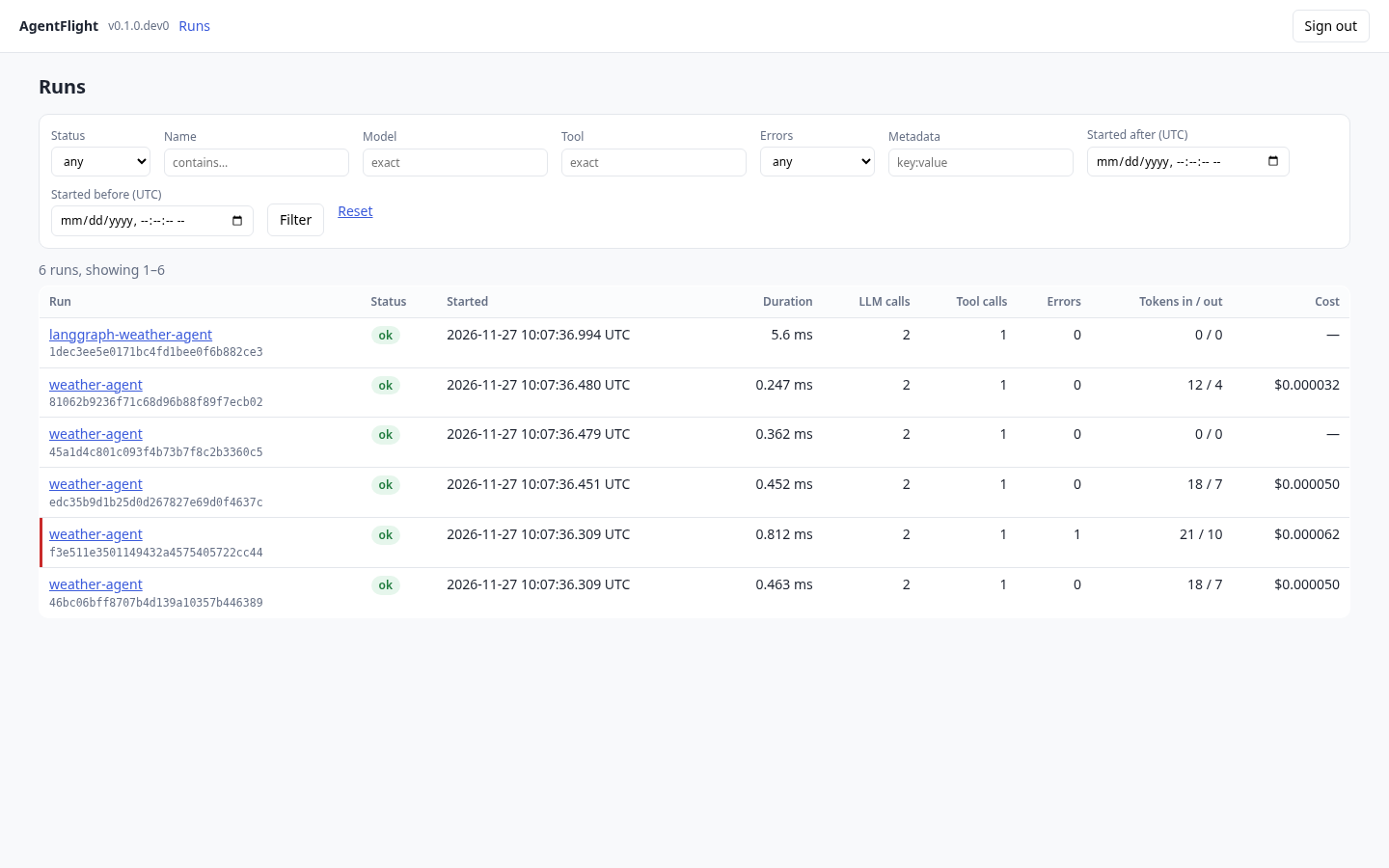
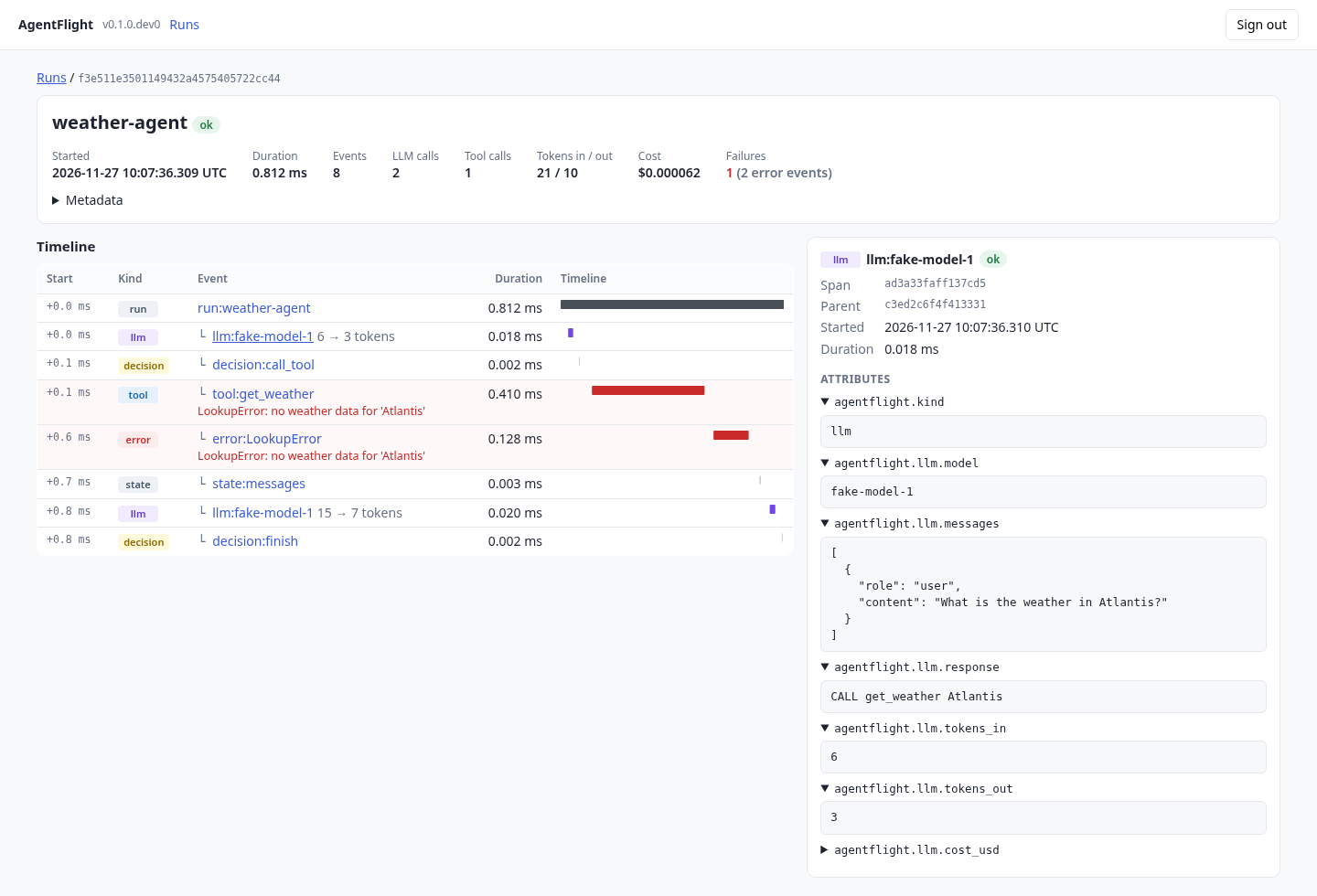
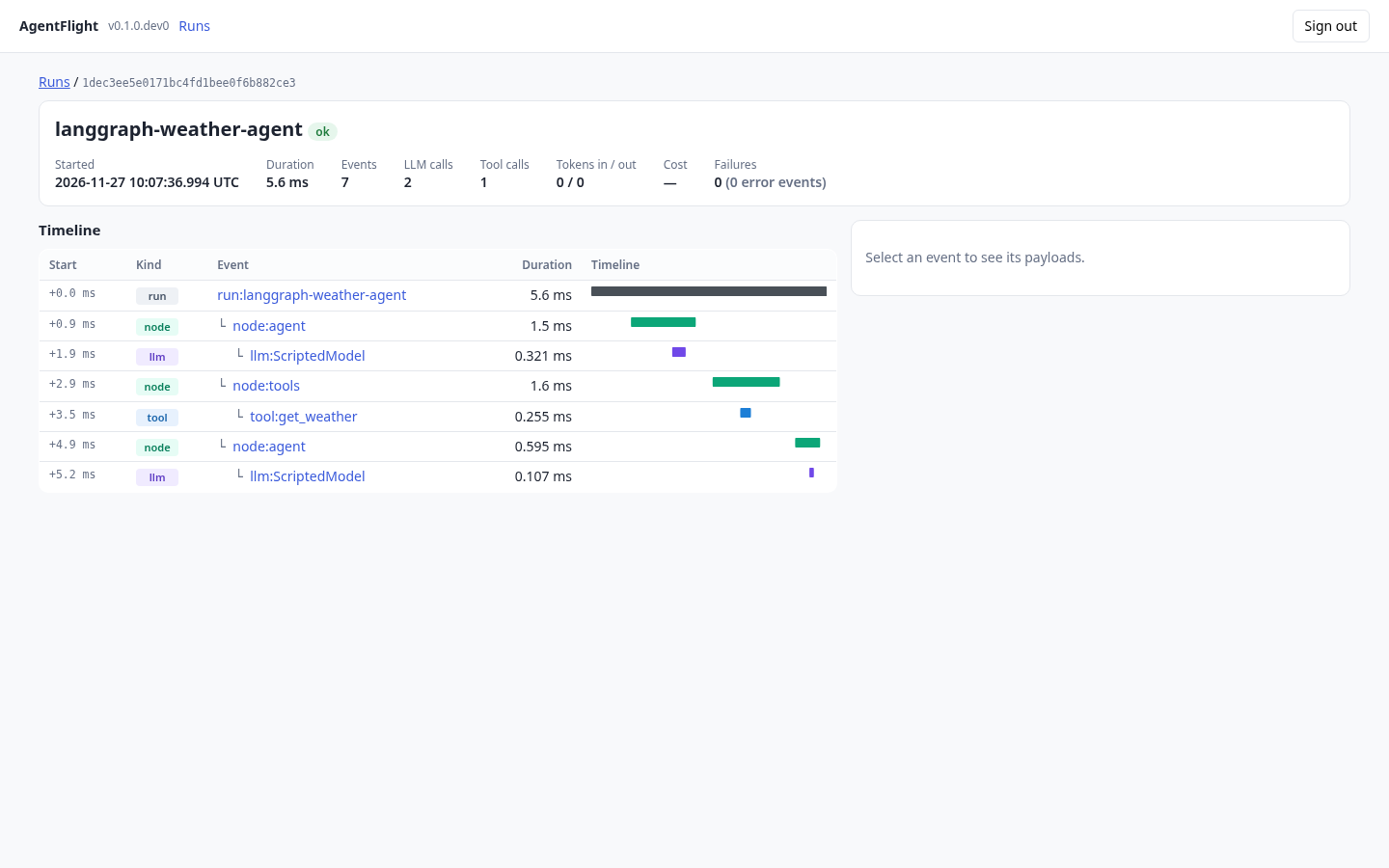
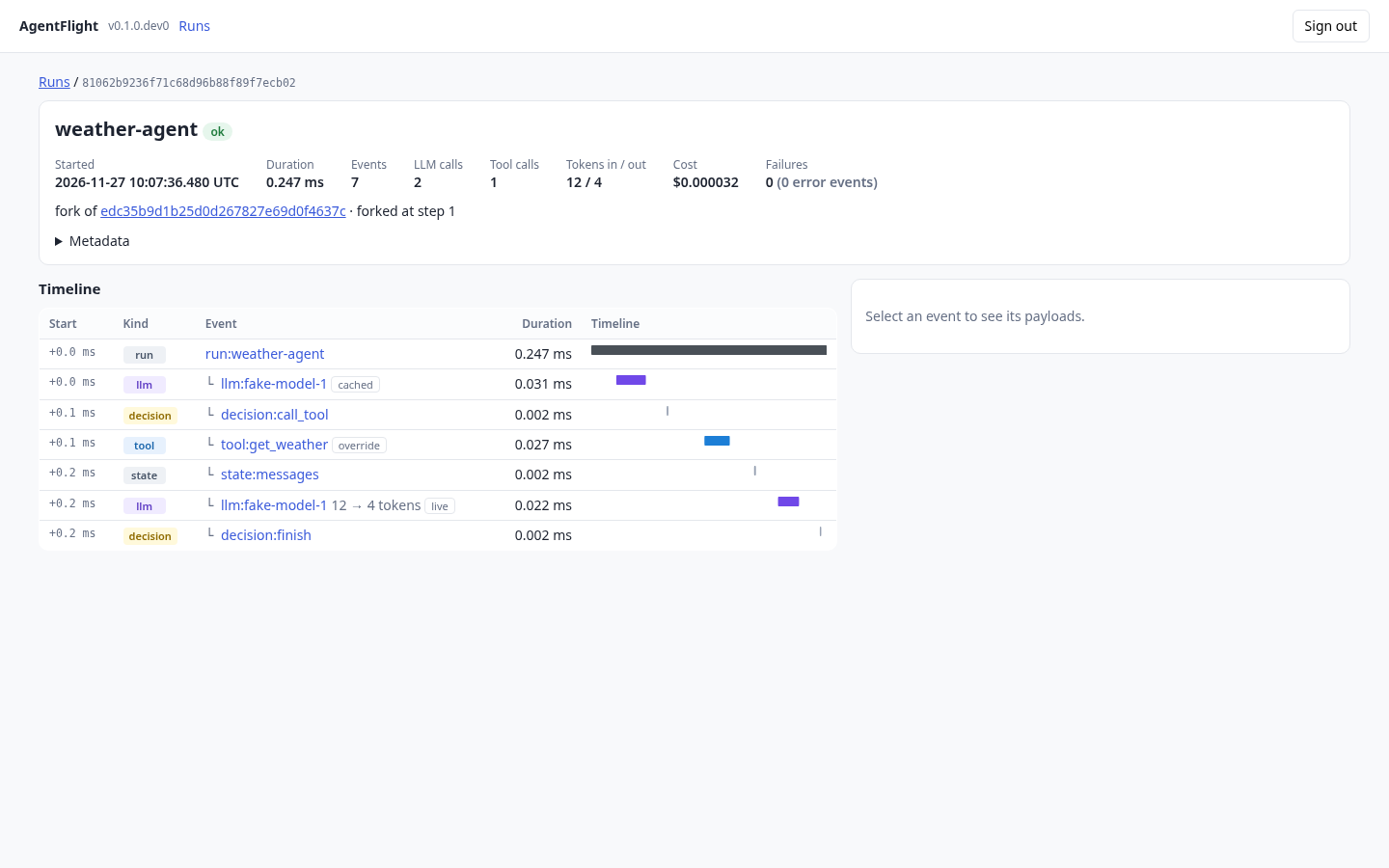
The screenshots come from the browser smoke test against the example agents; regenerate
them with AGENTFLIGHT_SCREENSHOT_DIR=docs/screenshots pytest tests/test_viewer_browser.py.
It is server-rendered (Jinja2 and htmx, vendored, no build step) and
reads through the same service functions and JSON shapes as the /v1 API, so another
frontend can be built on the API alone. Everything a run recorded is treated as untrusted:
templates autoescape everything and nothing is marked safe, and pages are served with a
Content-Security-Policy that allows no inline script or style (script-src 'self'). See
Viewer sign-in for how sessions work.
import agentflight

agentflight.configure("http://localhost:8000")


@agentflight.tool  # records name, bound args, result or exception
def search(query: str) -> list[str]: ...


with agentflight.run("support-agent", metadata={"ticket": 42}) as run:
    with agentflight.llm_call("gpt-4o-mini", messages) as call:
        resp = client.chat(...)  # your model client
        call.record(resp.text, tokens_in=..., tokens_out=..., cost_usd=...)  # cost optional
    agentflight.decision("next_step", "search", reason="needs docs")
    agentflight.state_change("plan", new_plan, old=old_plan)
    try:
        search("refund policy")
    except Exception as exc:
        agentflight.error(exc)  # handled error: recorded, run continues

agentflight.flush() # before exit, so batched spans are sentduration_ms in the API).run, llm_call or a @tool marks that span (and the run) as
error and is re-raised unchanged.@agentflight.tool works on sync and async functions; @agentflight.tool(name="...")
overrides the name.Optional extras; the core SDK depends on neither package.
pip install "agentflight-sdk[openai]"from openai import OpenAI
from agentflight.integrations.openai import instrument_openai
client = instrument_openai(OpenAI()) # same client, now recorded
with agentflight.run("support-agent"):
resp = client.chat.completions.create(model="gpt-4o-mini", messages=msgs, tools=tools)chat.completions.create call is an llm span with the model, messages, request
params (tools, temperature, ...), the full response (tool calls included) and
tokens_in/tokens_out from response.usage.OpenAI and AsyncOpenAI, and with any client that has the same
client.chat.completions.create(model=..., messages=...) shape. openai itself is never
imported by AgentFlight.instrument_openai(client, cost=lambda model, tokens_in, tokens_out: ...) if you want it.extra_headers, extra_query, extra_body and timeout are passed to the client but
never recorded (headers can carry credentials). Everything recorded goes through your
redact hook.cost function fails, that's
logged and ignored. A client without the expected shape is returned untouched.stream=True calls (passed straight through) and the Responses API.pip install "agentflight-sdk[langgraph]"from agentflight.integrations.langgraph import AgentFlightCallbackHandler
handler = AgentFlightCallbackHandler(run_name="react-agent")
graph.invoke(inputs, config={"callbacks": [handler]})
print(handler.run_id)run. Inside an agentflight.run(...) it's a node span in that run
instead. Each executed node is a node span with agentflight.node.name, .step,
.input (state in) and .output (state update).llm spans (messages, params, response, token
usage from usage_metadata or token_usage). LangChain tools are tool spans. So
create_react_agent-style graphs record without any SDK calls in your code.{"interrupted": ...}.api_key, secret, password or authorization are dropped.@agentflight.tool,
llm_call) attach to the surrounding agentflight.run, not to the node span, and are
only part of a run if one is open.Both examples run offline (scripted model, no API key needed):
python examples/openai_agent.py      # uses the real API if OPENAI_API_KEY is set
python examples/langgraph_agent.pyAgents that are already instrumented with OpenTelemetry (OpenLLMetry, OpenInference,
framework auto-instrumentation or your own spans) can send traces to AgentFlight over
standard OTLP/HTTP, without the AgentFlight SDK: POST /v1/traces accepts
application/x-protobuf and application/json, optionally with
Content-Encoding: gzip. OTLP over gRPC is not supported.
Use an ingest key, sent as Authorization: Bearer <key> (or X-AgentFlight-Key).
With the stock environment variables (the exporter appends /v1/traces to
OTEL_EXPORTER_OTLP_ENDPOINT; the space in the header value is written %20):
export OTEL_EXPORTER_OTLP_PROTOCOL=http/protobuf
export OTEL_EXPORTER_OTLP_ENDPOINT=http://localhost:8000
export OTEL_EXPORTER_OTLP_HEADERS="authorization=Bearer%20${AGENTFLIGHT_INGEST_KEY}"
export OTEL_EXPORTER_OTLP_COMPRESSION=gzip
Or in Python (pip install opentelemetry-exporter-otlp-proto-http):
from opentelemetry.exporter.otlp.proto.http import Compression
from opentelemetry.exporter.otlp.proto.http.trace_exporter import OTLPSpanExporter
from opentelemetry.sdk.trace import TracerProvider
from opentelemetry.sdk.trace.export import BatchSpanProcessor

exporter = OTLPSpanExporter(
    endpoint="http://localhost:8000/v1/traces",
    headers={"Authorization": f"Bearer {ingest_key}"},
    compression=Compression.Gzip,
)
provider = TracerProvider()
provider.add_span_processor(BatchSpanProcessor(exporter))
Or from an OpenTelemetry Collector, next to whatever else it exports to:
exporters:
  otlphttp/agentflight:
    endpoint: http://agentflight:8000        # the exporter appends /v1/traces
    headers:
      authorization: "Bearer ${env:AGENTFLIGHT_INGEST_KEY}"
    compression: gzip
service:
  pipelines:
    traces:
      receivers: [otlp]
      exporters: [otlphttp/agentflight]
How spans become runs. One trace is one run (the run id is the trace id), as with the SDK:
Find threats in your stack.
OX Radar can check high-priority threats, like critical package CVEs, against your context.
Each incident is marked Detected or Not Detected with a remediation plan and proof all tracked in the Response Center.
The probe returned only these fields for this server — auth requirement, protocol and tool list weren’t observed, so they’re not shown (never guessed).
The publisher’s own links, as the registry reports them. These are not sources for the assessment on this page.
Read the latest findings