AI Dev Workspace
Handoffs you can verify. When an assistant stops, a configured client can start from a handoff with what was done, what was decided, the evidence you recorded and what not to retry. No background AI; plain Markdown you own.


Quick start
pipx install ai-dev-workspace --pip-args='--pre'  # beta; omit --pip-args after a stable release
cd ~/code/myapp && ws start
ws start previews every file and writes nothing until you confirm. No pipx? brew install pipx, or python3 -m venv ~/.ws && ~/.ws/bin/pip install --pre ai-dev-workspace; put its bin directory on PATH first. Follow the 5-minute tutorial.
The 5 commands
| Command |
What it does |
ws start |
Connect this repo to private memory outside the checkout; previews first |
ws remember "<decision>" |
Save one decision or correction in your claimed task |
ws checkpoint --status in_progress --next "<exact next step>" |
Save status and the exact next step |
ws brief |
Print the task memory: decisions, next action, blockers, Do not redo:; the session-start hook runs it for you |
ws start --undo |
Remove the repo wiring again; private memory is kept |
Full list: CLI commands.
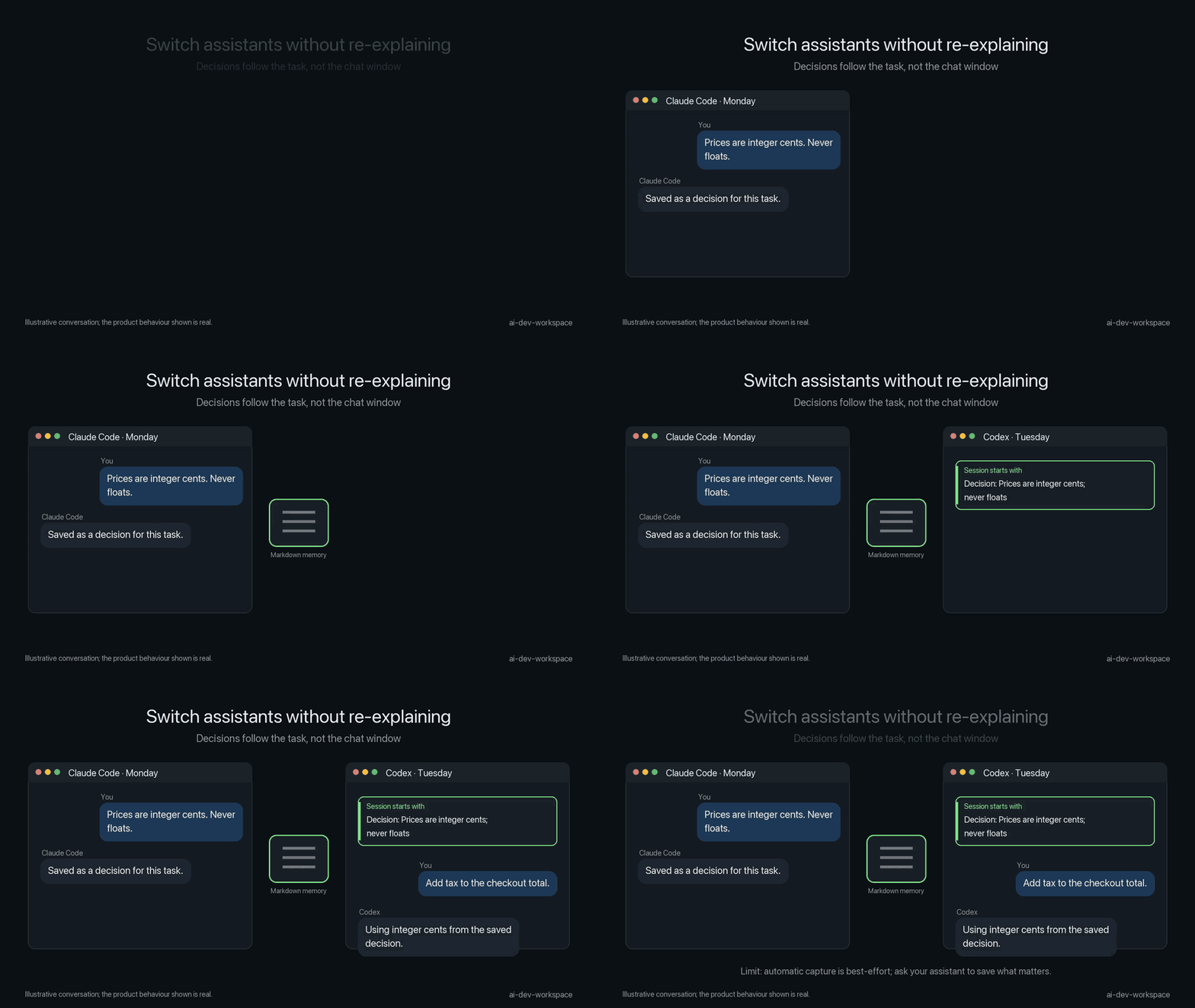
- Switch Claude Code ↔ Codex mid-task: save a checkpoint, then continue with a bounded brief from the saved task memory; client context can differ (guide).
Results
Measured in bench/README.md across independent paired investigations (Codex gpt-6-luna/high). In the workspace arms the assistant was told not to write notes, so they measure automatic capture; the Markdown arm was told to write HANDOFF.md.
| Arm |
Pass (November 18) |
Pass (October 11) |
Pass (October 10) |
| Fresh baseline (no memory) |
0/8 |
0/5 |
0/5 |
| Workspace (automatic brief) |
2/7 |
2/5 |
1/5 |
| Workspace, handoff injected as written |
0/7 |
– |
– |
| Plain Markdown handoff |
6/7 |
5/5 |
4/5 |
On November 18 the handoff-as-written arm also used 1.6x the plain Markdown arm's input tokens (339,168 against 208,720 per trial). That cohort stopped after 29 of 40 scheduled trials (two consecutive transport failures at a usage limit); the remaining trials cannot change the order against plain Markdown. Raw results.
Automatic capture does not yet produce a reliable handoff. Save the handoff explicitly with ws checkpoint and ws remember; those are deterministic. The win for the workspace is structure, cross-assistant handoff, and avoiding manual file management, not automatic memory. Details and earlier runs: bench/README.md and docs/MEASUREMENTS.md.
Compatibility
| Assistant |
Status |
Test proof |
| Claude Code |
supported, tested live on macOS |
CI-tested; live sessions |
| Codex |
supported, tested live on macOS |
CI-tested; live sessions |
Cursor, Copilot (VS Code), Gemini CLI and Antigravity are fixture-tested (CI); no live session is on record. Linux: CI only; no live session on record. Windows: CI only. Reports welcome through Something broke. Details: Experimental features and client verification.
Plugin and videos
Prefer a Claude Code plugin? Preview. Not yet listed in Anthropic's official plugin directory; install from our GitHub marketplace:
/plugin marketplace add Alenroyfeild/ai-dev-workspace
/plugin install ai-dev-workspace@ai-dev-workspace
Live-checked on beta.7 (2026-11-05). See the plugin preview. Generated assistant hooks and configs stay local (.git/info/exclude), task memory lives outside the repo in ~/.ai-dev-workspace/<repo-name>, and ws start --undo cleanly removes repo wiring (remove it).
Watch (videos for 0.1.0b7)
Example
Session 1 — You: “Empty email returns missing_email; leave signup unchanged.”
Assistant: “I’ll trace login and keep the decision with this task.”
You: “Save a checkpoint and stop here.”

Session 2 — You: “Continue the login fix.”
Assistant: “The saved note says return missing_email and leave signup unchanged.”
You: “Yes, continue.”
Features
| Feature |
Status |
What it does |
Docs link |
| Session brief |
Stable |
Injects bounded task memory at session start; transcript captures are unverified |
Overview |
| Decisions & handoffs |
Stable |
Saves status, next action, and explicit rulings (ws checkpoint, ws remember); automatic capture is best-effort |
Commands |
| Dead ends |
Stable |
Records failed approaches and displays a bounded Do not redo: in the brief |
Concepts |
| Lessons |
Stable |
Records cross-task guidance through the lesson tools; tools should save only when the user asks or approves |
Commands |
| MCP server |
Stable |
Exposes 7 core tools by default; others by name on request via stdio |
MCP |
| Guards pack |
Stable |
PreToolUse hook denies risky commands and secrets before execution; beta.7 reads git push option grammar (abbreviations, --prune, --mirror); a safety net, not a security boundary |
Packs |
| Claude Code plugin |
Preview |
Hooks + MCP + the handoff, pickup, lesson and thinkbeforeact skills; needs CLI + ws start; not in Anthropic directory; Windows untested |
Advanced |
| Skills packaging |
Stable |
Format checked; third-party installer not verified; CLI and setup still required |
Skills |
| Compact MCP recall |
Stable |
Bounded note cards and explicit untrusted detail; CLI snippets unchanged |
Advanced |
Not in the 1.0 promise: see Experimental features.
How it works
Claude Code / Codex / Cursor / Copilot / Gemini ── startup & capture hooks ──┐
Antigravity ── startup hook only; no automatic capture ─────────────────────┤
        (Cursor, Copilot, Gemini and Antigravity are fixture-tested)          ▼
~/.ai-dev-workspace/<repo-name>/           (private, outside repo)
  ├── workspace.json                       (settings, active task, packs)
  └── vault/
      ├── Tasks/<id>.md                    (status, next action, decisions, blockers)
      └── Learnings.md                     (reusable cross-task lessons & dead ends)
        ▲
        │ (MCP stdio connection: 7 core tools by default; others by name)
  Local Assistant (MCP client)
Memory storage makes no background model calls. Task memory is plain Markdown you own.
Compared with
- Built-in memory files (CLAUDE.md, AGENTS.md): Plain instructions per assistant;
ai-dev-workspace adds cross-assistant handoffs, active task state, and Do not redo: constraints.
- A plain HANDOFF.md: Works well for manual notes (and beat automatic workspace capture in the last three benchmark cohorts, 6/7 vs 2/7 on November 18);
ai-dev-workspace adds cross-assistant automation, structured brief injection, and staleness warnings.
- claude-mem: Captures tool use through hooks and compresses it with AI into SQLite + vector search (upstream docs), providing automatic memory capture without explicit commands;
ai-dev-workspace keeps explicit Markdown you own, makes no background model calls for memory (explicit delegation can call declared CLIs or a configured gateway), and focuses on durable handoffs with next steps and dead ends (guide).
Known limits
- Capture is best-effort: Explicit CLI commands (
ws remember, ws checkpoint) are deterministic; automatic transcript cue-word capture is best-effort.
- Guards are a safety net: Pattern matching blocks common risky commands and secrets in commands or written files, but is not an unbypassable security boundary.
Privacy & safety
- Private by default: Memory is stored outside checkout paths in
~/.ai-dev-workspace/<repo-name>. Team sharing requires an explicit private repo with manual confirmation (Experimental).
- Redaction is best-effort:
ws masks known API keys, tokens, and private spans (<private>...</private>), but does not reliably catch names or amounts. Review previews before sharing; regex redaction does not replace secret hygiene.
- Network checks: Session-start notices can check GitHub releases and linked issues about once a day; set
WS_OFFLINE=1 to disable these checks.
- Guards are a safety net: The
guards PreToolUse hook blocks known risky shell patterns and secrets in commands or written files, but it is a safety net, not an unbypassable security boundary.
Experimental
Commands beyond the core commands are Experimental and may change or be removed.
Updating? ws update updates the ws software (a package install prints the pipx upgrade command instead). Then ws upgrade --dry-run previews managed private-workspace updates and ws upgrade --yes applies them. Then run ws start in each repo to refresh its wiring. Running assistant sessions and MCP servers keep the old code until you start a new session or reload MCP connections.
For an isolated offline walkthrough, run ws demo.









