AutoPWN Suite
AutoPWN Suite is a project for scanning vulnerabilities and exploiting systems automatically.

Quick start
-
Install Nmap (needed for network scans, not for
website-only dashboard scans) and AutoPWN Suite with pipx
or uv. It needs Python 3.11.5 or newer. See
Installation for standalone binaries, Docker and other options:
pipx install autopwn-suite
-
Scan a host or network that you are authorized to test:
autopwn-suite -t <target ip address>
-
Or start the web dashboard, then sign in with the admin account whose
random password is printed once in the terminal on first launch:
autopwn-suite --web
Use -h for all options. Report problems through support and
vulnerabilities privately through the security policy.
Security expectations
AutoPWN Suite is an operator-controlled scanner that runs with your privileges and
stores integration credentials in plaintext JSON. Scan only systems you are authorized
to test, do not expose the dashboard to the public internet, keep it behind HTTPS and
trusted network controls, and verify releases before use. See the
security policy for reporting, response times and deployment guidance.
Achievements and project health
The badges at the top show the status that
OpenSSF Best Practices project 15518
reports for the Best Practices levels and the
OpenSSF Baseline levels.
They are updated by OpenSSF, not by this repository. The roadmap lists
planned work and non-goals, and the continuity plan describes
maintainer succession.
Features
Project documentation: build from source,
dependency management, architecture,
interfaces, governance,
changelog, release verification, and
security policy, support lifecycle,
threat model, secret management, and
security checks, roadmap,
access continuity, accessibility and
internationalization.
CLI
- Fully automatic scanning and exploitation
- Detect network IP range without any user input
- Vulnerability detection based on service versions
- Web app vulnerability candidates (Unix/Windows LFI, reflected XSS, error-based SQLI)
- Web response header and cookie configuration advisories
- Web app directory discovery with catch-all page filtering
- Get information about vulnerabilities right from your terminal
- Automatically download exploits related to discovered vulnerabilities
- Noise mode for creating traffic on the network
- Evasion mode for stealthy scanning
- Automatically select scan types based on privilege level
- Easy to read output with rich formatting
- Specify arguments using a config file
- Send scan results via webhook or email
- Works on Windows, macOS and Linux
- Use as a module
- Use as a daemon to periodically scan the network
Web UI
AutoPWN Suite includes a built-in web dashboard for managing scans from your browser.
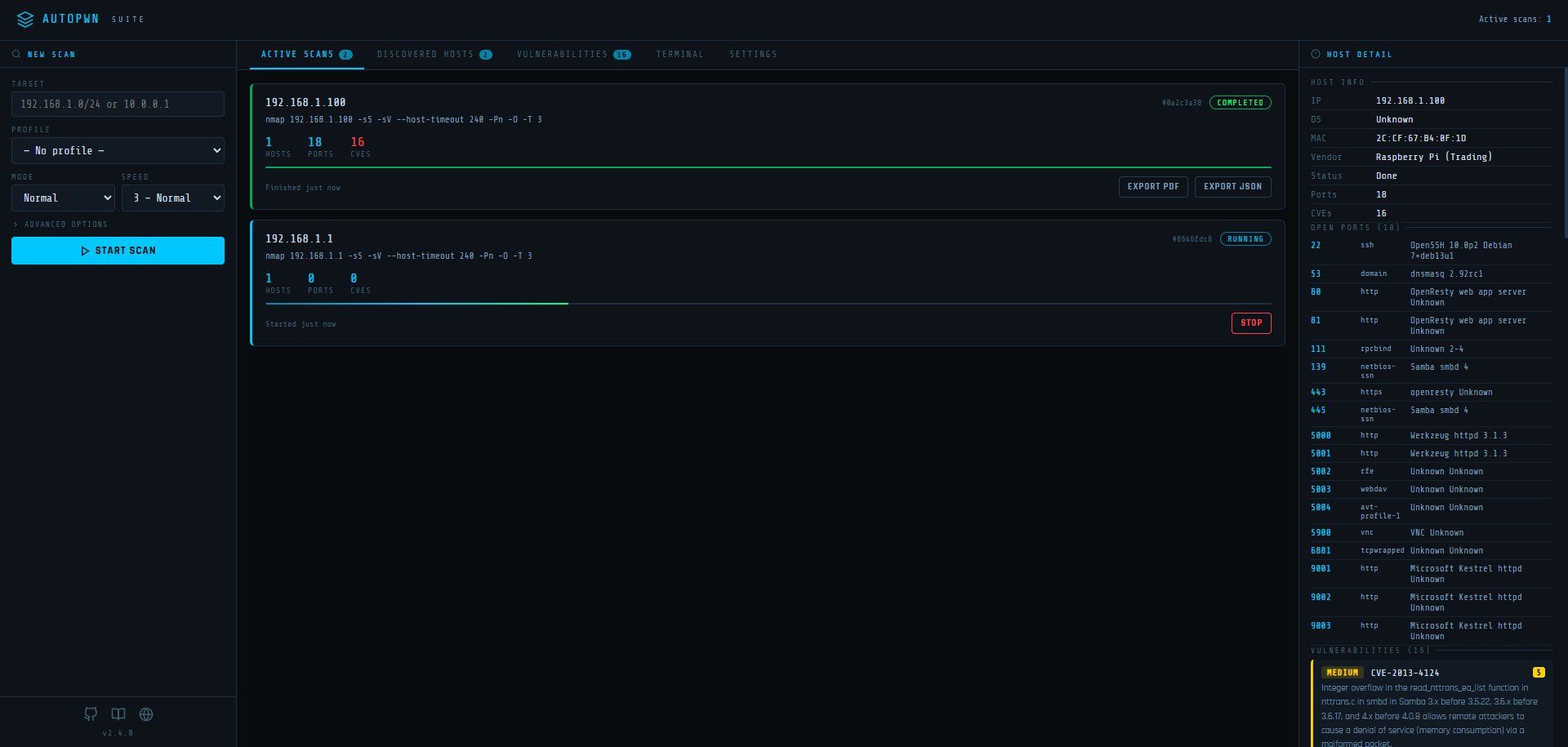
Signing in. The dashboard requires a login. On first launch the server creates an admin
account with a random password and prints both once in the terminal; only a scrypt hash of the
password is stored in web_ui_auth.json (inside AUTOPWN_DATA_DIR, or the per-user data directory by
default). Change the username and password after signing in under Settings → Account. If you
forget the password, run autopwn-suite --web-reset-account on the server to restore admin
with a new random password and sign out all sessions. Remote access requires HTTPS (or set
AUTOPWN_WEB_SECURE_COOKIE=1 behind a TLS-terminating proxy that passes the browser's Host header
through, or sign-in is refused as cross-origin); localhost works over plain HTTP.
- Multiple concurrent scans - Launch and monitor several scans at the same time
- Live terminal output - Watch nmap commands and results in real time via SSE
- Scan progress - Live Nmap stage percentages, completed CVE lookup counts and target completion counters. The bar follows the current stage; stages without a reported percentage show ongoing activity. Stopped and failed scans retain their last measured progress.
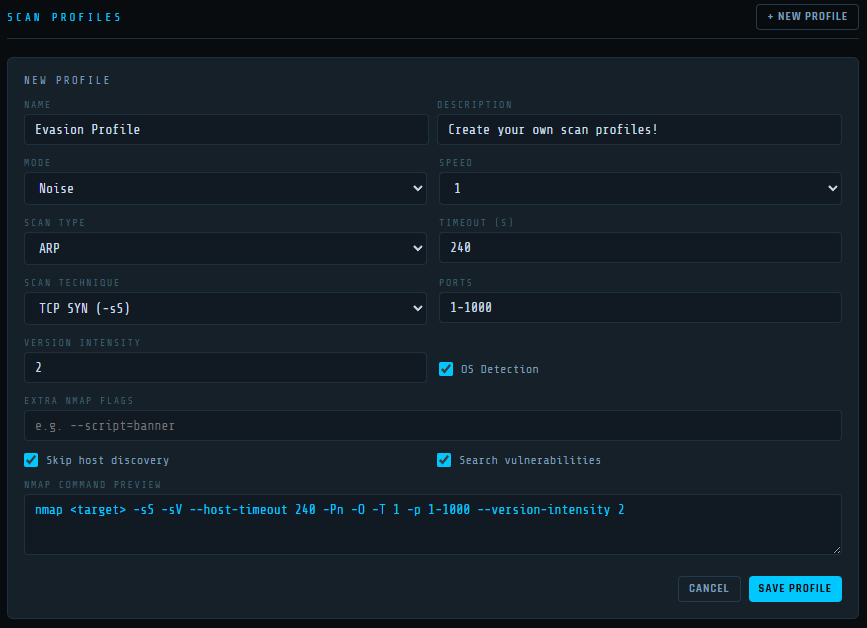
- Scan profiles - Save and reuse scan configurations (technique, speed, timeout, ports, version intensity, OS detection, evasion)
- Web security dashboard - Select application checks, inspect captured evidence and remediation, download PoCs, and explicitly replay recorded checks
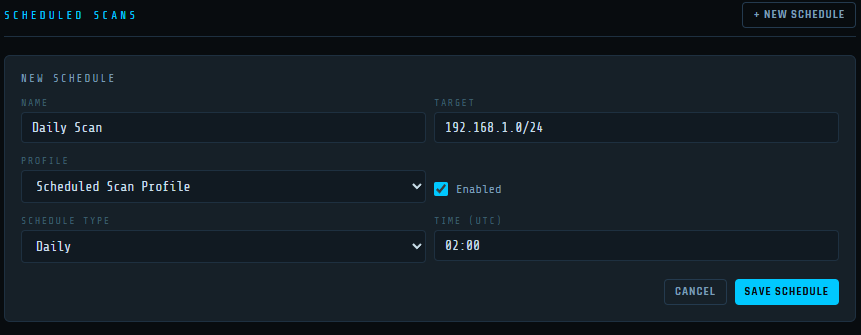
- Scheduled scans - Set up recurring scans on a cron schedule with automatic profile loading
- Scan techniques - Choose between TCP SYN, TCP Connect, UDP, Window, ACK, FIN, Xmas, Null and Maimon scans
- No free-text Nmap options - Since v2.7.0 the dashboard builds the Nmap arguments only from its own controls (scan technique list, ports, version intensity, OS detection, speed, timeout and mode). It has no box for Nmap options, so it cannot be made to run NSE scripts or to read or write files through Nmap, and the API refuses a non-empty
nmap_flags. The ports field takes numbers from 1 to 65535, ranges and comma lists (22,80,1-1000). A profile saved by an earlier release with Nmap options is kept but not used: its scheduled scans are disabled (when they next come due, or when you save the profile again, which removes the options), and you enable the schedule again by hand afterwards. Custom Nmap flags remain available to the trusted command line (--nmap-flags) and the Python API (nmap_args)
- Evasion mode - Fragmented packets, spoofed source port and padded data length
- Email notifications - Get notified on scan completion with inline result summaries
- Webhook notifications - Post scan results to any webhook endpoint
- Persistent settings - All settings, profiles and schedules are saved to disk
- Configurable via environment variables - Set host, port and data directory without touching code
How Does It Work?
AutoPWN Suite uses nmap TCP-SYN scan to enumerate the host and detect the version of software running on it. After gathering enough information about the host, AutoPWN Suite automatically generates a list of keywords to search the NIST vulnerability database.
A keyword names the product the way NVD does (Nmap's Apache httpd becomes Apache HTTP Server and Samba smbd
becomes Samba) with its upstream release (8.2p1 Ubuntu 4ubuntu0.5 becomes 8.2p1). The product is searched,
and a CVE is reported when NVD's applicability data (the CPE configurations of the CVE) marks that release of
the application vulnerable. When Nmap reports CPEs for the service (cpe:/a:filezilla-project:filezilla_server:0.9.41),
the CVEs whose applicability lists that product, of any vendor and without a version, are fetched as well,
which finds those whose description does not name it (HTTP/2 Rapid Reset, CVE-2023-44487, for nginx), and
only the entries for the product they name count: that vendor and product in any of NVD's spellings
(aol:aol_server for aol:aolserver), also as an operating system (NVD's netapp:data_ontap), or that product,
possibly with generic words, under a vendor the product's name also gives (f5:nginx_open_source for Nmap's
igor_sysoev:nginx). So FileZilla Server no longer gets FileZilla client CVEs, nor Sun iPlanet Messaging Server
the Web Server's. Nmap's operating system and device CPEs count only for a service without an application CPE
whose name names that system: VxWorks ftpd with cpe:/o:windriver:vxworks is searched as VxWorks and gets
the CVEs NVD files under VxWorks, while KarjaSoft Sami ftpd, which Nmap gives only cpe:/o:microsoft:windows,
gets no Windows CVEs. A CPE whose product shares no word with the service's name is ignored, since Nmap
gives some services another product's CPE (python:python for Werkzeug, mysql:mysql for a MariaDB server
that answers as MySQL). Without a CPE, or when no search result names its product (Nmap's
matt_johnston:dropbear_ssh_server), the product's name decides, and an operating system's entries do not count
for a service named after it, such as OpenBSD ftpd. A version with fewer numbers than the product's releases (Apache's 2.4) gets only the CVEs
that affect every release it may be. A CVE whose applicability says nothing about versions (not analyzed yet, or
only "every version" of the product) is reported when its description names the release other than as the fix
("before 2.4.52"), and no CVE is reported whose description says the detected release, or an earlier build of
it, fixed that product ("OpenSSH before 4.4" for 4.4p1). A release that starts a range ("1.0.2 before 1.0.2e"),
belongs to another product or is followed by a vendor's build ("before 8.0 HP2") is not read as the fix. A
version that names no single release, such as 3.X - 4.X, a bare major version like 4, 2.0.0 or later,
3.0 or 3.1 or protocol 3.3, is not searched.
The CLI, Python API and dashboard use the project's autopwn_suite/nmap_backend.py adapter
to run the system Nmap executable directly and parse its
XML output with Python's standard library.
Install Nmap and make sure nmap is on PATH; no Python Nmap wrapper is required.
Host discovery, TCP/UDP services, OS/vendor detection, custom Nmap flags (command line and
Python API only; the dashboard builds its arguments from its own controls) and NSE
results are supported. Dashboard scans retain live progress and cancellation.
The adapter also exposes complete raw XML, CPE identifiers and nested NSE tables
for callers that need more detail, and rejects failed or incomplete XML output.
python -m pytest checks dependency declarations, XML parsing and process cleanup.
With Nmap installed, the suite also scans temporary loopback HTTP/TLS services through
the CLI, Python API and dashboard, and checks IPv6 when available. These live cases
are skipped when the executable is missing; the parser and process tests still run.
Poetry CI installs system Nmap so the live checks run there too.
Web application checks
The CLI's existing web vulnerability prompt runs directory discovery and passive header/cookie
checks even on sites with no query inputs. When port results are available it checks each detected
TCP HTTP(S) service, including nonstandard ports; otherwise it tries the host's default web ports.
The crawler follows same-origin links and discovers
GET forms, preserving blank inputs, repeated parameter names and other query values. It skips
POST forms, password forms and uploads. The default crawl limits are 250 pages, 1,000 discovered
URLs and five levels of links; reaching a limit is reported as limited coverage. A page with more than
100 forms, with more than 2,000 form controls, or with forms that hold more than 200,000 elements in all, is analysed only in part and reported the same way, and a link or form
URL longer than 8,192 characters is not followed.
SQLi and LFI checks compare against the original response and repeat promising probes before
reporting new database errors or Unix/Windows file signatures. Reflected XSS checks require an
unescaped payload in a script element or HTML event handler in an HTML response; JSON, plain
text, comments and inactive HTML contexts are excluded. Browser execution and CSP bypass are
not verified, so injection findings remain candidates requiring review. Directory hits are
observations, with random missing-path controls suppressing soft 404 pages and blanket
login redirects. A protected path is not itself a vulnerability.
Configuration checks report advisories for missing/invalid nosniff, HTML CSP and framing
protection, HTTPS hostname HSTS, and cookie Secure/HttpOnly/SameSite flags. Cookie values are
excluded from these advisories. Recommendations follow the
OWASP HTTP Headers Cheat Sheet.
They describe the response observed, not a complete configuration audit.
Additional application checks include:









