





Scan your whole stack








Are you using cloudcostwise?
Find out what’s in your code.
Scan your apps free in minutes (opens in a new tab)Latest version: v0.1.29
cloudcostwise was last scanned on 23 Nov 2026 at version 0.1.29. Risk score 0 of 100. No malicious behavior was detected.
| Version | Published | Status |
|---|---|---|
| 0.1.29 LATEST | 23 Nov 2026 | No rules fired |
| 0.1.27 | 16 Nov 2026 | No rules fired |
| 0.1.26 | 16 Nov 2026 | No rules fired |
| 0.1.23 | 13 Nov 2026 | Not shown |
| 0.1.22 | 12 Nov 2026 | Not shown |
Findings for v0.1.29. The score is a capped sum of the weights of the rules that fired — not CVSS, not exploitability, and not a probability. It is not comparable across packages with different scan coverage.
The score describes 0.1.29; other versions have their own rules, not their own score.
The publisher’s own README, as collected from the registry.
Find AWS waste from your terminal or your AI assistant, including the kinds AWS's own tools don't flag.
cloudcostwise scans your account on your own machine, with your own read-only AWS credentials.
don't, and 14 more go further than the closest AWS check.
pipx install cloudcostwise
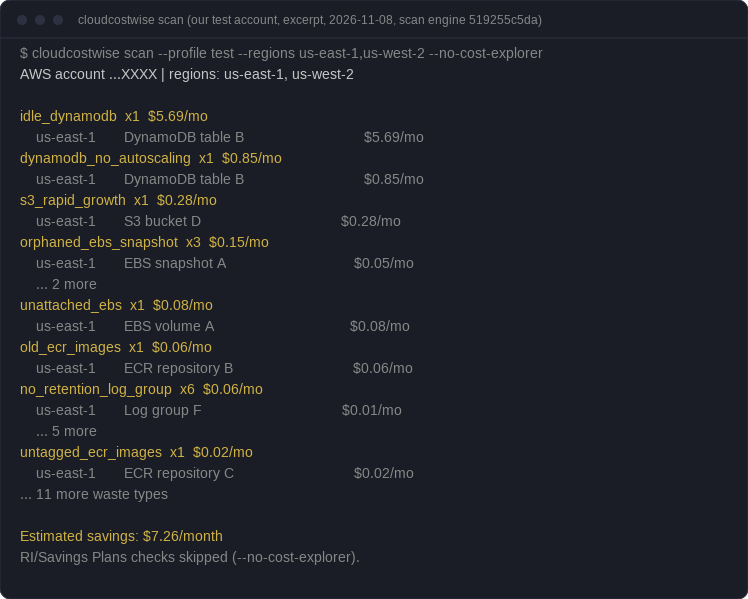
cloudcostwise scan
From an AI assistant (the server starts with uvx, so install uv first):
claude mcp add -s user cloudcostwise -- uvx cloudcostwise mcp   # Claude Code
gemini mcp add -s user cloudcostwise uvx cloudcostwise mcp   # Gemini CLI
Then ask it: "Where am I wasting money on AWS?" Setup for Codex, Cursor and Kiro is further down.
What it finds that AWS's tools don't (every check, with the closest AWS check):
For idle EC2, RDS and NAT gateways, rightsizing and Savings Plans, AWS's tools cover the same ground: use them too.
Before you run it with AWS credentials:
Describe, List, Get, Search or Lookup is refused before it is sent, whatever your credentials allow.cloudcostwise share --off
turns it off for good; CLOUDCOSTWISE_SHARE=no turns it off for that environment. See Sharing a summary.~/.config/cloudcostwise/share.json, the summary numbers of your last scan in ~/.config/cloudcostwise/last-summary.json (never sent by itself; see Sharing a summary) and, only if you use cloudcostwise exclude, your exclude list in ~/.config/cloudcostwise/exclude.json (it never leaves your machine). No report, cache or credentials are written.Least-privilege IAM policy (73 read-only actions):
docs/iam-policy.json. See a real scan first, no credentials needed:
cloudcostwise.io/sample-scan.
pipx install cloudcostwise          # or: uvx cloudcostwise scan
cloudcostwise scan                      # us-east-1 plus your profile's region
cloudcostwise scan --profile prod --regions all
cloudcostwise scan --format json > waste.json
cloudcostwise scan --format json --anonymize > waste-to-share.json   # then read it through before you email it
Options:
| Option | Meaning |
|---|---|
--profile NAME |
AWS profile; otherwise the standard credential chain (env vars, SSO, instance role) |
--regions LIST |
Comma-separated regions, or all for every enabled region. Account-level checks (CloudWatch dashboards, orphaned DNS records, RI/Savings Plans) run once, in us-east-1, and are skipped with a warning if it is not listed |
--format table\|markdown\|json |
Output format |
--anonymize |
Replace the account ID and the resource IDs, names, ARNs and tag values it recognizes with stable placeholders (account-1, resource-1, ...; the same value always gets the same one). Waste type, region, savings, confidence, action wording, warnings and counts stay. Works with every --format; it runs locally and sends nothing. Anonymizing is not complete: it replaces the identifiers it recognizes, so review the file before you send it |
--demo |
Print a recorded scan of a CloudWise test account instead of scanning: sample data with every identifier replaced by a placeholder, no AWS call, no credentials, no network. The first and last line say it is sample data, and JSON output carries "demo": true. Works with every --format and with --anonymize; --profile and --regions are refused with it; --no-cost-explorer, --no-exclude and --parallel have nothing to change and are ignored. It never asks to share a summary and is never sent, whatever your share setting says |
--emulator |
Run a live scan of a fake AWS account in AWS Emulator on your machine (needs Docker): it starts the emulator or reuses it, creates fake wasteful resources next to healthy twins, and runs the normal scan against them. It never uses your AWS credentials; --profile, --regions and --demo are refused with it; Cost Explorer is always off and --no-exclude and --parallel are ignored. Works with every --format and with --anonymize; every output says it is a fake account, and JSON output carries "emulator": true. It never asks to share a summary and is never sent |
--emulator-port PORT |
Port for --emulator, on 127.0.0.1 only (default 9397, or $CW_DEMO_EMULATOR_PORT) |
--emulator-down |
Stop the emulator that --emulator started; its fake resources are gone |
--no-exclude |
Ignore your exclude list (see below) for this run and show every finding |
--no-cost-explorer |
Make no Cost Explorer call. AWS bills those at $0.01 per request and a scan makes up to about 10. Skips the RI/Savings Plans checks, the one KMS spend read and the one request that reads this account's last 30 days of spend (all regions; credits and refunds left out), so the score falls back to "without spend data" |
--parallel N |
Regions scanned at once, each in its own process (default 4; --regions all takes ~2–3 min instead of ~10) |
--verbose |
Show data warnings (checks that could not read a metric report it as missing, never as zero) and the missing permissions, each naming the IAM action |
uvx cloudcostwise scan --demo # a recorded sample scan; any --formatIn an AI assistant, call the scan tool with demo set to true: list_findings, explain_finding and fix_guidance then work on the sample. It is a recording of a CloudWise test account, not your account, and every result says so. Nothing is scanned, nothing leaves your machine, and a demo result is never shared.
uvx cloudcostwise scan --emulator # needs Docker; --emulator-down stops itThis starts AWS Emulator, AWS's own free local emulator, in Docker (published on 127.0.0.1 only, telemetry off), creates a small fake account with wasteful resources next to healthy twins, and runs the normal scan against it. The first run builds a local image from AWS's own package (about 1.4 GB, once). Without Docker running it stops with one line and suggests --demo. It never uses your AWS credentials or AWS_PROFILE: it reads only the emulator's own credentials file and stops unless the endpoint is 127.0.0.1 and the account is the emulator's 000000000000. The resources are fake, savings use AWS list prices, and checks that need billing or usage history can't fire there; every output says so, and a result is never shared. In an AI assistant, call the scan tool with emulator set to true; list_findings, explain_finding and fix_guidance then work on it.
A finding you have already decided to keep (a bucket that looks idle but is not, a snapshot you retain on purpose) can go on a local exclude list that survives the next run:
cloudcostwise exclude add vol-0abc123def4567890 --reason "kept for the audit"   # a resource ID or a full ARN
cloudcostwise exclude list
cloudcostwise exclude remove vol-0abc123def4567890
cloudcostwise scan --no-exclude # ignore the list for one runFind threats in your stack.
OX Radar can check high-priority threats, like critical package CVEs, against your context.
Each incident is marked Detected or Not Detected with a remediation plan and proof all tracked in the Response Center.
The probe returned only these fields for this server — auth requirement, protocol and tool list weren’t observed, so they’re not shown (never guessed).
The publisher’s own links, as the registry reports them. These are not sources for the assessment on this page.