df2tables - Pandas & Polars DataFrames to Interactive HTML Tables

df2tables's main job is to present and make DataFrames easy to explore: hand it a Pandas or Polars DataFrame and get back an interactive table you can browse locally - as a self-contained HTML file that opens straight in your browser, no server needed - or inline in a notebook (Jupyter, VS Code notebooks, marimo). It's also built to embed seamlessly into Flask, Django, FastAPI, or any web framework for the cases where you do want one, and is powered by DataTables, a mature JavaScript table library, under the hood.
By rendering tables directly from JavaScript arrays, this tool delivers fast performance and compact file sizes, enabling smooth browsing of large datasets while maintaining full responsiveness. For datasets where you'd rather not embed the rows at all, render_ajax() lets the same table fetch its data from an API endpoint at runtime instead - see Main Functions.
Zero dependencies - you just need pandas or polars installed (you don’t need pandas if using polars).
Converting a DataFrame to an interactive table takes just one function call:
render(df, **kwargs)
# or for web frameworks:
render_inline(df, **kwargs)
# or, to fetch rows from an API endpoint at runtime instead of embedding them:
render_ajax(df, data_url, **kwargs)
Features
- Converts
pandas and polars DataFrames into interactive standalone HTML tables
- Web Framework Ready: Specifically designed for easy embedding in Flask, Django, FastAPI, and other web frameworks
- On-demand / AJAX loading:
render_ajax() renders a table whose rows are fetched from an API endpoint at runtime (paired with to_js_array() on the server side) instead of being embedded in the page at generation time
- Browse large datasets using filters and sorting
- Works independently of Jupyter or a running web server (though notebook rendering is supported)
- Useful for training dataset inspection and feature engineering: Quickly browse through large datasets, identify outliers, and catch data quality issues interactively
- Customization: Configuring DataTables from Python
Screenshots
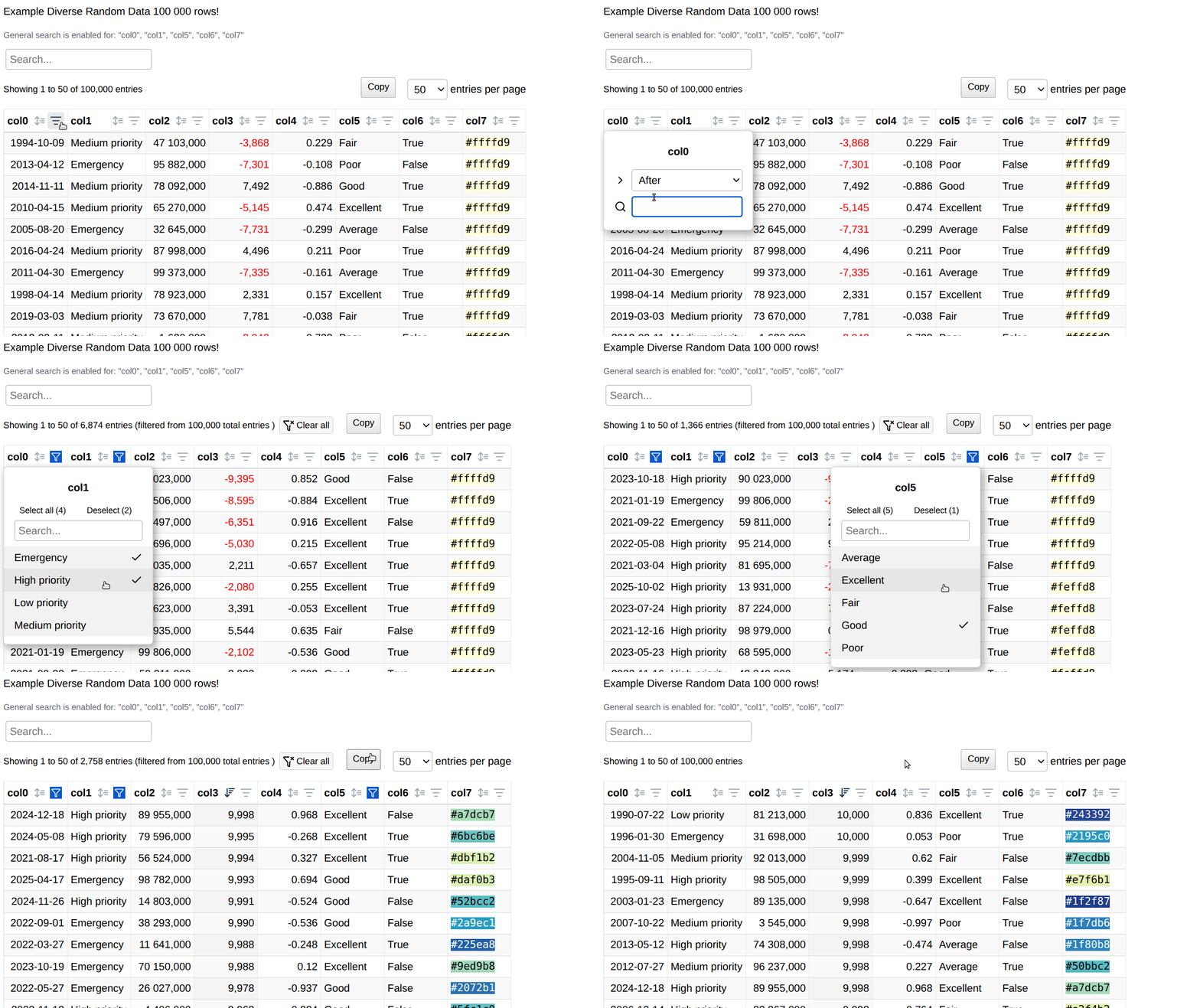
A standalone HTML file containing a JavaScript array as data source for DataTables has several advantages. For example, you can browse quite large datasets locally.
The column control feature provides dropdown filters for categorical data and search functionality for text columns, enhancing data exploration capabilities through the excellent DataTables Column Control extension.
Note: By default, filtering is enabled for all non-numeric columns.
Quick Start
The simplest function call with default arguments is:
import df2tables as df2t

df2t.render(df, to_file='df.html')
Installation
pip install df2tables
Sample DataFrame
# Render a sample DataFrame; returns the output file path (and opens it in the browser)
output_path = df2t.render_sample_df(to_file="sample_table.html")

# Polars sample instead of the pandas default
output_path = df2t.render_sample_df(df_type="polars", to_file="sample_table_pl.html")
The underlying generator, get_sample_df(df_type="pandas", size=50, seed=None), is also available directly if you just want the sample DataFrame without rendering it - pass seed=<int> for a reproducible frame.
Rendering in notebook
from df2tables import render_nb

render_nb(df)                 # interactive table inside an iframe
render_nb(df, height=800)     # taller iframe
render_nb(df, iframe=False)   # render inline, without the iframe wrapper
df2t.show is an alias for render_nb. Notebook rendering is currently supported in Jupyter, VS Code notebooks and marimo.
Main Functions
render
df2t.render(
    df: pd.DataFrame | pl.DataFrame,
    to_file: str = "datatable.html",
    title: str = "",
    startfile: bool = True,
    precision: int = 2,
    format_negatives: Union[bool, List[str], Tuple[str], Set[str]] = False,
    buttons: Union[bool, List[str]] = False,
    render_opts: Optional[dict] = None,
    js_opts: Optional[dict] = None,
    templ_path: str = TEMPLATE_PATH,
    **kwargs
) -> Union[str, None]
Parameters:
df: Input pandas or polars DataFrameto_file: Output HTML file path (default: "datatable.html"). If None, returns HTML string instead of writing filetitle: Title for the HTML table (default: "")startfile: If True, automatically opens the generated HTML file in default browser (default: True)precision: Number of decimal places for floating-point numbers. Must be a non-negative integer (default: 2)format_negatives: Configure negative number formatting with color-coded HTML (negative values in red):
False: No special formatting (default)True: Auto-detect and format all numeric columns containing negative valuesList/Tuple/Set[str]: Format only specified column names (spaces in column names should be replaced with underscores)
buttons: List of DataTables button types to add to the toolbar (e.g., ['copy', 'csv', 'excel', 'pdf']). Requires DataTables Buttons extension (default: False)render_opts: Dictionary of additional rendering configuration options (see below for available options)js_opts: Dictionary of DataTables configuration options to customize table behavior (e.g., pagination, scrolling, layout, language) (default: None)templ_path: Path to custom HTML template (uses default if not specified)**kwargs: Deprecated - Passing load_column_control, display_logo, or the old num_html name directly is deprecated and will be removed in a future version. Use render_opts={'load_column_control': ...} and format_negatives=... instead - see Deprecated Arguments
Available render_opts options:
locale_fmt (bool): Enable locale-based number formatting (default: False)load_column_control (bool): Enable the DataTables ColumnControl extension, which adds the per-column order/search icons and dropdown filters described above. When False, that per-column UI is omitted (default: True)reorder (bool): Enable column reordering functionality. Requires load_column_control=True (default: False)dropdown_select_threshold (int): Maximum number of unique values for a column to get a dropdown filter instead of a text filter. Applies to integer and non-numeric (string/categorical) columns; floating-point columns always get a text filter regardless of this threshold (default: 9)table_id (str): HTML ID for the table element in the generated page (default: "pd_datatab")unique_id (bool): Generate unique UUID-based table ID for multiple tables on one page (default: False; takes precedence over table_id)default_table_class (str): CSS classes for the table element in the generated page (default: "display compact hover order-column")add_expand_btn (bool): Add expand/collapse button for row details (default: True)display_logo (bool): Display DataTables logo (default: False)scroll_x (bool): Enable horizontal scrolling (default: True)scroll_y (str | None): Vertical scrolling height, e.g. "70vh"; set to None to disable (default: "70vh")scroll_collapse (bool): Collapse the container height when there are fewer rows than scroll_y (default: True)list_preview (int): How many elements of a list/dict cell are shown in its basic preview before the tail is elided (default: 5)paging_warn_limit (int | None): Row-count threshold for the in-page performance warning when paging is disabled; None keeps the template default (500) (default: None)fragment_css (bool): Include the portable layout <style> block in inline fragments; set to False when the host page styles the table itself (default: True)table_theme (str | None): Apply a visual theme - "condensed" or "narrow"; None is the built-in look (see Table themes) (default: None)
Returns:
- File path (str) if
to_file is specified and the file is successfully written
- HTML string if
to_file=None
Raises:
ValueError: If precision is not a non-negative integer, the DataFrame type is unsupported, or the DataFrame cannot be processedTypeError: If render_opts, js_opts, buttons, or format_negatives have the wrong typeUserWarning: For unknown keyword arguments passed to the function (a warning, not fatal)FileNotFoundError: If templ_path does not existRuntimeError: If the template cannot be read or renderedOSError: If the output file at to_file cannot be written
All of the above raise unconditionally - see Error Handling.
render_inline
df2t.render_inline(
    df: pd.DataFrame | pl.DataFrame,
    table_attrs: Optional[Dict] = None,
    add_scripts: bool = False,
    **kwargs
) -> str
Parameters:
This function is designed for integration with web applications and has the following characteristics:
- Returns only the
<table> markup and the associated JavaScript
- Excludes
<html>, <head>, and <body> tags
- Useful for pages with multiple tables, as you can assign unique IDs via the
table_attrs dictionary (e.g., {'id': 'my-unique-table'})
- By default (
add_scripts=False), the snippet does not include the DataTables library or its extension assets - you must include them manually in your host HTML page for the table to work. Set add_scripts=True to prepend the CDN <link>/<script> assets to the returned snippet.
The table_attrs argument accepts a dictionary of HTML table attributes, such as an ID or CSS class. This is especially useful for multiple tables on a single page (each must have a different ID). For render_inline, use table_attrs instead of the render_opts['table_id'] option. If you don't pass an id, each call generates its own unique one automatically.
Note: Some arguments from render() are not applicable here, such as title, display_logo, or startfile, because the returned HTML contains only the table element and its initialization script.
Fragment stylesheet: a fragment ships a small <style> block of its own with the table layout rules (content-wide table, margin reset, cell truncation), scoped to table.dataTable.df2t so the host page's tables are never touched. Turn it off with render_opts={"fragment_css": False} when the host page styles the table itself; the AJAX loader CSS still ships. To override a single declaration, use a more specific host rule, e.g. #my-page .df2t td { max-width: 30em }.
Example:
See an example of multiple tables with different configuration options placed in separate tabs (jQuery UI Tabs): flask_multiple_tables_tabs.py
Note: Pandas DataFrame indexes are not rendered by default. If you want to enable indexes in an HTML table, simply call df2tables.render(df.reset_index(), args...)
render_ajax
df2t.render_ajax(
    df: pd.DataFrame | pl.DataFrame,
    data_url: str,
    to_file: Optional[str] = None,
    title: str = "",
    startfile: bool = True,
    precision: int = 2,
    format_negatives: Union[bool, List[str], Tuple[str], Set[str]] = False,
    buttons: Union[bool, List[str]] = False,
    button_label: str = "Load data",
    autoload: bool = False,
    fetch_opts: Optional[dict] = None,
    status_messages: Optional[dict] = None,
    render_opts: Optional[dict] = None,
    js_opts: Optional[dict] = None,
    templ_path: str = TEMPLATE_PATH,
    full_page: bool = False,
    add_scripts: bool = False,
    table_attrs: Optional[dict] = None,
    **kwargs
) -> str
Renders a table whose rows are fetched at runtime from data_url via the browser's Fetch API, instead of being embedded in the HTML. df is only used to derive the column definitions and options - the actual data is served separately, typically with to_js_array().
It's generated from the exact same template as render(): the AJAX loader lives in dedicated regions that render() strips out and render_ajax() fills in, so there's no second template file to maintain.
By default it returns an inline fragment, the same shape as render_inline() - unlike render(), whose default is a full standalone page. Pass full_page=True for a complete HTML document instead.
Parameters:
-
df: pandas or polars DataFrame (used to derive columns and options only - rows are never embedded)
-
data_url: URL of the endpoint returning the row data as JSON
-
to_file: output file path; if None (the default), the HTML fragment/document is returned as a string instead of written to disk
-
title: page title, used only when full_page=True (ignored for the inline fragment)
-
startfile: open the generated file in the browser after writing (default: True)
-
precision, format_negatives, buttons, render_opts, js_opts: same meaning as in render()
-
button_label: label of the "load data" button, used only when autoload=False (default: "Load data")
-
autoload: if True, rows are fetched immediately with no button - a pulsing "Loading data…" indicator is shown, with a Retry button shown only on failure. If False (default), the rows are fetched on click of the button_label button
-
fetch_opts: dict merged into the fetch() call's options (defaults to {"credentials": "same-origin"})
-
status_messages: texts of the loader status line. None (default) = English defaults; False = every message switched off; or a dict overriding single entries. An empty string switches that message off. The texts are HTML and support the placeholders {n} (row count) and {error} (error message), so a fully translated page is one argument away:
| key |
default |
loading |
Loading data… (the spinner is prepended) |
loaded |
Loaded <strong>{n}</strong> rows. |
error |
Failed to load data: {error} |
retry |
Retry — '' also means the autoload Retry button is never created |
# hide the redundant "Loaded N rows." (the page has its own KPI counters)
df2t.render_ajax(df, "/api/table", status_messages={"loaded": ""})
# Polish page, everything translated
df2t.render_ajax(df, "/api/table", status_messages={
    "loading": "Trwa łączenie z CDN…",
    "loaded": "Załadowano <strong>{n}</strong> wierszy.",
    "error": "Nie udało się pobrać danych: {error}",
    "retry": "Ponów",
})
# a silent loader (no status line at all)
df2t.render_ajax(df, "/api/table", autoload=True, status_messages=False)
-
templ_path: path to the HTML template - a custom template must contain the same comnt tags as the bundled datatable_templ.html, including the AJAX loader regions and the data_url / button_label / autoload / fetch_opts tags (see Custom Templates). The msg_loading / msg_loaded / msg_error / msg_retry tags are optional: an older template without them simply keeps its own hard-coded texts (no error)
-
full_page: return a complete standalone HTML document instead of the default inline fragment
-
add_scripts: prepend the DataTables CDN <link>/<script> block (inline mode only; default: False)
-
table_attrs: extra HTML attributes for the <table> element (inline mode only). If you don't pin an id here (or via render_opts['table_id']), each call generates its own unique one automatically
Returns:









