
Scan your whole stack











Are you using hypergan?
Find out what’s in your code.
Scan your apps free in minutes (opens in a new tab)Latest version: v2.2.0
hypergan was last scanned on 23 Nov 2026 at version 2.2.0. Risk score 0 of 100. No malicious behavior was detected.
| Version | Published | Status |
|---|---|---|
| 2.2.0 LATEST | 23 Nov 2026 | No rules fired |
| 2.1.1 | 21 Nov 2026 | No rules fired |
| 2.1.0 | 21 Nov 2026 | No rules fired |
| 2.0.0 | 18 Nov 2026 | Not shown |
| 2.0.0a4 | 18 Nov 2026 | Not shown |
Findings for v2.2.0. The score is a capped sum of the weights of the rules that fired — not CVSS, not exploitability, and not a probability. It is not comparable across packages with different scan coverage.
The score describes 2.2.0; other versions have their own rules, not their own score.
The publisher’s own README, as collected from the registry.
Train generative models. Follow their progress. Export the result.




Documentation · Quickstart · Examples · Python API · CLI Reference · TOML Schema · HNDL Ops
HyperGAN 2.2.0 trains generative models from declarative hypergan-model/1 TOML recipes using HNDL neural graphs and ParticleGAN (unified_v12, multi-critic coupled thermal coordination). Drive every workflow from the Docker-style CLI or lazy-loaded typed Python API (import hypergan as hg, 129 public symbols), watch training live in the Foldlite DB WebAssembly Observatory, and export standalone EMA generators for serving.
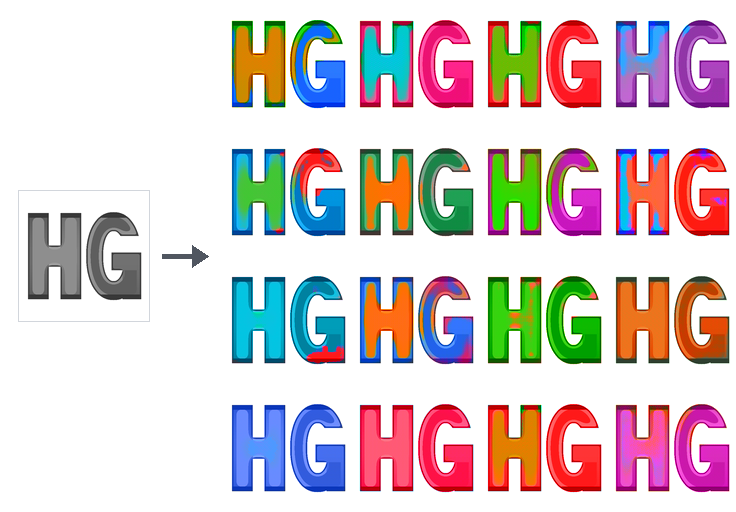
The HyperGAN icon above is generated by conditioning the packaged 128×128 HNDL particle colorizer on a grayscale HG monogram across 16 particle draws with exact 7-face polytope luminance lock. View the single badge, colorized grid, and grayscale source.
| Area | Verified Result / Capability | Reference |
|---|---|---|
| 5 Packaged Wheel Recipes | gaussian-grid, image-folder-128, colorization-128, cifar10-tiny-transformer, and cifar10-transgan ship inside the wheel (hypergan recipes), plus a 256×256 DINOv3 colorizer source example |
Examples Gallery |
| 256×256 DINOv3 Colorization | Held-out FID-10k 6.37 at step 2,500 on 2× RTX A6000 (ParticleGAN 0.9.7 BISPF); grayscale luminance error 2.61e-7 |
Colorization setup |
| CIFAR-10 32×32 Benchmarks | cifar10-tiny-transformer: FID-50k 14.56 @ 15k steps (BISPF) · 15.16 @ 12.5k steps (EMPF, 3.32 steps/s) on 2× RTX A6000, global batch 256 |
CIFAR recipes & results |
| Multi-GPU NCCL Scaling | 2.20× single-GPU throughput (1,517.19 img/s, 110.2% efficiency) on 2× RTX A6000 at global batch 256 (0.79× at batch 64) |
Scaling measurements |
| 4 Standalone Export Formats | Privacy-clean EMA generator exports to Python bundle (.pt), PyTorch pt2, onnx, and safetensors |
Deployment guide |
Use Python 3.12+ for the tested training runtime. Lightweight package checks cover Python 3.11–3.14 on Linux, macOS and Windows; the CPU reference profile is tested on Linux. The train extra accepts torch>=2.6,<3, but CI tests only torch==2.14.0, the version the commands below install; other versions are untested.
CPU:
python -m venv .venv
. .venv/bin/activate
python -m pip install "torch==2.14.0" "torchvision==0.29.0" --index-url https://download.pytorch.org/whl/cpu
python -m pip install "hypergan[all]==2.2.0"
hypergan --help
python -m hypergan --version
NVIDIA GPU (CUDA 13.0):
python -m pip install "torch==2.14.0" "torchvision==0.29.0" --index-url https://download.pytorch.org/whl/cu130
python -m pip install "hypergan[all]==2.2.0"git clone https://github.com/HyperGAN/HyperGAN.git
cd HyperGAN
python -m venv .venv
. .venv/bin/activate
python -m pip install -e .
hypergan --help
python -m hypergan --versionFor local NVIDIA GPU training from source:
python -m pip install "torch==2.14.0" "torchvision==0.29.0" --index-url https://download.pytorch.org/whl/cu130
python -m pip install -e ".[all]"
For a local CPU correctness fixture from source, install the CPU PyTorch wheel instead (python -m pip install "torch==2.14.0" "torchvision==0.29.0" --index-url https://download.pytorch.org/whl/cpu) before python -m pip install -e ".[all]" and pass --device cpu (or -d cpu). Lightweight CLI commands (new, validate, ps, status, logs, inspect, tag, runs, queue, gc, rm) do not import PyTorch or ParticleGAN.
The core install can scaffold and validate gaussian-grid. For image templates using defaults = "particlegan", install the train extra (included in all) so structural validation can read the installed ParticleGAN preset.
Explore starter templates (dcgan, tiny-transformer, resnet, gaussian-grid) and packaged wheel recipes:
hypergan new --list
hypergan recipes
Scaffold a project workspace (hypergan.toml, runs/, and configs/<template>.toml). When --dataset points at an image folder, hypergan new inspects image headers without loading pixels into RAM, auto-detects the resolution (32, 64, 128, or 256) and color mode (RGB or L), and sizes the HNDL generator and critic automatically:
# Image GAN project sized automatically from a folder of images
hypergan new --project my_gan --dataset ./images

# Or specify an explicit template and resolution (or 2D toy fixture on CPU)
hypergan new --project my_transformer --template tiny-transformer --resolution 64
hypergan new --project my_toy --template gaussian-grid --device cpu
Validate the generated format = "hypergan-model/1" configuration before launching training:
# Fast structural validation (no Torch imports)
hypergan validate my_gan/configs/dcgan.toml
hypergan validate my_gan

# Validate with inline overrides and emit resolved JSON
hypergan validate my_gan/configs/dcgan.toml -s train.batch_size=32 -s optimizer.lr=0.0002 --json

# Verify image dataset inventory/hashes (--data) and construct networks in a worker (--runtime)
hypergan validate my_gan/configs/dcgan.toml --data
hypergan validate my_gan/configs/dcgan.toml --runtimeFull flags and subcommands are documented in the CLI Reference.
Start training from a model .toml file or packaged recipe name. Customize the run name (-n), override any config key (-s KEY=VALUE), or pick the device (-d):
hypergan train my_gan/configs/dcgan.toml --steps 1000
hypergan train my_gan/configs/dcgan.toml -n exp-lr2e4 -s train.lr=0.0002 -s train.batch_size=32
hypergan train my_toy/configs/gaussian-grid.toml --steps 20 -d cpu --no-server
Every run is tracked in a daemonless global registry with a unique Run ID (<short_id>, e.g. 0608d849), a memorable Docker-style Slug (<adj>-<noun>, e.g. fleet-hawk), and an optional Tag. Inspect and control runs from any working directory with zero arguments (targets the active or most recent run) or by <slug>, <short_id>, <tag>, or <run_dir>:
# List active runs, live GPU VRAM usage, and queued jobs (-a for full history)
hypergan ps
hypergan ps -a
hypergan ps -a --json

# Single-screen summary (progress, speed, ETA, latest losses, best FID, checkpoints)
hypergan status
hypergan status fleet-hawk

# View or follow (-f) formatted training logs (Ctrl-C detaches without stopping training)
hypergan logs -n 50
hypergan logs -f fleet-hawk

# Request a durable checkpoint at the next update boundary, or stop gracefully
hypergan checkpoint
hypergan checkpoint fleet-hawk
hypergan stop
hypergan stop fleet-hawk
hypergan stop --all# Tag (rename) an active or stopped run (writes RUN/tag.json and updates the registry)
hypergan tag fleet-hawk baseline-dcgan32
# Inspect manifest JSON or model architecture/loss/optimizer summary
hypergan inspect baseline-dcgan32
hypergan model baseline-dcgan32
hypergan model baseline-dcgan32 --write # build on meta device and save RUN/model.json
# Resume from the latest (or specific --checkpoint) boundary; extends step budget seamlessly
hypergan resume baseline-dcgan32 --steps 2000# Draw fresh samples from the EMA generator (writes PNG grid for image models or JSON)
hypergan sample baseline-dcgan32 --count 16 --seed 42
# Condition a trained colorizer on a single grayscale input image across 16 particles
hypergan sample logos-colorization-128 --input docs/assets/hg-bw-128.png --count 16 --output hg-grid.png
# Run configured snapshot evaluations (e.g. FID, color moments, sample diversity)
hypergan eval baseline-dcgan32
hypergan evaluate baseline-dcgan32 --metric sample_diversity
# Export the EMA inference bundle and its SHA-256 digest
hypergan export baseline-dcgan32 --checkpoint latest -o exported_model.ptFor HNDL bundles, install HyperGAN, Torch, NumPy and HNDL on the serving host. The deployment guide includes separate load commands for Python bundles, PT2, ONNX Runtime and SafeTensors. Serve an exported generator · Upgrade an alpha run
# List, filter, and compare runs side-by-side across step milestones
hypergan runs ls --sort fid
hypergan runs compare baseline-dcgan32 exp-lr2e4
hypergan runs compare baseline-dcgan32 exp-lr2e4 --metric loss_g --at 500,1000,best,latest --json

# Schedule and execute queued experiments sequentially across GPUs
hypergan queue status
hypergan queue add my_gan/configs/dcgan.toml -n job1 --steps 5000 -s train.lr=0.0005 -d gpu0
hypergan queue ls --json
hypergan queue run --once
hypergan queue stop --all# Reclaim disk space by pruning rebuildable views and compacting routine train events
hypergan gc baseline-dcgan32 --dry-run
hypergan gc baseline-dcgan32
hypergan gc --all # every finished run in this workspace's runs root
hypergan checkpoints prune baseline-dcgan32 --dry-run
# Delete a run directory and unregister it from the global registry (-f stops if active)
hypergan rm exp-lr2e4rm, gc, stop and tag act onMutating commands resolve targets strictly so you never touch the wrong directory:
hypergan tag name, a run directory name, or a path to a run directory (containing manifest.json or summary.json with a run_id, or manifest.json itself). Prefix, substring, and config-name matching are disabled; ambiguous names fail and list candidate run IDs.hypergan.toml), registered runs roots, directories containing runs, $HOME, /, and symlinks are refused before anything is touched.--all rules: with no target, commands act on the current directory if it is a run; otherwise stop stops the sole active run (refusing if multiple are active) and the others ask for an explicit name. hypergan gc --all cleans only finished runs under the current workspace's runs root (or an explicit hypergan gc --all <runs-root>) and skips active runs.hypergan view)With .[web] installed, interactive training launches the local Web Observatory on 127.0.0.1:8765 by default. Pass -b 0.0.0.0 (or --bind 0.0.0.0) to listen across local network interfaces:
# Start the global runs dashboard and per-run observatory
hypergan view
hypergan view my_gan/runs --port 8765 --open
hypergan view baseline-dcgan32 --port 8765
hypergan view -b 0.0.0.0

# Check status or stop a background dashboard
hypergan view --status
hypergan view --stop
Viewer autostart is automatically suppressed in non-interactive shells (CI, background jobs, agent sandboxes) and can be disabled via HYPERGAN_NO_SERVER=1 or --no-server.
GET /, GET /api/runs): Live-updating table of all runs with search/status filters, sortable columns, progress bars, throughput (steps/s, samples/s), hardware topology, and disk usage.GET /runs/<id_or_slug_or_tag>): Real-time learning curves powered by a Foldlite DB WebAssembly streaming reducer, grouped metrics rail, retained EMA preview history sliders, snapshot evaluation charts, and an inline Model view with 3-stage architecture dataflow and per-layer HNDL network tables.See Local browser and streaming API for --auth token, TLS proxy configuration (--public-origin), and the full /api/runs/* and /api/v1/runs/* REST/SSE contract.
Use --devices 0,1 for single-host replicated training with NCCL. The packaged CIFAR tiny transformer saved a checkpoint and resumed cleanly on two RTX A6000s with ParticleGAN 0.10.1. In a separate throughput benchmark, two A6000s reached 2.20× single-GPU throughput at global batch 256 (1,517.19 img/s) and 0.79× at batch 64. Scaling measurements
Multi-host training is experimental. The two-node A10 smoke exercised the internal trainer for three updates; shared-storage recovery and the public multi-host supervisor still need qualification. Tested topologies and recovery conditions
import hypergan as hg)Find threats in your stack.
OX Radar can check high-priority threats, like critical package CVEs, against your context.
Each incident is marked Detected or Not Detected with a remediation plan and proof all tracked in the Response Center.
The probe returned only these fields for this server — auth requirement, protocol and tool list weren’t observed, so they’re not shown (never guessed).
The publisher’s own links, as the registry reports them. These are not sources for the assessment on this page.