LANspector






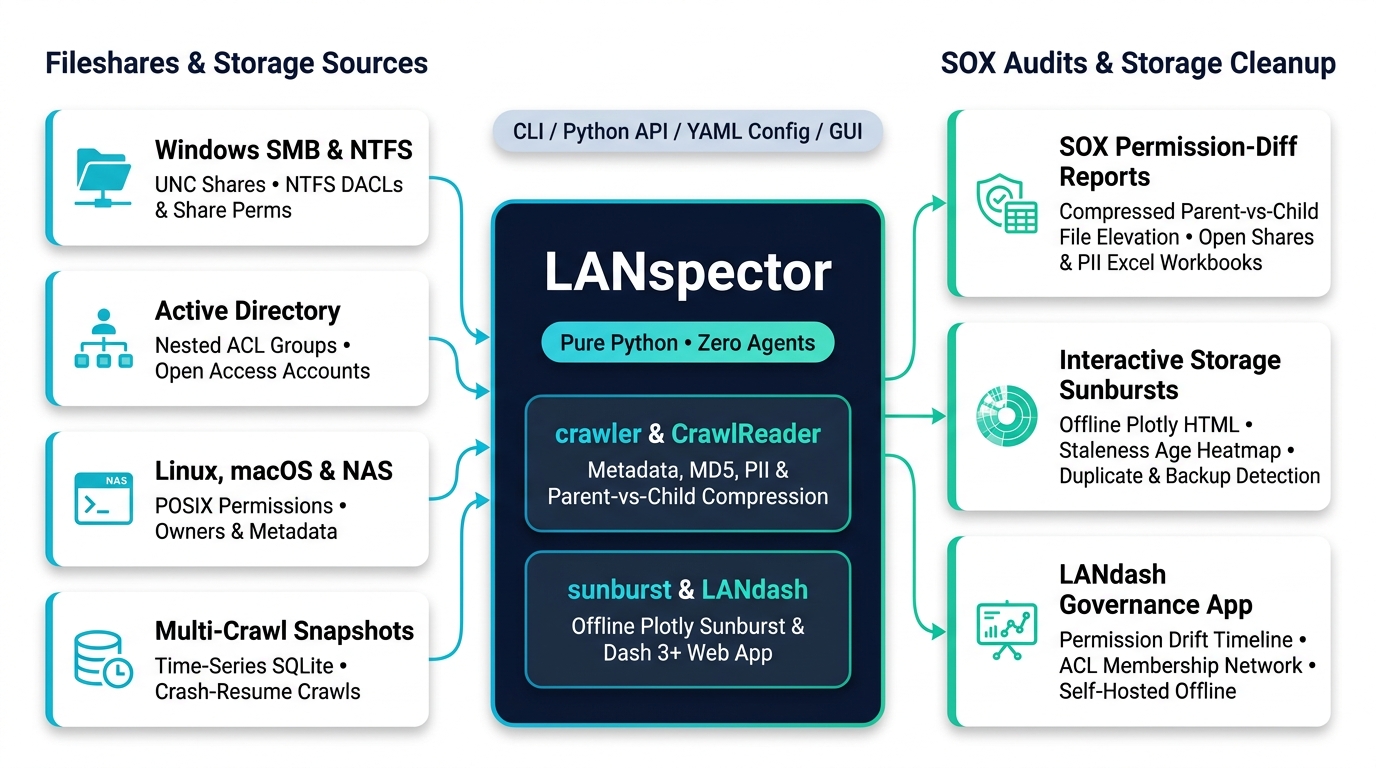
Cross-platform LAN & Windows fileshare auditor (lanspector) — harvest directory/file metadata (atime/ctime/mtime, owner, size, MD5, PII indicators) and NTFS/POSIX ACLs into timestamped SQLite databases, generate losslessly compressed parent-vs-child SOX permission-diff Excel reports, and explore storage hotspots with interactive Plotly sunburst charts and an optional Dash web dashboard (lanspector[dashboard]).
Why LANspector?
Auditing unstructured network fileshares for SOX, SOC 2, ISO 27001, or storage cleanup typically forces teams to choose between raw dumps (such as DumpSec) or seven-figure commercial governance suites (such as Varonis). LANspector provides a fast, open-source Python alternative:
| Capability |
LANspector |
DumpSec |
Commercial Governance Suites |
| Cost & Footprint |
Free, open-source (MIT), zero agents |
Free Windows utility |
Expensive enterprise licensing & agents |
| Folder and File-Level ACL Harvesting |
Yes (catches files with broader access than parent folders) |
Folders only (skips hidden objects) |
Yes |
| Lossless Parent-vs-Child Permission Compression |
Yes (100k+ folders compressed to only permission boundaries) |
Raw dump only |
Proprietary web console |
| Multi-Crawl Drift & Access Comparison |
Yes (SQLite time-series snapshots) |
Manual diffing |
Yes |
| Interactive Storage Sunburst & Stale Data Heatmap |
Yes (standalone offline Plotly HTML + optional Dash app) |
No |
Proprietary UI |
| Cross-Platform (Windows NTFS/AD + Linux/macOS POSIX) |
Yes |
Windows only |
Windows / NAS appliances |
How Parent-vs-Child Compression Works
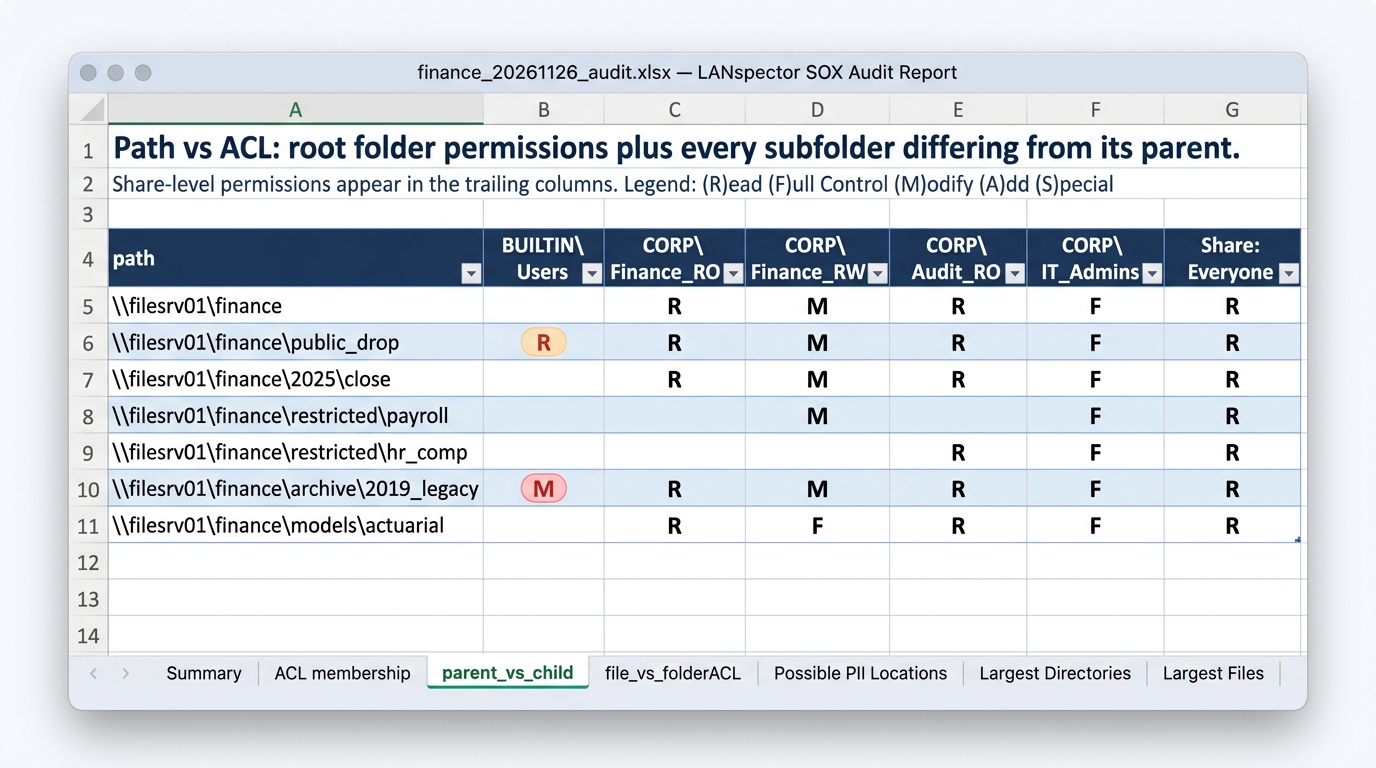
Instead of dumping 200,000 repetitive rows, parent_vs_child_report outputs the root folder with its full ACLs and then only subfolders whose effective permissions differ from their immediate parent:
| path |
ACL1 |
ACL2 |
/share/finance |
R |
|
/share/finance/q1/archive/2025 |
R |
M |
Reading this is lossless: /share/finance/q1 and /share/finance/q1/archive are omitted because their permissions match /share/finance, while 2025 appears because ACL2 gained (M)odify access there. The companion file_vs_folderACL sheet flags individual files granting more permissions than their containing directory.
Sample Reports
Compressed SOX Permission-Diff Excel Workbook (lanspector report)
Every audit workbook includes executive Summary KPIs, ACL membership, compressed parent_vs_child permission boundaries, file_vs_folderACL elevation checks, Possible PII Locations, Largest Directories, and Largest Files:
Offline Interactive Plotly Storage Sunburst (lanspector sunburst)
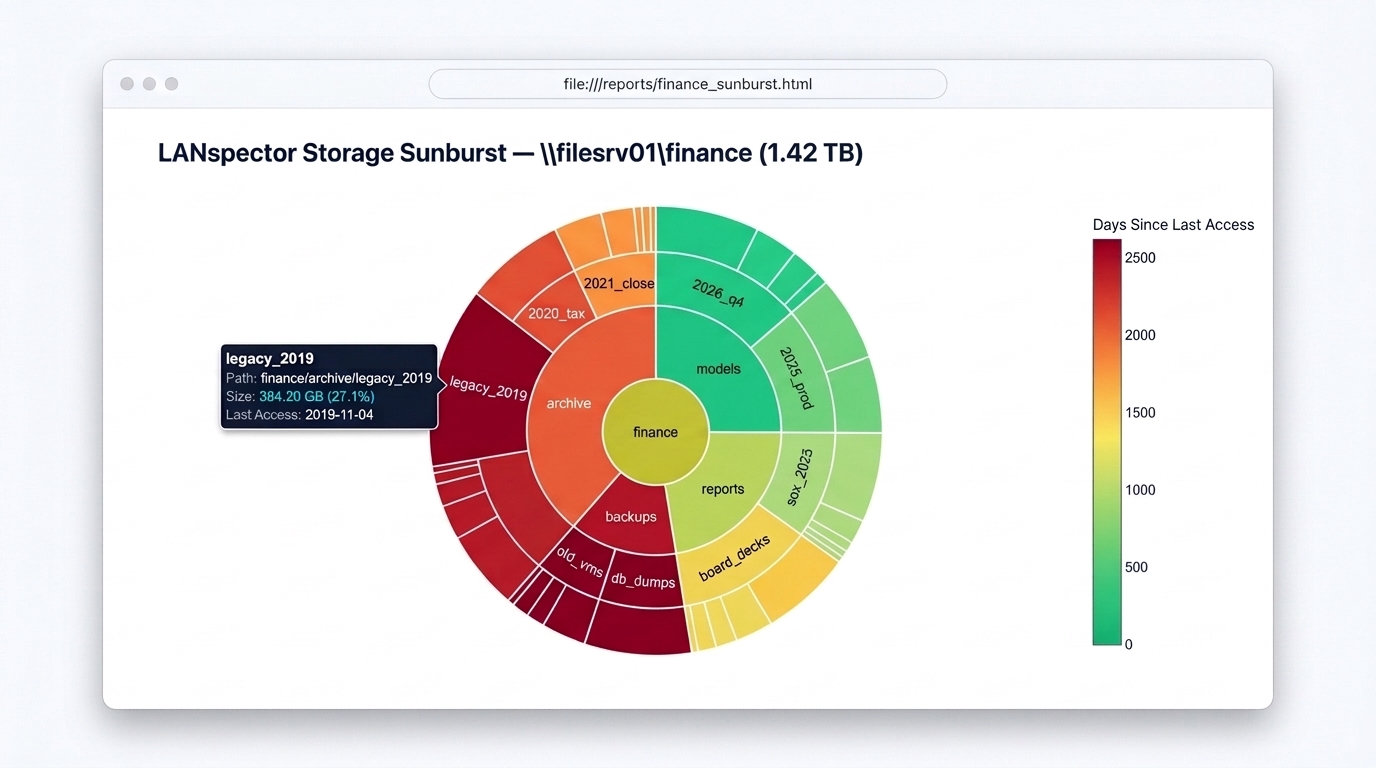
Generate self-contained HTML sunburst charts (--include_plotlyjs inline) colored by last-access staleness with auto-scaled TB/GB/MB/KB hover tooltips—click any ring to drill into large, stale folders ready for cleanup:
Installation
Install from PyPI:
pip install lanspector
# or with uv
uv add lanspector
Optional extras:
pip install "lanspector[dashboard]"  # Modern Dash 3+ LANdash web app (offline-ready)
pip install "lanspector[pii]"        # Optional NLTK proper-noun NER for PII scanning
pip install "lanspector[docs]"       # Sphinx + PyData theme documentation dependencies
pip install "lanspector[all]"        # Dashboard + PII extras
For local development using uv:
uv sync --all-groups
Quick Start
Command-Line Interface (lanspector)
All CLI subcommands are powered by jsonargparse from typed dataclasses in lanspector.settings, supporting both CLI flags and YAML/JSON configuration files (--config):
# 1. Quickest crawl: --path is the only required argument!
#    Defaults to ./<target>.db in the current directory and automatically writes
#    a multi-sheet Excel audit summary alongside it (paths are logged at INFO level).
lanspector crawl --path /srv/shares/finance

# 2. Explicit database, Excel summary, and standalone Plotly sunburst HTML
lanspector crawl --path /srv/shares/finance --fout finance.db --summarize true --sunburst_html finance_sunburst.html

#    Resume an interrupted crawl (picks up incomplete scan_end IS NULL table and skips completed paths)
lanspector crawl --path /srv/shares/finance --fout finance.db --resume true

# 3. Generate a full multi-sheet SOX & storage-cleanup Excel audit workbook from existing DB(s)
lanspector report --databases '[finance.db]' --output finance_audit.xlsx --use_permission_hierarchy true

# 4. Export a standalone offline Plotly storage sunburst chart colored by last-access age
lanspector sunburst --database finance.db --output finance_sunburst.html --color_by age

# 5. Compare two crawl snapshots in the same database for permission & file drift
lanspector compare --database finance.db --output drift_report.xlsx

# 6. Prepare & serve the optional LANdash multi-share web app (requires lanspector[dashboard])
lanspector dashboard-prep --databases '[finance.db]' --dashboard_db landash.sqlite
lanspector dashboard --dashboard_db landash.sqlite --port 8050

# 7. Launch the optional Tkinter desktop GUI
lanspector gui --database finance.db
Configuration Files (--config & --print_config)
Every subcommand accepts a YAML or JSON configuration file via --config (and CLI flags override values from the file). Ready-to-use samples are included in examples/:
examples/crawl_config.yaml — Full single-share crawl configurationexamples/report_config.yaml — Multi-database Excel SOX report configurationexamples/driver_shares.txt — Batch multi-share / server / domain driver file
# Run with a sample YAML config file (and optionally override individual flags)
lanspector crawl --config examples/crawl_config.yaml --path /srv/shares/finance

# Generate a starter YAML template for any subcommand with all defaults
lanspector crawl --print_config > my_crawl.yaml
lanspector report --print_config > my_report.yaml
Python API
from lanspector import (
    CrawlReader,
    crawl,
    export_sunburst_html,
    generate_fileshare_report,
)

# 1. Harvest metadata and NTFS/POSIX ACLs into SQLite
result = crawl(
    r"\\fileserver\finance",  # or any local Linux/macOS/Windows path
    fout="finance.db",
    scantype="fd",
    permissions=True,
    max_md5=10 * 2**20,
    detect_pii_content=True,
)

# 2. Query SOX permission differences and storage hotspots
with CrawlReader("finance.db") as db:
    pvc = db.parent_vs_child_report(use_permission_hierarchy=True)
    print(pvc.dirs_df)

    # Export multi-sheet Excel audit workbook
    generate_fileshare_report(db, "finance_audit.xlsx")

    # Export standalone interactive Plotly sunburst HTML
    export_sunburst_html(db, "finance_sunburst.html", color_by="age")
Excel Audit Workbook Sheets
generate_fileshare_report automatically omits empty sheets and writes formatted Excel tables across:
Summary: Executive rollup (paths, crawl timestamps, LANspector version, object counts, scaled storage, ACLs found, owners found).No Access to Crawl: Folders inaccessible due to permission errors or path limits.ACL membership: Active Directory group membership for discovered ACLs (Windows).parent_vs_child: Compressed folder permission boundary matrix (R, A, M, S, F) plus share-level columns.file_vs_folderACL: Individual files granting broader entitlements than their parent folder.Possible PII Locations: Combined filename-keyword and file-content (.txt, .csv, .xlsx) PII hits.Largest Directories / Largest Files / Largest Users: Storage-cleanup targets by path, file, and owner.Duplicate Files: Exact duplicate files/directories matched by MD5 digest.Access Time Distribution / Oldest Objects: Retention & staleness analysis by atime/mtime/ctime.Backup Files / Backup Paths: Heuristic detection of .bak, _vN, and date-stamped copies.Objects Owned by User: Directories with direct individual user ACL grants instead of security groups.
Development & Verification
make bootstrap      # Create .venv and install dependencies via uv
make static-check   # ruff format/check + ty static type checking
make dynamic-check  # pytest with coverage + Sphinx HTML docs build
make build          # Build Sphinx docs + sdist/wheel packages
make ci             # Run the complete pipeline
License
MIT License — Copyright (c) 2026 Aaron Berndsen. See LICENSE.









