
Scan your whole stack








Are you using lovia?
Find out what’s in your code.
Scan your apps free in minutes (opens in a new tab)Latest version: v0.9.269
lovia was last scanned on 23 Nov 2026 at version 0.9.269. Risk score 0 of 100. No malicious behavior was detected.
| Version | Published | Status |
|---|---|---|
| 0.9.269 LATEST | 23 Nov 2026 | No rules fired |
| 0.9.268 | 23 Nov 2026 | No rules fired |
| 0.9.267 | 23 Nov 2026 | No rules fired |
| 0.9.266 | 22 Nov 2026 | Not shown |
| 0.9.265 | 22 Nov 2026 | Not shown |
Findings for v0.9.269. The score is a capped sum of the weights of the rules that fired — not CVSS, not exploitability, and not a probability. It is not comparable across packages with different scan coverage.
The score describes 0.9.269; other versions have their own rules, not their own score.
The publisher’s own README, as collected from the registry.




English | 简体中文
One agent loop, three ways to use it. lovia is a Python agent framework you
can import as a library, run as a ready-made assistant in your browser, or take
apart to build your own. Each layer is built on the one below, so going from a
script to a product never means switching frameworks. The core depends only on
httpx, pydantic and pyyaml; everything else is opt-in.
| Use lovia as… | What you get | Start with |
|---|---|---|
| A library | An agent loop in ordinary Python: tools, streaming, sessions, approvals, context management | pip install lovia |
| A ready-made harness | A local assistant that works in your project folders, with files, shell, memory, skills and MCP | pip install "lovia[web]", then lovia web |
| The base for your own | That assistant as a toolkit: add tools, brand the page, add views, or keep only the API | lovia[web], then default_app() or create_app() |
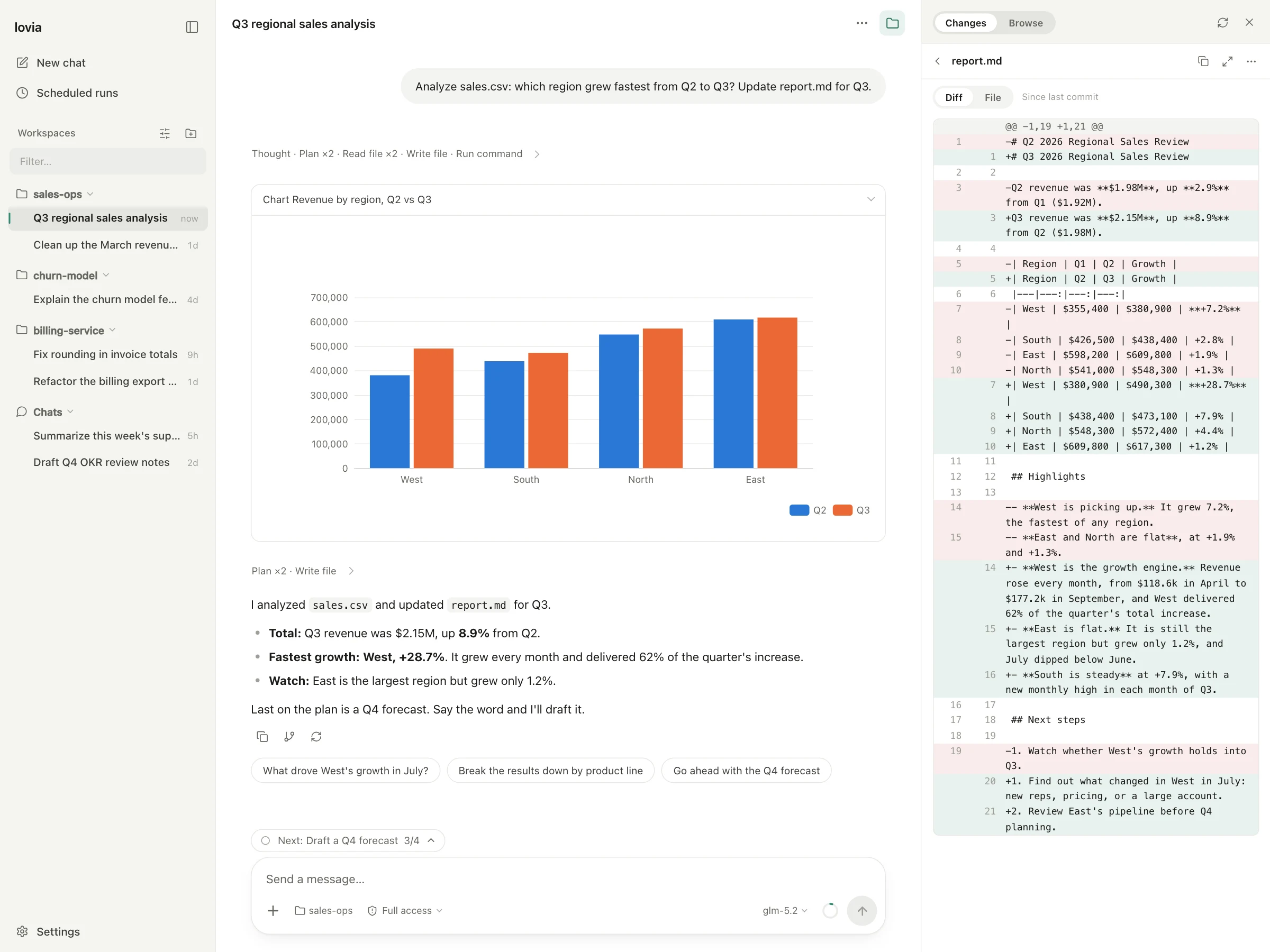
lovia web: chats grouped by workspace, a chart a tool drew, the agent's plan
above the composer, and the diff of the report it just updated.
pip install lovia
export OPENAI_BASE_URL=https://your-endpoint/v1  # any OpenAI-compatible endpoint
export OPENAI_API_KEY=...
from lovia import Agent, tool
@tool
def get_order(order_id: str) -> str:
"""Look up an order's status by id."""
return f"Order {order_id}: shipped 2 days ago, arriving Thursday."
agent = Agent(
name="support",
instructions="Look the order up before answering, in one or two sentences.",
model="glm-5.2", # a model your endpoint serves
tools=[get_order],
)
print(agent.run_sync("Where is my order A-1042?").output)From async code, use await Runner.run(agent, ...), or Runner.stream(...) for
typed events. For Anthropic, set ANTHROPIC_API_KEY and write
model="anthropic:<model>"
(configure a model).
What the loop gives you, each a few lines away:
→ Cheatsheet, every feature in one snippet · Quickstart · Examples, a numbered path of runnable scripts
lovia webpip install "lovia[web]"
lovia webOpen http://127.0.0.1:8000 and add a model on first launch. New chats work in
the directory you started from; lovia web ~/code/app picks another.
AGENTS.md,
.agents/skills and .mcp.json. In the composer, / lists commands and
skills and @ mentions a file.~/.lovia, never in your repository.On 127.0.0.1 no credentials are needed; binding any other address requires a
token. lovia web --help lists the flags.
lovia web is assembled from public pieces. Pick the depth you need:
| You want | Use | What you keep |
|---|---|---|
| The same assistant, plus your tools | default_app(customize=...) |
All of lovia web: Settings, memory, workspaces, schedules |
| Your own agent in a branded, extended chat page | create_app(agent, ui=ChatUI(...)) |
The chat page: streaming, approvals, history, files |
| Your own front end | create_app(agent, ui=False) or build_api_router() |
The JSON + SSE API behind the page (/api/docs) |
The same assistant, plus your tools. default_app() builds exactly what
lovia web serves, and customize hands you each agent it builds:
from lovia import tool
from lovia.web import default_app, serve


@tool
def order_status(order_id: str) -> str:
    """Look up an order."""
    return "shipped"


serve(default_app(customize=lambda agent: agent.clone(tools=[*agent.tools, order_status])))
Your agent, your page. create_app(agent) serves the agent you built,
exactly as you built it. It returns a FastAPI app, so your own routes sit
beside it:
from lovia.web import ChatUI, create_app, serve

app = create_app(
    agent,
    title="Acme",
    auth=my_auth,          # any FastAPI dependency
    run_deps=my_run_deps,  # who is asking, and what the page picked -> ctx.deps
    ui=ChatUI(assets="ui", styles=["theme.css"], logo="logo.svg", scripts=["acme.js"]),
)
serve(app)ui_result(kind, props).
Tables, ECharts charts and sandboxed HTML pages are built in.window.lovia, your scripts add renderers,
tool views, slash commands, and whole views beside the chat. Template blocks,
design tokens and data-i18n keys change the page's markup, look and wording.
lovia web init-ui ui scaffolds the directory.26–27 and 31–35 cover serving,
components, branding and extensions.
lovia-react extends the bundled chat
with React views.Your own front end. create_app(agent, ui=False) serves only the API.
build_api_router() mounts it in your own FastAPI app, behind your own auth.
→ Web server guide · HTTP API · Deployment
Agent, a stateless Runner, @tool, and plugins
as the one extension axis. Every piece fits one screen of mental model.lovia needs Python 3.10 or newer.
| Need | Install |
|---|---|
| Core library | pip install lovia |
| MCP | pip install "lovia[mcp]" |
| Web app (includes MCP) | pip install "lovia[web]" |
| DuckDuckGo search | pip install "lovia[ddg]" (Tavily needs no extra: set TAVILY_API_KEY) |
| Runnable examples | pip install "lovia[examples,web]" |
lovia is in beta, on its way to 1.0. Until then, breaking changes can ship in patch releases; pin a version if that matters to you. Stability lists what 1.0 will promise to keep.
python -m venv .venv && .venv/bin/pip install -e ".[dev]"
.venv/bin/python -m pytest
.venv/bin/python -m ruff check . && .venv/bin/python -m ruff format .
.venv/bin/python -m mypy lovia
Live provider tests are skipped unless enabled:
LOVIA_LIVE_TESTS=1 .venv/bin/python -m pytest -m live_provider. Read
Architecture before changing
the internals.
Find threats in your stack.
OX Radar can check high-priority threats, like critical package CVEs, against your context.
Each incident is marked Detected or Not Detected with a remediation plan and proof all tracked in the Response Center.
The probe returned only these fields for this server — auth requirement, protocol and tool list weren’t observed, so they’re not shown (never guessed).
The publisher’s own links, as the registry reports them. These are not sources for the assessment on this page.