Scan your whole stack








Are you using nave-xai?
Find out what’s in your code.
Scan your apps free in minutes (opens in a new tab) Read the latest findings
Latest version: v0.1.5
nave-xai was last scanned on 27 Nov 2026 at version 0.1.5. Risk score 0 of 100. No malicious behavior was detected.
| Version | Published | Status |
|---|---|---|
| 0.1.5 LATEST | 27 Nov 2026 | No rules fired |
| 0.1.4 | 27 Nov 2026 | No rules fired |
Findings for v0.1.5. The score is a capped sum of the weights of the rules that fired — not CVSS, not exploitability, and not a probability. It is not comparable across packages with different scan coverage.
The score describes 0.1.5; other versions have their own rules, not their own score.
The publisher’s own README, as collected from the registry.
NAVE explanations of vision encoders: which concepts an encoder extracts, and where.
nave-xai is the official package of NAVE (Neuro-Activated Vision Explanations), from
Multi-depth Concept Extraction for Post-Hoc Vision Encoder Explanation (ECML PKDD 2026)
by Ahcène Boubekki, Samuel G. Fadel and Sebastian Mair.
NAVE explains the encoder, not a prediction. It combines the feature activations of a frozen encoder at several depths, extracts concepts from them, and returns an explanation map: how the encoder decomposes the image, before any classifier gets involved. It is post-hoc, unsupervised and architecture-agnostic (CNNs and ViTs), and needs no fine-tuning.
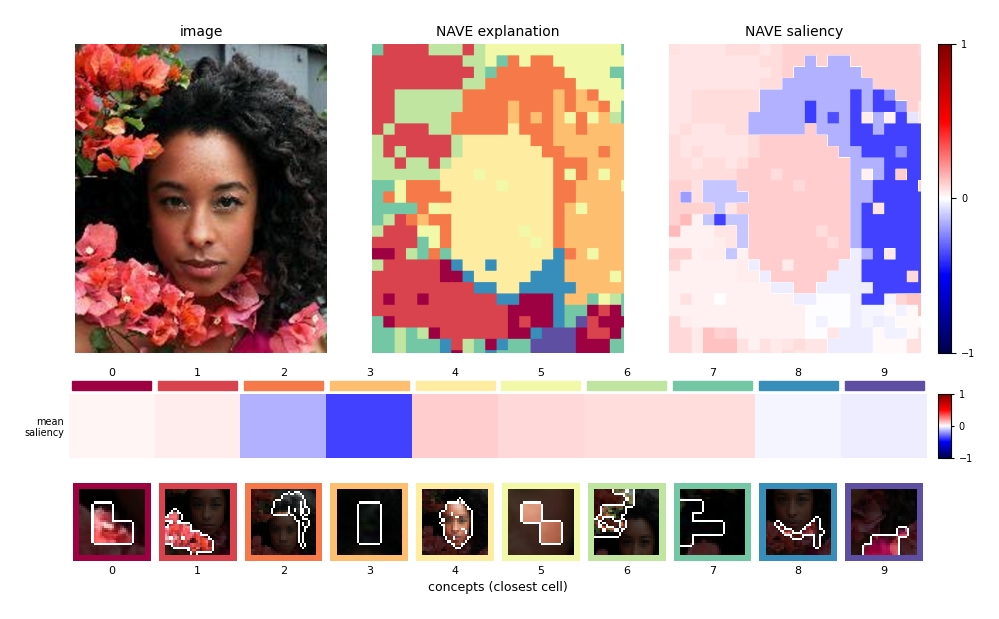
If you use nave-xai in your work, please cite the paper (see Citation).
pip install nave-xai               # ViT-Ti/16 (ImageNet) weights download on first use, about 11 MB
pip install "nave-xai[torch]" # explain your own PyTorch models (GPU too)from nave_xai import NAVEImage
explainer = NAVEImage() # ViT-Ti/16, ImageNet weights
exp = explainer.explain(image) # (H, W, 3) array or PIL image
exp.explanation # (H, W) the concept of every pixel
exp.segmentation() # (H, W) connected regions, like skimage's slic
exp.border(width=1) # (H, W) 0/1 inner margin of every regionDraw it with any tool, e.g. matplotlib: plt.imshow(explainer.palette[exp.explanation]).
One concept can appear in several places: in a bird image, the scattered background shares one
concept; in a chest X-ray, both lungs do.
explainer = NAVEImage(model="resnet50", k=10).fit(images)          # one set of concepts for all images
explanations = explainer.predict(test_images)                  # the same concepts in every image

explainer.prototypes      # (K, D) concept prototypes
explainer.patches         # (K, 2, 32, 32, 3) closest and largest cell of every concept
explainer.classes         # predicted classes (or the groups given to fit)
explainer.correlation     # (K, C) correlation of concept proportions with the classes

explainer.fit(images, groups=labels)            # one projector per group (the paper's protocol)
explainer.reorder(by="classes", recolor=True)   # concepts grouped and coloured by class
explainer.summarize(image, saliency=True) # a figure in the style of the paper's Figure 1The same method explains sequence encoders, with one concept per time step or per token:
from nave_xai import NAVESeries, NAVEText

series_explainer = NAVESeries(my_1d_cnn, layers=["block3", "block4", "block5"], k=20).fit(recordings)
series_explainer.summarize(recordings[0])        # channels over the segmentation, snippets, profiles

text_explainer = NAVEText("spacy").fit(documents)  # pip install "nave-xai[text]"
text_explainer.summarize(documents[0])           # tokens on their concept's colour, concept table
See Time series and Text.
| Model | Trainings | Layers by default |
|---|---|---|
"vitt16" (ViT-Ti/16, default) |
random, imagenet | N:12 (last block) |
"resnet18", "resnet50" |
random, imagenet (+ dino for ResNet50) | N34 |
"vits16" (ViT-S/16) |
random, imagenet, dino | N:12 |
NAVEImage(model="resnet50", layers="N234")          # or layers=[2, 3, 4]
NAVEImage(model="vits16", training="dino", layers="N:9-12")
NAVEImage(projector="bayesian", k=100)              # learns how many concepts are needed
NAVEImage(projector="pca")                          # principal components as concepts
NAVEImage(model="vits16", training="dino", features="keys")   # ViTs: attention keys instead of block outputs
Shallow layers carry fine detail and edges, deep layers abstract semantics; NAVE's composite pixels combine both. Your own PyTorch models, ONNX files and plain functions work too, see Your own models.
gimp/ holds a GIMP 3 plugin, Filters › Generic › NAVE Superpixels…, that adds NAVE's segment
borders, average-coloured segments or concept colours to an image as new layers, with ResNet18, ResNet50 or
ViT-S/16 (random, ImageNet or DINO weights). It runs on its own: no torch, and it sets up a private Python
with numpy and onnxruntime on first use. See gimp/README.md for installation.
If you use nave-xai, please cite the paper:
Ahcène Boubekki, Samuel G. Fadel, Sebastian Mair. Multi-depth Concept Extraction for Post-Hoc Vision Encoder Explanation. Machine Learning and Knowledge Discovery in Databases (ECML PKDD), Research Track, Springer, 2026, pp. 449–467. https://doi.org/10.1007/978-3-032-37664-0_26
@inproceedings{boubekki2026nave,
  author    = {Boubekki, Ahc{\`e}ne and Fadel, Samuel G. and Mair, Sebastian},
  editor    = {Ceci, Michelangelo and Kocev, Dragi and Monreale, Anna and Vens, Celine and Flach, Peter
               and Manco, Giuseppe and Spiliopoulou, Myra and Masciari, Elio},
  title     = {Multi-depth Concept Extraction for Post-Hoc Vision Encoder Explanation},
  booktitle = {Machine Learning and Knowledge Discovery in Databases. Research Track},
  publisher = {Springer Nature Switzerland},
  address   = {Cham},
  pages     = {449--467},
  year      = {2026},
  doi       = {10.1007/978-3-032-37664-0_26},
  isbn      = {978-3-032-37664-0}
}
Some features go beyond the paper:
Results with them are not those reported in the paper.
We thank Ulf Brefeld (Leuphana University Lüneburg) for lending us the computing resources without which this work would not have been possible.
nave-xai is released under the MIT license (see LICENSE). Pretrained weights keep their own
licenses:
Dependencies: numpy (BSD-3-Clause), onnxruntime (MIT), matplotlib (matplotlib license, BSD-style).
Find threats in your stack.
OX Radar can check high-priority threats, like critical package CVEs, against your context.
Each incident is marked Detected or Not Detected with a remediation plan and proof all tracked in the Response Center.
The probe returned only these fields for this server — auth requirement, protocol and tool list weren’t observed, so they’re not shown (never guessed).
The publisher’s own links, as the registry reports them. These are not sources for the assessment on this page.
Read the latest findings