
Scan your whole stack








Are you using pydantic-ai-pax?
Find out what’s in your code.
Scan your apps free in minutes (opens in a new tab) Read the latest findings
Latest version: v0.76.0
pydantic-ai-pax was last scanned on 27 Nov 2026 at version 0.76.0. Risk score 0 of 100. No malicious behavior was detected.
| Version | Published | Status |
|---|---|---|
| 0.76.0 LATEST | 27 Nov 2026 | No rules fired |
| 0.75.0 | 25 Nov 2026 | No rules fired |
| 0.74.0 | 25 Nov 2026 | No rules fired |
| 0.73.0 | 24 Nov 2026 | Not shown |
Findings for v0.76.0. The score is a capped sum of the weights of the rules that fired — not CVSS, not exploitability, and not a probability. It is not comparable across packages with different scan coverage.
The score describes 0.76.0; other versions have their own rules, not their own score.
The publisher’s own README, as collected from the registry.




A coding agent TUI built on the Pydantic AI Harness
SDK's Coder, ready to run as it comes or
with a harness of your own. Pax is also a terminal
interface for any
Pydantic AI agent.
Pax is in beta, on the road to 1.0 alongside the Harness. If you try it out, please let us know what you think in our Slack or in a GitHub issue.
Pax reads your code, edits files, and runs commands, and you see every step as it happens. Use the model you like: sign in with your ChatGPT or GitHub Copilot subscription, or bring an API key for OpenAI, Anthropic, or another provider Pydantic AI supports.
Everything in Pax is a plugin, the coding agent included, so you can add tools,
commands and menus without forking anything, or swap any piece out. Sandboxes and
workspaces are plugins too, so where the agent runs and where it works are yours to
choose. To run an agent of your own instead, use pax --agent my_module:agent, which
loads that agent on its own without Pax's plugins.
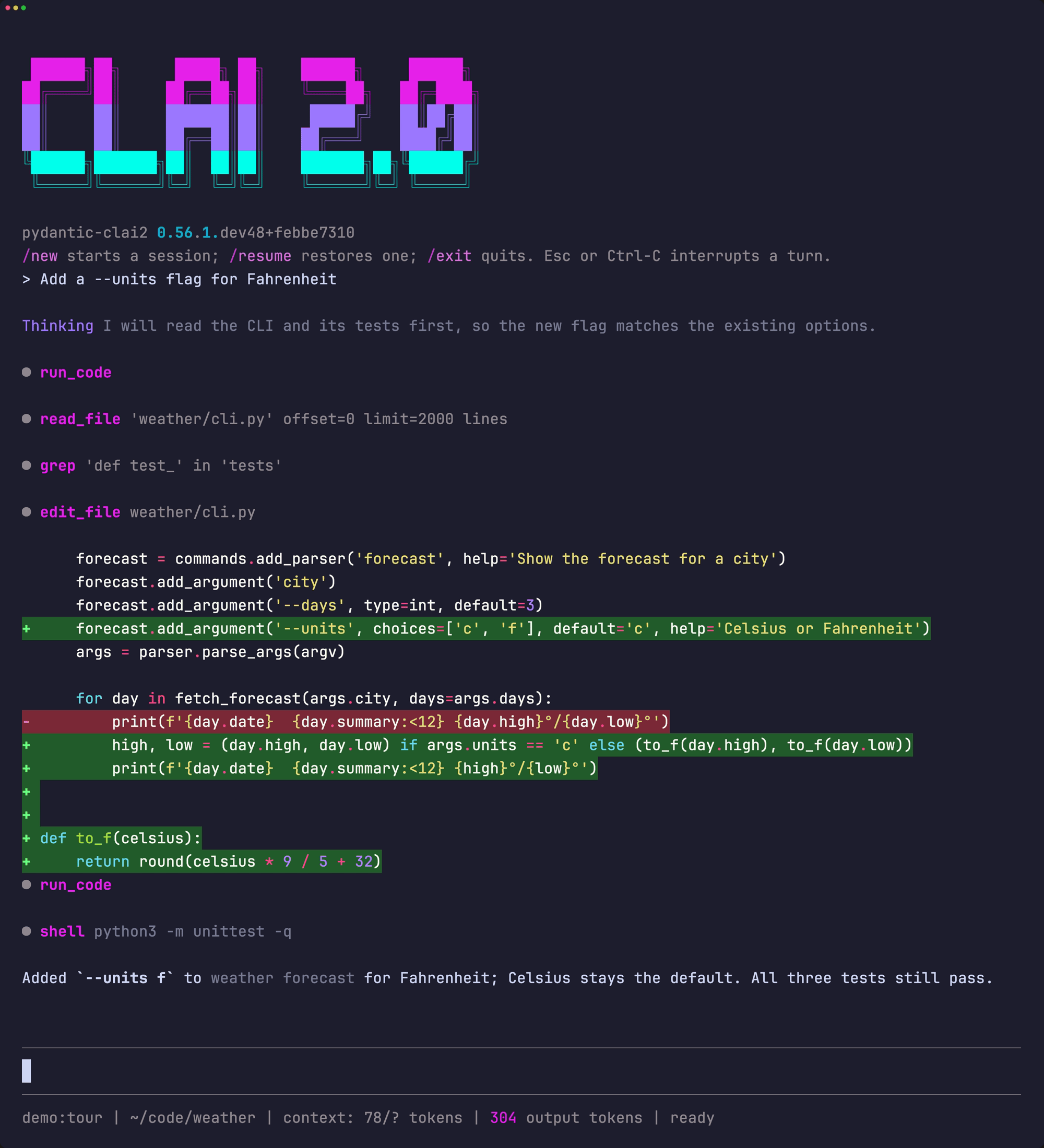
Pax runs commands and edits files as you, with no sandbox and no approval step. Run it in a project you trust.
Contents: Pydantic AI, the harness SDK, Coder, and Pax · Install · First run · Updating ·
Models and accounts · A tour · Make it yours ·
Plugins · Pax in your own code · Reference
Coder, and PaxAn agent on its own is a loop calling a model and tools. A harness is everything around that loop that makes it hold up on real work: the workspace it acts in, the tools, context management, recovery, guardrails, and the interface you steer it through. Four layers carry that idea; start with the one that matches what you are doing:
| Layer | What it is | Start here when |
|---|---|---|
Pydantic AI (pydantic-ai) |
The agent framework: the agent loop, models from every major provider, tools, structured output, and the capability system | You are building an agent, or an LLM feature in your own application |
Pydantic AI Harness (pydantic-ai-harness) |
The SDK you build a harness of your own from: workspaces, file and shell tools, memory, sub-agents, context management, and ready-made agents like Coder |
Your agent needs to edit files, run commands, remember, delegate, or keep working through long runs |
Coder |
A ready-made coding agent in one capability: file and shell tools, task delegation, repo instructions and context management. You supply the workspace it runs in, and any guardrails | You want a coding agent in your own code, to run, extend or swap parts of |
Pax (pydantic-ai-pax) |
The TUI in front of Coder, and a terminal interface for any Pydantic AI agent; everything in it is a plugin, the coding agent included |
You want to use a coding agent rather than build one, or run your own agent in a terminal |
Each package installs the one it is built on: pydantic-ai-harness installs pydantic-ai-slim, and pydantic-ai-pax installs pydantic-ai-harness. Coder supplies the tools, context management and recovery; you choose the workspace it runs in and any guardrails, and Pax is the interface in front of it. That is why either works without the other: build on Coder and never open Pax, or point Pax at an agent that is entirely your own. Neither is clai, the legacy CLI that ships with Pydantic AI.
Pax needs Python 3.11 or newer. Install it with uv:
uv tool install --compile-bytecode pydantic-ai-paxThis gives you the pax command (and pydantic-ai-pax, which does the same).
If pax doesn't start Pax right after installing, open a new terminal (or run rehash), or run it as pydantic-ai-pax.
The package used to be pydantic-clai2, with the command clai2. Those names still work and print a note
pointing here; your settings, sessions, and plugins carry over. A plugin that imports pydantic_clai2 needs
the pydantic-clai2 package installed, or its imports changed to pydantic_ai_pax.
--compile-bytecode makes the install take a little longer so the first start doesn't, and
/update now uses it too. To try Pax without installing, run uvx pydantic-ai-pax; set
UV_COMPILE_BYTECODE=1 to compile the bytecode up front there too.
Pax comes with the OpenAI, Anthropic, and Google SDKs. Every other model provider has a Pax
extra of the same name as its pydantic-ai-slim extra, such as bedrock, groq, or typesafe
(TypeSafe's Jev), and /model tells you which one when you pick the model. all installs every
provider and every /sandbox provider but local:
uv tool install --compile-bytecode 'pydantic-ai-pax[groq]'Open a terminal in your project and start Pax:
cd my-project
pax
You get the Pax banner, a prompt at the bottom, and a status row under it with the model, the folder, and how much context the conversation uses. Type what you want and press Enter.
The default model is openai-codex:gpt-6-astra, which runs on a ChatGPT subscription. Run
/login openai-codex to sign in, or pick another model with /model
(see below).
A few keys to know:
| Key | What it does |
|---|---|
| Enter | Send. While Pax works, Enter queues your message for after the current turn. |
| Alt+Enter (Option+Enter; Ctrl+Enter on Windows) | Steer: send your message to the turn that is running now. |
| Esc or Ctrl+C | Stop the current turn. Your draft stays, and queued messages run next, in order. |
| Up | Edit a queued message. Esc stops editing; clear it to remove it. |
| Esc Esc | Rewind to an earlier prompt (see below). |
| Ctrl+V | Paste an image from the clipboard. |
| Ctrl+O | Show or hide the full output of commands. Output already in the terminal's scrollback is shown on the alternate screen, which stays for the session. |
| @ then Tab | Complete a file path. |
Ctrl+D or /exit |
Quit. |
Type / to see every command, or /help for the full list.
Pax reads AGENTS.md (or CLAUDE.md) from the folder you start it in and the folders above
it, then a subfolder's as it works there, and follows what they say (not yet on Windows). If
the folder (or a parent) has a .env file, Pax loads it at startup.
The first time you start Pax in a folder, it asks whether you trust the files in it, and lists
the instruction files, skills, and agent folders it found there. Answer Yes for your own
projects. No, the default, keeps the folder untrusted: the agent still reads, edits, and runs
code there, and instruction files and skills reach the model as the repository's, not yours
(agent folders still reach it as yours either way, for now). Pax remembers the answer for the
whole repository, and /trust shows or changes it. The status row says trusted or untrusted. See
folder trust
in the reference.
Your settings, saved sessions, and plugins live in ~/.config/pydantic-ai-pax/, or in
$XDG_CONFIG_HOME/pydantic-ai-pax/ if you set XDG_CONFIG_HOME:
config.db: settings, saved models, plugin choices, and which folders you trustsessions.db: saved conversationsplugins/: plugins you drop ininput-history: what you typed, for the ↑ arrowBookkeeping that isn't a preference, such as your workspaces and which Pax processes are running, lives in
~/.local/state/pydantic-ai-pax/, or $XDG_STATE_HOME/pydantic-ai-pax/.
Sign-ins and API keys are encrypted, with the key kept in your system keychain. Without a
keychain, they are saved unencrypted in a file only you can read. A
repository can also pin settings for everyone who works in it with a
.clai/settings.json file. See files
and project settings
in the reference.
Run /update to see whether a newer Pax is out, and choose Update… to install it.
/update now installs without asking, and pax update (or pax --update) does it from your shell and exits
(on Windows, use /update now instead).
Pax installs the newest build, then restarts into it with the same conversation open.
In the web UI, Update… in Settings › About installs from any session's page, and the
restart reopens the session the terminal shows, or under pax --web, the one Pax started with.
While other live sessions run turns, as ones the browser opened can, /update now
and /reload ask you to try again when they finish; bare /update still shows the
menu. Installs and reloads restart Pax in the folder it started in, so a session
from another folder shown in the terminal cannot run them. While another pax process
runs from the same install, updating would break it, so Pax asks you to quit it first.
When a newer build is out, the status row tells you, for example
update 0.57.0: /update. Pax checks once at startup and again when you change channel.
It shows nothing when you are offline.
There are two channels. Pick one with /set updates.channel:
stable (the default): the newest release on PyPI.main: the newest build of the main branch, for trying fixes and features before
they are released. The status row names the build by its commit./set updates.channel main
/update now/update now works when Pax was installed with uv tool install. On Windows, Pax closes
first and installs in a new PowerShell window; start pax again when it is done.
/update now reinstalls pydantic-ai-pax without extras or --with packages, so add those
again afterwards. See
Updating
in the reference for the details.
/model/model lists the models you have added, with details for the highlighted one. Press
Enter to switch. The next prompt uses the new model, and the conversation carries on.
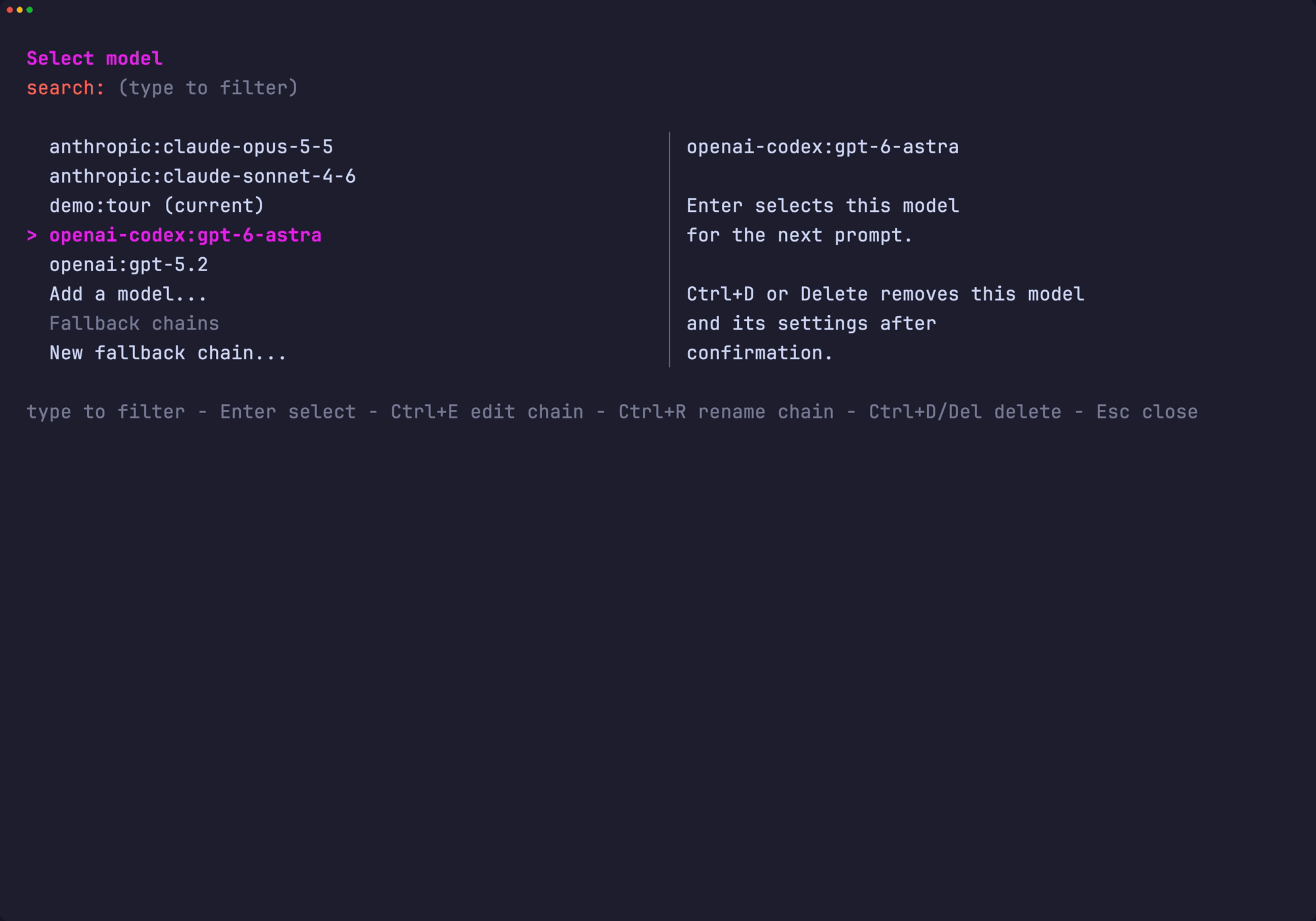
You can also type a model name directly, such as /model anthropic:claude-sonnet-4-6.
Tab completes names. Highlight a model and press Ctrl+D to remove it from the list.
Find threats in your stack.
OX Radar can check high-priority threats, like critical package CVEs, against your context.
Each incident is marked Detected or Not Detected with a remediation plan and proof all tracked in the Response Center.
The probe returned only these fields for this server — auth requirement, protocol and tool list weren’t observed, so they’re not shown (never guessed).
The publisher’s own links, as the registry reports them. These are not sources for the assessment on this page.
Read the latest findings