qikly








Website · Start here · Use it from your agent · What it has caught · Where it fits today · Contributing · Privacy
Find out what your tests miss. Free, no key, about 30 seconds, from your
project's root folder, pointed at any module of yours that has tests:
pip install qikly
qikly --score your_module.py
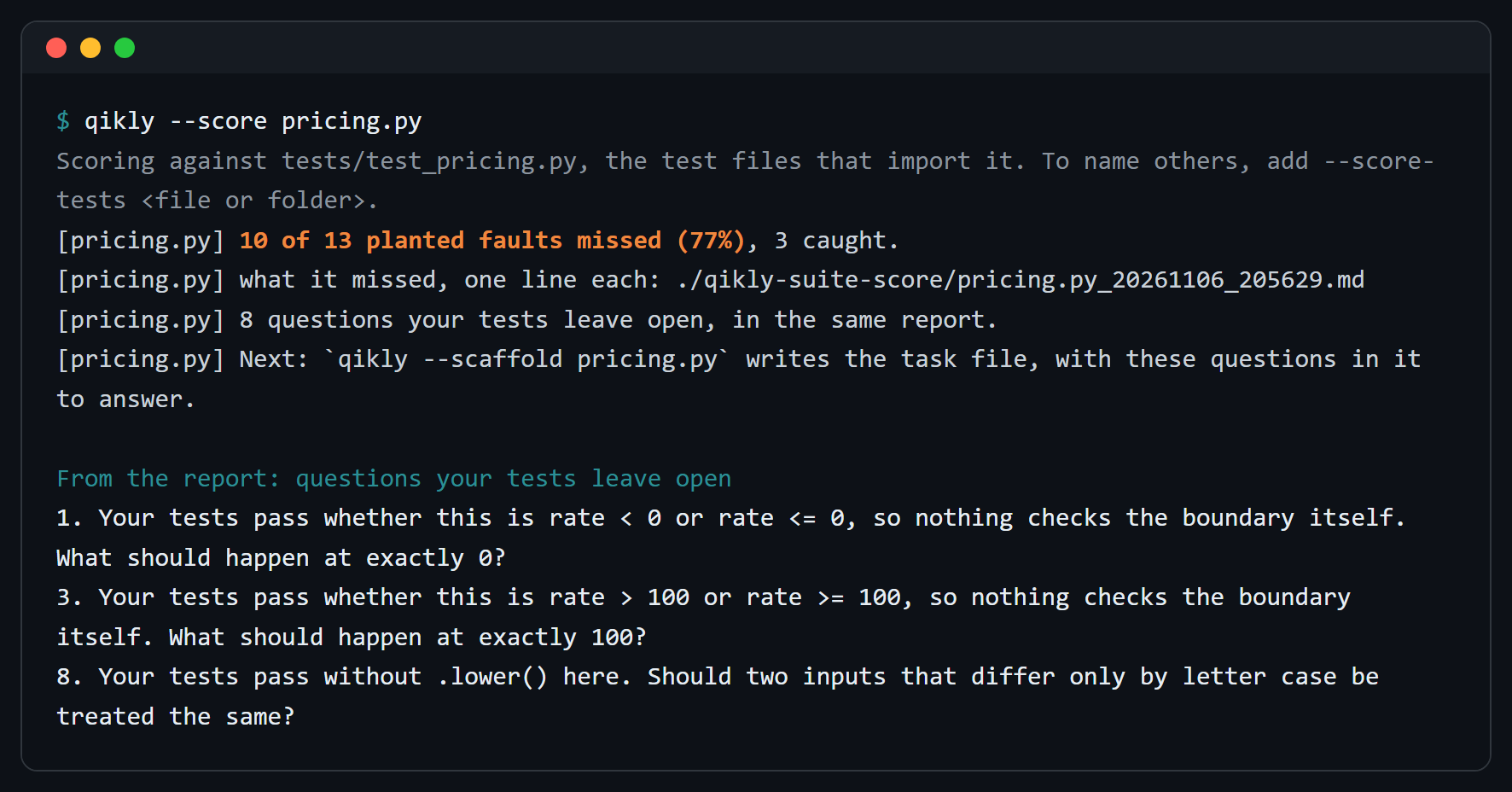
It plants faults in a copy of your code, one at a time, and turns each one your
tests miss into a question about behaviour nothing checks. Nothing of yours is
changed. Above, a real run on the bundled
pricing example,
whose two tests both pass.
Watch it first: a 10-minute video walkthrough
of all three steps on the bundled pricing example, with English subtitles.
Then close the gaps: your AI writes both the code and its tests. How do you know the tests are really valid?
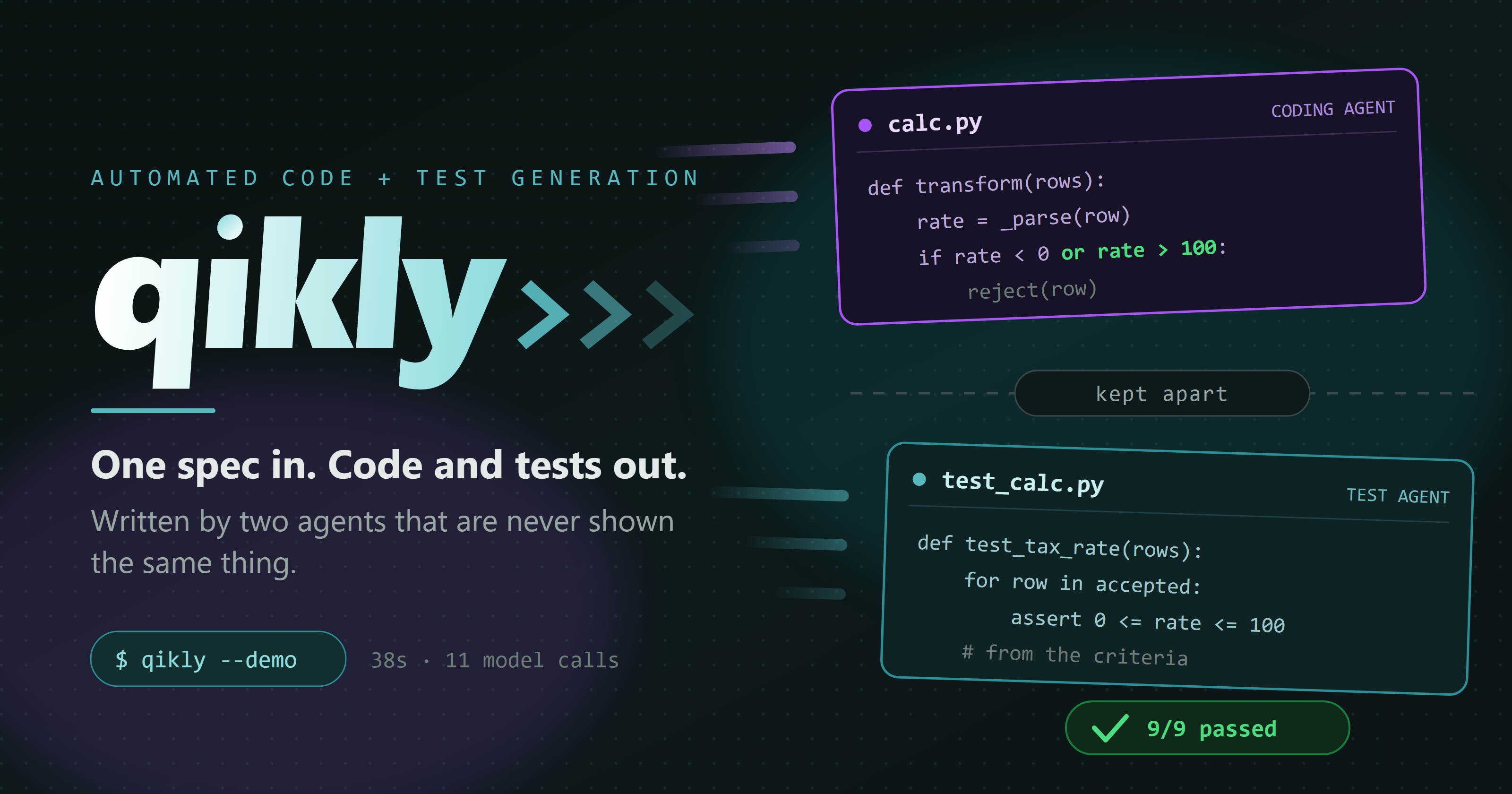
One logged run. The test agent builds the test suite: it was told, from the
spec's acceptance criteria, that a rate may not exceed 100. The coding agent
never saw the acceptance criteria and discovered that rate limit from a failing
test: it then added or rate > 100 by itself, so the 9 of 9 is code eventually
passing the test suite after applying fixes in an automated repair loop.
Run on 50 young Python libraries, it surfaced 4 real problems as well as the
test gaps, each confirmed by hand and reported upstream. 2 are fixed so far:
cyclopts #1044, fixed in
#1047, and
prompt-template #48,
fixed in v1.2.1. Fixes for
markdown-code-runner
and xmltodict are in review.
|
|
| Get started |
Why use qikly? · Start here · What it is for · From your coding agent |
| How it works |
The idea · What makes this different |
| Running it |
Four ways to use it · Free commands · The demo · Your own data · Test data · Running · When a run stalls · Output · Two free checks |
| Set up |
Configuration · Use it in CI · Version check |
| Reference |
Features · Where it fits today · What it has caught · Further reading |
| Community |
The badge · Contributing a task · Where this came from · Privacy · License |
Why use qikly?
A student who writes the exam paper, writes the answer key and then sits the
exam will pass. That is what happens when one model is given the acceptance
criteria and asked to produce both the implementation and the suite that checks
it. Everything goes green, and the green can mean nothing. qikly takes the answer
key away from the student: the coding agent never sees the acceptance criteria.
Start here
Before you start, three things:
-
Install qikly: pip install --upgrade qikly.
-
Set one API key, for steps 2 and 3: Google Gemini (free tier, no card),
Anthropic or OpenAI. In the terminal you will run qikly from:
export GEMINI_API_KEY="..."          # macOS and Linux
$env:GEMINI_API_KEY = "..."          # Windows PowerShell
Getting a key, and the other two providers.
Step 1 needs no key; without one, step 2 leaves every answer for you to
write.
-
Check your tests pass on their own, from your project's root folder:
python -m pytest. qikly runs them the same way, so a missing package or
the wrong Python version stops step 1 too.
Then run these from that root folder. Each takes one module or a whole
folder, and the same path in every step:
qikly --score my_module.py       # 1. what your tests miss         free, no key
qikly --scaffold my_module.py    # 2. the drafted spec, to check   a fraction of a cent
qikly --tasks my_module.py       # 3. the run                      a cent or so
-
--score scores the tests you have. It plants faults in a copy of your
code, one at a time, and names the ones your tests did not notice, each as
a question about behaviour nothing checks. It finds your tests itself: the
test_*.py and *_test.py files that import your code, searched from the
project root. To name them instead, add --score-tests tests/. No model is
called and nothing of yours is changed.
-
--scaffold drafts the spec, inputs_private/config/tasks/MY_MODULE_VERIFY.yaml,
with everything it can read from your code filled in, and a data file of
the values your tests already call it with. With a key set (Google
Gemini, Anthropic or OpenAI), a spec agent then drafts the parts only an
owner could write: a line on what the module is for, and an answer to
each of step 1's questions as an acceptance criterion. It reads your
README, docs and docstrings, never your code, so it says what the code should
do rather than what it does, and a test written from it can disagree
with the code:
#? What should apply_discount(100, 100) do?
#? Answer below drafted by qikly from your README, docs or docstrings: "...so a rate
#? of 100 or more is rejected with ValueError". Keep it, or change it.
- "apply_discount(100, 100) raises ValueError"
Each answer says where it came from: a quote from your documentation,
checked word for word, or CHECK where the agent judged it from the
module's purpose because nothing written decides it. Run the draft as it
is, or change any answer you disagree with, with or without quotes. What
the documentation cannot decide is left as a TODO: answer it with an
option's number where qikly found values by running your code
(1: <value> for one that asks for a value; "doesn't matter" drops the
question; N: <sentence> is your own answer), or a sentence that names a
value. No option says which one the code does now. A TODO you leave is skipped.
Without a key, every answer is yours to write, and the requirements
line is marked TODO: MODIFY THIS:. On a folder it writes one task file
for each module step 1 asked about. Lines starting #? are notes for you,
and no agent reads them. This file is the one source of truth: change
it and run step 3 again. qikly --validate my_module.py checks it, free,
and shows each short answer as the criterion it becomes.
-
--tasks runs it, which needs an API key (Google Gemini, Anthropic or
OpenAI). A test agent writes tests from your criteria before any code is
shown to it, and a separate coding agent, which never sees them, repairs a
copy of your code until they pass. Your files are never edited. It ends by
pointing at qikly --take-tests my_module.py, which copies the new
tests into your own tests folder, under qikly_generated/, rewritten to
import your module rather than qikly's copy, and runs them on your code. A
test that fails there is one to compare with its criterion: either your
code or the test is wrong, and the report says which failures were written
from a criterion and which are the test writer's own reading, to check.
Try it on a worked example first: docs/examples/
has a one-module project and a two-module folder, each with its task files
as they look once answered, to compare yours against.
The task is named after the module, MY_MODULE_VERIFY, where _VERIFY marks
a task that tests code you already have. You never need to type it: every
step takes the path you gave --score, and a task written with --task-id
is found by its path too. qikly --scaffold my_module.py --fresh writes MY_MODULE.yaml instead, a task in which qikly writes a new
implementation of the same interface.
Other ways in
| If you want to |
Run |
Costs |
| Watch a real run end to end, on a bundled task |
qikly --demo |
needs a key, about half a minute and well under a cent |
| Start from a finished example in a project of your own |
qikly --example |
nothing to set it up |
| See the split for yourself, on a bundled task |
qikly --explain CALC_TAX |
nothing, no API key |
| Write a task from nothing |
qikly --init |
nothing to set it up |
Good to know
--score on its own is the one to try in a meeting. Point it at a module or a
package, with the tests you already have. It plants one fault at a time in a
copy of your code, runs those tests against each one, and names the faults
nothing noticed. Both flags are needed: one says what to break, the other says
what should notice.- It tells you what your tests would notice changing. It cannot tell you whether
the code was right to begin with, because it works by breaking code that is
there, so anything the code never did is invisible to it. No model is called,
nothing of yours is modified, and no code leaves your machine.
- It plants every fault it can, up to 60 in one module or 150 in a folder,
and a sample when your tests are slow.
--score-mutants 48 sets the
number, and --score-seed 1 draws a different sample.
--demo works in a throwaway demo/throwaway_<timestamp>/ folder it expects you to
delete. It is for watching, not for building in. --example and --scaffold
create a real project in the directory you are standing in, and those are the
two to build from.--upgrade rather than a bare install, because the Skill ships inside the
package: pip install qikly on a machine that already has an older one
prints "Requirement already satisfied", changes nothing, and
--install-skill then writes that older Skill.- The quick start walks the same steps, then each command on its own.
- qikly.com is the two minute version of this page, and
the one to send to somebody else.
New: an agent Skill. qikly --install-skill teaches Claude Code, Gemini
CLI, Codex, Cursor or GitHub Copilot how to drive qikly.
What the Skill contains.
Who it is for: a developer or team pointing an AI coding agent at a
self-contained Python module that transforms data, for example an ETL step, a
merge, a calculation or a validation routine, who does not want to trust a
green suite when the same agent wrote both the code and the tests. It suits one
module at a time in small to mid-sized repositories: when a test fails, only
the files that failure names are loaded, so runs stay small and quick. It fits
most naturally where verification already has to be independent, such as
automotive, medical devices, fintech and defence: ADAS_HEADWAY, a bundled
example, checks following distance from forward-radar samples. See What it is for.
Installing with uv
pip install qikly is the simplest way, and it is what to use inside a project's
own environment. If you use uv, these work too:
uv tool install qikly          # the qikly command on your PATH
uv tool upgrade qikly          # later, to update it
uvx qikly --score pricing.py   # a one-off run, nothing installed
qikly runs your tests with the Python it is installed in. A uv tool install lives
in its own environment, so if your project needs its own packages, --score
stops with No module named ... even though the tests pass in your project's
environment. Either install qikly into the project (pip install qikly, or
uv pip install qikly), or add what the project needs to the tool:
uv tool install --force --with tabulate qikly
uvx --with tabulate qikly --score fmt.py
uvx keeps the version it first fetched. To get a newer release, run it with
--refresh, for example uvx --refresh qikly --version.
What it is for
Built for self-contained Python modules that transform data, not for a large
existing repository: ETL, merges, calculations, validation. That is the layer where a wrong answer looks like a
right answer, and where a test written from the rule is the only thing that
catches it.
Where it does not fit today: an existing large repository. PATCH prompts
load only the files a FIX names, and while a large file is now excerpted rather
than loaded whole, there is no cross-file index. See
Where it fits today.
Use it from your coding agent
qikly runs as an MCP server, so an agent in
any MCP host can start a run and read the result without you leaving the
conversation. It is tested in VS Code and Claude Code so far. With uv
installed there is nothing else to install. In Claude Code:
claude mcp add qikly -- uvx --from "qikly[mcp]" qikly-mcp
In VS Code, the Install qikly MCP badge at the top of this page writes the
same command for you.









