
Scan your whole stack








Are you using r3context?
Find out what’s in your code.
Scan your apps free in minutes (opens in a new tab) Read the latest findings
Latest version: v0.6.50
r3context was last scanned on 25 Nov 2026 at version 0.6.50. Risk score 0 of 100. No malicious behavior was detected.
| Version | Published | Status |
|---|---|---|
| 0.6.50 LATEST | 25 Nov 2026 | No rules fired |
| 0.6.49 | 25 Nov 2026 | No rules fired |
| 0.6.48 | 25 Nov 2026 | No rules fired |
| 0.6.47 | 23 Nov 2026 | Not shown |
| 0.6.46 | 23 Nov 2026 | Not shown |
Findings for v0.6.50. The score is a capped sum of the weights of the rules that fired — not CVSS, not exploitability, and not a probability. It is not comparable across packages with different scan coverage.
The score describes 0.6.50; other versions have their own rules, not their own score.
The publisher’s own README, as collected from the registry.


Context representation for large-scale reasoning with smaller, cheaper models.
Ask a question whose evidence is spread across many documents. R3Con finds and organizes the relevant information, then reasons over it to produce an answer.
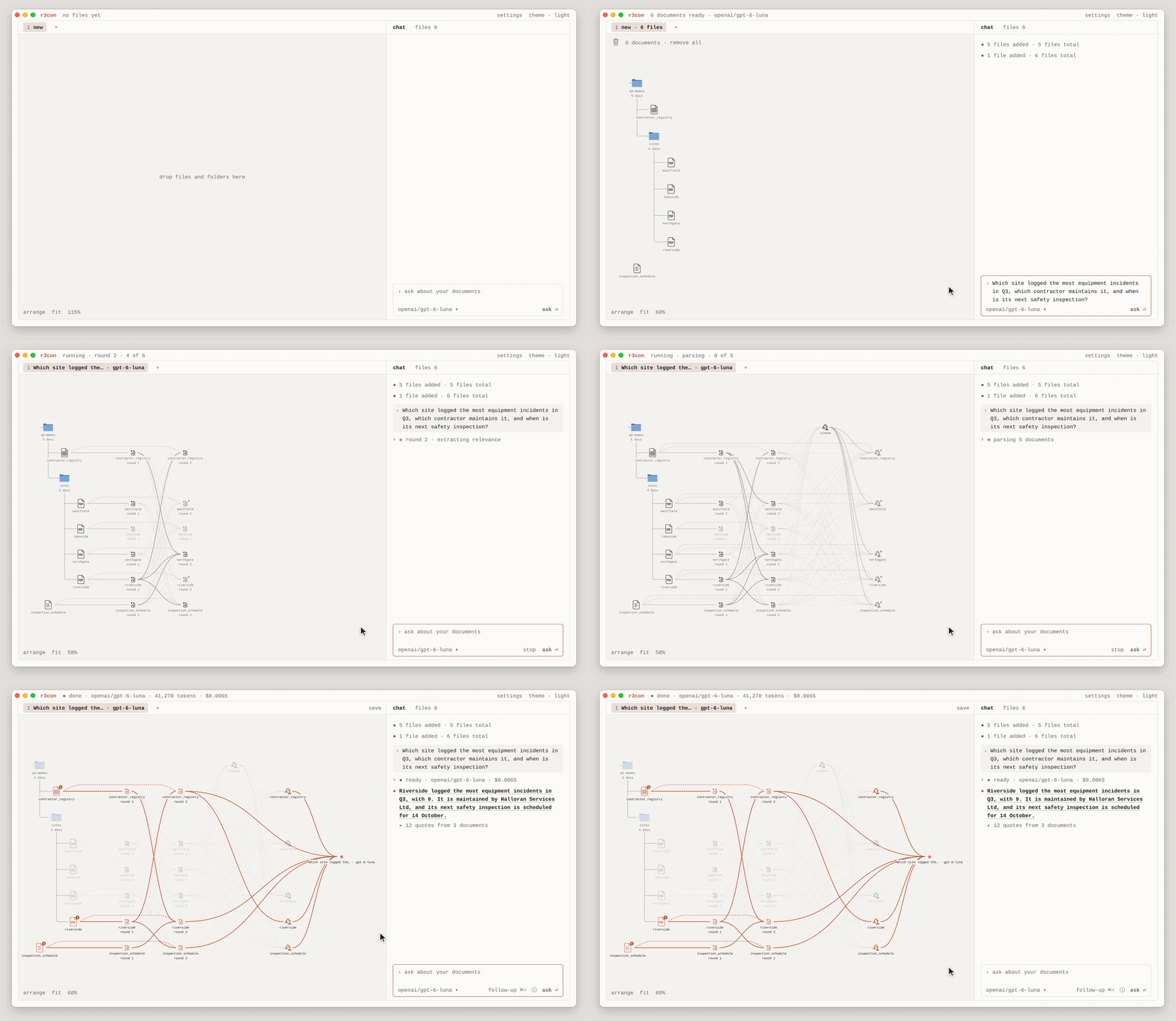
Download R3Con, double-click it, and drag R3Con to Applications.
brew install michaeltheologitis/r3con/r3conEither way, R3Con updates itself: R3Con → Check for Updates…
First install uv:
curl -LsSf https://astral.sh/uv/install.sh | shRun R3Con in your browser:
uv tool install --python 3.15 "r3context[app]"r3con apppip install r3contextOr uv add r3context.
Set the API key(s) for the AI provider(s) you use:
export OPENAI_API_KEY=sk-...
export ANTHROPIC_API_KEY=sk-ant-...
You can also put them in a .env file in your working directory.
Ask a question about documents in a folder:
r3con run "Which supplier missed the most delivery windows?" ./reports \
  --model openai/gpt-6-luna
./reports is the folder containing your documents. --model selects the AI
model to use.
You can use any model supported by LiteLLM, for example:
anthropic/claude-sonnet-5-5
gemini/gemini-3.8-flash
hosted_vllm/Qwen/Qwen3.5-35B-A3B
The default is openai/gpt-6-luna.
You can read an entire folder, select files using glob patterns, or specify
individual files. A glob pattern uses * to match filenames and ** to
include subfolders.
# All supported files in reports and its subfolders
r3con run "Who approved the Q3 overspend?" ./reports

# Only PDF files directly inside reports
r3con run "Who approved the Q3 overspend?" "./reports/*.pdf"

# PDF files inside reports and its subfolders
r3con run "Who approved the Q3 overspend?" "./reports/**/*.pdf"

# Only these three files
r3con run "Who approved the Q3 overspend?" q1.md q2.md q3.md
Keep glob patterns in quotes, as shown above. When reading a folder or using a glob pattern, R3Con skips links to files outside the selected folder. Individual files can be specified directly.
Add --evidence-level document to skip quoting sentences: the answer's
provenance then lists only its documents.
If a run fails or you stop it partway, it prints the command that carries it on:
r3con resume logs/20261105T173546Z_bb4f0c37 ./reportsGive it the same sources the run read, in the same order. It reuses what the run finished and only does the rest.
Load documents from a folder, glob pattern, or list of files:
from r3con import r3con

docs = r3con.read_documents("./reports")
result = r3con.run(
    "Which supplier missed the most delivery windows?",
    docs,
)
print(result)  # "Ardent Logistics missed the most delivery windows: 8 in total."
read_documents supports PDF, Word (.docx), .txt, .md, .csv, .json,
.html, .htm, and .xml files; Word files and web pages are read as Markdown, a
web page under the title, author, dates and address its metadata gives. It skips
hidden files and folders when reading directories or using glob patterns.
It returns each document's text along with its filename. If a file is inside
a subfolder, its name includes that subfolder. For example, a file at reports/q3/ardent.pdf is named q3/ardent.pdf.
Here, q3 is simply the subfolder name, and ardent.pdf is the filename.
If your documents are already stored as text in Python, pass them directly without reading files:
result = r3con.run(
    "Which supplier missed the most delivery windows?",
    [doc_a, doc_b, doc_c],
)
You can provide documents as a list:
documents = [doc_a, doc_b, doc_c]Or give them names:
documents = {
    "report_a": doc_a,
    "report_b": doc_b,
    "report_c": doc_c,
}
To skip quoting, run at the document level:
result = r3con.run(
    "Which supplier missed the most delivery windows?",
    docs,
    evidence_level="document",
)
R3Con then doesn't ask the model for quotes, so the provenance lists only
documents (result.provenance["relevant_trail"]["documents"]), not their
sentences.
To ask another question without repeating the earlier processing, use
r3con.ask:
other = r3con.ask(result, "Which supplier delivered on time most often?")
print(other)
This reuses the information organized during the first run and only repeats the final reasoning step.
If a run fails or is stopped partway, for example by a rate limit or a lost
connection, r3con.resume carries it on from where it was, in the same folder.
Give it the run's folder (the error names it) and the same documents:
result = r3con.resume("logs/20261105T173546Z_bb4f0c37", docs)It checks that the documents are the run's, reuses each result the run had saved, document by document, and computes only what is missing, then the final reasoning step.
result.provenance has three parts: the relevant trail, the claims, and the
evidence trail.
result.provenance["relevant_trail"] is the answer's citations traced back.
cited holds what the answer cites: the IDs of relevance summaries
(summary_ids) and of documents whose parsed records it used (parse_ids).
documents lists the documents behind those summaries, directly or through the
parsed records it cites, each with its document ID and name.
Its quotes list the sentences the answer is based on. Each has the
document's name, text as the AI model quoted it, and
document_text, the document's own words, from its start to its end
character in that document. The two differ when the model changed the
wording. match says how the sentence was found: exact, normalized
(only spacing, case, quotation marks, dashes or markup differ), elided (the
model wrote ... for words it left out) or fuzzy (some words differ), and a
fuzzy one has a score out of 100:
quote = result.provenance["relevant_trail"]["quotes"][0]
print(quote["name"], quote["match"], quote["score"])  # q3/ardent.pdf fuzzy 94.1
print(quote["text"])  # Ardent missed 8 delivery windows, mainly in August.
print(quote["document_text"])  # Ardent missed 8 delivery windows, mostly in August.
With evidence_level="document", quotes is empty.
result.provenance["claims"] splits the answer into its claims (each
sentence, clause, list item or table row), then links each one to the quotes
that directly support it. Each claim has its text, from its start to its
end character in result.answer, the documents behind it by ID, and the
quotes behind it, each by its document, start and end, as in the
relevant trail's quotes:
for claim in result.provenance["claims"]:
    print(claim["text"], claim["documents"])
Finding the claims takes one more call to the AI model, after the answer, and
linking them one call per claim, made in parallel. With
evidence_level="document", the one call does both, and a claim lists only its
documents. To skip these calls, pass claims=False.
result.provenance["evidence_trail"] is the part of the relevant trail the
claims rest on: the documents and quotes they cite, in the same form. When
no claim cites anything, for example with claims=False, it is the whole
relevant trail. Its from says which: "claims" or "trail".
evidence = result.provenance["evidence_trail"]
print(evidence["from"], [document["name"] for document in evidence["documents"]])
examples/provenance.ipynb
shows the rest of the provenance.
The examples use five short memos, with the information spread across them so no single document contains the complete answer:
examples/quickstart.ipynb — a complete example of using R3Con.examples/provenance.ipynb — checking the original sentences, summaries, and records behind an answer.examples/options.ipynb — configuring models, summary rounds, reasoning, generation settings, custom connections, and saved files.examples/vllm.ipynb — using an AI model hosted on your own vLLM server.r3con.run(...) returns the answer and the information created during the run:
result.answer  # Final answer
result.relevant_context  # Relevant text found in the documents
result.structured_context  # Information extracted and organized from the documents
result.provenance  # What the answer is based on (see Provenance above)
result.run_dir  # Folder where this run's files are saved
result.skipped  # What the run skipped, and why
When the AI model's reply for one document stays unusable after its retries
(cut off at its output limit, not fitting the requested format, or empty),
the run skips that document's relevance note or parsed records and carries on
rather than failing. result.skipped lists each skip, r3con run prints a
line about them after the answer, and the run folder's skipped.json has
the details.
Every run saves its results and processing records in a folder under ./logs.
logs/<timestamp>_<hex>/          <- result.run_dir
├── ids.json                     <- each document's ID
├── names.json                   <- each document's filename
├── documents.json               <- each document's SHA-256 (UTF-8, lone surrogates passed through)
├── events.jsonl                 <- when each processing step started and finished
├── skipped.json                 <- notes and parses skipped, and why
├── splits.json                  <- how documents were split, if necessary
├── relevance/
│   ├── result.json              <- relevant text and supporting quotes
│   └── calls.json               <- AI requests made during relevance checking
├── structuring/
│   ├── schema/
│   │   ├── result.json          <- structure created for organizing information
│   │   ├── calls.json           <- AI requests
│   │   └── transcript.yaml      <- record of the process
│   └── parsing/
│       ├── result.json          <- information extracted from documents
│       └── calls.json           <- AI requests
├── reasoning/
│   ├── result.json              <- final answer
│   ├── calls.json               <- AI requests
│   └── transcript.yaml          <- record of the reasoning process
├── claims/
│   ├── result.json              <- the answer's claims and its evidence trail
│   ├── calls.json               <- AI requests
│   └── transcript.yaml          <- record of the request
└── asks/<folder>/ <- saved results for each additional questionFor benchmark results, comparisons with other methods, and evaluation code, see r3con-evaluation.
MIT — see LICENSE.
src/r3con/runtime/python_executor.py includes modified code from
smolagents, licensed under
Apache-2.0 and © HuggingFace Inc.
See THIRD-PARTY-NOTICES.
Find threats in your stack.
OX Radar can check high-priority threats, like critical package CVEs, against your context.
Each incident is marked Detected or Not Detected with a remediation plan and proof all tracked in the Response Center.
The probe returned only these fields for this server — auth requirement, protocol and tool list weren’t observed, so they’re not shown (never guessed).
The publisher’s own links, as the registry reports them. These are not sources for the assessment on this page.
Read the latest findings