
Scan your whole stack


From OX Research Newsroom






Are you using sift-rag?
Find out what’s in your code.
Scan your apps free in minutes (opens in a new tab) Read the latest findings
Latest version: v2.0.0
sift-rag was last scanned on 28 Nov 2026 at version 2.0.0. Risk score 0 of 100. No malicious behavior was detected.
| Version | Published | Status |
|---|---|---|
| 2.0.0 LATEST | 28 Nov 2026 | No rules fired |
| 1.15.2 | 22 Nov 2026 | No rules fired |
| 1.15.1 | 22 Nov 2026 | No rules fired |
| 1.15.0 | 21 Nov 2026 | Not shown |
| 1.14.0 | 21 Nov 2026 | Not shown |
Findings for v2.0.0. The score is a capped sum of the weights of the rules that fired — not CVSS, not exploitability, and not a probability. It is not comparable across packages with different scan coverage.
The score describes 2.0.0; other versions have their own rules, not their own score.
The publisher’s own README, as collected from the registry.





Local search over your documents, for AI agents. sift indexes folders of documents and notes, embeds them on your GPU, and serves keyword, semantic and hybrid search to Claude Code, Cursor and other agents as an MCP (Model Context Protocol) server. Everything runs on your own machines: no cloud services, no API keys.
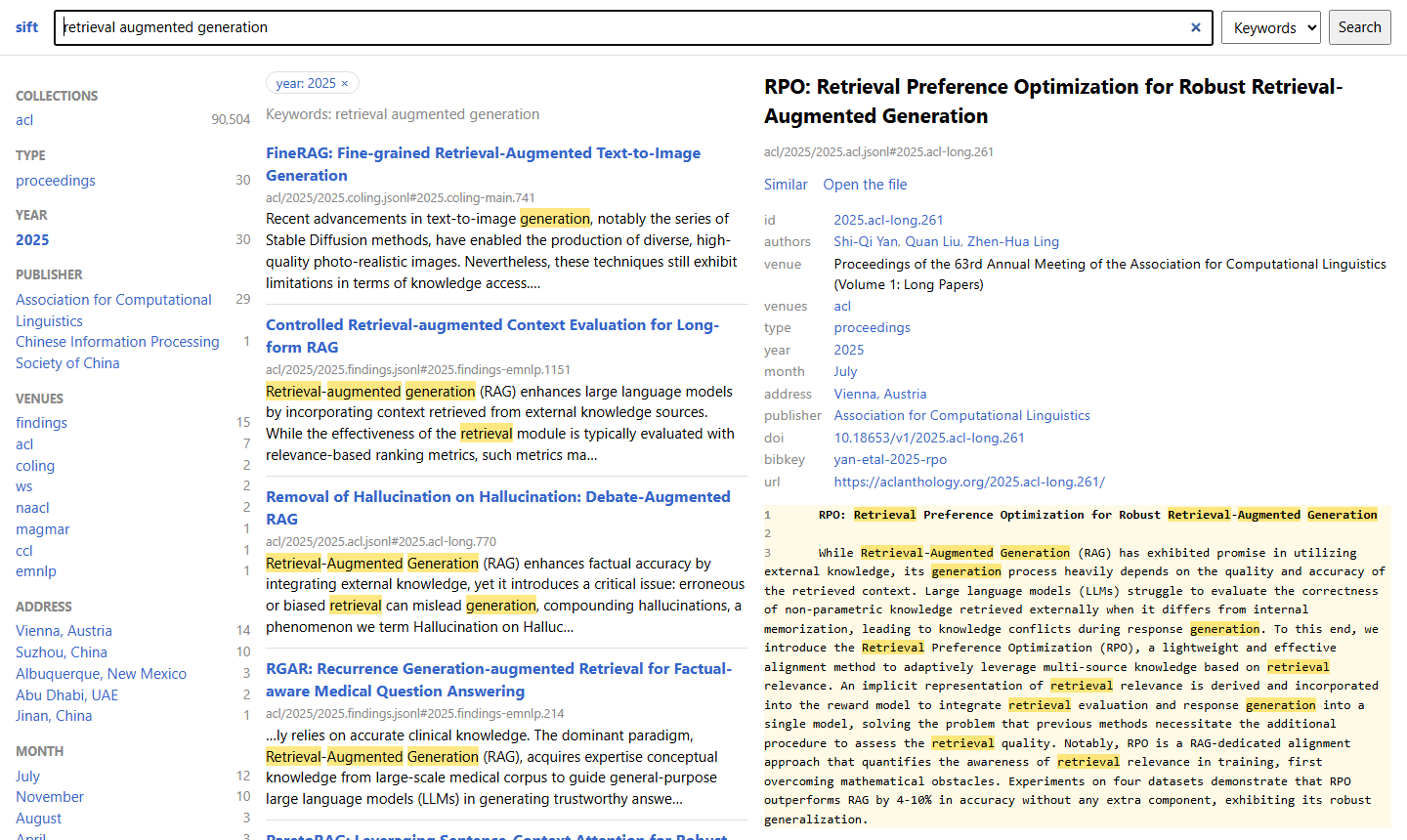
[[wikilinks]], notes not written yet, and unlinked mentions.sift retrieves; it does not generate answers, watch folders (agents call reindex after writing), run OCR on images
other than PDF pages, or serve searches to other machines: its server listens on 127.0.0.1 only.
Requires Python 3.12 or newer with SQLite 3.38 or newer, which the Python builds of uv, python.org and Homebrew include. With uv:
uv tool install --torch-backend auto sift-rag # installs the `sift` commandWith pip, in a virtual environment: pip install sift-rag. sift is prebuilt for Linux on x86-64 and ARM (glibc 2.28
or newer), macOS on Apple silicon and Windows on x86-64; anywhere else the install builds its compiled part from
source, which needs rustup (it installs the pinned Rust 1.100.0) and a C compiler. The first use
downloads two models from Hugging Face (about 2 GB), each pinned to a commit, so that later changes to a model's
repository never change your vectors. The first scanned PDF read on a GPU downloads a third model, for OCR.
sift uses an NVIDIA GPU (CUDA) if there is one, else an Apple GPU, else the CPU, where query takes about 20 seconds
per question instead of about one. PyTorch from PyPI uses the GPU on Linux and macOS. On Windows, --torch-backend auto
installs the CUDA build for your driver; with pip, install PyTorch's CUDA build as
pytorch.org shows for your system. If an NVIDIA GPU sits unused, sift says
so and prints the fix, uv tool install --reinstall --torch-backend auto sift-rag. A machine without a GPU can
use another machine's.
sift add ~/handbook --name handbook    # add a folder as a collection
sift index                             # read its files into the collection's store
sift embed                             # embed every passage that has no vector yet
sift query "who approves travel expenses abroad"
sift serve                             # MCP on http://127.0.0.1:8765/mcp, and the UI under /ui
sift index and sift embed process only what changed since their last run; an interrupted sift embed continues
where it stopped. While sift serve runs, it answers your sift commands too, with the models loaded once; without
it, each command works on its own. Or let your agent do it all: tell it to read and follow
Setting sift up with an agent.
Leave sift serve running and register it with Claude Code once, for all projects:
claude mcp add --scope user --transport http sift http://127.0.0.1:8765/mcpclaude mcp list then shows sift, and new sessions can use it. Without --scope user sift is registered for the
current folder only (undo there with claude mcp remove sift --scope local). Other MCP clients, such as Cursor, VS Code
or Windsurf, connect to the same streamable HTTP endpoint; one server serves any number of agents with the models loaded
once. For an agent that starts sift itself, over stdio: claude mcp add --scope user sift -- sift serve --stdio, which
starts sift serve if none is running (on Windows in a minimized window); a home process started this way exits after
15 idle minutes.
Connectors in claude.ai and the Claude apps' Chat tab can't use sift: they connect from Anthropic's servers, which can't reach your computer.
| Tool | Purpose |
|---|---|
search |
Hybrid search for RAG (keyword and semantic candidates, reranked by a cross-encoder), or keyword search ranked by BM25 ("phrases", prefix*, AND, OR, NOT, parentheses), or semantic search |
get |
Documents by id, whole or some of their lines, with front-matter fields |
related |
Documents alike in meaning to one, a note's links and backlinks, or the documents naming it without a link |
collections |
The collections: folders, counts, front-matter fields, links, and the jobs that run |
reindex |
Read files again right after they were written or deleted; changes only sift's stores, never a file |
Every hit carries id (collection/path), title, first_line and last_line, score and the passage's text;
the answer names what its scores measure (scored_by). An answer holds at most 100,000 characters of text: get
cuts a longer text at a line and says how to get the rest, and a search leaves out the text of its last hits and says
so.
search takes up to 20 queries per call, filters on front matter, paths and links, compact (no text), adaptive
(only the results before the largest drop in score), offset to page on, and more; the tools' schemas describe every
parameter. When an agent connects, the server tells it which mode fits which kind of question, how to research in
rounds (several phrasings at once, a compact survey, then the best few read), and which collections and front-matter
fields exist.
| Command | Does |
|---|---|
sift add FOLDER [--name NAME] |
Add a folder as a collection (--store PATH puts its store elsewhere, --follow-links reads files linked from outside it, --title-from name titles notes by file name) |
sift index [NAME ...] [--file PATH] |
Read new and changed files, of every active collection or those named; --file, repeated: only these |
sift embed [NAME ...], sift embed --reset |
Embed every passage without a vector; --reset: every passage of every collection again |
sift search, vsearch, query TEXT |
Keyword, semantic and hybrid search |
sift similar ID |
Documents near one in meaning |
sift get ID [ID ...] [--lines 14-23] [--fields a,b] |
Documents, or some of their lines |
sift links, unresolved, mentions |
Linked notes |
sift status [NAME ...] [--unreadable] |
Each collection's folder and what its store holds, as a table |
sift activate, deactivate NAME ... |
Take collections into searches again, or leave them out |
sift move [NAME ...] FOLDER |
Move the stores of collections, or of all, to another folder or drive |
sift rm NAME |
Remove a collection and its store; its files stay |
sift serve [--port N] [--stdio] [--idle-exit S] |
The home process: MCP, the UI under /ui, and your commands, on 127.0.0.1 (port 8765) |
sift ui [--no-browser] |
Search, browse and read in your browser |
sift jobs [--stop JOB] |
What sift serve does in the background, such as an agent's reindex |
sift worker [--port N] [--host H] |
Embed and rerank on this machine's GPU for other machines (port 8766) |
sift import [--home FOLDER] [-c NAME] |
Bring in the collections of an older home, their vectors kept (Updating) |
sift bench QUESTIONS.json |
How well each search mode finds the documents you expect |
Every command takes --json for an answer in JSON and --color for when to colour; sift COMMAND --help says the
rest. Search options, keyword syntax, filters, the formats sift reads, .siftignore and where sift keeps its files:
usage.
sift search '"notice period" AND (contract OR agreement)'
sift query "per diem abroad" -f departments=finance -f "created>=2024-06"None needed: sift picks the device, its GPU memory budget and batch sizes itself. Optional environment variables:
Find threats in your stack.
OX Radar can check high-priority threats, like critical package CVEs, against your context.
Each incident is marked Detected or Not Detected with a remediation plan and proof all tracked in the Response Center.
The probe returned only these fields for this server — auth requirement, protocol and tool list weren’t observed, so they’re not shown (never guessed).
The publisher’s own links, as the registry reports them. These are not sources for the assessment on this page.
Read the latest findings