SkillSinc



Write your agent skills, instructions, agents, prompts, MCP servers, reference files, and hooks once. SkillSinc copies them into Claude Code, GitHub Copilot, VS Code, Codex, and the shared ~/.agents folder, converting formats where it must and saying so when a conversion loses something.
It replaces hand-copying, symlinks, and per-tool sync scripts with a plan of the file actions a sync would perform.
SkillSinc is alpha software for developers. Automated tests cover Windows,
macOS, and Linux; native harness verification is partial. Review the
verified behavior and remaining checks, keep
your source library versioned, and inspect a plan before enabling scheduled sync.
How it works
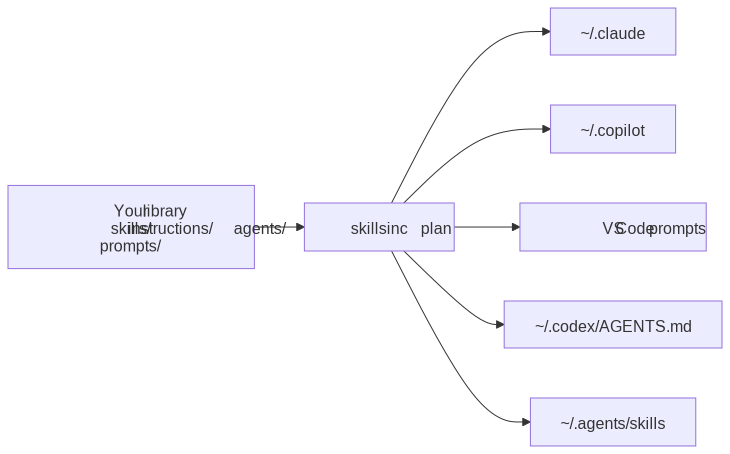
- Your library is the source of truth. A sync makes each destination match it: new items are added, changed items updated, removed items deleted.
- SkillSinc only touches what it wrote. It records every file it owns. An existing file it did not write blocks that destination until you review it and pass
--adopt.
- Nothing is written without a plan.
skillsinc plan previews current file actions; skillsinc sync calculates a fresh plan and checks files again before applying it.
- Lossy conversions are opt-in. If a harness cannot represent a field (for example, Claude ignores Copilot
tools lists), the item is skipped until the route sets allow_lossy = true.
- A broken source never deletes anything. If a library cannot be read completely, its destinations are left untouched.
- Pick only what you want. From 0.6.0, a source's
include selectors take just the named skills (or other resources) from a library or GitHub repository. Select specific resources.
- Per-project syncs. From 0.6.0, a repository's
.config/skillsinc/config.json syncs chosen resources into that repository's .claude/, .github/, AGENTS.md, and .mcp.json, with its own state; run it from a task such as poe sync-skills. Project configurations.
- Removing a destination cleans it up. From 0.6.0, a destination deleted from the configuration has its managed output removed on the next sync, like Terraform destroying a resource removed from its configuration.
- Disable resources without deleting originals. From 0.4.0, a source's
disabled selectors suppress items across every route. Preview cleanup and preserve local edits before syncing.
Install
Requires Python 3.12+ and uv.
uv tool install skillsinc
This installs the latest published release. Run skillsinc --version to check
your installation and uv tool upgrade skillsinc to update it. The documentation
on main can describe unreleased features; consult the matching
release tag for your version.
Quick start
-
Write a configuration. It enables a destination for every harness folder found on this machine and creates an empty library at ~/.config/skillsinc/library ($XDG_CONFIG_HOME/skillsinc/library). Pass --source DIR to use an existing library instead:
skillsinc init
Starting with 0.3.0, detecting Codex or VS Code also enables the shared
agents destination for skill discovery, even when ~/.agents does not
exist yet. For older releases, add that destination and route skills to it
in the configuration. Destination folders
are created only when you explicitly sync.
Optionally use skillsinc init --with-guidance to add a SkillSinc skill and
always-on instruction to the library (requires 0.3.0 or later). They tell
assistants to author shared
guidance at its source and distribute it through SkillSinc. You own and can
edit both files; differing existing files are never overwritten, even with
--force. Nothing is synced, scheduled, or committed to Git by init.
-
Preview the changes:
skillsinc plan
Plans show paths, actions, conflicts, and conversion losses. They do not
display content diffs; review your source changes separately before syncing.
-
Apply them:
skillsinc sync
-
Optionally keep destinations in sync on a schedule (Task Scheduler on Windows, launchd on macOS, a systemd user timer or cron on Linux). Manual skillsinc sync remains supported:
skillsinc schedule install --interval 5m
Installing the package cannot register this for you; run it once per machine. skillsinc schedule status shows the last result and skillsinc schedule remove undoes it. See scheduling. An overlapping run exits without writing.
Library layout
The layout matches GitHub Copilot's file conventions, so an existing Copilot library works unchanged:
my-agent-library/
├── skills/<name>/SKILL.md            # plus any supporting files
├── instructions/<name>.instructions.md
├── agents/<name>.agent.md
├── prompts/<name>.prompt.md
├── mcp/<name>.json                   # one MCP server definition per file
├── resources/<name>.md               # reference files, copied as written
├── hooks/<name>.json                 # one Copilot CLI hook file per file
└── plugins/<plugin>/                 # Claude Code plugin layout, expanded into the kinds above
A library can also live in a Git repository, public or private. Name it instead of a path, and SkillSinc keeps a cached checkout current at the cost of one git ls-remote per run, serving the last good copy if the remote is unreachable (requires 0.5.0 or later):
"sources": { "public": { "github": "mikejhill/agent-skills" } }
See remote sources.
INTENT.md, *.intent.md, and hidden files are never distributed. A plugin's skills/, agents/, commands/, and .mcp.json are synced as skills, agents, prompts, and MCP servers; everything else in it (hooks, scripts, LSP servers) is reported as a loss. See decision 0005.
What each harness receives
| Profile |
Skills |
Instructions |
Agents |
Prompts |
MCP servers |
Resources |
Hooks |
claude |
skills/ |
rules/<name>.md (paths) |
agents/<name>.md |
commands/<name>.md |
~/.claude.json mcpServers |
resources/ + CLAUDE.md @ import |
settings.json hooks |
copilot |
skills/ |
instructions/ |
agents/ |
— |
mcp-config.json mcpServers |
resources/ |
hooks/ |
vscode |
— |
<name>.instructions.md |
<name>.agent.md |
<name>.prompt.md |
User/mcp.json servers |
— |
— |
codex |
— |
managed block in AGENTS.md |
agents/<name>.toml |
— |
config.toml mcp_servers |
— |
— |
agents |
skills/ |
— |
— |
— |
— |
— |
— |
generic |
verbatim |
verbatim |
verbatim |
verbatim |
verbatim |
verbatim |
verbatim |
Run skillsinc harnesses for the same table. See harness profiles for exact conversions.
Commands
| Command |
Purpose |
skillsinc init |
Write a starter configuration |
skillsinc plan |
Show every change a sync would make; write nothing |
skillsinc sync |
Apply the plan |
skillsinc status |
Show each source's state, including remote failures |
skillsinc profiles |
List sync profiles and which apply on this machine |
skillsinc harnesses |
List harness profiles and what each kind becomes |
skillsinc schedule |
install, remove, or show status of a scheduled sync |
plan and sync accept --profile NAME (sync profiles: one config, a different segment per machine), --destination NAME (repeatable), --adopt, --json, --verbose, --log-file PATH, --config PATH, and --user. Inside a project with .config/skillsinc/config.json, they use that file. Exit codes: 0 success, 1 a destination was blocked or failed, 2 configuration or usage error, 130 interrupted.
Editing, recovery, and uninstalling
Edit your source library: sync overwrites edits to managed destination content
that is still routed. SkillSinc does not keep backup versions or provide an
automatic rollback. Preserve source history and copy any destination edits you
want to retain before syncing or adopting existing files.
To uninstall, first run skillsinc schedule remove if you registered a job,
then run uv tool uninstall skillsinc. Uninstalling the package leaves your
library, configuration, ownership records, and distributed files in place;
harnesses can still load those files. See
removing managed content and recovery
to retire a destination or remove distributed content deliberately.
Documentation
License
MIT









