starlake-snowflake
starlake-snowflake is the Starlake Python Distribution for Snowflake.
It is recommended to use it in combinaison with starlake dag generation, but can be used directly as is in your pipelines.
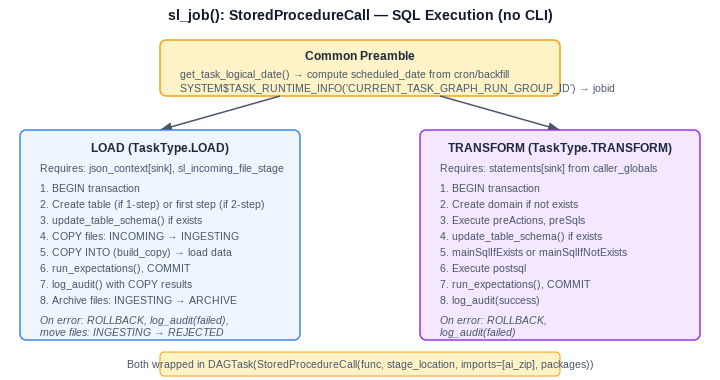
Unlike Airflow or Dagster modules where Starlake CLI is invoked externally, the Snowflake module is fundamentally different: Snowflake Tasks ARE the orchestrator. Load and transform logic runs as Snowflake Stored Procedures executing SQL directly within Snowflake — the Starlake CLI is not invoked at runtime.
Prerequisites
Before installing starlake-snowflake, ensure the following minimum versions are installed on your system:
- starlake: 1.5.7 or higher
- python: 3.8 or higher
- A Snowflake account with Snowpark support
Installation
pip install starlake-orchestration[snowflake] --upgrade
or
pip install starlake-snowflake --upgrade
Environment Variables
The following environment variables must be set to establish a Snowpark session:
| name |
description |
| SNOWFLAKE_ACCOUNT |
Your Snowflake account identifier |
| SNOWFLAKE_USER |
The Snowflake user name |
| SNOWFLAKE_PASSWORD |
The Snowflake user password |
| SNOWFLAKE_DB |
The Snowflake database name |
| SNOWFLAKE_SCHEMA |
The Snowflake schema name |
| SNOWFLAKE_WAREHOUSE |
The Snowflake warehouse name |
StarlakeSnowflakeJob
ai.starlake.snowflake.StarlakeSnowflakeJob is a concrete factory class that extends ai.starlake.job.IStarlakeJob[DAGTask, StarlakeDataset], ai.starlake.job.StarlakeOptions, and SnowflakeEvent. It is responsible for generating Snowflake DAGTask instances that execute load and transform operations as stored procedures.
Key Differences from Airflow/Dagster
- Execution environment:
StarlakeExecutionEnvironment.SQL only — all operations run as Snowflake stored procedures, not shell commands
- Orchestrator:
StarlakeOrchestrator.SNOWFLAKE — Snowflake Tasks handle scheduling and dependency management natively
- No CLI invocation:
sl_job() creates StoredProcedureCall instances wrapping Python functions that execute SQL directly via Snowpark Session
sl_load
It generates the Snowflake DAGTask that will execute the starlake load operation as a stored procedure.
def sl_load(
    self,
    task_id: str,
    domain: str,
    table: str,
    spark_config: StarlakeSparkConfig=None,
    **kwargs) -> DAGTask:
    #...
| name |
type |
description |
| task_id |
str |
the optional task id ({domain}_{table}_load by default) |
| domain |
str |
the required domain of the table to load |
| table |
str |
the required table to load |
| spark_config |
StarlakeSparkConfig |
the optional ai.starlake.job.StarlakeSparkConfig |
The load stored procedure handles the full file lifecycle:
- Moves files from INCOMING to INGESTING stage
- Executes
COPY INTO to load data into the target table
- Supports two-step loading for SCD2, schema evolution, and merge logic
- Runs expectations for data quality
- On success: archives files (INGESTING to ARCHIVE)
- On error: rolls back and rejects files (INGESTING to REJECTED)
sl_transform
It generates the Snowflake DAGTask that will execute the starlake transform operation as a stored procedure.
def sl_transform(
    self,
    task_id: str,
    transform_name: str,
    transform_options: str=None,
    spark_config: StarlakeSparkConfig=None,
    **kwargs) -> DAGTask:
    #...
| name |
type |
description |
| task_id |
str |
the optional task id ({transform_name} by default) |
| transform_name |
str |
the transform to run |
| transform_options |
str |
the optional transform options |
| spark_config |
StarlakeSparkConfig |
the optional ai.starlake.job.StarlakeSparkConfig |
The transform stored procedure executes within a transaction:
- Creates domain if not exists
- Runs pre-actions and pre-SQL statements
- Handles schema evolution via
update_table_schema()
- Executes the core transform SQL (
mainSqlIfExists / mainSqlIfNotExists)
- Applies SCD2 column additions if needed
- Runs post-SQL and expectations
- Logs results to the audit table
- On error: rolls back and logs error audit
sl_job
Ultimately, both sl_load and sl_transform delegate to sl_job, which creates a DAGTask wrapping a StoredProcedureCall. Only LOAD and TRANSFORM task types are supported; other task types raise NotImplementedError.
def sl_job(
    self,
    task_id: str,
    arguments: list,
    spark_config: StarlakeSparkConfig=None,
    **kwargs) -> DAGTask:
    #...
| name |
type |
description |
| task_id |
str |
the required task id |
| arguments |
list |
The required arguments of the starlake command to run |
| spark_config |
StarlakeSparkConfig |
the optional ai.starlake.job.StarlakeSparkConfig |
Init
To initialize this class, you may specify the optional pre load strategy and options to use.
def __init__(
    self,
    filename: str=None,
    module_name: str=None,
    pre_load_strategy: Union[StarlakePreLoadStrategy, str, None]=None,
    options: dict=None,
    **kwargs) -> None:
    """Overrides IStarlakeJob.__init__()
    Args:
        filename (str): The optional filename.
        module_name (str): The optional module name.
        pre_load_strategy (Union[StarlakePreLoadStrategy, str, None]): The pre-load strategy to use.
        options (dict): The options to use.
    """
    super().__init__(filename=filename, module_name=module_name, pre_load_strategy=pre_load_strategy, options=options, **kwargs)
    #...
StarlakePreLoadStrategy
ai.starlake.job.StarlakePreLoadStrategy is an enum that defines the different pre load strategies that can be used to conditionaly load tables within a domain.
The pre-load strategy is implemented by sl_pre_load method that will generate the Snowflake task corresponding to the choosen strategy.
def sl_pre_load(
    self,
    domain: str,
    tables: set=set(),
    pre_load_strategy: Union[StarlakePreLoadStrategy, str, None]=None,
    **kwargs) -> DAGTask:
    #...
| name |
type |
description |
| domain |
str |
the domain to load |
| tables |
set |
the optional tables to pre-load |
| pre_load_strategy |
str |
the optional pre load strategy (self.pre_load_strategy by default) |
NONE
The load of the domain will not be conditionned and no pre-load tasks will be executed.
IMPORTED
This strategy implies that at least one file is present in the landing area. If there is one or more files to load, the method sl_import will be called to import the domain before loading it, otherwise the loading of the domain will be skipped. The chain is: sl_pre_load >> sl_import >> sl_load.
PENDING
This strategy implies that at least one file is present in the pending datasets area of the domain, otherwise the loading of the domain will be skipped.
ACK
This strategy implies that an ack file is present at the specified path (option global_ack_file_path), otherwise the loading of the domain will be skipped.
Options
The following options can be specified when initializing StarlakeSnowflakeJob:
| name |
type |
description |
| sl_env_var |
str |
optional starlake environment variables passed as an encoded json string |
| pre_load_strategy |
str |
one of none (default), imported, pending or ack |
| global_ack_file_path |
str |
path to the ack file ({SL_DATASETS}/pending/{domain}/{{{{ds}}}}.ack by default) |
| ack_wait_timeout |
int |
timeout in seconds to wait for the ack file (1 hour by default) |
| stage_location |
str |
required — the Snowflake stage location for uploading packages and imports |
| warehouse |
str |
optional Snowflake warehouse to use for task execution |
| packages |
str |
optional comma-separated list of additional Python packages (croniter, python-dateutil, and snowflake-snowpark-python are always included) |
| allow_overlapping_execution |
bool |
whether to allow overlapping DAG executions (False by default) |
| sl_incoming_file_stage |
str |
optional Snowflake stage for incoming files (used during load operations) |
Pipeline Triggering and Dataset Validation
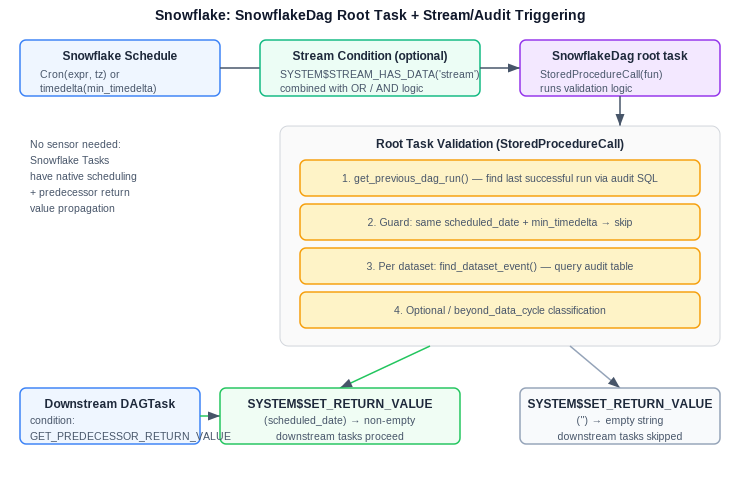
Snowflake Tasks have native scheduling using Cron expressions or timedelta intervals. Unlike Airflow and Dagster, there is no "unscheduled" mode — pipelines are always scheduled.
Stream-based Triggering
Snowflake Streams (SYSTEM$STREAM_HAS_DATA) provide CDC-like change detection. When upstream datasets have associated Snowflake Streams, a condition is built on the root task:
- Most-frequent dataset streams: combined with
OR (any change triggers execution)
- Non-scheduled dataset streams: combined with
AND (all must have data)
- Mixed:
(stream1 OR stream2) AND (stream3 AND stream4)
Root Task Validation
The root task of each SnowflakeDag contains a StoredProcedureCall that performs dataset freshness validation:
- Queries the Starlake audit table for the last successful run
- Guards against duplicate runs for the same scheduled date
- Validates each tracked upstream dataset for freshness
- Propagates the result via
SYSTEM$SET_RETURN_VALUE:
- Non-empty string (scheduled date) if all datasets are present
- Empty string if any required dataset is missing
Downstream Gating
All downstream DAGTask nodes have their condition set to SYSTEM$GET_PREDECESSOR_RETURN_VALUE() <> ''. This ensures the entire pipeline is skipped if the root task determined that upstream data is not ready.
ALL-only Triggering — dataset_triggering_strategy Has No Effect
The dataset_triggering_strategy job option (any/all) is ignored by starlake-snowflake: both values produce a structurally identical Snowflake DAG. The stream condition connectives are hard-wired (OR across most-frequent scheduled streams, AND across not-scheduled streams) and the root task validation skips the run if any depended-upon dataset was not published within the window frame.
This is by orchestrator design: Snowflake has no event-based triggering mechanism, so ANY semantics cannot be implemented — the run must ensure all depended-upon datasets were published within the window frame. Pipelines that rely on ANY triggering on Airflow or Dagster will behave as ALL when deployed to Snowflake. See ARCHITECTURE.md for details.
SnowflakePipeline
SnowflakePipeline extends AbstractPipeline[SnowflakeDag, DAGTask, List[DAGTask], StarlakeDataset] and manages the full lifecycle of a Snowflake DAG.
Pipeline Lifecycle
Deploy
Deploys the pipeline to Snowflake by creating the required stage and deploying the DAG:
pipeline.deploy()
# Internally: creates Snowflake stage + DAGOperation.deploy(dag, mode=or_replace)
Run
Runs the pipeline in one of three modes:
- DRY_RUN: Calls each
StoredProcedureCall.func(session, dry_run=True) locally without deploying to Snowflake
- RUN: Suspends the root task, sets configuration, resumes, executes, and polls
INFORMATION_SCHEMA.TASK_HISTORY() until completion
- BACKFILL: Delegates to RUN mode, or uses
SYSTEM$TASK_BACKFILL() when overlapping execution is allowed and no streams are configured
pipeline.run(execution_mode=StarlakeExecutionMode.RUN)
Delete
Removes the pipeline from Snowflake:
pipeline.delete()
# Internally: DAGOperation.delete(pipeline_id)
Session Management
SnowflakePipeline creates a Snowpark Session from the environment variables described in the Environment Variables section.
SnowflakeOrchestration
ai.starlake.snowflake.SnowflakeOrchestration extends AbstractOrchestration and is responsible for wiring task dependencies within a Snowflake DAG. It maps core abstractions to Snowflake-specific types:
| Core Abstraction |
Snowflake Type |
| Pipeline |
SnowflakeDag |
| Task |
DAGTask |
| Task Group |
List[DAGTask] |
| Event |
StarlakeDataset |
Example
The following example shows how to use StarlakeSnowflakeJob to generate a pipeline that loads a domain and runs transforms.
from ai.starlake.snowflake import StarlakeSnowflakeJob, SnowflakeOrchestration

options = {
    'stage_location': '@my_stage',
    'warehouse': 'MY_WAREHOUSE',
    'sl_env_var': '{"SL_ROOT": "/starlake/samples/starbake"}',
}

sl_job = StarlakeSnowflakeJob(options=options)

# Create load tasks
customers_load = sl_job.sl_load(
    task_id="starbake_customers_load",
    domain="starbake",
    table="Customers"
)

orders_load = sl_job.sl_load(
    task_id="starbake_orders_load",
    domain="starbake",
    table="Orders"
)

# Create transform task
customer_ltv = sl_job.sl_transform(
    task_id="customer_lifetime_value",
    transform_name="Customers.CustomerLifeTimeValue"
)
Note: In practice, it is recommended to use starlake dag generation to generate the pipeline code automatically, including the SQL statements and dependency wiring.
Architecture









