tooldata-lint
English | 한국어
Lint tool-calling fine-tuning data (JSONL) before you train. tooldata-lint checks that every tool call matches the tool's JSON Schema, that calls and responses pair up, and that arguments are encoded consistently, and it reports each problem with a line number and a rule code. Messages are available in English and Korean.
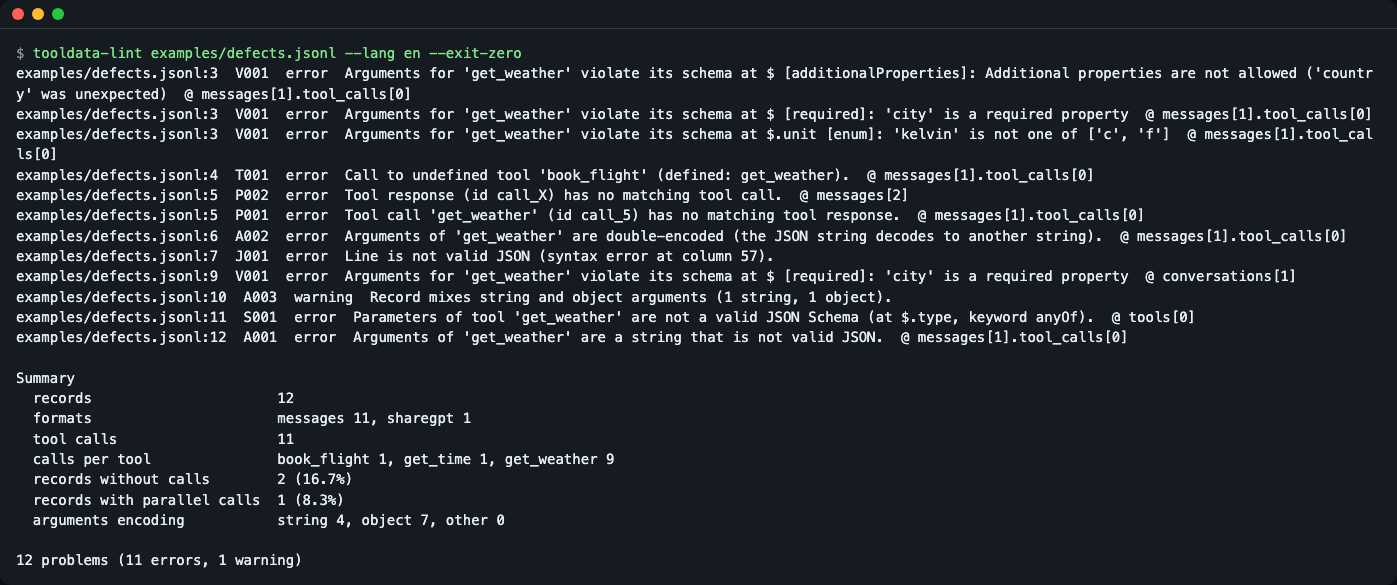
tooldata-lint on examples/defects.jsonl: three schema violations of one call on line 3, an undefined tool on line 4, a broken pair on line 5, and so on.
Who it is for
- You fine-tune a model for tool calling (TRL, Axolotl, Unsloth, LLaMA-Factory, or OpenAI fine-tuning) and want to catch data defects before the run, not after.
- You generate synthetic tool-call conversations and want a last CI step that fails on bad records.
- You convert data between the OpenAI format (
arguments is a JSON string) and the Hugging Face format (arguments is an object) and want to see which records mix the two.
Why
A fine-tuned model only learns what the data shows. If a record calls a tool with "unit": "kelvin" when the schema allows c or f, or the call has no matching tool response, the training run does not fail. The model quietly learns the defect, and you notice it later as "the model invents wrong arguments". This tool moves that discovery to before training.
A tool-call record has three parts that must agree: the tool definitions (name and JSON Schema of the parameters), the calls the assistant makes, and the tool responses that answer them.
flowchart LR
    D[Tool definitions<br/>name + JSON Schema] --> C[Assistant call<br/>name + arguments]
    C --> R[Tool response<br/>matched by id or order]
    C -. checked against .-> D
- A call must name a tool that is defined (
T001) and its arguments must satisfy that tool's schema (V001).
- Each call needs exactly one response and each response needs a call (
P001, P002).
Install
Requires Python 3.10 or newer. uv is the easiest way to run it (curl -LsSf https://astral.sh/uv/install.sh | sh). On a minimal Linux image you also need git and curl.
git clone https://github.com/LeeGyeongPil/tooldata-lint
cd tooldata-lint
uv run tooldata-lint --version
tooldata-lint 0.1.2
The package is also prepared for uv tool install git+https://github.com/LeeGyeongPil/tooldata-lint and, once published on PyPI, uvx tooldata-lint.
Quick start
The repository ships two sample files: examples/clean.jsonl (no defects) and examples/defects.jsonl (one defect per kind).
uv run tooldata-lint examples/defects.jsonl --exit-zero
examples/defects.jsonl:3  V001  error  Arguments for 'get_weather' violate its schema at $ [additionalProperties]: Additional properties are not allowed ('country' was unexpected)  @ messages[1].tool_calls[0]
examples/defects.jsonl:3  V001  error  Arguments for 'get_weather' violate its schema at $ [required]: 'city' is a required property  @ messages[1].tool_calls[0]
examples/defects.jsonl:3  V001  error  Arguments for 'get_weather' violate its schema at $.unit [enum]: 'kelvin' is not one of ['c', 'f']  @ messages[1].tool_calls[0]
examples/defects.jsonl:4  T001  error  Call to undefined tool 'book_flight' (defined: get_weather).  @ messages[1].tool_calls[0]
examples/defects.jsonl:5  P002  error  Tool response (id call_X) has no matching tool call.  @ messages[2]
examples/defects.jsonl:5  P001  error  Tool call 'get_weather' (id call_5) has no matching tool response.  @ messages[1].tool_calls[0]
examples/defects.jsonl:6  A002  error  Arguments of 'get_weather' are double-encoded (the JSON string decodes to another string).  @ messages[1].tool_calls[0]
examples/defects.jsonl:7  J001  error  Line is not valid JSON (syntax error at column 57).
examples/defects.jsonl:9  V001  error  Arguments for 'get_weather' violate its schema at $ [required]: 'city' is a required property  @ conversations[1]
examples/defects.jsonl:10  A003  warning  Record mixes string and object arguments (1 string, 1 object).
examples/defects.jsonl:11  S001  error  Parameters of tool 'get_weather' are not a valid JSON Schema (at $.type, keyword anyOf).  @ tools[0]
examples/defects.jsonl:12  A001  error  Arguments of 'get_weather' are a string that is not valid JSON.  @ messages[1].tool_calls[0]

Summary
  records                      12
  formats                      messages 11, sharegpt 1
  tool calls                   11
  calls per tool               book_flight 1, get_time 1, get_weather 9
  records without calls        2 (16.7%)
  records with parallel calls  1 (8.3%)
  arguments encoding           string 4, object 7, other 0

12 problems (11 errors, 1 warning)
How to read a line: file:line CODE severity message @ location.
line is the 1-based line number in the file, so you can jump straight to it.- Line 3 shows why all schema errors are reported, not only the first: one call violates
enum, required and additionalProperties at once, and fixing only the first would leave the other two. The message gives the JSON path ($.unit) and the failing keyword ([enum]).
- Line 7 is not valid JSON. It is reported as
J001 and the check continues with line 8.
--exit-zero makes the exit code 0 so the demo does not look like a failed command. Without it the command above exits with 1.
A clean file ends with No problems found and exits with 0:
uv run tooldata-lint examples/clean.jsonl
Summary
  records                      6
  formats                      messages 5, sharegpt 1
  tool calls                   6
  calls per tool               get_time 1, get_weather 5
  records without calls        1 (16.7%)
  records with parallel calls  1 (16.7%)
  arguments encoding           string 3, object 3, other 0

No problems found
The summary is a quick look at your data distribution. "records without calls" at 0% means the model never sees an example where it should answer without calling a tool.
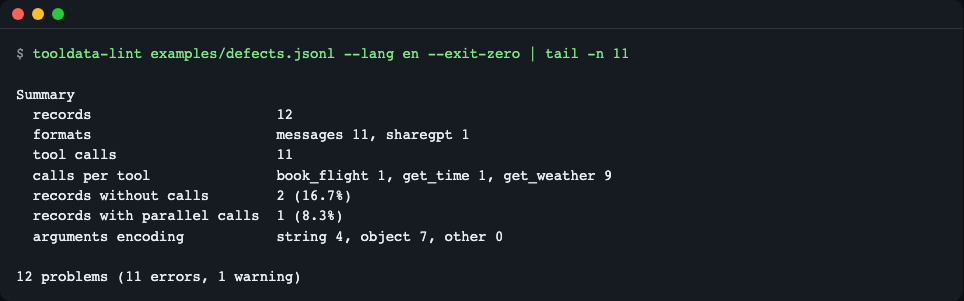 The summary block: formats, calls per tool, records without calls, parallel calls and argument encodings.
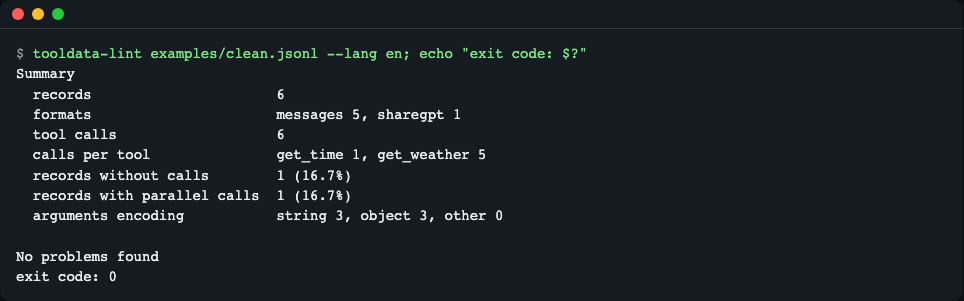 A clean file exits with 0, so it can gate a pipeline.
Usage
tooldata-lint [--format FORMAT] [-o OUT] [--fail-on LEVEL] [--ignore CODES]
              [--exit-zero] [--lang LANG] [--version] [-h]
              FILE [FILE ...]
| Option |
What it does |
Example |
FILE ... |
JSONL files to check. - reads standard input. |
tooldata-lint train.jsonl val.jsonl |
--format text\|json |
Human-readable text (default) or a JSON report. |
--format json |
-o, --output OUT |
Write the report to a file instead of standard output. |
-o report.json |
--fail-on error\|warning |
Lowest severity that makes the exit code 1 (default error). |
--fail-on warning |
--ignore CODES |
Comma-separated rule codes to drop from the output and the exit code. |
--ignore J001,P004 |
--exit-zero |
Always exit with 0, even if problems are found. |
--exit-zero |
--lang en\|ko |
Output language, see Configuration. |
--lang ko |
--version |
Print the version. |
|
Exit codes: 0 no problems at the chosen level, 1 problems found, 2 tool error (wrong usage, an unreadable input file, an output file that cannot be written, or an internal error). The tool never ends with a traceback. See docs/rules.md.
Pipe data in.
cat examples/defects.jsonl | uv run tooldata-lint - --exit-zero | tail -n 3
  arguments encoding           string 4, object 7, other 0

12 problems (11 errors, 1 warning)
Ignore a rule and make warnings fail. Dropping V001 and J001 leaves the other findings, and --fail-on warning makes even the lone warning count:
uv run tooldata-lint examples/defects.jsonl --ignore V001,J001 --fail-on warning | tail -n 1
7 problems (6 errors, 1 warning)
Machine-readable output. --format json prints tool, version, files, counts, issues and summary. Keys, rule codes and severity values do not depend on the language; only message is localized.
uv run tooldata-lint examples/defects.jsonl --format json -o report.json
Report written to report.json.
This command exits with 1 because the file has errors.
Tool errors exit with 2, which CI can tell apart from "problems found" (1).
uv run tooldata-lint nope.jsonl
uv run tooldata-lint examples/clean.jsonl -o /nonexistent/d/r.json
tooldata-lint: error: Cannot open 'nope.jsonl': the file does not exist.
tooldata-lint: error: Cannot write '/nonexistent/d/r.json': the path or its directory does not exist
Rules
| Code |
Severity |
Meaning |
| J001 |
error |
The line is not valid JSON. Linting continues. |
| U001 |
warning |
Record has an unknown format and is skipped, or the file has no records at all (empty or only blank lines). |
| S001 |
error |
A tool's parameters is not a valid JSON Schema. |
| T001 |
error |
The call names a tool that is not defined in the record. |
| T002 |
error |
The record has calls but no tool definitions at all. |
| V001 |
error |
Arguments violate the tool's JSON Schema (one finding per violation). |
| A001 |
error |
arguments is a string that is not valid JSON. |
| A002 |
error |
arguments is double-encoded (decodes to another string). |
| A003 |
warning |
One record mixes string and object arguments. |
| P001 |
error |
A call has no tool response although the conversation continues after it. A call in the last message of a record is the training label (OpenAI fine-tuning layout) and is not reported. |
| P002 |
error |
A tool response has no matching call. |
| P003 |
error |
The same call id appears twice in a record. |
| P004 |
warning |
Some calls have ids and some do not. |
Each rule with its cause and fix: docs/rules.md.
Supported formats
The format is detected per line. Every format is converted to one internal record, so the same rules run on all of them.
| Format |
Detected by |
Notes |
| OpenAI |
messages |
arguments is a JSON string, calls carry ids. |
| Hugging Face / TRL / Axolotl |
messages |
arguments is an object, ids may be missing. tools may be a list or a JSON string. |
| ShareGPT (LLaMA-Factory) |
conversations |
function_call and observation turns. An array in a function_call turn means parallel calls. |
If a record has any id, responses are paired with calls by id. If it has none (common in Hugging Face data), they are paired in order, and that is not reported as an error.
Use it from Python
Install it as a library in your own project with uv add git+https://github.com/LeeGyeongPil/tooldata-lint (or pip install git+https://github.com/LeeGyeongPil/tooldata-lint; pip install tooldata-lint once it is on PyPI).
import json
from tooldata_lint import lint_file, lint_record

report = lint_file("examples/defects.jsonl")
print(report.exit_code(), len(report.issues), report.summary.records)

kept = []
with open("examples/clean.jsonl", encoding="utf-8") as f:
    for number, line in enumerate(f, start=1):
        record = json.loads(line)
        if not lint_record(record, line=number):
            kept.append(record)
print(len(kept))
1 12 12
6
lint_record returns a list of Issue objects (code, severity, message, line, json_path, keyword, ...). Data defects are returned as issues, not raised as exceptions; lint_file raises InputError only when the file cannot be opened.
Configuration
| Setting |
Values |
Default |
--lang |
en, ko |
see below |
TOOLDATA_LINT_LANG |
en, ko |
unset |
The language is chosen in this order: --lang, then TOOLDATA_LINT_LANG, then LC_ALL, LC_MESSAGES and LANG. A value starting with ko selects Korean; anything else selects English. Help, usage, argument errors, findings and the summary are all localized.
TOOLDATA_LINT_LANG=ko uv run tooldata-lint examples/clean.jsonl
요약
  레코드            6
  형식              messages 5, sharegpt 1
  도구 호출         6
  도구별 호출       get_time 1, get_weather 5
  호출 없는 레코드  1 (16.7%)
  병렬 호출 레코드  1 (16.7%)
  arguments 인코딩  문자열 3, 객체 3, 기타 0

문제가 없습니다
No API key, network access or GPU is needed.
How it works









