TL;DR
- Since the past six months, container security has shifted from simply scanning the images to considering the full context: how containers are built, the dependencies they bring in, and the systems they communicate with. Teams now realize that issues hardly ever come from the container itself; they often start with the pipeline, the registry, or the code behind it.
- Image scanners find vulnerabilities, but they don’t show which ones can actually be reached at runtime. OX Security links every issue to the commits, build steps, and workloads involved, helping teams tell the difference between a harmless CVE and one that could impact production.
- Container images still have the usual risks, such as outdated libraries, loose instructions, and missing health checks. But what’s now important is how quickly teams can trace the problem back to its source and fix it. OX gives developers that upstream visibility without slowing them down.
- Build pipelines have quietly become a top target for attackers because they are the entry point for code, secrets, and images in the container lifecycle. OX’s real-time triggers monitor your pipeline and immediately flag leaked secrets, risky image changes, and misconfigurations before they reach production.
- OX’s container triggers give you real-time visibility into new vulnerabilities, misconfigurations, and secrets during builds, helping you catch and fix issues faster.
- This article looks at five enterprise-ready container security platforms: OX Security, Aqua Security, Sysdig, Wiz, and Prisma Cloud, to see how each approaches container protection and where OX stands apart for large-scale environments.
Containers are a common way to package and run applications across teams. They make it easier to ship software that behaves the same across environments, but they also introduce risks that can spread quickly if not handled early. The Cloud Native Computing Foundation (CNCF) reports that 89% of organisations use cloud-native technologies, and 93% are either using, piloting, or analysing container-based platforms in production. With this scale of adoption, the attack area expands to every container image, registry pull, misconfigured deployment, and potentially exposed runtime service. According to a SentinelOne article, 87 % of container images in production contain high or critical security vulnerabilities.
This is why organisations use container security products and services to protect their environments. These solutions aim to protect the full lifecycle of container workloads, including image build, registry validation, deployment posture, runtime behaviour, and supply-chain integrity. Yet many AppSec and platform teams express frustration about alert overload, noting that
“these scans have so many false positives, and CVE scores are incredibly inaccurate. You need to do a proper look at the attack surface and what actually runs.” Reddit
This highlights growing tool fatigue, a flood of low-value findings, and the constant risk of missing truly exploitable issues.
OX Security links vulnerabilities, secrets, and misconfigurations to their code origin, CI/CD pipelines, and runtime context, giving teams actionable clarity rather than isolated findings. Instead of reacting to raw alerts, teams understand impact, ownership, and the path to resolution.
This article will break down the main risk domains in container-native environments, outline what an enterprise-ready container security solution should bring, compare leading tools in the ecosystem, and show how OX Security positions itself uniquely for large-scale teams building at speed.
Key Risk Domains in Containerised Environments
Container security incidents rarely start with a zero-day. They start with a base image that hasn’t been updated in six months, a secret hardcoded into a Dockerfile, or a dependency pulled from a public registry that nobody vetted.
Below are the five risk domains where enterprises consistently get caught out.
1. Image Risks
CVEs enter container images from multiple layers that teams often don’t track separately: the base image OS, libraries added in user code, packages installed via Dockerfile instructions, and Java archive files bundled into the build.
Each source has a different owner and a different fix path. The 2025 Sysdig report found that 87% of production container images carry high or critical vulnerabilities, largely because base images get reused across teams without anyone checking what’s changed since the last build.
2. Configuration and Misconfiguration Risks
The misconfigurations that create the most exposure are well-documented but still common: containers running as root, images built without a health check, more network ports open than the workload needs, file system permissions that allow writes in layers that should be read-only, and environment variables used to pass secrets instead of a secrets manager. Any one of these can be exploited independently, and combined, they make a container trivially escapable for an attacker already inside the cluster.
3. Runtime and Behavioural Risks
Once containers are running, build-time scanning is no longer relevant. A process spawning a shell it shouldn’t, a container making outbound calls to an unexpected IP, a binary written to a previously clean filesystem layer, or lateral movement between pods that have no business communicating, these don’t show up in a pre-deploy scan. The Sysdig 2025 report notes that cloud attacks are now being detected and mitigated within 10 minutes in many environments, which means detection cycles that run on a schedule rather than on events are already too slow.
4. Supply Chain and Registry Risks
Pulling a base image from Docker Hub without verifying its signature means trusting a build process with no visibility into it. That image could include a compromised layer added upstream, a dependency introduced through typosquatting, or a package that was legitimate six months ago and isn’t anymore. The same risk applies to public images mirrored into private registries; internal hosting doesn’t change what’s inside the image or where it originally came from. Without a record of build provenance, who built it, from what source, through which pipeline, there’s no way to govern third-party image risk at scale.
5. Prioritisation and Noise
A large container environment generates thousands of CVE findings per scan cycle. The vulnerable component isn’t loaded at runtime, the affected code path is never reached, or the fix was already applied in a newer image that hasn’t been promoted yet, but none of that context shows up in a raw scanner output. Without exploitability, reachability, and workload priority layered on top, teams end up triaging noise and the genuinely dangerous findings get buried.
These five domains don’t exist in isolation. A vulnerable base image slips through because the team is buried in low-priority alerts. A misconfiguration goes undetected because runtime visibility lives in a separate tool with no connection to the build. The platforms that address this well are the ones that connect these layers rather than treating each domain as a separate scanning problem.
What an Enterprise-Grade Container Security Solution Should Cover
1. Unified Coverage Across Build-to-Runtime
A complete container security solution must secure every stage of the lifecycle, from code and image build to runtime. Scanning once isn’t enough when every deployment introduces new dependencies or registry pulls. OX Security bridges these stages through a unified code-to-runtime view, connecting images, code, and runtime in a single flow. With this unified approach, enterprises:
- Cut fragmented tool use and centralize visibility.
- Track every component, dependency, and configuration change across the pipeline in real time through the PBOM (Pipeline Bill of Materials).
- Correlate build-time findings with runtime library loading, so teams know which vulnerabilities are active in production.
- Reduce critical findings by up to 95%, as demonstrated by Swisscom, which achieved zero critical vulnerabilities for the first time using OX.
2. Deep CI/CD Integration
Security checks should run across the pipeline code, then build, and then deploy to stop issues early instead of reacting post-release.
OX’s workflow triggers automatically activate when a vulnerability, secret, or misconfiguration is detected in a container image, covering CVEs from base images, OS layers, user code, and Dockerfile instructions. Example outcomes:
- CI/CD pipelines catch and block unsafe container images before deployment.
- Event-driven triggers replace scheduled scans, giving teams earlier detection and faster remediation cycles.
- VibeSec takes this further, embedding security guidance directly into AI coding agents like Cursor before code is ever generated, preventing vulnerabilities before they enter the pipeline.
3. Intelligent Prioritisation
Finding every CVE is easy. Knowing which ones matter is not. OX Security’s contextual prioritisation engine evaluates:
Exploitability: Is the vulnerability reachable?
Business context: Does it affect critical workloads?
Runtime exposure: Is the vulnerable component active?
This lets AppSec teams focus on what’s exploitable, not just what’s listed.
4. Automated Response and Developer Workflows
Security shouldn’t hinder or interfere with developer speed. OX Security provides no-code workflows that:
- Create Jira or GitHub issues automatically.
- Notify responsible teams via Slack or email.
- Keep teams fixing issues in-flow, avoiding handoffs between tools.
AI Remediation, which generates tailored fix suggestions tied to the exact issue occurrence, is currently available in Early Access.
5. Regular Monitoring and Runtime Posture
Once deployed, containers continue to evolve, configurations drift, images update, and workloads change. OX Runtime Sensor deploys across Kubernetes clusters, Linux hosts, AWS EC2, and AWS ECS environments, using eBPF to detect which third-party libraries are actually loaded in memory at runtime, without code changes, sidecars, or application restarts. A CVE in a dependency that’s never loaded gets triaged differently from one active in a running service, giving teams the reachability context that build-time scanning alone can’t provide. OX Agentic Pentester (Early Access) closes the loop further, performing real-world penetration testing against live web applications and tracing every finding to the exact repository, file, and commit.
Leading Container Security Vendors and Tools
Snapshot of the Current Landscape
Enterprises have more container security tools available than ever, yet few provide complete coverage across the build-to-runtime lifecycle. Below is a look at five major container security vendors and how they compare to OX Security, which adds contextual prioritisation and developer-ready automation.
| Vendor | Coverage Scope | CI/CD Integration | Prioritization Model | Enterprise Readiness |
| OX Security | OX Platform, VibeSec, OX Code, OX Cloud, Agentic Pentester; container CVEs, secrets, PII, misconfigurations; PBOM-backed supply chain | GitHub Actions, GitLab CI, Jenkins; event-driven container triggers | Exploitability + runtime library loading + workload priority | Findings traced to originating commit and pipeline stage; Agentic Pentester validates container attack paths |
| Aqua Security | Strong for image, runtime, and Kubernetes hardening. | Moderate integration via Jenkins, GitHub Actions | CVSS-based, limited runtime context | Works well for compliance-driven enterprises, less aligned with developer-led pipelines. |
| Sysdig Secure | Deep runtime visibility with Falco-powered detection. | High; integrates with CI/CD and Kubernetes | Runtime-focused rather than code/path-aware. | For teams prioritising runtime threat detection over shift-left coverage. |
| Wiz | Broad cloud + container visibility via agentless scans. | Smooth SaaS integrations for multi-cloud setups. | Broad risk correlation but limited container depth | Strong for cloud posture leadership, lighter for hands-on container remediation. |
| Prisma Cloud (Palo Alto) | Full CNAPP (Cloud-Native Application Protection Platform) stack across cloud, IaC, and containers. | Enterprise-grade with tight network security integration | Rule-based prioritisation, less contextual | Ideal for governance-heavy orgs; slower developer adoption due to platform complexity. |
| Anchore Enterprise | Image scanning, SBOM generation, supply chain policy | Basic CI plugins for image gatekeeping. | CVE-based, no runtime intelligence | Trusted in regulated and air-gapped environments where SBOM accuracy is a priority. |
Observations
Most container security tools focus on scanning and listing vulnerabilities, but rarely help teams understand which ones truly matter.
While Sysdig and Aqua provide strong runtime defence, they still lack clear links back to the code or CI/CD source. Many tools also miss developer-friendly remediation, sending alerts without showing how to fix them. This leads to duplicate findings, inconsistent data, and tool sprawl.
OX Security solves this by connecting image, runtime, and pipeline visibility in one place, using its VibeSec approach to keep security aligned with development speed.
How OX Security Outperforms Other Container Security Solutions
Traditional container security tools often work in isolation, forcing teams to juggle multiple dashboards and alerts. OX Security takes a different approach with its VibeSec model, which fits naturally into how software is built and shipped.
- Unified visibility: OX brings container, code, and cloud signals together in one view. This single-pane visibility helps teams trace vulnerabilities back to their origin and understand their impact across the stack.
- Prioritisation engine: Instead of listing every issue, OX highlights only what’s exploitable or reachable in runtime. This reduces the noise and focuses attention on the 5% of threats that can actually have an impact.
- Developer adoption: OX integrates directly into existing workflows with no-code automation and AI Remediation. Developers can fix issues where they work, keeping builds smooth and uninterrupted.
- Scalability: Built for enterprise scale, OX connects to move than 100 integrations across cloud, CI/CD, and security toolset. This makes OX flexible, whether needed for complex infrastructure or hybrid environments.
- Proven results: Many enterprises using OX report measurable improvements in risk reduction, including one customer stating they reached “zero critical vulnerabilities for the first time.”
Container Security Solutions for Enterprise Pain Points
Enterprises often face overlapping risks and tool fatigue when protecting containers. This table breaks down the most common pain points and how OX Security’s unified approach simplifies each challenge.
| Enterprise Pain Point | What Typical Tools Do | How OX Solves It |
| Tool sprawl | Multiple scanners and dashboards | Unified visibility and workflow automation |
| Alert fatigue | Thousands of low-value alerts | Prioritised 5% of critical issues |
| Lack of runtime view | Stops at build-time scans | Regular runtime monitoring |
| Compliance and reporting | Manual exports | Built-in dashboards and risk summaries |
| Developer friction | Separate tools and plugins | Native CI/CD integration and AI Remediation |
Top 5 Enterprise-Ready Container Security Tools
1. OX Security
Overview
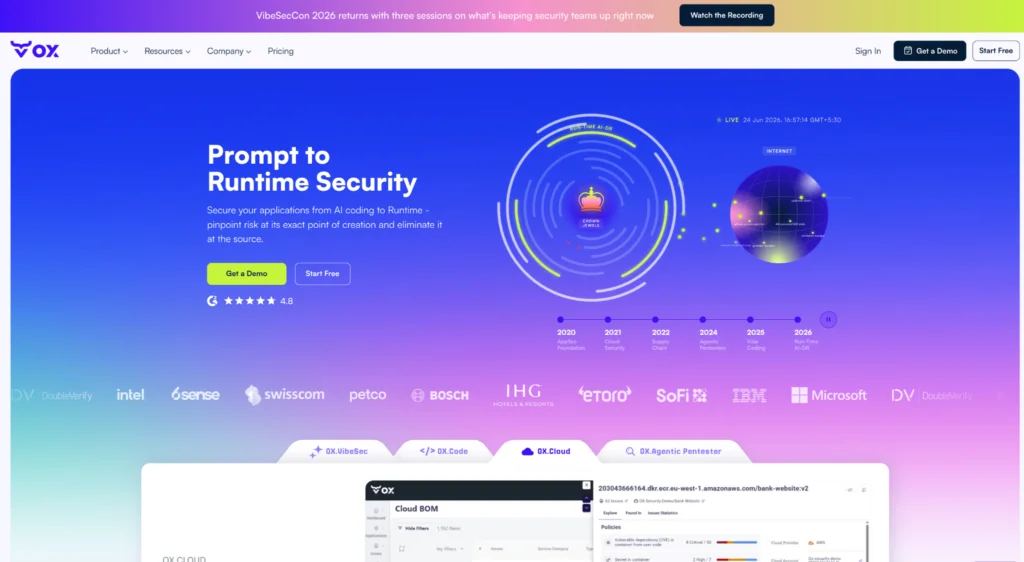
OX Security takes a different approach to container risk than most platforms. When a vulnerability surfaces in a container image, whether it entered through a base image, a Dockerfile instruction, or a library in user code, OX traces it back to the exact commit and pipeline stage that introduced it. That context is what determines whether a finding needs immediate action or can wait.
The platform covers the full lifecycle across four capabilities: VibeSec for preventing vulnerabilities in AI-generated code before they enter the build; OX Code for code-level risk across the SDLC; OX Cloud for runtime and cloud coverage; and OX Agentic Pentester for continuously validating what an attacker could actually reach. The PBOM (Pipeline Bill of Materials) connects these layers, tracking every component, dependency, and configuration change across the pipeline in real time.
For security teams managing large container estates across multiple registries, pipelines, and cloud environments, end-to-end traceability is what makes the difference between knowing a CVE exists and knowing what to do about it.
Why Choose OX Security
- Container findings trace back to the exact commit, developer, and pipeline stage through PBOM, so remediation has a clear owner from the start.
- 14 Container Security Policies cover CVEs across base images, OS layers, user code, and Dockerfile instructions, alongside secrets, PII, misconfigurations, and malicious dependencies.
- OX Runtime Sensor detects which libraries are actually loaded in memory at runtime across Kubernetes, Linux hosts, AWS EC2, and AWS ECS, so a CVE in a dependency that’s never active gets triaged differently from one running in production.
- Event-driven workflow triggers activate on container-specific events and route findings automatically to the right owner without manual handoff.
- VibeSec embeds security guidance into AI coding agents like Cursor before code is generated, preventing vulnerabilities from entering the container build pipeline.
- OX Agentic Pentester (Early Access) performs real-world penetration testing against live web applications, actively interacting with the running application to validate whether vulnerabilities can actually be exploited, rather than flagging theoretical risks from static analysis alone.
Pros
- Prioritisation that reflects what’s actually running: exploitability, runtime library loading, and workload business priority combined, not just CVSS scores.
- Every container finding has a traceable origin, commit, developer, and pipeline stage, which cuts triage time and removes the back-and-forth between security and development teams.
- Single platform across build and runtime: Container Security Policies at the image level and OX Runtime Sensor for deployed workloads, without needing a separate tool for each layer.
- No-code workflow automation keeps fixes inside the developer flow; Jira tickets, Slack notifications, and owner assignment happen automatically.
- AI Remediation (Early Access) generates tailored fix suggestions based on the exact occurrence of the issue.
Cons
- Teams requiring deep behavioral anomaly detection, such as process-level syscall monitoring for zero-day detection, may need to complement OX Runtime Sensor with a dedicated runtime security tool like Falco.
- The breadth of coverage means initial onboarding requires investment, particularly for teams managing complex multi-cloud environments.
- OX Agentic Pentester are currently in Early Access and not generally available; teams that need these capabilities immediately should factor access timelines into their evaluation.
2. Aqua Security
Overview
Aqua has been in the container security space long before AI pipelines became the norm. It is a well-established container security platform that provides image scanning, runtime protection, and Kubernetes security. It supports enforcing security policies during build and runtime to help teams maintain compliance and reduce risk. However, in the context of AI-heavy pipelines, Aqua’s strength lies largely on the runtime side rather than early pipeline correlation.
Why to Choose
- Aqua provides a strong baseline for enterprises with mature Kubernetes deployments.
- It provides advanced runtime protection that prevents container escapes and zero-day exploits.
- The platform enforces Kubernetes policies effectively, helping organisations align with compliance frameworks.
Pros
- Kubernetes controls: Powerful admission controls keep insecure workloads from entering production.
- Runtime protection: Instrumentation catches container escapes and suspicious process activity.
- Enterprise maturity: A stable product with proven deployment patterns for large organisations.
Cons
- Limited visibility into AI supply-chain layers, such as model artifacts or PBOM data.
- Does not correlate issues back to code commits or AI-generated changes.
- Remediation workflows depend more on manual triage, which is slower for high-velocity pipelines.
3. Sysdig Secure
Overview
Sysdig Secure is built around Falco’s behavioral detection to catch unusual container activity, such as unexpected syscalls or container behavior. It provides both agent-based runtime monitoring and CI/CD scanning for full container visibility. However, tools focused on runtime may still miss risks that start earlier in AI-driven pipelines.
Why to Choose
- Provides runtime visibility for teams using Falco-based monitoring, giving insight into container behavior.
- Detects anomalies, policy violations, and behavioral drift in real time.
- Enables DevOps teams to enforce runtime security policies effectively.
Pros
- Runtime visibility: Provides detailed insights across clusters to speed up incident investigation.
- Operational context: Integrates with Prometheus and Kubernetes metrics for a better understanding of cluster activity.
Cons
- Minimal AI-specific security support (vector DBs, model artifacts, prompt surfaces).
- Early-stage detection (before runtime) remains limited.
- No end-to-end correlation from code → pipeline → runtime.
4. Wiz
Overview
Wiz is a cloud-native application protection platform (CNAPP) that includes container visibility through agentless scanning. Reviewing Wiz from a DevSecOps lens, it provides strong cloud misconfiguration detection and identity correlation, but its container security layer is more cloud-contextual than pipeline-aware.
Why to Choose
- Wiz is designed for organisations seeking unified visibility across multiple clouds and containerised workloads.
- Its agentless scanning simplifies setup and speeds onboarding for distributed teams.
- Strong multi-cloud asset visibility, identity mapping, and compliance posture.
Pros
- Simplified onboarding: Agentless discovery makes setup faster and reduces operational overhead.
- Identity correlation: Provides strong cloud identity mapping for better security context.
- Regular compliance: Helps maintain compliance across hybrid cloud environments.
Cons
- Wiz provides limited insight into deeper container layers and dependencies.
- It lacks strong SBOM tracking and code-level correlation for vulnerability origin tracing.
- Agentless runtime depth is weaker than that of runtime-focused vendors.
5. Prisma Cloud (Palo Alto Networks)
Overview
Prisma Cloud is Palo Alto Networks’ CNAPP that secures containers, cloud workloads, and infrastructure-as-code configurations. It provides policy enforcement and compliance management across hybrid and multi-cloud environments. However, its container scanning and runtime layers are part of a larger suite that is not specifically tailored for AI-driven pipelines.
Why to Choose
- Prisma Cloud suits regulated enterprises requiring comprehensive compliance and IAM correlation.
- It provides detailed Kubernetes posture management and runtime protection capabilities.
- The platform provides a unified dashboard for large-scale container environments with compliance automation.
Pros
- Broad security coverage: Prisma Cloud protects cloud infrastructure, infrastructure-as-code (IaC), and container environments within a single platform.
- Prebuilt compliance: Provides ready-to-use frameworks and policies for standards like PCI-DSS and HIPAA.
- Integrated visibility: Works with Palo Alto’s network security stack for end-to-end visibility from code to cloud.
Cons
- Complex onboarding and configuration for distributed teams.
- No meaningful AI-specific artifact or inference API security features.
- Limited correlation between CI/CD changes and vulnerabilities in runtime workloads.
How to Choose the Right Container Security Vendor
Comparing container security solutions on feature lists alone rarely leads to the right decision. A solution that works well for a 20-person team running a single Kubernetes cluster will break down at enterprise scale. The following criteria give a more useful lens, focused on what actually matters when containers are running across multiple pipelines, registries, and cloud environments.
1. Does scanning cover every layer that an image is built from?
Image scanning is the baseline; every solution on this list does it. The question is what gets scanned. CVEs can enter through the base image OS, libraries added in user code, packages installed via Dockerfile instructions, and Java archive files bundled into the build. A scanner that only checks one or two of these sources gives you incomplete coverage without telling you so.
Evaluate: whether the solution scans base images, OS layers, user code, Dockerfile instructions, and public images hosted in private registries, and whether findings from each source are visible in the same place.
2. Can a runtime finding be traced back to what introduced it?
A CVE without an owner is a CVE that doesn’t get fixed. The solutions that cut remediation time are the ones that link a finding in a running container back to the commit, developer, and pipeline stage that introduced it, so there’s no investigation required before the fix can start.
Evaluate: whether the solution connects runtime findings to their code origin, and how ownership is assigned when a container finding is detected.
3. Does the solution know which vulnerabilities are actually loaded in production?
Raw CVE counts aren’t a useful metric. A solution that surfaces thousands of findings with no context on which dependencies are active in production, which code paths are reachable, and which workloads are business-critical creates triage work rather than reducing it.
Evaluate: whether the solution uses runtime library loading data to filter findings, and whether workload business priority is factored into severity scoring.
4. Do container findings reach developers without a manual handoff?
Findings that land in a separate security dashboard and require manual routing between teams get deprioritized. The faster path is when ticket creation, owner notification, and fix guidance happen automatically, tied to the specific container issue, without the developer leaving their existing tools.
Evaluate: workflow automation depth, integrations with Jira, GitHub, and Slack, and whether remediation guidance is specific to the exact issue or generic across finding types.
5. Does it hold up across multiple registries, pipelines, and cloud environments?
Enterprise container environments are rarely homogeneous. A solution that works cleanly in a single cloud with one CI/CD system may struggle when you add a second cloud provider, a different registry, or a new pipeline tool. The platform needs to handle that complexity without requiring you to standardize the entire environment first.
Evaluate: multi-cloud support, CI/CD system breadth, registry integrations, and whether operational overhead increases as the environment grows.
Using OX Security for Container Protection: Step-by-Step Guide
Follow this hands-on walkthrough to see how OX ingests container artifacts, runs image scans, shows container-specific alerts, ties findings back to commits, and automates remediation, all inside the same platform.
Step 1: Connect your source control and registry
Connect your GitHub repository to OX using the OAuth flow so OX can scan code and Dockerfiles.
Then create a read-only registry token in Docker Hub (or GHCR) and add it to **Connectors** in the OX platform. Use your username and the token as the password.
To create a read-only Docker Hub registry token:
1. Go to Docker Hub and sign in.
2. Go to Account Settings -> Security -> Personal Access Tokens.
3. Click Generate New Token, give it a descriptive name, and select Read-only access.
4. Click Generate, then copy the token; you won’t be able to see it again.
After connecting GitHub and Docker Hub, OX scans and displays repository posture and registry ingestion status on the project dashboard.
Step 2: Confirm containers are assigned to the application
Open the Applications page and click on your app in the table. A detail pane opens on the right side. Select the Containers tab to confirm artifacts are listed. If empty, use Assign Container to Repo and choose your image from the dropdown, then click Add. If the connector was newly added, press Reset Containers, then re-open the Containers tab.
Here is how the application detail pane looks with the Containers tab available alongside other tabs:
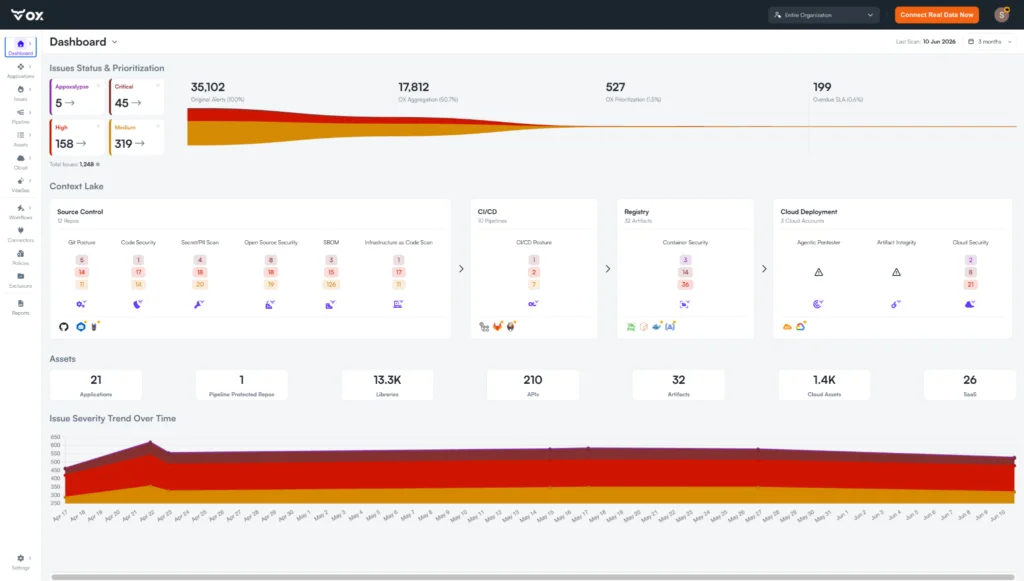
The Application Flow at the bottom of the pane, GitHub -> CI/CD -> Registry -> Cloud, shows the full pipeline chain OX has mapped for this application, confirming which stages are connected before you proceed to the container scan.
If the Assign Container dropdown is empty, check that Docker Hub is connected and images are imported successfully.
Step 3: Verify container security policies are enabled
Go to Policies in the left sidebar and scroll to the Container Security section. The header shows how many of the 14 policies are currently active. Here is what the Container Security policy section looks like with the individual policy toggles visible:
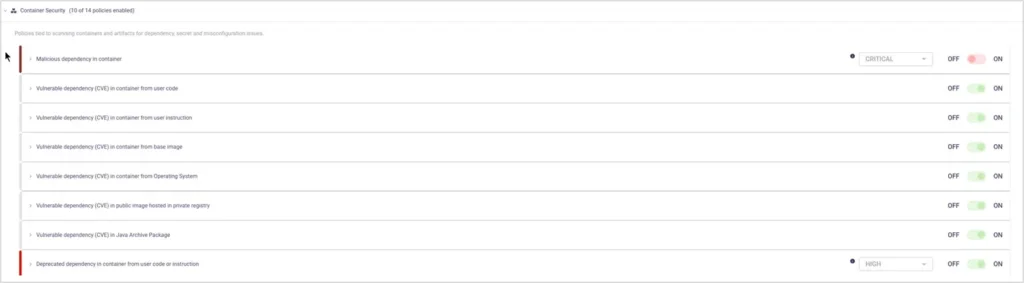
The 10 of 14 policies enabled indicator at the top tells you at a glance how much coverage is active. Each policy row has an independent ON/OFF toggle. Notice that Malicious dependency in container is currently toggled OFF despite being set to CRITICAL severity, meaning malicious package detections would not fire until this is enabled. The Deprecated dependency policy at the bottom shows a HIGH severity threshold with a dot indicator, flagging it as needing attention before saving.
Note: If you are scanning container images in a CI/CD pipeline, the Container Security policy is not included in the default pipeline workflow and must be added manually. Go to Pipeline Workflows, drag the Container Security policy into your active workflow, and define actions based on severity.
Step 4: Run the image scan and review the artifact breakdown
In the Artifact BOM, find the assigned image and click Scan or re-run the scan. Once the scan completes, OX surfaces a breakdown of all issues found across the image, categorized by source and severity. Here is how the scan results appear for a container image in the Artifact BOM:

Step 5: Check container security issue statistics
Open your application and go to Issue Statistics or Issue Trends. Issue statistics for the repository show Container Security as a distinct category with critical and high severity counts for deeper triage.
Step 6: Review the full list of container security issues
Open Issues, Active Issues, and apply Category. Container Security. OX displays all active container findings filtered to this category, ranked by severity. Here is what the filtered Active Issues view looks like across a real container environment:
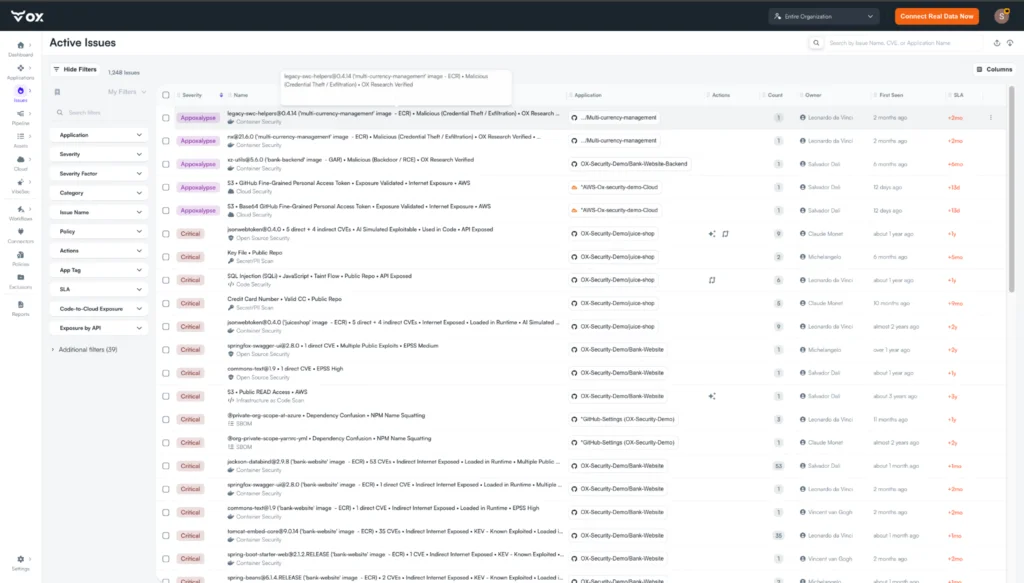
Step 7: Expand a single issue and review the full context
Click an issue row to open the detail view. For a malicious dependency finding, the Explore tab shows the full picture, what the package does, how it entered the image, and what the attack path looks like. Here is the detail view for a malicious dependency detected in a container image:
The OX AI Analysis explains the blast radius, the package can exfiltrate secrets and keys, and removing it may not be sufficient if it has already executed. The Docker Instruction field (`COPY /app /app # buildkit`) shows exactly how the malicious package entered the image, and the Attack Path diagram at the bottom maps the full chain from detection through to the Internet-exposed Kubernetes cluster.
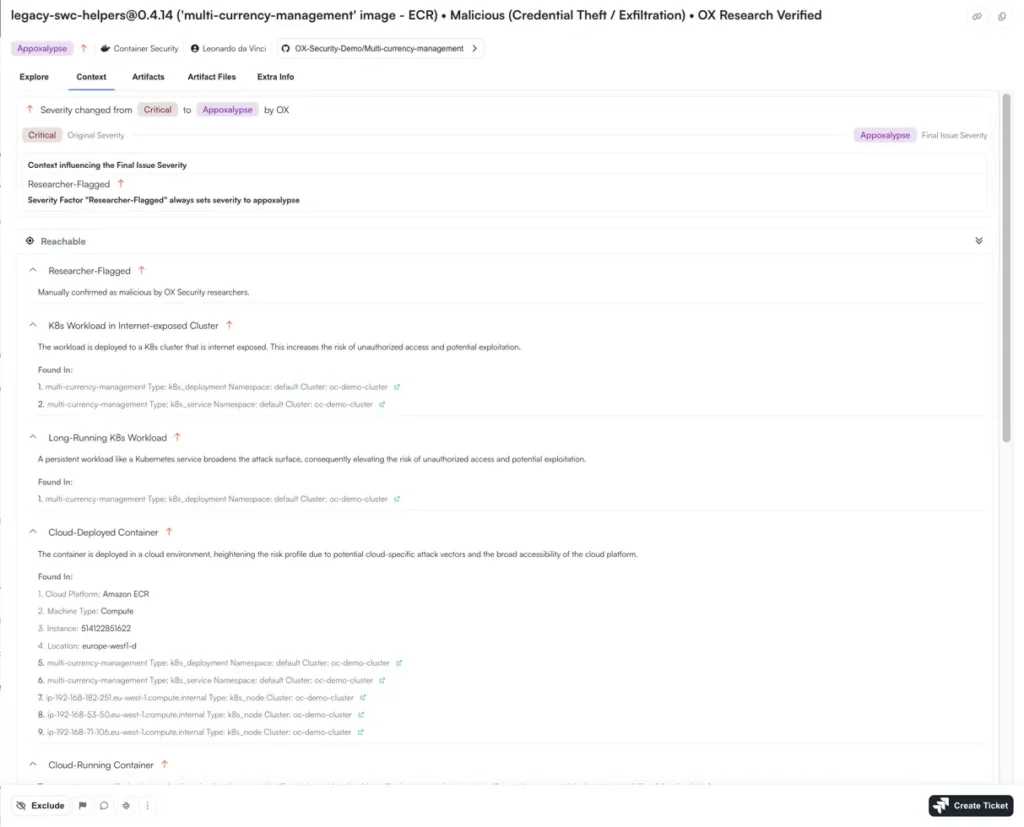
Now open the Context tab to see why OX escalated the severity and what runtime factors are contributing. Here is the Context tab for the same issue, showing the severity escalation and reachability signals:
OX escalated the original Critical severity to Appoxalypse based on the Researcher-Flagged signal alone, and the Reachable section confirms why: the workload is deployed in an internet-exposed Kubernetes cluster, is long-running, is cloud-deployed on Amazon ECR, and the dependency itself is confirmed malicious with public exploit data. Each factor is listed with its exact location in the cluster.
Now open the Artifacts tab to confirm the runtime status of the affected image. This is how OX shows whether the vulnerable image is actively running in production:
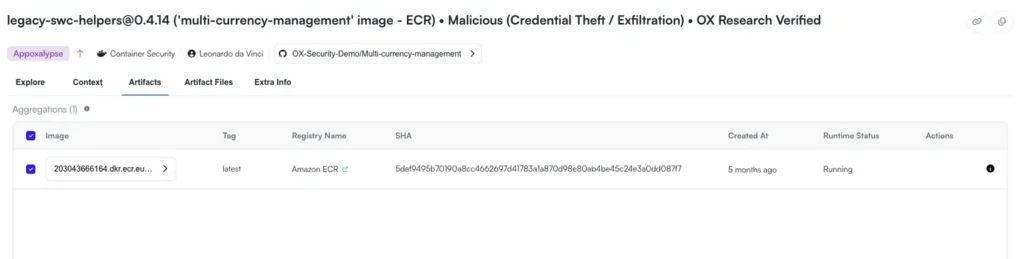
The Runtime Status column shows Running, confirming this image is live in production, not a historical artifact. The SHA hash, registry source (Amazon ECR), and creation timestamp give the team everything they need to identify and replace the exact image version.
Step 8: Set up automated remediation workflows (optional)
In Pipeline Workflows, create or open a workflow triggered by a container event, such as a secret detection or a high-severity CVE.
Add actions: create a Jira ticket, send a Slack message, or block the artifact. Save and enable the workflow, then re-trigger the alert to confirm it runs.
Automated workflows let teams create tickets and notify owners when container rules trigger, keeping fixes inside the developer flow without manual handoff.
Best Practices for Container Security in 2026
Container security in 2026 is about catching issues as early as possible and having enough context at runtime to know which ones actually matter. These practices reflect what enterprise teams are doing to stay ahead.
1. Catch vulnerabilities before they enter the build pipeline
The earlier a vulnerable dependency or misconfigured Dockerfile is caught, the cheaper it is to fix. Integrating container image scans directly into CI/CD. triggered on every build, not on a schedule, means issues surface when the context is still fresh, and the fix is straightforward. VibeSec takes this a step further by embedding security guidance into AI coding agents like Cursor before code is ever generated, stopping insecure patterns before they reach the pipeline.
2. Keep an accurate inventory of what each image contains
A container image is only as trustworthy as the inventory behind it. Maintaining an up-to-date SBOM for every image, covering OS packages, user-installed libraries, and Dockerfile-introduced dependencies, gives teams a clear answer to “what’s in this image and is any of it vulnerable?” OX generates and validates SBOMs automatically, linking each artifact to its build pipeline and registry source through the PBOM (Pipeline Bill of Materials) so teams have full build provenance.
3. Know which vulnerabilities are actually loaded at runtime
A CVE in a dependency that’s never loaded in production is a different problem from one that’s active in a running service. OX Runtime Sensor detects which third-party libraries are actually loaded in memory across Kubernetes, Linux hosts, AWS EC2, and AWS ECS, giving teams the runtime context they need to triage build-time findings accurately rather than treating every CVE as equally urgent.
4. Make sure every finding has a traceable owner
Findings without owners don’t get fixed. Every container security issue should trace back to the commit, developer, and pipeline stage that introduced it, so remediation starts immediately without a separate investigation. OX links container findings to their originating commit and build pipeline through PBOM, and event-driven workflow triggers assign ownership and create tickets automatically when a finding is detected.
5. Automate the routine, focus humans on the complex
Outdated base images, missing health checks, and containers running as root are well-understood problems with well-understood fixes. Automating detection and notification for these frees security teams to focus on findings that require actual judgment, malicious dependencies, exploitable CVEs in internet-exposed workloads, and secrets in active images. OX no-code workflows handle ticket creation, Slack notifications, and artifact blocking automatically when container policies trigger.
6. Validate exploitability, not just existence
Knowing a vulnerability exists is not the same as knowing it can be exploited. The most effective container security programs layer exploitability, reachability, and business priority on top of raw CVE data, so teams work from a list of findings that can cause real damage, not a list of everything that technically matches a known vulnerability pattern. OX Agentic Pentester (Early Access) performs real-world penetration testing against live web applications to validate whether vulnerabilities identified at build time can actually be exploited in practice.
Conclusion
Securing containers is no longer optional; it has become an ongoing journey, integrated across code, build, deployment, and runtime phases. With thousands of containers, multiple teams, and cloud-native architectures, relying on fragmented tools can leave major risks hidden rather than under control. The current approach demands a platform that connects these layers, prioritises real risks, and allows developers to fix issues in their natural workflows.
This article covers the main risk domains in container environments, what a truly enterprise-grade container security solution must cover, how leading vendors compare, and why OX Security stands out with its unified, developer-first VibeSec platform.
OX Security provides exactly that with its VibeSec model: security that moves with development speed, not against it. By unifying image scanning, runtime protection, and contextual prioritisation under one platform, it helps enterprises focus on the vulnerabilities that matter most while lowering alert fatigue and operational overhead.
As 2026 unfolds, teams that embrace this connected, developer-friendly approach will spend less time chasing alerts and more time shipping secure, resilient software.
FAQs
OX Security is purpose-built for enterprise scale, handling thousands of developers across distributed teams without creating bottlenecks. Unlike tools designed for smaller teams, OX provides unified visibility across polyglot codebases, multiple CI/CD systems, hybrid cloud environments, and containerized services that generate thousands of builds daily. Its Active ASPM approach scales horizontally while maintaining performance, giving AppSec leaders centralized governance without forcing platform teams to standardize on a single pipeline or registry.
OX Security solves the resource constraint problem where AppSec teams are outnumbered 50:1 or even 200:1 by developers. Instead of requiring manual review of every container finding, OX automates prioritization, remediation assignment, and policy enforcement directly inside developer workflows. It connects vulnerabilities to the exact commit and owner, creates tickets automatically, and blocks risky builds before they reach production—allowing small security teams to govern large engineering organizations without becoming a bottleneck.
OX Security provides the governance layer enterprises need as AI-generated code accelerates development velocity. It validates AI-created Dockerfiles, dependencies, and configurations at build time, enforces security policies inside AI workflows, and tracks how AI-generated artifacts progress through pipelines into runtime. For enterprises concerned about insecure patterns propagating at AI speed, OX ensures that security controls scale to match AI-driven productivity without blocking innovation or requiring developers to context-switch between tools.
OX Security handles the hybrid reality most enterprises face: monoliths, microservices, serverless functions, and legacy systems all running simultaneously. It provides consistent security coverage across Docker, Kubernetes (EKS, AKS, GKE), multiple registries (ECR, GCR, ACR, Artifactory, Harbor), and polyglot codebases without requiring infrastructure rewrites or forcing teams to abandon existing tools. For enterprises managing technical debt alongside cloud-native modernization, OX delivers unified risk visibility and governance across the entire estate.