TL;DR
- Container security in 2026 is about keeping up with fast-moving pipelines, short-lived workloads, and the complexity of code and images that are constantly changing. Teams are dealing with container changes happening minute-to-minute rather than build-to-build.
- Since early 2025, attacks on build systems, unverified registry pulls, and misconfigured Kubernetes deployments have significantly increased. Weak spots like unpatched dependencies and exposed secrets don’t stay isolated; they can affect pipelines, registries, and clusters, making context more important than raw scan results.
- Scanners can show you vulnerabilities, but that’s not enough. Teams need to see which issues actually affect the running services, which images come from risky commits, and which deployments could be exploited. The goal is no longer just to “find everything” but to “zero in on what’s important.”
- Platform teams want one system that handles everything from identifying threats and validating builds to checking registries, deployment settings, and runtime behavior. Without this, they end up juggling inconsistent dashboards and dealing with duplicate alerts.
- OX Security connects container issues back to their source. This includes the commit, the pipeline, and the deployment. It also matches runtime signals with build-time data to cut down on noise and show the few risks that could actually affect production.
- This article reviews OX Security, Trivy, Clair, Anchore, Falco, Kube-Bench, KubeArmor, Dagda, Docker Scout, and Wiz, breaking down how each tool fits into the container security lifecycle.
Container security has become harder to manage because AI-driven development changes code, images, and configurations faster than traditional controls can process them. AI systems now generate Dockerfiles, manifests, and dependency updates, creating container variants across pipelines and clouds that legacy scanners were never created to evaluate.
The National Technology Security Coalition (NTSC) notes a clear shift in attacker behavior: targeting build pipelines, artifact integrity, and software supply-chain weak points rather than just exposed workloads. That tracks with what most enterprises see internally: issues introduced early in the SDLC that spread through registries and clusters long before anyone inspects them.
The challenge for AppSec leaders is no longer finding vulnerabilities; it’s determining which issues map to real attack paths, which images originate from untrusted or AI-generated changes, and whether they can prove end-to-end lineage from code, pipeline, image, and runtime.
Most container tools still operate in isolation. They find data but not context, leaving Platform and Product Security teams to triage noise rather than defend systems.
This guide evaluates how the leading tools, including OX Security, address container risk in 2026 and which of them help enterprise teams focus on the small fraction of issues that matter.
Understanding Container Threat Modelling in 2026
1. What is a Container Threat Model?
A container threat model outlines how an attacker could interact with each stage of a containerised environment, from the Dockerfile through to the point where the container is running in Kubernetes. It gives engineering teams a realistic view of how failures occur, rather than simply listing theoretical risks.
A strong threat model analyzes each phase of the container lifecycle and asks a more practical question:
“What could go wrong here, and how would we detect or stop it?”
Here’s how these layers typically align:
- Build Stage: Unpatched dependencies, insecure Dockerfiles, hardcoded credentials, or vulnerable base images.
- Registry Stage: Unsigned or tampered images, stale SBOMs (Software Bill of Materials), and outdated repositories.
- Deployment Stage: Misconfigured Kubernetes manifests, exposed ports, over-permissive roles, and namespace sprawl.
- Runtime Stage: Privilege escalation, container escapes, abnormal process execution, or lateral movement within the cluster.
- Response Stage: Poor visibility, alert noise, and lack of contextual prioritisation that slows down incident response.
A container threat model is useful only when it directly guides which tools a team actually needs. Without clarity on where the real risks come from, teams often end up buying multiple scanners that all do the same thing or skipping tools that would catch real issues in production. Teams often overbuy scanners that duplicate effort or under-invest in runtime-focused controls. This leads to wasted budget and gaps in protection that attackers can easily take advantage of.
2. Common Attack Points in Containerised Environments
Organisations are relying heavily on containerised workloads today, which has made attack paths more complex and interconnected. A single weakness can quickly spread across clusters and pipelines, whether it is an outdated image, a misconfigured role, or a leaked credential. Container environments also change quickly, with each build pulling new dependencies, services sharing the same networks, and short-lived workloads that can be exploited within minutes of appearing.
Below are the most common stages where attackers gain footholds in containerised setups:
- Build-time: Attackers target build pipelines by injecting malicious code into open-source dependencies or compromising base images. An unscanned Dockerfile or outdated image tag can introduce high-severity CVEs into every container built from it.
- Registry: Public and private registries are often used to store or pull container images. Pulling unsigned or unverified images from public repositories (such as Docker Hub) poses a risk, as threat actors can upload lookalike images containing cryptominers or remote shells.
- Runtime: Once containers are deployed, attackers exploit weak isolation to move laterally between pods or escalate privileges to the host kernel. Exploits such as container escapes or privilege escalation in Kubernetes can turn a minor misconfiguration into a full cluster compromise.
- CI/CD Pipelines: Automated integration systems are another popular target, especially for secret exposure or environment tampering. Compromised credentials in pipelines can grant attackers build-level control, allowing them to poison artifacts, modify configurations, or exfiltrate sensitive data.
Why Today’s DevOps Teams Need Container Security Tools (Benefits and Business Impact)
Today’s DevOps teams manage container environments that change by the hour, with new images built, pushed, and deployed automatically across multiple clusters. Without proper security tools, it’s very hard to keep track of what’s happening, ensure images are safe, or spot unusual activity as it happens. Container security tools don’t just find vulnerabilities; they connect the dots between build pipelines, registries, and runtime workloads, enabling engineers to secure the entire lifecycle without disrupting delivery speed.
1. Strengthening Software Supply Chain Integrity
- Container security platforms validate image origins, verify digital signatures, and detect vulnerabilities before they enter the registry.
- By scanning every image within CI/CD pipelines, teams can automatically block compromised builds, outdated dependencies, or unsigned base layers from being deployed.
- This constant verification creates a chain of trust, ensuring that only clean and verified artifacts make it into production.
2. Improving Visibility and Response
- Tools aggregate and correlate data from multiple layers: build-time scans, configuration checks, and runtime events.
- By linking vulnerabilities with container metadata (namespace, image tag, commit ID), teams can respond faster and with precision.
- Real-time dashboards and alerts reduce mean time to detection (MTTD) and mean time to remediation (MTTR) during incidents, cutting response time from hours to minutes.
3. Lowering Operational Overhead and Noise
- Traditional scanners often flood dashboards with hundreds of low-value findings. Next-generation container security solutions prioritise the findings based on exploitability and runtime exposure. This helps engineers focus on vulnerabilities that actually impact active services, not dormant packages buried deep in an image layer.
- Alerts that are focused and context-aware let teams automate responses, so fixes are applied only when a vulnerability could actually affect production.
4. Enabling Compliance and Governance
- Regular container image scans and audit trails simplify compliance with standards like SOC 2, ISO 27001, and PCI-DSS.
- Many tools provide pre-configured policies aligned with CIS Kubernetes Benchmarks, ensuring a consistent posture across clusters.
- Security teams can easily generate compliance reports for regulators or customers, proving adherence without manual review.
Top 10 Container Security Tools Every DevOps/Platform Engineer Should Know in 2026
1. OX Security
Overview
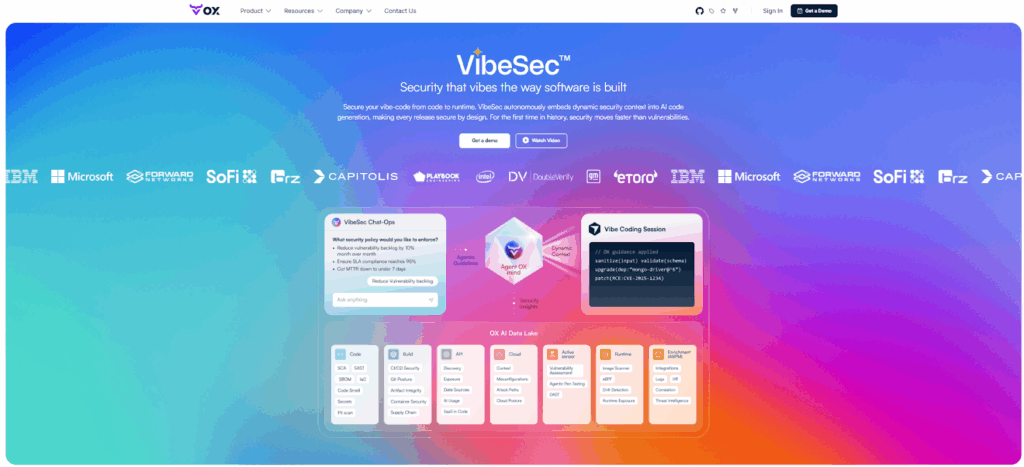
OX Security is an Active ASPM (Application Security Posture Management) platform built for enterprise AppSec, Platform Security teams and DevOps managing large-scale development organizations. It secures software from code to production by correlating risks across source code, CI/CD pipelines, container registries, and runtime workloads—showing AppSec leaders which vulnerabilities are actually exploitable rather than flooding teams with theoretical findings.
OX operates on the VibeSec principle: security adapts to developer workflows rather than blocking them, embedding checks directly where engineers already work (IDE, Git, pipelines, clusters). For Heads of Product Security overseeing hundreds or thousands of developers, OX provides unified governance, automated remediation, and audit-ready compliance across polyglot codebases, multiple CI/CD systems, and hybrid cloud environments.
Key Features
- Container Security: Flags unsafe images, misconfigurations, or exposed secrets as soon as they show up in your builds.
- Active ASPM: Connects signals from code, pipelines, registries, and runtime so teams can see the full picture of risk.
- AI Remediation and No-Code Workflows: Automatically opens issues tied to the exact commit and developer, making it easier to fix problems quickly.
Hands-On Usage Guide: Using OX Security for Container Protection
Follow this hands-on walkthrough to see how OX ingests container artifacts, runs image scans, shows container-specific alerts, ties findings back to commits, and automates remediation, all inside the same platform.
Step 1: Connect source control and registry
- Connect your GitHub repository to OX using the OAuth flow so OX can scan code and Docker files.
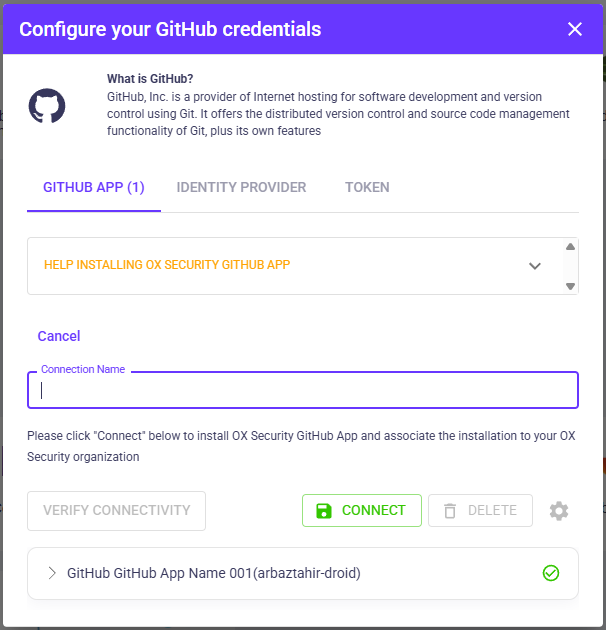
- Create a read-only registry token in Docker Hub (or GHCR) and add it to Configure → Connectors, Registry in OX. Use your username and the token as the password.

After connecting GitHub and Docker Hub, OX performs a scan and shows repository posture and registry ingestion status on the project dashboard.
Step 2: Confirm containers are assigned to the application
- Navigate to Applications and open your selected app.
- In the bottom-right panel, choose Containers to check whether your image artifacts are already listed.
- If none appear, click Assign Container to Repo, select the image from the dropdown, and press Add. Use Reset Containers once, if a new connector is added.

- If you cannot find a container image, check if Docker Hub is connected and the images are imported successfully.
Step 3: Run the image scan
- In Registry / Images, find the assigned image and click Scan or re-run the scan.
- Wait for the scan to complete and refresh the dashboard.
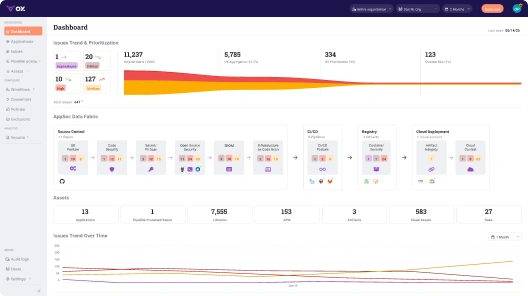
Dashboard showing AppSec Data Fabric, Registry counts, and container security tile with issue count.
Step 4: Check the full list of container security issues
- Open Issues → Active Issues and apply Category = Container Security.
- Active issues list filtered to Container Security (shows critical/high/info items).
- The active issues view lists container findings such as secrets, outdated base images, and missing health checks, ready for triage.”
Step 5: Expand a single issue and check the attack path
- Click an issue row (for example, “Dockerfile has no healthcheck instruction” or secret detection).
- Open the Attack Path tab to show relationships: app, SBOM, and registry artifact.
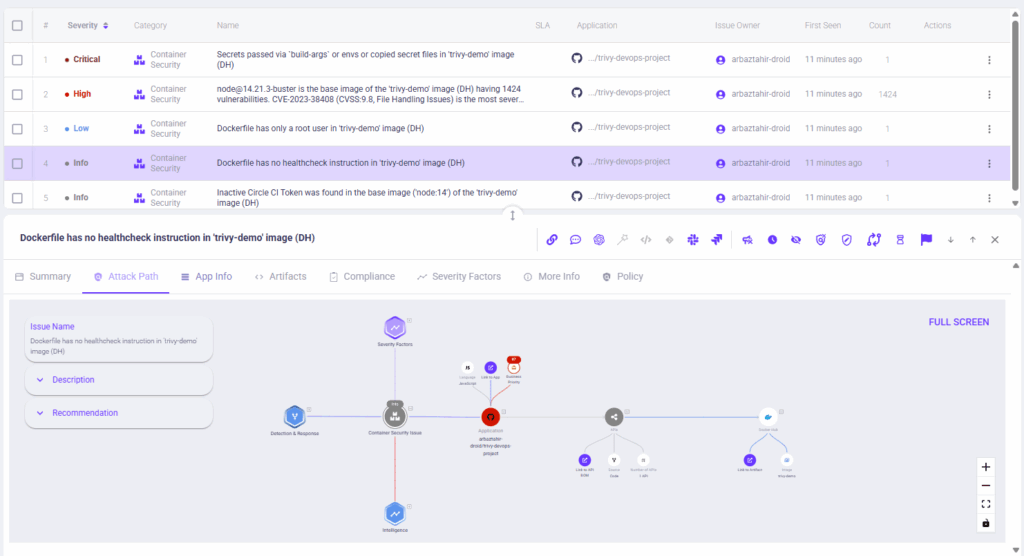
Issue detail with the Attack Path / Graph open.
- The attack path links the container finding to the application, SBOM, and registry artifacts, where you can see the impact and likely attack vectors.
OX visualizes how a container finding could be exploited and what elements it touches in the software supply chain.
Note: The Attack Path panel dispvisualisesed assets, detection context, and remediation suggestions. If the full graph isn’t visible in a static screenshot, remember that the interactive view allows you to zoom and see the entire attack path in detail.
Step 6: Automating Fix and Response (no-code workflow, optional)
- In Configure → Workflows, create or open a workflow triggered by a container event (secret or high CVE).
- Add actions: create a JIRA ticket, send a Slack message, or block artifact. Save and enable, then re-trigger the alert to capture a run.

No-code workflow builder with trigger, conditions, and actions for automated remediation.
- Remediation can be automated and assigned to owners without manual handoffs.
Automated workflows let teams create tickets and notify owners when container rules trigger, keeping fixes inside the developer flow.
Pros
- Link Issues to Source: Every vulnerability is tied to the exact code path, pipeline run, and container using it, which reduces triage time.
- Prioritise Real Risks: Only vulnerabilities that can actually be exploited in live workloads are highlighted.
- Fits Developer Workflows: Integrates smoothly into CI/CD without forcing teams to change how they work.
Cons
- Integrating OX Security with multiple CI/CD pipelines, container registries, and cloud platforms can require extra configuration and testing.
- Runtime monitoring, such as behavior tracking and anomaly detection, may slightly affect container performance under heavy workloads.
- Teams new to cloud-native security may need time to get up to speed.
2. Trivy (Aqua Security)
Overview
Trivy is a fast, widely used open source scanner that finds vulnerabilities and misconfigurations in container images, file systems, and source repositories while also generating SBOMs. It is designed for direct integration into CI pipelines and developer workflows.
Key Features
- Scans container images, filesystems, and Git repositories with straightforward CLI commands.
- Generates SBOM in standard formats (SPDX) and supports CI/CD integration via CLI and actions.
- Provides integration with GitHub Actions, GitLab, and other CI services.
Hands-On Usage Guide: Scanning Docker Images and Secrets with Trivy
This walkthrough demonstrates how to scan Docker images with Trivy, identify vulnerabilities, integrate scanning into GitHub Actions, and review scan reports.
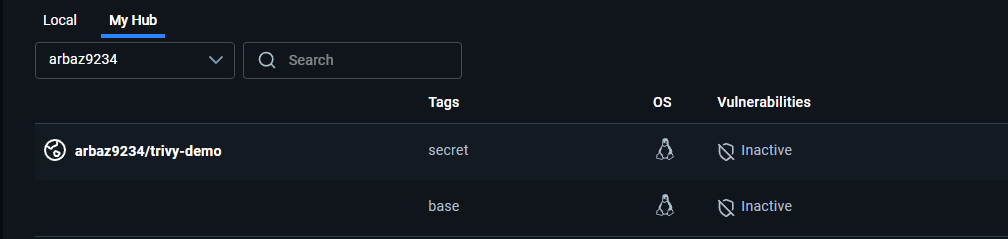
Step 1: Confirm Images Exist in the Registry
The demo uses two Docker images:
- trivy-demo:base (a standard Node.js image)
- trivy-demo:secret (a version that includes an exposed AWS secret and older dependencies).
Confirm that both images exist in your Docker Hub repository before scanning.
docker pull arbaz9234/trivy-demo:base
docker pull arbaz9234/trivy-demo:secret
Trivy scans container images stored locally or in remote registries. Ensuring both images are available guarantees accurate analysis of their software layers.
Step 2: Install Trivy on Windows
Chocolatey installation
choco install trivy -y
trivy --version
Or
Manual installation
- Download trivy_windows_amd64.zip from the Trivy GitHub releases page.
- Extract and move trivy.exe to C:\Tools\trivy.
- Add that folder to your PATH.
Trivy’s CLI is cross-platform, but Windows requires manual PATH configuration for global use.
Step 3: Scan Images and Generate Reports
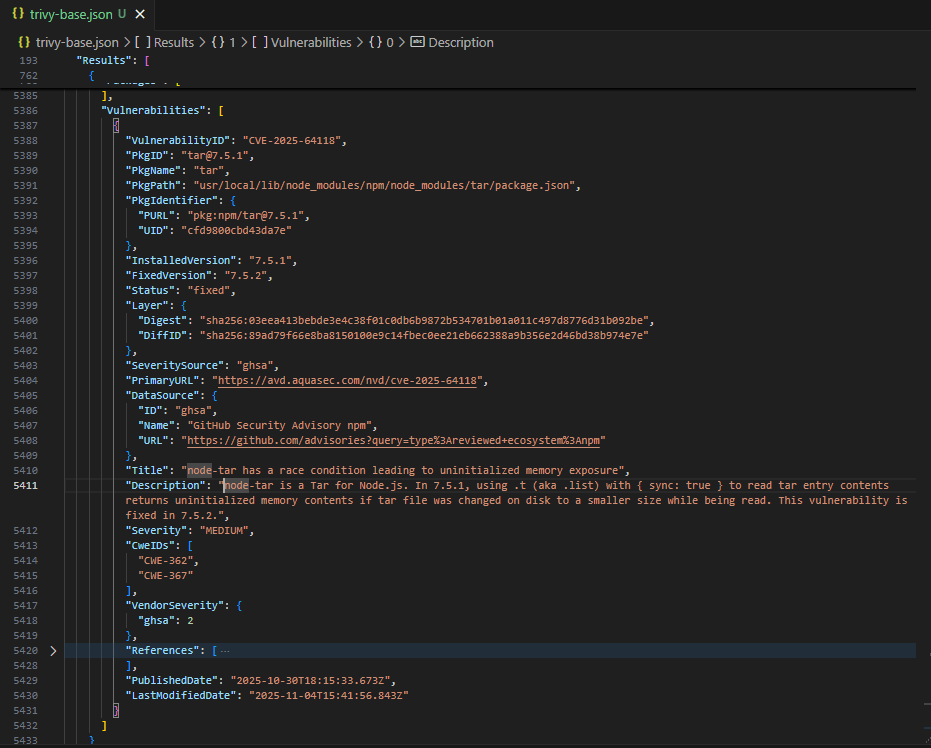
Trivy scans images for vulnerabilities in system packages and application dependencies. It uses constantly updated CVE databases to find risks early in the pipeline.
trivy image --format json --output trivy-base.json "arbaz9234/trivy-demo:base"
trivy image --format json --output trivy-secret.json "arbaz9234/trivy-demo:secret"- The first scan analyses the clean image (base).
- The second scan inspects the vulnerable one (secret).
Both generate JSON reports listing vulnerabilities, package names, and severity.
Scan result – trivy-base.json:
Scan result – trivy-secret.json:
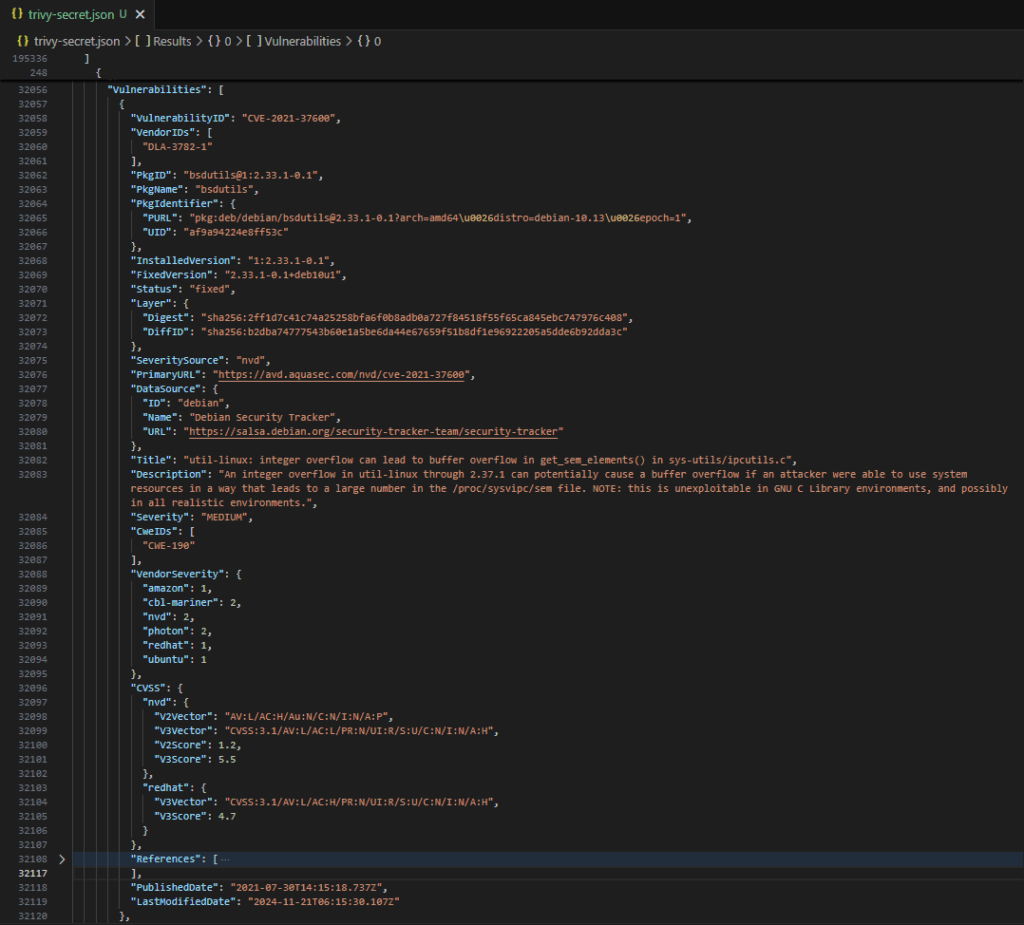
These two images show how Trivy identifies risk introduced by older or misconfigured images, a common issue in production environments.
Step 4: Scan Repository Files for Secrets (Filesystem Scan)
Scan the repository to detect baked-in secrets in source files and Dockerfiles. This step uses Trivy’s secret scanner and produces a JSON report (trivy-secrets.json) that can be reviewed or included as an artifact.
Commands (Windows PowerShell)
# run Trivy filesystem secret scan and save JSON output or view in a tabular format
trivy fs --scanners secret --format json --output trivy-secrets.json .
Or
trivy fs --scanners secret --format table DockerfileOutput:
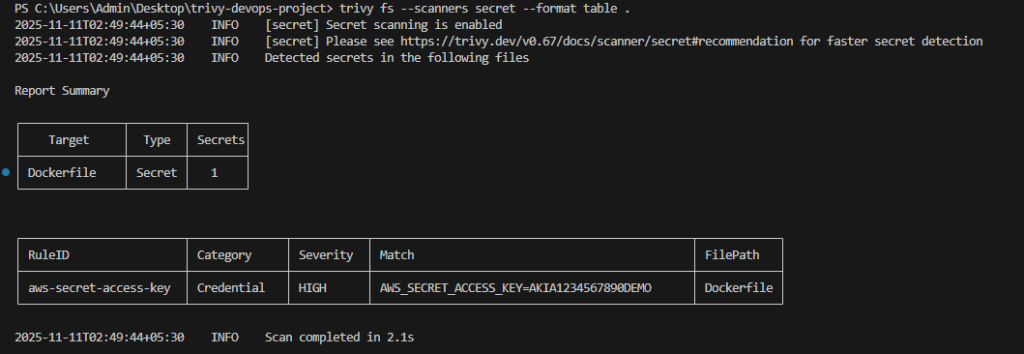
If the repo contains large files or previous Trivy outputs, run focused scans to avoid skipped files:
# scan only the Dockerfile
trivy fs --scanners secret --format json --output trivy-secrets.json Dockerfile- trivy-secrets.json will list matched secret findings with:
- RuleID (detector name), Category, Severity, Match (matched string or snippet), and FilePath.
Step 5: Add Trivy to CI as a Pull Request Check
Security should run automatically as part of the development process. Integrating Trivy into GitHub Actions ensures that vulnerable images never make it to main branches.
Create a new file: .github/workflows/trivy-scan.yml
name: trivy-scan
on:
  pull_request:
    types: [opened, synchronize]
jobs:
  trivy:
    runs-on: ubuntu-latest
    steps:
      - name: Checkout
        uses: actions/checkout@v4

      - name: Run Trivy image scan
        uses: aquasecurity/trivy-action@0.20.0
        with:
          image-ref: arbaz9234/trivy-demo:secret
          format: json
          output: trivy-report.json
          severity: CRITICAL,HIGH
          exit-code: '1'

      - name: Upload Trivy report
        uses: actions/upload-artifact@v4
        with:
          name: trivy-report
path: trivy-report.json- GitHub Actions runs automatically when a pull request is opened.
- Trivy scans the specified image and fails the workflow if it finds high or critical issues.
- The resulting JSON report is uploaded as an artifact for review.
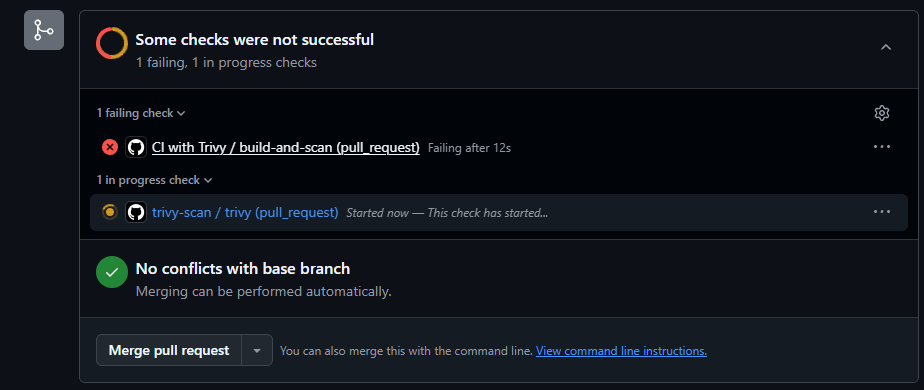
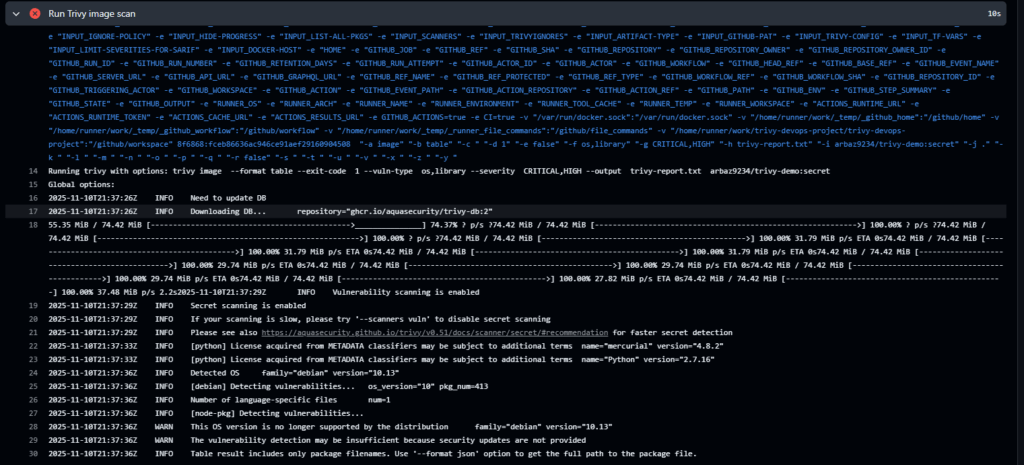
Automated enforcement ensures insecure builds never progress through CI/CD, closing security gaps early.
Step 6: Download the Trivy Report Artifact
Each workflow run stores its scan output as an artifact. Reviewing it helps teams analyse issues in detail before deciding on remediations.
Steps to locate the report:
- Navigate to Actions → Latest Run in your repository.
- Scroll to the bottom right to find Artifact.
- Click trivy-report.zip to download and extract it.
- Open trivy-report.json in VS Code.
JSON file:
{
  "ArtifactName": "arbaz9234/trivy-demo:secret",
  "Results": [
    {
      "Target": "node:14 (debian 11)",
      "Vulnerabilities": [
        {
          "VulnerabilityID": "CVE-2024-22345",
          "PkgName": "libc-bin",
          "InstalledVersion": "2.31-13+deb11u7",
          "FixedVersion": "2.31-13+deb11u8",
          "Severity": "CRITICAL"
        }
      ]
    }
  ]
}
Trivy reports can be archived or exported into dashboards, providing traceability and audit-ready evidence of vulnerability management.
Pros
- Lightweight and Easy to Integrate: Can be added to any CI/CD job with minimal setup, making it simple for teams to start scanning containers quickly.
- Frequent Updates and Community Support: Maintains a fast-updating vulnerability database and benefits from an active open-source community, helping keep scans current and reliable.
Cons
- Focused on build-time scanning and misconfiguration checks rather than runtime protection.
- Alerts require manual triage since Trivy cannot show which issues actually reach a cluster.
- CLI-centric workflows may need additional tooling to feed enterprise dashboards.
3. Clair
Overview
Clair is an API-driven, open source engine that performs static, layer-by-layer scanning of container images to detect known vulnerabilities. It is often built into registries to analyse images as they get pushed. As a scanner, it’s dependable, but without context or prioritisation it becomes another feed that DevOps teams must process manually.
Key Features
- Performs layer-by-layer vulnerability analysis using a hostable API.
- Built to plug into registries for automated scanning of pushed images.
- Works with container registries such as Harbor and Quay for streamlined scanning.
Pros
- Registry-Level Scanning: Fits teams that want to scan images directly at the registry, catching issues early.
- Layer Transparency: Helps developers see exactly which layer or component introduced a vulnerability.
Cons
- No native runtime detection or behavioural analytics.
- Requires additional orchestration to provide enterprise-level dashboards and prioritisation.
4. Anchore Engine / Grype
Overview
Anchore’s open source toolkit (Syft, Grype) is focused on SBOM generation and vulnerability scanning. Grype detects CVEs across a wide range of OS and language packages while Syft builds portable SBOMs for automation. DevOps teams often use these tools during build-time checks, but still require an additional tool to connect SBOM output to deployments, like OX Security.
Key Features
- Automated SBOM generation with Syft, producing consistent and portable SBOMs for all applications.
- Vulnerability scanning with Grype across operating systems, libraries, and language-specific packages to catch CVEs early.
- JSON output that integrates easily with CI/CD pipelines, compliance tools, and automated governance workflows.
Pros
- SBOM-first approach: Enables teams to track all components and dependencies, simplifying compliance and governance across the development lifecycle.
- Easy integration: Can be quickly scripted and added to container build jobs, allowing DevOps teams to automate security checks without slowing down CI/CD workflows.
Cons
- No runtime visibility; evaluates only what’s inside the image, not how it is used.
- Enterprises using it need to build integration layers for prioritisation and incident response.
- Does not provide runtime protection or network observability on its own.
5. Falco
Overview
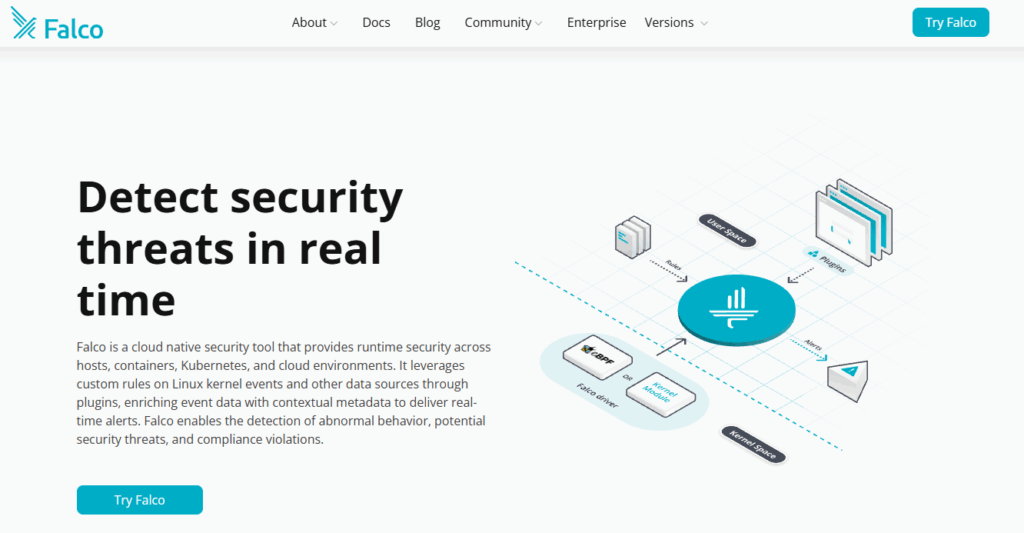
Falco is a CNCF (Cloud Native Computing Foundation) runtime detection project that monitors syscalls and other kernel-level activity to detect anomalous container behaviour in real time. It includes a rules system for high-fidelity alerts. While it provides an extra layer of security by monitoring runtime activity, Falco by itself does not connect runtime events back to the builds or images responsible.
Key Features
- Kernel-level syscall monitoring with a rules engine for behavioural detection.
- Integrations for alerting and observability in platforms like Prometheus and Grafana.
Pros
- Runtime visibility: Provides timely detection of unusual container activity, helping teams monitor potential security events.
- Established rule: Comes with a mature range of detection rules and a supportive community, making it easier to adopt and maintain monitoring.
Cons
- Rules require tuning to reduce noise and avoid false positives.
- Produces many alerts with no link to code or pipelines.
- Needs pairing with ASPM platforms like OX to understand root cause.
6. Kube-Bench (by Aqua Security)
Overview
Kube-Bench is a command-line tool that runs checks from the CIS Kubernetes Benchmark to evaluate cluster configuration and hardening posture. It is useful for compliance audits and automated cluster checks. It’s a straightforward compliance tool, but it doesn’t tie findings back to images, workloads, or pipelines.
Key Features
- Automated CIS benchmark checks for API server, controller manager, scheduler, kubelet and etcd.
- YAML-driven test configuration that maps to updated benchmark rules.
Pros
- Kubernetes configuration audit: Provides a quick way to check Kubernetes configuration hygiene, helping teams identify misconfigurations early.
- Flexible deployment: Can run in CI pipelines or directly inside clusters, allowing DevOps teams to integrate checks wherever it fits best.
Cons
- It is a benchmark tool and does not detect runtime attacks.
- Requires interpretation and follow-up work to remediate configuration findings.
7. KubeArmor
Overview
KubeArmor is a CNCF Sandbox open-source project—a cloud-native runtime security enforcement engine. It enforces runtime security policies using LSM (Linux Security Modules) and eBPF (extended Berkeley Packet Filter) to restrict process, file, and network behaviors, providing a strong containment layer for high-sensitivity workloads. Like most runtime enforcement tools, mapping blocked actions back to build-time origins typically requires complementary platforms such as OX.
Key Features
- Policy enforcement for process execution, file access and network operations using LSM/eBPF.
- Native Kubernetes integration to apply policies per pod or namespace.
Pros
- Low-overhead runtime enforcement: Efficiently monitors and blocks suspicious actions that scanners won’t catch.
- Enhanced containment for critical workloads: Provides an additional security layer that complements scanners and detection tools, lowering risk from runtime threats.
Cons
- Policy authoring and lifecycle management are complex in large and dynamic clusters.
- Enforcement needs careful testing to avoid blocking legitimate behaviour.
8. Dagda
Repository link: https://github.com/eliasgranderubio/dagda
Overview
Dagda is an image analysis framework that blends vulnerability scanning with malware and trojan detection for Docker images and running containers. It provides research and forensics-oriented feature rules, making it useful for niche threat analysis but not for full-lifecycle visibility.
Key Features
- Scans for known CVEs plus malware signatures using engines like ClamAV.
- REST API and scan history storage to track changes over time.
Pros
- Malware detection: Enables identification of rare malware during image checks, enhancing overall security coverage.
- Investigation support: Useful for analyzing suspicious or third-party images, helping teams make informed decisions before deployment.
Cons
- Requires manual work to run reliably, as updates and rule tuning can be inconsistent.
- Provides minimal support for CI pipelines or runtime environments, making automation more challenging.
9. Docker Scout
Overview
Docker Scout is Docker’s built-in image analysis service that generates SBOMs for images pushed to Docker Hub or scanned locally, matching components against a vulnerability database to provide remediation guidance. It’s convenient for developers, but it stops at image-level insights and doesn’t track how those images behave when deployed.
Key Features
- Automatic SBOM generation and component inventory for images.
- Risk summaries, CVE matching and remediation recommendations inside Docker Hub and CLI.
Pros
- Zero configuration for Docker Hub users: Teams can get started quickly with minimal setup, achieving fast time to value.
- Seamless developer workflow integration: Works directly with Docker CLI and Hub, making security and scanning part of the existing development process.
Cons
- Limited enterprise-grade runtime monitoring and cross-cluster visibility.
- Enterprise teams will likely need complementary tools for prioritisation and response.
10. Wiz
Overview
Wiz is a CNAPP that discovers and prioritises risks across cloud, container and identity resources, using an agentless graph model to connect vulnerabilities and misconfigurations to attack paths and exposure. It is great at wide cloud coverage but focuses broadly on infrastructure, not developer-facing workflows. DevOps teams often complement Wiz with platforms/tools that require deep integration with code, pipelines, and runtime behaviour, such as OX Security.
Key Features
- Agentless discovery and graph-based correlation across cloud and container assets.
- Contextual prioritisation that combines vulnerability data with exposure and identity.
Pros
- Faster initial setup: Quick onboarding and broad asset coverage across multi-cloud environments.
- Integrated Risk Correlation: See cloud and container risks in one place for faster, more complete threat analysis.
Cons
- Less focused on developer-facing CLI tools and fine-grained SBOM workflows.
- An agentless model may miss some deep runtime telemetry compared to agent-based solutions.
Assessing the Top 10 Container Security Tools
The table below provides a quick side-by-side view of the leading container security tools, highlighting their strengths and intended use cases for advanced DevOps and platform teams.
| Tool | Coverage Scope | CI/CD Integration | Prioritisation Approach | Runtime Visibility | Developer Experience |
| OX Security | Full code-to-runtime lifecycle | Deep pipeline-aware integration | Context-driven impact prioritisation | Linked to build metadata | Strong developer-aligned workflows |
| Trivy | Build-time image scanning | Simple CLI-based integration | Severity-based vulnerability lists | No runtime inspection | Lightweight and easy to adopt |
| Clair | Registry-focused image analysis | API-driven CI hooks | Basic CVE severity ranking | No behavioural visibility | Straightforward but minimal context |
| Anchore / Grype | SBOM-centric image scanning | Scriptable CI workflows | Policy-based evaluation rules | No runtime correlation | Useful for supply-chain checks |
| Falco | Runtime behavioural detection | Limited CI compatibility | Rule-driven anomaly alerts | Strong syscall-level insights | Requires tuning and rule care |
| Kube-Bench | Kubernetes configuration auditing | Can run in CI jobs | Benchmark-aligned reporting only | No runtime monitoring | Clear guidance for cluster posture |
| KubeArmor | Pod-level runtime enforcement | No native CI support | Policy-based blocking actions | System calls and file controls | Needs careful policy lifecycle handling |
| Dagda | Vulnerability + malware scanning | Scriptable but manual | CVE + malware signature scores | Partial runtime checks | Mostly research and forensics use |
| Docker Scout | Image analysis and SBOMs | Native Docker CLI workflows | Component-level risk insights | No cluster or runtime data | Very friendly for Docker users |
| Wiz | Cloud + container posture | Broad agentless integrations | Exposure-aware graph analysis | Limited deep runtime detail | Strong cloud-wide visibility |
What to Consider when Choosing a Container Security Tool
The difference in choosing the right container security platform is often between teams that react to alerts versus those that proactively stop breaches. In short, choosing a container security tool is about picking something that enables engineering teams to move faster while lowering risk, not adding another dashboard or more noise. Instead of picking tools based on popularity or vendor marketing, teams should assess alignment with their workflows, scale, and automation maturity.
1. Match Capabilities to Team Goals
- Identify your primary objective: it’s early vulnerability detection in CI/CD, runtime defence against live exploits, or full-lifecycle protection that ties everything together.
- Smaller teams may prioritise build-time scanners like Trivy or Clair, while larger enterprises often need unified tools like OX Security that handle posture, prioritisation, and runtime analytics in one system.
- OX security strengthens this category by connecting SCA, SBOM/PBOM, IaC, image scanning, secret exposure, and runtime context, removing the need for separate tools.
2. Check Integration and Developer Adoption
- A tool is only as valuable as it naturally fits within your current pipelines and workflows. Look for ready-made integrations with GitHub Actions, Jenkins, GitLab CI, or your container registry.
- APIs, CLI support, and webhook triggers allow teams to automate scans or actions without breaking their update cycle.
3. Prioritization and Automation
- Choose tools that filter out the noise and highlight the exploitable vulnerabilities, instead of showing endless lists of CVEs.
- Built-in workflow automation: the creation of tickets, auto-remediation, or triggering rebuilds of containers decreases response time and embeds security into the delivery process.
4. Evaluate Scalability and Coverage
- Containers multiply quickly; a tool that performs well in small clusters may struggle at enterprise scale.
- Check for multi-cloud deployments support, Kubernetes, serverless environments, and large image registries.
- Runtime monitoring must scale horizontally: Falco or KubeArmor handle high-volume telemetry efficiently, while ASPM platforms such as OX Security maintain unified visibility across thousands of builds and workloads.
5. Budget and Maintenance Trade-offs
- Commercial platforms provide managed databases, dashboards, and automation, but come with licensing costs.
- The ideal balance depends on your team’s operational maturity; if you lack in-house security engineering, managed platforms typically provide faster time to value and fewer maintenance burdens.
Conclusion
Container security in 2026 demands more than isolated scanners or post-deployment audits; it requires constant, contextual protection across build, registry, runtime, and response. With containers powering the majority of both CI/CD pipelines and production workloads, the attack area has moved far beyond simple image scanning, and the ecosystem has equally matured to meet that challenge with tools at every stage of the lifecycle. For teams looking for comprehensive visibility without adding operational overhead, OX Security provides a unified view that traces vulnerabilities, misconfigurations, and secrets directly to their source in code and pipelines to ensure end-to-end protection from development to deployment.
This article reviewed how container threat modelling helps teams choose the right tools, why container security platforms now serve as a foundation for visibility and governance, and how ten leading solutions approach scanning, runtime defence, and policy enforcement. Across these categories, one statement becomes clear: tools must provide context, not just more alerts.
Looking ahead, container security will continue shifting closer to the developer workflow, emphasizing automation, contextual prioritization, and AI-assisted remediation. Teams that treat security as part of their build process rather than a separate gate will be best positioned to maintain both agility and resilience as container ecosystems grow more complex.