
TL;DR
- Aikido is an application security platform that combines SAST (Static Application Security Testing), SCA (Software Composition Analysis), and container scanning in a single interface. It focuses on detecting vulnerabilities in code and dependencies, but as teams grow, its simplified model and limited integration depth can restrict visibility across larger, multi-pipeline environments.
- AppSec teams need platforms that provide active risk correlation, context-aware prioritization, and flexible governance while integrating into existing CI/CD workflows. This shift toward Application Security Posture Management (ASPM) is driven by the need for real-time insight across repositories, pipelines, and deployments, not just static scanning results..
- For teams that have outgrown Aikido’s simplified model, platforms like Snyk, Checkmarx, Veracode, and Qualys offer broader coverage and deeper pipeline integrations. OX Security goes further as a platform securing applications from the first line of AI-generated code through cloud runtime, pinpointing vulnerabilities at creation and eliminating them at the source.
- This guide compares the top five Aikido alternatives for 2026: OX Security, Snyk, Checkmarx One, Veracode, and Qualys, focusing on visibility, scalability, developer experience, and readiness for current DevSecOps environments.
Aikido positions itself as an all-in-one security tool for developers, bringing code and dependency scanning under one interface. It focuses on simplicity, providing Static Application Security Testing (SAST) and Software Composition Analysis (SCA) through a single dashboard. While this makes it accessible for smaller engineering teams, reviews and user feedback suggest that as projects expand, the platform can lack the flexibility and visibility required for large-scale DevSecOps environments. This article explores several mature alternatives that address those scalability and governance challenges more effectively.
Consider a team of 25 developers managing 40–50 microservices across multiple CI/CD systems, such as GitHub Actions, Jenkins, or GitLab. Each service runs its own scans, generating hundreds of isolated results every week. Without a unified view, teams spend more time sorting duplicate issues than fixing critical ones. Aikido centralizes some of this data, but as pipelines multiply and compliance needs expand, visibility and governance often fall behind the pace of development.
The 451 Alliance recently reported that among organizations with existing application security tooling, 20% have already adopted Application Security Posture Management (ASPM) platforms, and another 14% plan to within the next year. This data underscores a clear market shift: security teams are moving beyond isolated scanners to adopt ASPM systems that unify risk data across code, build, and runtime phases.
In this guide, we’ll break down the top five Aikido alternatives for 2026: OX Security, Snyk, Checkmarx, Veracode, and Qualys. Each section breaks down how these tools handle visibility, remediation, and integration, helping you decide which platform aligns best with your team’s DevSecOps maturity and scale.
Why Enterprises Are Exploring New AppSec Options
Many organizations are reassessing their application security stack to address visibility gaps, workflow fragmentation, and compliance requirements that traditional scanners no longer meet.
- Real-time security and ASPM adoption: Teams need ongoing visibility across code, pipelines, and runtime, not point-in-time scans.
- Complex multi-repo and multi-pipeline setups: Security teams need unified control across multiple repositories, CI/CD tools, and deployment targets instead of managing isolated scanners per project.
- Unified visibility and risk correlation: Correlating isolated findings into a single risk view helps prioritize real issues and reduce manual triage.
- Compliance and audit readiness: Centralized platforms simplify audit preparation, compliance tracking, and policy enforcement for enterprises facing stricter reporting requirements.
- DevSecOps workflow integration: Developers prefer tools that integrate directly with their CI/CD and IDE workflows, allowing them to fix vulnerabilities during development instead of after deployment.
When to Look for an Aikido Alternative
Teams often reach a point where their security needs surpass what Aikido’s all-in-one setup can handle. Here are a few clear indicators that it might be time to evaluate other options.
1. Limited Pipeline Visibility Across Security Stages
When vulnerability data is split between code, build, and runtime environments, teams lose track of where the actual risk lies. A platform with unified visibility helps connect these stages and streamline remediation.
2. Difficulty Scaling Security Workflows for Large Teams
As development groups and repositories grow, enforcing consistent scanning policies becomes harder. Enterprise-grade platforms allow centralized control while keeping developer autonomy.
3. Limited Integration Depth with Existing Toolchains
If connecting Aikido to CI/CD systems, ticketing tools, or vulnerability databases requires workarounds, productivity suffers. Broader API coverage and native integrations simplify adoption and reduce maintenance overhead.
4. Compliance and Governance Requirements Outpacing Capabilities
Meeting frameworks like SOC 2, NIST, or ISO 27001 demand detailed audit logs and custom policies. Alternatives providing governance dashboards and compliance templates make these requirements easier to meet.
5. Need for Contextual Prioritization and Risk Correlation
Raw vulnerability counts mean little without context. Platforms that correlate findings across scanners and environments help teams focus on the few issues that actually pose business risk.
Top 5 Aikido Alternatives in 2026
1. OX Security
Overview
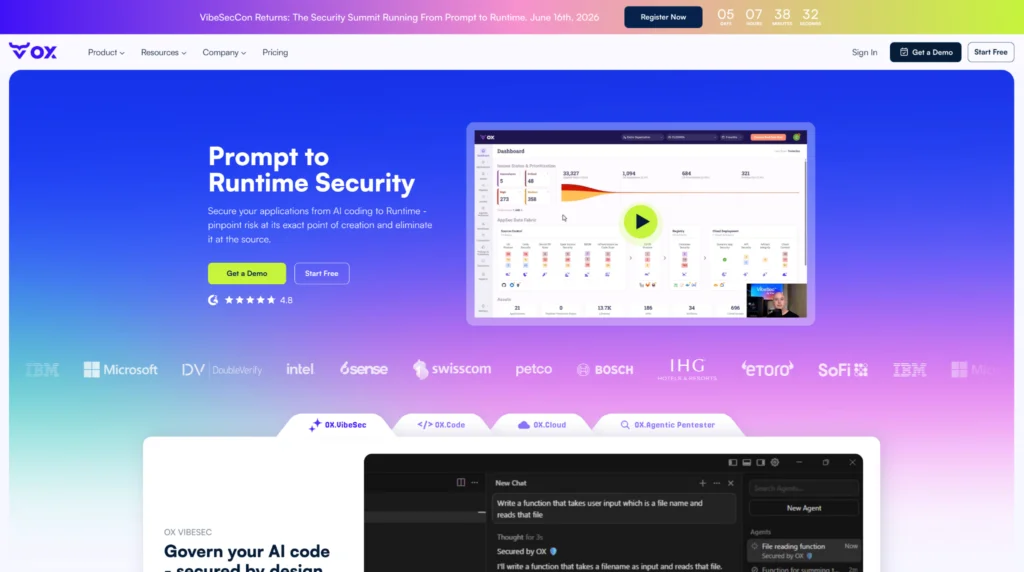
OX Security is different from the other tools on this list in one important way: it doesn’t start at the pull request. AppSec platforms pick up vulnerabilities once code already exists. OX starts earlier, inside the AI coding agents where code is actually being generated, and carries that coverage all the way through to cloud runtime.
The difference is clear: most teams coming from a tool like Aikido have used AppSec tools to detect vulnerabilities after code is already in the PR. OX starts at the prompt, or we can say at the source, using VibeSec embeds your security rules and organizational context directly into the AI coding tools your developers already use, such as Cursor, GitHub Copilot, Claude, and Windsurf, so every line is secure by design before it ever reaches the repository. No cleanup, no rework, no PRs blocked at the last minute. And because VibeSec also resolves related vulnerabilities in existing code as developers work, the security backlog shrinks with every commit rather than growing.
Below that layer, OX Code handles risk across the full SDLC, such as SAST, SCA, secrets, IaC, and CI/CD posture, tracing every finding back to the exact line and commit where it originated. OX Cloud extends that same code-first approach into the runtime, so infrastructure vulnerabilities aren’t handed off to a separate team working with a separate tool. OX Agentic Pentester continuously validates your real posture by emulating actual attacker techniques, with every finding tied to the exact repository, file, and commit rather than surfaced as a generic alert.
The PBOM ties it together, a live record of software lineage from the first line of code through to release, so there are no gaps between what was built, how it was built, and what is actually running in production.
Key Features of OX Security
- Code: One dashboard for SAST, SCA, IaC, containers, secrets, and CI/CD, ranked by what’s actually exploitable and what affects your business. You’re not staring at 400 findings of varying severity. You’re looking at the 12 that genuinely need attention this week.
- VibeSec™: Works in the background while developers use their AI coding tools. It reads the prompt, identifies potential issues, and redirects the agent before the risky code is written. Security teams also get a live view of every MCP server, AI model, and SaaS integration that developers are running, and can block the ones they don’t want.
- BOM coverage: Five live inventories running at once, APIs, libraries, SaaS tools, build artifacts, and cloud assets. If something is moving through your pipeline or running in production, it shows up here in real time.
- Agentic Pentester (Early Access): Behaves like a real attacker, probes your web apps, looks for exposed credentials, tests for policy gaps, and then maps every finding back to the exact code that caused it. Manual trigger for now, but the output is a full pentest report that actually tells you where to fix things.
- Cloud: Cloud and Kubernetes misconfigurations don’t just surface as alerts; Code Projection Technology traces them back to the originating code across AWS, Azure, and GCP. The developer who can fix it gets the context, not just a runtime warning with nowhere to go.
- Integrations: GitHub, GitLab, Bitbucket, Jenkins, GitHub Actions, CircleCI, AWS, Azure, GCP, Jira, Slack, ServiceNow, Snyk, Checkmarx, SonarQube, Veracode, Semgrep, JFrog, all feeding into one place, no custom connectors needed.
Hands-On with OX Security: From Connection to Prioritized Risk
Once you connect your repositories, CI/CD pipelines, and cloud environments, OX starts pulling everything into a single dashboard. Here’s what that looks like in practice.
Step 1: The Dashboard, seeing the signal through the noise
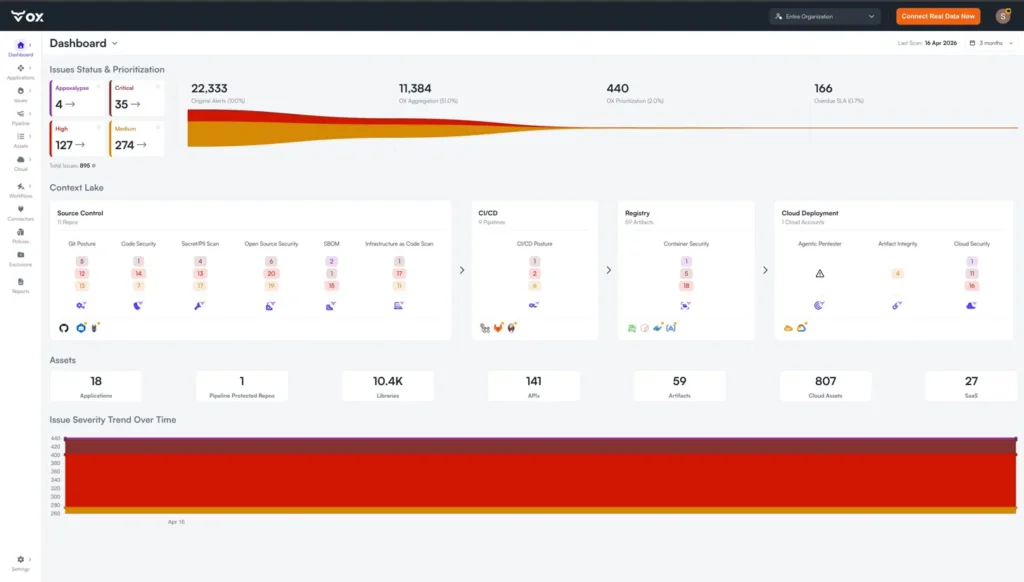
The first thing you notice is the funnel at the top. In this example, OX ingested 22,333 original alerts from across the stack. After aggregation, it brought that down to 11,384, and after prioritization, the number of issues actually worth acting on landed at 440. That’s 2% of the original alert volume. The rest isn’t ignored, it’s contextualized and ranked so it doesn’t eat your team’s time.
Below that, the Context Lake breaks the environment into layers: Source Control (11 repos), CI/CD (9 pipelines), Registry (59 artifacts), and Cloud Deployment, each showing findings by category. The Assets section at the bottom gives you the full inventory: 18 applications, 141 APIs, 10.4K libraries, 807 cloud assets, and 27 SaaS tools, all in one place.
Step 2: Looking for Active Issues
The Active Issues view shows 895 total findings ranked by severity. At the top sit four Apocalypse-level issues. OX’s highest severity tier, reserved for threats that represent immediate, critical business risk.
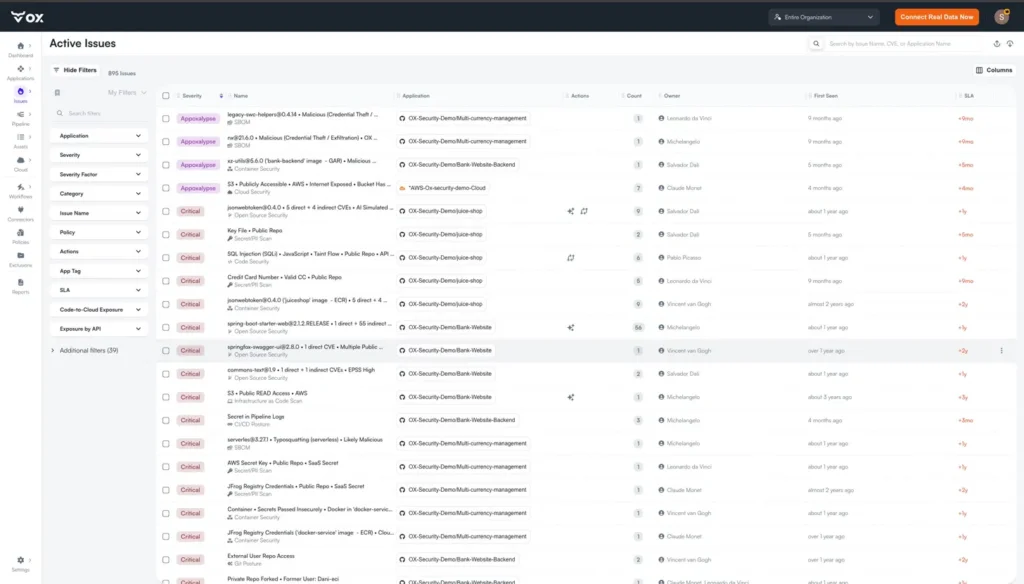
Below those, Critical findings cover a wide range: SQL injection in a public repo, secrets exposed in pipeline logs, an AWS secret key in a public repository, an S3 bucket with public READ access, and external user repo access via Git Posture.
The filters on the left let you cut by application, severity, category, SLA status, code-to-cloud exposure, and 39 additional parameters, so large teams can scope the view to exactly what’s relevant without wading through the full list.
Step 3: Issue Detail, context that tells you what to do
Clicking into the top Appoxalypse finding shows why context matters. The issue is a malicious npm dependency, legacy-swc-helpers@0.4.14, flagged for Credential Theft and Exfiltration, verified by OX Research, and tied to a known malware identifier (MAL-2024-7969). OX’s AI analysis explains exactly what the package does and why removing it may not be sufficient on its own.
The Top Context tags indicate what raised the severity: Researcher-Flagged, Malicious Dependency, Vulnerability in a Public Repo, or Credential Theft/Exfiltration. The Attack Path graph maps the full blast radius, showing how the dependency connects through to APIs, artifacts, cloud services, and downstream SaaS tools like Monday, Bilge, and Discord.
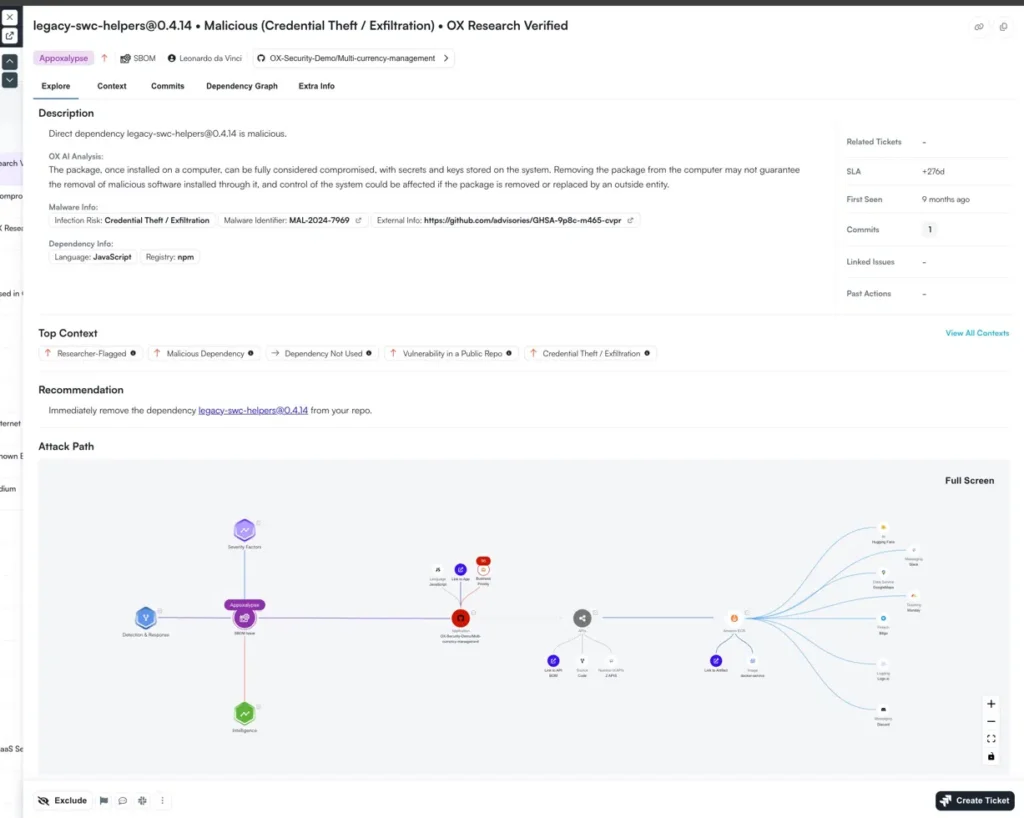
The recommendation is direct: remove the dependency immediately. No interpretation required, no hunting across dashboards to understand impact, the context, the path, and the fix are all in the same view.
Pros
- One platform from AI-generated code to cloud runtime, no separate tools stitching things together
- Findings ranked by actual business impact and reachability, not raw CVSS scores
- Continuously maps against 35+ compliance frameworks, including NIST, SOC2, PCI, and GDPR; audit prep is built in, not bolted on
Cons
- Broad coverage means real setup time; large environments take effort to onboard properly
- Agentic Pentester is Early Access, manually triggered, and a web app only for now
2. Snyk: Developer-Centric Security Platform
Overview
Snyk is a developer-first security platform built to identify and fix vulnerabilities early in the development cycle. It integrates directly with code editors, pull requests, and CI/CD pipelines, allowing developers to detect and remediate issues before deployment. Snyk focuses on speed and usability, helping engineering teams maintain security without slowing down their release process.
Key Features of Snyk
- Comprehensive coverage with SAST, SCA, IaC, and container scanning.
- Inline pull request checks and auto-generated fix suggestions.
- Native integrations with GitHub, GitLab, Bitbucket, Jenkins, and Azure DevOps.
- IDE support for VS Code, IntelliJ, and JetBrains environments for instant feedback while coding.
Hands-On with Snyk: From Detection to Automated Fixes
Snyk makes it easy to identify vulnerabilities in your projects and automatically open pull requests with recommended fixes. Once the GitHub integration is done, Snyk regularly monitors your repositories and alerts you whenever a new issue appears. Below is a step-by-step walkthrough showing how we added our frontend project and used Snyk’s automated remediation workflow.
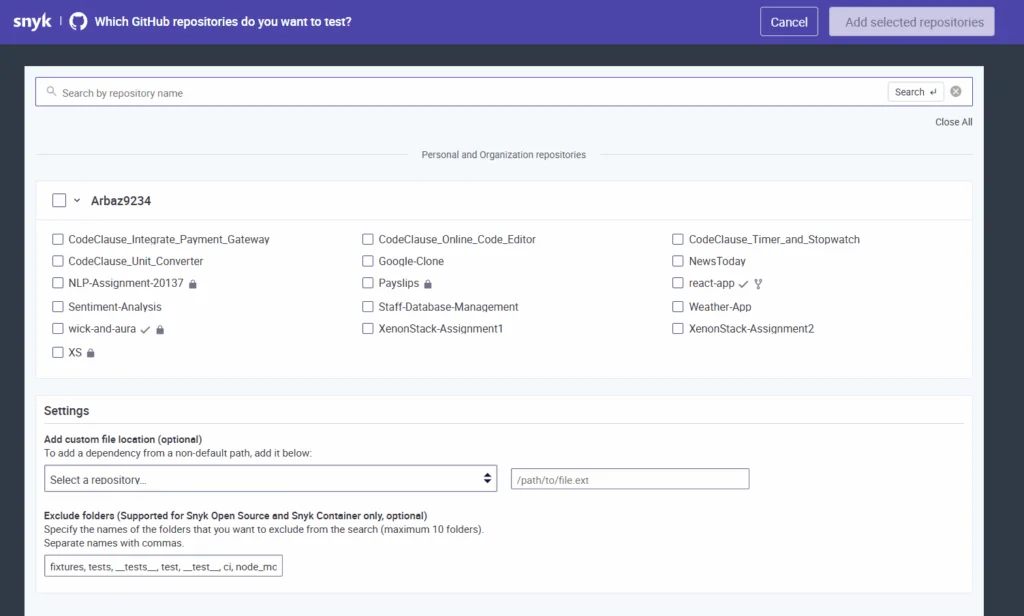
Step 1: Connect Your Repository to Snyk
- After signing in to Snyk, navigate to Integrations → Source Control and choose GitHub or any other platform.
- Authorize your account and select the repository you want Snyk to monitor. Once connected, Snyk automatically scans the repository’s package.json and any Dockerfiles it detects.
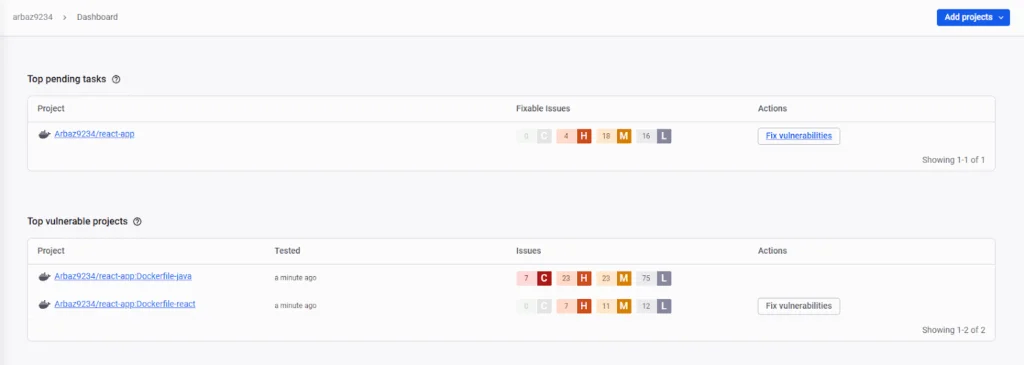
In the Projects tab, your repository now appears as a list of targets, in this case, Dockerfile-java and Dockerfile-react. Each target shows the number of issues, the last scan date, and a summary of severity levels.

This dashboard gives a quick overview of where the highest-risk components lie.
Step 2: Review the Security Report
- Open any project target to view the detailed security report.
Snyk lists each vulnerability with its CVE, severity, priority score, exploit maturity, and whether a fix is available.
In our case, Snyk identified multiple dependency vulnerabilities in npm packages as well as a critical issue in the Docker base image (node:16-alpine).
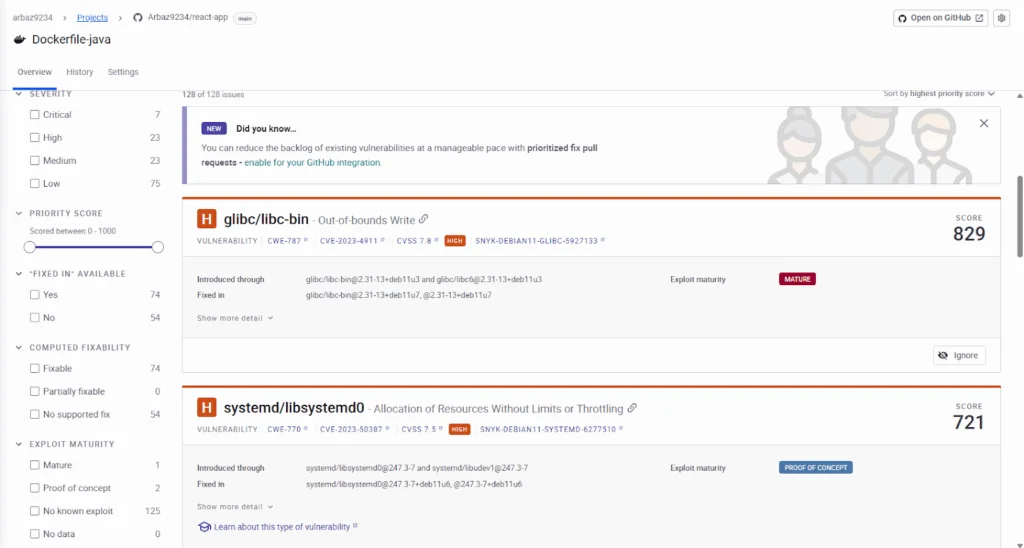
The dashboard also displays overall issue distribution by severity and provides contextual data such as the package version affected and the suggested upgrade path.
Step 3: Generate a Fix Pull Request
To remediate an issue, click Open a fix PR from the issue details page.
Snyk automatically drafts a pull request in your GitHub repository containing the required dependency or image upgrades.
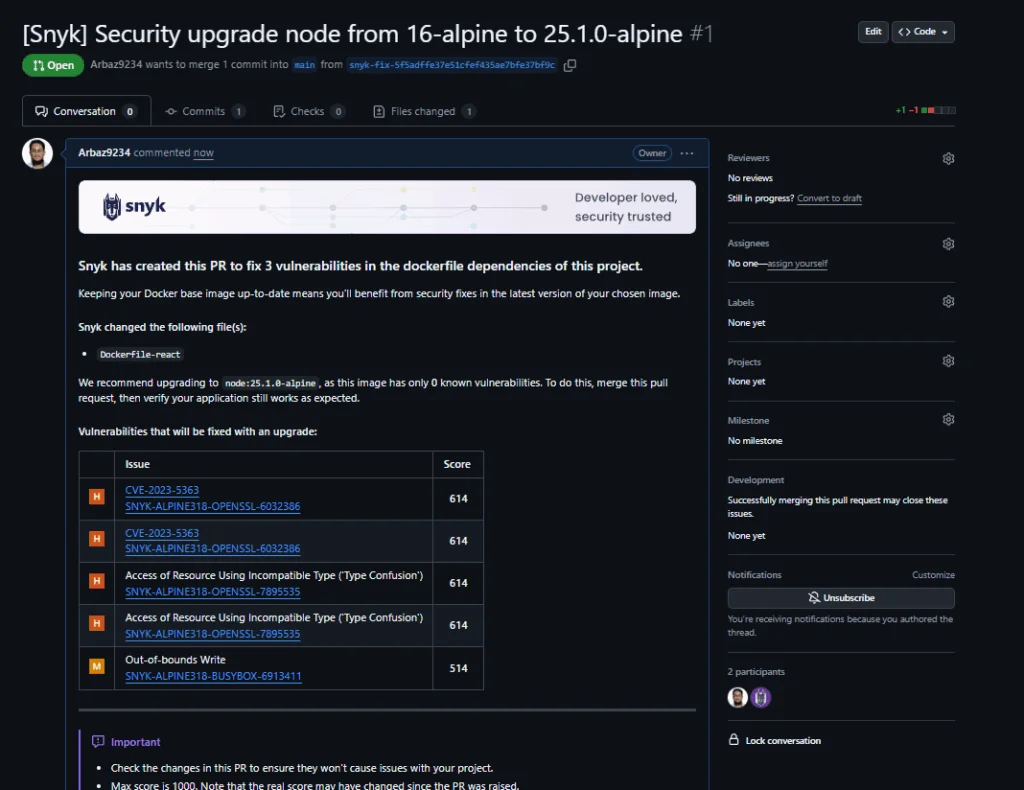
For example, Snyk suggested upgrading the Docker base image from node:16-alpine to node:25.1.0-alpine.

The generated pull request includes:
- A clear title (e.g., [Snyk] Security upgrade node from 16-alpine to 25.1.0-alpine).
- A summary of the vulnerabilities it resolves, with CVE references and severity breakdowns.
- Direct links back to Snyk for verification.
Step 4: Review and Merge the PR in GitHub
- Once the pull request is created, review the changes in GitHub.
- Each fix PR contains only the minimal required modifications — for instance, updating a version number in the Dockerfile or package manifest.
- After your CI pipeline validates the changes, merge the PR to apply the fix.
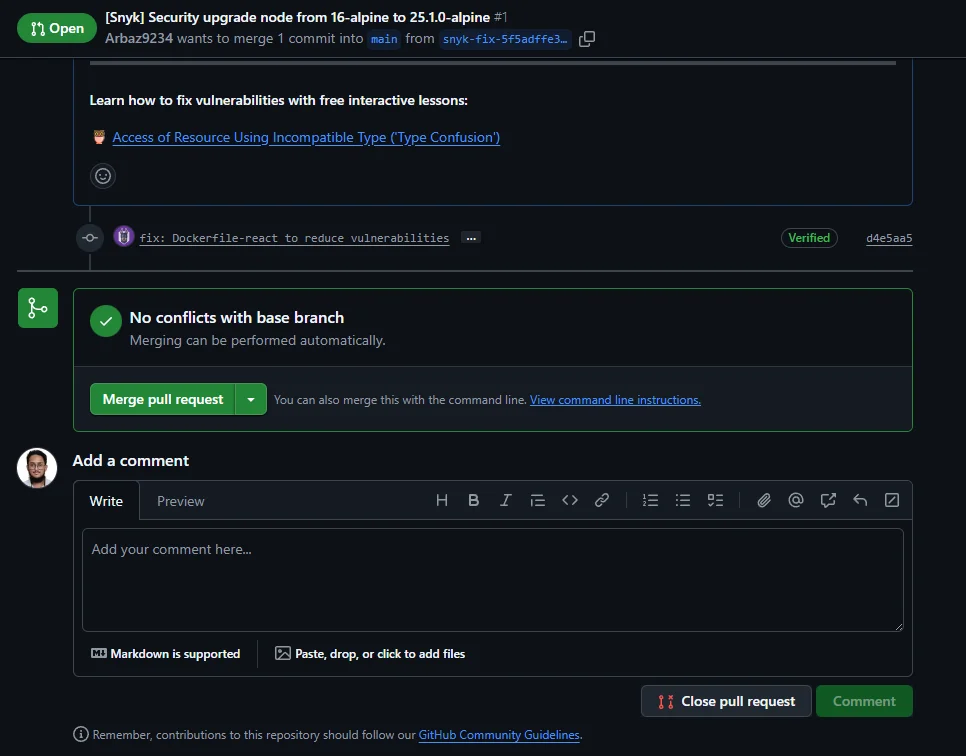
Snyk automatically re-scans the repository after the merge, confirming that the vulnerabilities have been resolved and updating the project’s status on the dashboard.
Result
By integrating directly with GitHub, Snyk closes the loop between detection and remediation.
In our project, the tool not only flagged outdated dependencies but also handled the entire fix workflow, from identifying the issue to opening and validating the pull request, to allowing developers to maintain a secure codebase with minimal manual effort.
Pros
- Excellent IDE integration: Security feedback appears directly where developers write code.
- Fast vulnerability detection: Enables proactive fixes through automated PR checks and patches.
- Wide ecosystem compatibility: Works smoothly across popular languages, frameworks, and CI/CD tools.
Cons
- Limited enterprise visibility: Risk management and reporting are less advanced compared to ASPM platforms.
- Cost scaling: Pricing increases significantly with large repositories or multiple environments.
- Dependency on cloud connectivity: Some scans require online access, limiting flexibility for restricted networks.
3. Checkmarx One: Enterprise-Grade AppSec Platform
Overview
Checkmarx One is an enterprise-focused Application Security Testing platform built to help large organizations secure complex software delivery pipelines. It provides deep static and interactive testing with governance controls that align with compliance frameworks and enterprise policies. Checkmarx is best suited for teams with hybrid infrastructure setups, long software lifecycles, and regulatory obligations that require strict security validation at every stage of development.
Key Features of Checkmarx One
- Advanced SAST engine with customizable rulesets and language coverage for advanced stacks.
- Interactive Application Security Testing (IAST) and IaC scanning for runtime and infrastructure visibility.
- Centralized risk management dashboards with compliance mapping for frameworks like OWASP, NIST, and ISO 27001.
- Seamless integration with CI/CD systems and ticketing platforms such as Jenkins, GitLab, and Jira.
Pros
- Accurate static analysis: Strong rule engine minimizes false positives and detects complex code-level flaws.
- Granular policy control: Ideal for enterprises with layered security and compliance needs.
- Comprehensive compliance mapping: Built-in templates align with major regulatory frameworks.
Cons
- Complex initial setup: Requires configuration and calibration for large multi-repo projects.
- Longer scan durations: Deep static scans can delay pipelines in large monolithic repositories.
- Higher operational overhead: Managing policies and updates demands ongoing security team involvement.
4. Veracode: Proven Application Security at Scale
Overview
Veracode is one of the most established names in application security, providing a SaaS-based platform that unifies Static Application Security Testing (SAST), Dynamic Application Security Testing (DAST), and Software Composition Analysis (SCA). It’s widely used by large enterprises that require strong compliance, structured workflows, and policy enforcement across distributed teams. Veracode’s strength lies in its reliability, governance features, and audit-ready reporting.
Key Features of Veracode
- Centralized reporting and policy management for tracking vulnerabilities across multiple projects.
- Binary static analysis that scans compiled code for deeper coverage across languages and frameworks.
- Integrations with major CI/CD systems such as Jenkins, GitHub Actions, and Azure DevOps.
- Automated ticketing and workflow sync with Jira and ServiceNow for vulnerability lifecycle management.
Pros
- Comprehensive compliance coverage: Meets the needs of regulated industries with detailed audit and reporting capabilities.
- Proven reliability: SaaS-first model simplifies deployment and scales well for large teams.
- Strong enterprise integrations: Native connections to CI/CD tools and ticketing systems.
Cons
- Slower scan performance: Full static and dynamic scans can delay fast-moving CI/CD cycles.
- Limited runtime visibility: Focuses on testing and reporting rather than end-to-end posture management.
- Less flexibility for advanced workflows: Built primarily for traditional release cycles over agile, multi-pipeline environments.
5. Qualys: Unified Vulnerability and App Security Platform
Overview
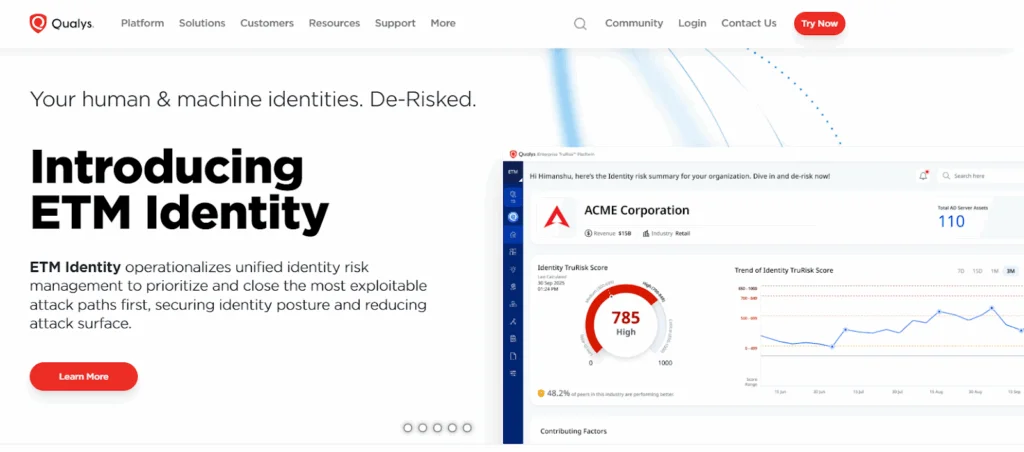
Qualys is best known for its vulnerability management suite, but it also provides strong coverage for application and cloud security. It provides dynamic scanning and regular monitoring across on-premises, cloud, and hybrid environments. The platform is designed for security and IT operations teams that need full visibility of their infrastructure, web applications, and endpoints within a single ecosystem.
Key Features of Qualys
- Web Application Scanning (WAS) for constant assessment of web apps and APIs.
- Patch management and endpoint visibility to track and remediate vulnerabilities across servers and devices.
- Integration with CI/CD pipelines through APIs and automation connectors.
- Cloud agent technology for real-time asset discovery and drift detection.
Pros
- Advance vulnerability intelligence: Backed by a large threat research database for accurate detection and prioritization.
- Broad infrastructure visibility: Monitors applications, containers, endpoints, and networks from a single dashboard.
- Enterprise scalability: Handles distributed, multi-environment deployments efficiently.
Cons
- Outdated user interface: Navigation and reporting feel less intuitive compared to newer platforms.
- Developer experience limitations: Lacks IDE integrations and PR-based workflows preferred by DevSecOps teams.
- Focused on security operations: Designed more for SecOps than day-to-day developer use.
Which Aikido Alternative Fits You Best?
Each platform brings different strengths depending on team size, integration needs, and security maturity. The table below summarizes how the top Aikido alternatives compare across key dimensions.
| Tool | Primary Strength | Ideal For | Enterprise Readiness | Pricing Model | Community Support |
| OX Security | Code-to-runtime coverage, prevention at creation via VibeSec through runtime via OX Cloud and OX Agentic Pentester | Enterprises with complex pipelines and AI-assisted development workflows | High | Per-developer pricing with custom enterprise tiers | Moderate |
| Snyk | Developer-first security with fast IDE feedback | Dev-focused teams | Medium | Per developer seat with usage-based tiers | Strong (vibrant open-source and developer community) |
| Checkmarx One | Deep static and interactive analysis | Regulated orgs | High | Annual license by app volume | Moderate (active enterprise user forums, limited open community) |
| Veracode | SaaS-based testing with strong compliance support | Mid–large enterprises | High | Per app or portfolio with enterprise SLAs | Limited (enterprise-only community and private knowledge base) |
| Qualys | Vulnerability and web app scanning | Security ops teams | Medium | Modular pricing by asset and product | Limited (customer portal and managed community forums) |
Why Choose OX Security as an Aikido Alternative
The right alternative depends on where your current tool creates blind spots, whether that’s missing context across CI/CD stages, no runtime correlation, or findings that can’t be traced back to the originating commit.
1. VibeSec corrects the prompt before the AI writes insecure code
Aikido flags SQL injection, exposed secrets, and vulnerable dependencies after developers have already committed them. VibeSec reads the developer’s prompt, identifies patterns likely to introduce those same vulnerabilities, and sends the AI agent corrected instructions, before code is generated, not after.
2. One platform instead of four tools with four dashboards
A team scaling past Aikido typically ends up adding a separate secrets scanner, a standalone IaC tool, a cloud posture platform, and a DAST runner, each with its own dashboard, alert queue, and integration to maintain. OX covers all of that in one platform, covering SAST, SCA, secrets, IaC, cloud, runtime, and pen testing, ranked by exploitability and business impact in a single view.
3. Existing scanners feed in, nothing gets replaced
GitHub, GitLab, Jenkins, AWS, Jira, Snyk, Checkmarx, findings from your existing scanners feed into OX’s unified issue list, ranked by the same runtime and business context as OX’s native scans. Nothing gets ripped out, everything gets connected.
4. 22,333 raw alerts correlated down to 440 exploitable findings
Each finding is evaluated against what’s reachable from the internet, what’s running in production, and what’s tied to a business-critical service. Security engineers stop working through severity-ranked alert queues and focus on vulnerabilities that can actually be exploited.
5. Policy checks logged against 35+ frameworks on every commit
Compliance gaps surface during development, not during the audit. Because OX continuously evaluates every commit, deployment, and cloud change against 35+ frameworks, audit evidence is collected automatically rather than assembled manually the week before a deadline.
Conclusion
Internal Developer Platforms (IDPs) have become a foundation for advanced engineering, bringing structure and visibility to how teams build and release software applications. They create alignment between development, operations, and governance, helping organizations maintain speed without losing control. By acting as a single coordination layer, IDPs ensure that what reaches production is consistent, secure, and cost-aware.
Throughout this article, we looked at how organizations are reassessing tools like Aikido and exploring platforms that provide broader context and deeper coverage. Each option brings its own strengths: some focus on developer-first adoption, others on compliance and governance, while newer ASPM platforms like OX Security bridge both worlds through unified risk mapping and regular monitoring.
In conclusion, the right choice depends on your security maturity and delivery model. For teams managing large and complex pipelines, OX Security’s Active ASPM approach provides constant coverage from code to cloud, thus helping identify, prioritize, and remediate risks in real time. Regardless of which tool you choose, the goal remains constant: to make security a built-in part of your software lifecycle, not a step that comes after deployment.
FAQs
Aikido focuses on scanning and detection across code, dependencies, and infrastructure. OX Security does more than that by providing Active ASPM, regularly mapping risks across the software lifecycle, and prioritizing issues through its VibeSec™ engine.
Yes. OX supports over 100 native integrations, including Snyk, Trivy, and Checkov. It unifies findings from these tools into a single risk graph for unified visibility and prioritization.
Yes. Qualys provides strong coverage for hybrid and cloud-native environments, enabling constant vulnerability scanning and asset discovery across containers, workloads, and web applications.
They can. OX is built to ingest results from existing scanners, making it a layer of correlation and governance rather than a replacement. Many enterprises use OX alongside Veracode or Checkmarx to unify risk data and automate remediation workflows.
Start by assessing your development speed, compliance requirements, and existing toolchain. Teams prioritizing automation and end-to-end visibility tend to benefit most from platforms like OX Security, while smaller teams may prefer more focused developer-first tools.